
V online prodeji je profesionální proces zpracování objednávek klíčem k úspěchu firmy. GTG CRM nabízí komplexní proces zpracování objednávek, od přijetí objednávky, správy skladu, dopravy až po vystavení faktury a péči o zákazníky – vše integrováno v jediném systému.
S GTG CRM nejen spravujete objednávky, ale také se můžete propojit s hlavními e-commerce platformami jako Shopee, Lazada, TikTok Shop, automaticky synchronizovat produkty a skladové zásoby, rychle vytvářet objednávky pro přepravu a vystavovat platné elektronické faktury. Jedná se o komplexní řešení, které pomáhá firmám efektivně fungovat, zlepšovat zákaznickou zkušenost a dosahovat udržitelného růstu.
Klíčové funkce
- Automatizované poradenství a uzavírání objednávek: AI Chatbot pomáhá odpovídat a uzavírat objednávky zákazníků 24/7, čímž snižuje pracovní zátěž zaměstnanců.
- Centralizovaná správa objednávek: Všechny objednávky z webu, e-commerce platforem a dalších kanálů jsou spravovány v jednom jediném systému.
- Propojení s více prodejními kanály: Integrace s platformami Shopee, Lazada, TikTok Shop a obousměrná synchronizace produktů a objednávek.
- Inteligentní správa skladu: Sledování skladových zásob v reálném čase, automatické aktualizace při přijetí objednávky, podpora více skladů.
- Integrace s přepravními společnostmi: Vytváření přepravních objednávek přímo s přepravními společnostmi jako Giao Hàng Nhanh, Viettel Post, podpora dobírky (COD).
- Vystavování elektronických faktur: Propojení s S-Invoice (Viettel) a MISA pro vystavování platných DPH faktur.
- Sledování stavu objednávky: Jasné sledování stavu od New → Processing → Completed.
Standardní proces zpracování objednávek
Krok 1: Příprava produktů a skladu
Vytvoření a správa skladu
Nejprve je nutné nastavit sklady v systému v sekci Správa skladu → Sklady.
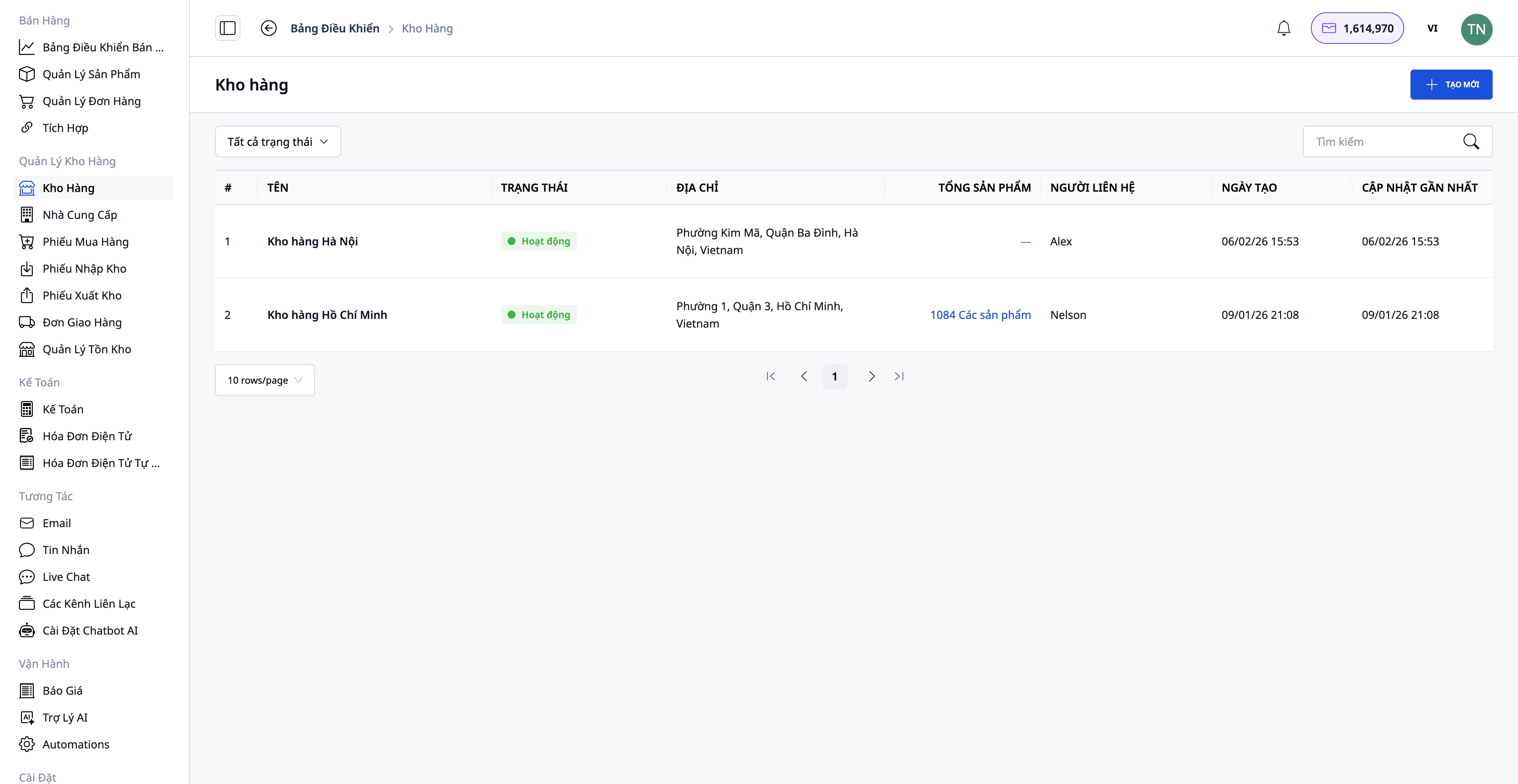
- Vytvoření skladu s informacemi: Název skladu, kód skladu, adresa, odpovědná osoba.
- Podpora více skladů: Hlavní sklad, vedlejší sklad, sklad pobočky.
- Sledování skladových zásob pro každý sklad zvlášť.
Vytvoření produktů v systému
Přejděte do sekce Prodej → Správa produktů pro vytvoření nového produktu.
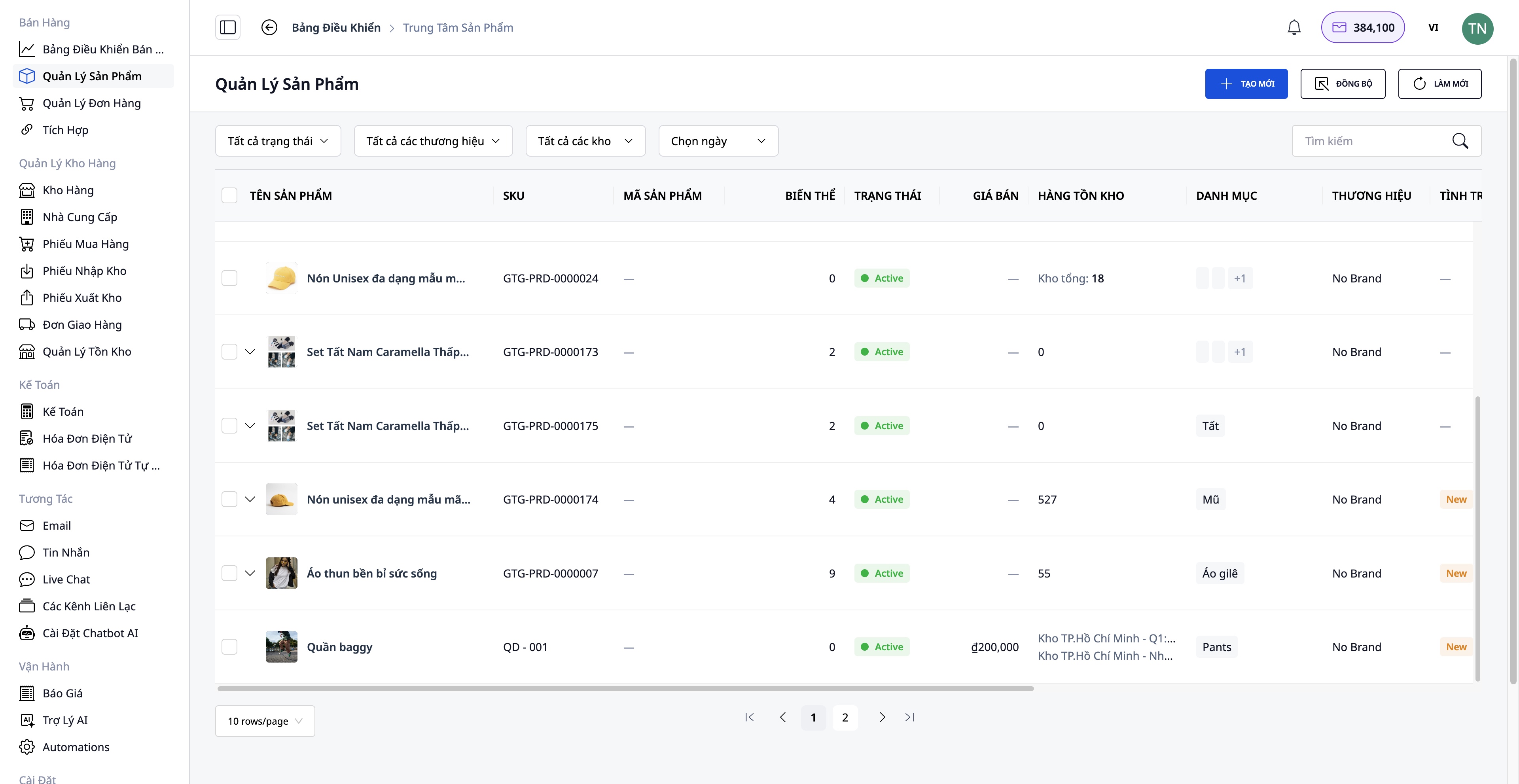
Potřebné informace k zadání:
- Název produktu, SKU, kategorie, značka.
- Obrázky a videa produktů.
- Varianty: Barvy, velikosti (maximálně 3 atributy).
- Původní cena, DPH, prodejní cena (systém automaticky vypočítá zisk).
- Detailní popis a technické specifikace.
- Počáteční množství skladových zásob.
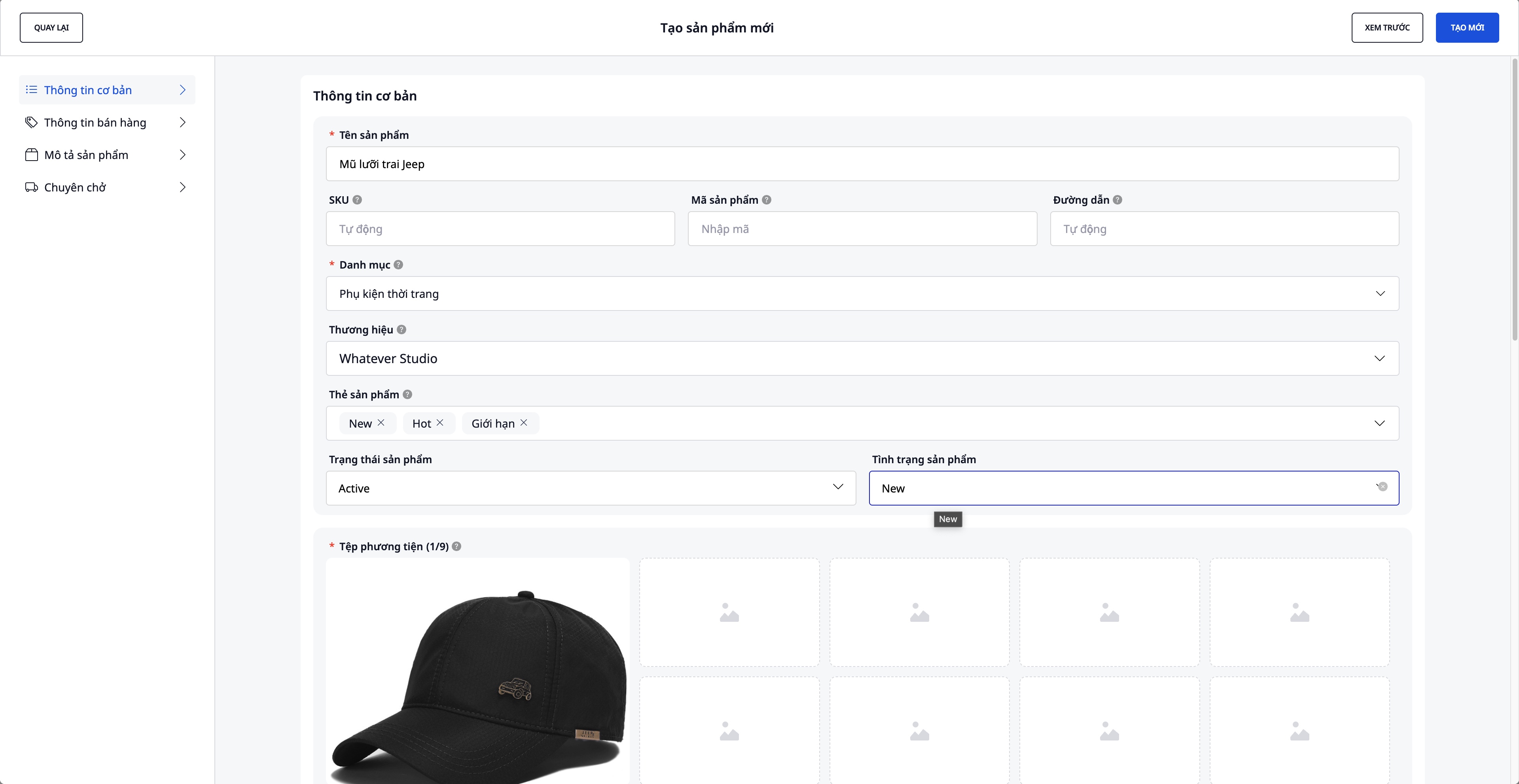
Propojení a synchronizace s e-commerce platformami
Přejděte do sekce Prodej → Integrace pro propojení s e-commerce platformami.
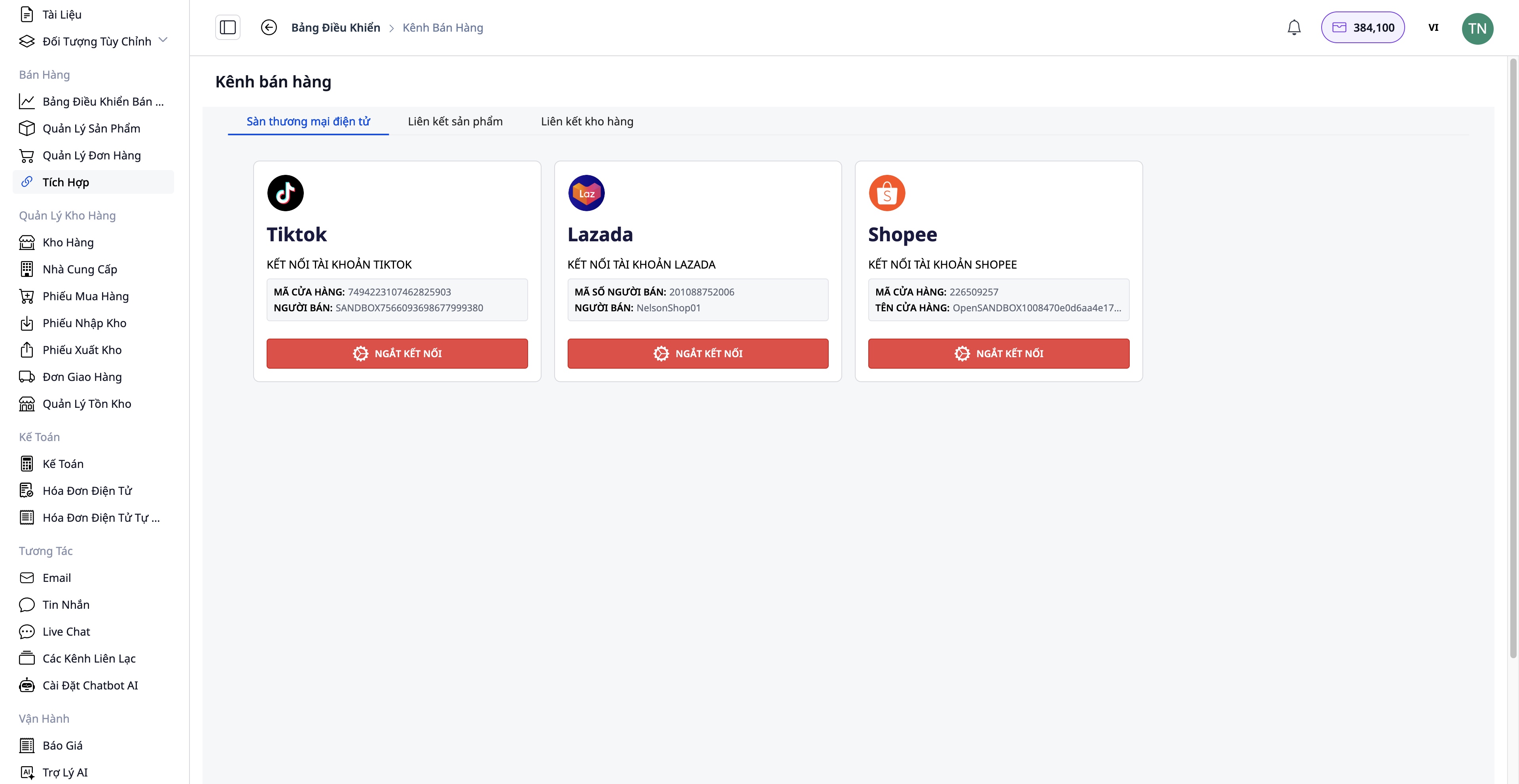
Kroky propojení:
- Vyberte platformu, se kterou se chcete propojit: Shopee / Lazada / TikTok Shop.
- Ověřte svůj účet obchodu.
- Obousměrná synchronizace produktů:
- Importovat: Načíst produkty z platformy do GTG CRM.
- Exportovat: Nahrát produkty z GTG CRM na platformu.
Výhody:
- Centralizovaná správa všech produktů.
- Automatická synchronizace skladových zásob mezi kanály.
- Úspora času při manuálních aktualizacích.
Krok 2: Přijetí objednávky
Přijímání objednávek z více kanálů
Objednávky mohou přicházet z:
- Váš web (integrovaný s GTG CRM)
- Shopee, Lazada, TikTok Shop (automatická synchronizace)
- Ruční objednávky (objednávky přes telefon, Facebook...)
Krok 3: Zpracování a příprava zboží
Kontrola a úprava objednávek (pokud je to nutné)
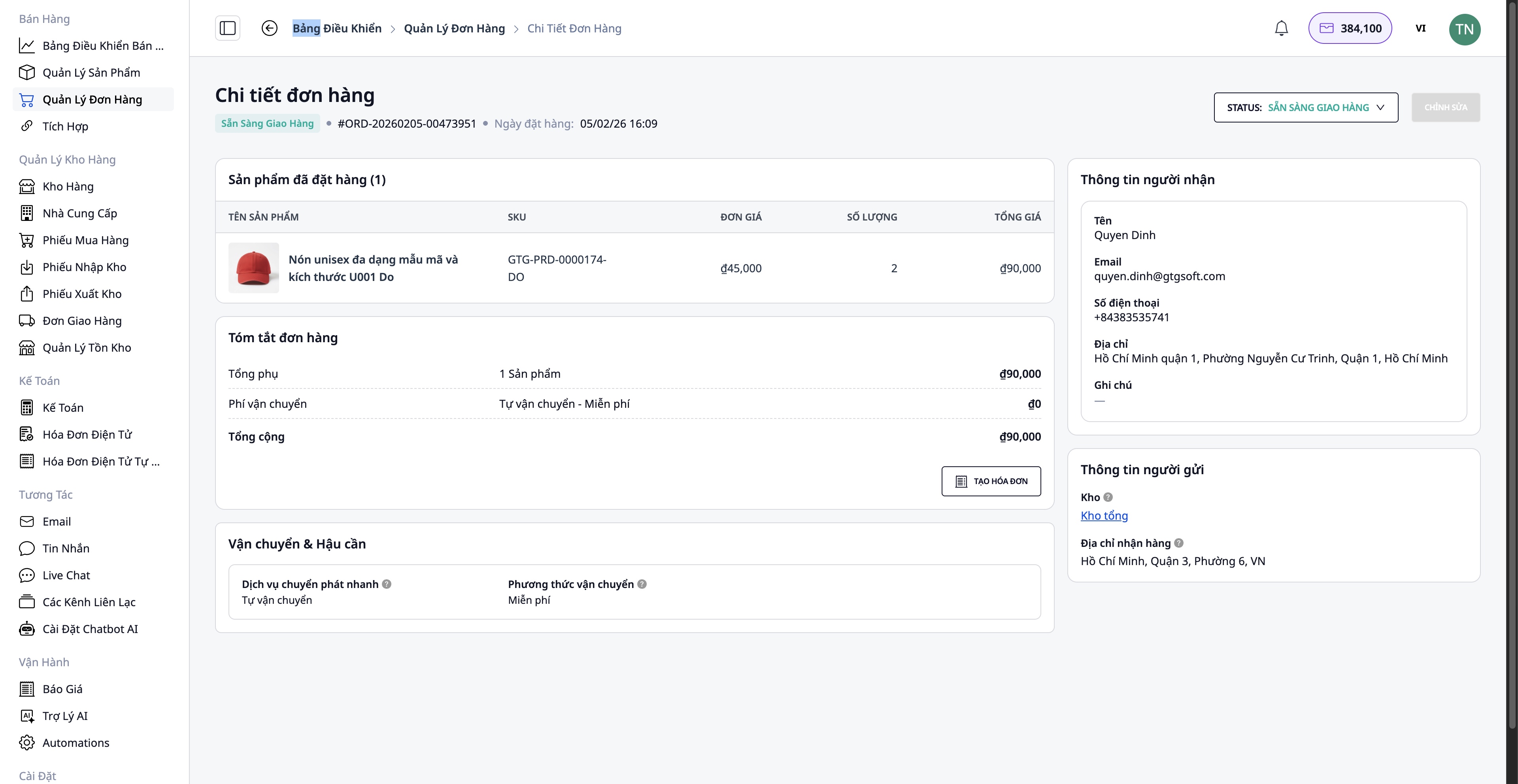
- Informace o kupujícím
- Dodací adresa
- Přidat/odebrat produkty
- Počet produktů
Kontrola skladových zásob
Systém automaticky kontroluje množství skladových zásob:
- ✅ Dostatek zboží → Pokračovat v balení
- ❌ Nedostatek zboží → Nutno objednat od dodavatele
Proces objednávky (v případě nedostatku):
Přejděte do Dodavatelé → Vyberte dodavatele → Vytvořit nákupní objednávku
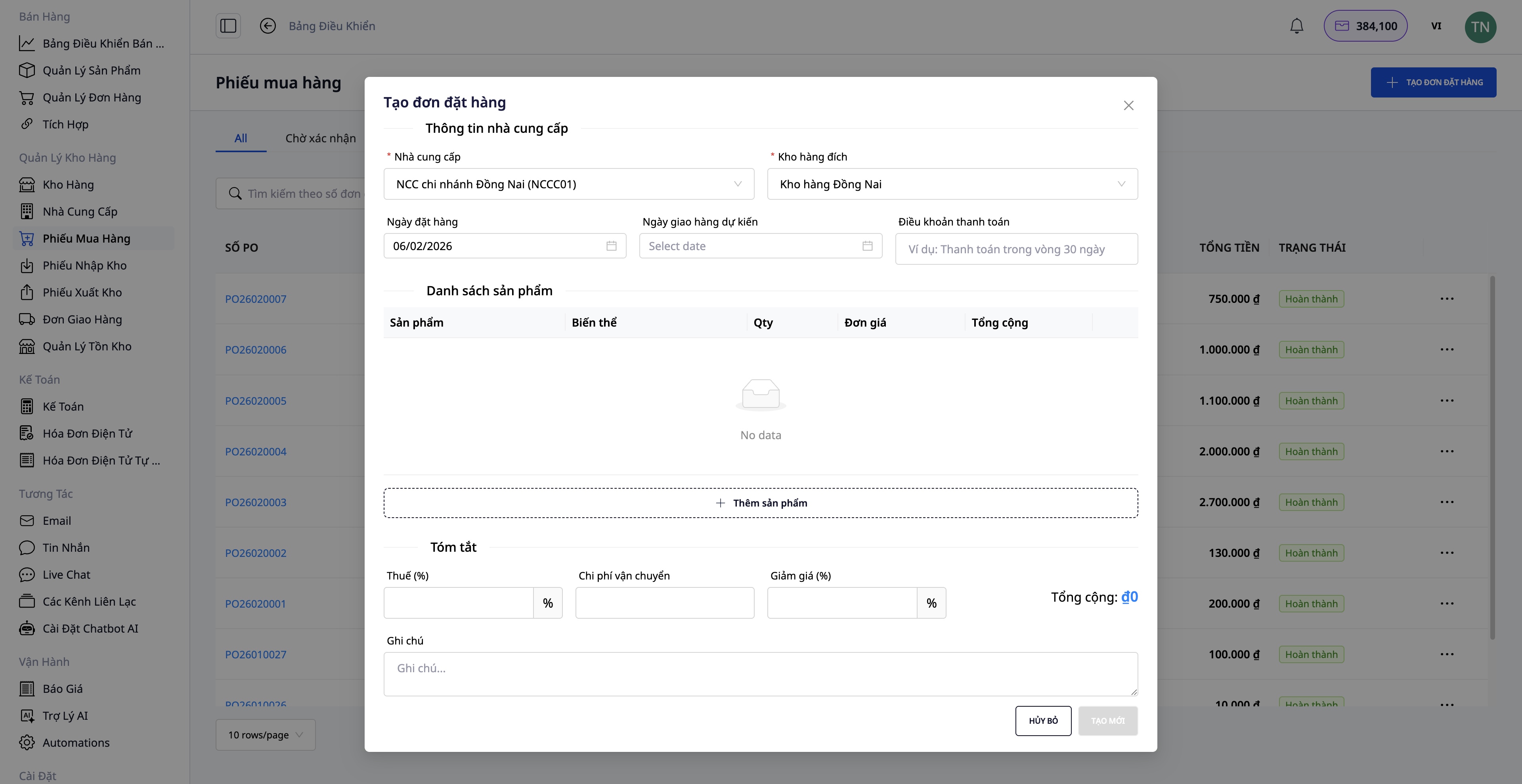
- Vyberte produkty k objednání
- Zadejte množství a jednotkovou cenu
- Potvrďte nákupní objednávku
- Po dodání zboží vytvořte Příjemku
- Stav zásob se automaticky aktualizuje
Krok 4: Vytvoření přepravní objednávky
Po dokončení balení zboží vytvořte přepravní objednávku přímo z objednávky.
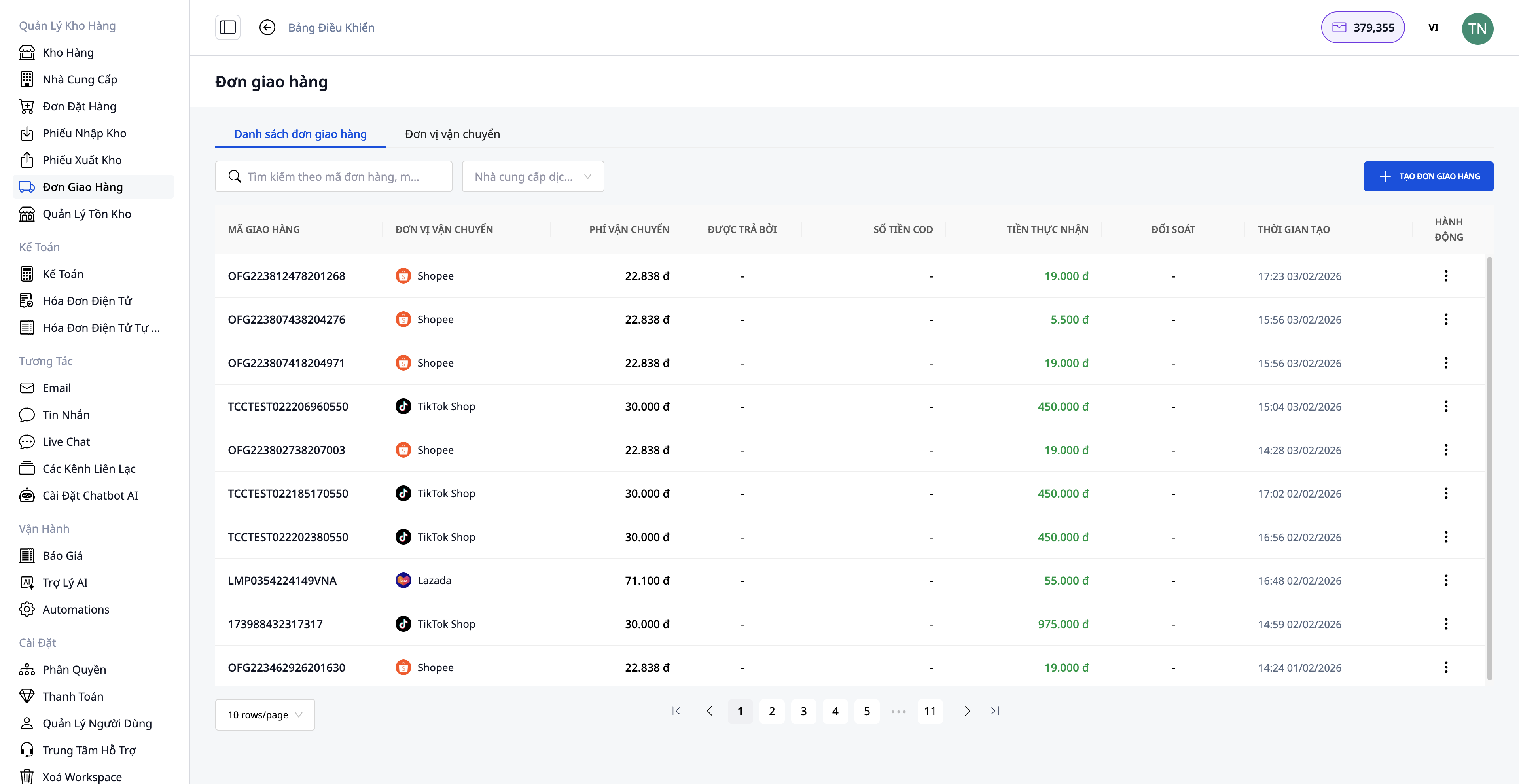
Potřebné informace:
1. Vyberte přepravní službu:
- Rychlá doprava
- Ekonomická doprava
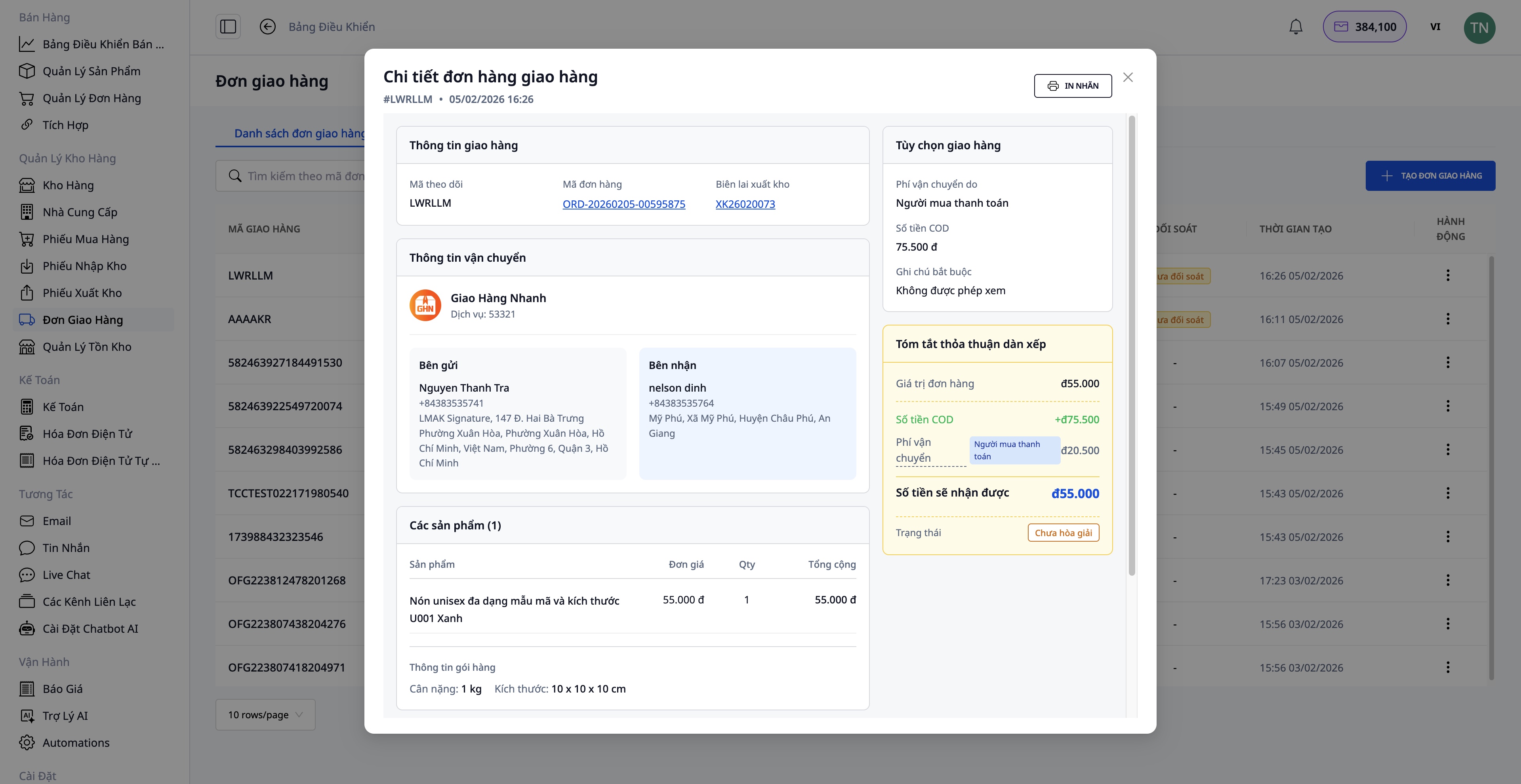
2. Dobírka (COD):
- Zadejte částku, kterou má zákazník zaplatit
- Zahrňte cenu zboží a poplatek za dopravu (pokud platí zákazník)
3. Informace o balíku:
- Hmotnost (kg)
- Rozměry (délka x šířka x výška)
- Kdo platí poplatek za dopravu (prodávající/kupující)
4. Potvrzení vytvoření objednávky:
- Systém automaticky načte informace z objednávky
- Odešle požadavek přepravní společnosti
- Obdržíte sledovací číslo
Po úspěšném vytvoření přepravní objednávky:
- Vytiskněte přepravní štítek a nalepte ho na balík
- Předání přepravní společnosti
Krok 5: Vystavení elektronické faktury
Pro firemní zákazníky nebo pokud potřebujete fakturu s DPH, můžete elektronickou fakturu vystavit přímo z objednávky nebo nechat systém fakturu vystavit automaticky.
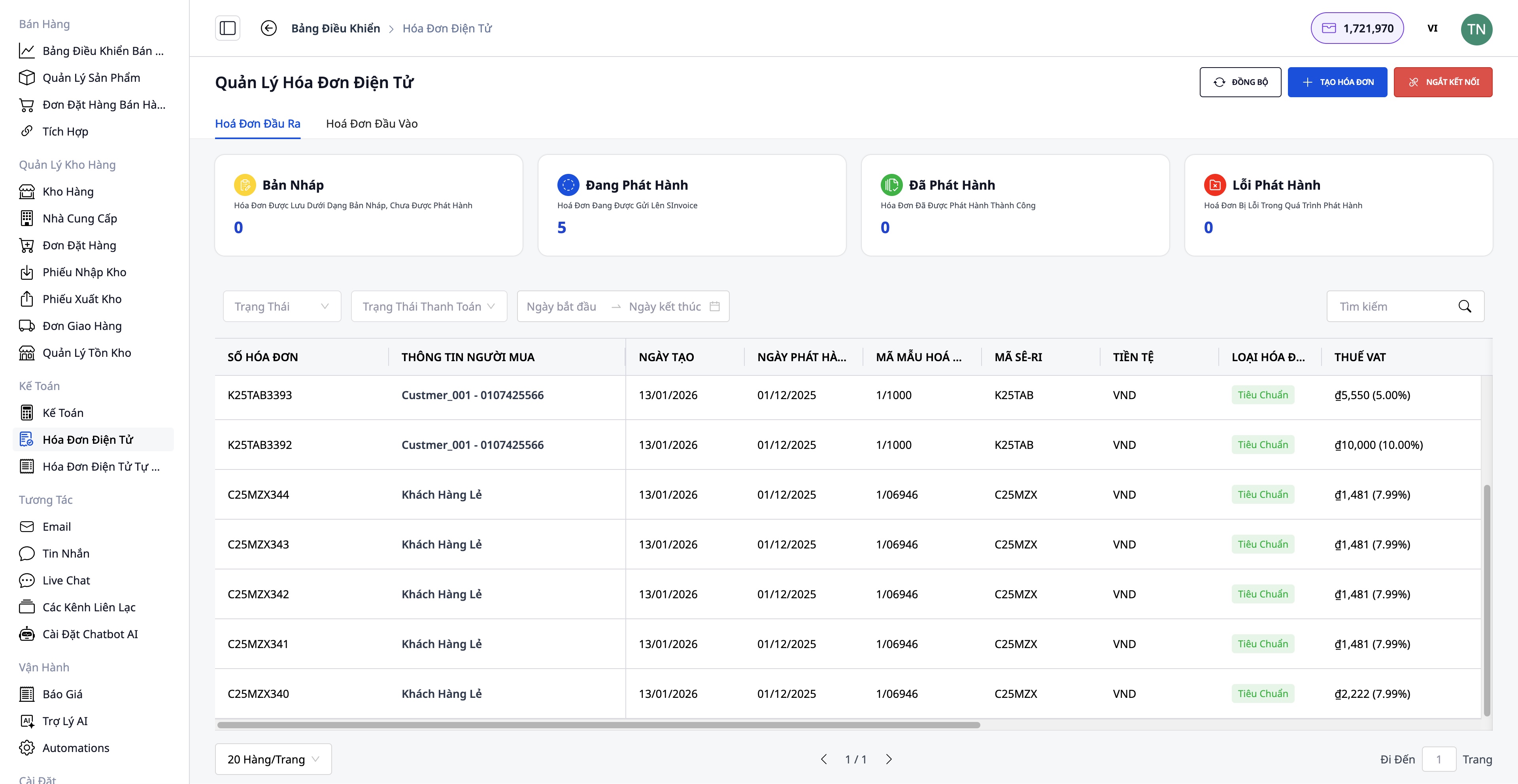
Kroky k vystavení faktury:
- Vyberte poskytovatele faktur: S-Invoice (Viettel) nebo MISA
- Vyberte šablonu faktury: Faktura s DPH nebo Prodejní faktura
- Vyplňte informace: Informace o kupujícím (název společnosti, IČO, adresa), produkty a množství (automaticky načteno z objednávky), sazba DPH, způsob platby
- Náhled PDF:
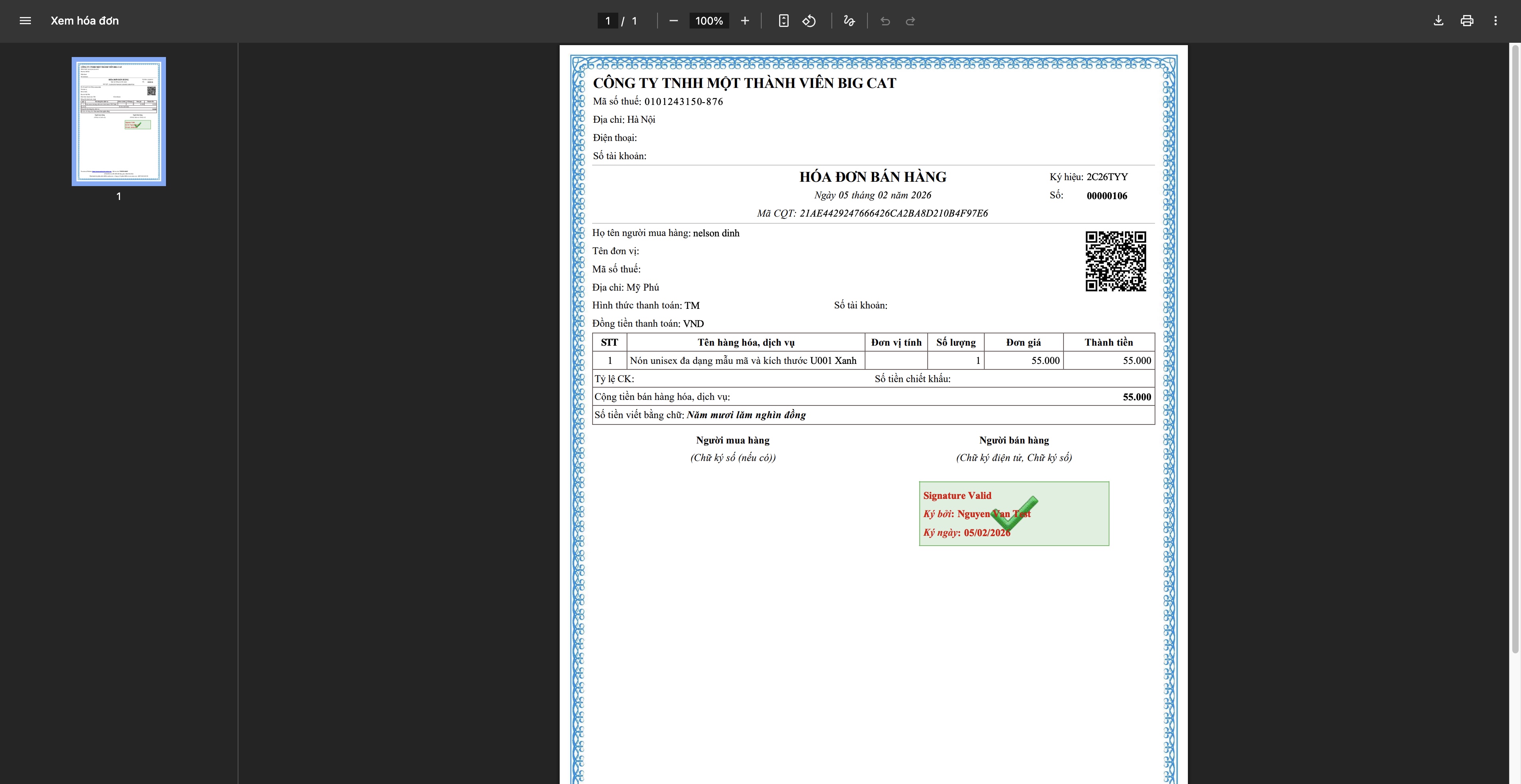
- Vystavení faktury: Systém odešle požadavek poskytovateli, faktura obdrží kód od daňového úřadu, stáhněte a odešlete zákazníkovi
Krok 6: Sledování a dokončení objednávky
Sledování dopravy
- Aktualizace stavu sledovacího čísla od přepravní společnosti
- Informování zákazníka o průběhu dodání
- Řešení mimořádných situací (neúspěšné doručení, zpoždění...)
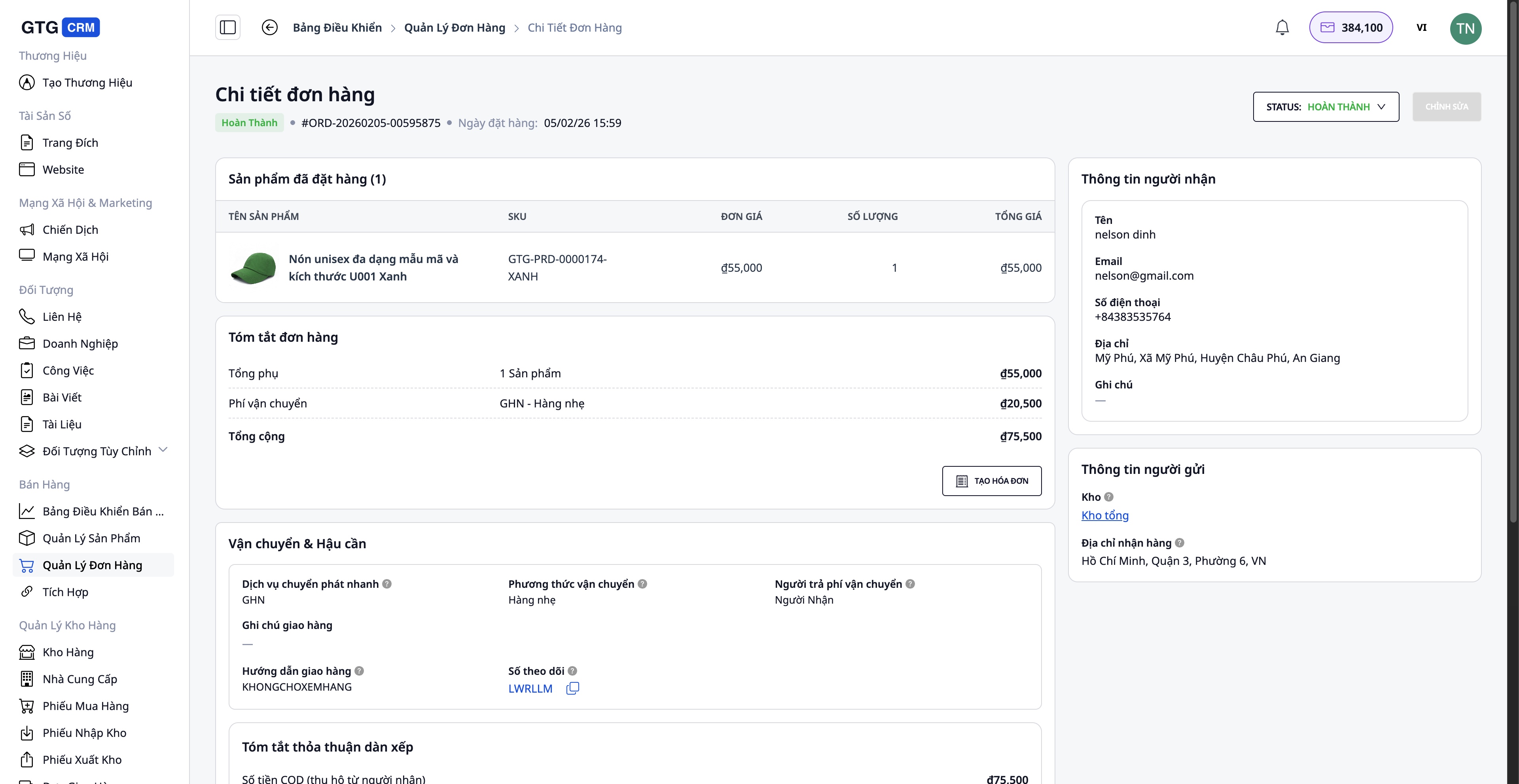
Dokončení objednávky
Po úspěšném přijetí zboží zákazníkem:
- Aktualizujte stav objednávky na Completed
- Potvrďte přijetí platby (u objednávek s dobírkou)
- Uložte informace do historie transakcí
Zpracování objednávek s problémy
Případ vrácení/výměny zboží zákazníkem:
- Vytvoření náhradní faktury (pokud již byla faktura vystavena) - Úprava množství, hodnoty - Systém automaticky vytvoří náhradní fakturu po aktivaci
- Aktualizace skladových zásob - Zpětné naskladnění vráceného zboží do skladu (pokud je v pořádku) - Evidování poškozeného zboží (pokud existuje)
- Vrácení peněz zákazníkovi (pokud je nutné)
Výhody standardního procesu
Pro firmu
- Centrální správa: Všechny objednávky, produkty, sklad v jednom systému
- Úspora času: Automatizace mnoha kroků (synchronizace produktů, generování přepravních štítků, vystavování faktur)
- Snížení chybovosti: Automatická synchronizace dat, omezení manuálního zadávání
- Kontrola zásob: Aktualizace v reálném čase, zabránění překročení počtu kusů na skladě
- Soulad s legislativou: Platné, úplné elektronické faktury
Pro zaměstnance
- Přátelské rozhraní: Snadné použití, nevyžaduje složité školení
- Jasný proces: Každý krok je konkrétně popsán
- Plná integrace: Není třeba přepínat mezi více aplikacemi
- Efektivní práce: Zpracování mnoha objednávek najednou
Pro zákazníky
- Rychlá odezva: AI Chatbot s podporou 24/7
- Včasné doručení: Rychlý proces vyřizování
- Přesné informace: Objednávky a doprava jsou průběžně aktualizovány
- Profesionální faktury: Platné, úplné elektronické faktury
Důležité poznámky
Ohledně připojení k tržištím:
- Je nutné mít ověřený účet prodejce na platformách Shopee/Lazada/TikTok Shop
- Synchronizaci produktů je vhodné provádět v době s menším počtem objednávek, aby se předešlo konfliktům dat
Ohledně správy skladu:
- Zásoby by měly být pravidelně aktualizovány, aby byla zajištěna jejich přesnost
- Provádějte pravidelné inventury skladu (měsíčně/čtvrtletně) pro porovnání se systémem
Ohledně vystavování faktur:
- Faktury vystavujte pouze na žádost zákazníka nebo při vysoké hodnotě objednávky
- Před vystavením faktury pečlivě zkontrolujte DIČ a adresu
- Náhradní faktury používejte pouze v případě nutnosti (vrácení zboží, chyby)
Ohledně dopravy:
- Opatrně balte zboží, abyste předešli poškození během přepravy
- Vyberte vhodnou přepravní službu s ohledem na hodnotu objednávky a požadavky zákazníka
Závěr
Standardní proces zpracování objednávek GTG CRM pomáhá firmám prodávajícím online fungovat profesionálně, efektivně a systematicky. Od správy produktů, propojení s více kanály, zpracování objednávek, dopravy až po vystavování faktur a péči o zákazníky - vše je plynule integrováno v jediné platformě.
Použitím tohoto procesu:
- Zrychlíte zpracování objednávek
- Budete mít lepší kontrolu nad svým podnikáním
- Optimalizujete provozní náklady
- Zlepšíte zákaznickou zkušenost
- Podpoříte udržitelný rozvoj svého podnikání
Začněte používat GTG CRM ještě dnes a zažijte profesionální prodejní proces!
Proměňte to, co jste právě četli, v reálné výsledky — vyzkoušejte to hned s GTG CRM, zdarma.
Použít nyní

