
Introduction to Features
You are selling, managing inventory, issuing invoices, and doing accounting bookkeeping on GTG CRM. But what about calculating payroll for employees at the end of the month? It's still a separate Excel file, still typing in Social Insurance, Personal Income Tax for each line, still manually copying numbers to the accounting book. And every time the state changes the rates or the minimum wage, you worry that the software will calculate incorrectly according to the law.
That ends today.
GTG CRM has a complete Human Resources (HRM) — Payroll module: managing employee profiles, labor contracts, running monthly payroll, and each time payroll is finalized, it automatically generates accounting entries to balance the general ledger — all within the same system you are using for sales and accounting. Payroll is calculated according to a pre-built national dataset — currently fully accounting for Vietnam (SI/HI/UI, union fees paid by the employer, progressive PIT), other countries are being prepared — and an important new feature: GTG provides the default legal figures, and you can view and adjust them to match your situation — you control the final numbers, not a black box.
Problems Businesses Are Facing
Payroll on Excel, accounting on a different software — Enter data 2-3 times, easy discrepancies between payroll and accounting records
Manual calculation of SI, PIT using formulas — One incorrect tax bracket → entire sheet is wrong, risk during tax settlement
Labor contracts drafted manually in Word — Rewriting each contract for every employee, easy to miss clauses
"Payroll expense" booked only after finalizing payroll — Forgotten entries, or incorrect booking in accounts 334/642
Don't know the rates/thresholds the software is using, cannot edit — Law changes or different situations → have to wait for the provider, no autonomy
Employee records scattered in many places — No single place to manage information, contracts, payroll
GTG CRM consolidates everything into a single data source: employees → contracts → payroll sheets → accounting entries, automatically and seamlessly — no separate HR software, no double data entry.
Highlights
1. Employee Profiles & Labor Contracts in One Place
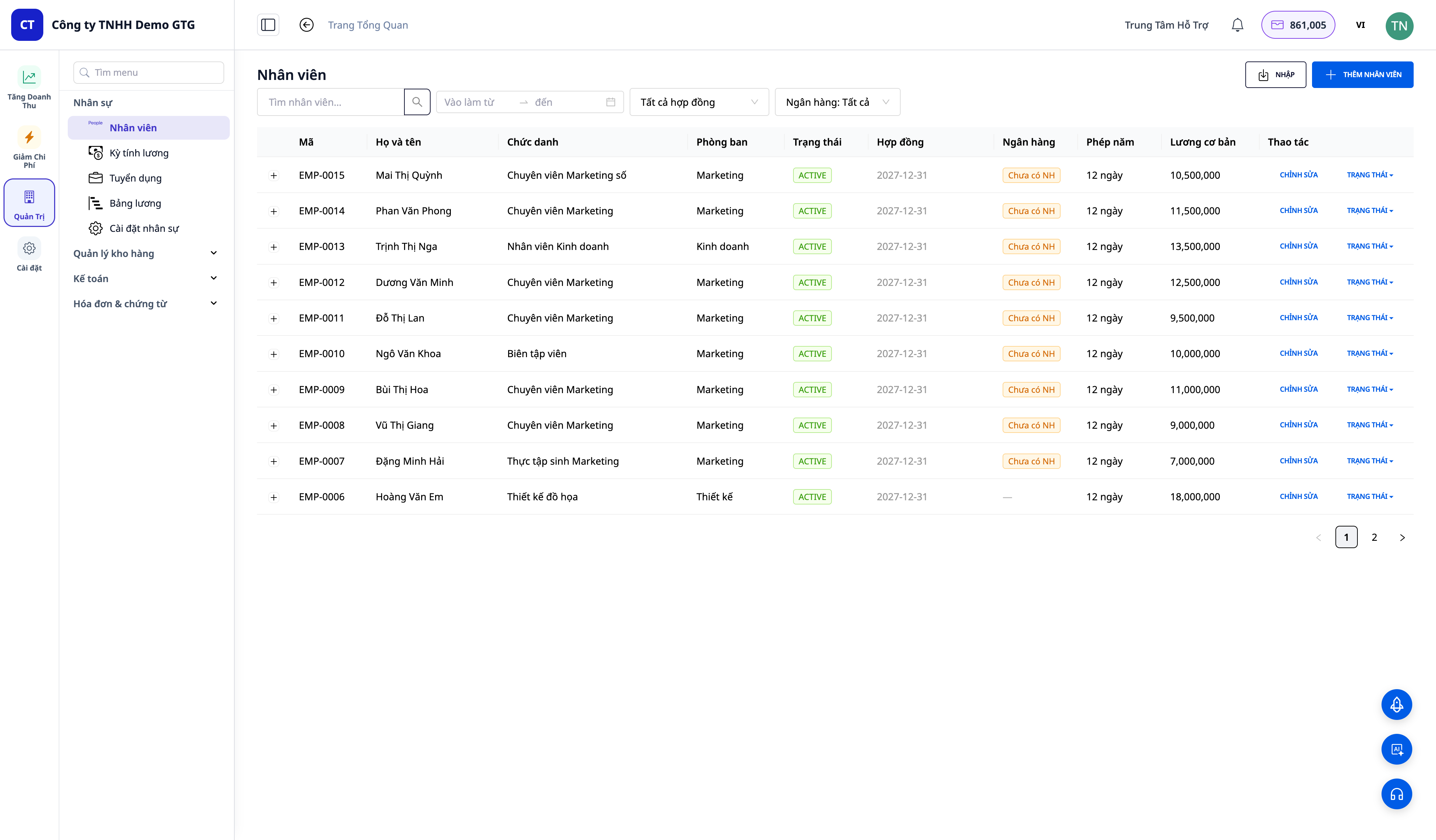
- Complete employee profiles: name, position, department, ID/passport, skills, experience, work history, seniority — and attached document profiles for each person.
- Labor Contracts (LC): create contracts per employee (contract type, term, basic salary, allowances). Each employee has one active contract — the system automatically monitors this.
- Draft contracts with AI: click "Create with AI" to generate a standard LC text (DOCX/PDF), automatically inserting your company's brand information; or upload a signed copy.
- Annual leave based on seniority, contract renewal / termination / addenda — manage the entire contract lifecycle.
💡 Quickly import existing data: have an employee list on Excel? Use bulk import via CSV to bring all personnel into the system in minutes.
2. Monthly Payroll — Automatic According to Vietnamese Standards
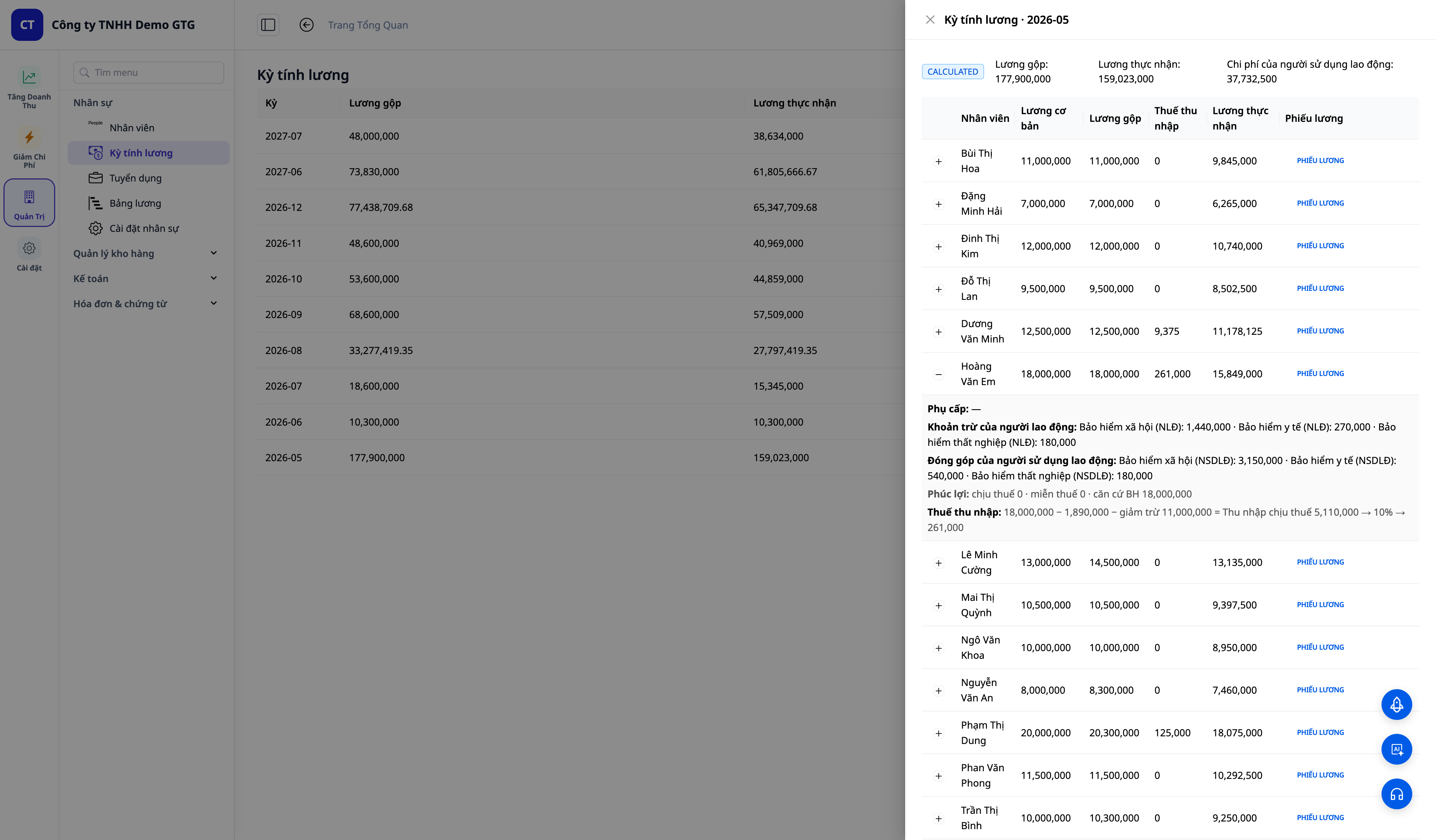
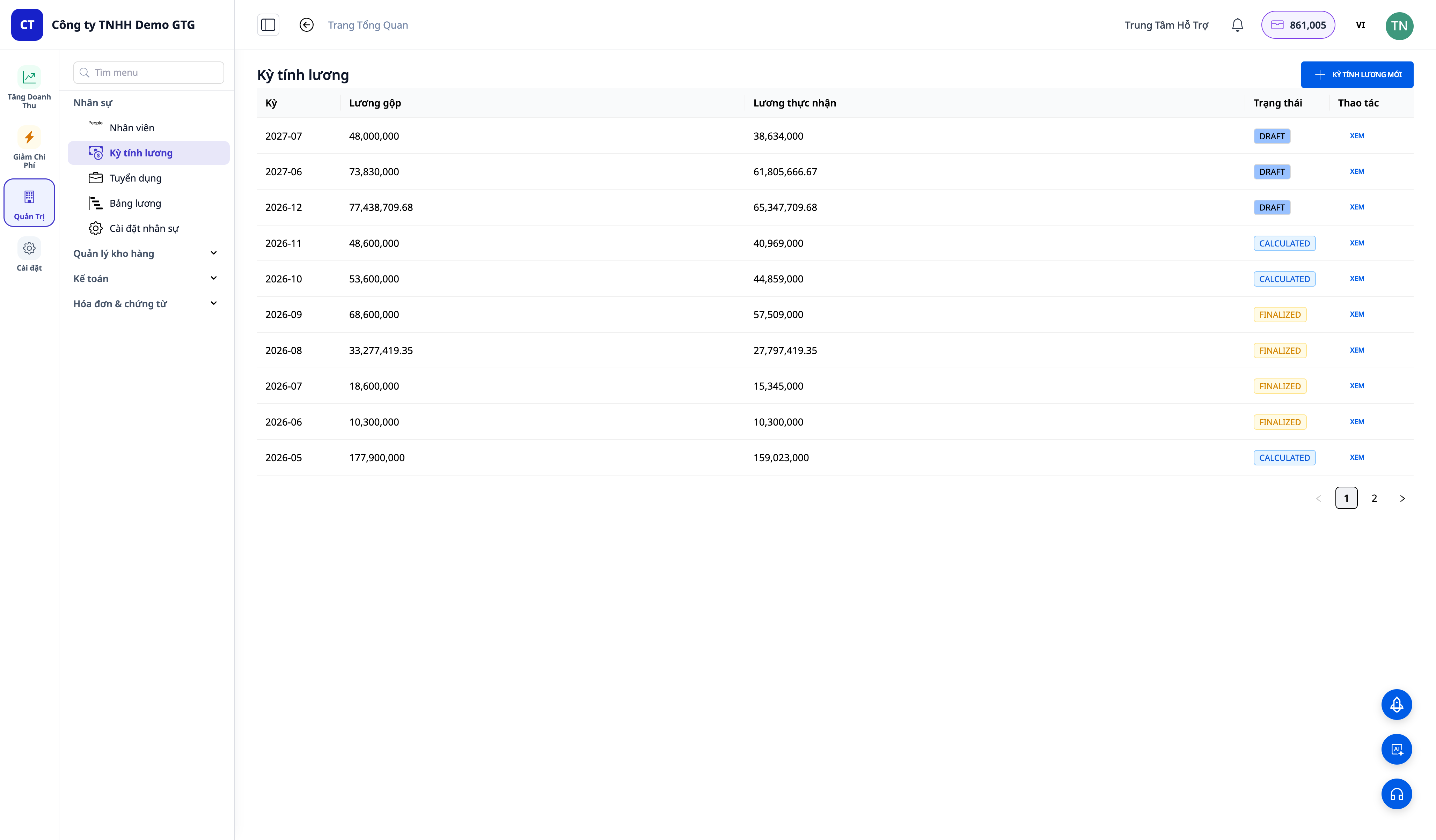
- One-touch payroll processing: the system calculates Gross Salary → Social/Health/Unemployment Insurance contributions → Personal Income Tax → Net Salary for each employee.
- Pre-built national datasets: currently available for Vietnam (Social insurance calculated on full salary, 2% union fees paid by the employer, progressive PIT table, prorated by day for mid-month hires/departures, regional minimum wage, and year-to-date income accumulation for correct tax calculation). Automatic payroll accounting is available for Vietnam; datasets for other countries are being prepared.
- Additional / off-cycle salary payments, structured benefits, and bonus awards → one-time income → payslip — all encapsulated within the same process.
- Payslips sent from your own inbox — employees receive payslip emails from your company's address, not a strange one.
3. Payroll Calculation Data Set — GTG Default, You Own the Numbers (NEW)
This is a major change for your peace of mind. Previously, legal figures (insurance contribution rates, thresholds, tax brackets, ceilings) were fixed — only the provider could change them. Now you can view and adjust them directly in the Payroll Settings section.
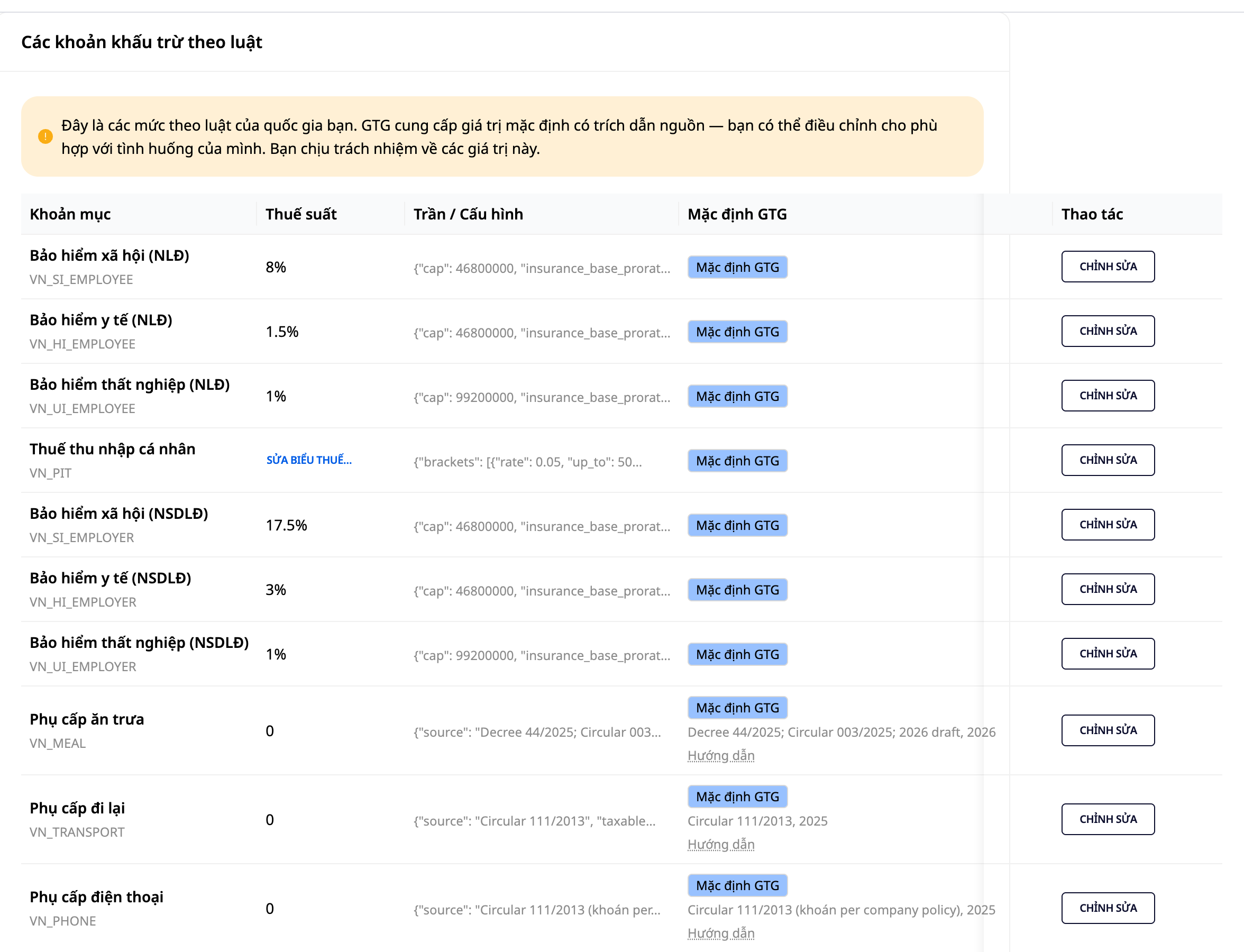
- Defaults provided by GTG, you review and own: each item displays GTG's default figures so you know what you are adjusting from. The primary legal basis for the Vietnam dataset: Social Insurance Law 2024, Employment Law 2025, Personal Income Tax Law 2025, Trade Union Law along with Decree 105/2026/ND-CP and Decree 293/2025/ND-CP. For union fees specifically: GTG calculates and accounts for this amount; payment to the union is the responsibility of the business; if the authorized trade union has approved your unit for reduced, temporary suspended, or waived contributions, adjust the rate accordingly.
- You adjust according to your situation: edit rates, thresholds, brackets, and ceilings to match your company's reality; the next payroll period will use your figures immediately.
- Reset to defaults anytime: a single click to revert to the figures provided by GTG.
- All changes are logged: who changed what, from which value to which value — as this is data that directly affects actual salaries.
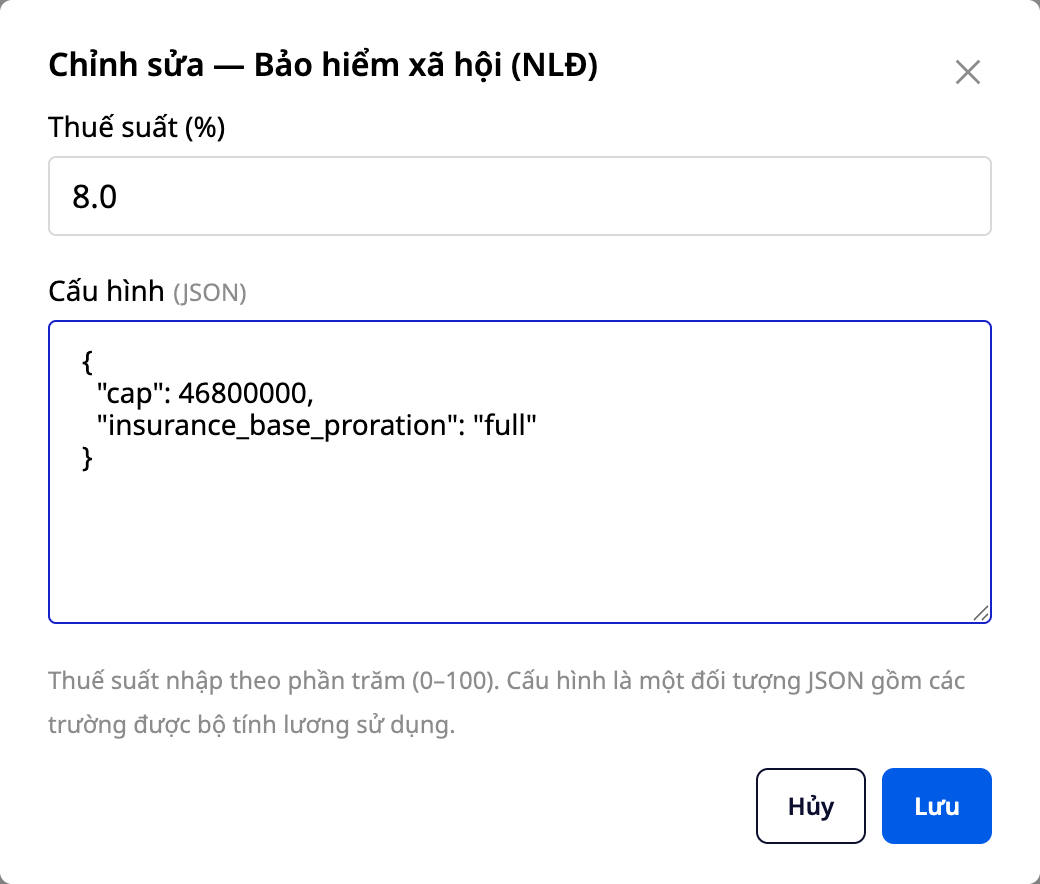
ℹ️ Why this is important: GTG does not "guarantee a legal number for you" and leave you responsible. GTG provides a transparent and adjustable default — you (or your accountant) are the one to review, adjust, and own the final numbers, just as all professional payroll software operates.
4. Finalize Payroll → Automatic General Ledger Entry
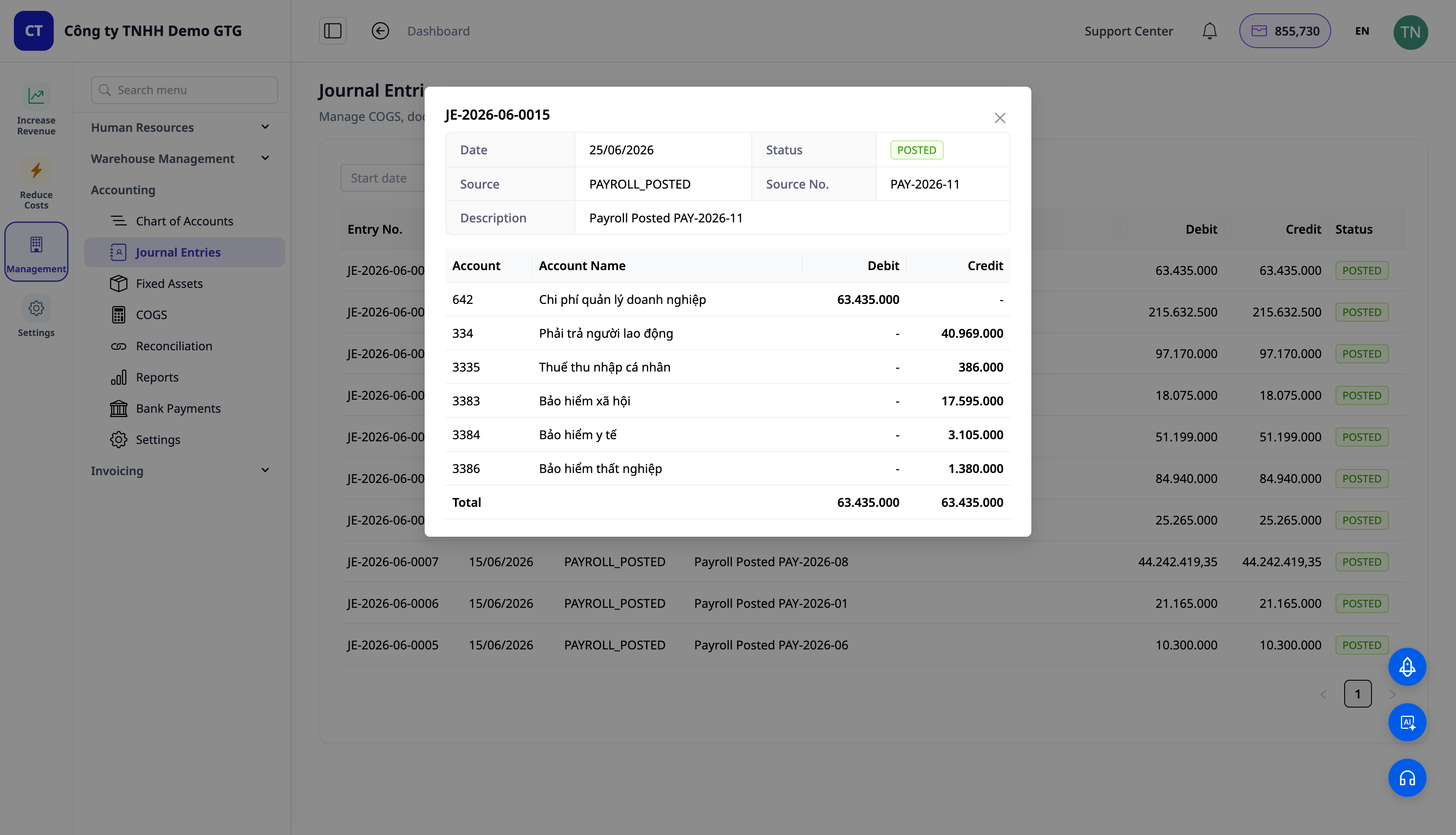
When you Finalize a payroll, GTG CRM automatically posts the payroll expense journal entry to the General Ledger — using the same automation mechanism that runs for invoices and payments.
- Balancing journal entry (Debit Payroll Expenses / Credit Accounts Payable – Employee 334 + Social Insurance and Union Fee accruals 3382). Personal Income Tax withheld is accounted for separately when incurred.
- You can view and edit the accounting rules — this is your workflow, not a black box.
- Net pay remains "pending" in account 334 until disbursed — in accordance with accounting principles.
- You immediately see the journal entry in the workflow log and in the General Ledger / Journal Entries, just like how invoices are accounted for.
5. Salary Scale & Personnel Decisions
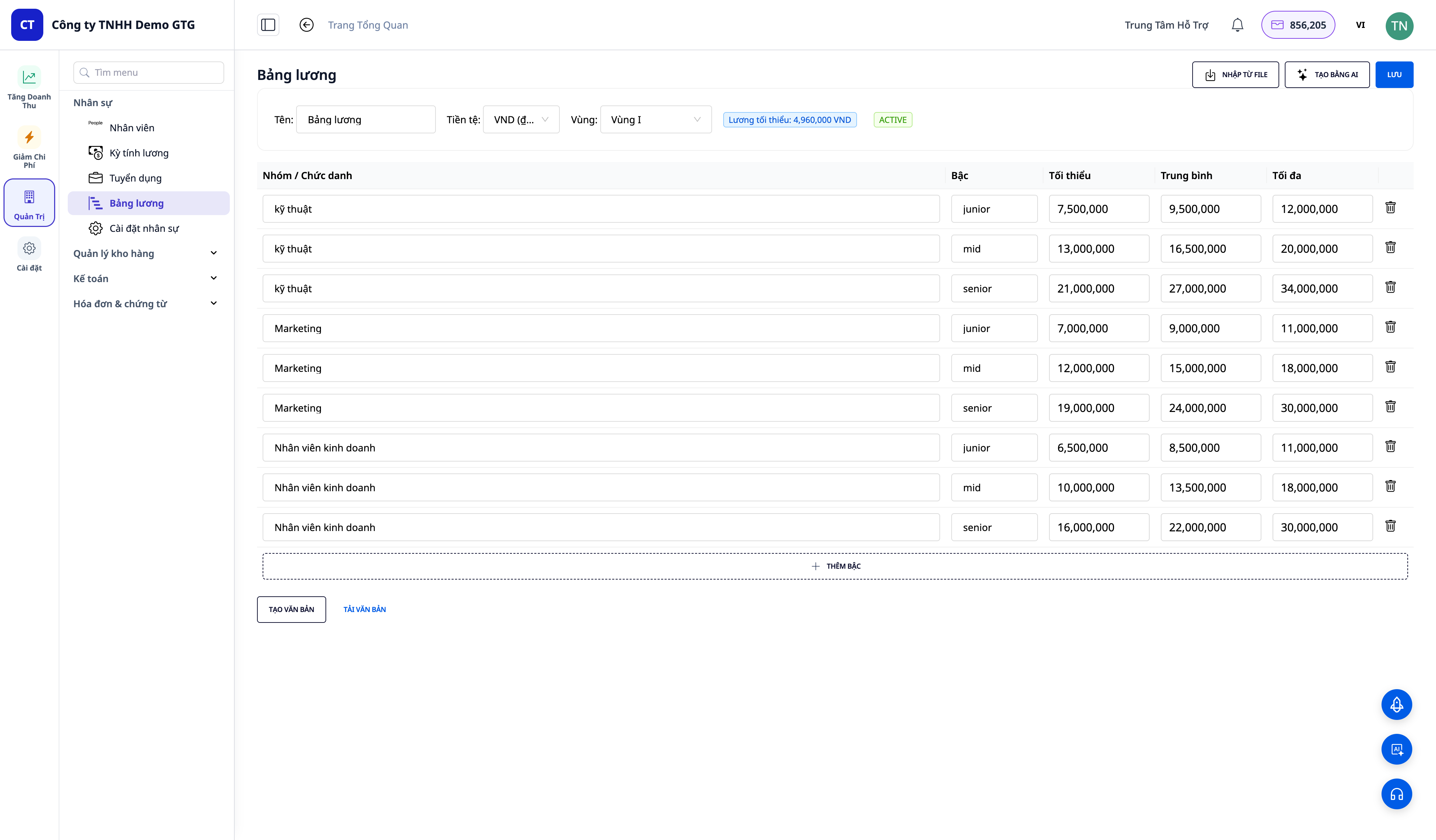
- Salary Scale: AI suggests salary tiers by position + regional minimum wage packages + standard text; used as a basis for recruitment and offer letters.
- Reward / Disciplinary / Termination Decision: creates decision documents (global default template + Vietnamese standard template set).
6. Sensitive Permissions — Protecting Salary Data
Salary, bank accounts, and tax codes are sensitive data. GTG CRM separates "view employee information" from "view salary information":
- Users with only employee contact viewing permissions will not see salary/bank/tax information — these fields are hidden at the server level, not just the interface.
- Two pre-set permission groups: HR Manager (full access) and HR Viewer (contacts only).
- Access Logging: the system records who viewed salary information — providing an audit trail for business owners.
7. Grant Platform Access to Employees (NEW)
You've hired someone and created their employee profile — so how does that employee access GTG CRM? Previously, you had to remember to go to Settings → User Management, re-enter the exact email used in the employee profile, and then manually select their role from scratch. Now, this can be done directly from the employee's profile with the Grant Access button.
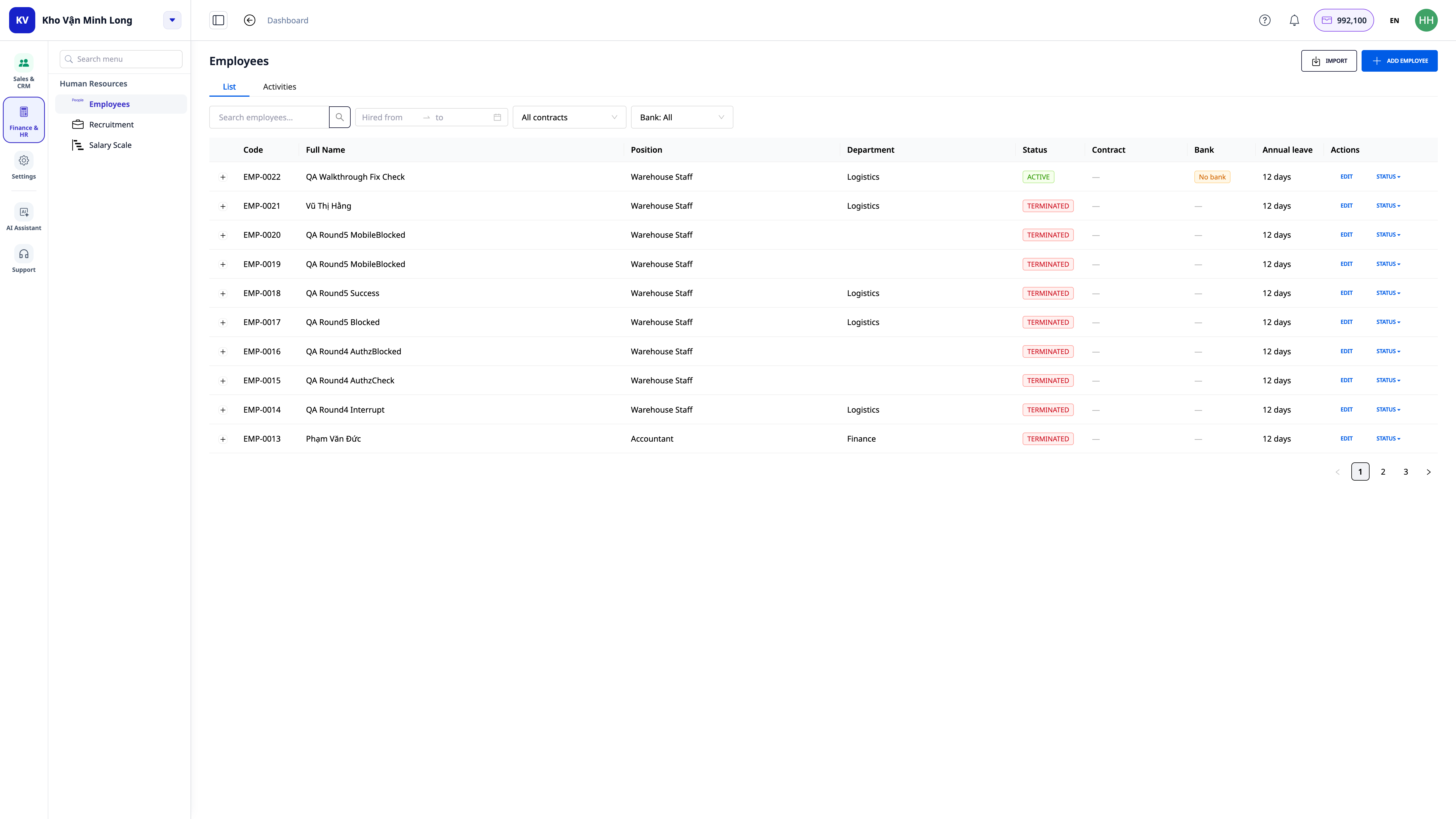
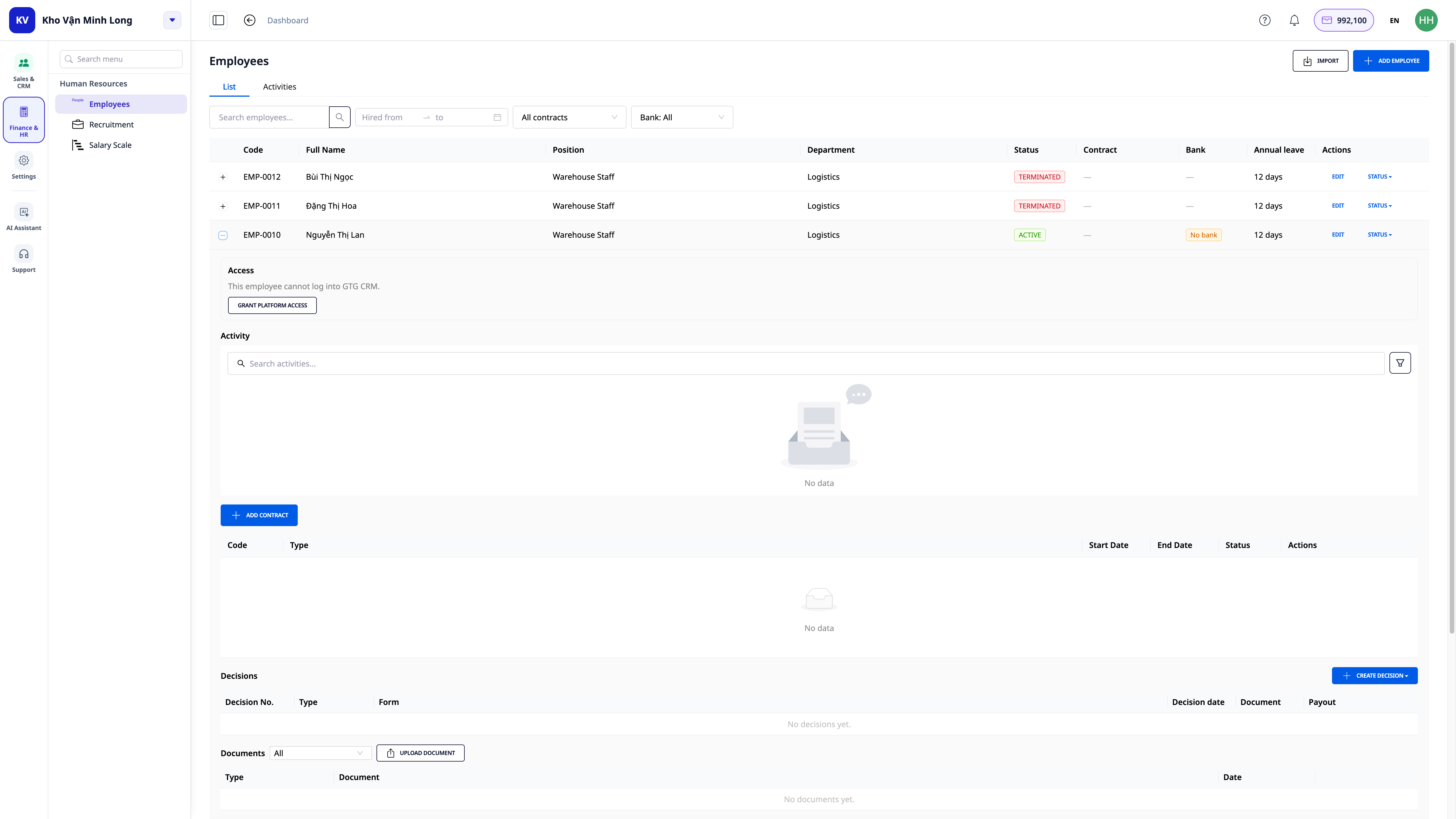
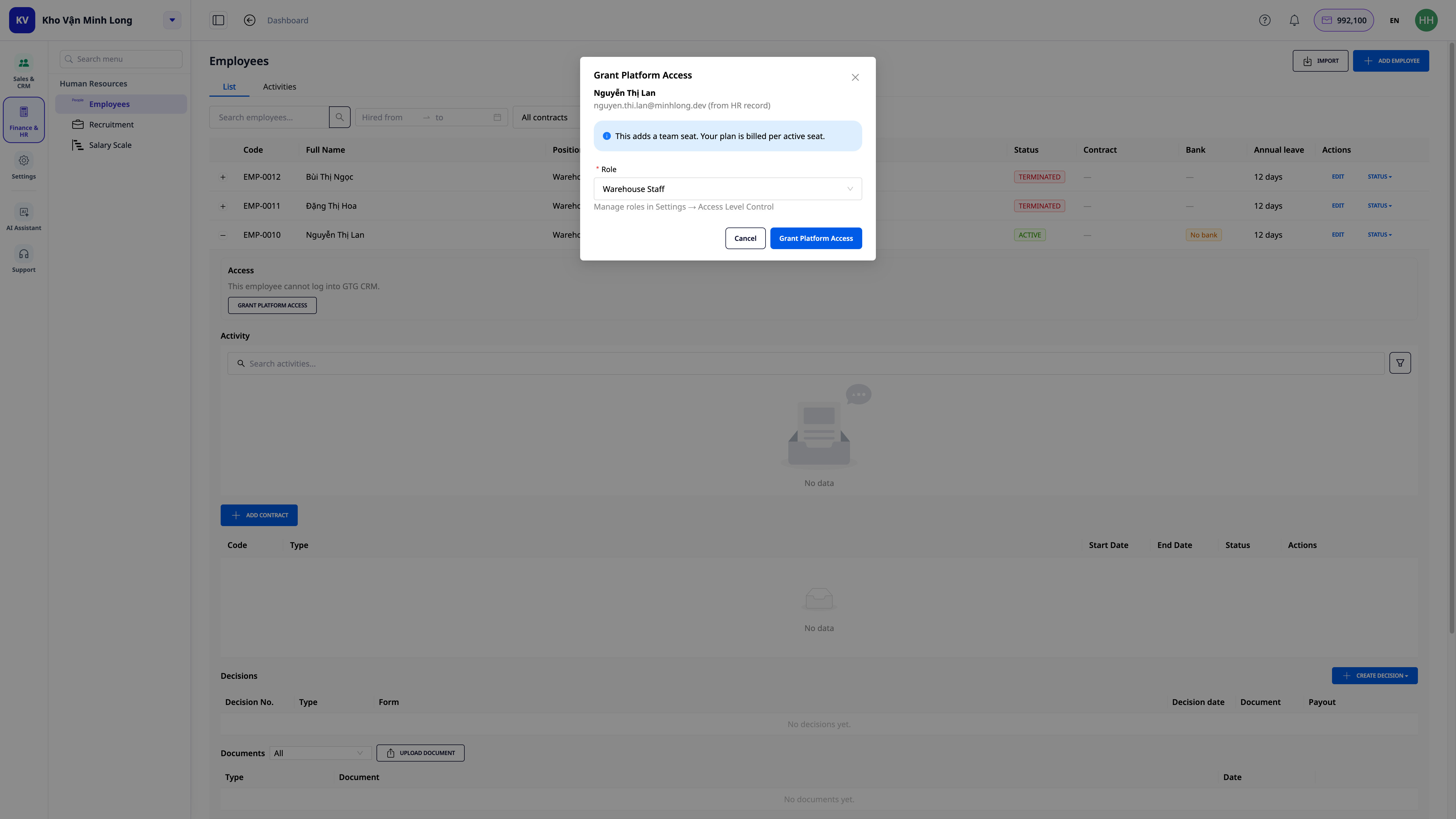
- Email and name are pre-filled from the employee's profile — no need to re-type, no risk of mistyping the email.
- Roles are pre-suggested based on job titles: if your workspace already has roles matching employee job titles (e.g., a "Cashier" job title matches a pre-set role), the system automatically selects it — you only need to confirm or change it if desired.
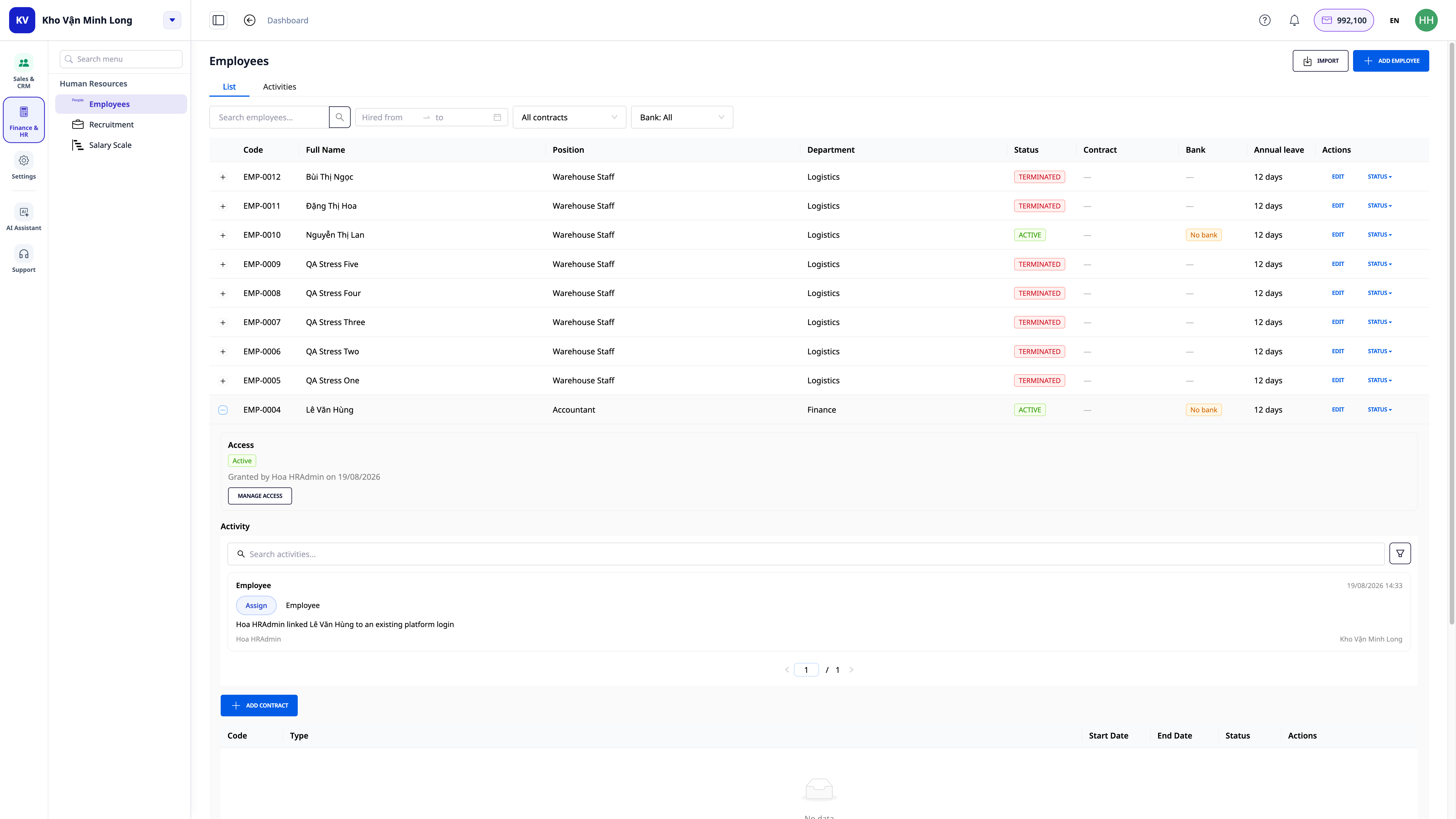
- Employee already has an account? The system automatically recognizes and links it — no re-inviting, no extra seat charged, no change to their existing role. This is common for those you invited manually before this button existed.
- No account yet → an invitation is sent via email with the selected role. GTG CRM always clearly states before you confirm: "This action will add a seat to your current subscription plan." — no hidden fees.
- Employee profile immediately displays access status: pending activation or active, their role, who granted it, and when — all within the same 360° view as their contract and salary information.
- When terminating an employee, the contract termination screen has an additional option (not automatically enabled) "Simultaneously revoke platform access". Enabling this option requires you to select who will take over the tasks and records currently assigned to that employee — ensuring no unfinished work is overlooked when access is revoked.
ℹ️ Who can see this button: HR personnel with employee profile management rights will see the "Grant Access" button. However, the actual granting of access still requires approval from the user management authority of the workspace. If you don't have sufficient permissions, the system will clearly state that you need to request confirmation from a specific administrator, rather than failing silently.
See detailed steps in the HR & Payroll User Guide.
Benefits for Businesses
Automatic salary calculation + social insurance + personal income tax — No more manual calculations, no more tax bracket errors — finalize payroll in minutes.
Default legal data sets, customizable by you — Rest assured, it's legally compliant, you control the numbers, and you can update it yourself when laws change without waiting for anyone.
Data sets for Vietnam, with other countries being prepared — A single system for gradual expansion into other markets.
Payroll finalization → automatic journal entries — Never forget to record salary expenses, no incorrect accounts.
One platform for HR + Sales + Accounting — Reduce the number of software purchases, one place for reconciliation.
AI-generated contracts — Employment contracts in seconds, standardized, with your brand pre-inserted.
Permission controls for sensitive payroll data + access logs — Payroll is protected correctly, with an audit trail.
Bulk employee import from CSV — Transfer all your personnel into the system in minutes.
Who is it For?
- SMB Business Owners who want to manage HR and payroll without purchasing separate HR software.
- HR / Administration Departments needing a single place to manage employee profiles, contracts, and payroll.
- Accountants who want salary costs automatically posted to ledgers, with correct accounts and periods — and who want to adjust rates/thresholds to reflect reality.
- Businesses in Vietnam, currently expanding or planning to expand to multiple countries, who want to manage payroll on the same system (countries outside Vietnam are currently being prepared).
How to Get Started?
The HR module is already available in your workspace. Start from HR → Employees: add your first employee profile (or import a list from CSV), then create employment contracts for each person. See the step-by-step HR & Payroll User Guide, or read why calculating payroll correctly while maintaining control over the numbers is important.
Free Trial — no credit card required.


