
Feature Introduction
You want a professional website, but you're stuck with the same old questions: hiring a developer is expensive, doing it yourself means not knowing where to start, and even after you've finished, you're still struggling to figure out how to upload it for customers to see. Many websites remain stuck in draft mode.
That ends today. With GTG CRM, you create entire multi-page websites using AI, visually edit them with a drag-and-drop web builder, manage article categories while building (see changes and updates directly in the preview), and publish the entire website with a single Publish button — all in one system, no coding required, and without leaving your current CRM.

The Problems Businesses Are Facing
Hiring a developer to build a custom website — High cost, long waiting times, and you have to ask for permission for any necessary changes.
Creating content page by page manually — It took a whole week of writing articles, choosing photos, and arranging the layout.
Article categories that are misspelled once are permanently stuck — they can't be renamed or deleted, making the blog look unprofessional on the website.
Managing categories requires repeatedly switching between screens — disrupting workflow and not seeing immediate results.
Many websites create pages but can't publish them — Pages get stuck in "Draft," and visitors never see them.
GTG CRM brings everything together in a single data source: creating, editing, categorizing content, and publishing are all within the same web builder.
Highlights
1. Create a complete website using AI.
Select the pages you want (homepage, about us, products, articles, contact), fill in a few lines about your business field and target customers, and the AI will automatically build the interface, write the content, and create a suitable product sample. You can also paste the URL of a website you like so the AI can reference the style and create your own version.
- Automatic brand matching : AI extracts colors, logos, and fonts from your brand identity to create a website that perfectly reflects your vision.
- Smart Header & Footer : Navigation menus, call-to-action buttons, contact information, and social media links are automatically generated and responsive across all devices.
- Watch the AI work live : monitor each section being created; if you're not satisfied with a part, click Regenerate to recreate that section separately.
ℹ️ Before creating a transaction, the system clearly displays the required credit amount and the current balance — you're in control and never interrupted due to running out of credit. If interrupted (power outage, shutdown), the progress saving feature allows you to resume from where you left off without incurring additional credit costs.
2. NEW — Manage article categories directly in the web builder, with live updates.
Previously, you could only select pre-existing categories when building a blog on a website; adding, editing, or deleting categories required exiting to a different screen. Now, you can add, rename, and delete post categories directly within the web builder — and the preview window updates live, without needing to reload the page.
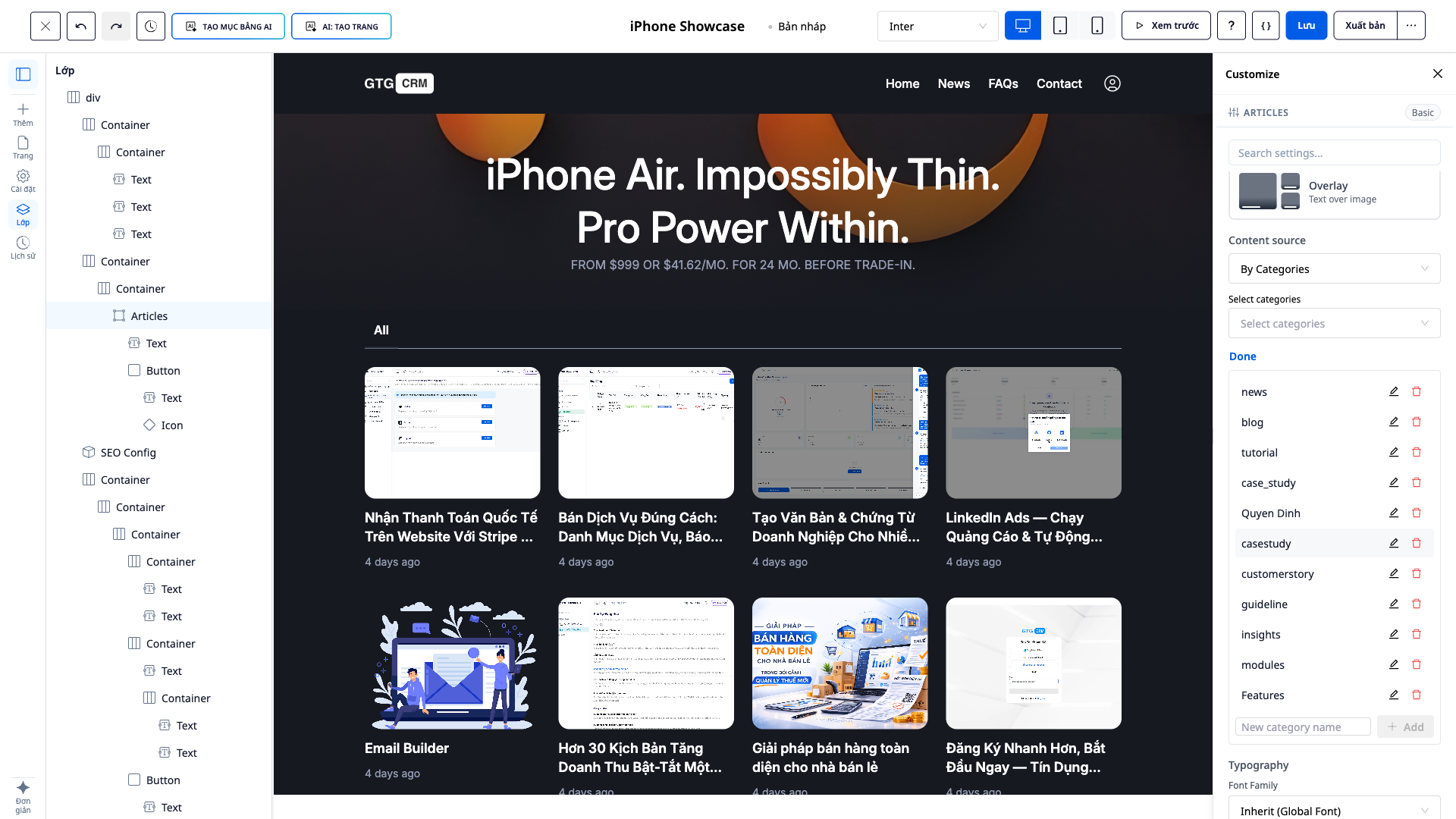
- Add new categories directly while arranging article blocks on the page.
- Renaming a category : all posts associated with that category will automatically update accordingly — no need to edit each post individually.
- Deleting unused categories : the system clearly states "the category is currently being used by N posts" before deleting, and securely removes labels from those posts (the posts remain intact).
- You'll see the result immediately : the block of posts on the page builder automatically changes according to your changes — exactly what you're posting is what you're seeing.
💡 Category management can also be done right within the CRM's post editor — the same experience, no matter which screen you're on.
3. NEW — Publish entire multi-page websites with just one button
Multi-page websites (homepage, about us, products, blog, solutions pages, etc.) can now be published simultaneously: click Publish , the system changes all eligible pages to published status, and the website goes live almost instantly at the correct URL for each page.
- Instant posting : no more pages stuck in "Draft".
- Preview before publishing : Check the entire page in the preview window before publishing.
- Creating your own sitemap and configuring SEO for each page (Title, Meta Description, URL, social media images) helps Google find you faster.
4. Sell directly on the website.
The website automatically connects to your product inventory: products are displayed, prices and inventory are synchronized in real time, orders are automatically created from the website within the system, and customers are saved to the CRM. Multiple e-commerce storefront templates are available, with clear payment steps (shipping carrier logo, inventory by category, international phone number) to make it easier for customers to close deals.
Benefits for Businesses
Create websites using AI — From idea to complete website in minutes, no coding knowledge required.
Managing article categories in the web builder — Blogs on your website are always neat; editing categories shows the results immediately.
Safely rename/delete categories — No more persistent misspelled categories; posts won't be lost.
Publish your entire website with one click — Get your page live instantly, no more getting stuck in draft mode.
Warehouse and payment integration — Sell directly on your website without the need for separate tools.
Who is it suitable for?
- Online shop owners want a fast-acting sales website that allows them to manage content and categories independently without relying on technical expertise.
- Marketers and agencies need to create and update pages and blogs according to campaigns, posting as needed.
- Freelancers and small businesses want a professional, SEO-optimized website without the cost of outsourcing.
How do I get started?
Go to the Website menu in GTG CRM, select Generate with AI (or create manually), build and customize in the web builder, manage article categories right there, and then click Publish to publish the entire website. Need detailed steps? See the guide on creating and managing websites using AI in GTG CRM .
Try it for free — no credit card required.


