
Představení funkcí
Na konci měsíce otevřete bankovní výpis a začnete prohledávat každý řádek: za jakou fakturu zákazník zaplatil tuto částku? Je tamto poplatek, interní převod, nebo vrácené platby COD od platformy? Pak otevřete Excel a ručně zadáváte, aby účetnictví odpovídalo bankovnímu výpisu. Ztratíte celé odpoledne, stále je zde prostor pro chyby, a pokaždé, když se vás někdo zeptá "odkud tyto peníze pocházejí", potíte se.
To končí ode dneška. GTG CRM promění bankovní výpisy v prostor pro sladění přímo v účetním systému, který používáte: třídí každou transakci do správného účtu, nastavuje jednorázová pravidla pro budoucí použití, aby automaticky navrhovala podobné řádky, zobrazuje přehledy a zprávy o sladění a aktivuje možnost automatického zaúčtování vyrovnávacích položek. Peníze ⇄ faktury ⇄ hlavní kniha se spojí do jednoho cyklu.
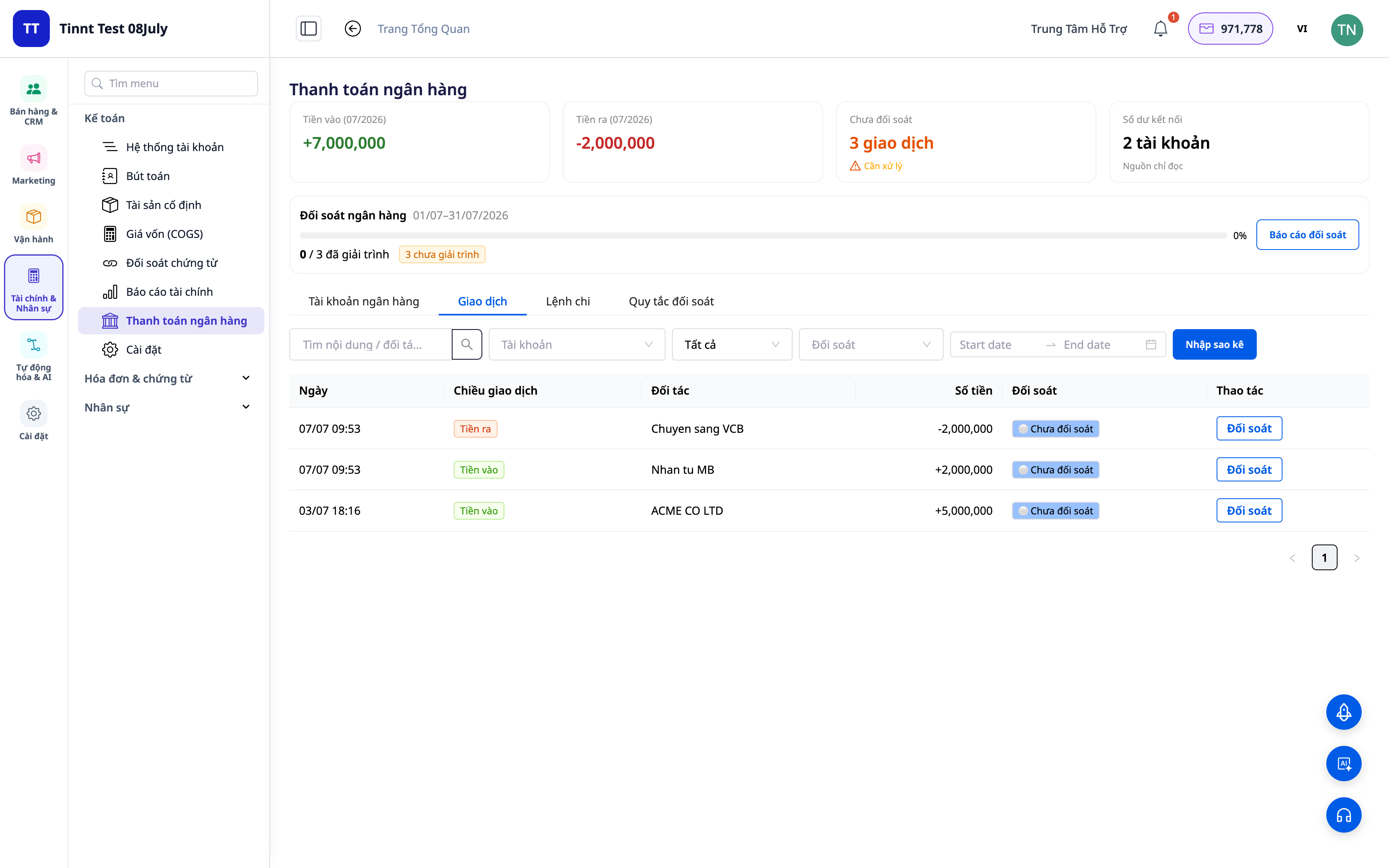
Problémy, kterým podniky čelí
| Starý způsob | Důsledek |
|---|---|
| Ruční kontrola bankovních výpisů a ruční zadávání do Excelu | Ztráta hodin každý měsíc, snadné chyby při zadávání, nemožnost zpětného dohledání |
| Neznalost, která peněžní toky odpovídají kterým fakturám | Neznámé pohledávky a závazky, nezjištěné přeplatky/duplicitní platby |
| Účetnictví vedené odděleně od banky | Nesoulad údajů, obtížná vysvětlení při daňových kontrolách |
| Obtížné oddělení vrácených plateb COD od platforem/přepravních společností | Nezřejmost, zda bylo vše přijato, zmatky při sladění COD |
GTG CRM sjednocuje vše do jednoho jediného zdroje dat: každá bankovní transakce je přímo propojena s účetním účtem a (pokud je to vhodné) s fakturou, čímž se automaticky generuje vyrovnávací položka.
Hlavní přednosti
1. Třídění transakcí do správných účtů
U každého řádku výpisu vyberte, co to je: tržby, poplatky, interní převod, hotovost–banka, COD... Systém přiřadí transakci ke správnému účetnímu účtu (GL account).
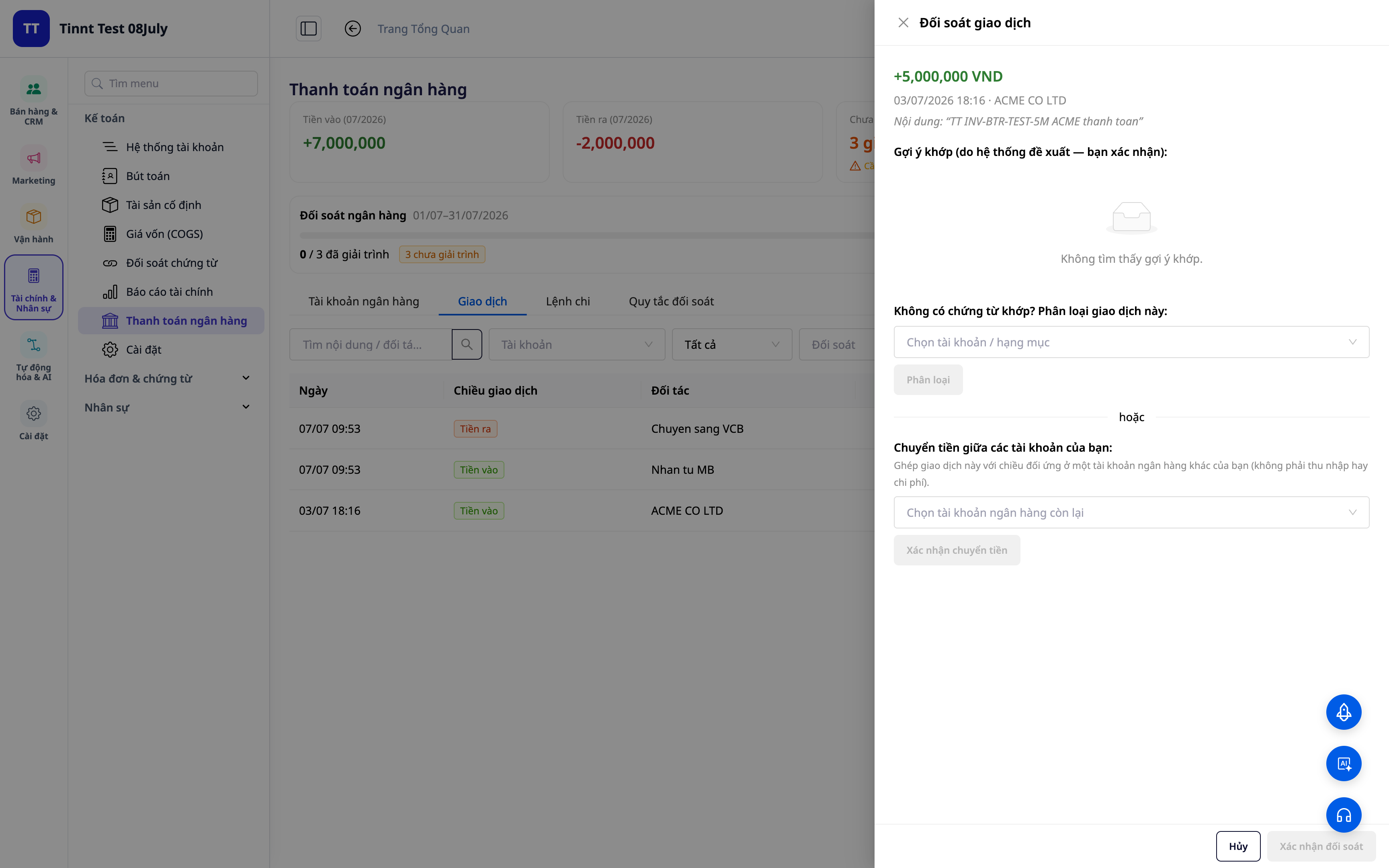
- Funkce: třídění transakcí → odpovídající účetní účet.
- Přínos: každá koruna příchozích/odchozích peněz má v účetnictví jasnou "adresu".
2. Pravidla pro opakované párování — nastavte jednou, páruje se automaticky
Vytvořte pravidla podle popisu/partnera/částky: podobné transakce v budoucnu budou automaticky přiřazeny ke správnému typu. Nová pravidla začínají fungovat okamžitě a aplikují se hned.
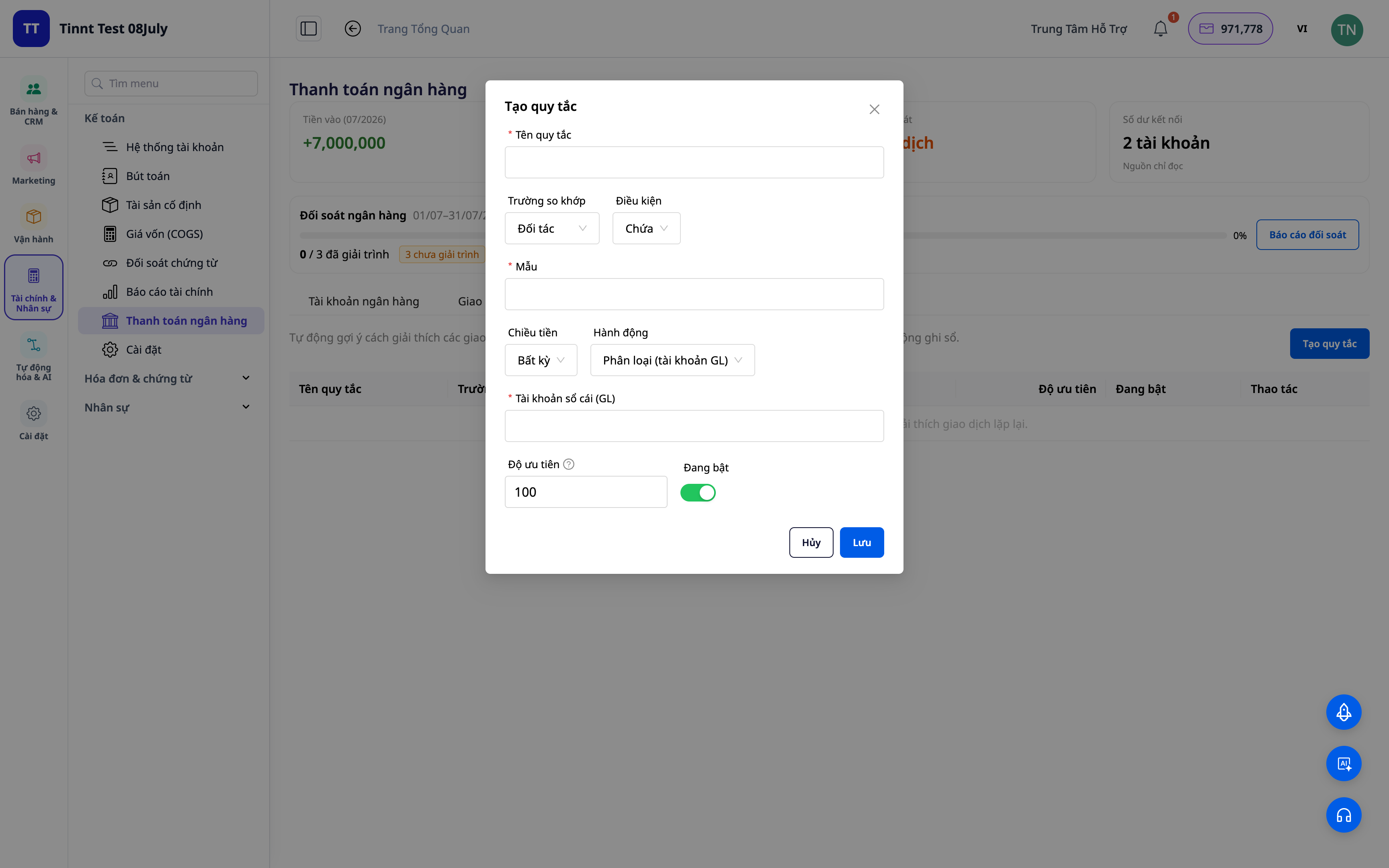
- Funkce: sada opakovaně použitelných pravidel pro párování.
- Přínos: příští měsíc snazší než ten předchozí — opakující se práce je automatizována.
3. Návrhy párování podle pravidel — stačí schválit
Pravidla, která jste nastavili, automaticky navrhnou způsob zařazení pro podobné transakce — stačí je zkontrolovat a schválit. Čím více budete systém používat, tím více situací pokryjí vaše pravidla a tím rychlejší bude párování. Vždy budete mít konečné slovo.
- Funkce: návrhy párování transakcí na základě pravidel (vy schvalujete).
- Přínos: rychlé zpracování opakujících se řádků při zachování plné kontroly.
ℹ️ Párování a návrhy podle pravidel jsou zdarma. Brzy bude k dispozici: AI asistent navrhnoucí způsoby vysvětlení i pro zcela nové transakce.
4. Přehled párování + zprávy
Získejte přehled: kolik bylo spárováno, kolik zbývá, kde jsou nesrovnalosti. Exportujte zprávu o párování pro archivaci a vysvětlení.
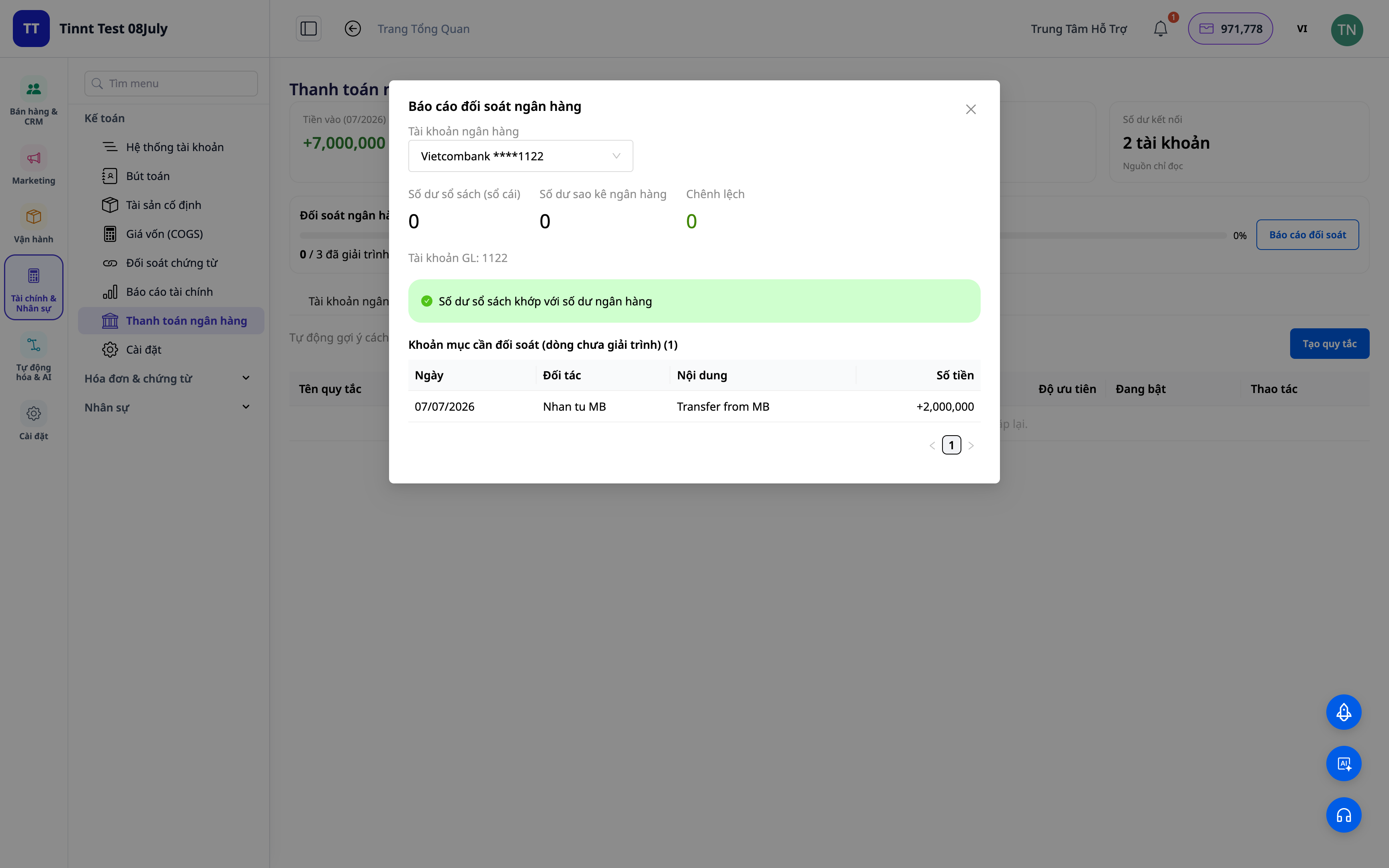
- Funkce: přehled vyrovnání + reporty.
- Výhody: na jedné obrazovce hned vidíte, zda účet odpovídá výpisu z banky.
5. Automatické zaúčtování vypořádacích položek (volitelné)
Zapněte možnost „zapsat do účtu“: transakce klasifikace / převodu / hotovosti – banky / dobírky automaticky vytvoří správné účetní vypořádací položky dle standardů. Odstranění vazby jedné transakce vrátí položku zpět.

- Funkce: automatické zaúčtování položek z vyrovnaných transakcí.
- Výhody: vyrovnání a zaúčtování je jedna věc, ne dvě — data jsou vždy konzistentní.
Výhody pro firmu
| Funkce | Skutečná výhoda pro vás |
|---|---|
| Klasifikace + pravidla pro přiřazení | Každý měsíc ušetříte hodiny manuálního procházení výpisů |
| Návrhy přiřazení podle pravidla | Rychlé zpracování opakujících se řádků, snížení chyb |
| Přehled vyrovnání + reporty | Rychlé uzavření knih, připravené podklady pro daňovou kontrolu |
| Automatické zaúčtování položek | Hlavní kniha vždy odpovídá výpisu z banky, žádné nesrovnalosti |
| Vyrovnání dobírek | Přesně víte, zda jste obdrželi veškeré platby za zboží |
Pro koho je vhodné?
- Účetní / hlavní účetní potřebující rychle uzavřít knihy a zajistit soulad s bankovními výpisy.
- Majitelé firem/živnostníci používající účetní modul v GTG CRM a chtějící mít kontrolu nad peněžními toky.
- Prodejci na dobírku potřebující vyrovnávat platby z platforem / od dopravců.
- Střední firmy chtějící snížit závislost na externím účetním softwaru.
Jak začít?
Přejděte do sekce Účetnictví ▸ Vyrovnání banky, nahrajte výpis nebo připojte bankovní účet a začněte s klasifikací. Potřebujete podrobnější kroky? Podívejte se na článek Návod k použití: Vyrovnání banky v GTG CRM a pro celkový přehled účetnictví si přečtěte článek Dvojité účetnictví přímo v CRM.
Zkuste zdarma — není vyžadována kreditní karta.


