
Hovedfunktioner
- Automatisk konsultation og ordrebekræftelse: AI Chatbot understøtter besvarelse og ordrebekræftelse for kunder 24/7, hvilket aflaster medarbejdernes arbejdsbyrde
- Centraliseret ordrehåndtering: Alle ordrer fra hjemmesiden, e-handelsplatforme og andre kanaler administreres i ét system
- Multikanal salgsintegration: Integrerer Shopee, Lazada, TikTok Shop og synkroniserer produkter og ordrer tovejs
- Intelligent lagerstyring: Spor lagerbeholdning i realtid, opdater automatisk, når der kommer ordrer, understøtter flere lagre
- Integreret fragtfirma: Opret forsendelsesordrer direkte med fragtfirmaer som Giao Hàng Nhanh, Viettel Post, understøtter COD
- Elektronisk fakturering: Forbinder med S-Invoice (Viettel) og MISA til udstedelse af gyldige momsregninger
- Ordrestatussporing: Opdater status fra New → Processing → Completed tydeligt
Standard Ordrebehandlingsproces
Trin 1: Forberedelse af Produkter og Lagerbeholdning
Opret og administrer lager
Først skal du opsætte lagre i systemet Lagerstyring → Lagre.
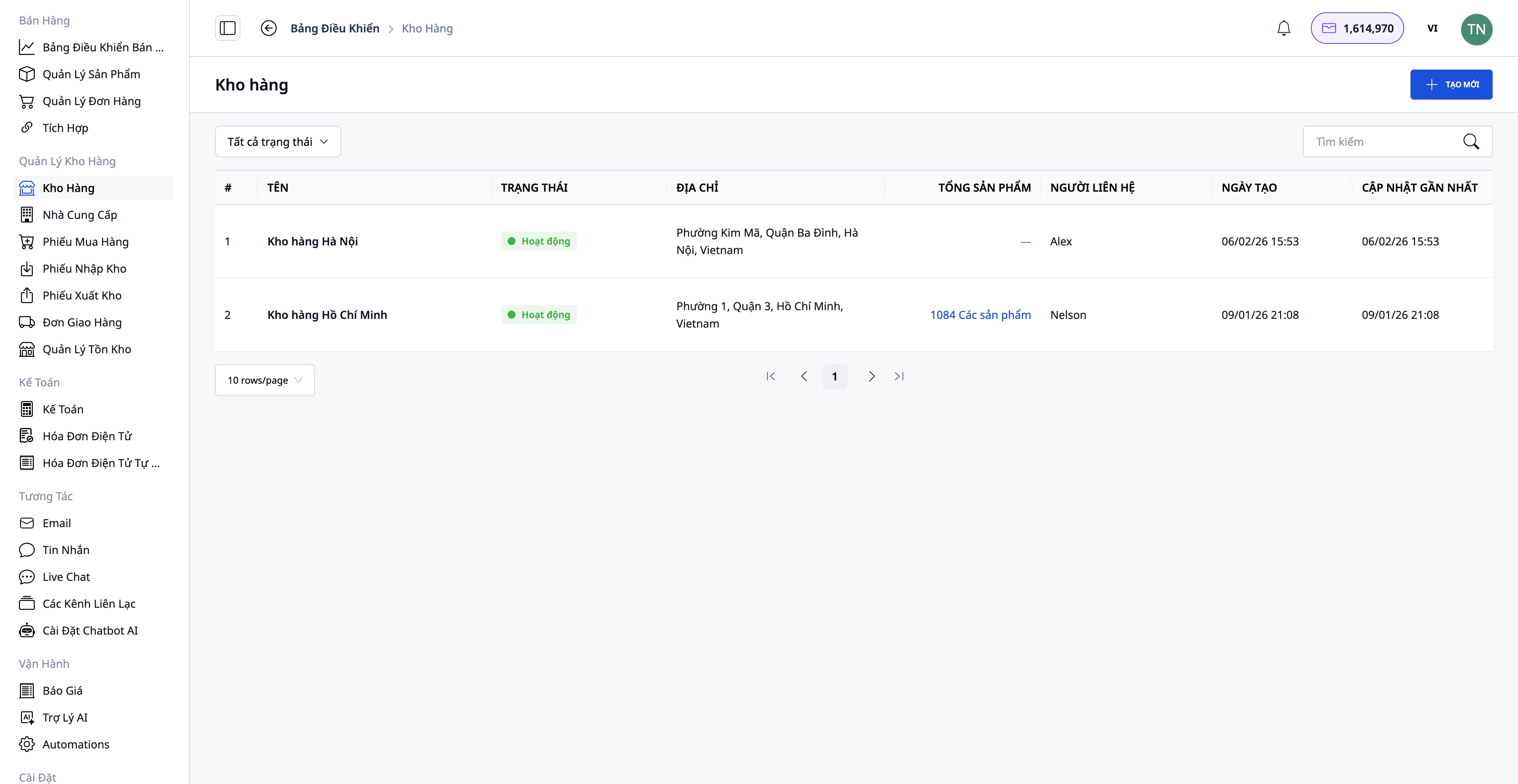
- Opret et lager med oplysninger: Lagerets navn, lagerkode, adresse, ansvarlig person
- Understøtter flere lagre: Hovedlager, sekundært lager, filiallager
- Spor lagerbeholdning separat for hvert lager
Opret produkter i systemet
Gå til Salg → Produktstyring for at oprette nye produkter.
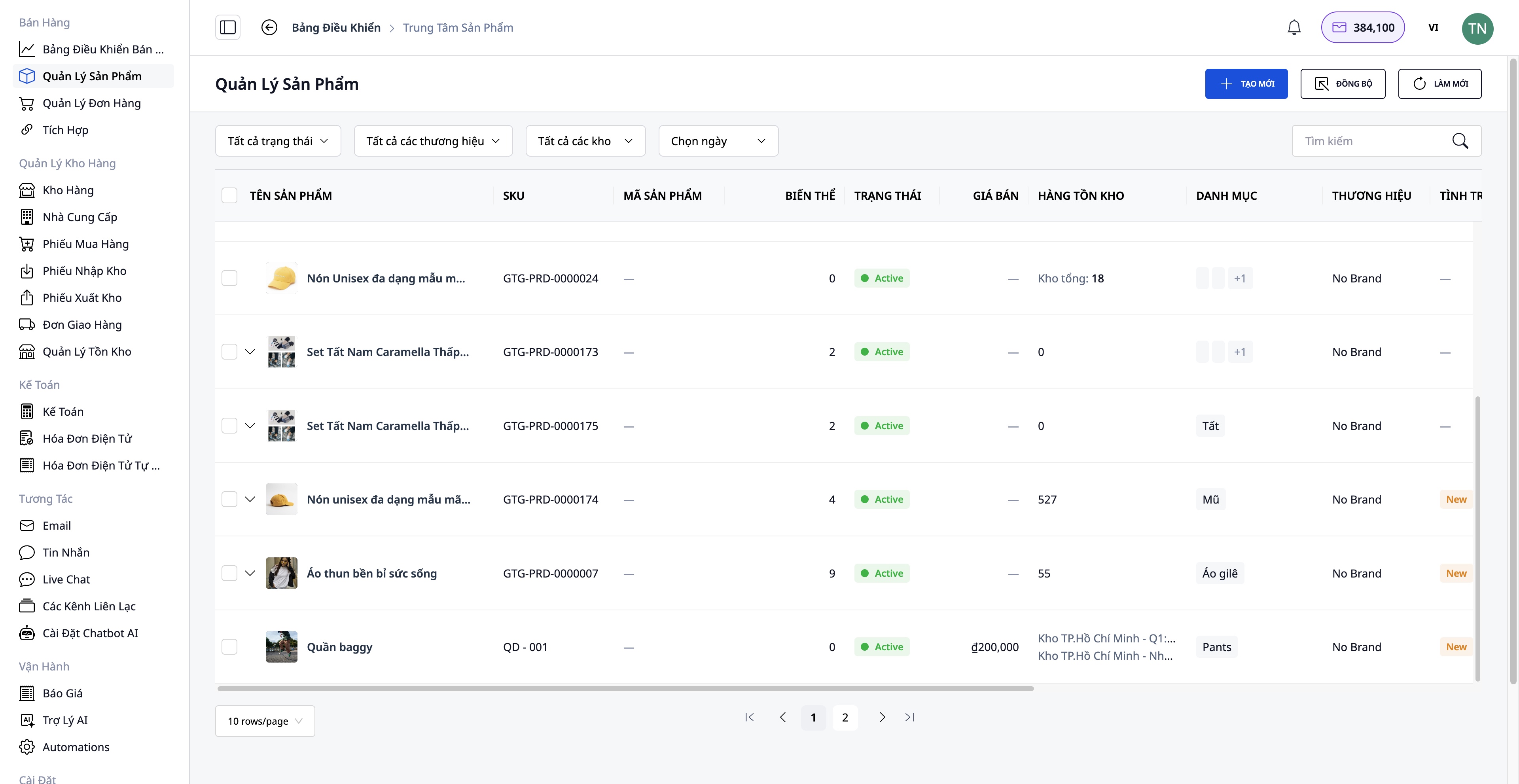
Oplysninger, der skal indtastes:
- Produktnavn, SKU, kategori, mærke
- Produktbilleder og videoer
- Varianter: Farve, størrelse (maks. 3 attributter)
- Originalpris, moms, salgspris (systemet beregner automatisk fortjenesten)
- Detaljeret beskrivelse og tekniske specifikationer
- Oprindelig lagerbeholdning
Forbind og synkroniser med e-handelsplatforme
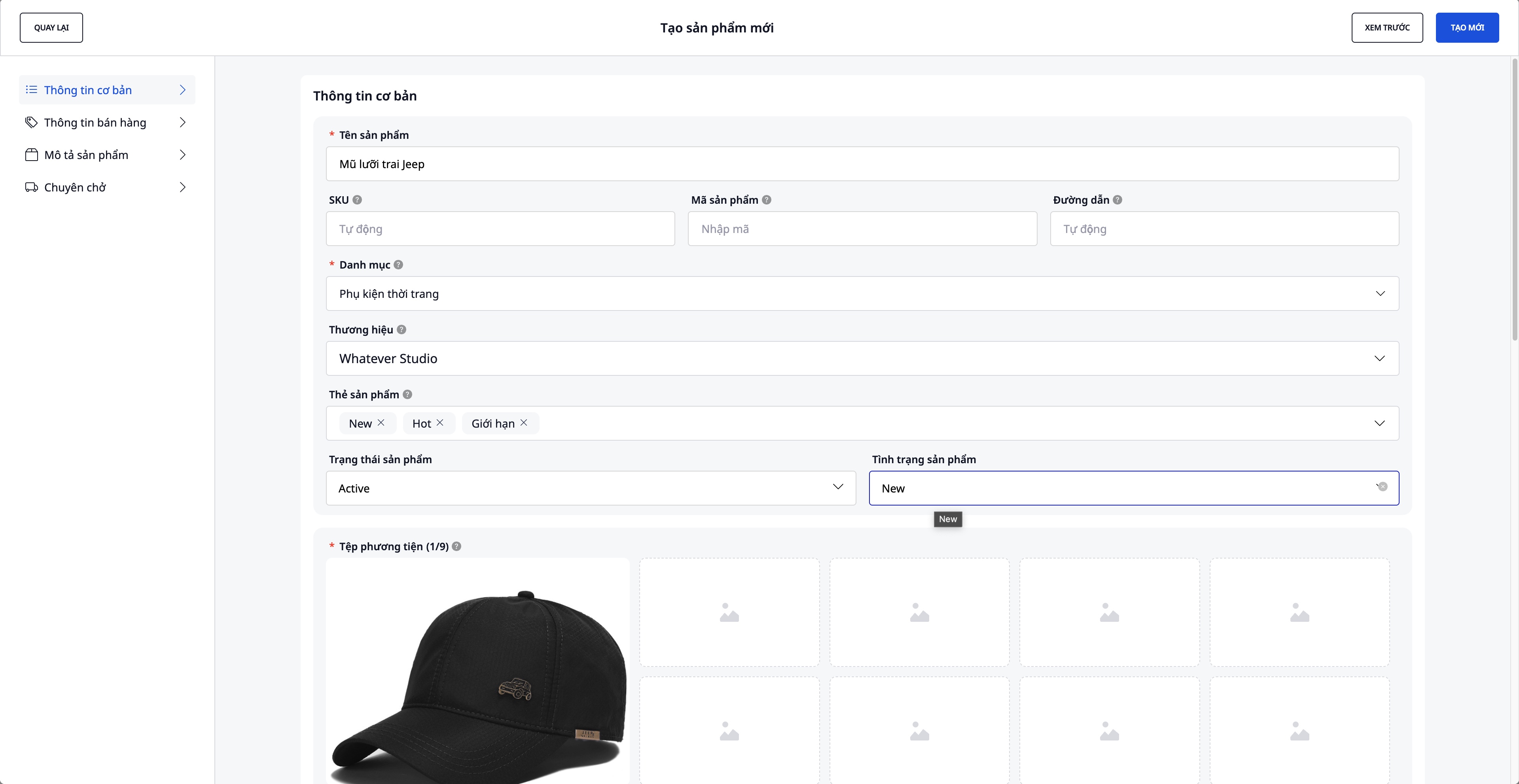
Gå til Salg → Integration for at oprette forbindelse til e-handelsplatforme.
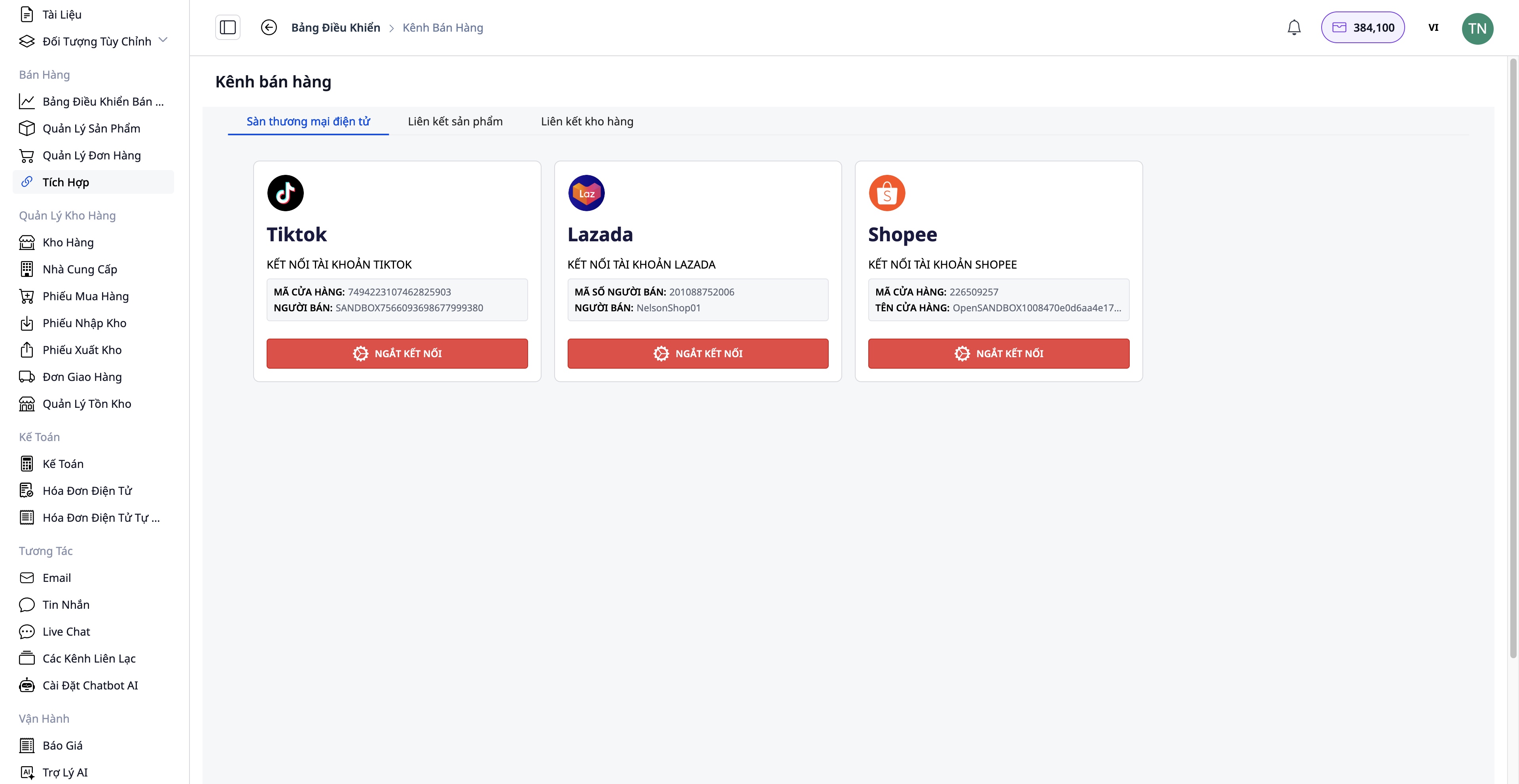
Tilslutningstrin:
- Vælg den platform, du vil oprette forbindelse til: Shopee / Lazada / TikTok Shop
- Godkend din butikskonto
- Tovejs produktsynkronisering:
- Træk ind: Hent produkter fra platformen til GTG CRM
- Skub op: Overfør produkter fra GTG CRM til platformen
Fordele:
- Centraliseret styring af alle produkter
- Automatisk synkronisering af lagerbeholdning mellem kanaler
- Sparer tid på manuel opdatering
Trin 2: Ordremodtagelse
Modtag ordrer fra flere kanaler
Ordrer kan komme fra:
- Din hjemmeside (integreret med GTG CRM)
- Shopee, Lazada, TikTok Shop (automatisk synkronisering)
- Manuelle ordrer (kunder bestiller via telefon, Facebook...)
Trin 3: Behandling og Klarering af Varer
Gennemgå og rediger ordrer (hvis nødvendigt)
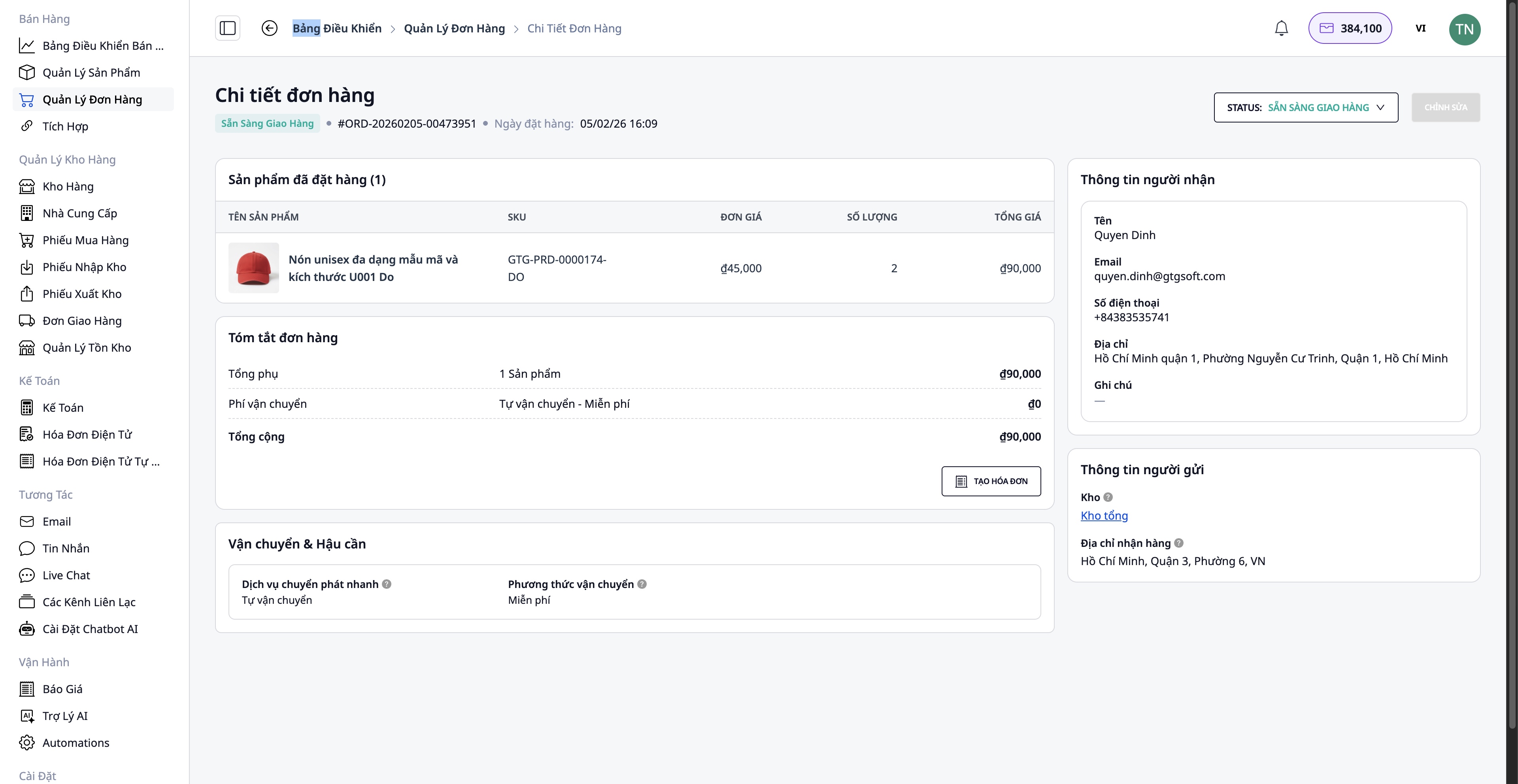
- Køberinformation
- Leveringsadresse
- Tilføj/fjern produkter
- Antal produkter
Kontroller lagerbeholdning
Systemet kontrollerer automatisk lagerbeholdningen:
- ✅ Varer på lager → Fortsæt med pakning
- ❌ Varer ikke på lager → Skal bestilles fra leverandøren
Procedure for bestilling (hvis varer mangler):
Gå til Leverandører → Vælg leverandør → Opret indkøbsordre
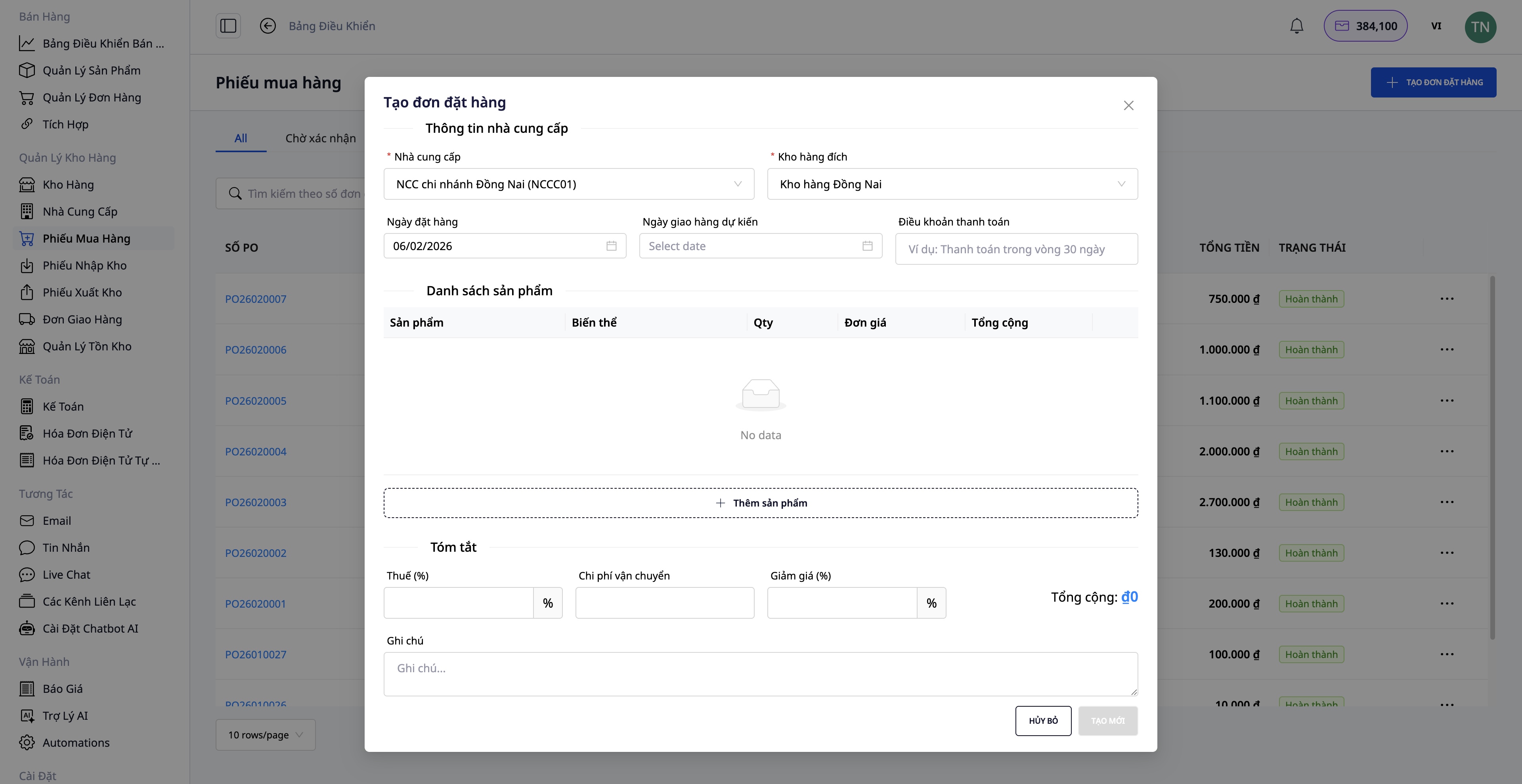
- Vælg de nødvendige produkter
- Indtast antal og enhedspris
- Bekræft indkøbsordren
- Når varerne ankommer, opret en Varemodtagelsesnota
- Lagerbeholdningen opdateres automatisk
Trin 4: Opret Forsendelsesordre
Efter at varerne er pakket, opret en forsendelsesordre direkte fra ordren.
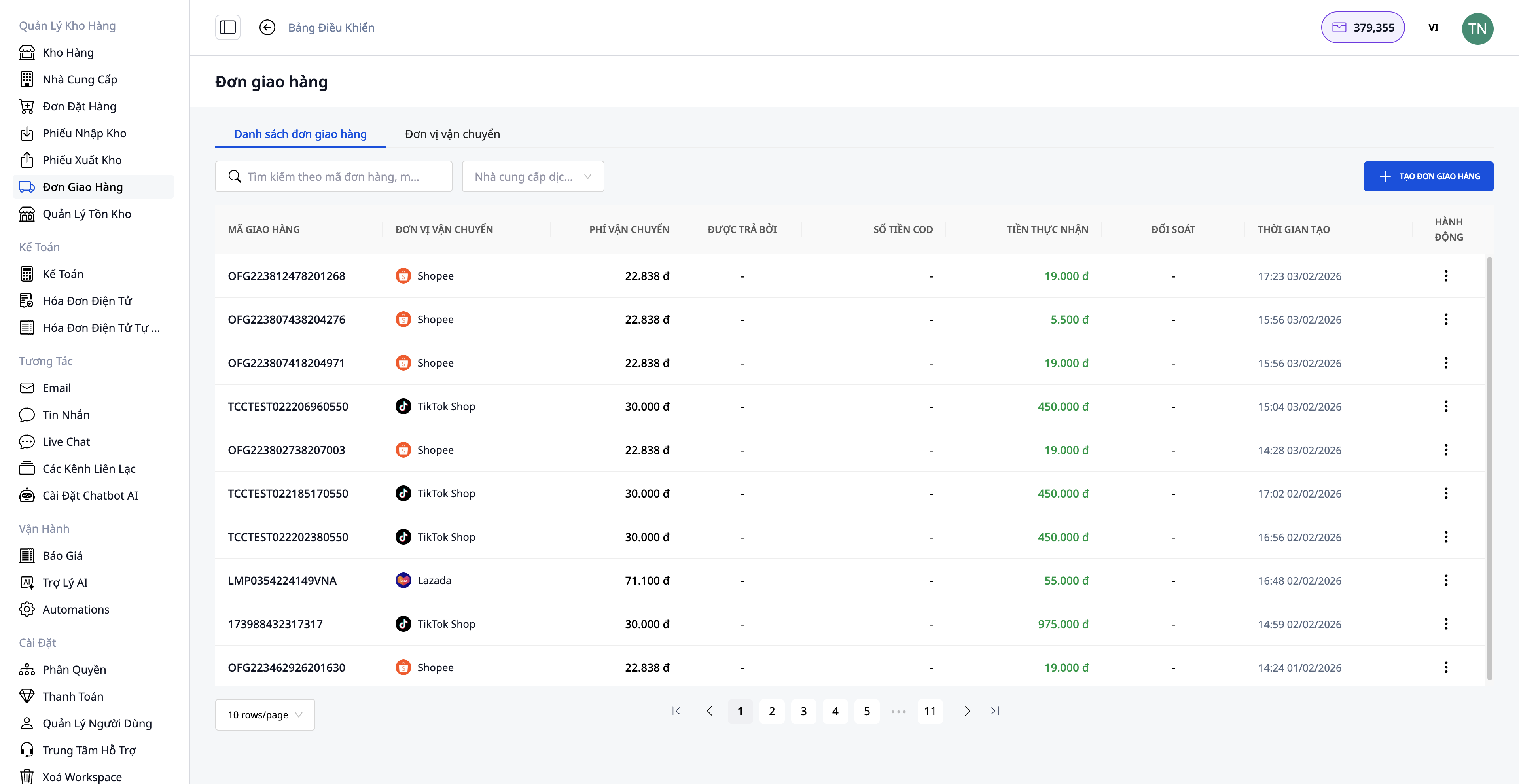
Nødvendig information:
1. Vælg forsendelsesservice:
- Hurtig levering
- Økonomisk levering
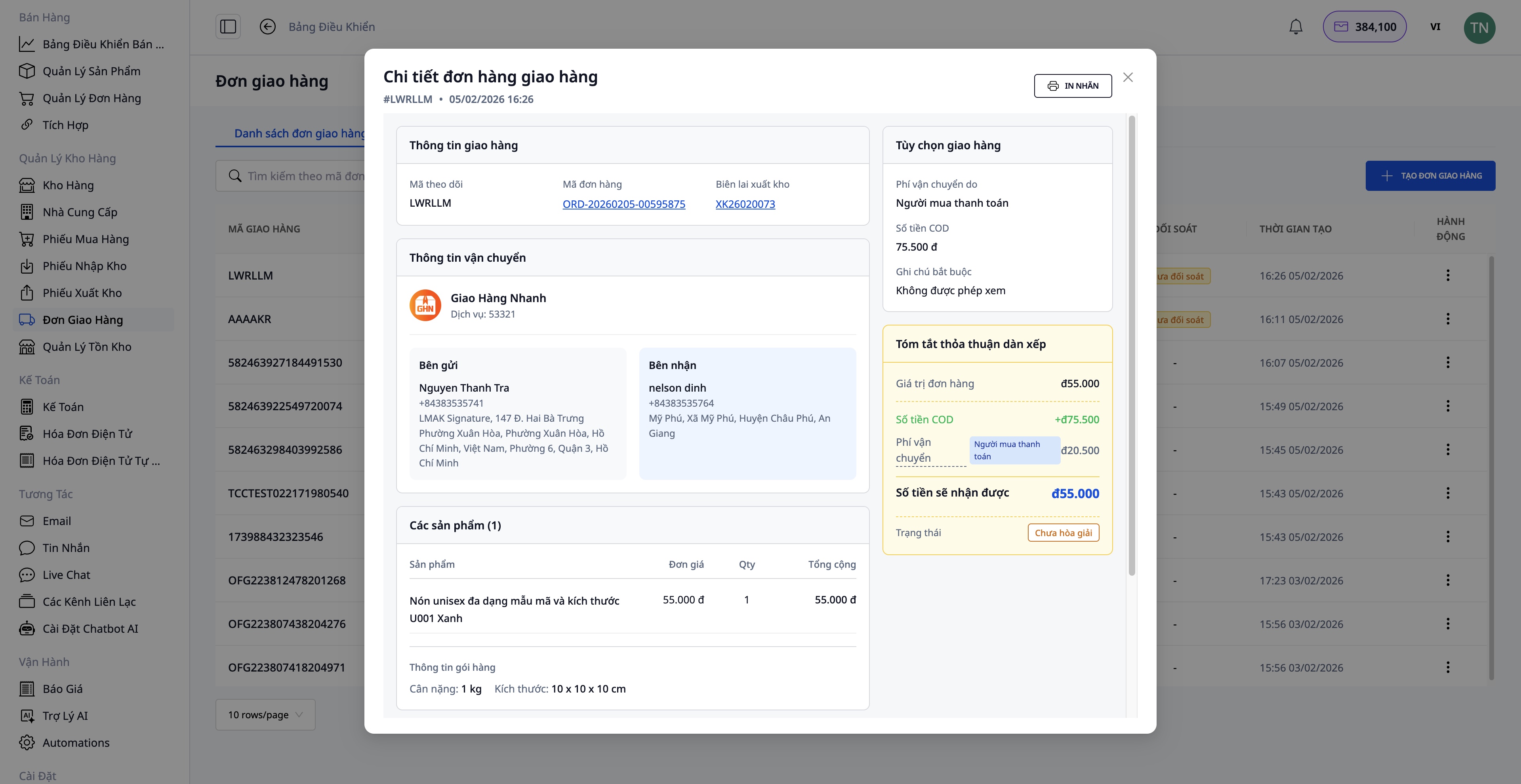
2. Afhentningsbeløb (COD):
- Indtast det beløb, der skal opkræves fra kunden
- Inkluderer vareprisen og forsendelsesgebyret (hvis kunden betaler)
3. Pakkeinformation:
- Vægt (kg)
- Dimensioner (længde x bredde x højde)
- Hvem betaler for forsendelsen (sælger/køber)
4. Bekræft ordreoprettelse:
- Systemet henter automatisk information fra ordren
- Sender anmodning til forsendelsesvirksomheden
- Modtag forsendelseskode
Efter vellykket oprettelse af forsendelsesordre:
- Udskriv leveringsseddelen og sæt den på pakken
- Overlever pakken til forsendelsesvirksomheden
Trin 5: Udsted Elektronisk Faktura
For erhvervskunder eller når der kræves en momsregning, kan du udstede en elektronisk faktura direkte fra ordren eller lade systemet automatisk udstede fakturaen.
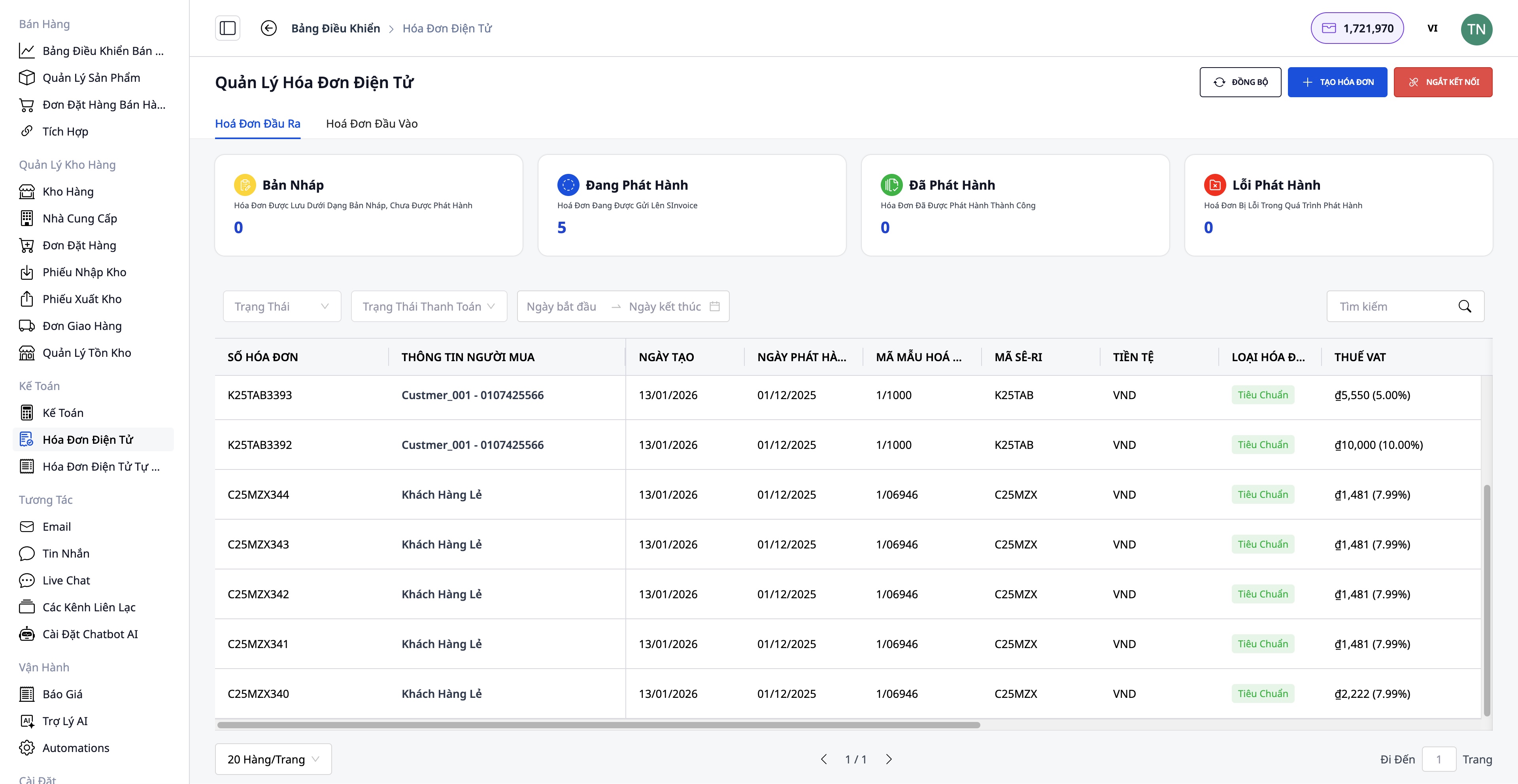
Fakturaoprettelsestrin:
- Vælg fakturaleverandør: S-Invoice (Viettel) eller MISA
- Vælg fakturaskabelon: Momsregning eller Salgsfaktura
- Udfyld information: Købers information (firmanavn, CVR-nummer, adresse), Produkter og antal (automatisk hentet fra ordren), Moms-sats, Betalingsmetode
- Forhåndsvisning af PDF:
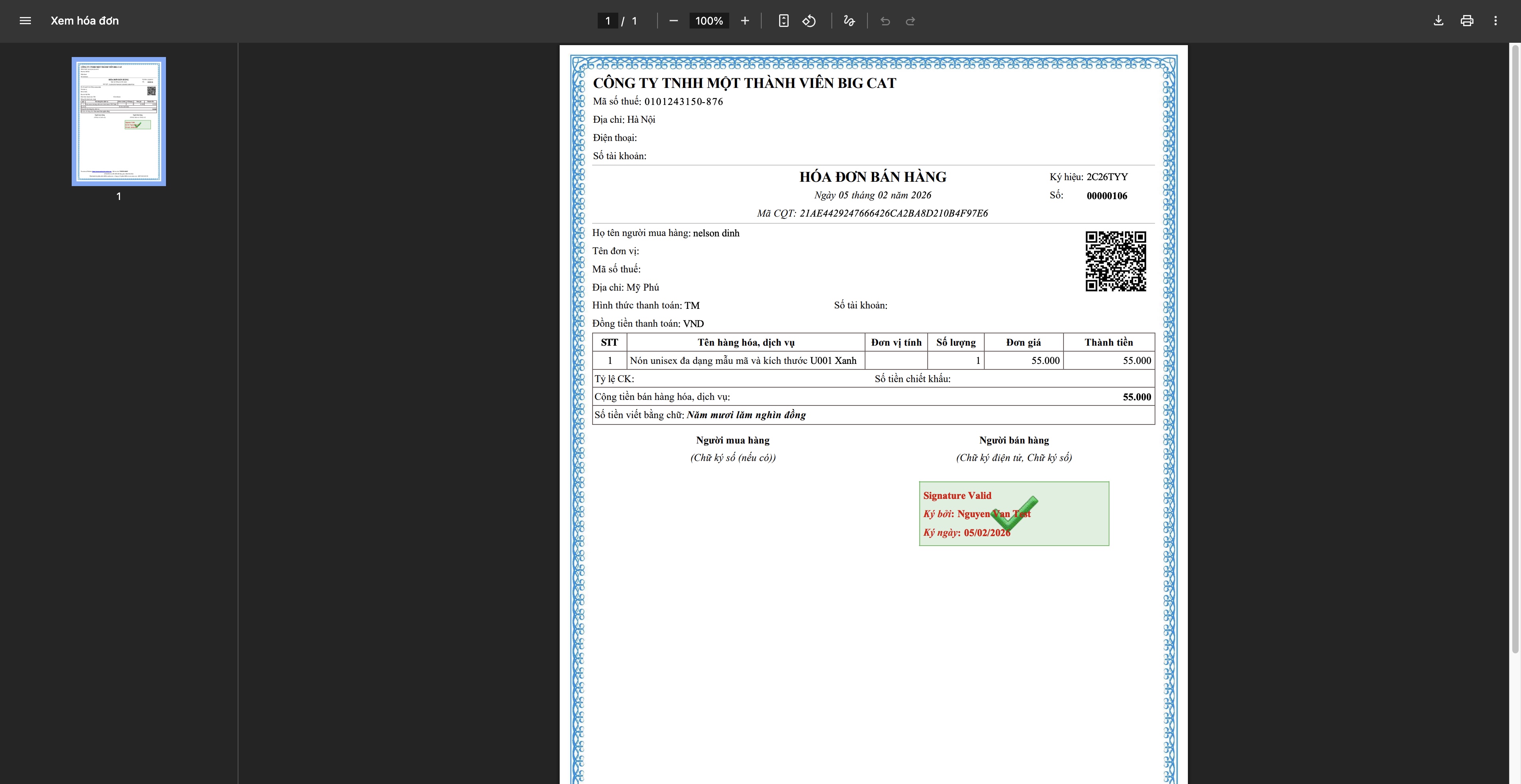
- Udsted faktura: Systemet sender en anmodning til leverandøren, Fakturaen tildeles en kode fra Skattestyrelsen, Download og send til kunden
Trin 6: Sporing og Afslutning af Ordre
Sporing af forsendelse
- Opdater forsendelseskodens status fra forsendelsesvirksomheden
- Informer kunden om leveringsprocessen
- Håndter specielle tilfælde (fejlslagen levering, forsinkelser osv.)
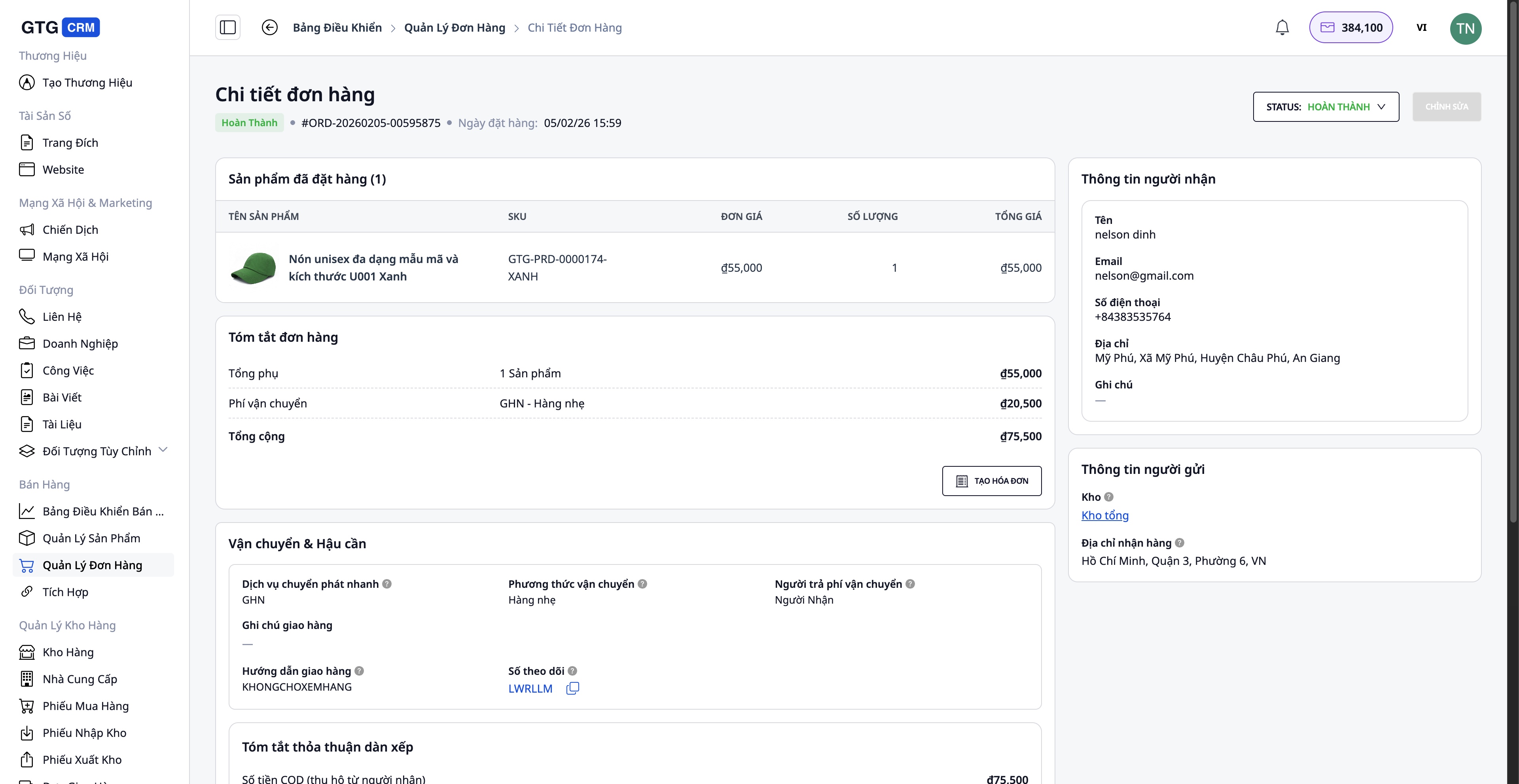
Afslutning af ordre
Når kunden har modtaget varen succesfuldt:
- Opdater ordrestatus til Completed
- Bekræft modtagelse af betaling (for COD-ordrer)
- Gem informationen i transaktionshistorikken
Håndtering af ordrer med problemer
Tilfælde hvor kunden returnerer/ombytter varer:
- Opret en erstatningsfaktura (hvis der er udstedt en faktura) - Juster antal, værdi - Systemet opretter automatisk en erstatningsfaktura, når den er aktiveret
- Opdater varelager - Indtast returnerede varer i lageret (hvis de er i god stand) - Registrer beskadigede varer (hvis nogen)
- Tilbagebetaling til kunden (hvis nødvendigt)
Fordele ved standardprocessen
For virksomheden
- Centraliseret administration: Alle ordrer, produkter, lager i ét system
- Tidsbesparelse: Automatisering af mange trin (produktsynkronisering, oprettelse af forsendelsesetiketter, fakturering)
- Fejlreduktion: Automatiskt synkroniserede oplysninger, begrænset manuel indtastning
- Lagerstyring: Realtidsopdateringer, undgår oversalg
- Juridisk overholdelse: Gyldige, komplette e-fakturaer
For medarbejdere
- Brugervenlig grænseflade: Nem at bruge, ingen kompleks træning kræves
- Klar proces: Specifik vejledning for hvert trin
- Fuld integration: Ingen grund til at skifte mellem flere applikationer
- Effektivt arbejde: Håndter flere ordrer samtidigt
For kunder
- Hurtig respons: AI Chatbot supporterer 24/7
- Levering til tiden: Hurtig behandlingsproces
- Nøjagtige oplysninger: Ordrer, forsendelser opdateres løbende
- Professionel fakturering: Gyldige, komplette e-fakturaer
Vigtige bemærkninger
Vedrørende forbindelse til e-handelsplatforme:
- Kræver en verificeret butikskonto på Shopee/Lazada/TikTok Shop
- Produktsynkronisering bør udføres på tidspunkter med få ordrer for at undgå datakonflikter
Vedrørende lagerstyring:
- Opdater lageret regelmæssigt for at sikre nøjagtighed
- Gennemfør lageroptælling med jævne mellemrum (månedligt/kvartalsvis) for at sammenligne med systemet
Vedrørende fakturering:
- Udsteds kun faktura, når kunden anmoder om det, eller ordreværdien er stor
- Kontroller CVR-nummer og adresse omhyggeligt, før du udsteder
- Erstatningsfakturaer bør kun bruges, når det er nødvendigt (returnering, fejl)
Vedrørende forsendelse:
- Pak forsigtigt for at undgå beskadigelse under transport
- Vælg en passende forsendelsesservice baseret på ordreværdien og kundens krav
Konklusion
GTG CRMs standard ordrebehandlingsproces hjælper onlinevirksomheder med at operere professionelt, effektivt og systematisk. Fra produktstyring, multi-channel forbindelse, ordrebehandling, forsendelse til fakturering og kundeservice – alt er problemfrit integreret i én platform.
Ved at anvende denne proces vil du:
- Øge ordrebehandlingshastigheden
- Få bedre kontrol over forretningsaktiviteterne
- Optimere driftsomkostningerne
- Forbedre kundeoplevelsen
- Udvikle din virksomhed bæredygtigt
Begynd at bruge GTG CRM i dag for at opleve en professionel salgsproces!
Omsæt det, du lige har læst, til resultater – anvend det nu med GTG CRM, gratis.
Anvend nu

