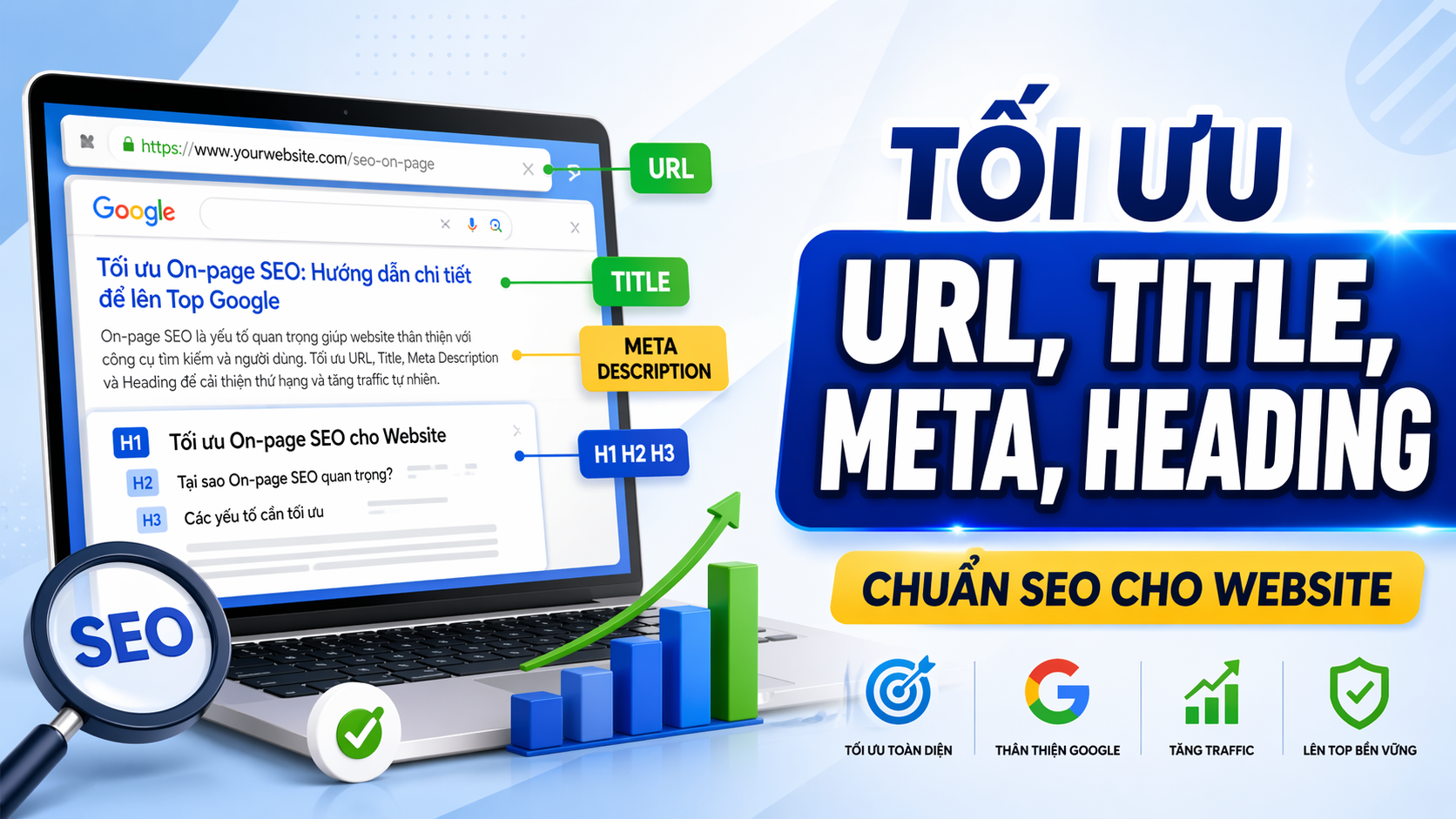
You can write a lot of content for your website, but if the URLs are messy, the titles are generic, the meta descriptions are vague, and the headings are disorganized, both users and search engines will have difficulty understanding exactly what your page is about. Optimizing URLs, titles, meta descriptions, and headings correctly is the foundation of on-page SEO, helping each page clearly convey its topic, making it easier to read, and increasing its chances of ranking better.

On-page SEO isn't a complicated trick; it's about organizing your content signals so that both readers and Google immediately understand what the page is about. Many websites aren't weak because they lack content, but because these basic elements are written haphazardly or overlapping. This article will guide you through understanding each part and how to do it right from the start.
Why are URLs, Titles, Meta Descriptions, and Headings Important in On-Page SEO?
When you create a new page, whether it's a service page, a product page, or a blog post, you're providing information to three audiences: users, search engines, and AI systems crawling the web. All three need clear signals to understand what your page is about.
The URL, title, meta description, and heading are the first signals. If you use a long, hard-to-read URL, an overly generic title, a meta description that sounds like an internal memo, and a disorganized heading, then even if the content is high-quality, you will still struggle to convey the page's main message.
Conversely, a page with properly optimized meta heading titles will help readers easily grasp the content at first glance, while also helping search engines accurately understand the page's topic and rank it more appropriately.
Doing these parts well doesn't mean you'll instantly reach the top, but it lays a solid foundation for your entire SEO strategy. This is what you need to do before thinking about more advanced techniques.
SEO-Friendly URL Writing Rules
A URL is the unique address of each page on a website. It appears in the address bar, in search results, and when someone shares a link. A standard SEO URL needs to meet the following criteria:
Short, easy to read, easy to remember.
A good URL is one that you can read aloud to someone over the phone and they'll understand immediately. If your URL contains meaningless strings of characters or too many parameters, users will find it hard to trust.
Correct example:
Incorrect example: gtgcrm.com/blog/cach-toi-uu-title-meta-heading Accurately reflect the content of the page. gtgcrm.com/blog/post?id=12345&cat=seo&ref=homepageURLs should contain the main keyword or a clear description of the page's topic. This helps users know what they will read before clicking.
Correct example:
Incorrect example: gtgcrm.com/huong-dan/quan-ly-khach-hang Avoid using special characters and Vietnamese diacritics. gtgcrm.com/p123Although modern search engines can handle Vietnamese URLs with diacritics, when shared, the URL will be encoded into a complex string of characters. Therefore, it is recommended to use slugs without diacritics, separated by hyphens.
Correct example:
Incorrect example: gtgcrm.com/blog/huong-dan-xay-dung-website Rational hierarchical structure gtgcrm.com/blog/hướng-dẫn-xây-dựng-websiteIf a website has many pages, URLs should be organized in a logical directory structure. This helps both users and search engines understand the relationships between the pages.
Good example:
gtgcrm.com/tinh-nang/website gtgcrm.com/tinh-nang/blog gtgcrm.com/huong-dan/tao-trang-webIn short, good URLs are not only visually appealing but also help increase credibility and create a better user experience from the very first seconds.gtgcrm.com/tinh-nang/website gtgcrm.com/tinh-nang/blog gtgcrm.com/huong-dan/tao-trang-web
Rules for Writing SEO-Optimized Titles
The title (meta title tag) is the most important element in on-page SEO. It appears as a blue link in search results and on browser tabs. A standard SEO title should meet the following principles:
Clearly, accurately, and accurately reflects the content of the page.
The title should immediately tell the reader what the page is about. Avoid generic titles like "Homepage" or "About Us" without adding context.
Correct example:
Incorrect example: Cách Tối Ưu Title, Meta Description và Heading Chuẩn SEO Length: 50 to 60 characters Hướng dẫn SEOGoogle typically displays the first 50-60 characters of the title. If the title is too long, the rest will be truncated. Place important keywords and key information at the beginning.
Correct example:
Incorrect example: Cách Tối Ưu Title Meta Heading Website Đúng Cách Contains the main keyword naturally. Bài viết này sẽ hướng dẫn bạn cách tối ưu title, meta description, heading và URL cho website của bạn để có thể xếp hạng tốt hơn trên GoogleThe main keywords should appear in the title, but naturally, not stuffed. The goal is to write for the reader first, then for search engines.
Correct example:
Incorrect example: Cách Tối Ưu URL, Title, Meta Description Cho Website Chuẩn SEO Avoid duplicate titles between pages. Title SEO, Cách Viết Title SEO, Title Chuẩn SEO, Title Website SEOEach page should have a unique title. If multiple pages share the same title, Google won't know which page to rank for that keyword, and users will also be confused.
Good example:
Trang A: Cách Xây Dựng Website Bán Hàng Online Trang B: Cách Tạo Blog Chuẩn SEO Cho Doanh NghiệpPoor example:Trang A: Cách Xây Dựng Website Bán Hàng Online Trang B: Cách Tạo Blog Chuẩn SEO Cho Doanh Nghiệp
Trang A: Hướng Dẫn Website Trang B: Hướng Dẫn WebsiteOneTrang A: Hướng Dẫn Website Trang B: Hướng Dẫn Website
Optimizing your website title correctly will help increase your click-through rate (CTR) from search results, as users will clearly see that the page meets their needs.
Rules for Writing SEO-Friendly Meta Descriptions
The meta description is a short summary that appears below the title in search results. Although Google doesn't use the meta description as a direct ranking factor, it significantly influences users' click-through decisions.
Clearly describe the content of the page.
A standard SEO meta description should accurately summarize the page content within 150-160 characters. Avoid writing in an internal note style or being too general.
Correct example:
Incorrect example: Hướng dẫn chi tiết cách tối ưu URL, title, meta description và heading để website dễ đọc hơn, dễ quản trị hơn và có nền tảng SEO tốt hơn. Contains natural secondary keywords Bài viết về SEO.The meta description is a good place to mention related secondary keywords, but it should still read naturally like a normal introductory sentence.
Correct example:
Incorrect example: Tìm hiểu cách tối ưu title, meta description, heading và URL chuẩn SEO để xây dựng website chuyên nghiệp, dễ quản trị và thân thiện với công cụ tìm kiếm. A call for gentle action. URL chuẩn SEO, title chuẩn SEO, meta description chuẩn SEO, heading chuẩn SEO, h1 h2 h3 chuẩn SEO.You can add a specific call to action or benefit to entice readers to click.
Good example:
Avoid duplication between pages. Áp dụng ngay các nguyên tắc on-page SEO cơ bản để trang web của bạn dễ đọc hơn và có cơ hội xếp hạng tốt hơn.Similar to the title, each page should have its own meta description that accurately reflects the content of that page.
A well -optimized meta description will help increase the click-through rate (CTR), thereby indirectly improving the page's SEO performance.
SEO-Friendly Heading Organization Guidelines
Headings (H1, H2, H3...) are titles and subheadings within a page's content. They help organize content in a logical hierarchical structure, making it easier for both readers and search engines to understand the content flow.
H1: Main title of the page
Each page should have only one H1. The H1 is typically the main title of the content and should clearly reflect the page's main topic.
Rules:
- Each page has only one H1.
- H1 should contain the main keyword.
- H1 may be the same or slightly different from the title.
Good H1 examples:
Example of a weak H1: Cách Tối Ưu URL, Title, Meta Description và Heading Chuẩn SEO Cho Website H2: Main sections of the content Chào mừng bạn đến với trang của chúng tôiH2 divides the content into major sections. Each H2 should focus on a specific aspect of the main topic.
Good example of H2:
## Quy Tắc Viết URL Chuẩn SEO ## Quy Tắc Viết Title Chuẩn SEO ## Quy Tắc Viết Meta Description Chuẩn SEOExamples of low H2 levels:## Quy Tắc Viết URL Chuẩn SEO ## Quy Tắc Viết Title Chuẩn SEO ## Quy Tắc Viết Meta Description Chuẩn SEO
## Phần 1 ## Phần 2 ## Phần 3H3: Sub-points within each section## Phần 1 ## Phần 2 ## Phần 3
H3 is placed inside H2, helping to break down the content into more specific points. You can use H3 to list steps, principles, or notes.
Here's an example of good structure:
## Quy Tắc Viết URL Chuẩn SEO ### Ngắn gọn, dễ đọc, dễ nhớ ### Phản ánh đúng nội dung trang ### Tránh ký tự đặc biệtAvoid keyword stuffing in headings.## Quy Tắc Viết URL Chuẩn SEO ### Ngắn gọn, dễ đọc, dễ nhớ ### Phản ánh đúng nội dung trang ### Tránh ký tự đặc biệt
Headings should be written naturally and be easy to read. Don't try to force keywords into every heading. A standard SEO heading helps readers understand the content structure, not one that's crammed with keywords.
Good example:
Poor example: ## Vì Sao URL Ngắn Gọn Lại Quan Trọng? In short, one ## URL Chuẩn SEO, URL Ngắn Gọn, URL Tối Ưu SEO Cho WebsiteA well-structured website heading system will help readers easily scan the content, while also helping search engines understand the flow of your content.
The Relationship Between Title, Meta Description, H1, and Page Content
One of the most common mistakes is when the title, meta description, H1 tagline, and page content are inconsistent. This confuses both users and search engines.
Title and H1 can be the same.
In many cases, the title and H1 can be identical, especially for blog posts or informational articles. This helps reinforce the signal of consistency regarding the page's main topic.
For example:
Title: Cách Xây Dựng Chiến Lược Content Marketing Hiệu Quả H1: Cách Xây Dựng Chiến Lược Content Marketing Hiệu QuảThe title and H1 may differ slightly.Title: Cách Xây Dựng Chiến Lược Content Marketing Hiệu Quả H1: Cách Xây Dựng Chiến Lược Content Marketing Hiệu Quả
Sometimes you can adjust the H1 tag to be slightly longer or more prominent than the title, or vice versa, to suit the reading context on the page.
For example:
Title: Cách Tối Ưu On-Page SEO Cho Website H1: Hướng Dẫn Chi Tiết Cách Tối Ưu On-Page SEO Cho Website Từ ĐầuThe meta description must accurately reflect the content.Title: Cách Tối Ưu On-Page SEO Cho Website H1: Hướng Dẫn Chi Tiết Cách Tối Ưu On-Page SEO Cho Website Từ Đầu
A meta description isn't a generic summary; it must accurately reflect what readers will find inside the page. If the meta description promises one thing but the page content is about something else, users will leave immediately.
The page content must meet expectations.
When users click on search results based on title and meta description, they expect to find specific information. The page content must meet that expectation, with logically organized and easy-to-read headings and paragraphs.
When all these elements come together, you're creating a seamless user experience and a clear signal to search engines that your page is trustworthy and relevant to the search topic.
Common Mistakes When Optimizing On-Page SEO
Here are some common mistakes many website administrators make when optimizing on-page elements:
URLs that are too long or difficult to understand.
Many CMS systems default to creating long, verbose URLs containing numerous parameters or meaningless strings of characters. Proactively edit URLs to a concise and easy-to-understand format before publishing your page.
The title is too general or too long.
A title like "Homepage" or "About Us" provides no information. Conversely, a title that is too long will be truncated in search results and lose its main message.
Meta description written as an internal note.
Many people write meta descriptions like "This article is about...", "We will introduce...", or leave it completely blank. This is a missed opportunity to attract users to click on your page.
A page with multiple H1 tags or no H1 tags.
Some themes or website templates automatically generate multiple H1 tags on the same page, or conversely, no H1 tags at all. Both cases can confuse search engines.
H2 and H3 are arranged haphazardly.
For example, you might have H2 and then jump to H4, or have H3 without H2 preceding it. This breaks the logical structure of the content.
The title, H1 tag, and page content are inconsistent.
This is the most serious mistake. For example, the title says "How to increase sales," but the page content is about "Company history." Users will leave immediately, and Google will not rank your page for that keyword.
Stuff keywords into every element.
Trying to stuff keywords into the title, meta description, H1, H2, H3, and every sentence will make the content unpleasant to read and will result in a Google penalty. Good SEO optimization is natural optimization.
Check your website to see which of these errors you're making, and fix them one by one to build a stronger foundation.
Mini Case: From a Clumsy Website to a Clear Website
An online furniture shop has about 30 product and service pages. Initially, all pages had the same title: "ABC Furniture Shop". The URLs were long and cumbersome, like "/product?id=123", the meta description was blank, and none of the pages had a clear H1 tag.
As a result, users find it difficult to distinguish between pages, not knowing which page is about sofas and which is about desks. Google also doesn't know which page to rank for which keyword, so the website hardly appears in search results.
After receiving advice, the shop decided to standardize each ingredient:
- Change the URL to the format
/ghe-sofa-phong-khach,/ban-lam-viec-go-soi - Rewrite the title for each page, for example: "Modern Living Room Sofa | ABC Furniture Shop"
- Write a clear meta description, for example: "Discover our collection of modern living room sofas, made with high-quality materials and offered at competitive prices. Nationwide delivery available."
- Use H1 for each product page, for example: "Modern Living Room Sofa"
- Organize H2 and H3 sections into the following parts: Product Features, Size, Price, and Warranty Policy.
After implementation, the website became much clearer. Users could easily find the right products they needed, and Google started ranking each page for relevant keywords. Organic traffic increased, and conversion rates improved because users were finding exactly what they wanted right from the start.
This isn't a miraculous result achieved overnight, but rather the result of getting the fundamental on-page SEO elements right from the start.
Checklist for Quickly Checking a Website
When you create or edit a page, take a few minutes to check the following points:
- Is the URL short, easy to read, and does it accurately reflect the page content?
- Is the title clear, does it contain the main keyword, and is it under 60 characters?
- Does the meta description accurately reflect the content and entice users to click?
- Does the page have exactly one H1 tag?
- Does H1 accurately reflect the main topic of the page?
- Are the H2 and H3 headings logically organized, easy to read, and free from keyword stuffing?
- Are the title, H1, and page content consistent with each other?
- Does the URL, title, or meta description duplicate that of another page?
If all the answers are "yes," you have a website that is SEO-friendly in terms of basic on-page optimization. If there are any areas that need improvement, fix them immediately before your site gets buried in search results.
Comparison: On-Page Optimized Pages vs. Pages Written Based on Intuition
| Element | On-page optimization | This page is written based on personal feelings. |
|---|---|---|
| URL | /customer-management-guide | /page?id=456 |
| Title | Guide to Effective Customer Management with CRM | Customer Management |
| Meta description | Learn how to effectively manage customers using CRM software, helping to increase sales and improve customer experience. | Do not have |
| H1 | Guide to Effective Customer Management with CRM | Welcome |
| H2, H3 | Organize the logic in steps. | No or messy |
| Content | Consistent with the title and H1 | Unrelated to the title |
You'll see the difference immediately. An on-page optimized page helps users understand the content instantly, making it easy to read and find information. A page written based on intuition confuses users and causes them to leave quickly.
End-to-End On-Page Optimization Process
When creating a new page, follow these steps:
- Identify the main topic of the page - What is this page about? What are the main keywords?
- Write concise and clear URLs - Based on the main topic, create URLs that are easy to read.
- Create a title that accurately reflects the content - Write a title containing the main keyword, under 60 characters.
- Write a clear meta description - Summarize the page content in 150-160 characters.
- Set an H1 for the page - A single H1 that reflects the main topic.
- Organize H2 and H3 logically - Divide the content into clear sections.
- Write complete and consistent content that aligns with the title and heading – ensuring the content meets the expectations set by the title and meta description.
- Review everything again - Use the checklist above to self-check.
This process doesn't take much time, but it helps you create websites with a solid foundation, easy to manage, and easy to optimize for SEO later.
Optimize On-Page SEO with GTG CRM
If you're building a website for your business or online shop, managing multiple pages and articles while ensuring all on-page elements are optimized is no easy task.
GTG CRM offers integrated website features that allow you to create multiple pages, integrate blogs, and manage basic SEO elements directly within the admin interface. You can easily customize SEO titles, meta descriptions, and URL slugs for each page without needing any programming knowledge.
The system automatically generates sitemaps and supports custom robots.txt, making it easier for search engines to crawl your website content. You can also manage heading structure and page content intuitively, ensuring each page has SEO-friendly H1, H2, and H3 headings and consistency.
Additionally, GTG CRM supports faster content creation with AI in certain relevant contexts, saving you time when writing blog posts or product descriptions.
If you want to build an SEO-friendly website from the start without worrying about complex technical issues, GTG CRM is a worthwhile option to consider.
Conclude
Optimizing URLs, titles, meta descriptions, and headings isn't a complicated trick; it's about organizing information so that both users and search engines understand the topic of each page. Doing it right from the start makes your website clearer, easier to manage, and provides a better foundation for all future SEO strategies.
Take the time to review your current pages, fix basic errors, and apply the on-page SEO principles outlined in this article. You will see a clear difference in user experience and long-term SEO effectiveness.
Frequently Asked Questions
1. Do the title and H1 tags necessarily have to be the same?
Not necessarily. The title and H1 can be the same to increase consistency, but they can also be slightly different if you want a longer or clearer H1. The important thing is that both accurately reflect the main topic of the page.
2. Does the meta description directly affect ranking?
No. Google doesn't use meta descriptions as a direct ranking factor, but they do affect the click-through rate (CTR). A compelling meta description will attract more clicks, and a high CTR can indirectly improve rankings.
3. Do URLs containing Vietnamese characters negatively impact SEO?
While not technically problematic, URLs with accents are encoded into complex strings when shared, making them difficult to read. Therefore, URLs without accents are easier to share and remember.
4. Can a page have multiple H1 tags?
Technically, HTML5 allows it, but for SEO, it's best to have only a single H1 tag to clearly signal the main topic. Multiple H1 tags can confuse search engines.
5. Can I change the title of a published page?
Yes, you can change the title at any time. However, if your page already ranks well, think carefully before changing it to avoid losing rankings. If optimization is needed, change it gradually and monitor the results.
6. How can I check if my website is well-optimized on-page?
You can use free tools like Google Search Console to check for errors in titles, meta descriptions, and headings. Additionally, reread each page yourself and ask: "If I were a user, would I immediately understand what this page is about?"
Turn what you've just read into tangible results — apply it now with GTG CRM, free.
Apply now