Are you manually editing DNS every time you want to use your domain?
Every time you want to put your business website, landing page, or email marketing on your own domain — congty.vn instead of a free address — you have to log in to where you bought your domain, find the correct DNS section, copy each record with absolute precision, and then wait. A single incorrect character in an email authentication record, and your marketing campaign silently lands in the spam folder without anyone notifying you.
The biggest risk isn't losing time. The biggest risk is you don't know what you're breaking — if that domain already has a website or email active elsewhere, and you change the nameservers before backing up the old records, your business's own website and email could stop working immediately, without warning.
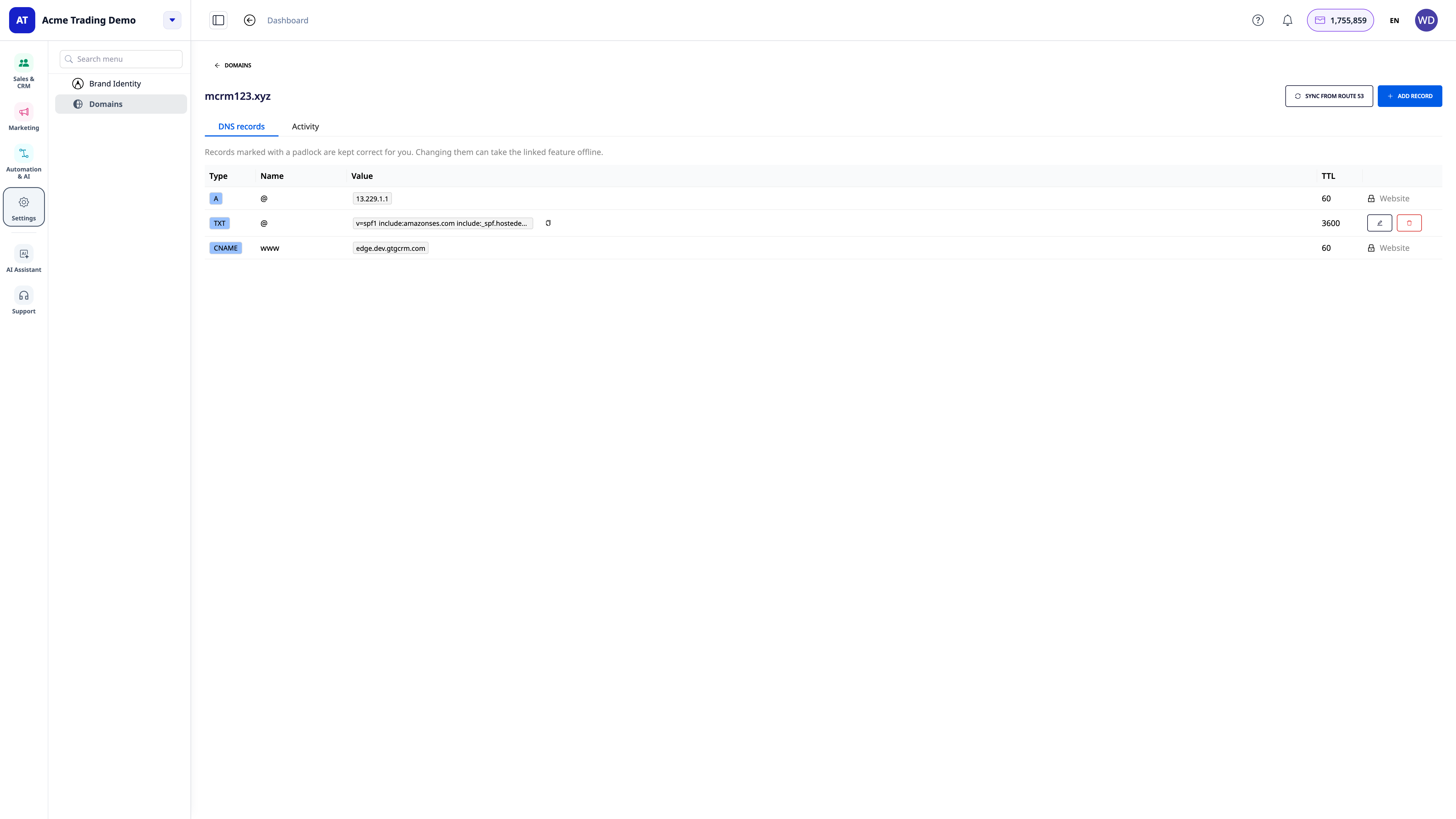
Settings → Domains: manage DNS right within GTG CRM, no need to leave the system
Domains is where you connect a domain you *already own* and manage all its DNS records, without needing to log in to your domain provider every time you need to make a change. The domain remains registered under your name, still registered where you purchased it — GTG CRM simply answers DNS queries on your behalf.
 What you get today
Connect your existing domain — no transfers, no registrar changes. You only change four nameserver addresses at the place where you bought your domain; the domain remains yours.
Safety warnings before you change nameservers. If the domain has an active website or email elsewhere, the system informs you beforehand — how many records the domain has, whether it has email or a website — and you must confirm you understand before proceeding.
Automatic backup of old records (best-effort). When you confirm to proceed, GTG CRM attempts to find and copy the most common records — website addresses, email routing, SPF/DKIM authentication records — into the new DNS zone, so you don't have to type them in line by line. This is a best-effort attempt, not a 100% full commitment, so always reopen the DNS records page to check after connecting.
Automatic records for websites & email, "locked" for protection. When you link a website or authenticate your domain for sending email on GTG CRM, the necessary records are created and kept correctly for you — and are marked with a lock so you (or colleagues) don't accidentally edit them incorrectly, breaking running features.
Sync when changes occur outside the system. The "Sync from Route 53" button rereads the entire actual DNS zone and corrects your own records if they differ, while also alerting (not auto-correcting) if a GTG CRM managed record looks unusual — to avoid erasing evidence of an issue.
Full activity log. Every change — who made it, what they did, when — is recorded, including changes made automatically by the system.
Free, unlimited. Connecting domains and managing DNS records does not cost any credits today.
 How to get started
Go to Settings → Domains, click Connect domain.
Enter the domain you already own (e.g., congty.vn) — without http:// or www..
If the domain currently has DNS elsewhere, carefully read the warnings and tick to confirm before proceeding.
Copy the four nameserver addresses, log in to where you bought your domain, and replace all old nameservers with these four addresses.
Return to GTG CRM, click Check now — when the change is successful, the status will change to Connected (usually within a few minutes to an hour).
Things to know before you start
Two parts of the Domains area have been built but are not yet live: buying a new domain directly from GTG CRM, and a private mailbox on your domain (like hello@company.vn with a password, webmail). If you need a new domain, buy it where you are used to and connect it here — you will still get all the benefits above because they come from DNS management, not from where you bought the domain. If you need an email inbox, continue using your current email provider — sending marketing emails from your authenticated custom domain is a different, active feature, at Settings → Email Domains.
Why this is important
This is not a minor convenience. This is the removal of a technical, error-prone, and time-consuming step from two things you've been doing with GTG CRM: putting your website/landing page on your custom domain, and sending emails from your correct business address. Instead of having to remember to log into another system, manually copy each record, and take on the risk of errors yourself, you do everything right within GTG CRM — the same place you've been managing customers, orders, and marketing campaigns.
Summary
Connect a domain you already own, and let GTG CRM handle the DNS. No transfers, no losing your domain, no need for deep DNS technical knowledge — just four nameserver values and a few minutes of waiting. From then on, your website and email on your custom domain will run automatically, be protected, and always be monitored.