

Í vínsla online-verslun er fagleg pöntunarvinnsla lykillinn að velgengni fyrirtækis. GTG CRM býður upp á alhliða pöntunarvinnsluferli, frá móttöku pantana, vörugeymslustjórnun, flutningi til útgáfu reikninga og þjónustu við viðskiptavini – allt samþætt í einu kerfi.
Með GTG CRM stýrir þú ekki aðeins pöntunum heldur getur þú einnig tengst stórum netverslunum eins og Shopee, Lazada, TikTok Shop, samstillt vörur og birgðir sjálfkrafa, búið til flutningspöntanir hratt og gefið út löglegar rafrænar reikningar. Þetta er alhliða lausn sem hjálpar fyrirtækjum að starfa á skilvirkan hátt, auka upplifun viðskiptavina og þróast sjálfbært.
Aðalatriði
- Sjálfvirk ráðgjöf og pöntunarklár: AI Chatbot aðstoðar við að svara og klára pantanir viðskiptavina allan sólarhringinn, sem léttir á vinnu starfsmanna
- Miðlæg pöntunarstjórnun: Allar pantanir frá vefsíðum, netverslunum og öðrum rásum eru stýrt í einu kerfi
- Fjölrása tengingar: Samþætting við Shopee, Lazada, TikTok Shop og tvíhliða samstilling vöru og pantana
- Snjöll vörugeymslustjórnun: Fylgist með rauntíma birgðum, uppfærir sjálfkrafa þegar pantanir berast, styður margar vörugeymslur
- Samþætting flutningsaðila: Býr til afhendingarpöntanir beint hjá flutningsaðilum eins og Giao Hàng Nhanh, Viettel Post, styður COD
- Útgáfa rafrænna reikninga: Tengist S-Invoice (Viettel) og MISA til að gefa út lögleg virðisaukaskattsreikninga
- Fylgist með stöðu pantana: Uppfærir stöðu frá New → Processing → Completed á skýran hátt
Standard pöntunarvinnsluferli
Skref 1: Undirbúningur vara og birgða
Búa til og stjórna vörugeymslum
Í fyrsta lagi þarftu að setja upp vörugeymslur í kerfinu Vörugeymslustjórnun → Vörugeymslur.
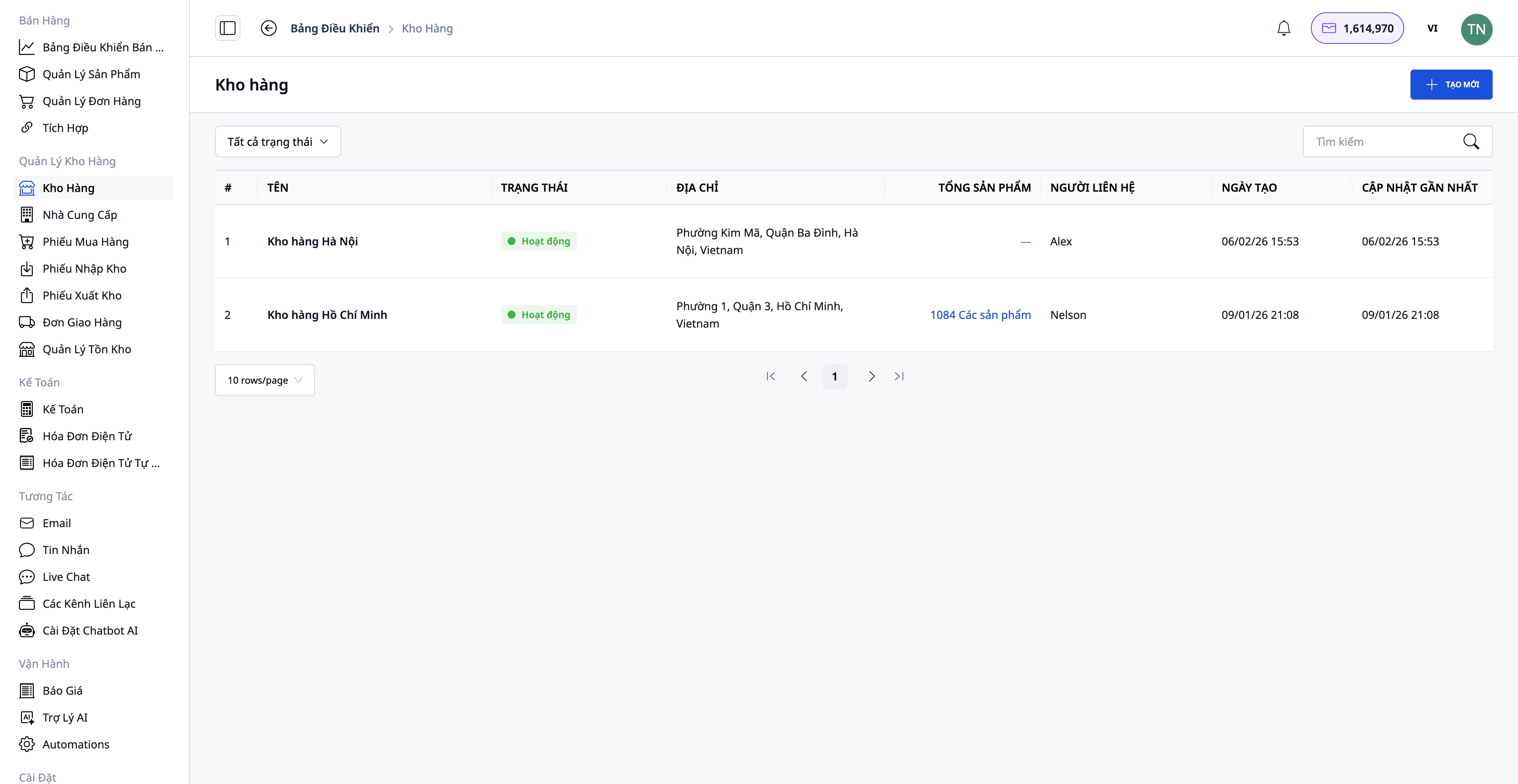
- Búðu til vörugeymslu með upplýsingum: Nafn vörugeymslu, kóði vörugeymslu, heimilisfang, ábyrgðarmaður
- Styður margar vörugeymslur: Aðalvörugeymsla, auka vörugeymsla, útibús vörugeymsla
- Fylgist með birgðum í hverri vörugeymslu fyrir sig
Búa til vörur í kerfinu
Farðu í Verslun → Vörustjórnun til að búa til nýjar vörur.
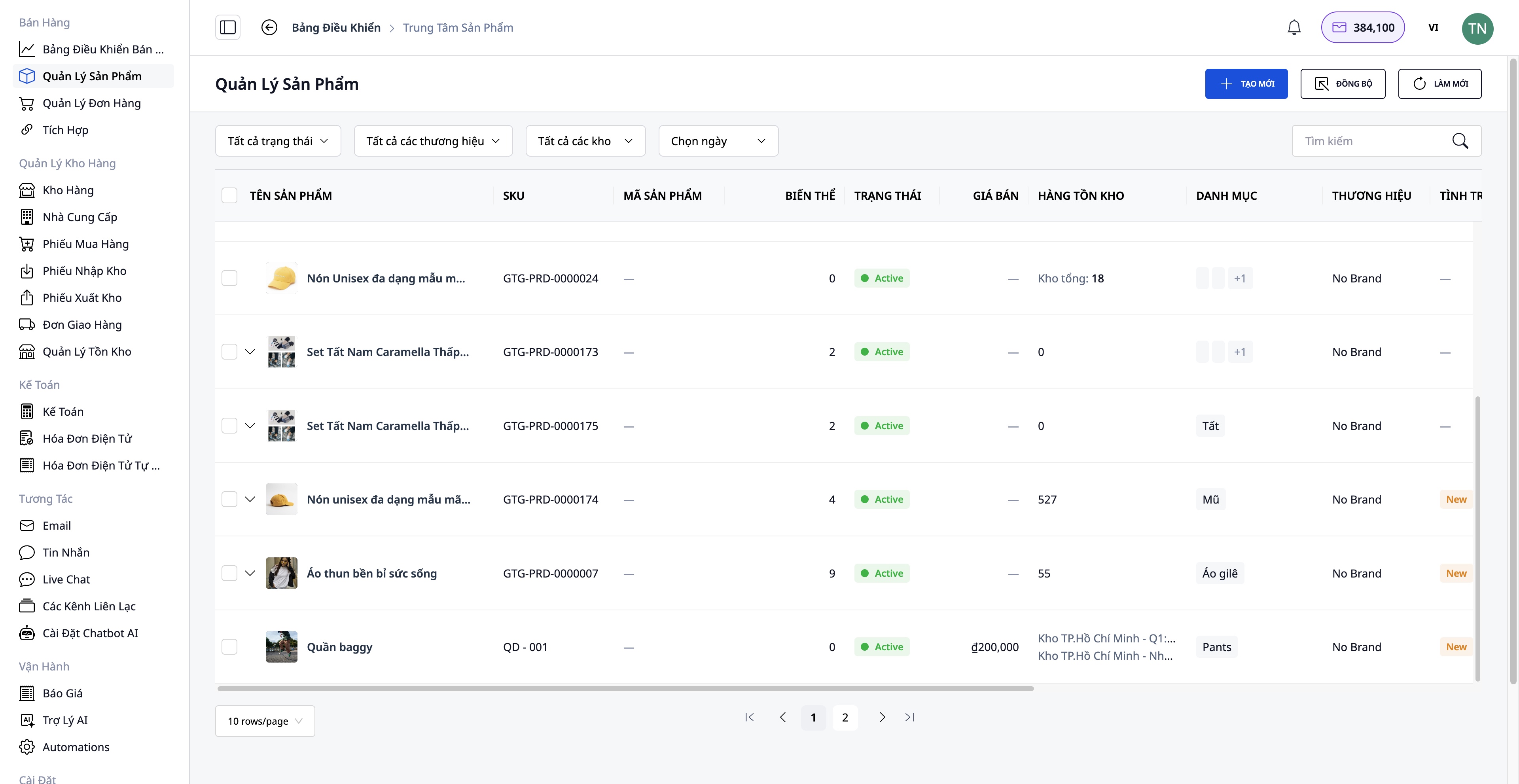
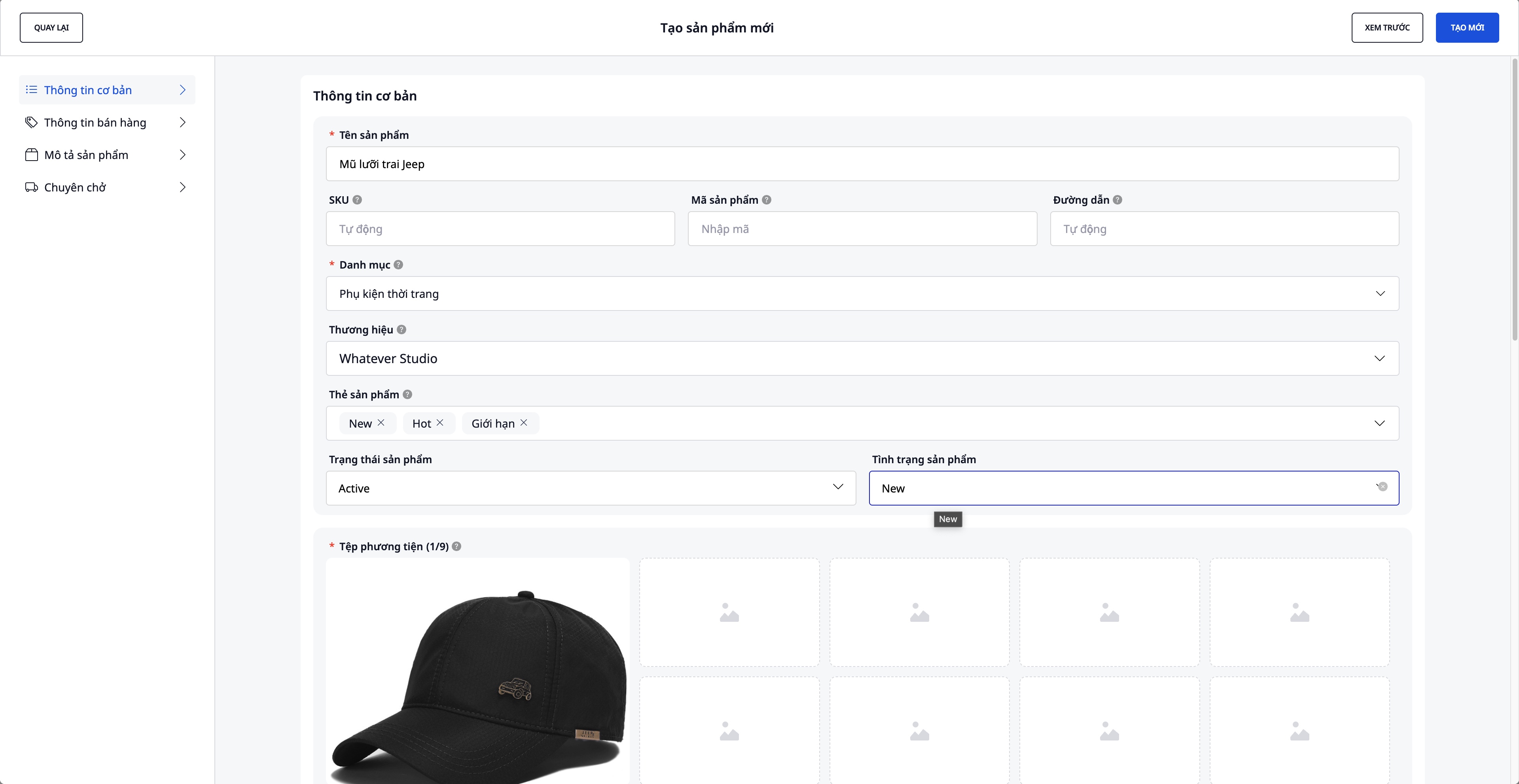
Upplýsingar sem þarf að slá inn:
- Nafn vöru, SKU, flokkur, vörumerki
- Myndir og myndbönd af vörum
- Afbrigði: Litir, stærðir (hámark 3 eiginleikar)
- Upphafsverð, virðisaukaskattur, söluverð (kerfið reiknar sjálfkrafa álagningu)
- Nákvæmar lýsingar og tæknilegar upplýsingar
- Upphafsbirgðir
Tengja og samstilla við netverslanir
Farðu í Verslun → Samþætting til að tengjast netverslunum.
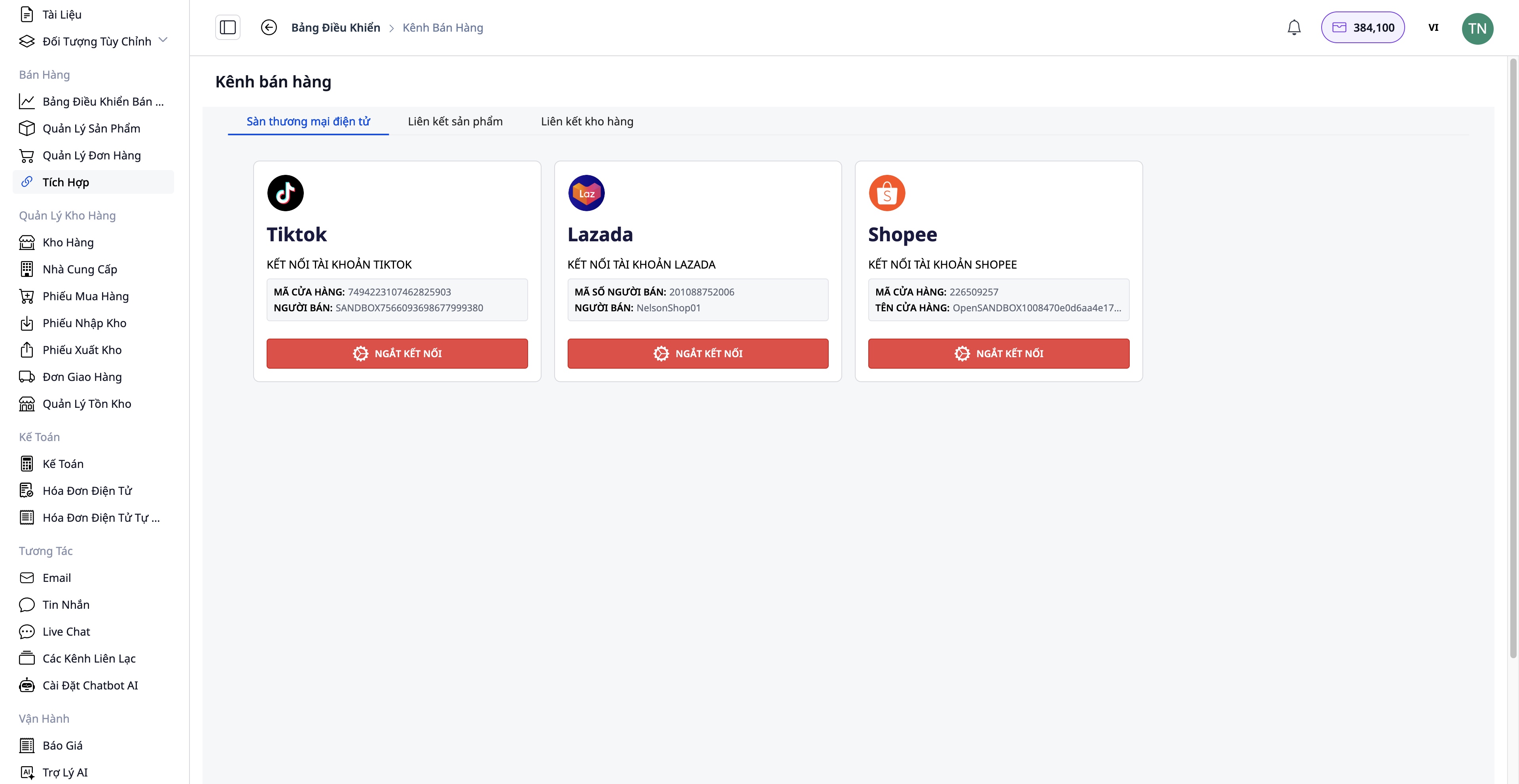
Tengingarskref:
- Veldu verslunina sem þú vilt tengja: Shopee / Lazada / TikTok Shop
- Staðfestu verslunarreikninginn þinn
- Tvíhliða vörusamstilling:
- Draga inn: Færa vörur frá verslun yfir í GTG CRM
- Hlaða upp: Hlaða vörum frá GTG CRM upp í verslun
Ávinningur:
- Miðstýring á öllum vörum
- Sjálfvirk birgðasamstilling milli rása
- Sparar tíma við handvirka uppfærslu
Skref 2: Móttaka pantana
Móttaka pantana frá mörgum rásum
Pantanir geta komið frá:
- Vefsíðan þín (samskipan GTG CRM)
- Shopee, Lazada, TikTok Shop (sjálfvirk samstilling)
- Handvirkir pantanir (viðskiptavinir panta í gegnum síma, Facebook...)
Skref 3: Vinnsla og undirbúningur vöru
Athuga og breyta pöntun (ef þörf krefur)
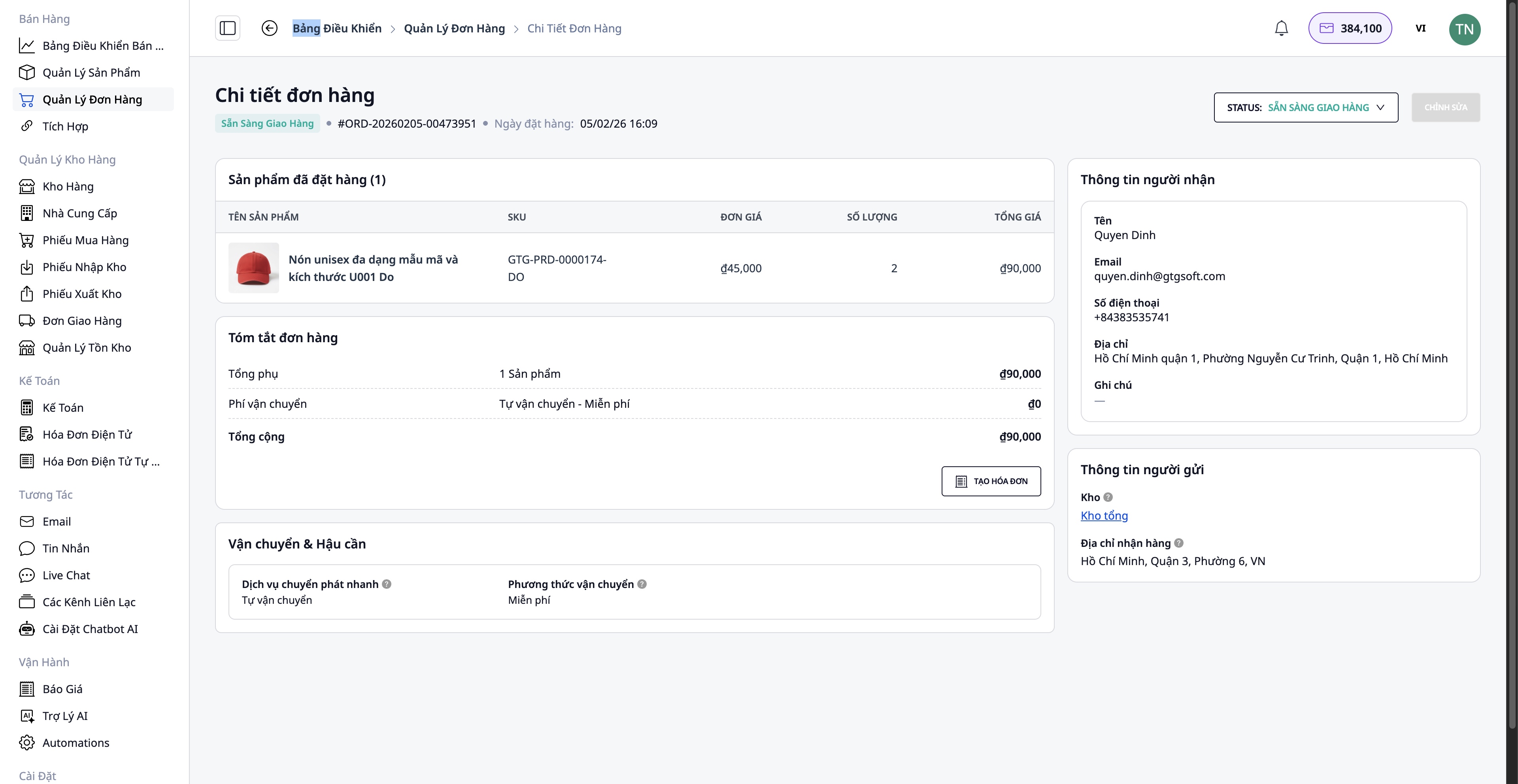
- Upplýsingar kaupanda
- Afhendingarheimilisfang
- Bæta við/fjarlægja vörur
- Magn vöru
Athuga lager
Kerfið athugar sjálfkrafa lager:
- ✅ Nógu margar vörur → Halda áfram að pakka
- ❌ Vantar vörur → Þarf að panta frá birgja
Pöntunarferli (ef vantar):
Fara í Birgjar → Velja birgi → Búa til innkaupapöntun
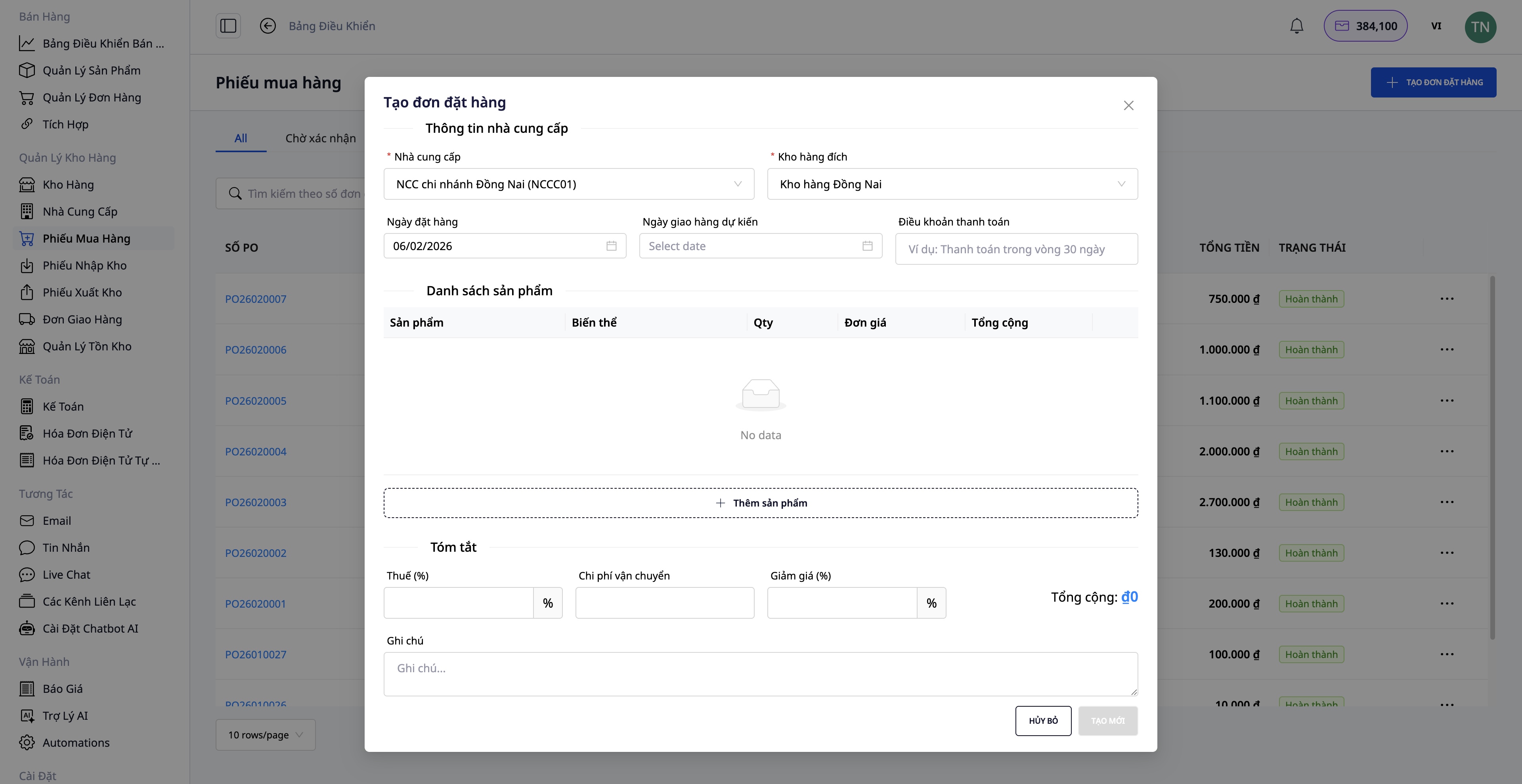
- Velja vörur til að panta
- Fylla út magn, einingarverð
- Staðfesta innkaupapöntun
- Þegar vörur berast, búa til Vörumóttökuskírteini
- Lager uppfærðist sjálfkrafa
Skref 4: Búa til sendingarpöntun
Eftir að hafa pakkað vörum er tilbúin, búið til sendingarpöntun beint frá pöntun.
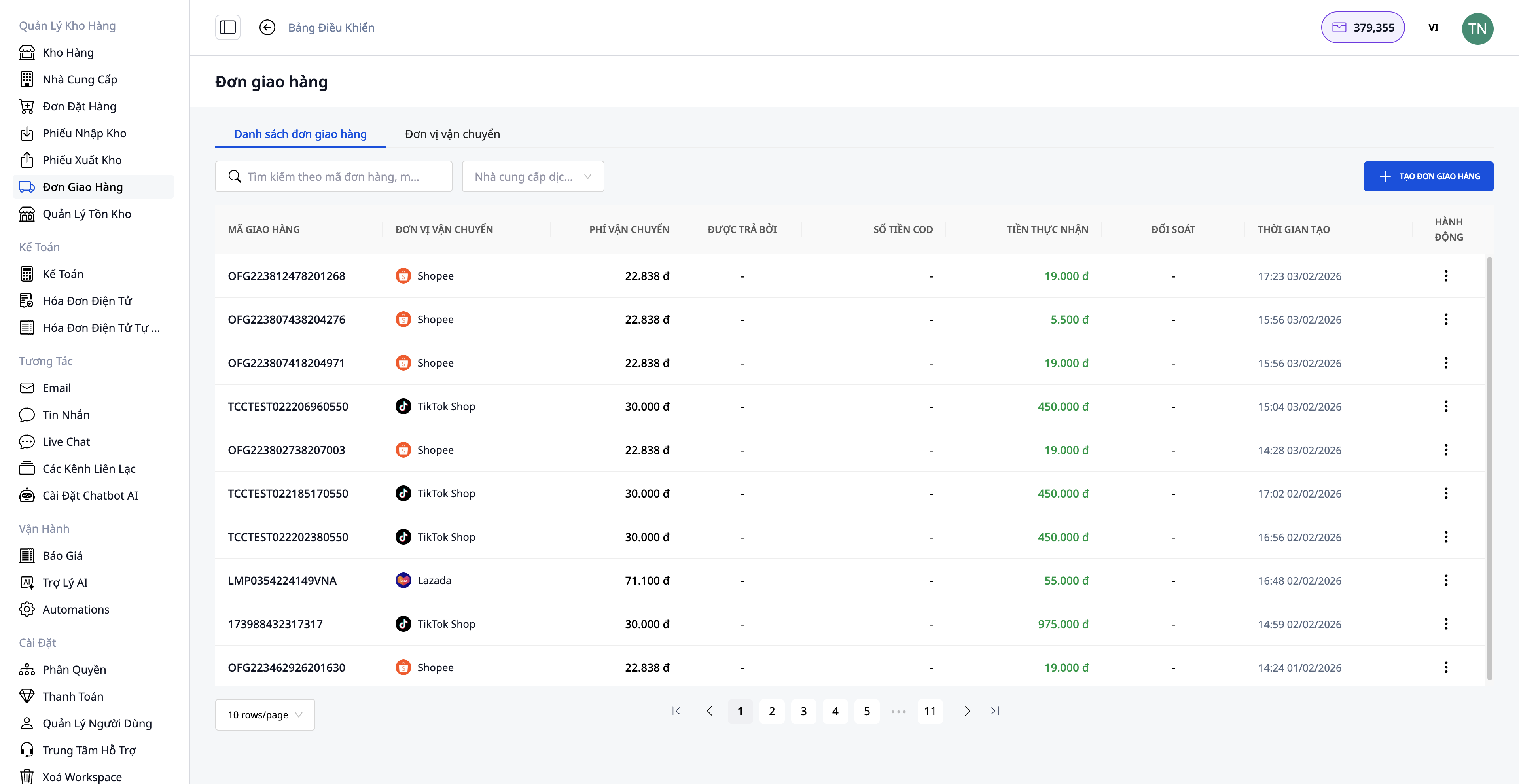
Nauðsynlegar upplýsingar:
1. Velja sendingarþjónustu:
- Hröð afhending
- Sparsýn afhending
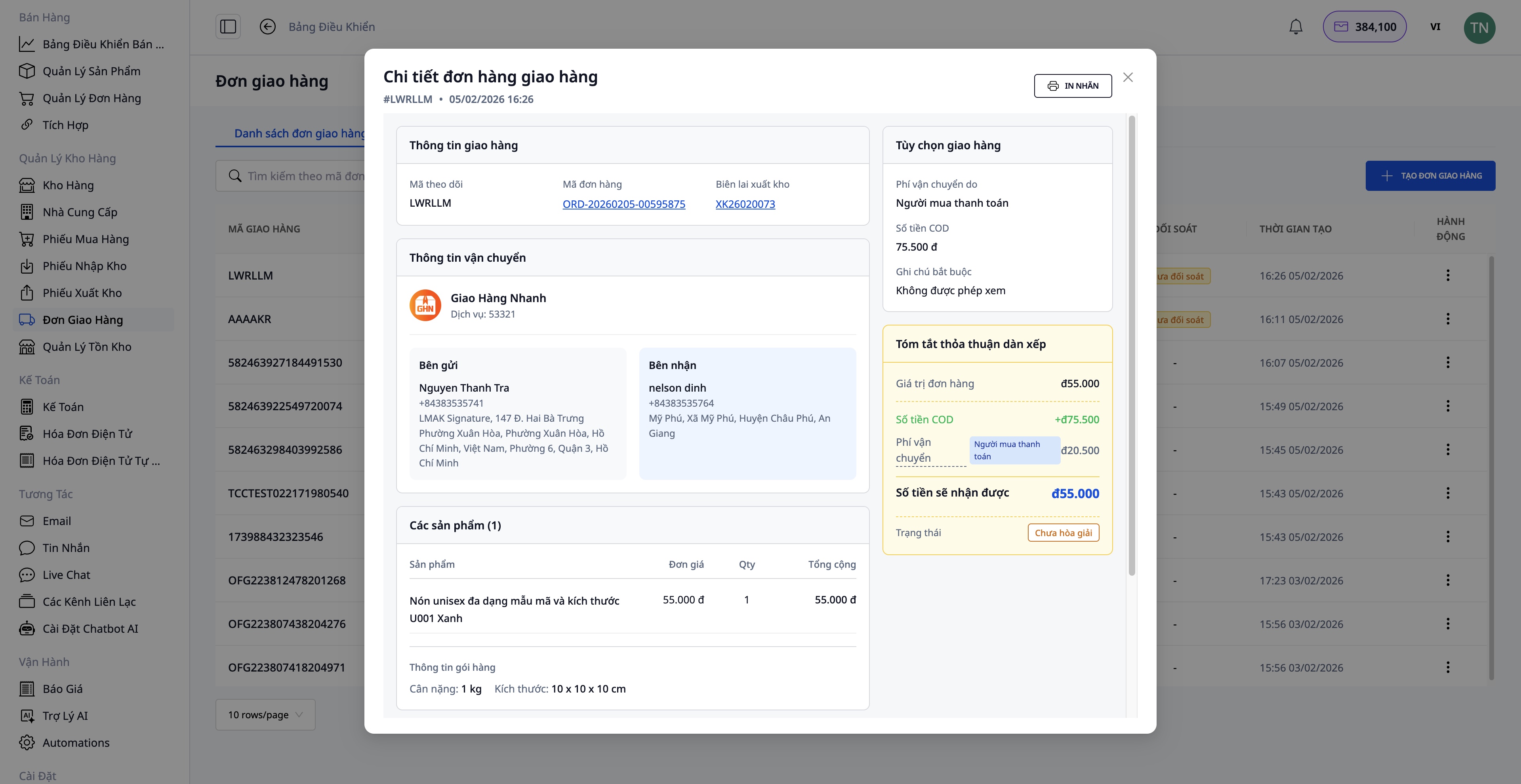
2. Afhendingu á staðnum (COD):
- Slá inn fjárhæðina sem á að innheimta af viðskiptavinum
- Inniheldur bæði vöruverð og sendingargjald (ef viðskiptavinur greiðir)
3. Upplýsingar um pakka:
- Þyngd (kg)
- Mál (lengd x breidd x hæð)
- Þeim sem greiðir sendingargjaldið (seljandi/kaupandi)
4. Staðfesta pöntun:
- Kerfið aflar upplýsinga sjálfkrafa úr pöntun
- Senda beiðni til sendingarfyrirtækis
- Fá sendibréfsnúmer
Eftir að sendingarpöntun hefur tekist:
- Prenta afhendingarseðil og festa á pakkann
- Afhenda sendingarfyrirtæki
Skref 5: Útvega rafræna reikninga
Fyrir fyrirtækjavöru eða þegar þörf er á virðisaukaskattsreikningi, getur þú útvegað rafrænan reikning beint úr pöntuninni eða leyft kerfinu að útvega reikninga sjálfkrafa.
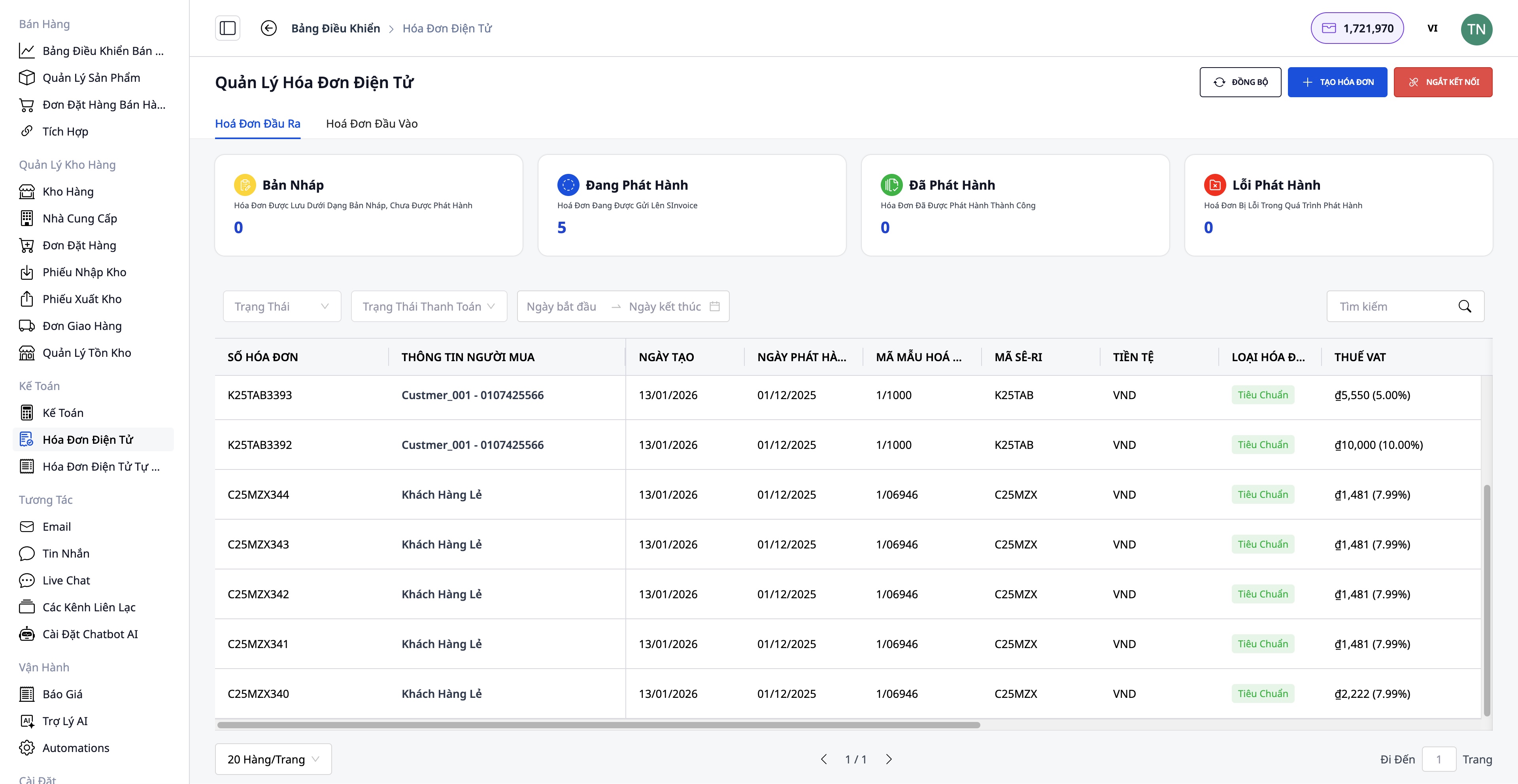
Skref til að útvega reikning:
- Velja reikningsbirgir: S-Invoice (Viettel) eða MISA
- Velja reikningssnið: Virðisaukaskattsreikningur eða sölureikningur
- Fylla út upplýsingar: Upplýsingar kaupanda (fyrirtækisheiti, kennitala, heimilisfang), Vörur og magn (sjálfkrafa sótt úr pöntun), Virðisaukaskattshlutfall, Greiðslumáti
- Forskoða PDF:
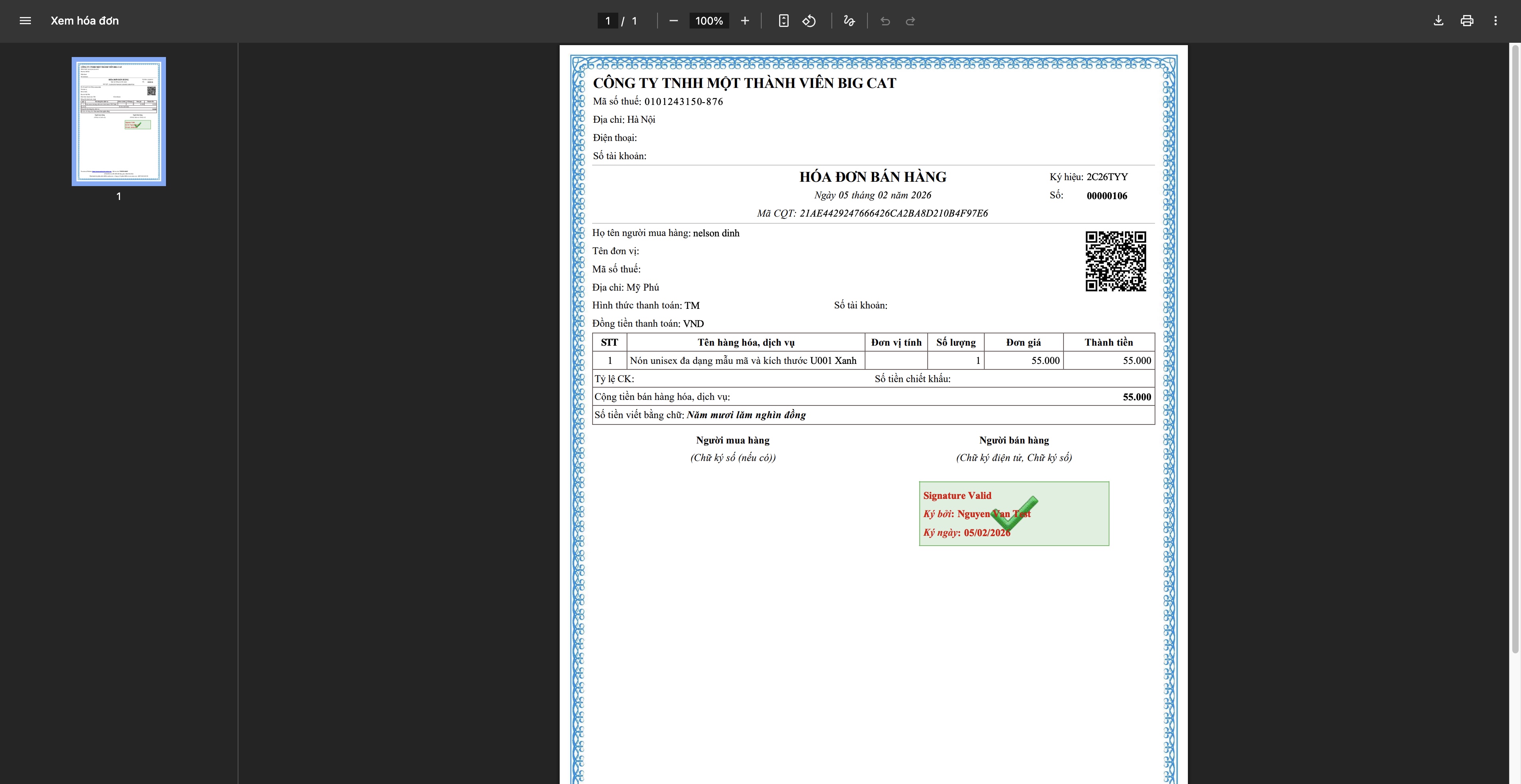
- Útvega reikning: Kerfið sendir beiðni til birgis, reikningur fær skattmerki, hlaða niður og senda til viðskiptavinar
Skref 6: Rekja og klára pöntun
Rekja sendingu
- Uppfæra stöðu sendibréfs frá sendingarfyrirtæki
- Tilkynna viðskiptavinum um framvindu afhendingar
- Leysa úr sérstökum málum (misheppnuð afhending, tafir...)
Klára pöntun
Þegar viðskiptavinur hefur fengið vörur að lokum:
- Uppfæra stöðu pöntunar í Fullgerð
- Staðfesta að greiðsla hafi borist (fyrir COD pantanir)
- Vista upplýsingar í viðskiptasögu
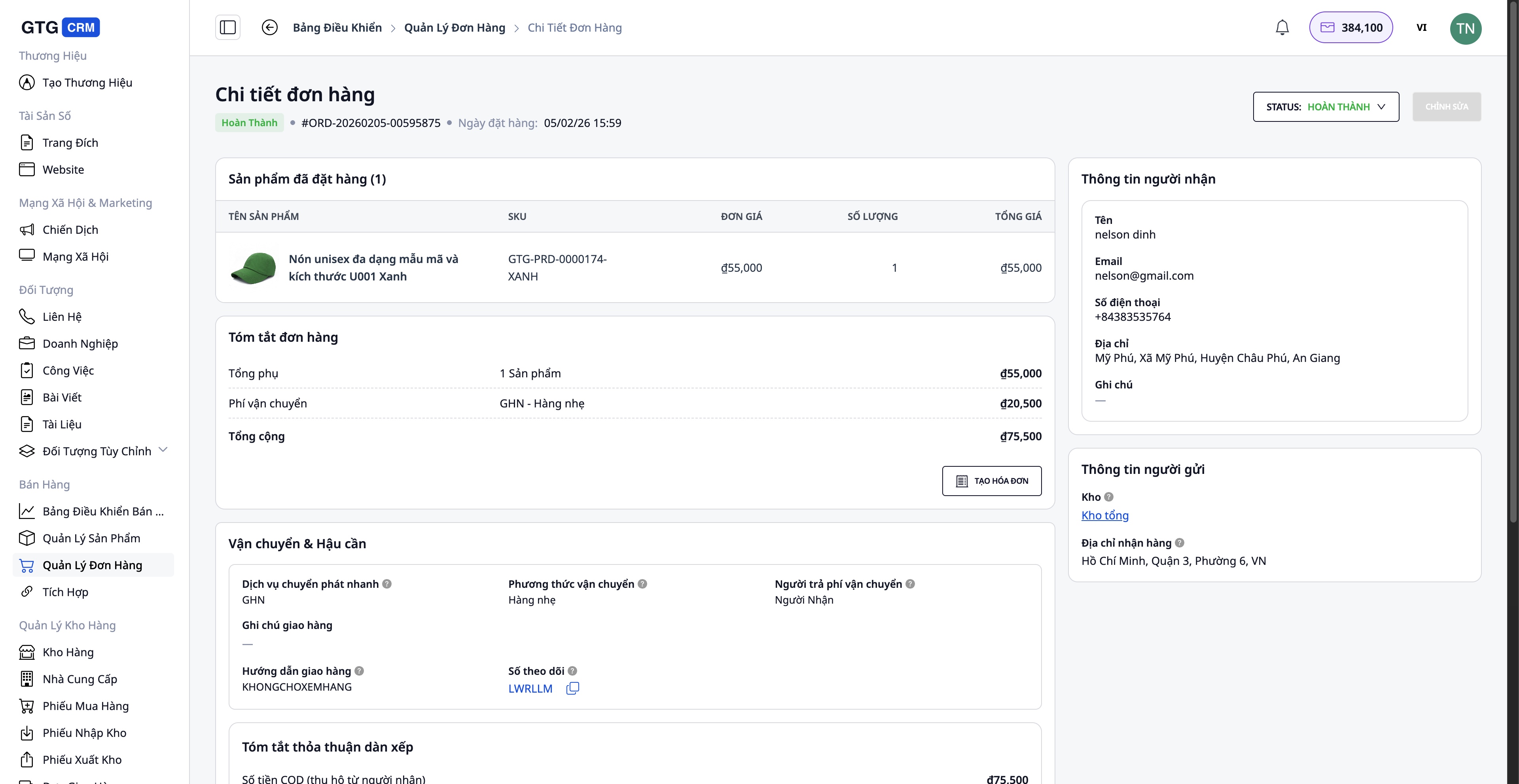
Vandamál við pöntunarvinnslu
Tilfelli þar sem viðskiptavinur skilar eða skiptir vöru:
- Búið til Skipta reikningur (ef reikningur hefur verið gefinn út) - Stilltu magn og verðmæti - Kerfið býr sjálfkrafa til staðgengilsreikning eftir virkjun
- Uppfærðu birgðir - Skráðu aftursenda vöru aftur á lager (ef hún er í lagi) - Skráðu skemmda vöru (ef einhver)
- Endurgreiðsla til viðskiptavinar (ef nauðsyn krefur)
Kostir staðlaðrar málsmeðferðar
Fyrir fyrirtæki
- Miðlæg stjórn: Allar pantanir, vörur, vöruhús í einu kerfi
- Tímasparnaður: Sjálfvirkni margra skrefa (vörusamstilling, sendingarmiðabúnaður, útgáfa reikninga)
- Minnka villur: Upplýsingar samstilltar sjálfkrafa, takmarkar handvirka gagnafærslu
- Birgðaeftirlit: Rauntíma uppfærslur, forðast sölu umfram magn
- Lögfræðileg samþykki: Gildur, fullkominn rafrænn reikningur
Fyrir starfsmenn
- Vingjarnlegt viðmót: Auðvelt í notkun, engin flókin þjálfun nauðsynleg
- Hrein málsmeðferð: Skref fyrir skref leiðbeiningar eru tilgreindar
- Full samþætting: Engin þörf á að skipta á milli margra forrita
- Skilvirk vinna: Vinna úr mörgum pöntunum samtímis
Fyrir viðskiptavini
- Hröð viðbrögð: AI Chatbot styður 24/7
- Afhending á réttum tíma: Skjótt málsmeðferð
- Nákvæmar upplýsingar: Pantanir, sendingar uppfærðar stöðugt
- Faglegir reikningar: Gildur, fullkominn rafrænn reikningur
Mikilvægar athugasemdir
Varðandi tengingar á markaðssvæði:
- Þarf staðfestan verslunarreikning á Shopee/Lazada/TikTok Shop
- Vörusamstilling ætti að fara fram á tímum með fáum pöntunum til að forðast gagnarýni
Varðandi vöruhúsastjórnun:
- Bara uppfæra birgðir oft til að tryggja nákvæmni
- Endurskoða birgðir reglulega (mánudagslega/fjórðungslega) til að bera saman við kerfið
Varðandi útgáfu reikninga:
- Aðeins gefa út reikning þegar viðskiptavinurinn biður um það eða verðmæti pöntunar er mikið
- Athugaðu vandlega skattnúmer og heimilisfangsupplýsingar áður en þú gefur út
- Staðgengilsreikningur er aðeins notaður þegar nauðsyn krefur (skil, villur)
Varðandi flutninga:
- Pakkaðu vandlega til að forðast skemmdir við flutning
- Veldu flutningaþjónustu sem hentar verðmæti pöntunar og kröfum viðskiptavinar
Niðurstaða
GTG CRM staðlað pöntunarferli hjálpar netverslunarfyrirtækjum að starfa á faglegan, skilvirkan og skipulagðan hátt. Frá vörustjórnun, margrásatengingum, pöntunarvinnslu, flutningum til reikningsútgáfu og þjónustu við viðskiptavini - allt er samþætt óaðfinnanlega á einum vettvangi.
Með því að innleiða þessa málsmeðferð muntu:
- Auka hraða pöntunarvinnslu
- Betri stjórn á viðskiptaáætlun
- Hagræða rekstrarkostnaði
- Auka upplifun viðskiptavina
- Þróa fyrirtæki sjálfbært
Byrjaðu að nota GTG CRM í dag til að upplifa faglega söluferli!
Breyttu því sem þú hefur lesið í raunverulegar niðurstöður - notaðu það strax með GTG CRM, ókeypis.
Notaðu strax

