
Funkcijų pristatymas
Elektroninės sąskaitos faktūros yra svarbi GTG CRM funkcija, padedanti įmonėms centralizuotai, automatiškai ir efektyviai tvarkyti visas gaunamas ir išsiunčiamas sąskaitas faktūras.
Kodėl reikia tvarkyti elektronines sąskaitas faktūras?
Versle yra du svarbiausi aspektai:
| Aspektas | Aprašymas | Sąskaitos faktūros tipas |
|---|---|---|
| Pajamos | Pajamų suma, gauta pardavus | Išsiunčiama sąskaita faktūra (išrašyta klientui) |
| Išlaidos | Pirktų prekių pardavimui suma | Gauta sąskaita faktūra (tiekėjas išrašė jums) |
GTG CRM padeda jums itin lengvai išrašyti sąskaitas faktūras ir tvarkyti sąskaitas faktūras!
Pagrindinės funkcijos
1. Gaunamų sąskaitų faktūrų tvarkymas
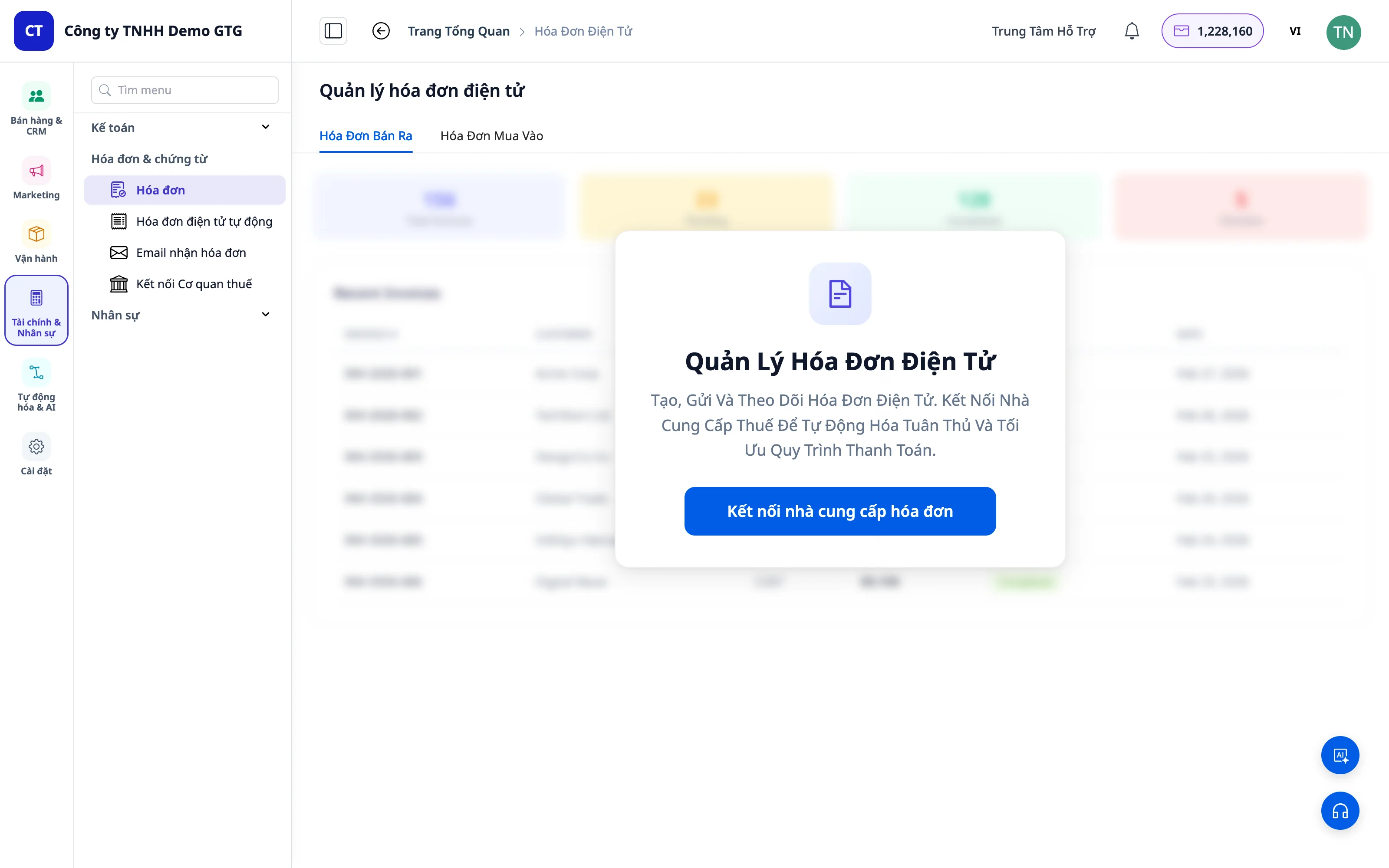
Rankinis sąskaitų faktūrų įkėlimas
- Vilkti ir numesti arba pasirinkti PDF formato sąskaitos faktūros failą
- Sistema automatiškai atpažįsta ir ištraukia informaciją
- Palaiko sudėtingas sąskaitas faktūras su daug produktų
Automatinis surinkimas iš el. pašto
Tai ypatinga GTG CRM funkcija!
- Prijunkite įmonės el. paštą prie GTG CRM
- Įjunkite funkciją „Automatinis sąskaitų faktūrų surinkimas“
- Sistema automatiškai gaus sąskaitas faktūras iš el. pašto ir importuos jas į sistemą
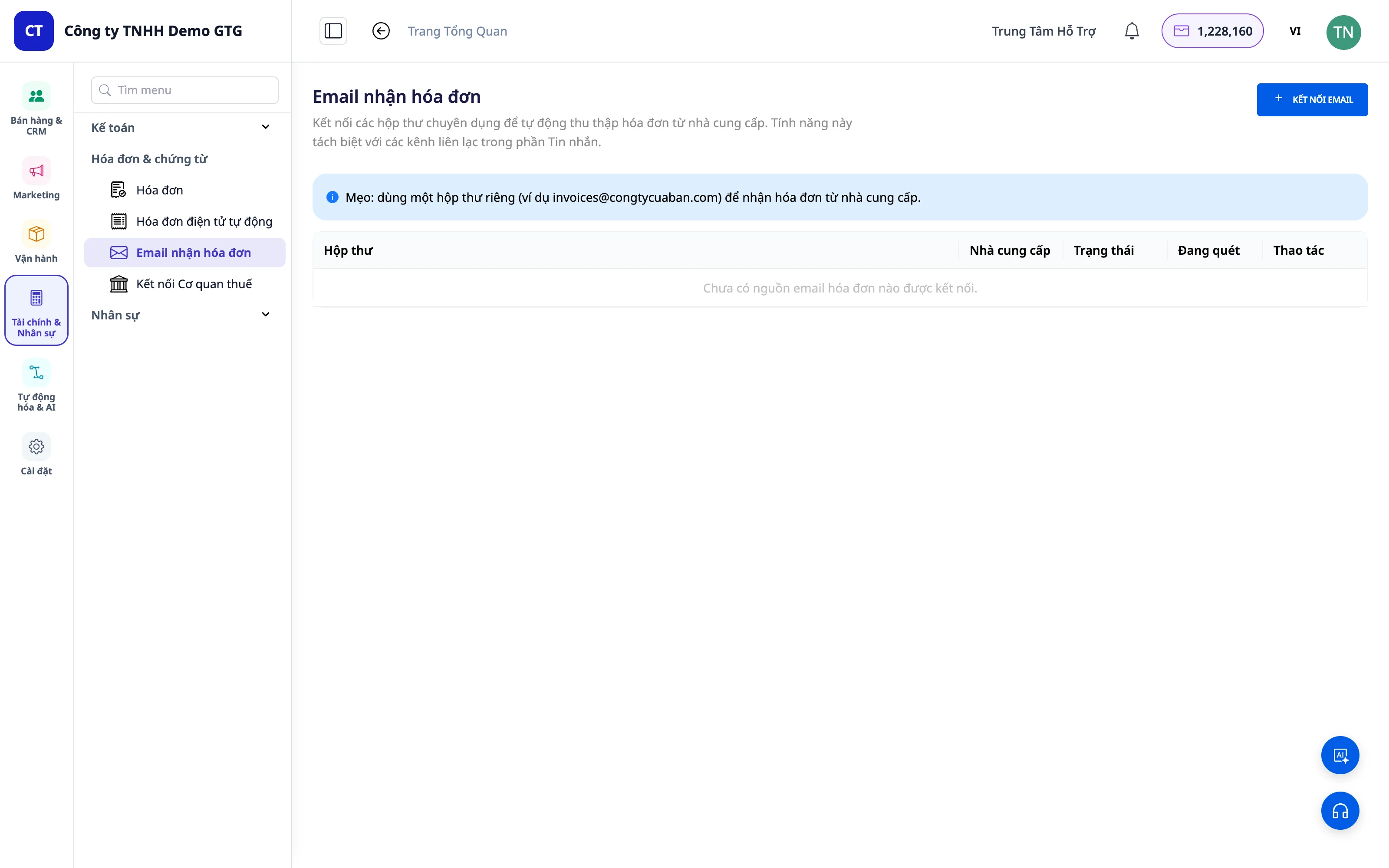
💡 Nauda: Nebereikės kas mėnesį rankiniu būdu atsisiųsti sąskaitų faktūrų! Visos gaunamos sąskaitos faktūros bus tvarkingai surinktos, o buhalteriui tereikės jas atsisiųsti ir parengti mokesčių ataskaitas.
Atskiri sąskaitų faktūrų pašto dėžutės (Invoice Mailboxes)
Dabar galite sukurti atskiras sąskaitų faktūrų pašto dėžutes – visiškai atskirtas nuo klientų aptarnavimo el. pašto kanalų (žinučių).
- Sukurkite vieną ar kelias pašto dėžutes, skirtas tik gaunamoms sąskaitoms faktūroms (pvz.:
invoice@company.com,ketoan@company.com) - Skirkite atskirus leidimus: tik įgalioti asmenys (buhalteriai, finansų vadovai) galės peržiūrėti sąskaitų faktūrų pašto dėžutes – įprasti verslo el. laiškai nesimaišys
- Visos į šias pašto dėžutes siunčiamos sąskaitos faktūros bus automatiškai surinktos į sąrašą „Gaunamos sąskaitos faktūros“ (Incoming Invoices)
- Sąrašą „Gaunamos sąskaitos faktūros“ galima filtruoti pagal pašto dėžutės šaltinį (source mailbox) – iškart žinosite, iš kurios pašto dėžutės atėjo sąskaita, nebėra maišymosi tarp skirtingų skyrių ar filialų
💡 Nauda: Gaunamos sąskaitos faktūros nebeskesta klientų aptarnavimo pašto dėžutėje. Buhalteris turės atskirą, švarią „sąskaitų faktūrų saugyklą“, kurią bus galima filtruoti pagal šaltinį – mėnesio užbaigimo ataskaitų rengimas bus daug greitesnis.
Pridėkite dokumentus prie kiekvienos pirkimo sąskaitos faktūros
Tiekėjo sąskaita faktūra vienur, mokėjimo pavedimas kitur, sutartis trečioje vietoje. Kiekvienai pirkimo sąskaitai faktūrai galima pridėti kelis failus vienu metu:
- Tiekėjo sąskaita, mokėjimo dokumentai (pvz., mokėjimo pavedimas), sutartis ar užsakymas, pristatymo kvitas ir kiti failai; kiekvienas failas turi pavadinimą, kas jį pridėjo ir kada
- Tiekėjo sąskaitas galite įkelti patys, gauti iš prijungtos sąskaitų dėžutės arba paimti iš mokesčių inspekcijos. Sąskaitas, kurioms trūksta failų, pridėkite paspaudę "+" skiltyje "Dokumentai". Likusius failus, įskaitant tuos, kuriuos atsisiuntėte iš el. pašto ar „Zalo“, taip pat pridėkite prie kiekvienos sąskaitos
- Senieji failai neperrašomi pridedant naujus, o failo pašalinimas jį tik paslepia nuo sąskaitos, bet neištrina visai
- Kai tiekėjas iš naujo atsiunčia pataisytą sąskaitą, GTG CRM failą nuskaitys (PDF ir paveikslėliai skaitomi naudojant AI, tai kainuoja 2 AI kreditus kiekvieną kartą; XML skaitomas tiesiogiai ir nekainuoja AI kreditų). Duomenys faile bus rodomi šalia saugomų duomenų, kad galėtumėte palyginti kiekvieną skaičių, netgi kiekvieną prekių eilutę. Duomenys iš naujo failo bus įrašyti į sąskaitą tik tada, kai asmuo, turintis teisę "Patvirtinti pirkimo sąskaitos duomenis", paspaus "Naudoti šio failo duomenis"
- Filtras, skirtas rasti sąskaitas be mokėjimo dokumentų, ir mygtukas, skirtas atsisiųsti visų filtravimo kriterijus atitinkančių sąskaitų priedus .zip faile su rodykle
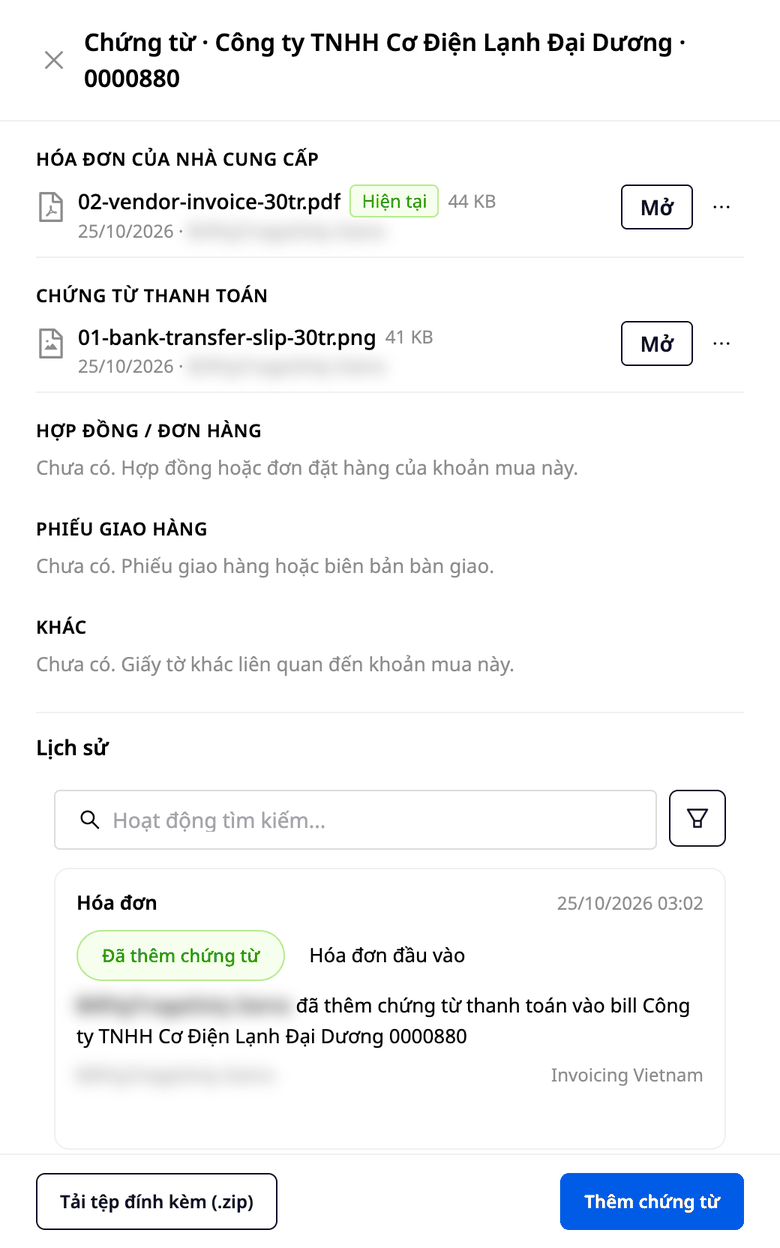
Prie tos pačios pirkimo sąskaitos pridėkite tiekėjo sąskaitą, mokėjimo dokumentus, sutartį ir pristatymo kvitą. Atidarę sąskaitą matysite visus failus ir galėsite juos visus atsisiųsti vienu metu. Kai tiekėjas atsiųs pataisytą sąskaitą, jums nereikės įvesti duomenų iš naujo. Pamatysite failo duomenis šalia saugomų duomenų ir palyginsite kiekvieną skaičių, tada pasirinksite naudoti naujus duomenis arba palikti esamus. Pridėjus failą, jokie skaičiai sąskaitoje automatiškai nepasikeis.
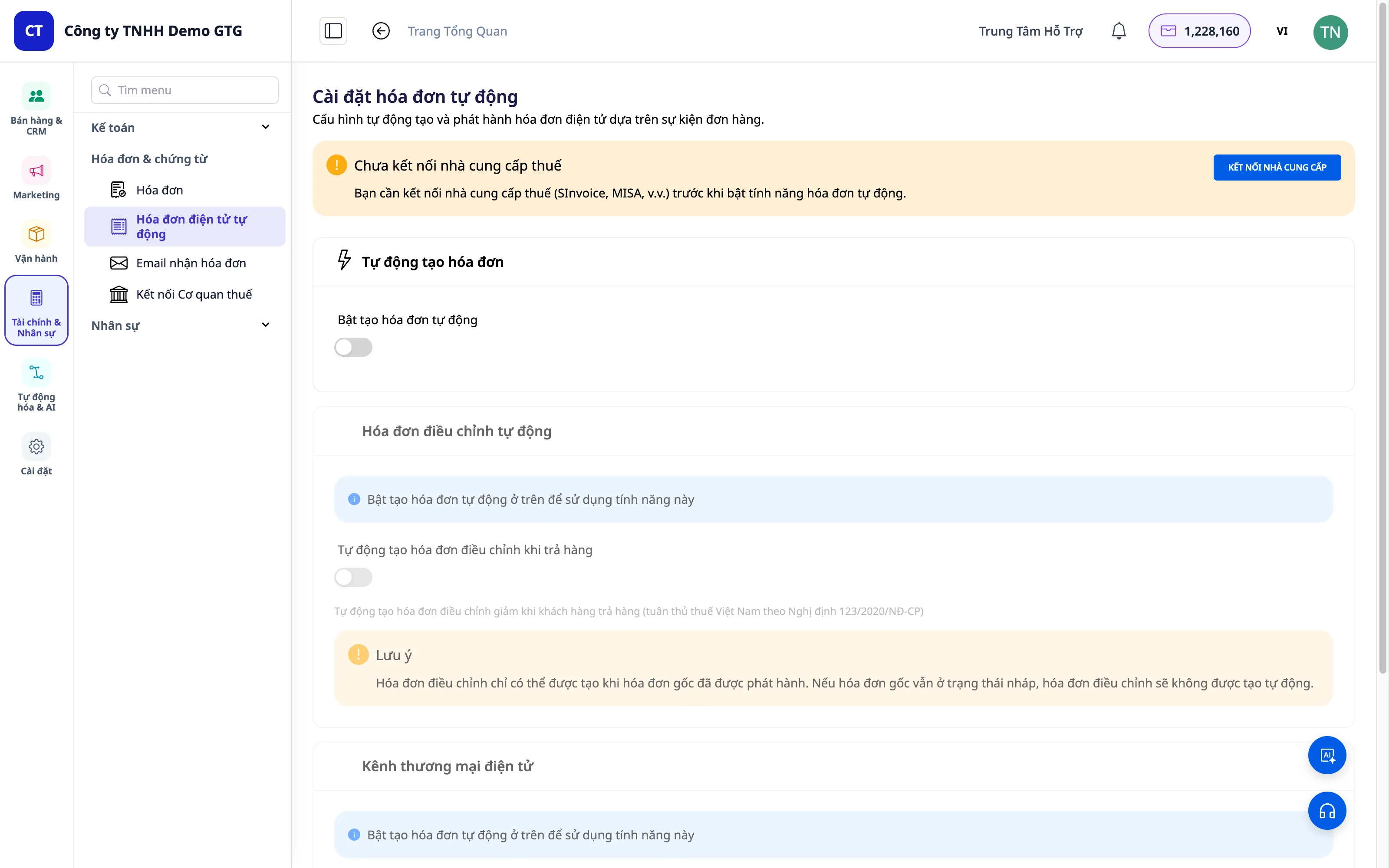
Norėdami išbandyti, paspauskite mygtuką „Nemokamas bandomasis laikotarpis“ puslapio apačioje.
2. Išrašyti pardavimo sąskaitas (PVM)
GTG CRM bendradarbiauja su patikimais elektroninių sąskaitų tiekėjais:
| Tiekėjas | Aprašymas |
|---|---|
| S-Invoice (Viettel) | Viettel elektroninės sąskaitos |
| MISA | Apskaitos ir elektroninių sąskaitų programinė įranga |
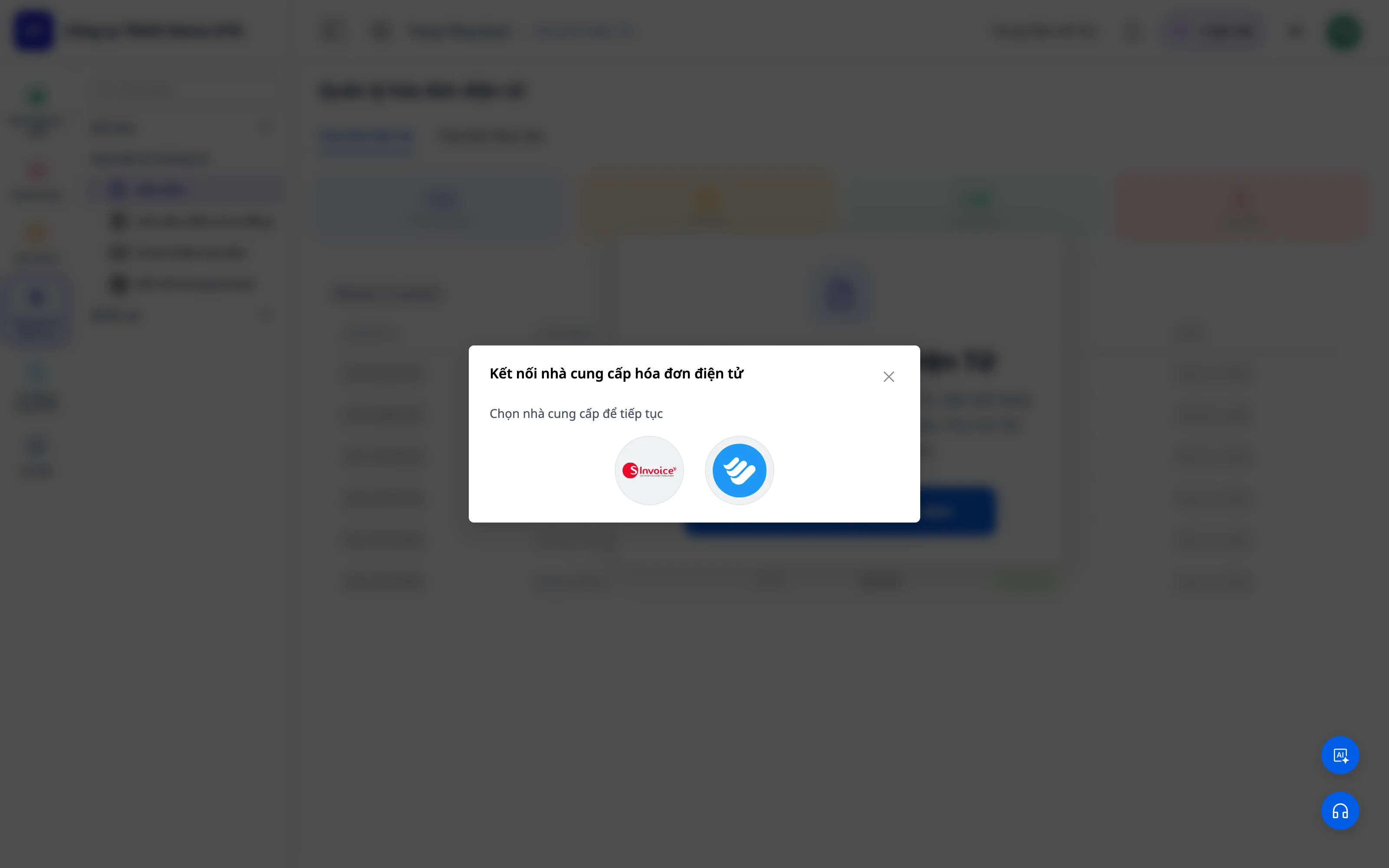
Lengva sukurti sąskaitą
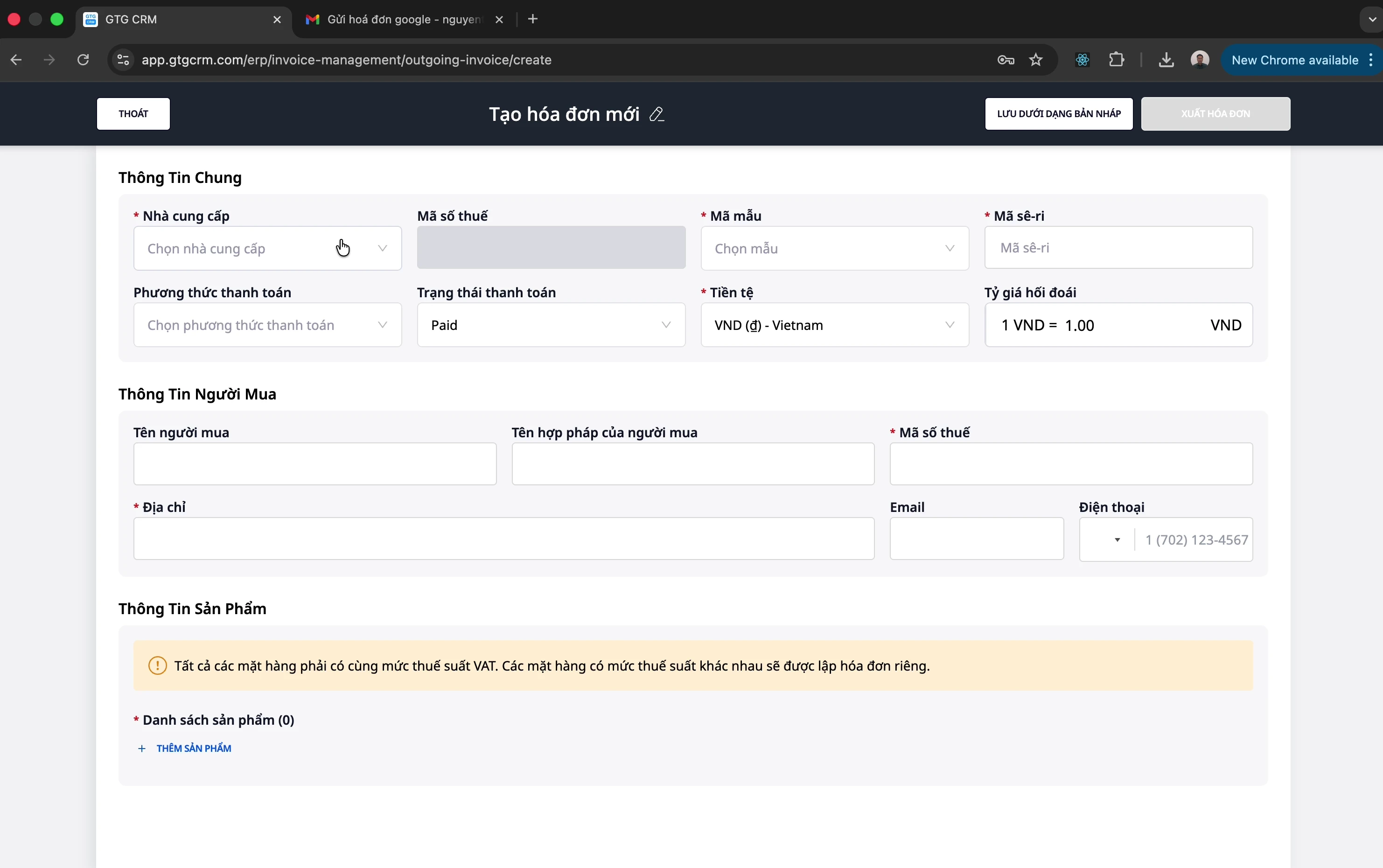
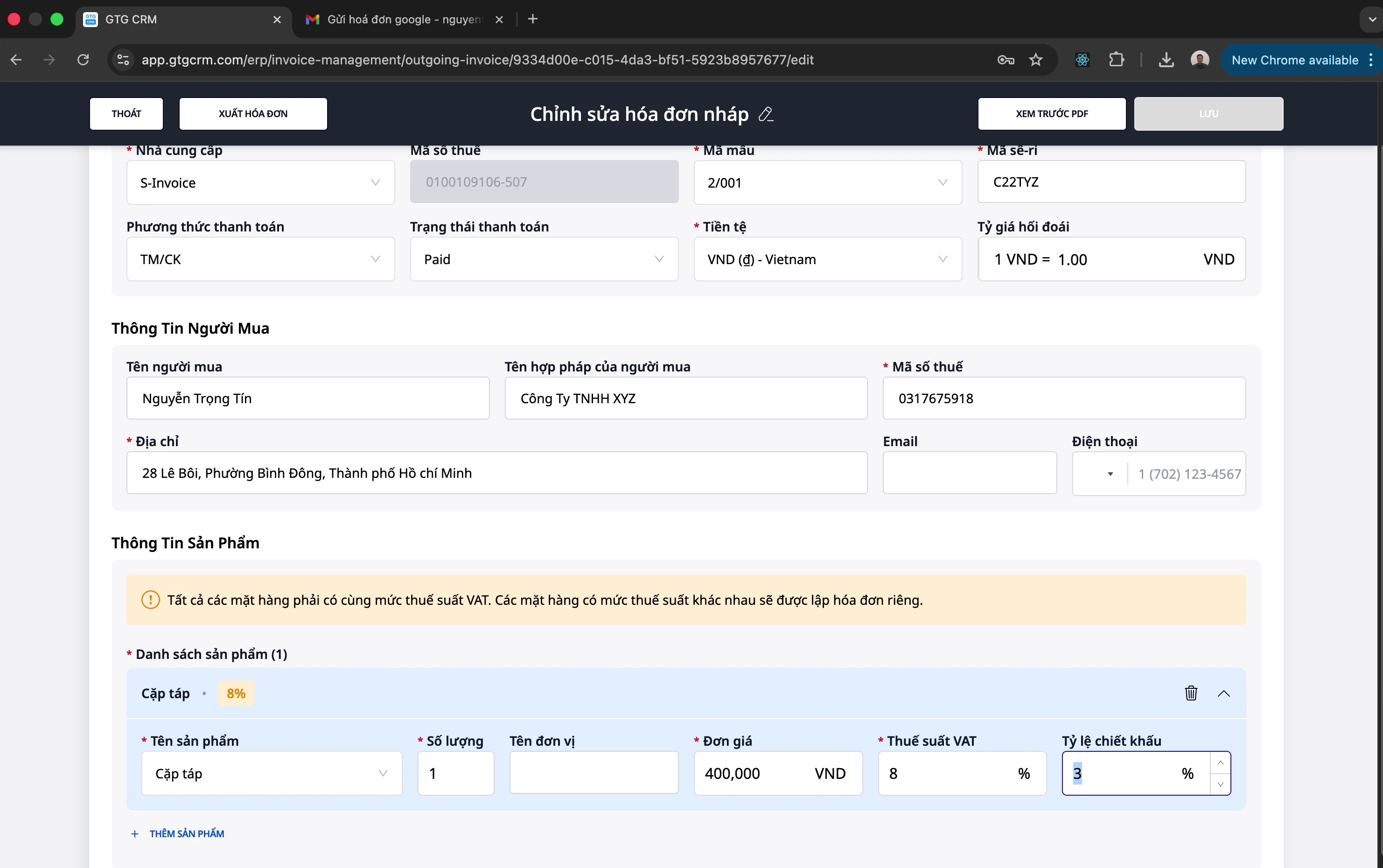
- Pasirinkite tinkamą sąskaitos šabloną
- Įveskite pirkėjo informaciją (vardas, mokesčių kodas, adresas)
- Pridėkite produktus/paslaugas su vieneto kaina, kiekiu, PVM tarifu
- Palaikomas nuolaidų taikymas pagal produktą
- Peržiūrėkite PDF prieš išrašydami
3. Pakeičiamosios sąskaitos
Kai reikia pakoreguoti išrašytą sąskaitą (klientas grąžina prekes, klaidos...):
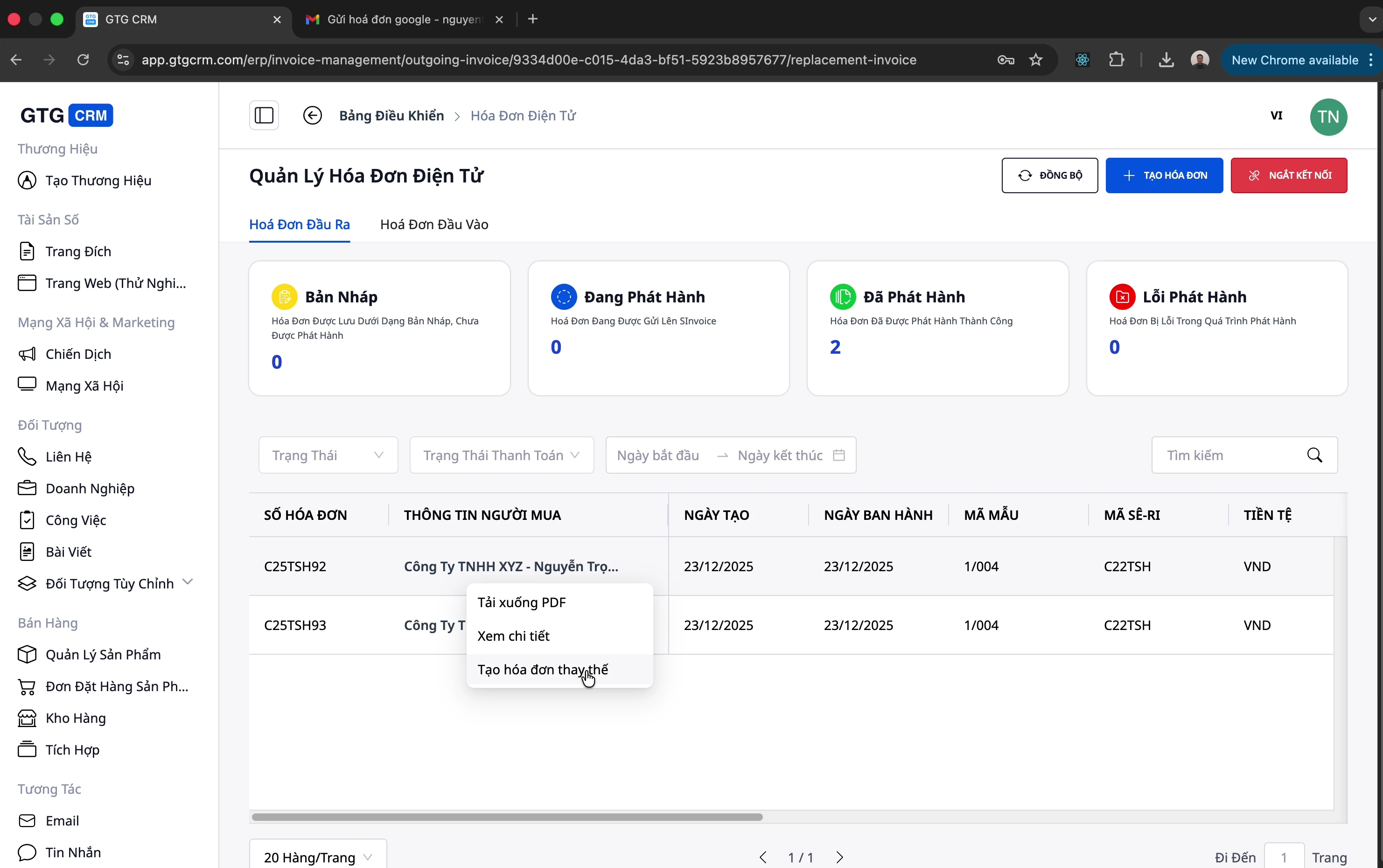
- Sukurkite pakeičiamąją sąskaitą tiesiogiai iš originalios sąskaitos
- Koreguokite produkto informaciją, kiekį, kainą
- Sistema automatiškai susies su originalia sąskaita
💡 Pastaba: Pakeitimas yra tik vienas iš apdorojimo būdų po išrašymo. Kai sąskaitą reikia visiškai panaikinti (o ne koreguoti), naudokite funkciją Atšaukti sąskaitą žemiau pateiktame skyriuje.
4. Elektroninių sąskaitų atšaukimas
Kai išrašytą sąskaitą reikia visiškai atšaukti (neteisingai išrašyta klientui, rimtos klaidos, atšauktas užsakymas...), GTG CRM leidžia atšaukti elektroninę sąskaitą tiesiogiai sistemoje su abiem tiekėjais:
| Tiekėjas | Sąskaitos panaikinimas |
|---|---|
| S-Invoice (Viettel) | ✅ Panaikinti tiesiogiai per API |
| MISA | ✅ Panaikinti tiesiogiai per API |
- Atidarykite išrašytą sąskaitą → pasirinkite „Panaikinti sąskaitą“ → patvirtinkite
- GTG CRM siunčia panaikinimo komandą tiekėjui (S-Invoice/MISA) ir atnaujina sąskaitos būseną
- Automatinis įrašo inversija (JE reversal): jei sąskaita buvo įtraukta į apskaitą, sistema automatiškai sukuria inversinį įrašą — pajamos, mokesčiai ir skolos grąžinamos į teisingą likutį, nereikia rankinio apskaitininko koregavimo
💡 Nauda: Sąskaitos panaikinimas nebėra veiksmas „prisijungti atskirai prie tiekėjo programinės įrangos + taisyti rankiniu būdu“. Vienas veiksmas GTG CRM — sąskaita panaikinama pagal procedūrą ir sąskaitos automatiškai sutampa iš karto. (Daugiau apie dvejybinę buhalteriją skaitykite GTG CRM Apskaitos funkcijų rinkinyje.)
5. Sinchronizavimas ir valdymas
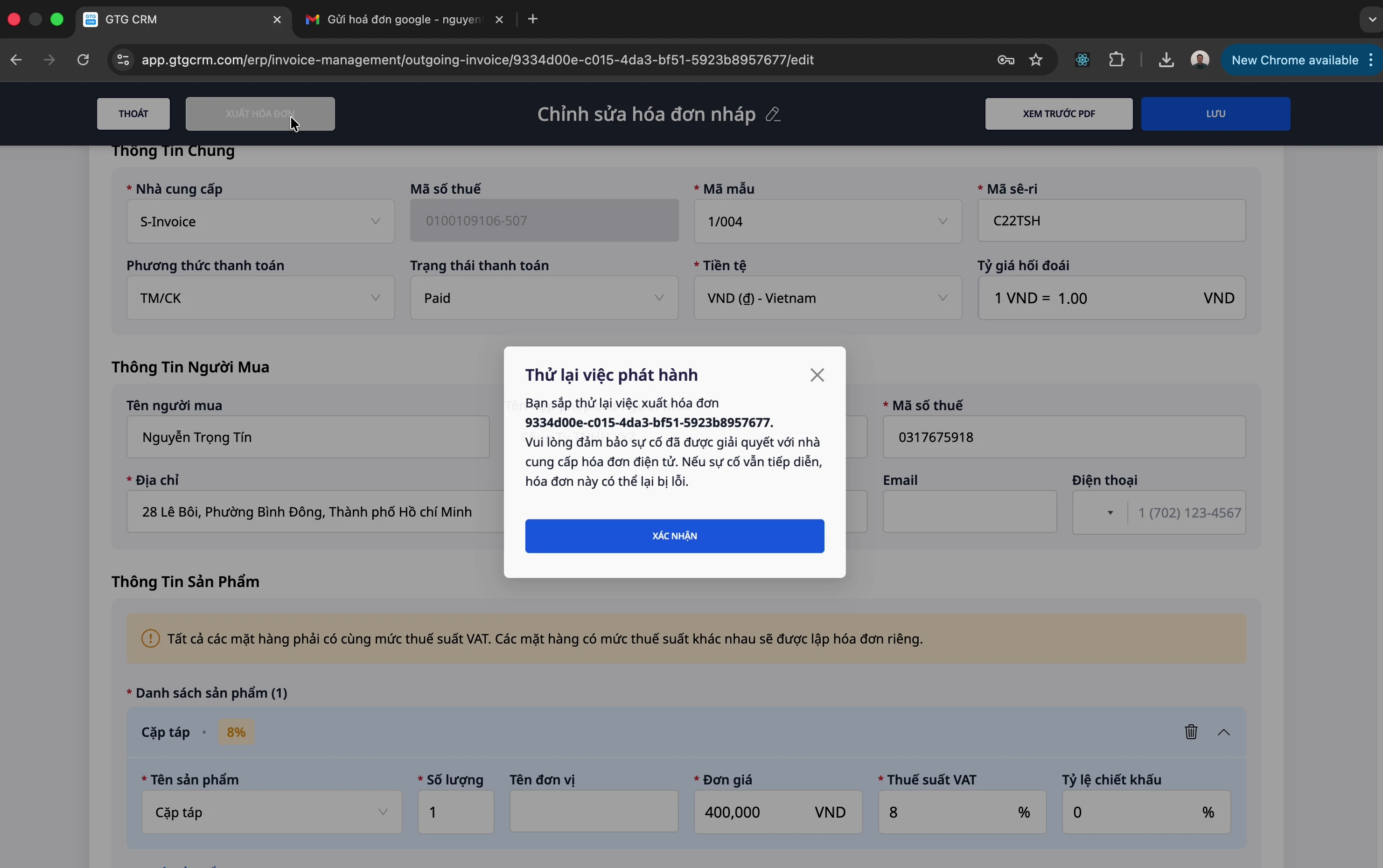
- Sąskaitų sinchronizavimas iš tiekėjo į GTG CRM
- PDF atsisiuntimas išrašytų sąskaitų
- Redaguoti sąskaitos informaciją, kai reikia
- Būsenos stebėjimas mokėjimo (Apmokėta / Nepanaikinta)
Nauda verslui
| Nauda | Aprašymas |
|---|---|
| Taupomas laikas | Automatinis įeinančių sąskaitų rinkimas iš el. pašto |
| Centralizuotas valdymas | Visos įeinančios/išeinančios sąskaitos vienoje vietoje |
| Tiekėjų ryšys | Išrašyti sąskaitas tiesiogiai per S-Invoice, MISA |
| Lengvas ataskaitų rengimas | Apskaitininkui lengva atsisiųsti ir rengti mokesčių ataskaitas |
| Pakeičiamos sąskaitos | Greitas koregavimų, grąžinimų apdorojimas |
| Saugus sąskaitų panaikinimas | Panaikinti S-Invoice/MISA sąskaitas vienu veiksmu — automatinis įrašo inversija, sąskaitos automatiškai sutampa |
| Sąskaitų pašto dėžutė | Įeinančių sąskaitų rinkimas į atskirą pašto dėžutę, leidimų suteikimas ir filtravimas pagal šaltinį |
| Skolos stebėjimas | Žinoti kiekvienos sąskaitos mokėjimo būseną |
Integracija su GTG CRM
Elektroninės sąskaitos yra giliai integruotos su kitais GTG CRM moduliais:
- Klientų valdymas (CRM): Sąskaitų susiejimas su klientais
- Užsakymų valdymas: Automatinis sąskaitų išrašymas užbaigus užsakymą
- Ataskaitos: Pajamų, išlaidų pagal sąskaitas statistika
Išvada
GTG CRM Elektroninės Sąskaitos yra išsamus sprendimas, padedantis įmonėms: - ✅ Automatiškai valdyti įeinančias sąskaitas (su atskira sąskaitų pašto dėžute, filtravimu pagal šaltinį) - ✅ Lengvai išrašyti PVM sąskaitas - ✅ Saugiai naikinti sąskaitas — automatinis įrašo inversija, sąskaitos automatiškai sutampa - ✅ Taupyti apskaitininko laiką - ✅ Laikytis mokesčių taisyklių
Pabandykite jau šiandien!
Dokumentacija priklauso GTG CRM – visapusiškai klientų santykių valdymo sistemai
Ar esate pasirengę išbandyti šią funkciją nemokamai savo verslui?
Nemokamai išbandykite

