
I nettbasert salg er en profesjonell ordrebehandlingsprosess en avgjørende faktor for virksomhetens suksess. GTG CRM tilbyr en helhetlig ordrebehandlingsprosess, fra mottak av bestillinger, lagerstyring og frakt til fakturering og kundeservice – alt integrert i ett og samme system.
Med GTG CRM kan du ikke bare administrere ordre, men også koble deg til store e-handelsplattformer som Shopee, Lazada, TikTok Shop, synkronisere produkter og lager automatisk, opprette fraktordre raskt og utstede gyldige e-fakturaer. Dette er en helhetlig løsning som hjelper virksomheter med å operere effektivt, forbedre kundeopplevelsen og vokse bærekraftig.
Hovedfunksjoner
- Automatisk rådgivning og ordrebekreftelse: AI Chatbot hjelper med å svare og bekrefte kundebestillinger 24/7, og reduserer arbeidsbelastningen for ansatte
- Sentralisert ordrebehandling: Alle ordre fra nettstedet, nettmarkedsplasser og andre kanaler administreres i ett og samme system
- Flerkanals salgskobling: Integrasjon med Shopee, Lazada og TikTok Shop, samt toveis synkronisering av produkter og ordre
- Intelligent lagerstyring: Spor lagerbeholdning i sanntid, oppdater automatisk når det kommer ordre, støtter flere lagre
- Integrasjon med fraktselskaper: Opprett leveringsordre direkte med fraktselskaper som Giao Hàng Nhanh og Viettel Post, med støtte for COD
- Utskrift av e-fakturaer: Koble til S-Invoice (Viettel) og MISA for å utstede gyldige VAT-fakturaer
- Sporing av ordrestatus: Oppdater status tydelig fra New → Processing → Completed
Standard prosess for ordrebehandling
Trinn 1: Klargjøring av produkter og lager
Opprett og administrer lager
Først må du sette opp lager i systemet Lagerstyring → Lager.
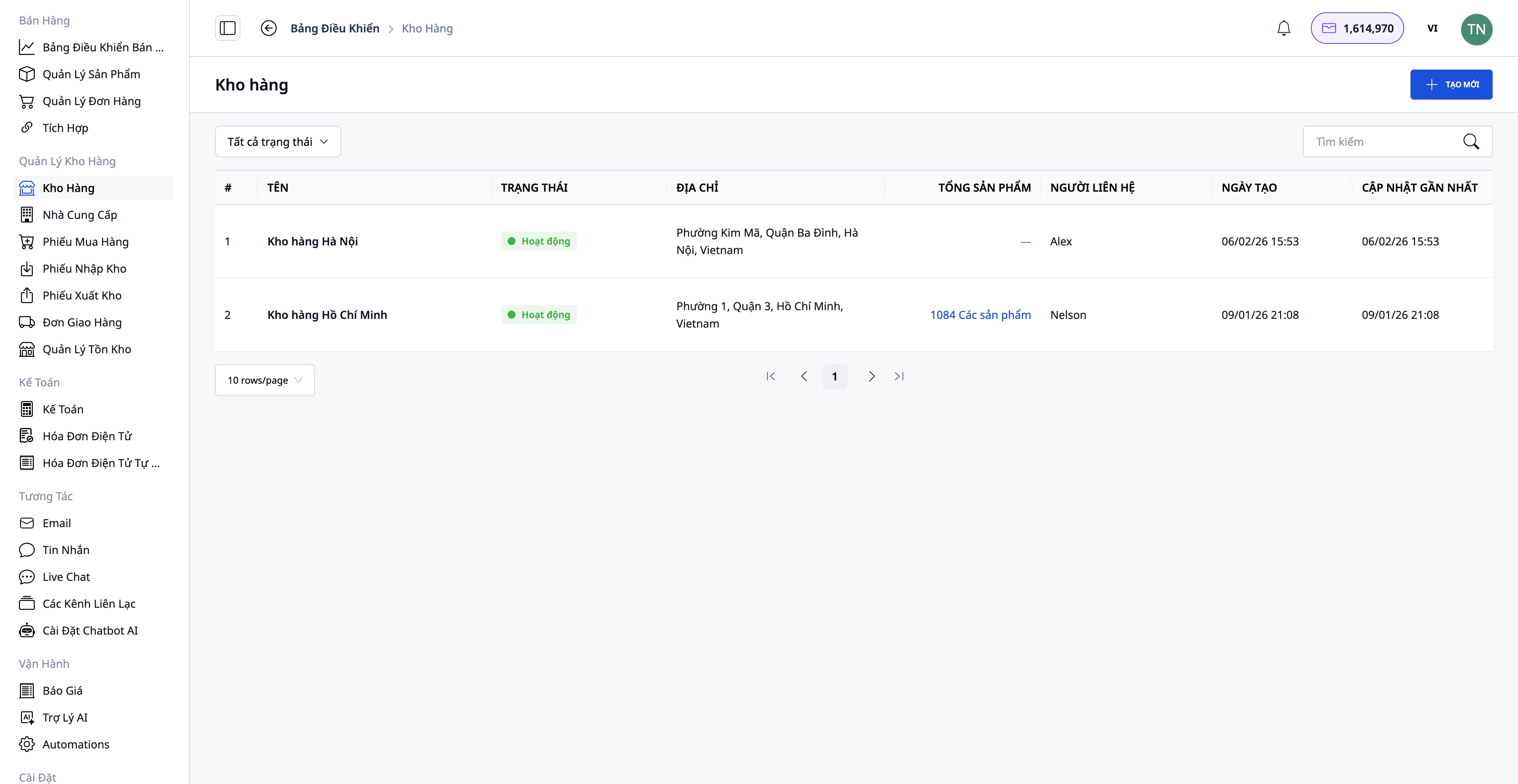
- Opprett lager med informasjon: lager navn, lagerkode, adresse, ansvarlig person
- Støtter flere lagre: hovedlager, underlager, filiallager
- Spor lagerbeholdning separat for hvert lager
Opprett produkter i systemet
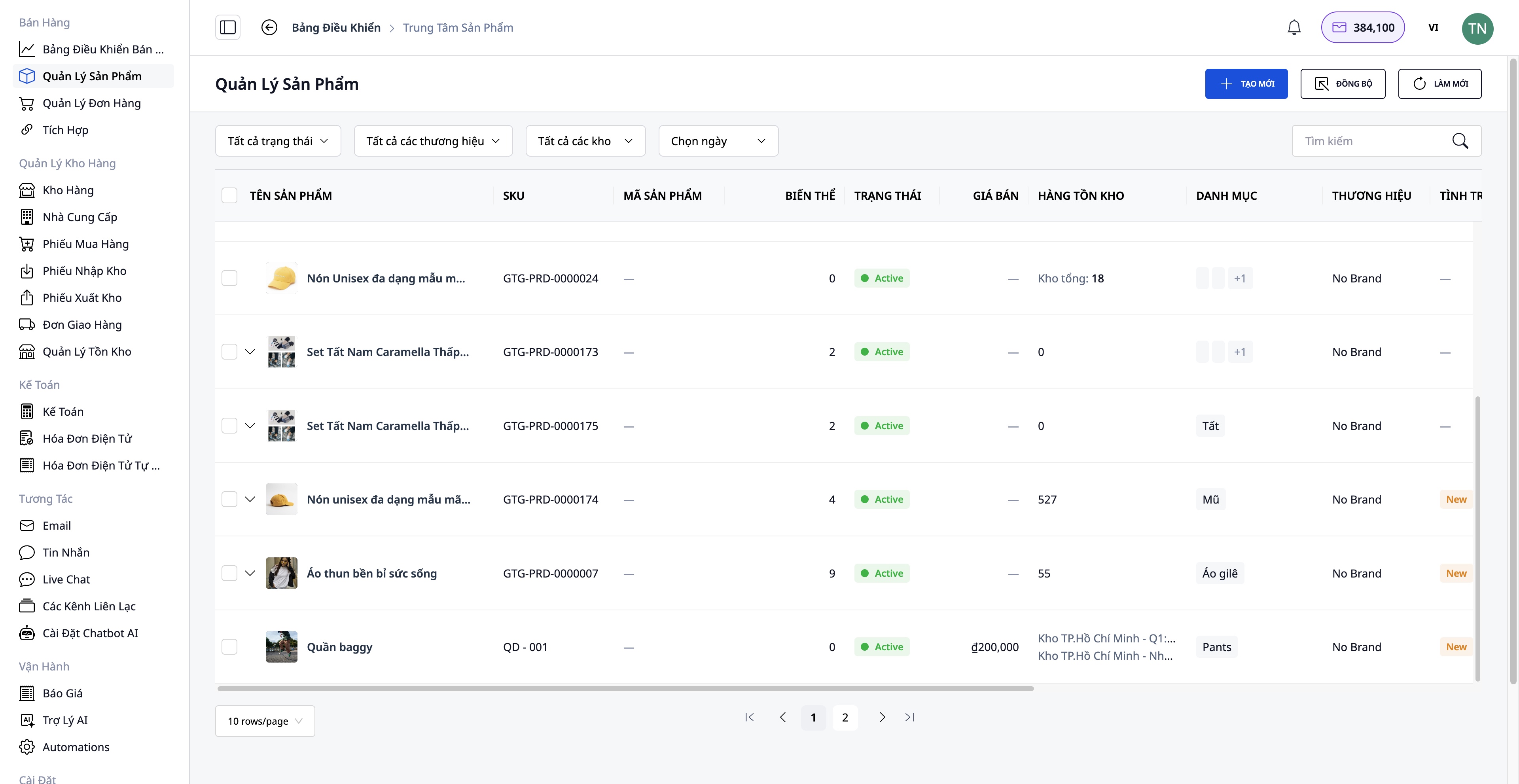
Gå til Salg → Produktstyring for å opprette et nytt produkt.
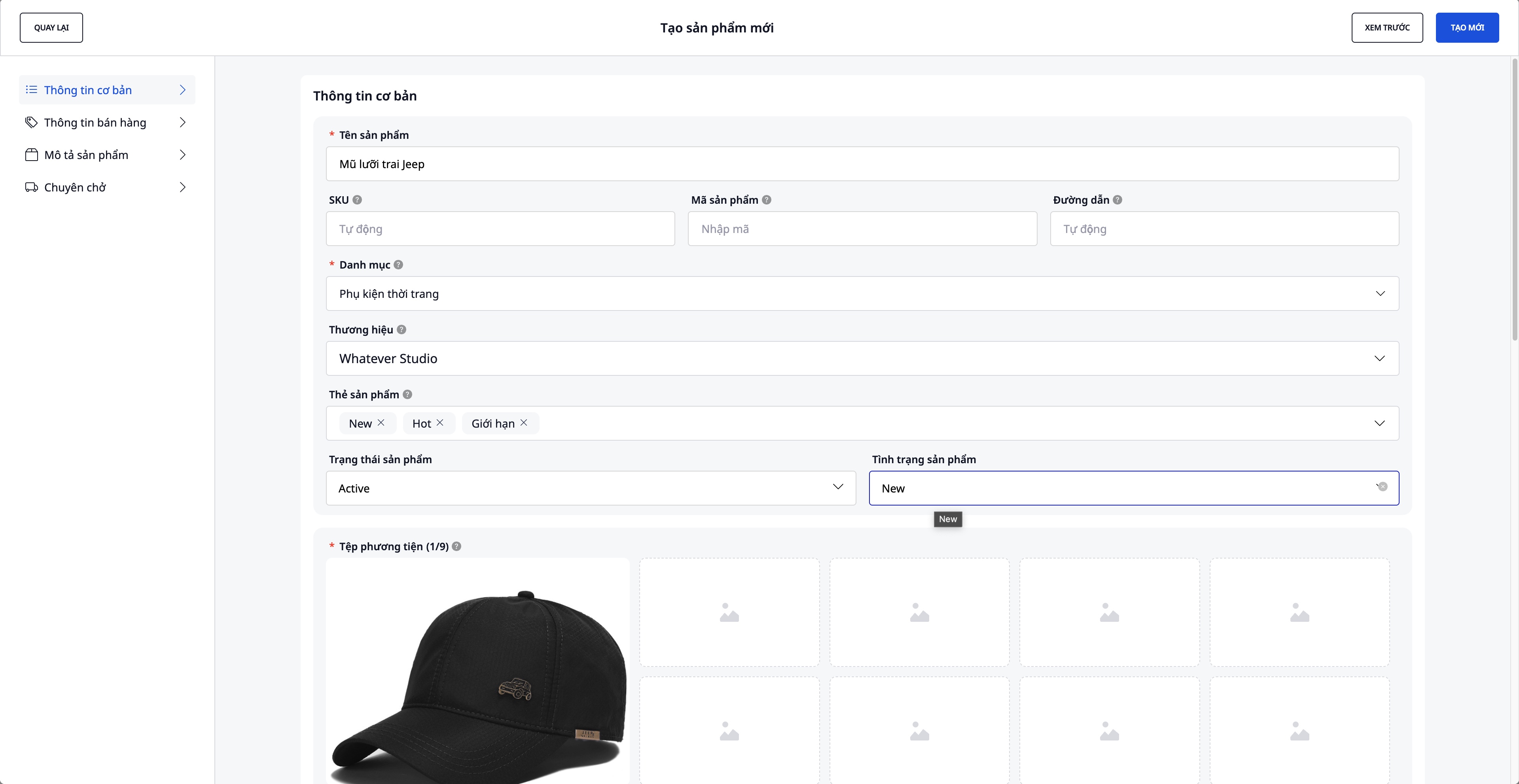
Informasjon som må fylles inn:
- Produktnavn, SKU, kategori, merke
- Produktbilder og videoer
- Varianter: farge, størrelse (maks 3 attributter)
- Innkjøpspris, VAT, salgspris (systemet beregner fortjenesten automatisk)
- Detaljert beskrivelse og tekniske spesifikasjoner
- Opprinnelig lagerantall
Koble til og synkronisere med e-handelsplattformer
Gå til Salg → Integrasjoner for å koble til nettmarkedsplasser.
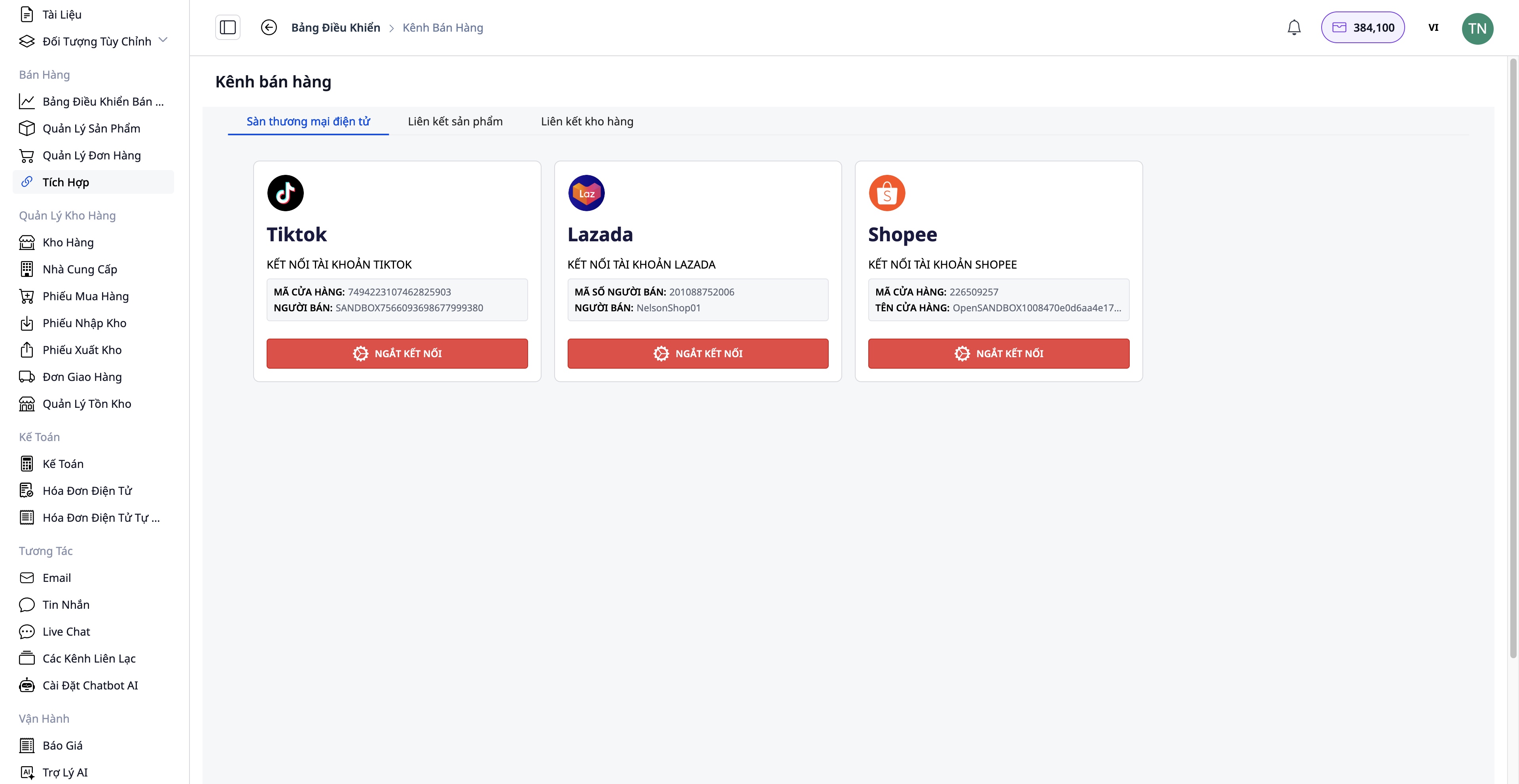
Trinn for tilkobling:
- Velg plattformen du vil koble til: Shopee / Lazada / TikTok Shop
- Autentiser butikkontoen din
- Toveis produktsynkronisering:
- Hent inn: Laster produkter fra plattformen inn i GTG CRM
- Last opp: Sender produkter fra GTG CRM til plattformen
Fordeler:
- Sentralisert administrasjon av alle produkter
- Lagerbeholdning synkroniseres automatisk mellom kanalene
- Sparer tid på manuelle oppdateringer
Trinn 2: Mottak av ordre
Motta ordre fra flere kanaler
Ordre kan komme fra:
- Nettsiden din (integrert med GTG CRM)
- Shopee, Lazada, TikTok Shop (automatisk synkronisering)
- Manuelle bestillinger (kunder som bestiller via telefon, Facebook...)
Trinn 3: Behandle og klargjøre varer
Kontroller og rediger bestillingen (om nødvendig)
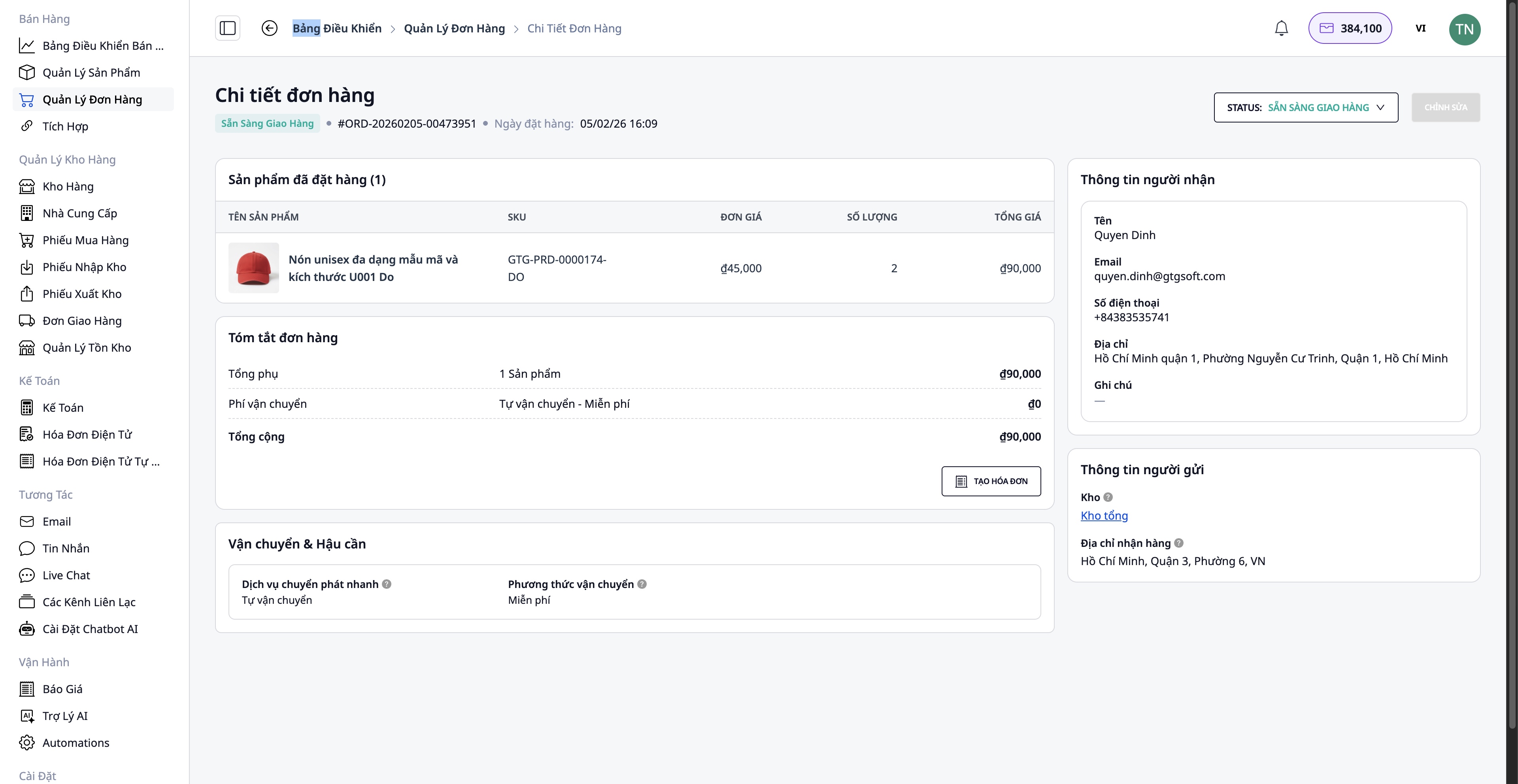
- Kjøperinformasjon
- Leveringsadresse
- Legg til/fjern produkter
- Antall produkter
Kontroller lagerbeholdningen
Systemet kontrollerer automatisk lagerbeholdningen:
- ✅ Nok varer → Fortsett med pakking
- ❌ Vare mangel → Må bestilles inn fra leverandør
Innkjøpsprosess (ved mangel):
Gå til Leverandør → Velg leverandør → Opprett innkjøpsordre
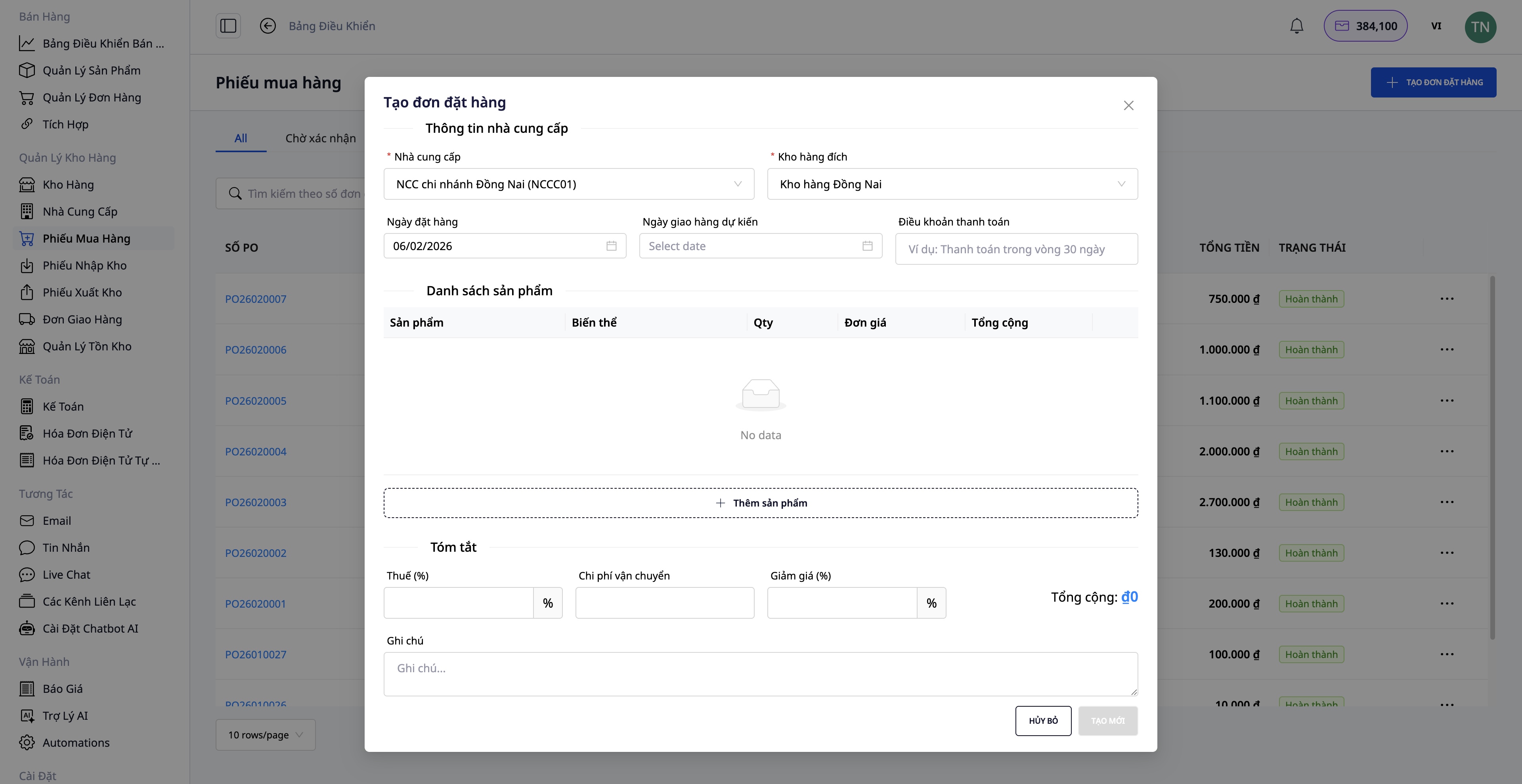
- Velg produktene som skal bestilles inn
- Fyll inn antall og enhetspris
- Bekreft innkjøpsordren
- Når varene ankommer, opprett Varemottak
- Lagerbeholdningen oppdateres automatisk
Trinn 4: Opprett fraktordre
Etter at varene er pakket, opprett fraktordren direkte fra bestillingen.
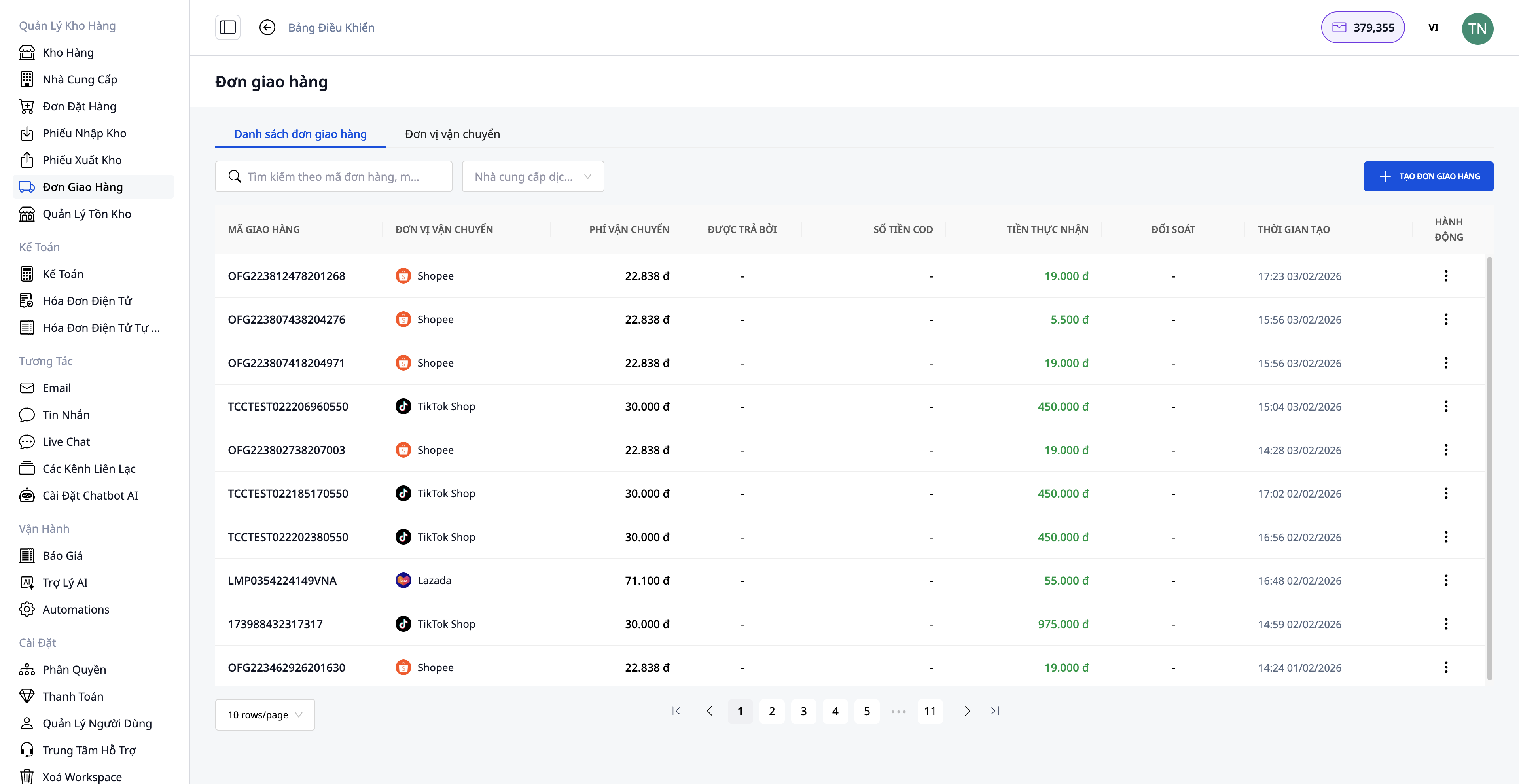
Nødvendig informasjon:
1. Velg frakttjeneste:
- Rask levering
- Økonomisk levering
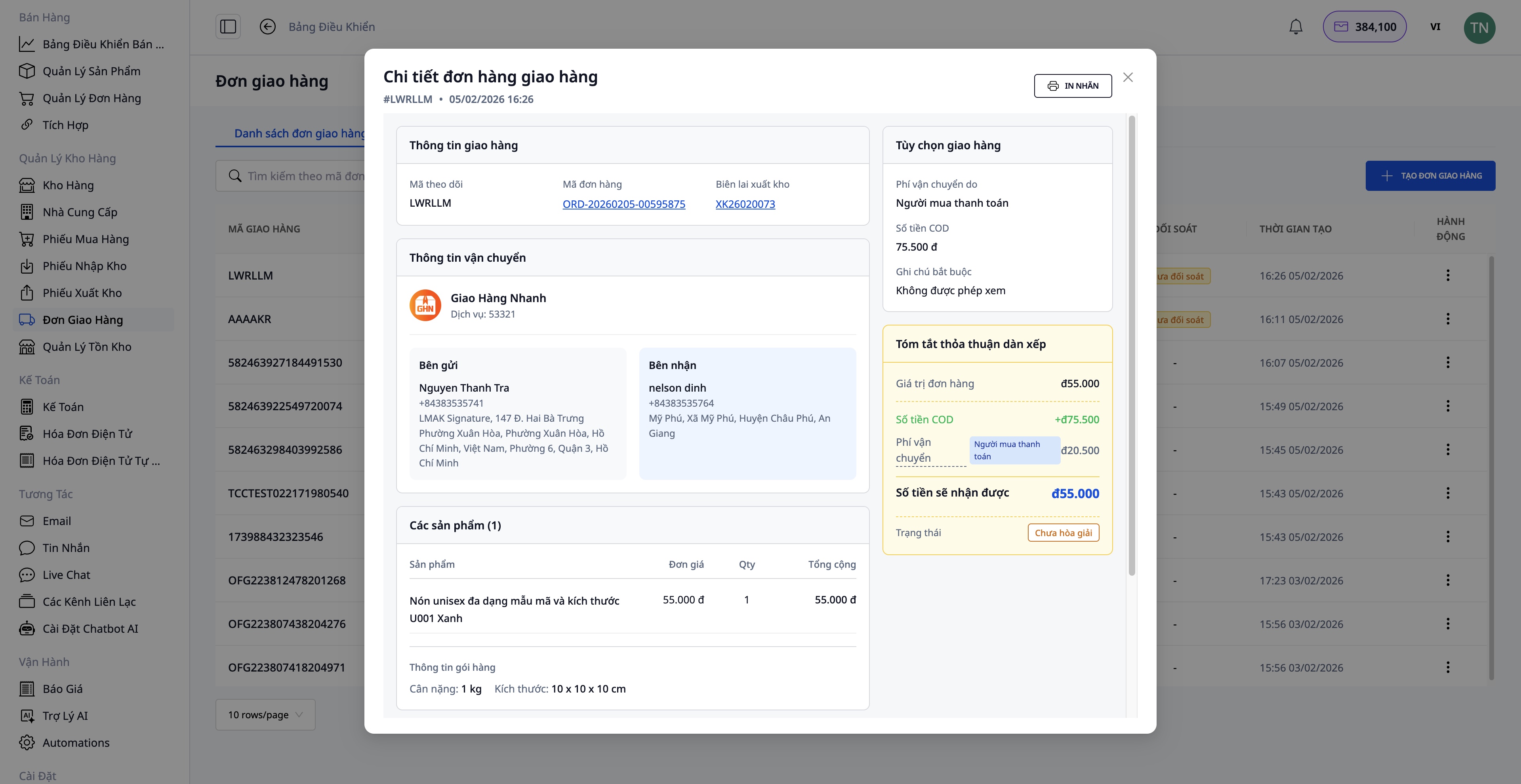
2. Beløp som skal innkreves (COD):
- Angi beløpet som skal kreves inn fra kunden
- Inkluderer både varepris og fraktkostnad (hvis kunden betaler)
3. Pakkeinformasjon:
- Vekt (kg)
- Størrelse (lengde x bredde x høyde)
- Hvem som dekker fraktkostnaden (selger/kjøper)
4. Bekreft opprettelse av ordre:
- Systemet henter automatisk informasjon fra bestillingen
- Sender forespørselen til transportøren
- Mottar fraktsporingsnummer
Etter at fraktordren er opprettet:
- Skriv ut fraktetiketten og fest den på pakken
- Overlever pakken til transportøren
Trinn 5: Utsted elektronisk faktura
For bedriftskunder eller når det trengs MVA-faktura, kan du utstede en elektronisk faktura direkte fra bestillingen eller la systemet utstede fakturaen automatisk.
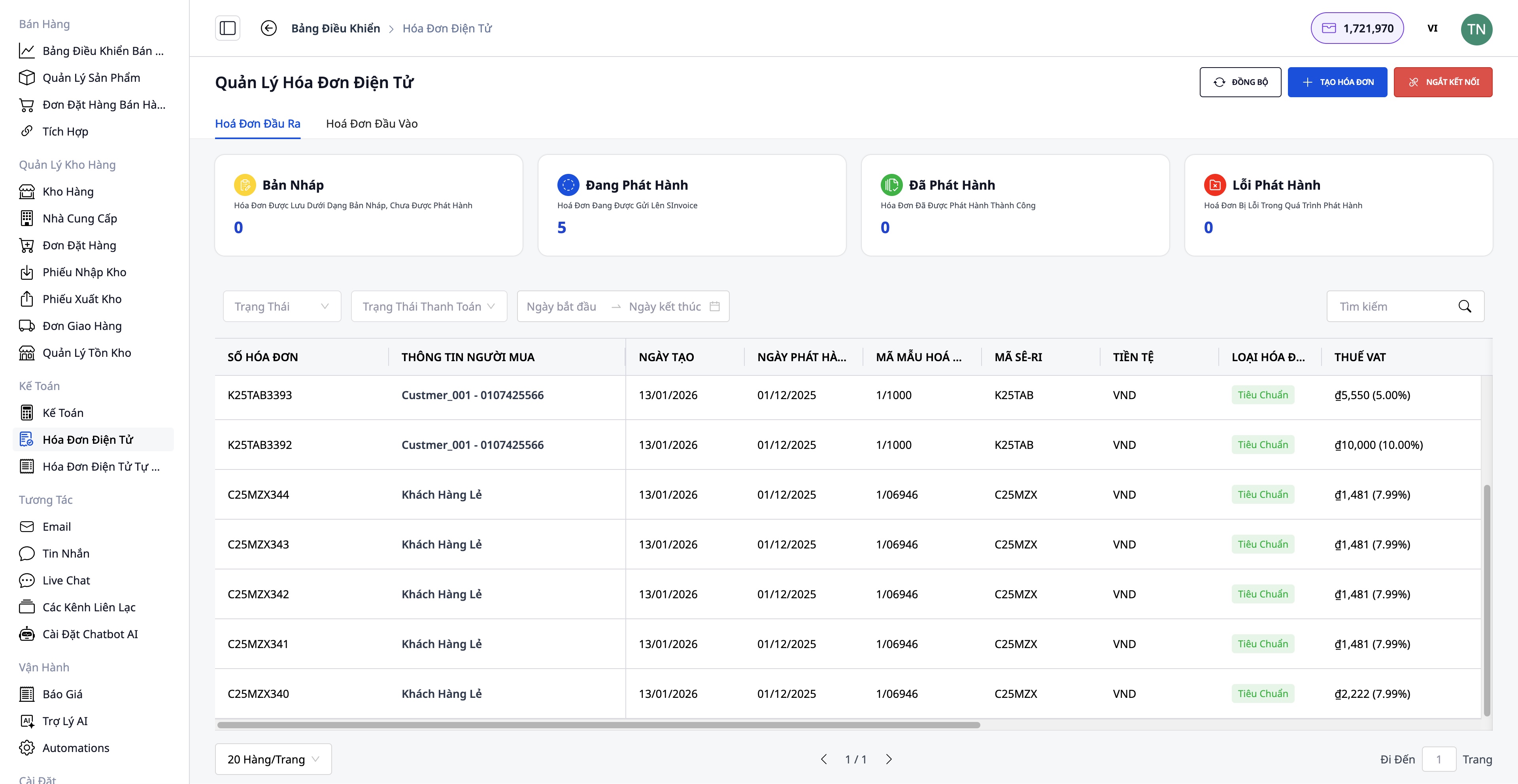
Fremgangsmåte for å utstede faktura:
- Velg fakturaleverandør: S-Invoice (Viettel) eller MISA
- Velg fakturamall: MVA-faktura eller salgsfaktura
- Fyll inn informasjon: Kjøperinformasjon (firmanavn, organisasjonsnummer, adresse), produkter og antall (hentes automatisk fra bestillingen), MVA-sats, betalingsmetode
- Forhåndsvis PDF:
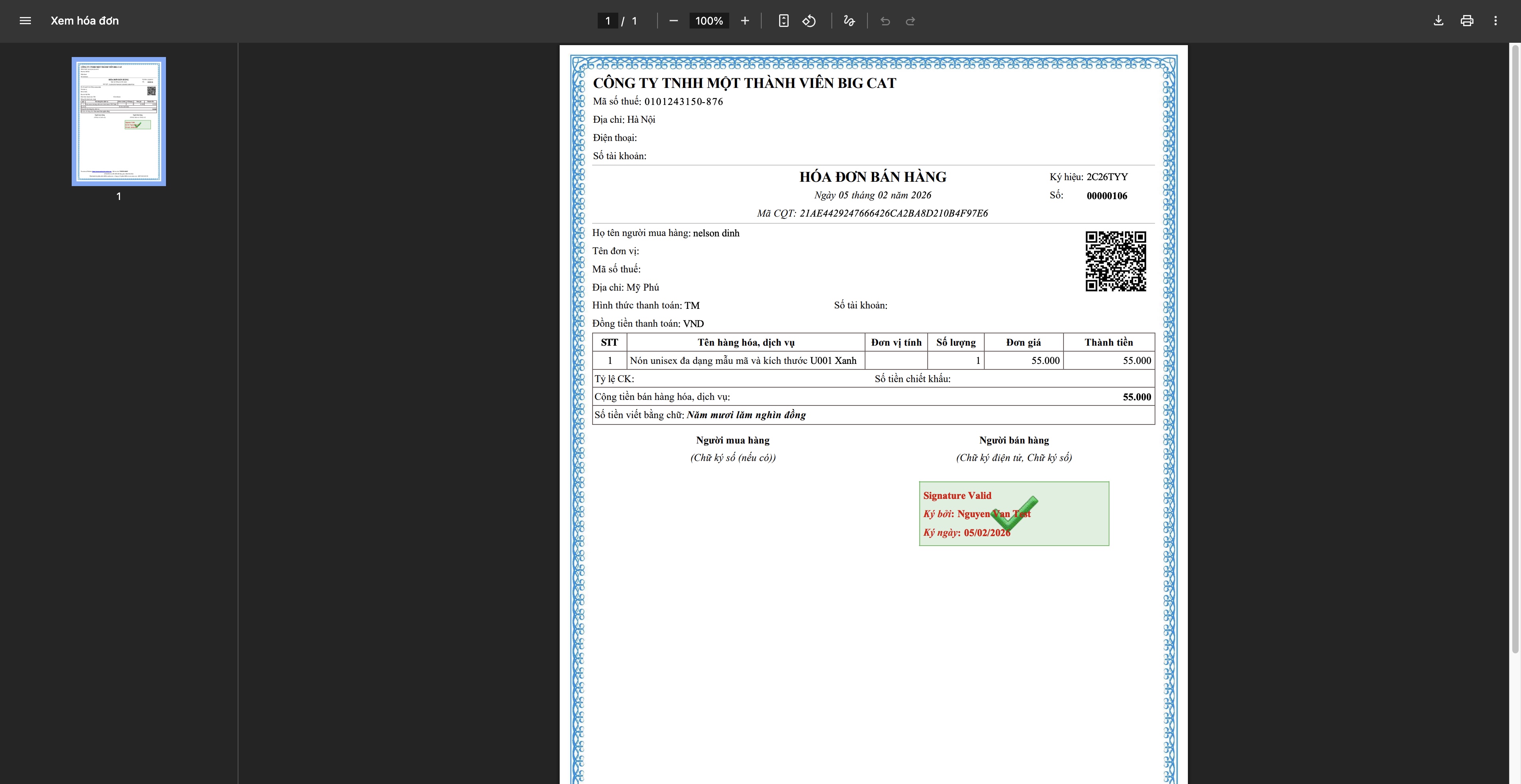
- Utsted faktura: Systemet sender forespørselen til leverandøren, fakturaen får et nummer fra skattemyndighetene, lastes ned og sendes til kunden
Trinn 6: Spor og fullfør bestillingen
Sporing av forsendelsen
- Oppdater sporingsstatus fra transportøren
- Varsle kunden om leveringsprosessen
- Håndtere spesielle tilfeller (mislykket levering, utsettelse...)
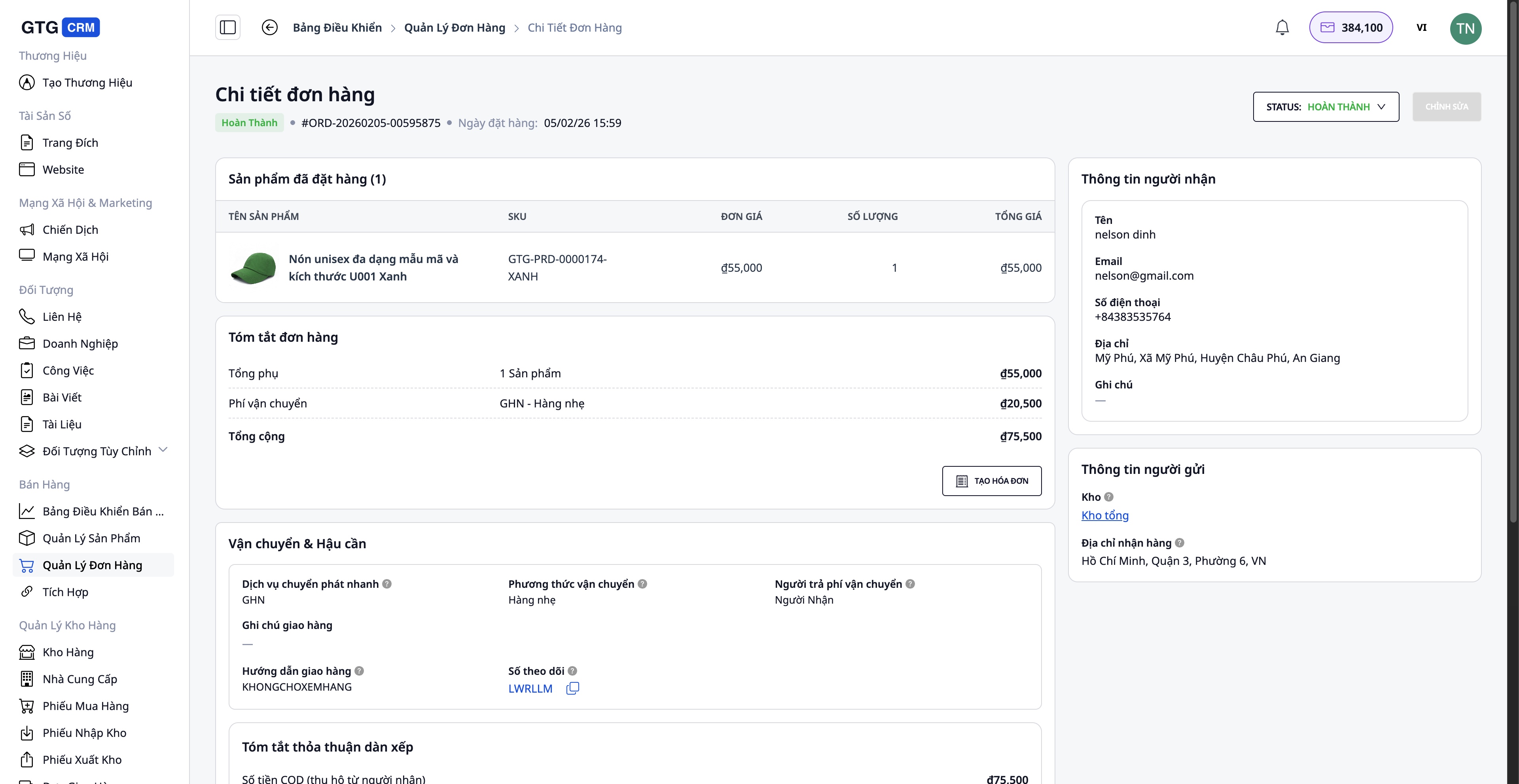
Fullfør bestillingen
Når kunden har mottatt varene успешно:
- Oppdater bestillingsstatus til Completed
- Bekreft at betalingen er mottatt (for COD-ordre)
- Lagre informasjonen i transaksjonshistorikken
Håndtering av problematiske bestillinger
Ved retur/bytte fra kunde:
- Opprett en erstatningsfaktura (hvis faktura allerede er utstedt) - Juster mengde og verdi - Systemet oppretter automatisk en erstatningsfaktura etter at den er aktivert
- Oppdater lageret - Registrer de returnerte varene tilbake på lager (hvis de fortsatt er i god stand) - Registrer skadede varer (hvis noen)
- Refunder kunden (om nødvendig)
Fordelene med standardprosessen
For virksomheten
- Sentralt styrt: Alle bestillinger, produkter og lager i ett system
- Tidsbesparende: Automatisering av mange trinn (produktsynkronisering, opprettelse av fraktbrev, fakturering)
- Færre feil: Informasjon synkroniseres automatisk, noe som reduserer manuell registrering
- Lagerkontroll: Oppdateres i sanntid, hindrer salg utover tilgjengelig antall
- Juridisk samsvar: Gyldige og komplette elektroniske fakturaer
For ansatte
- Brukervennlig grensesnitt: Enkelt å bruke, krever ikke komplisert opplæring
- Klart definert prosess: Hvert trinn er tydelig veiledet
- Full integrasjon: Ingen behov for å bytte mellom flere apper
- Effektivt arbeid: Håndter flere bestillinger samtidig
For kundene
- Rask respons: AI Chatbot støtter 24/7
- Levering til avtalt tid: Rask og effektiv behandling
- Nøyaktig informasjon: Bestillinger og frakt oppdateres fortløpende
- Profesjonell faktura: Gyldige og komplette elektroniske fakturaer
Viktige merknader
Om tilkobling til e-handelsplattformer:
- Du må ha en verifisert butikkkonto på Shopee/Lazada/TikTok Shop
- Produktsynkronisering bør gjøres når det er få bestillinger for å unngå datakonflikter
Om lagerstyring:
- Det anbefales å oppdatere lagerbeholdningen jevnlig for å sikre nøyaktighet
- Utfør regelmessig lageropptelling (månedlig/kvartalsvis) for å sammenligne med systemet
Om fakturering:
- Utsted faktura kun når kunden ber om det eller ved høy bestillingsverdi
- Kontroller MVA-nummer og adresse nøye før utstedelse
- Erstatningsfaktura skal kun brukes ved behov (retur, feil)
Om frakt:
- Pakk varene forsvarlig for å unngå skade under transport
- Velg en frakttjeneste som passer bestillingsverdien og kundens krav
Konklusjon
GTG CRMs standard prosess for ordrebehandling hjelper nettbaserte bedrifter med å operere profesjonelt, effektivt og strukturert. Fra produktstyring, multikanal-tilkobling og ordrebehandling til frakt, fakturering og kundeservice - alt er sømløst integrert i én og samme plattform.
Ved å ta i bruk denne prosessen vil du:
- Øke hastigheten på ordrebehandlingen
- Få bedre kontroll over driften
- Optimalisere driftskostnadene
- Forbedre kundeopplevelsen
- Bygge en bærekraftig virksomhet
Begynn å bruke GTG CRM i dag for å oppleve en profesjonell salgsprosess!
Gjør det du nettopp har lest om til konkrete resultater — ta i bruk GTG CRM med en gang, gratis.
Ta i bruk nå

