
V poslovanju spletne prodaje je profesionalen postopek obravnave naročil ključnega pomena za uspeh podjetja. GTG CRM ponuja celovit postopek obravnave naročil, od prejema naročila, upravljanja zalog, pošiljanja do izdaje računov in podpore strankam - vse integrirano v en sam sistem.
Z GTG CRM ne upravljate le naročil, temveč se lahko povežete tudi z velikimi platformami e-trgovine, kot so Shopee, Lazada, TikTok Shop, samodejno sinhronizirate izdelke in zaloge, hitro ustvarjate naročila za pošiljanje in izdajate veljavne elektronske račune. To je celovita rešitev, ki podjetjem pomaga pri učinkovitem poslovanju, izboljšanju uporabniške izkušnje in trajnostnem razvoju.
Ključne funkcije
- Samodejno svetovanje in zaključevanje naročil: AI Chatbot podpira odgovarjanje in zaključevanje naročil strank 24/7, kar zmanjšuje obremenitev zaposlenih
- Centralizirano upravljanje naročil: Vsa naročila s spletnih strani, platform e-trgovine in drugih kanalov se upravljajo v enem sistemu
- Večkanalna prodajna povezava: Integracija s Shopee, Lazada, TikTok Shop ter dvosmerna sinhronizacija izdelkov in naročil
- Inteligentno upravljanje zalog: Sledenje zalogam v realnem času, samodejno posodabljanje ob prejemu naročila, podpora za več skladišč
- Integracija s ponudniki dostave: Neposredno ustvarjanje naročil za dostavo pri ponudnikih dostave, kot so Giao Hàng Nhanh, Viettel Post, podpora za COD
- Izdajanje elektronskih računov: Povezava s S-Invoice (Viettel) in MISA za izdajanje veljavnih DDV računov
- Sledenje statusu naročila: Jasno posodabljanje statusa od Novega → V obdelavi → Dokončano
Standardni postopek obravnave naročil
1. korak: Priprava izdelkov in zalog
Ustvarjanje in upravljanje skladišč
Najprej morate v sistemu nastaviti skladišča pod Upravljanje zalog → Skladišča.
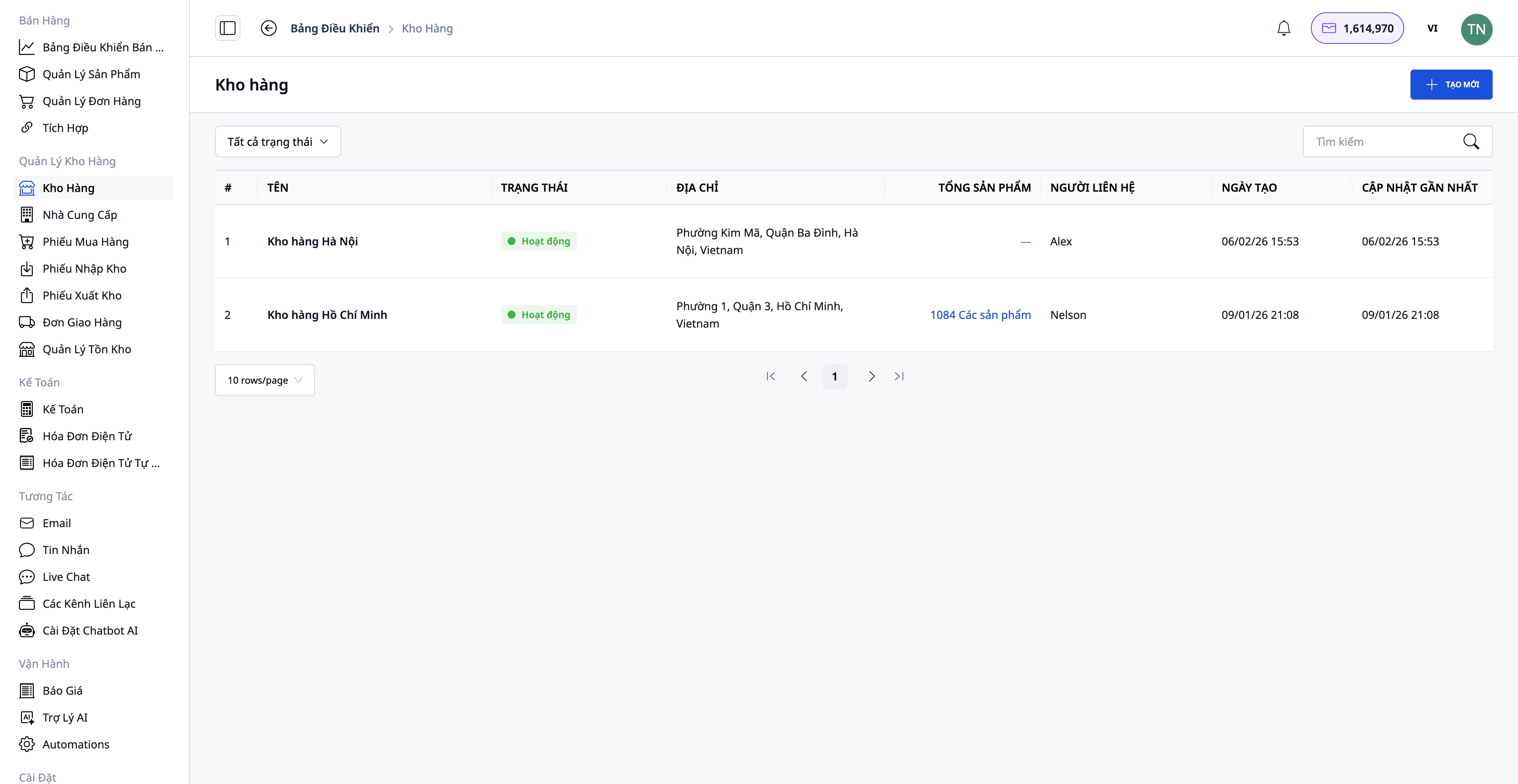
- Ustvarite skladišče s podatki: Ime skladišča, koda skladišča, naslov, odgovorna oseba
- Podpora za več skladišč: Glavno skladišče, pomožno skladišče, skladišče podružnice
- Sledenje zalogam za vsako skladišče posebej
Ustvarjanje izdelkov v sistemu
Pojdite na Prodaja → Upravljanje izdelkov, da ustvarite nov izdelek.
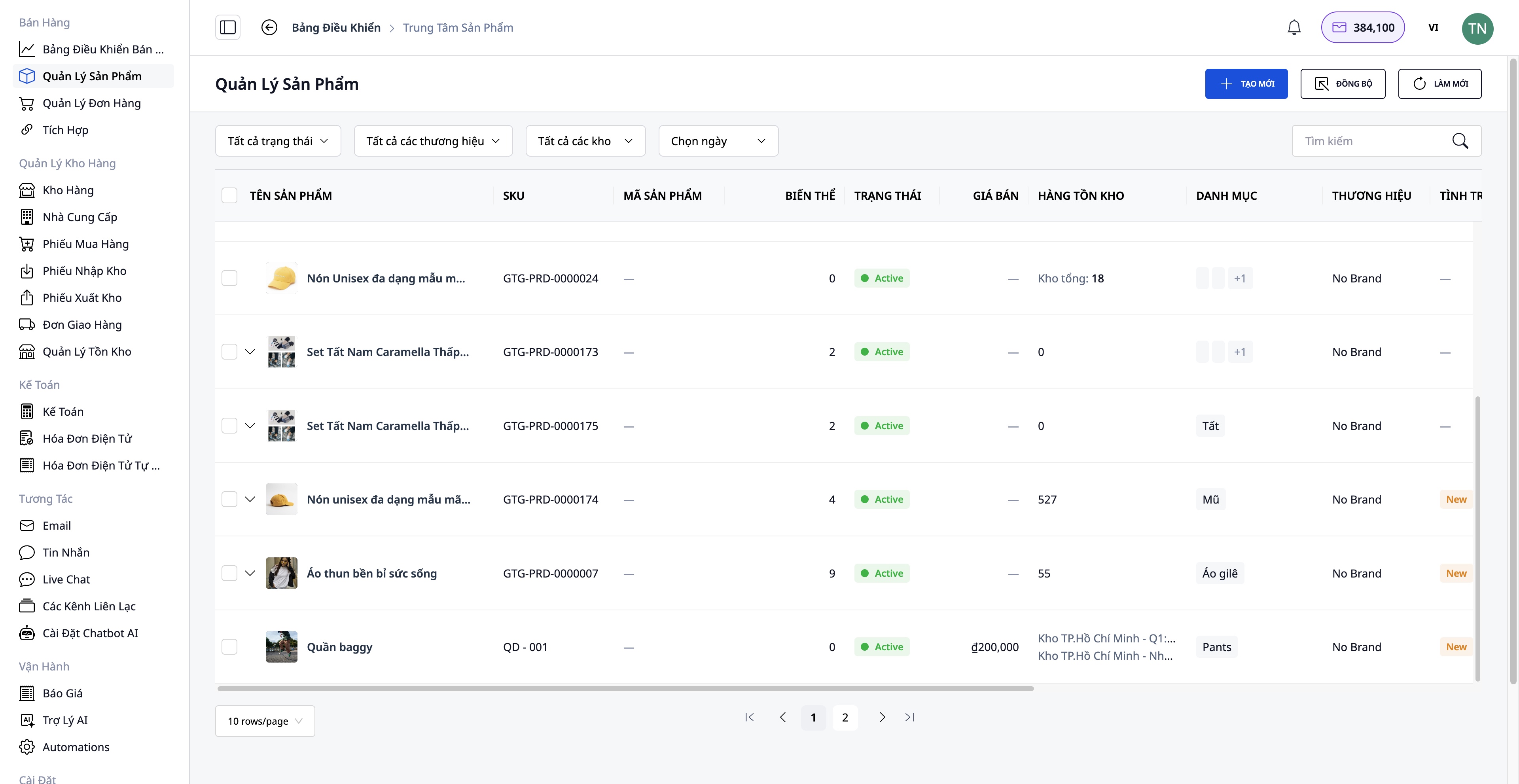
Potrebni podatki za vnos:
- Ime izdelka, SKU, kategorija, blagovna znamka
- Slike in videoposnetki izdelkov
- Variacije: Barva, velikost (do 3 atributi)
- Osnovna cena, DDV, prodajna cena (sistem samodejno izračuna dobiček)
- Podroben opis in tehnične specifikacije
- Začetna količina na zalogi
Povezava in sinhronizacija s platformami e-trgovine
Pojdite na Prodaja → Integracije, da se povežete s platformami e-trgovine.
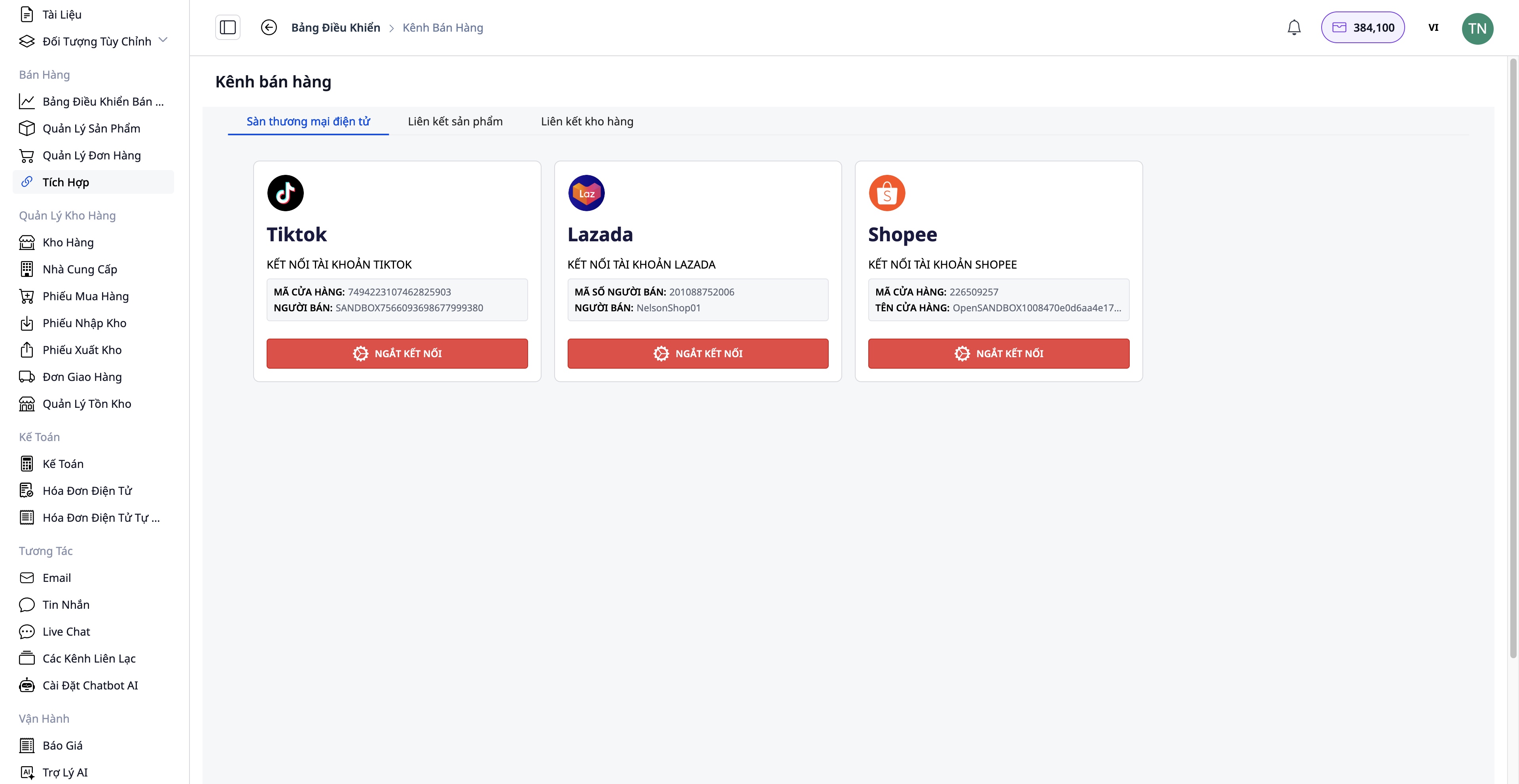
Koraki povezovanja:
- Izberite platformo, s katero se želite povezati: Shopee / Lazada / TikTok Shop
- Preverite svoj račun trgovine
- Dvosmerna sinhronizacija izdelkov:
- Prenesi nazaj: Prenos izdelkov s platforme v GTG CRM
- Naloži gor: Prenos izdelkov iz GTG CRM na platformo
Prednosti:
- Centralizirano upravljanje vseh izdelkov
- Samodejna sinhronizacija zalog med kanali
- Prihranek časa pri ročnem posodabljanju
2. korak: Prejem naročil
Prejem naročil iz več kanalov
Naročila lahko prihajajo iz:
- Vaše spletne strani (integrirano z GTG CRM)
- Shopee, Lazada, TikTok Shop (samodejna sinhronizacija)
- Ročna naročila (stranke naročijo preko telefona, Facebooka...)
Korak 3: Obdelava in priprava blaga
Pregled in sprememba naročila (če je potrebno)
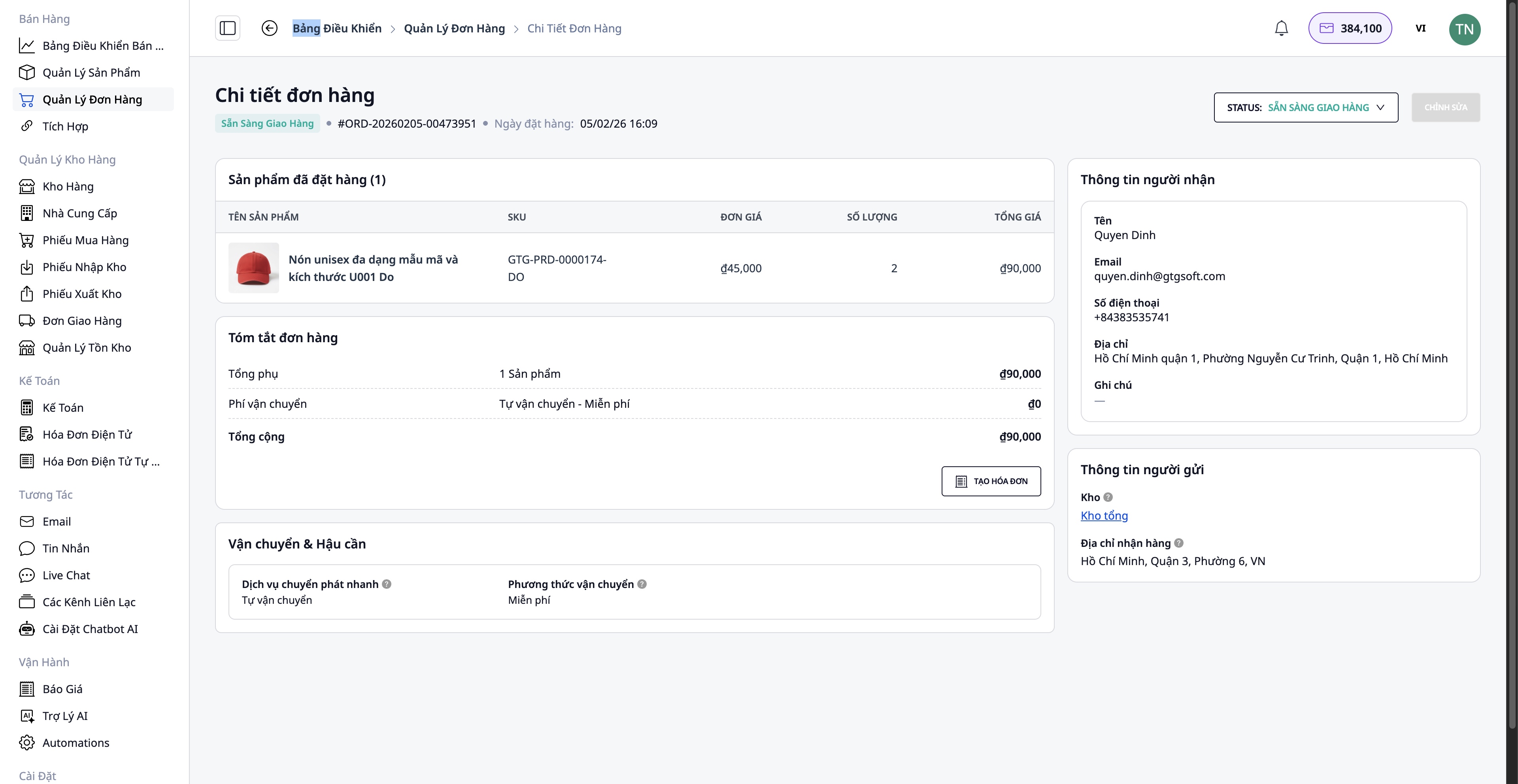
- Podatki o kupcu
- Naslov za dostavo
- Dodajanje/odstranjevanje izdelkov
- Količina izdelkov
Preverjanje zalog
Sistem samodejno preverja količino zalog:
- ✅ Dovolj blaga → Nadaljujte s pakiranjem
- ❌ Premalo blaga → Potrebno je naročiti blago pri dobavitelju
Postopek naročanja blaga (če ga primanjkuje):
Pojdite na Dobavitelji → Izberite dobavitelja → Ustvari naročilnico
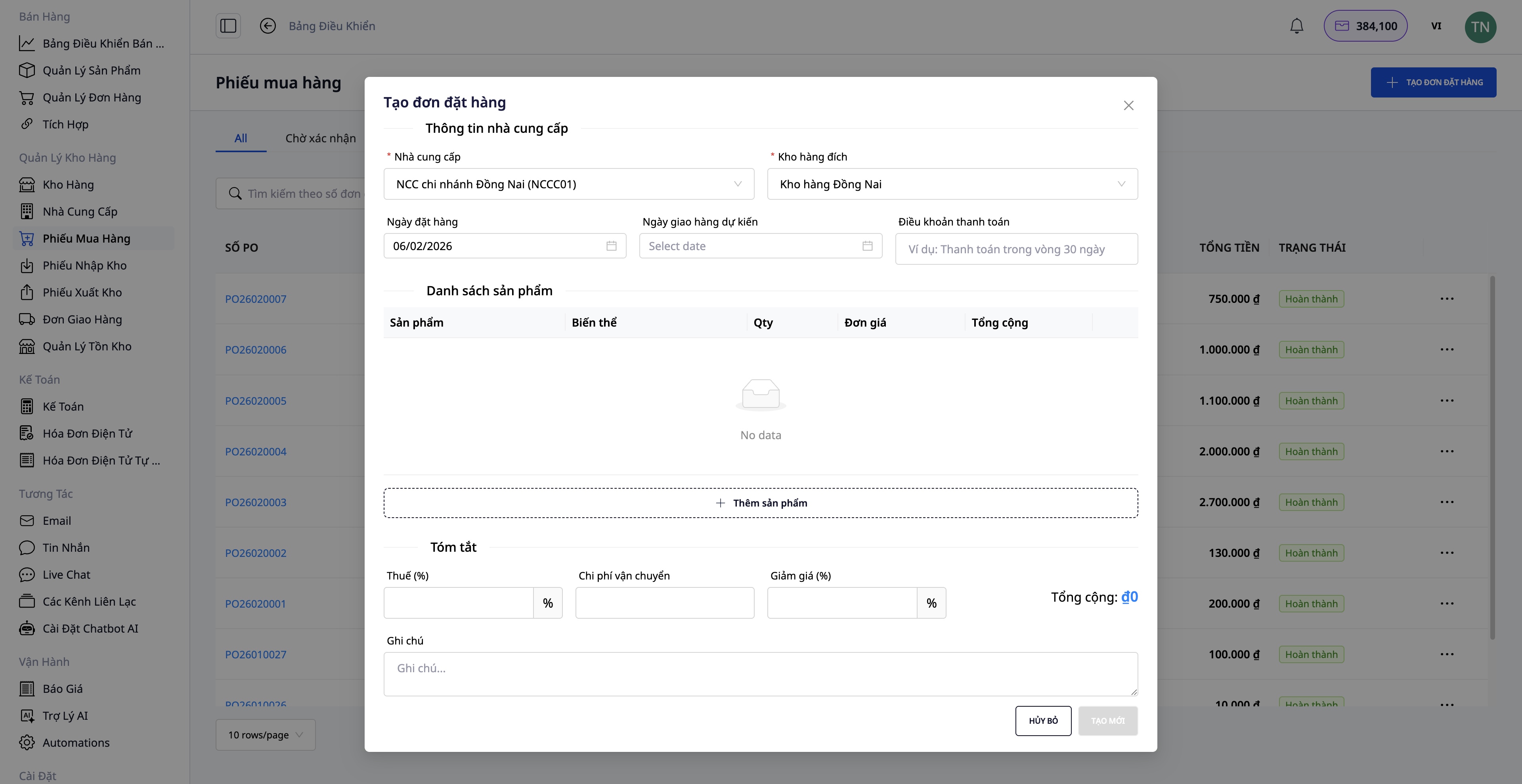
- Izberite izdelke, ki jih je treba naročiti
- Vnesite količino, ceno na enoto
- Potrdite naročilnico
- Ko blago prispe, ustvarite Dobavnico
- Zaloge se samodejno posodobijo
Korak 4: Ustvarjanje naloga za pošiljanje
Po končanem pakiranju blaga ustvarite naloga za pošiljanje neposredno iz naročila.
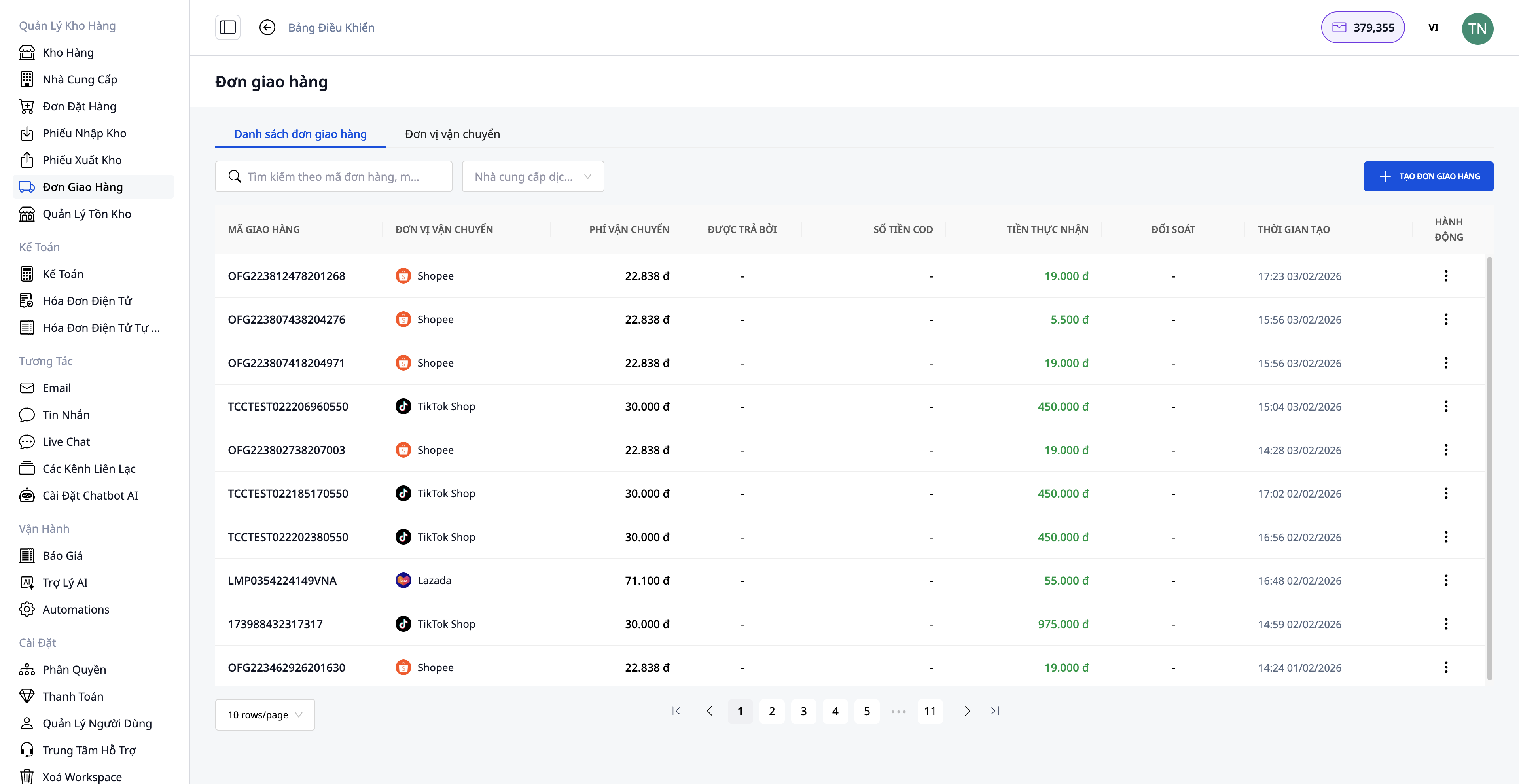
Potrebni podatki:
1. Izberite dostavno službo:
- Hitra dostava
- Ekonomična dostava
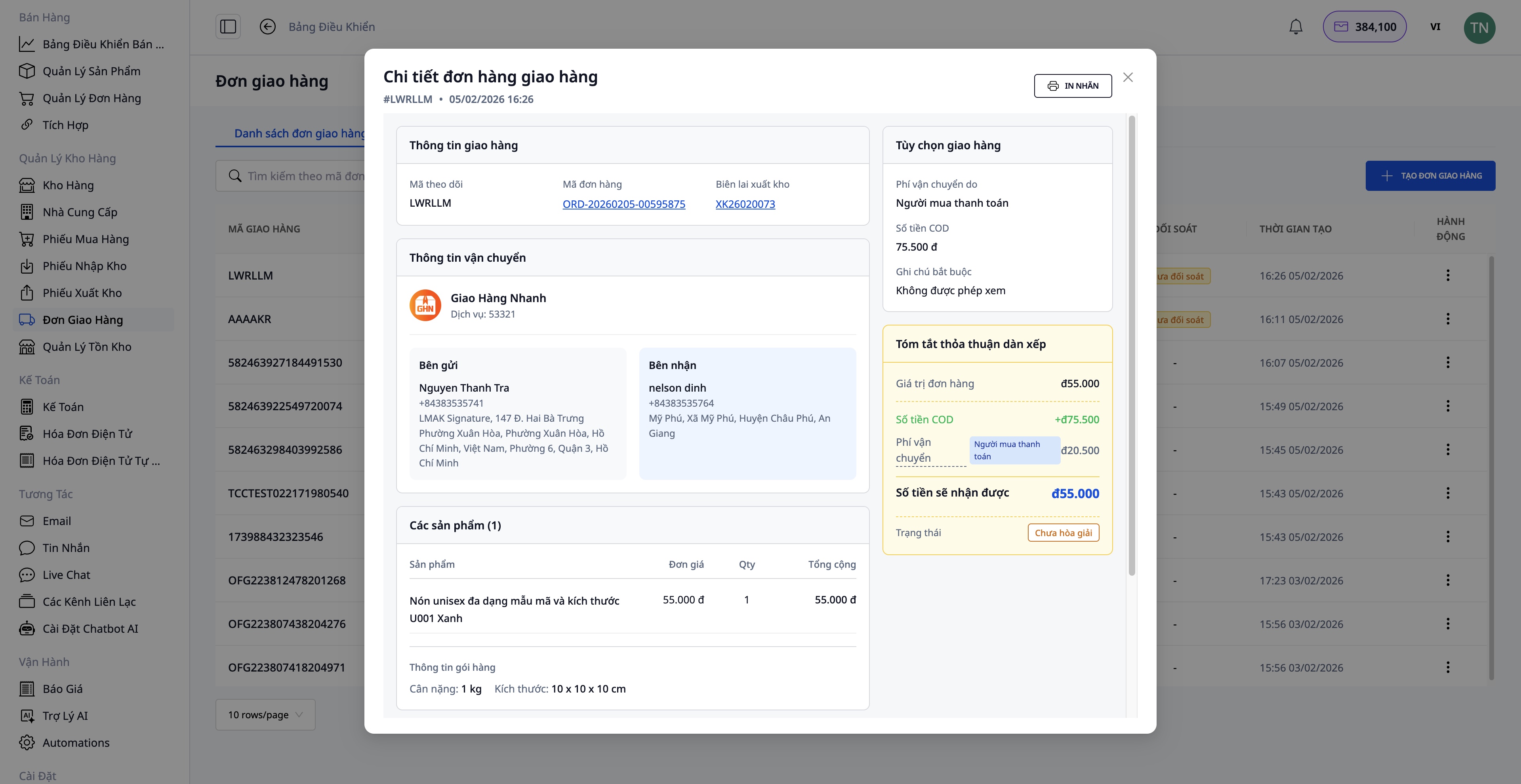
2. Znesek za povračilo ob dostavi (COD):
- Vnesite znesek, ki ga je treba pobrati od kupca
- Vključuje ceno blaga in stroške pošiljanja (če jih plača kupec)
3. Podatki o paketu:
- Teža (kg)
- Mere (dolžina x širina x višina)
- Kdo plača stroške pošiljanja (prodajalec/kupec)
4. Potrditev ustvarjanja naloga:
- Sistem samodejno pridobi podatke iz naročila
- Pošlje zahtevo dostavni službi
- Pridobi številko za sledenje pošiljke
Po uspešni kreaciji naloga za pošiljanje:
- Natisnite dostavni list in ga prilepite na paket
- Predajte ga dostavni službi
Korak 5: Izdajanje e-računov
Za poslovne kupce ali tiste, ki potrebujejo DDV račune, lahko e-račune izdajate neposredno iz naročila ali pa sistem samodejno izdaja račune.
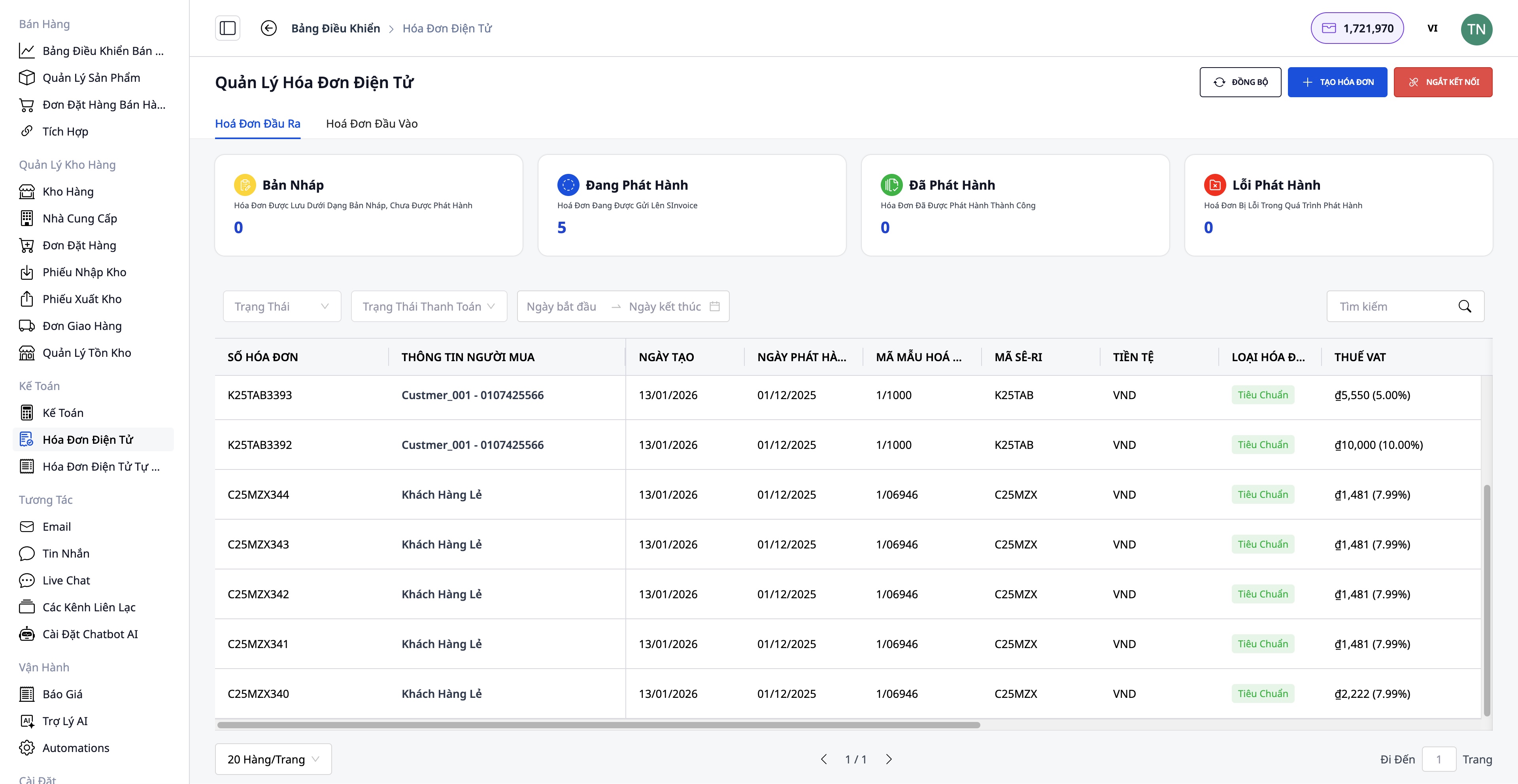
Koraki za izdajanje računa:
- Izberite ponudnika računov: S-Invoice (Viettel) ali MISA
- Izberite predlogo računa: DDV račun ali prodajni račun
- Vnesite podatke: Podatki o kupcu (ime podjetja, davčna številka, naslov), Izdelki in količine (samodejno pridobljeno iz naročila), Stopnja DDV, Način plačila
- Predogled PDF:
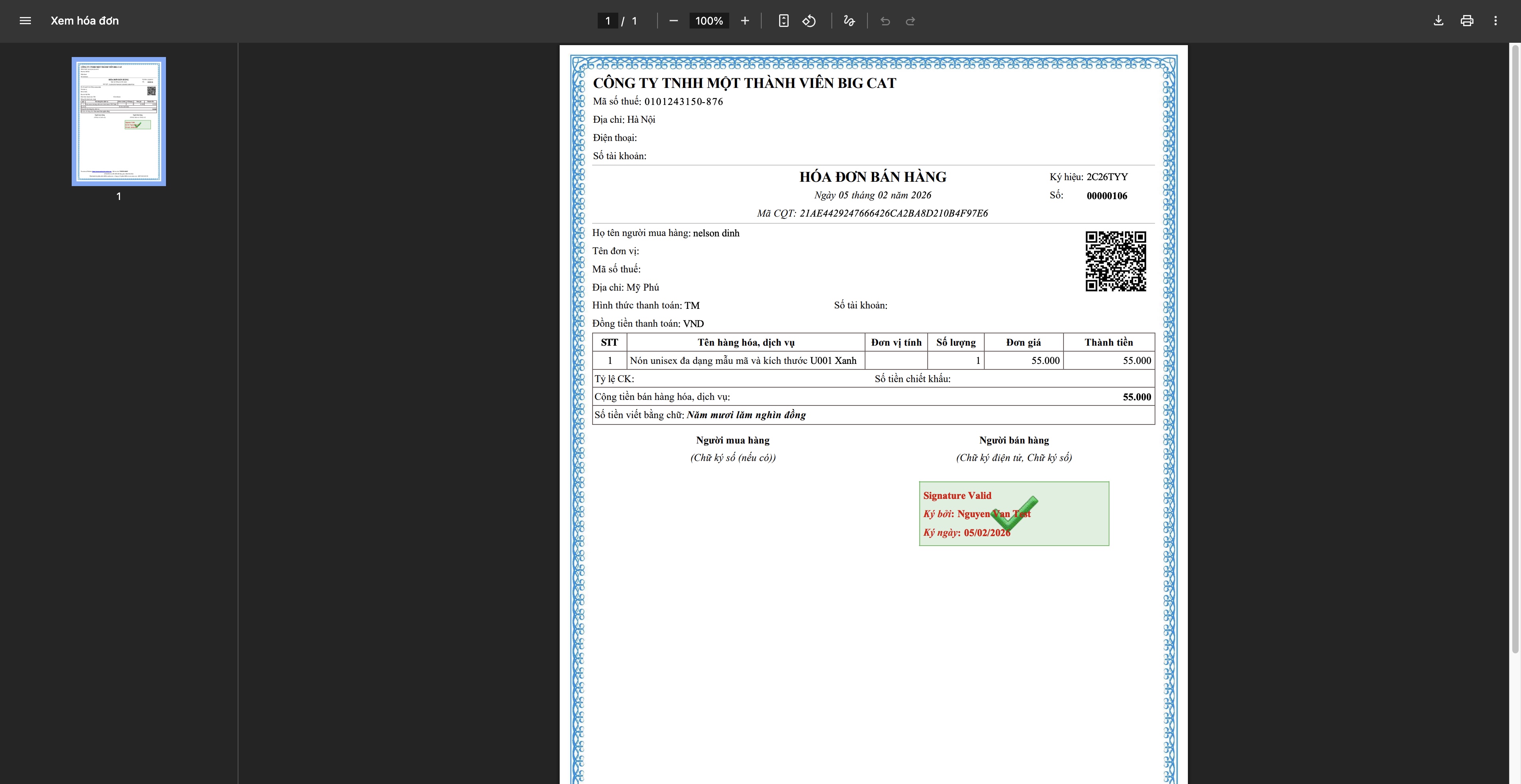
- Izdajanje računa: Sistem pošlje zahtevo ponudniku, račun prejme davčno številko davčne uprave, prenesete ga in pošljete kupcu
Korak 6: Sledenje in zaključek naročila
Sledenje pošiljk
- Posodobite status pošiljke od dostavne službe
- Obvestite kupca o poteku dostave
- Obravnavajte posebne primere (neuspela dostava, zamude...)
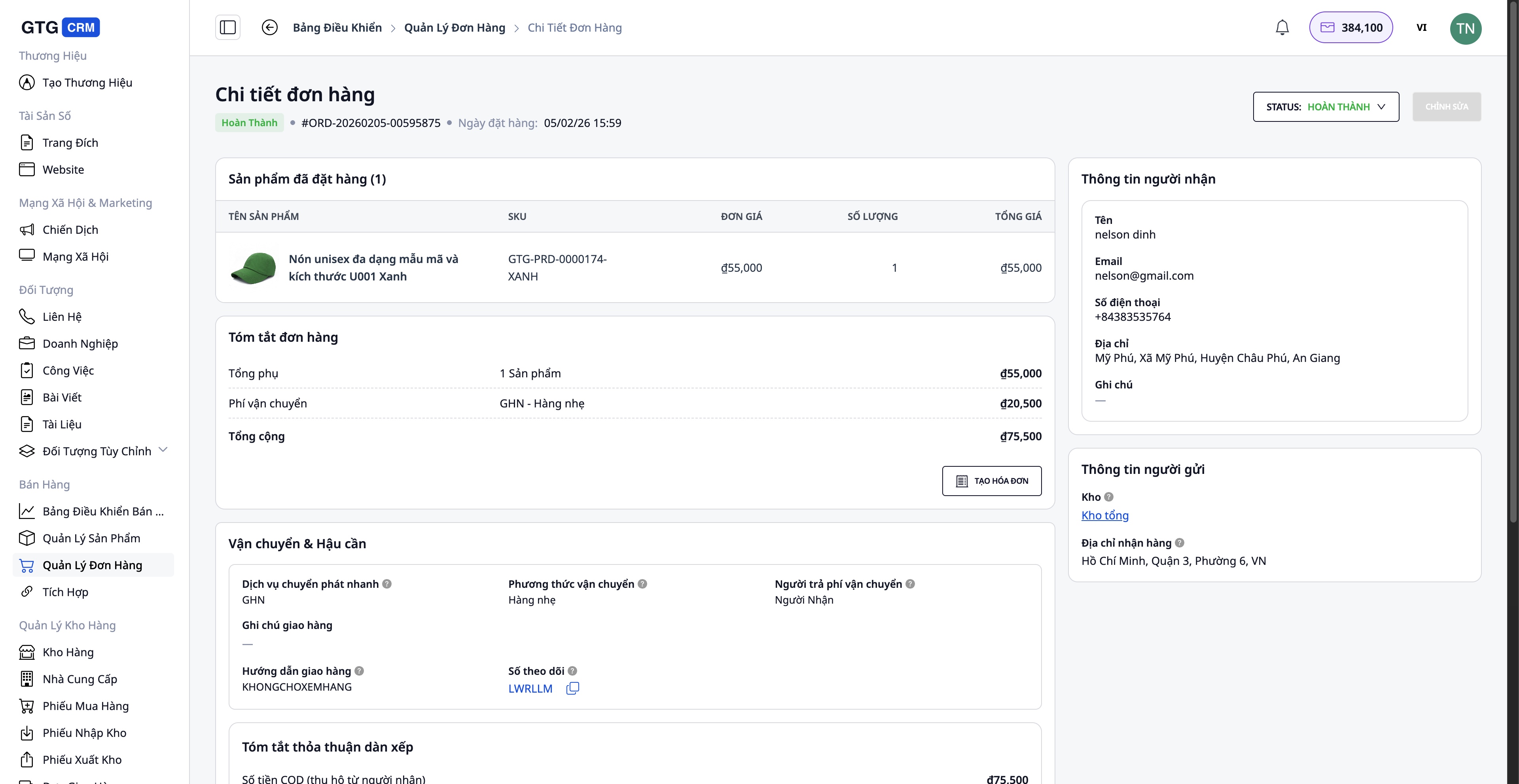
Zaključek naročila
Ko je kupec uspešno prejel blago:
- Posodobite status naročila v Completed
- Potrdite prejem plačila (za naročila COD)
- Shranite podatke v zgodovino transakcij
Obravnava naročil s težavami
Primer vračila/zamenjave blaga s strani kupca:
- Ustvari nadomestni račun (če je bil izdan račun) - Prilagodi količino, vrednost - Sistem samodejno ustvari nadomestni račun po aktivaciji
- Posodobi zaloge - Vrni blago v skladišče (če je še v dobrem stanju) - Zabeleži poškodovano blago (če obstaja)
- Vračilo kupcu (če je potrebno)
Prednosti standardnega postopka
Za podjetja
- Osredotočeno upravljanje: Vsa naročila, izdelki, skladišče v enem sistemu
- Prihranek časa: Avtomatizacija številnih korakov (sinhronizacija izdelkov, ustvarjanje nalepk za pošiljanje, izdajanje računov)
- Zmanjšanje napak: Samodejna sinhronizacija podatkov, omejen ročni vnos podatkov
- Nadzor zalog: Posodabljanje v realnem času, izogibanje prodaji čez količino
- Zakonska skladnost: Veljavni, popolni elektronski računi
Za zaposlene
- Prijazen vmesnik: Enostaven za uporabo, ne zahteva zapletenega usposabljanja
- Jasni postopki: Vsak korak je podrobno opisan
- Popolna integracija: Ni potrebe po preklapljanju med več aplikacijami
- Učinkovito delo: Obravnava več naročil hkrati
Za kupce
- Hitro odzivanje: AI Chatbot podpira 24/7
- Dostava pravočasno: Hiter postopek obravnave
- Točne informacije: Naročila, pošiljanje se nenehno posodabljajo
- Profesionalni računi: Veljavni, popolni elektronski računi
Pomembni opozorila
O povezovanju s spletnimi tržnicami:
- Potreben je potrjen trgovski račun na Shopee/Lazada/TikTok Shop
- Sinhronizacijo izdelkov je treba izvesti v času manj naročil, da se izognemo konfliktom podatkov
O upravljanju zalog:
- Redno posodabljajte zaloge, da zagotovite točnost
- Redno izvajajte inventuro zalog (mesečno/kvartalno), da jih primerjate s sistemom
O izdajanju računov:
- Račune izdajajte le na zahtevo kupca ali če je vrednost naročila visoka
- Pred izdajanjem natančno preverite davčno številko in naslov
- Nadomestne račune uporabite le, kadar je to nujno (vračilo blaga, napake)
O pošiljanju:
- Skrbno zapakirajte, da preprečite poškodbe med pošiljanjem
- Izberite primerno storitev pošiljanja glede na vrednost naročila in zahteve kupca
Zaključek
Standardni postopek obravnave naročil GTG CRM pomaga spletnim podjetjem delovati na profesionalen, učinkovit in organiziran način. Od upravljanja izdelkov, povezovanja z več kanali, obravnave naročil, pošiljanja do izdajanja računov in podpore strankam - vse je brezhibno integrirano na eni platformi.
Z uporabo tega postopka boste:
- Pospešili obravnavo naročil
- Bolje nadzirali poslovanje
- Optimizirali operativne stroške
- Izboljšali uporabniško izkušnjo
- Trajnostno razvijali podjetje
Začnite uporabljati GTG CRM še danes in izkusite profesionalen prodajni proces!
Spremenite prebrano v dejanske rezultate — takoj jih uporabite z GTG CRM, brezplačno.
Uporabi zdaj

