
The AI Full Website Generator feature is an automation tool that helps you build a complete website for your business in just minutes. Instead of hiring designers and developers and spending weeks to get a professional website, now you only need to provide basic business information, and the AI will create a fully functional, SEO-optimized, and responsive website on all devices.
Key Features
- Automatically generate a complete website with basic business information
- Simple 2-step wizard (industry + style)
- AI generates header/footer with automatic navigation menu
- Automatic brand recognition (colors, logo, font)
- Check credits before generation - know the cost upfront, no interruptions
- Resume Flow - continue from where you left off if disconnected
- SEO optimized from the start
- Automatic responsive design (desktop, tablet, mobile)
- Reference design from any URL
- Regenerate individual sections if not satisfied
Step 1: Access the AI Full Website Generator
Log in to GTG CRM → navigate to the Website section in the sidebar → click the "Create New Website" button → select the "Generate with AI" tab.
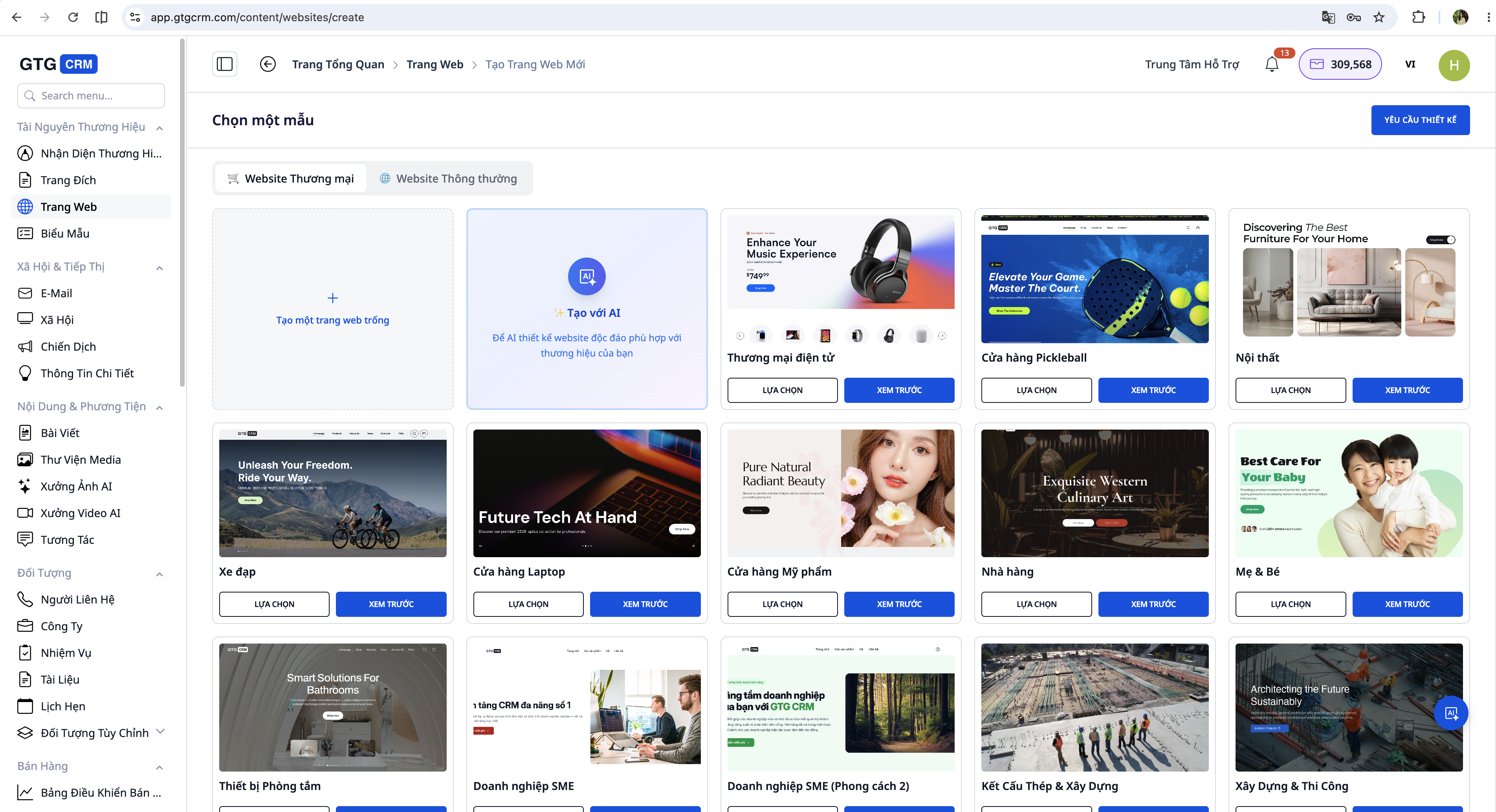
Choose Website Type
Before filling in information, select the appropriate website type:
| Type | Suitable for | Special Features |
|---|---|---|
| E-commerce Website | Online shops, product sales | Shopping cart, checkout, product catalog |
| General Website | Services, portfolios, introductions | Contact form, information presentation |
Step 2: Check Credits Before Generation
Before you start, the system displays an Estimated Cost table:
┌─────────────────────────────────────────┐
│  Website Generation Cost                │
│                                         │
│  E-commerce Website:   2,500 credits   │
│  Current Credits:       3,200 credits   │
│  Remaining Credits:      700 credits   │
│                                         │
│  [✓ Sufficient Credits — Start Generation] │
└─────────────────────────────────────────┘
If you don't have enough credits, the system will notify you and won't start the generation:
┌─────────────────────────────────────────┐
│  ⚠️ Insufficient Credits                │
│                                         │
│  Required: 2,500 credits                │
│  Available: 800 credits                 │
│  Shortage: 1,700 credits                │
│                                         │
│  [Buy More Credits]  [Cancel]           │
└─────────────────────────────────────────┘
Reference Costs: - Full E-commerce Website: 2,500 credits - Simple Landing Page: 500 credits
Step 3: Fill in Business Information
Step 3.1: Industry & Content
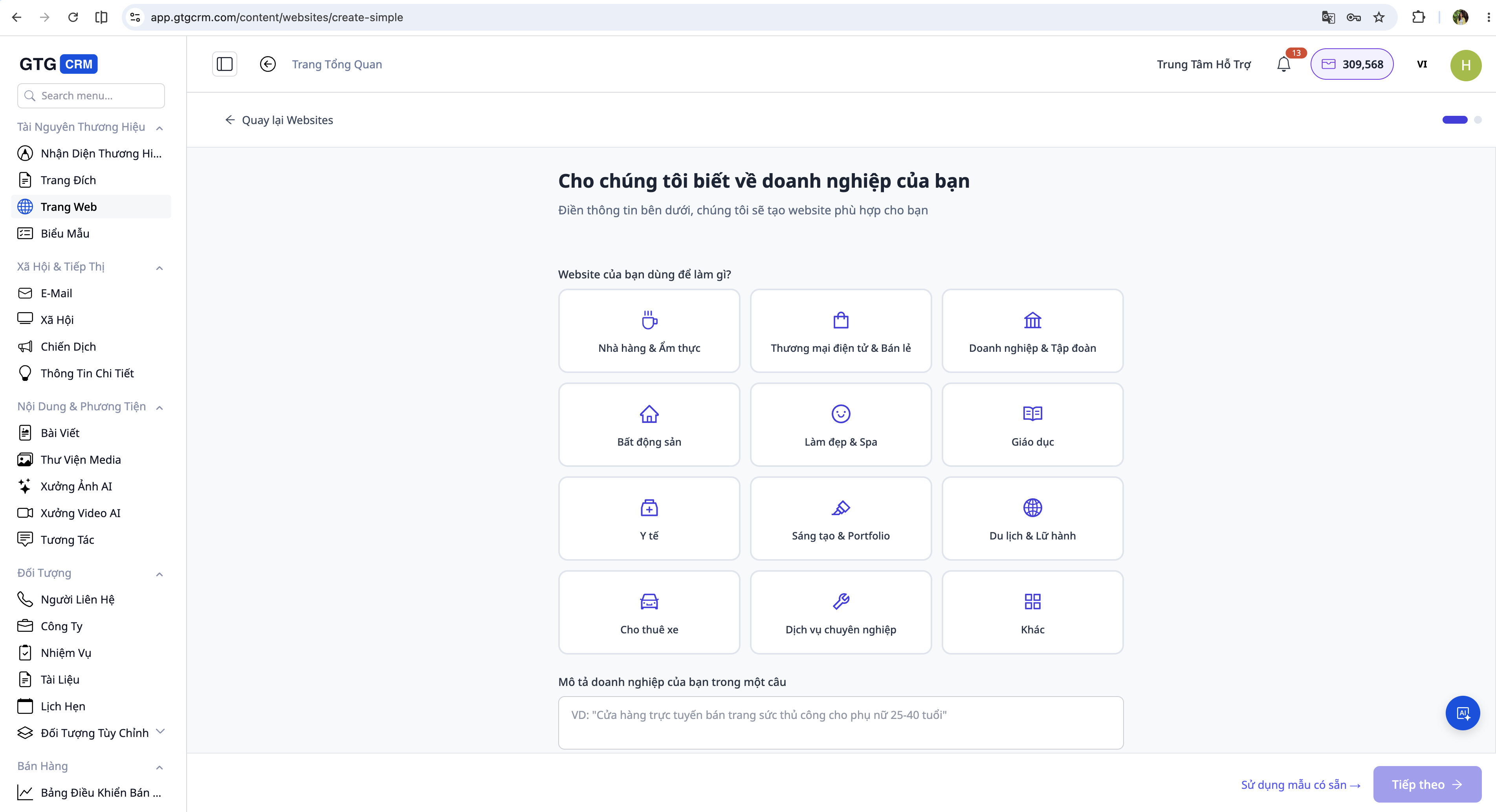
Required Information: - Business Name and slogan (if any) - Industry - select from the list or enter freely - Short Description - 2-3 sentences about what you do - Main Products/Services - list the 3–5 most important products/services - Contact Information - phone number, email, address - Desired Pages - choose from: Home, About Us, Products, Services, Blog, Contact
Optional Information (for more accurate website generation): - Website Purpose (sales / introduction / booking / portfolio) - Website Language (Vietnamese / English) - Target Audience (age group, industry sector)
Step 3.2: Style & Reference
Design Style: - Choose primary color scheme (automatically selected from Brand Identity if set up) - Select design inspiration: Youthful / Luxurious / Professional / Friendly / Minimalist
Reference from Existing Websites (Optional):
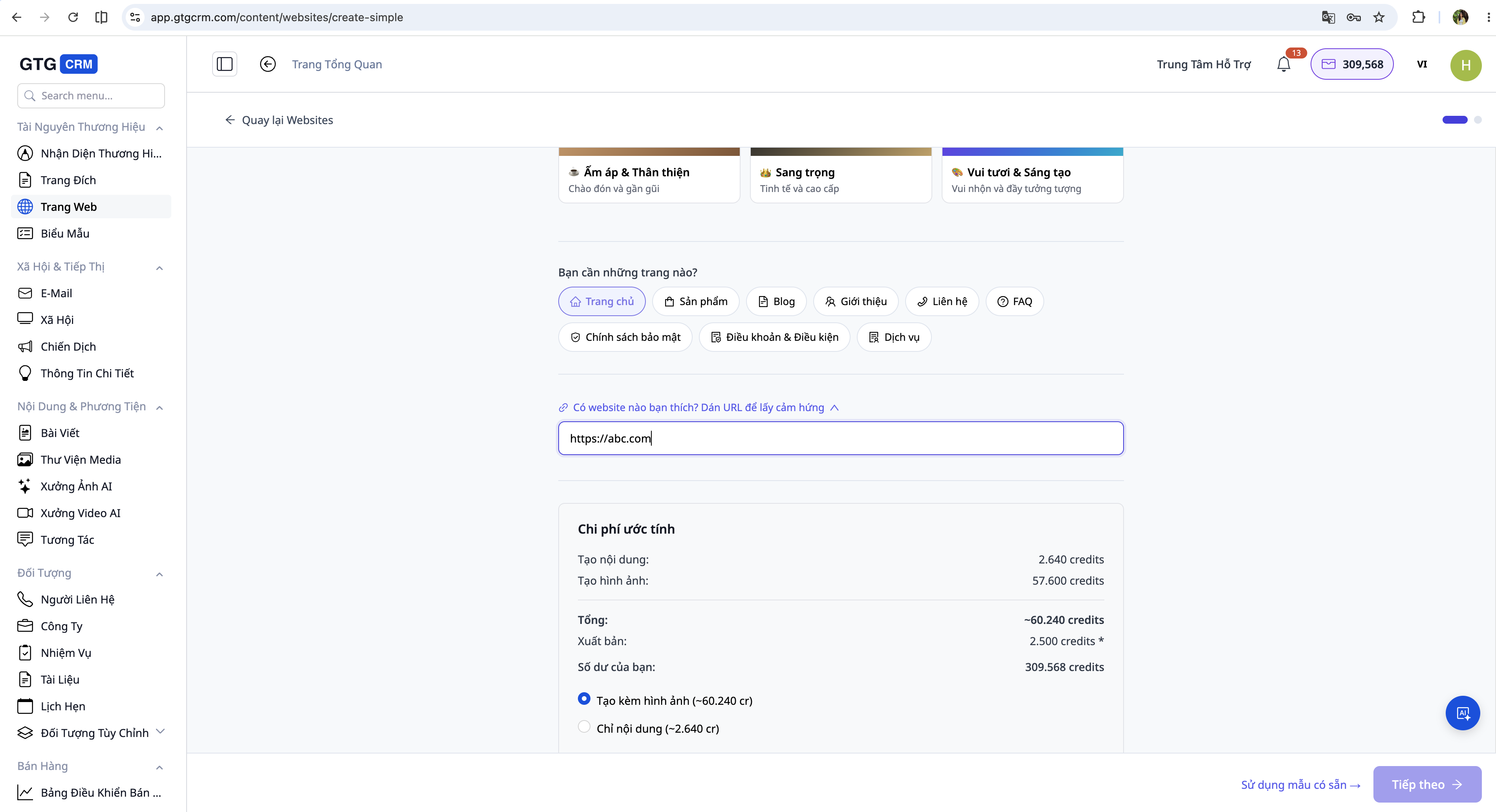
Paste any URL of a website you like → the AI will analyze its style and apply it to your website. This is the fastest way to get a website that matches your vision without lengthy descriptions.
After filling in the details → click "Next".
Step 4: Automatic Brand Recognition
If you have set up your Brand Identity in GTG CRM, the AI will automatically apply it:
| Brand Identity Information | Applied to Website |
|---|---|
| Logo | Header, footer, favicon |
| Primary Color | Buttons, headings, highlights |
| Secondary Color | Backgrounds, borders, accents |
| Font | All text content |
No Brand Identity yet? Go to Settings → Brand Identity to set it up before creating your website. Your website will have a consistent style with your other marketing materials.
Step 5: Monitor AI Website Generation
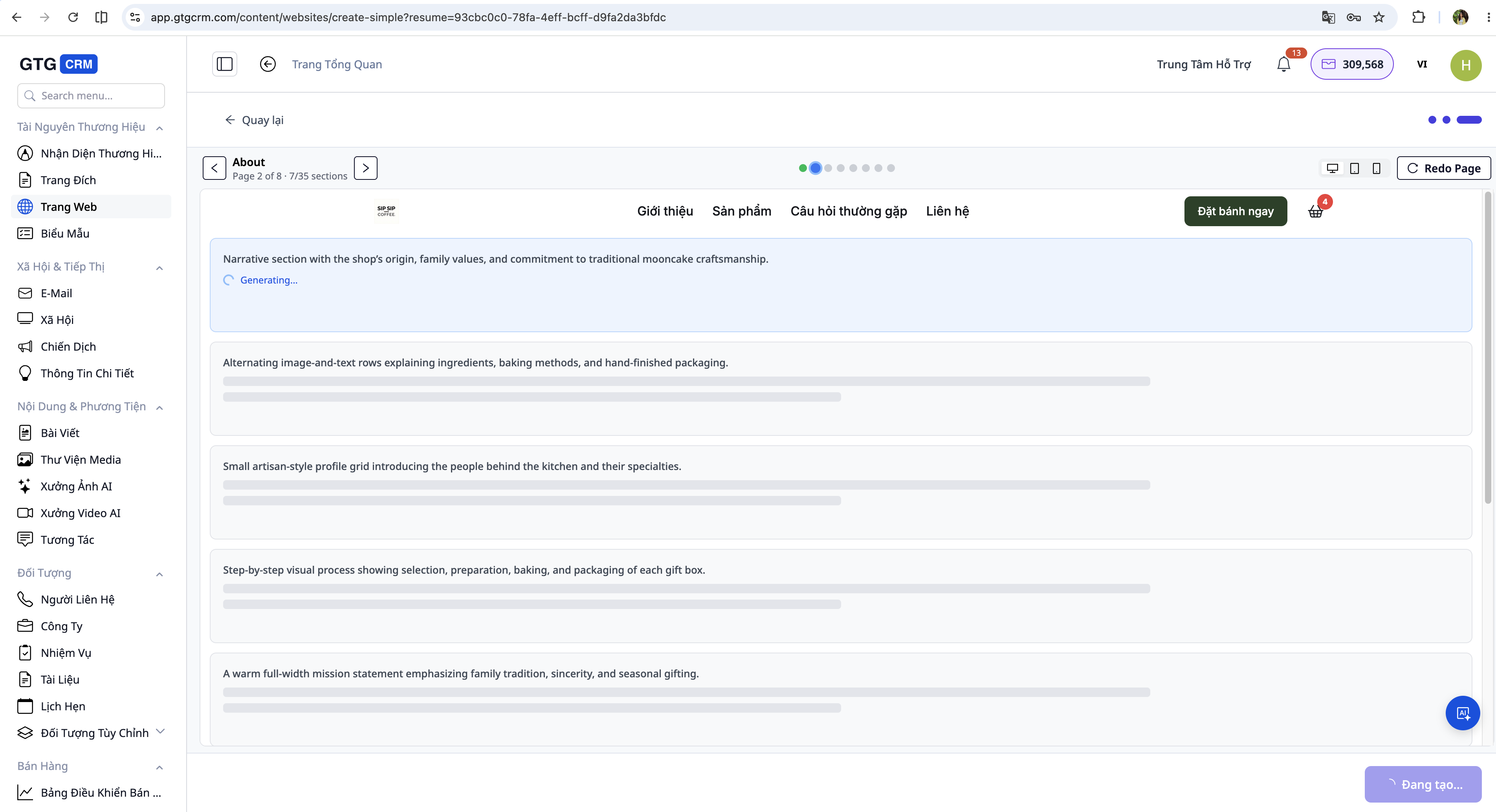
The AI website generation process typically takes 3-7 minutes depending on the number of pages. You can monitor: - The overall progress bar - Each section being generated - The page and area currently being processed
During the waiting period, the AI performs: 1. Industry analysis → selects a suitable design style 2. Creates header and footer with navigation menu 3. Generates content for each page (home, about, products, etc.) 4. Creates sample products from your CRM data (if available) 5. Optimizes SEO for all pages 6. Ensures responsiveness across all devices
Step 6: Resume Flow - Continue if Interrupted
If the process is interrupted (power outage, tab closed, connection lost), don't worry. GTG CRM automatically saves your progress.
When returning to an incomplete website
The system displays a notification:
┌─────────────────────────────────────────────┐
│  ↩️ Incomplete Website Generation           │
│                                             │
│  AI has generated 6/12 sections            │
│  Pages: Home ✅, About ✅                   │
│  In progress: Products, Blog, Contact       │
│                                             │
│  [Continue Generation]  [Start Over]       │
└─────────────────────────────────────────────┘
- "Continue Generation" → The AI will only generate the remaining sections, without consuming credits for completed parts
- "Start Over" → Generate a completely new website (costs credits as the first time)
Note: If you open the same website on two different devices, only one device can generate at a time. If the old session is inactive for 5 minutes, the new session will automatically take over.
Step 7: Preview and Review Website
Once the AI is finished, you will see a full preview interface:
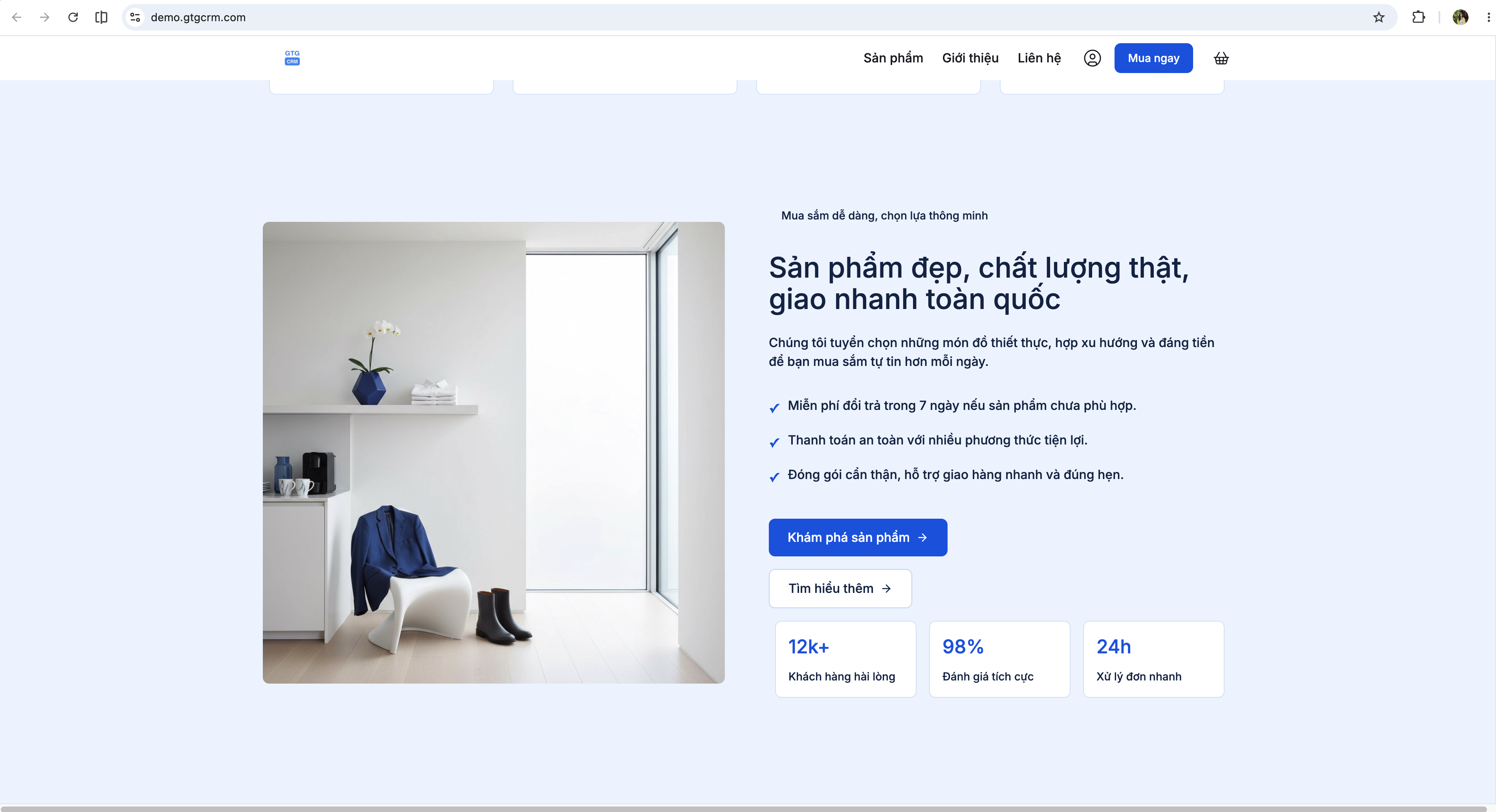
Check the following: - Header: correct logo, complete menu, clear CTA - Homepage: engaging hero section, accurate messaging - Products/Services: accurate information, relevant images - About Us: brand story aligned with positioning - Contact: correct phone number, address, email - Footer: quick links, social links, copyright - Mobile: check on a mobile device
Step 8: Customize Content (If Needed)
If any part needs adjustment, you have two options:
Option 1: Regenerate Section
Click on the section you want to regenerate → press "Regenerate" → the AI will create a new version of that section. Repeat until satisfied.
Option 2: Manual Editing
Click on individual elements on the page to edit: - Change text, headings, descriptions - Replace placeholder images with your actual business images - Adjust colors and fonts - Add or remove sections - Edit contact information
All edits are automatically saved and displayed immediately in the preview.
Step 9: Publish Website
Once you are satisfied → click the "Publish" or "Launch Website" button.
The system will ask about publishing configuration: - Domain: free subdomain (yourcompany.gtg.in) or connect your own domain - Meta SEO: page title, description, keywords - Tracking: Google Analytics, Facebook Pixel (if available)
After confirmation, the website will go live within seconds.
Step 10: Manage and Update Website
After publishing, you can: - Edit content at any time - Add or delete new pages - View traffic statistics - Recreate the website completely with a new style - Connect your own domain
All changes are saved automatically and can be published again instantly.
Important Notes
Regarding Input Information: The quality of your website depends on the information you provide. Fill in all business details accurately and completely. The more detailed the information, the better the results.
Regarding Brand Identity: Setting up your Brand Identity before creating your website allows the AI to automatically apply your brand colors and logo, saving you editing time later.
Regarding Images: The automatically generated website will use placeholder images. For a professional look, replace these with your actual business images during the customization step.
Regarding Domain: A free subdomain is suitable for testing. To increase credibility, consider registering your own domain name for your business.
Regarding Resume Flow: Progress is automatically saved during generation. If interrupted, find the website with the 🔄 status in the list and click "Continue Generation".
Frequently Asked Questions
Q: How many credits do I need to create a website? A: A full e-commerce website requires 2,500 credits. A simple landing page requires 500 credits. The system will display the exact cost before you start.
Q: What if I close the browser mid-process? Will I lose everything? A: No. GTG CRM automatically saves progress section by section. When you return, select "Continue Generation", and the AI will complete the remaining parts without charging credits for the completed sections.
Q: How long does it take for the AI to generate a website? A: Typically 3–7 minutes, depending on the number of pages (a 5-page website takes about 5 minutes). You can monitor the real-time progress on the screen.
Q: Can I create multiple websites? A: Yes. Each website uses its own credits. You can create and manage multiple websites within the same workspace.
Q: Is the website SEO-optimized? A: Yes. The AI automatically generates meta titles, meta descriptions, heading structures (H1, H2, H3), and basic sitemaps for each page.
Q: Can I connect my own domain? A: Yes. After your website goes live on the gtg.in domain, you can connect your custom domain in the website settings.


