

In the era of omnichannel sales, a question constantly arises for shop owners: How can I manage hundreds of orders from Facebook, Website, Shopee, Lazada, and TikTok Shop without getting overwhelmed? How can I ensure no order is missed, no wrong item is shipped, and most importantly, how can I save time processing orders instead of manually entering each one?
In reality, many shop owners have to open 5-6 browser tabs simultaneously, constantly switching between different platforms to check new orders. Every time an order comes in from Facebook Messenger, they have to copy customer information, address, and product details, then manually enter them into the system. When an order comes from Shopee, they have to go to the platform, download it, and then re-enter it into the management software. This manual process is not only time-consuming but also prone to errors, severely impacting customer experience and the shop's reputation.
GTG CRM understands this pain point and has developed an intelligent automatic order creation system, helping you focus on business growth instead of wasting time on manual order processing.
Automatic Order Creation System from All Channels
GTG CRM integrates all the most popular sales channels today, allowing for automatic synchronization of all orders to a single platform.
1. Facebook/Zalo and Website with AI Chatbot
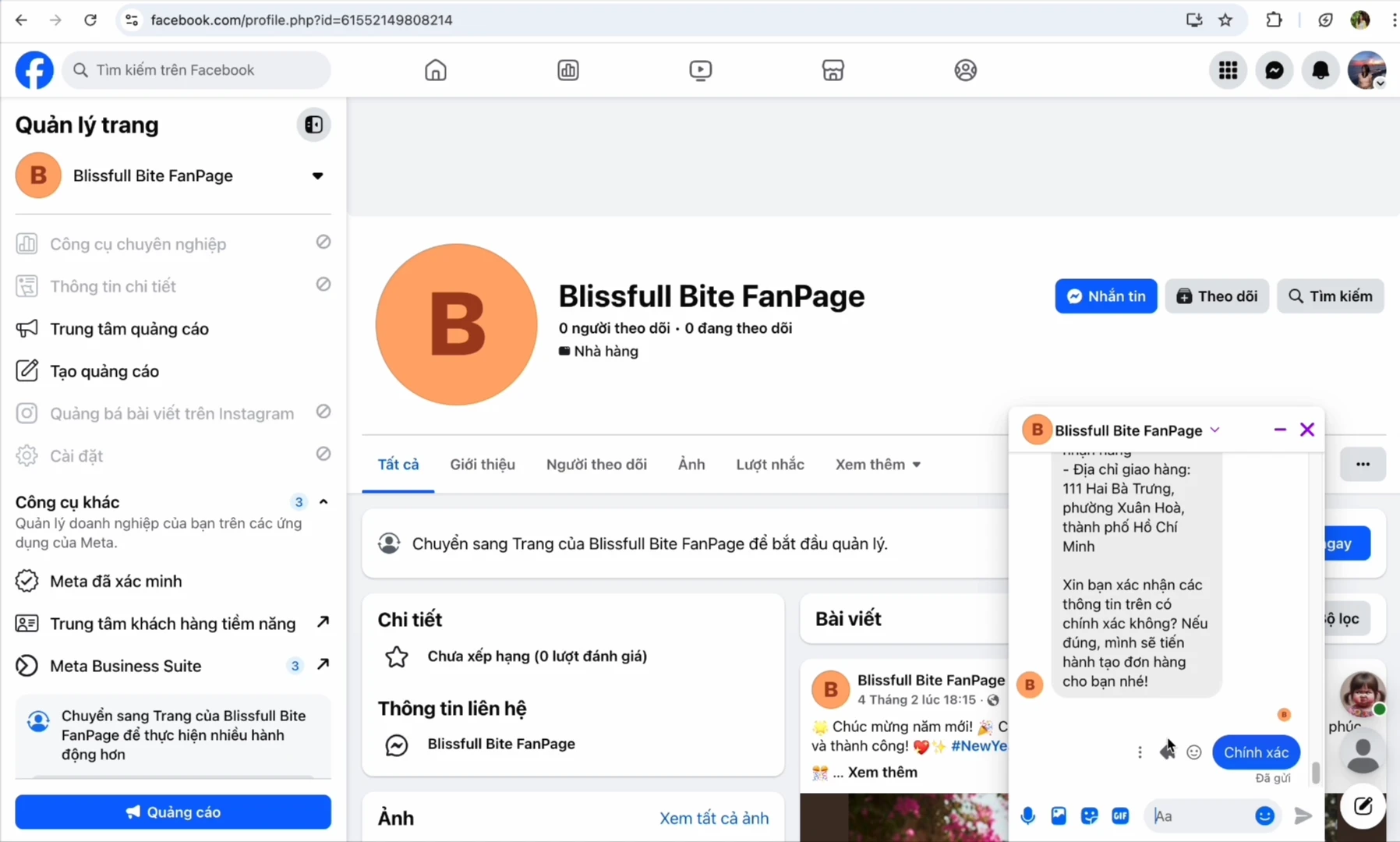
When customers message to order via Facebook Messenger or chat on the website, GTG CRM's AI Chatbot will automatically identify their needs, ask for shipping information, and create an order instantly. You no longer need to sit and reply to every message or copy-paste customer information. The system handles everything, from product consultation to order confirmation.
2. Automatic Synchronization from E-commerce Platforms
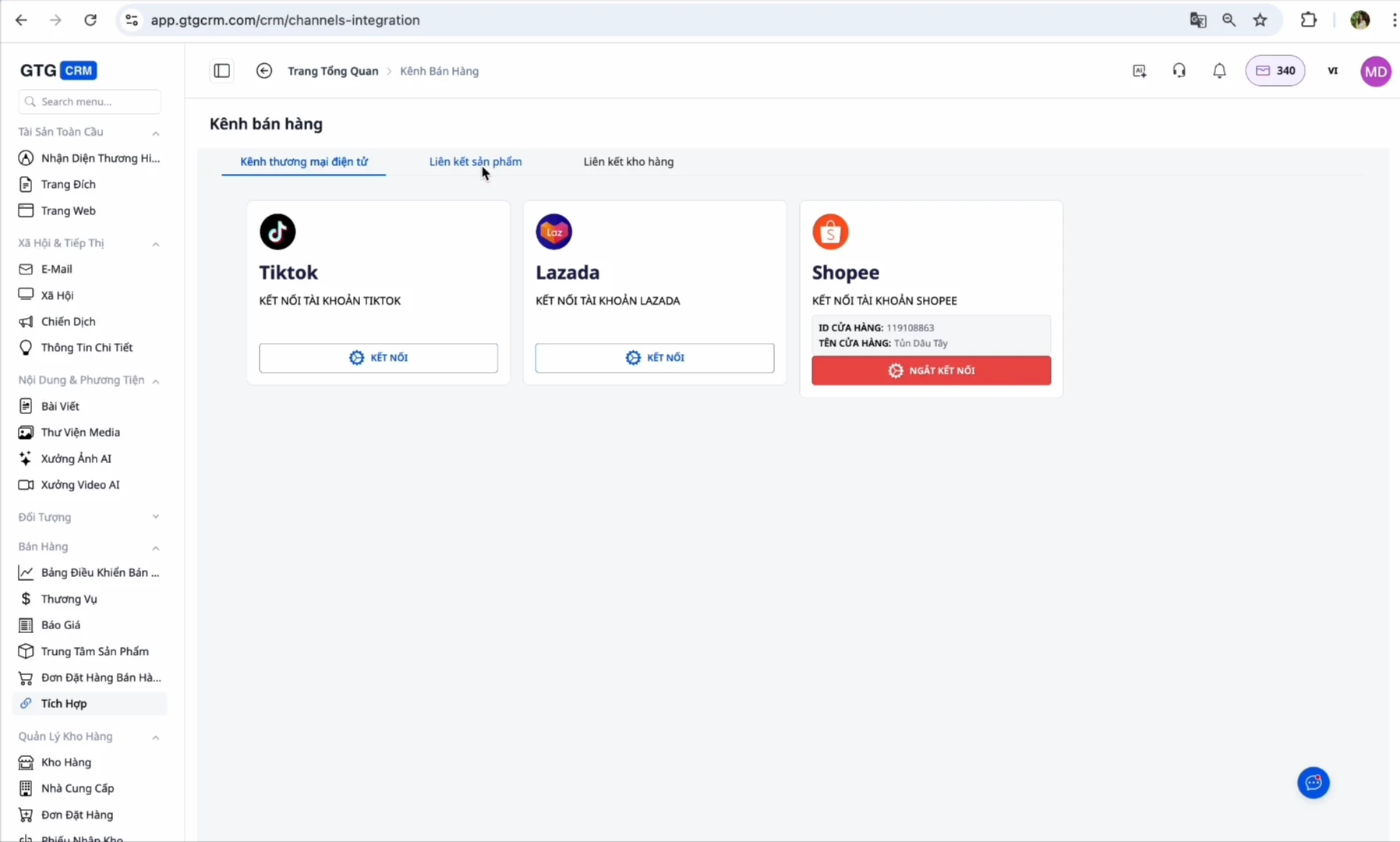
GTG CRM connects directly to Shopee, Lazada, and TikTok Shop. Every time a new order is placed on these platforms, the system automatically pulls it in and creates an order within GTG CRM. Customer information, products, and shipping addresses are synchronized with 100% accuracy, without you needing to perform any additional actions.
Especially when you sell the same product across multiple platforms, GTG CRM automatically identifies it through SKU codes and updates unified inventory. This prevents overselling or confusion between channels.
Automated Process from Order to Warehousing
After orders are automatically created, GTG CRM continues to support you throughout the entire order processing workflow.
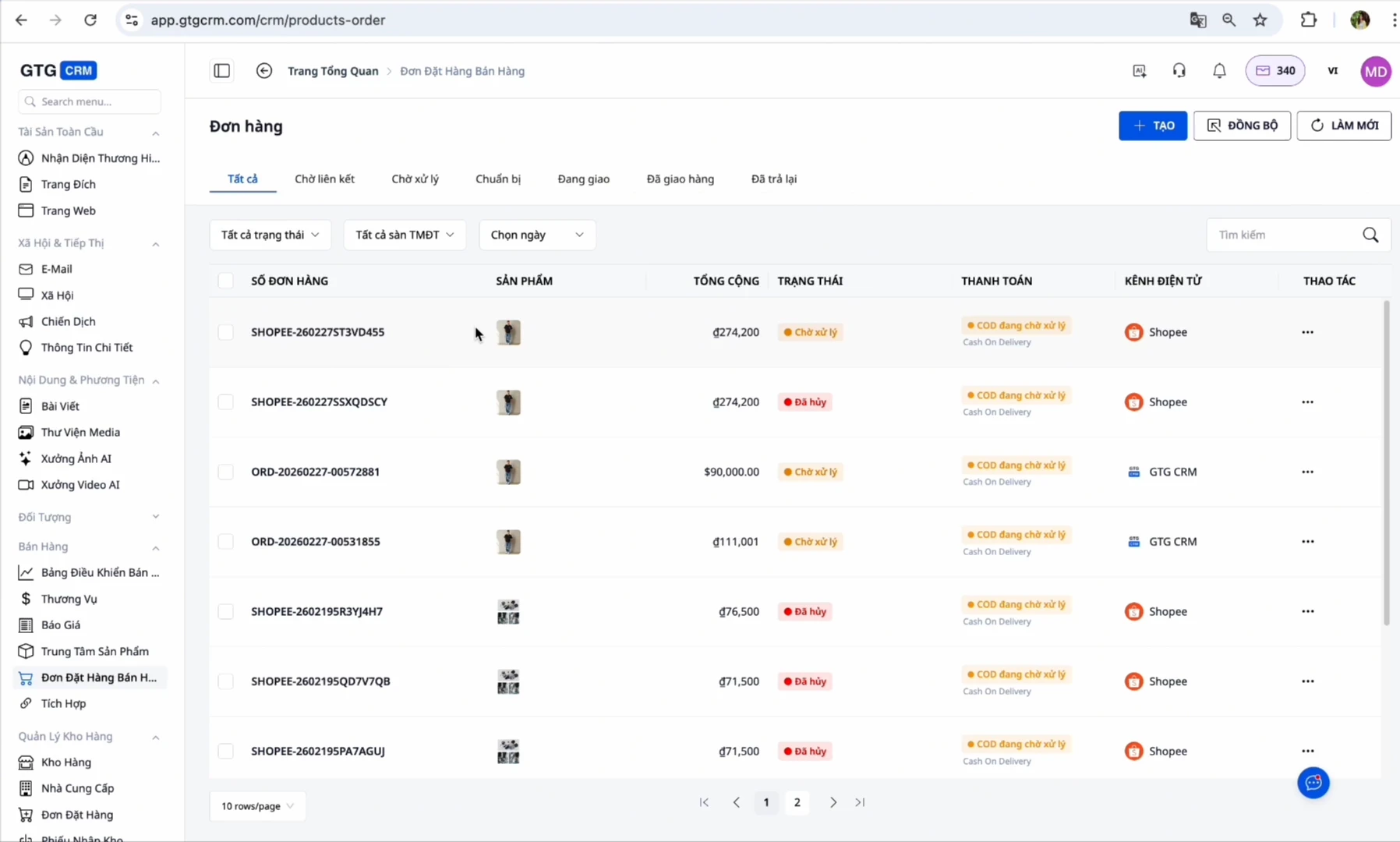
Step 1: Orders Automatically Appear in the System
As soon as a customer places an order from any channel, it will appear in the list with the status "Pending Confirmation." You just need to review and confirm the order is valid.
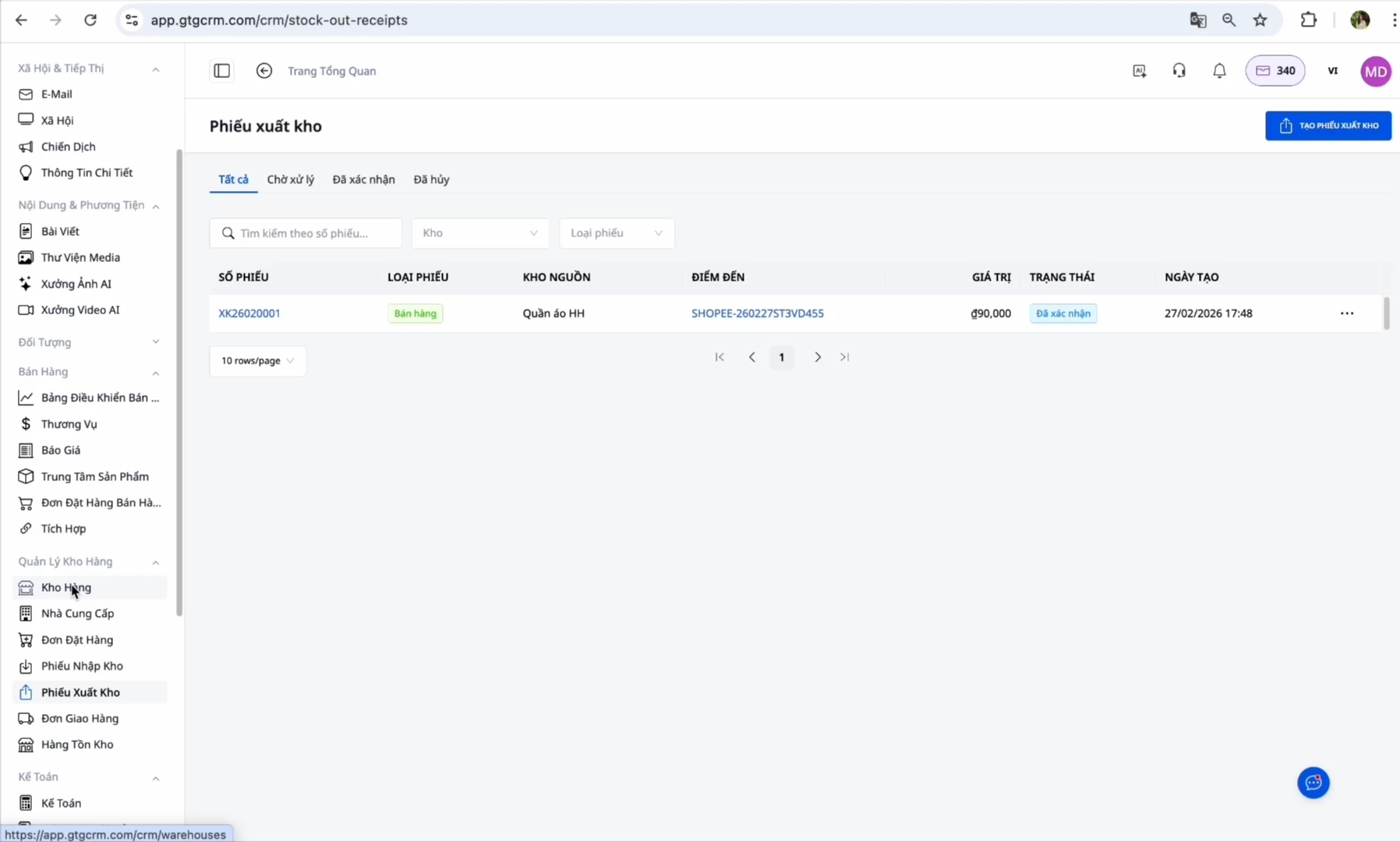
Step 2: Automatic Creation of Picking Slips
When you change the order status to "Ready for Pickup," GTG CRM automatically creates a corresponding picking slip. Warehouse staff only need to go to the Inventory Management section, view the picking slip, and prepare the goods. There's no need to print individual orders or make manual notes.
Step 3: Warehouse Confirmation and Automatic Invoice Issuance
Once the warehouse staff has finished preparing the goods, simply click "Confirm Warehouse Shipment" in the system. Immediately, GTG CRM will automatically issue an electronic invoice in accordance with the regulations of the General Department of Taxation. Invoices can be configured to create drafts or be issued immediately, depending on your needs.
Outstanding Benefits of Using Automatic Order Creation Feature
Save up to 80% of order processing time
Instead of spending 3-5 minutes manually entering an order, orders now appear automatically in the system within seconds. For 100 orders a day, you save precious hours to focus on customer care and product development.
Minimize errors to the maximum
When manually entering orders, mistakes in addresses, phone numbers, and products are unavoidable. The system automatically synchronizes information directly from the source, ensuring absolute accuracy. This significantly reduces instances of wrong shipments, incorrect addresses, and customer complaints.
Centralized management, comprehensive control
All orders from every channel are consolidated on a single platform. You can easily track the status of each order, view sales reports by channel, by product, and by time. No more opening multiple tabs or software to check orders.
Ensure compliance with e-invoice legal regulations
With new e-invoice regulations, issuing an invoice for every transaction is mandatory. GTG CRM automatically issues invoices immediately after confirming warehouse shipment, helping you fully comply with regulations without wasting extra time. The system also supports adjustment invoices for returns, ensuring accurate and transparent tax filing.
Important Notes When Using
Configure unified SKU codes
For the system to accurately identify products from different channels, you must ensure that the SKU codes on all platforms are the same. For example, the product "Mickey Pants Model 1" on Shopee, Lazada, and TikTok Shop must all have the SKU "QUAN_MICKEY_M1". This allows GTG CRM to automatically update inventory accurately for the same product.
Do not enable automatic invoice issuance if authorized by the platform
If you have authorized Shopee, Lazada, or TikTok Shop to automatically issue invoices, you should not enable the automatic invoice issuance feature within GTG CRM. Issuing invoices twice will cause errors in tax filing and violate the regulations of the General Department of Taxation.
Adjustment invoices can only be issued when the original invoice has been issued
In case of customer returns, you can only issue an automatic adjustment invoice if the original invoice has already been issued. If the original invoice is still in draft status, you need to issue the original invoice first before you can issue an adjustment invoice.
Conclusion
In the increasingly prevalent landscape of omnichannel business, automating the order processing workflow is no longer an option but a mandatory requirement to maintain competitiveness. GTG CRM, with its automatic order creation feature from all sales channels, not only helps you save time and effort but also improves order processing accuracy, ensures legal compliance, and creates a solid foundation for sustainable business growth.
Instead of struggling with hundreds of scattered orders across multiple platforms, you can now rest assured that GTG CRM will automatically handle everything, from the moment a customer places an order to the completion of invoice issuance. This is how GTG CRM accompanies you on your business development journey, allowing you to focus on what truly matters: quality products and excellent customer experience.

