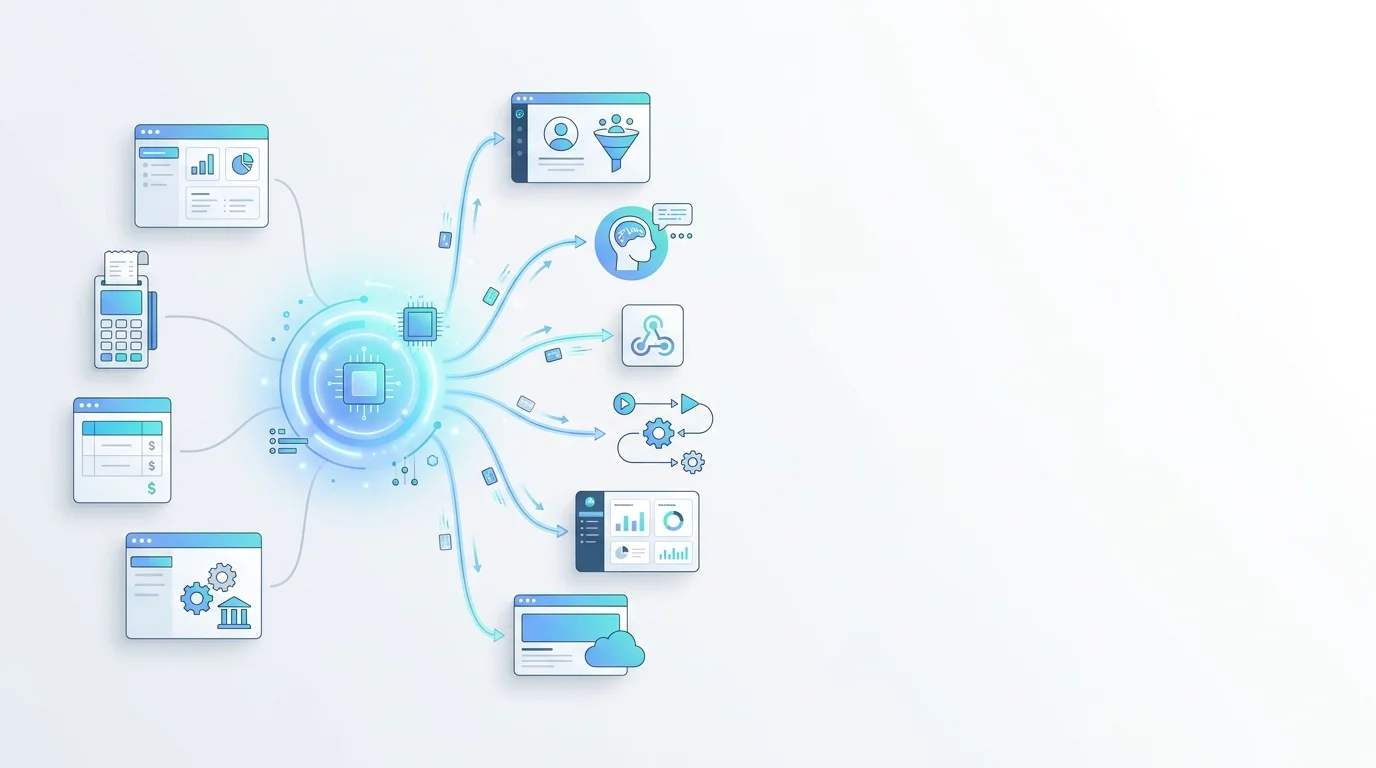
In the modern business environment, companies often operate multiple different software systems serving distinct purposes. These could include sales management software, accounting systems, marketing tools, or custom-developed internal applications. Each of these systems contains valuable data and plays a crucial role in business operations.
The biggest challenge isn't the lack of data, but rather the fact that this data exists in a fragmented manner across multiple platforms. Employees have to switch between systems, manually enter the same information multiple times, and lack a comprehensive view of the customer. This not only wastes time but also increases the risk of errors and missed business opportunities.
GTG CRM's Integration Hub & API is designed to fundamentally address this problem. Instead of requiring businesses to replace their entire existing systems, this solution creates a bridge connecting these systems. Data can move freely between platforms, processes are automated, and most importantly, AI agents can participate in processing to improve operational efficiency.
This document will provide detailed, step-by-step instructions for businesses to successfully implement integration, from creating applications and configuring access permissions, to using APIs to read and write data, setting up webhooks to receive automated events, and finally, combining with AI Agents to create fully automated intelligent processing workflows.
Overview of key features
The Integration Hub & API provides a comprehensive set of tools that allows businesses to connect GTG CRM with any application via the standard RESTful API protocol. The API Token management system, with its detailed scope-based authorization mechanism, ensures high security and allows precise control over access rights for each integrated application.
AI Agent Integration is a key differentiator, allowing businesses to leverage artificial intelligence to automate data processing and perform complex tasks without requiring programming. Businesses can manage multiple AI agents with different roles, each trained for a specific purpose.
The ability to synchronize data bidirectionally between GTG CRM and external systems ensures businesses always have a consistent view of customer information. Comprehensive API documentation, including curl command examples, makes integration and debugging easy for developers. Businesses can query contact lists, tasks, transactions, and update information in real time.
Webhook endpoints allow for automatic data retrieval from external systems without continuous polling. When combined with automation and AI agents, businesses can build fully automated event processing workflows. The integrated website builder within the ecosystem allows for direct website creation from GTG CRM with full SEO features and automated sitemaps.
Step-by-step user guide
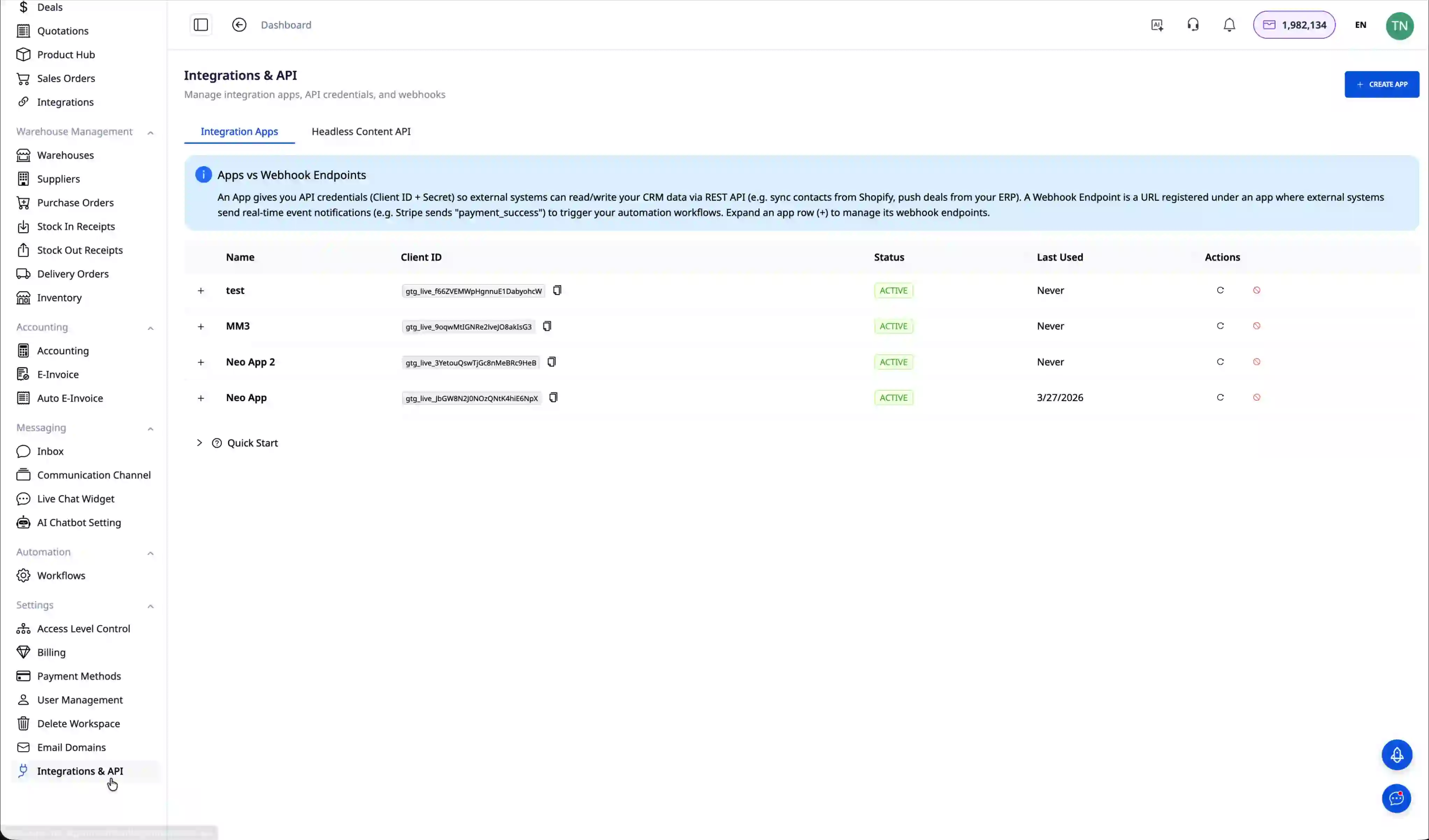
Step 1: Create an integration application
The first step to begin the integration is to create a new application in GTG CRM. Access the "Integration & API" menu and click the "Create New Application" button. Give the application a meaningful name for easy management later, for example, "Sales System Integration" or "Mobile Application". After entering the name, click "Create" to complete the process.
Step 2: Configure access permissions
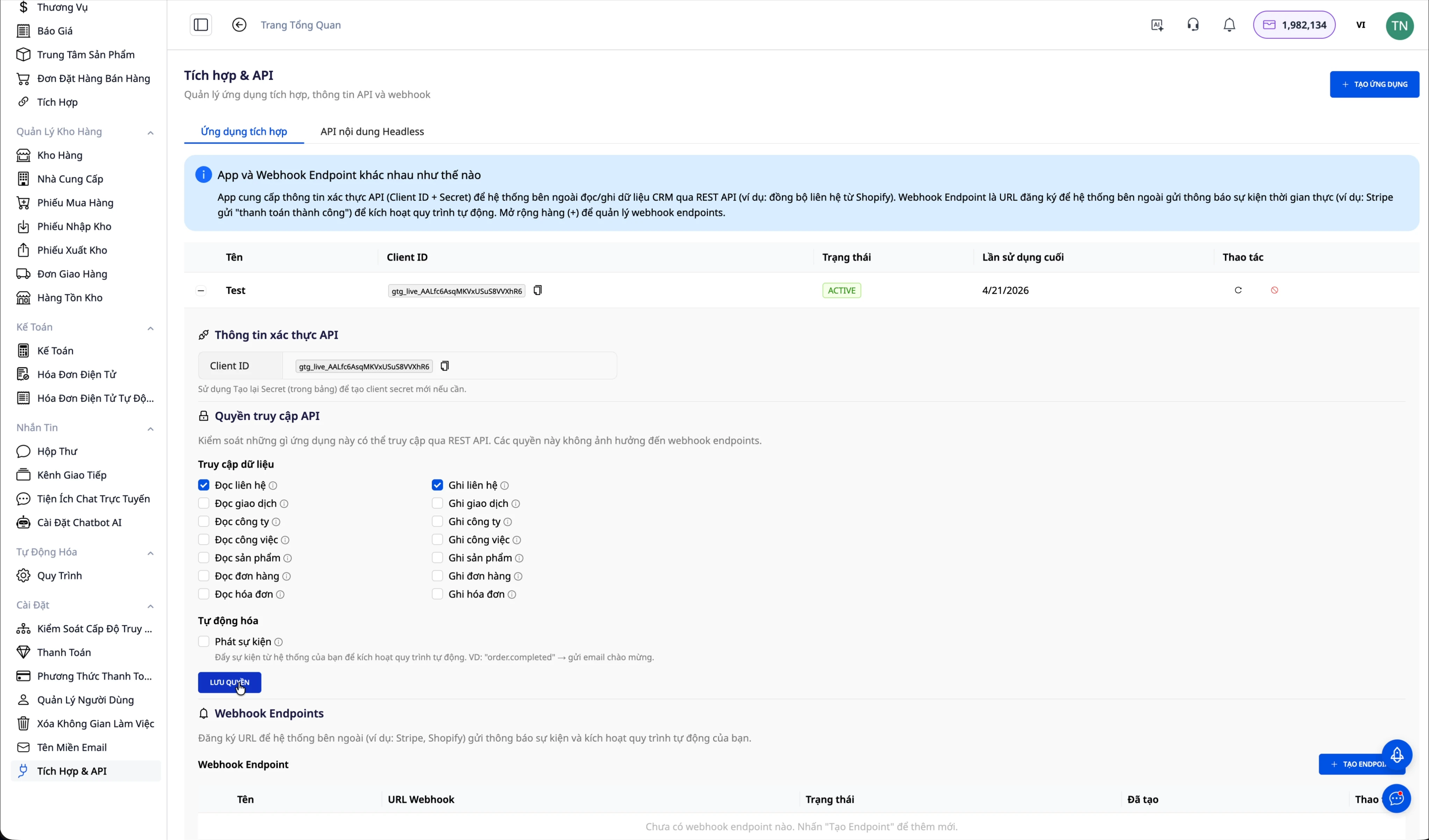
Scope-based permissions allow for precise control over what an application can do with CRM data. After creating the application, select the newly created application and access the "Access Permissions" or "Scopes" tab. Here you will see a list of the permissions that can be granted.
If the application only needs to read contact information, select the "contacts.read" scope. If it needs to create and update contacts, add the "contacts.write" scope. To allow the application to read information about AI Agents in the system, grant the "agents.read" permission. If you want the application to be able to request AI Agents to perform tasks, grant the "agents.execute" permission. After selecting the necessary permissions, click save to update the configuration.
Step 3: Create an API Token
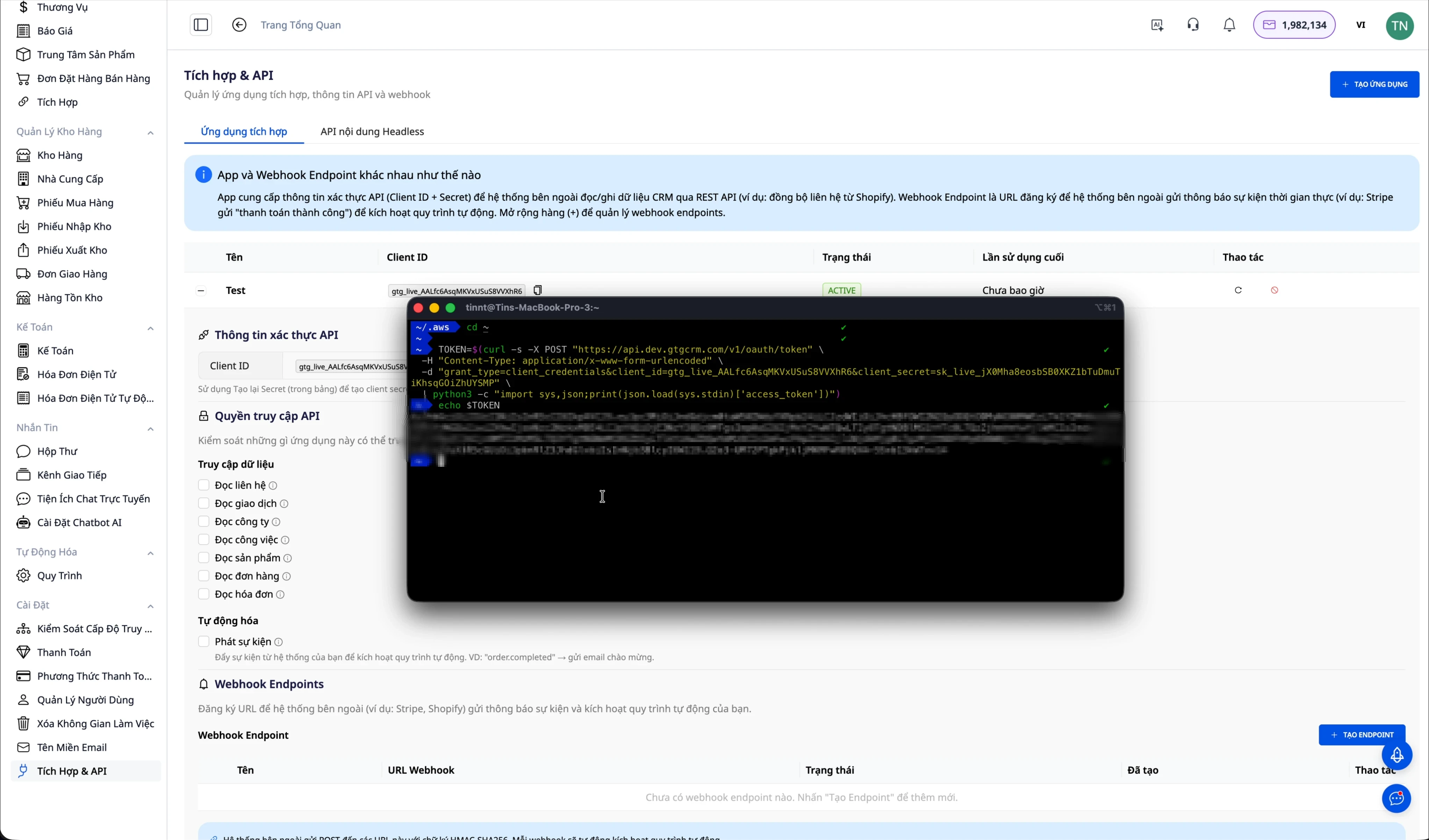
A token is an authentication key that allows external applications to securely call GTG CRM's API. In the application details page, find the "API Token" section and click "Generate Token". The token will be displayed only once with a format starting with "gtg_", copy and store it in a safe place immediately. This token needs to be used in the Authorization header of every API request.
Important note: If you add new permissions to the application after creating the token, the old token will not automatically have those new permissions. You will need to create a new token to have the full configured access rights.
Step 4: Check the API connection
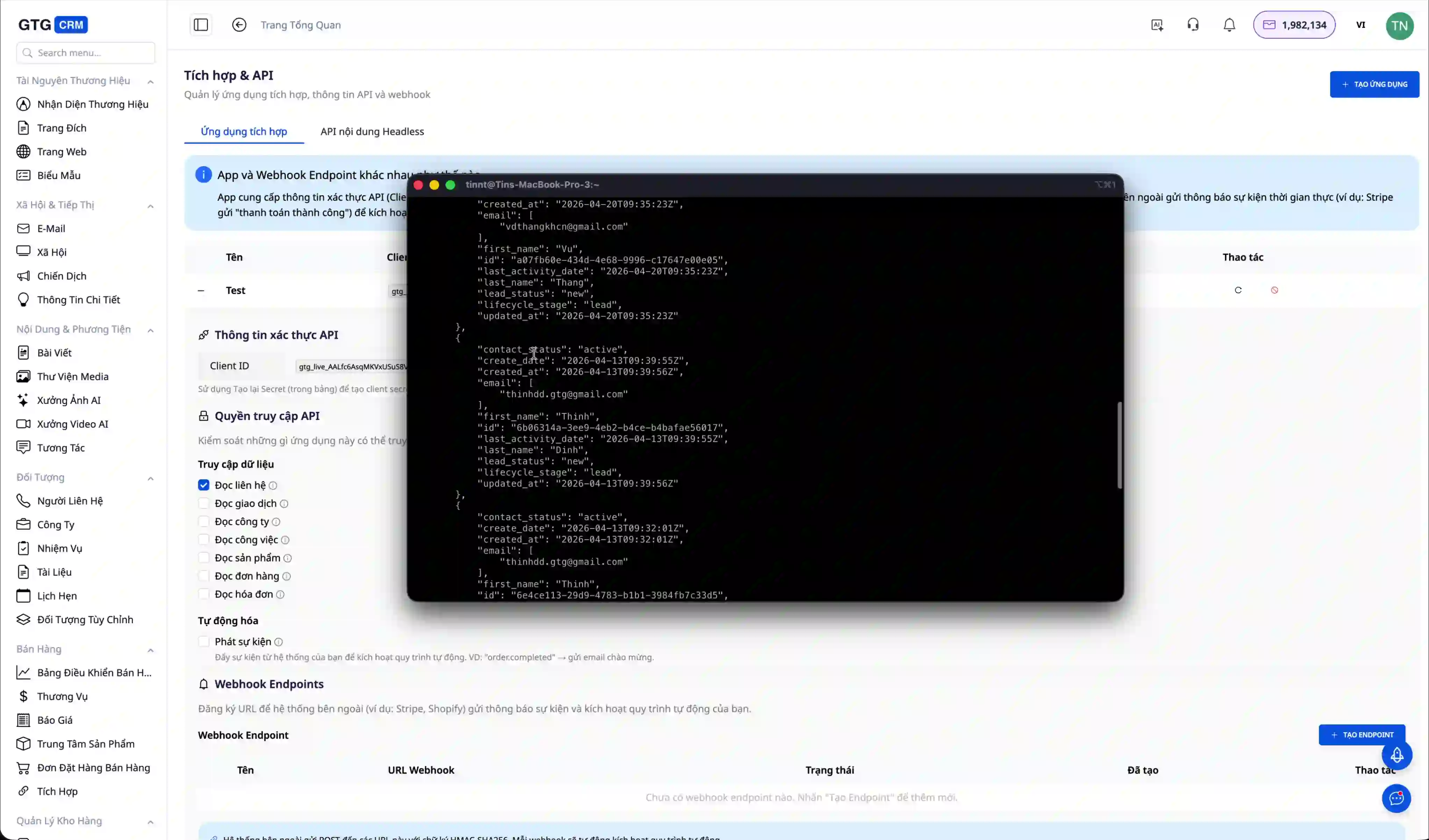
After obtaining the token, the next step is to verify that the integration is working correctly. The simplest way to do this is to use the curl command from the terminal. The example below illustrates how to retrieve a contact list from GTG CRM.
curl -X GET https://api.gtgcrm.com/v1/integration/contacts \ -H "Authorization: Bearer YOUR_API_TOKEN"If the connection is successful and the token has sufficient permissions, you will receive a JSON response containing a list of contacts with complete information such as ID, name, email, phone number, and other data fields.curl -X GET https://api.gtgcrm.com/v1/integration/contacts \ -H "Authorization: Bearer YOUR_API_TOKEN"
{ "data": [ { "id": "contact_123", "name": "Nguyễn Văn A", "email": "nguyenvana@example.com", "phone": "0901234567" } ] }Step 5: Integrate with your system{ "data": [ { "id": "contact_123", "name": "Nguyễn Văn A", "email": "nguyenvana@example.com", "phone": "0901234567" } ] }
After successful testing, you can integrate the API into your real-world application. Below is an example using Node.js, one of the most popular languages for backend development. This code snippet illustrates how to retrieve a contact list and create a new contact in GTG CRM.
const axios = require('axios'); const API_URL = 'https://api.gtgcrm.com/v1/integration'; const API_TOKEN = 'your_api_token_here'; async function getContacts() { const response = await axios.get(`${API_URL}/contacts`, { headers: { 'Authorization': `Bearer ${API_TOKEN}` } }); return response.data; } async function createContact(contactData) { const response = await axios.post(`${API_URL}/contacts`, contactData, { headers: { 'Authorization': `Bearer ${API_TOKEN}`, 'Content-Type': 'application/json' } }); return response.data; }Similarly, you can use any other programming language such as Python, PHP, Java, or C# for integration. The general principle is to always send the token in the Authorization header with the format "Bearer YOUR_TOKEN" and use the Content-Type "application/json" for POST or PUT requests.const axios = require('axios'); const API_URL = 'https://api.gtgcrm.com/v1/integration'; const API_TOKEN = 'your_api_token_here'; async function getContacts() { const response = await axios.get(`${API_URL}/contacts`, { headers: { 'Authorization': `Bearer ${API_TOKEN}` } }); return response.data; } async function createContact(contactData) { const response = await axios.post(`${API_URL}/contacts`, contactData, { headers: { 'Authorization': `Bearer ${API_TOKEN}`, 'Content-Type': 'application/json' } }); return response.data; }
Step 6: Applying AI Agents in the actual process.
To clearly see the value of Integration Hub, consider a real-world business scenario. When a new customer completes registration on a company's sales website, instead of employees manually creating a profile in the CRM and sending a welcome email, the entire process can be automated.
The process works as follows: First, the customer fills out the registration form on the sales website. The website's backend immediately calls the GTG CRM API to create a new contact with complete customer information such as name, email, phone number, and customer source.
curl -X POST https://api.gtgcrm.com/v1/integration/contacts \ -H "Authorization: Bearer YOUR_TOKEN" \ -H "Content-Type: application/json" \ -d '{ "name": "Trần Thị B", "email": "tranthib@example.com", "phone": "0987654321", "source": "Website" }'As soon as a contact is created in GTG CRM, the AI Agent automatically identifies them as a new customer from the website. The Agent analyzes the customer information to send a personalized welcome email, not a generic template. Simultaneously, the Agent creates a follow-up task for the sales staff, requiring them to call the customer within 24 hours to provide consultation.curl -X POST https://api.gtgcrm.com/v1/integration/contacts \ -H "Authorization: Bearer YOUR_TOKEN" \ -H "Content-Type: application/json" \ -d '{ "name": "Trần Thị B", "email": "tranthib@example.com", "phone": "0987654321", "source": "Website" }'
The benefits of this automated process are clear. Customers receive a welcome email immediately after registration, creating a professional impression and increasing trust. No manual staffing is required, saving time and minimizing errors. Emails are personalized based on customer information, not generic content. Sales staff are informed and have specific tasks to follow up on, ensuring no opportunities are missed. All these factors together help increase the conversion rate from leads to actual customers.
Step 7: Set up a Webhook to automatically receive data.
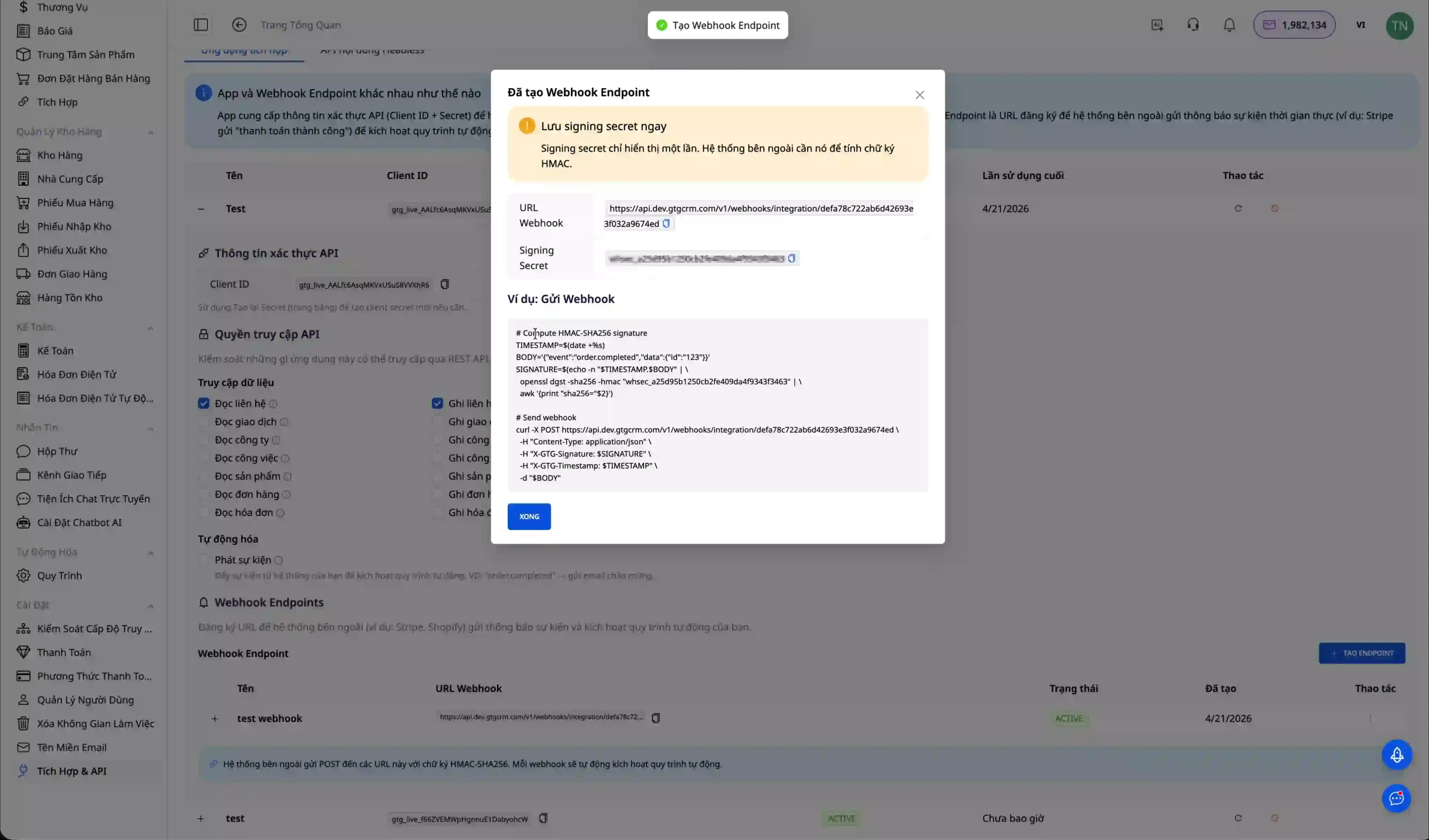
Webhooks are a technology that allows external systems to proactively send data to GTG CRM when an event occurs, instead of constantly polling to check. To get started, go to the "Integrations & APIs" page and select the "Webhooks" tab, then click "Create New Webhook" and give the webhook a meaningful name.
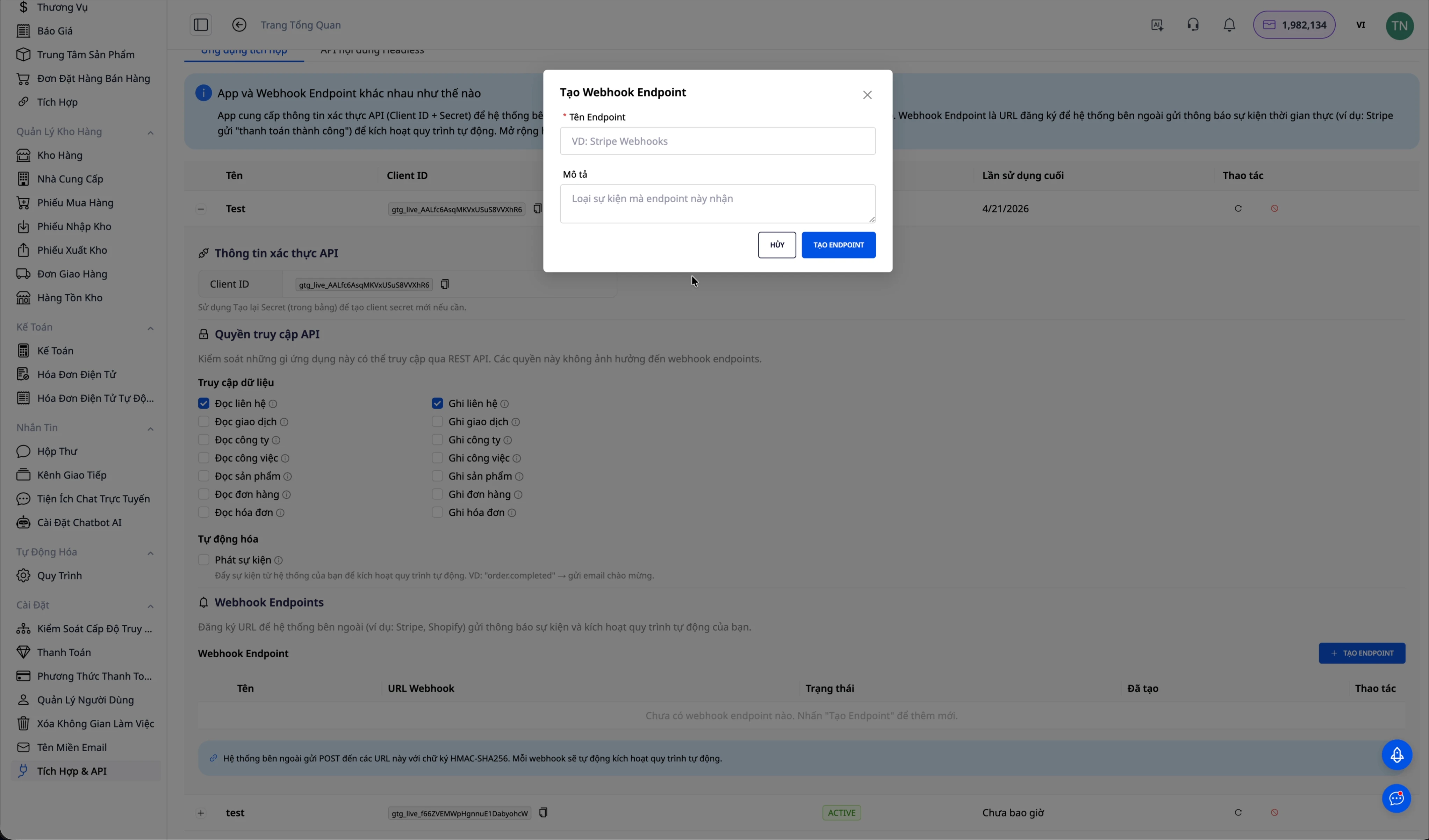
After creation, the system will provide two important pieces of information. The Webhook URL is the endpoint to which the external system will send data via HTTP POST. The Signing Secret is a secret code used to verify that the request actually comes from an authorized system and not from a fake source.
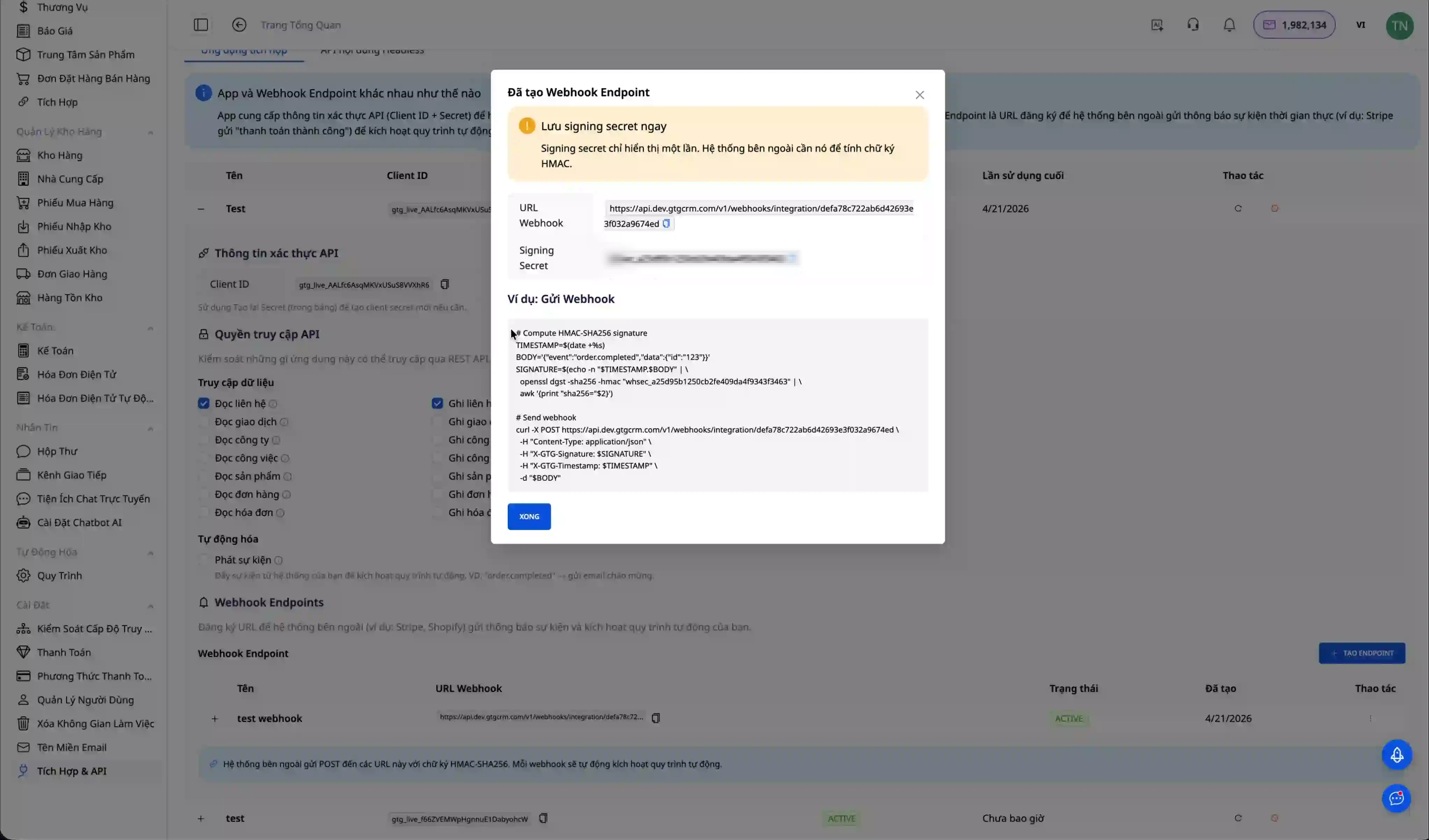
It's very important to note that the Signing Secret is only displayed once when creating a webhook. Copy and save it immediately to your company's secure secret management system. If you lose this secret, you will have to create a new webhook.
To test if the webhook is working correctly, send a test event using the curl command. The request needs a Content-Type header of application/json and an X-Webhook-Signature header containing the signing secret for authentication.
curl -X POST "YOUR_WEBHOOK_URL" \ -H "Content-Type: application/json" \ -H "X-Webhook-Signature: YOUR_SIGNING_SECRET" \ -d '{ "event": "order.completed", "eventId": "evt_123456", "data": { "orderId": "ORD-001", "customerName": "Nguyễn Văn A", "amount": 500000 } }'If the webhook is working correctly, you will see this event appear in the list of received events.curl -X POST "YOUR_WEBHOOK_URL" \ -H "Content-Type: application/json" \ -H "X-Webhook-Signature: YOUR_SIGNING_SECRET" \ -d '{ "event": "order.completed", "eventId": "evt_123456", "data": { "orderId": "ORD-001", "customerName": "Nguyễn Văn A", "amount": 500000 } }'
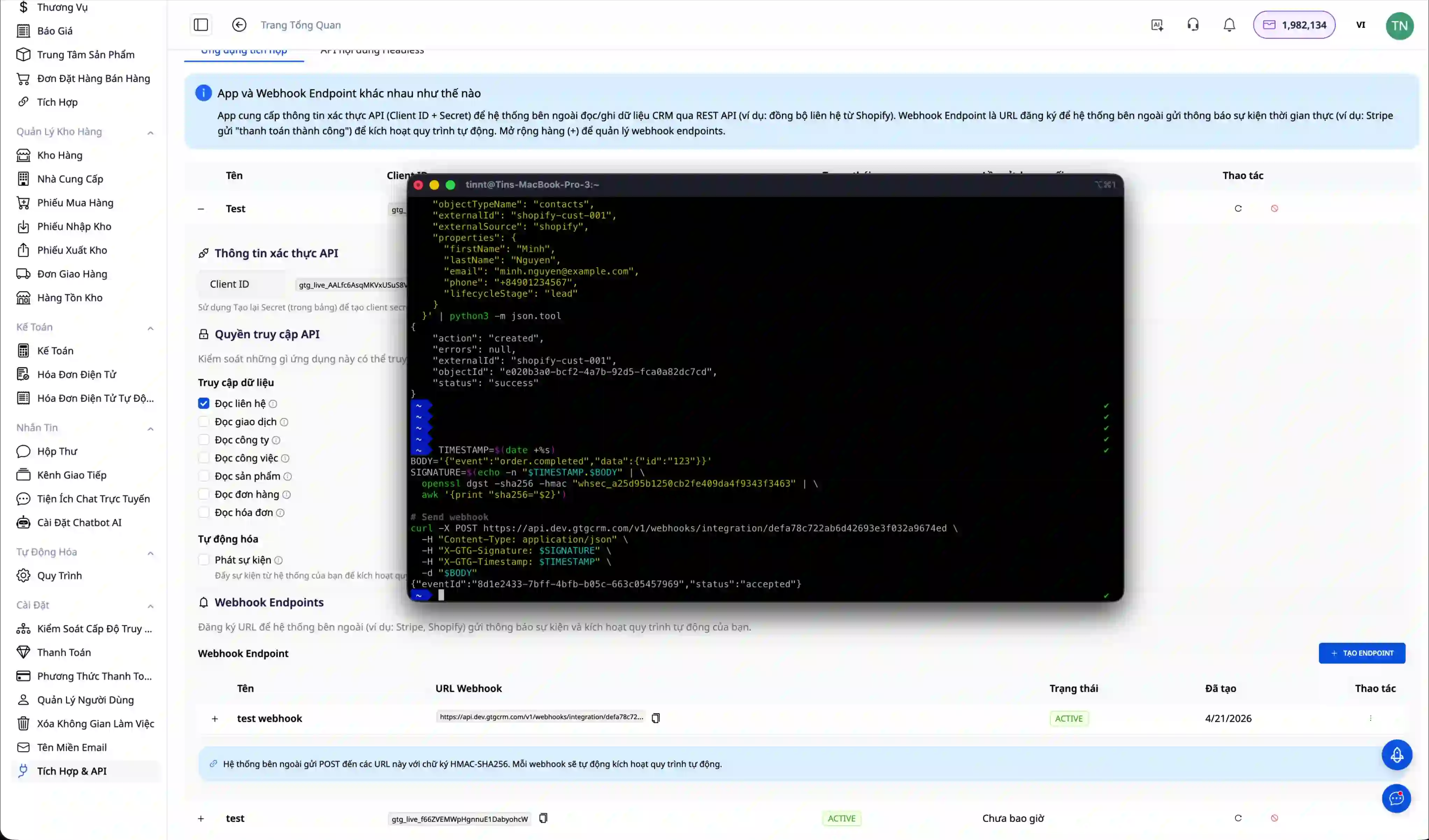
Step 8: Combine Webhooks with Automation and AI Agents
The true power of Integration Hub is only fully exploited when Webhooks are combined with automation processes and AI agents. This allows businesses to build intelligent processes that automatically respond to events from external systems without manual intervention.
To set up a process, access the "Automation" menu in GTG CRM and click "Create new process".
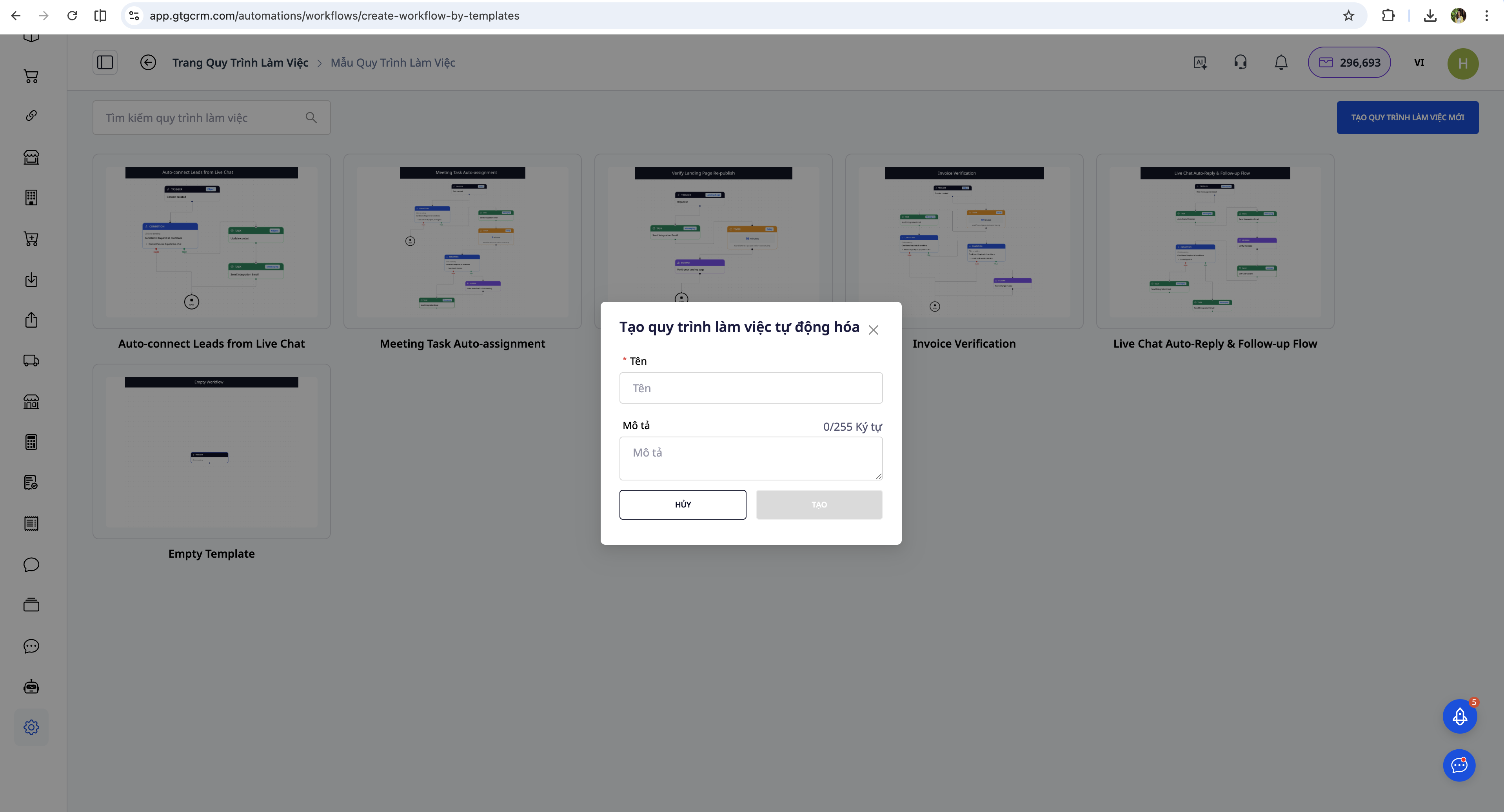
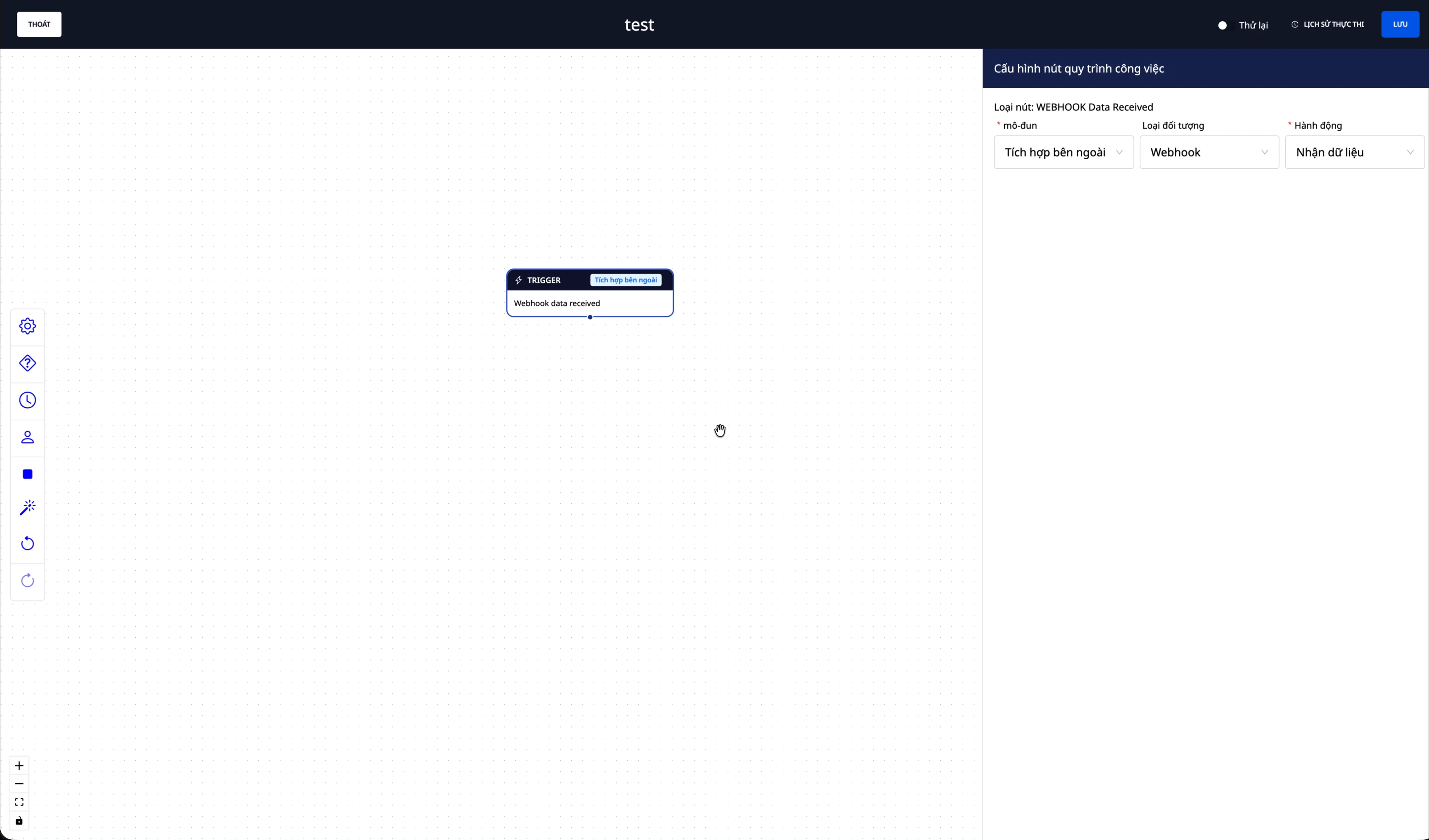
The most important part is configuring the trigger so the process knows when to activate. Select the "External Integration" module, the "Webhook" object, and the "Get Data" action. This means that every time the webhook receives an event from an external system, the process will be automatically triggered.
After configuring the trigger, add the AI Agent task to the workflow. Click Add Task, select the "AI" module, and then select "AI Agent Task". This is where you will write instructions for the AI Agent on how to process the data received from the webhook.
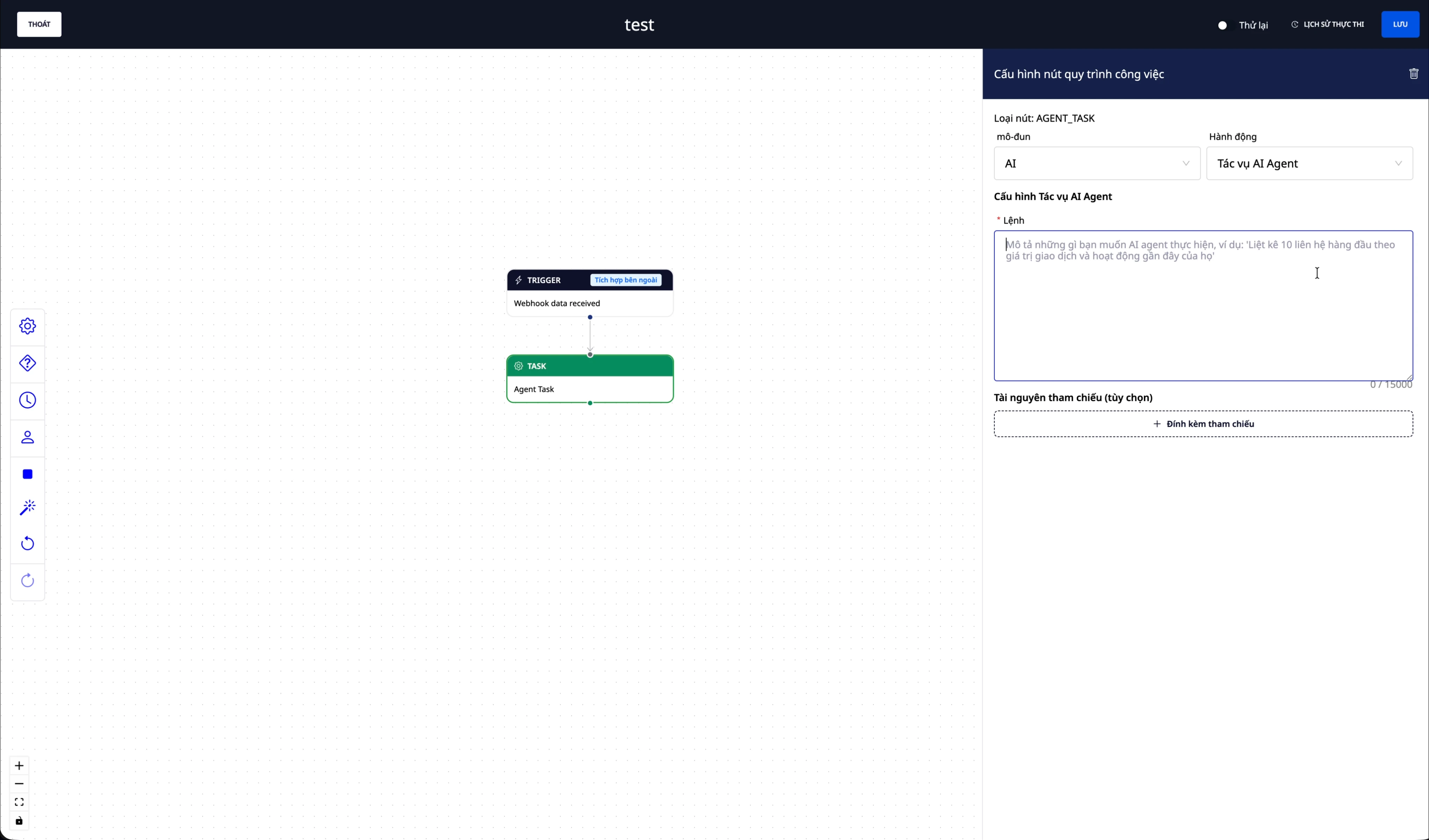
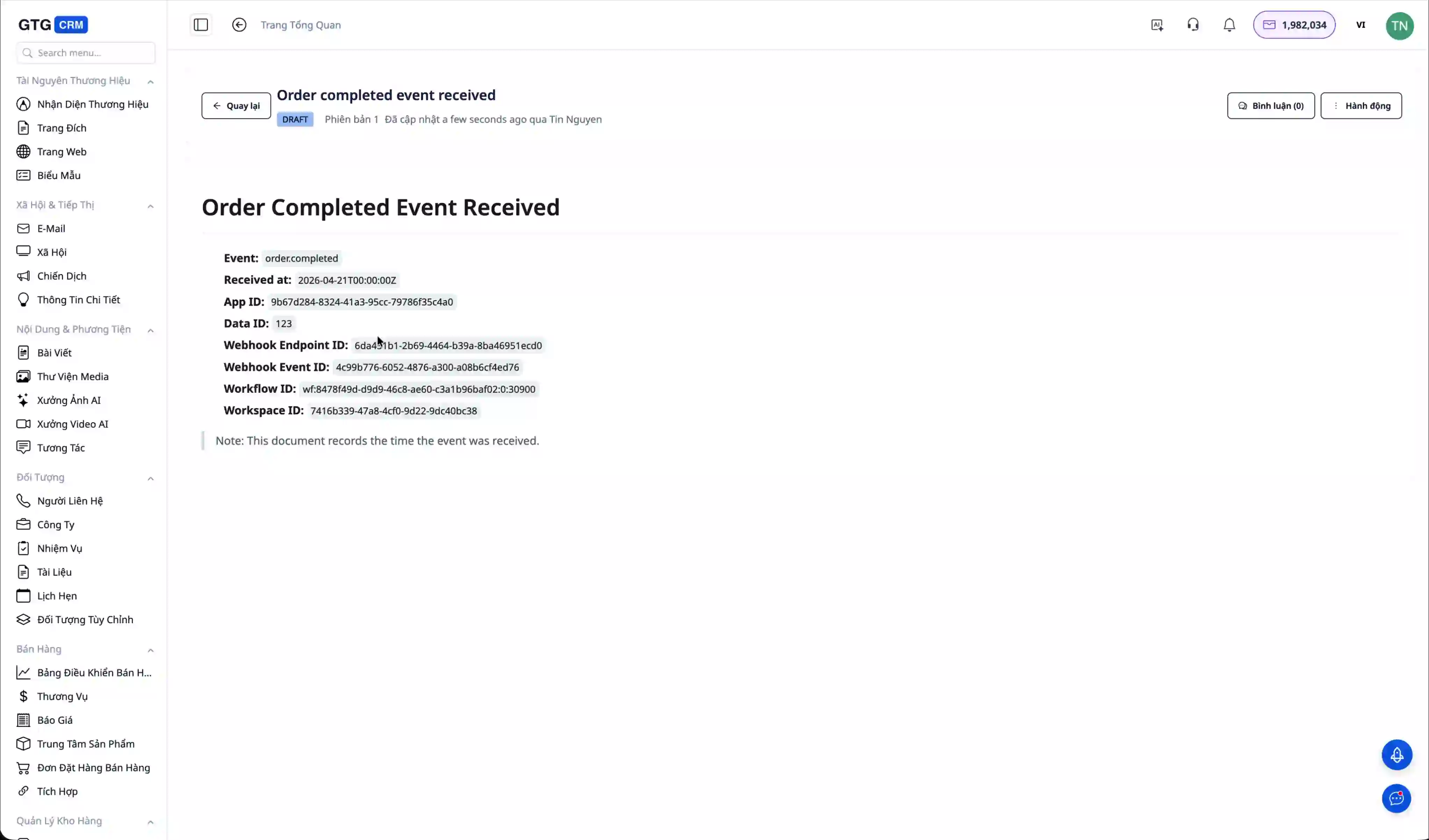
The prompt for the AI Agent is where businesses demonstrate their business logic. For example, you could write: "When the event is order.completed, create a document note recording the time the event was received and the order information. Then send a thank-you email to the customer and notify the sales team."
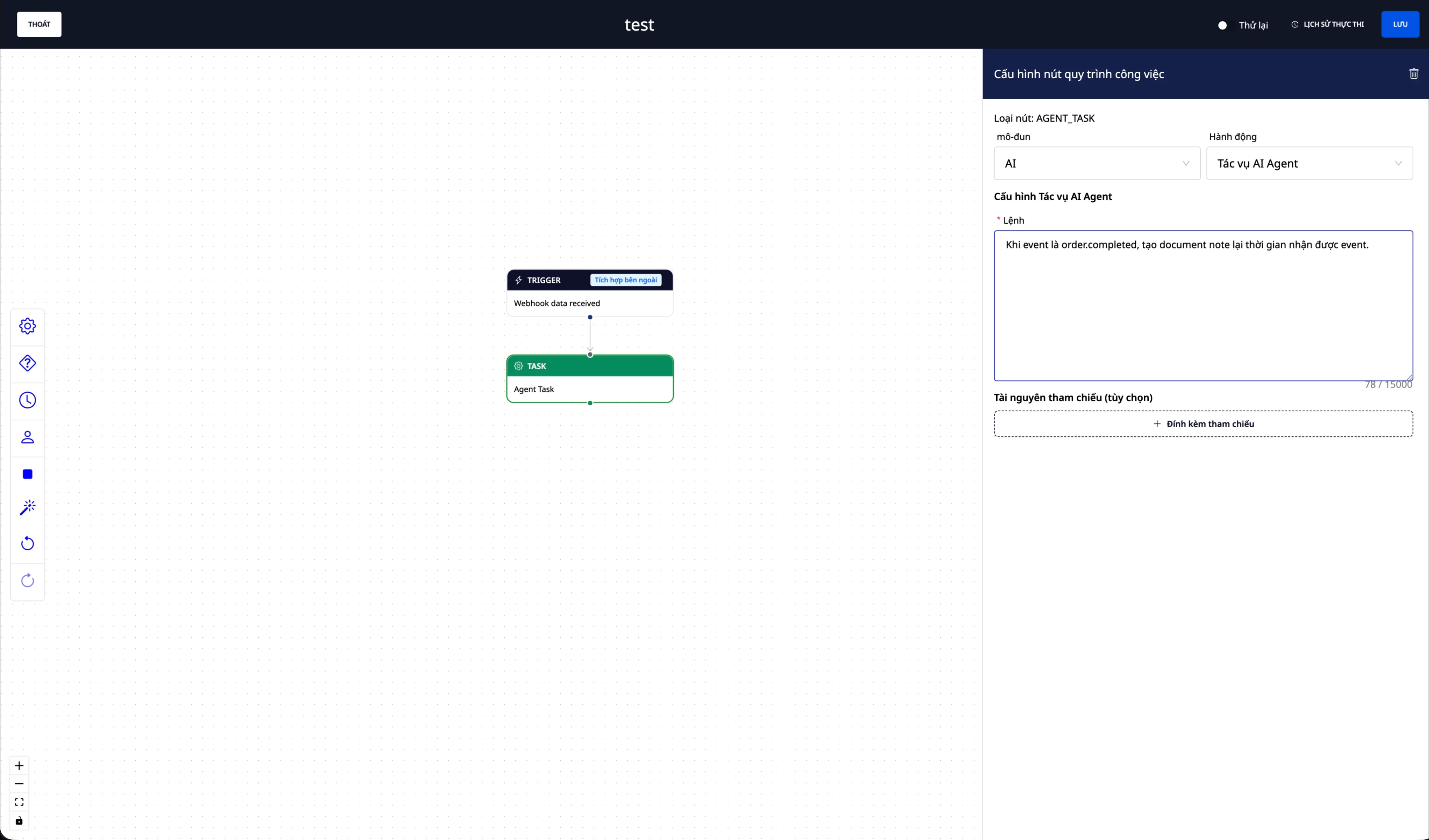
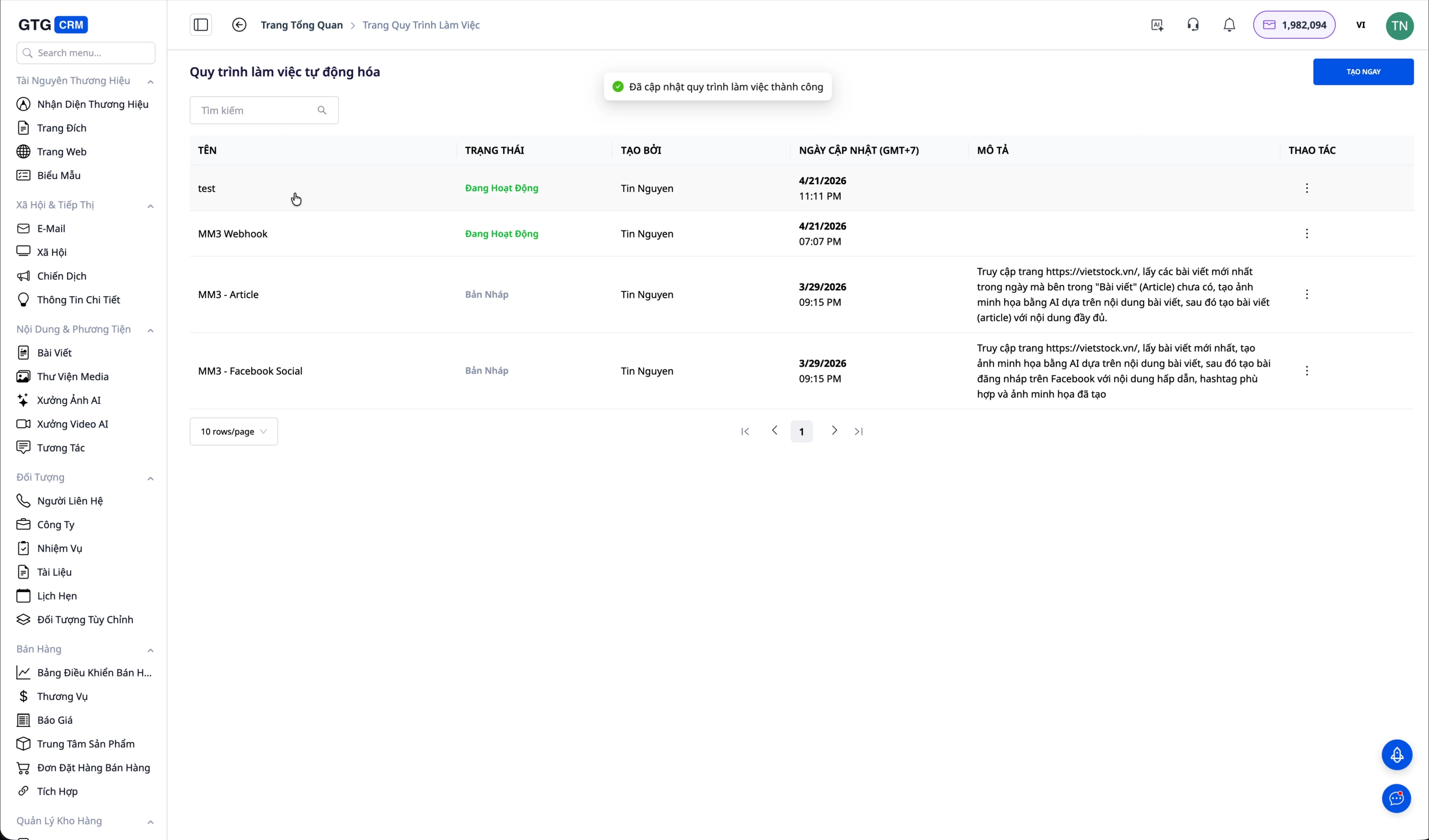
After completing the configuration, change the process status to "Active". From now on, whenever an external system sends an event to the webhook, the AI Agent will automatically perform the tasks as instructed.
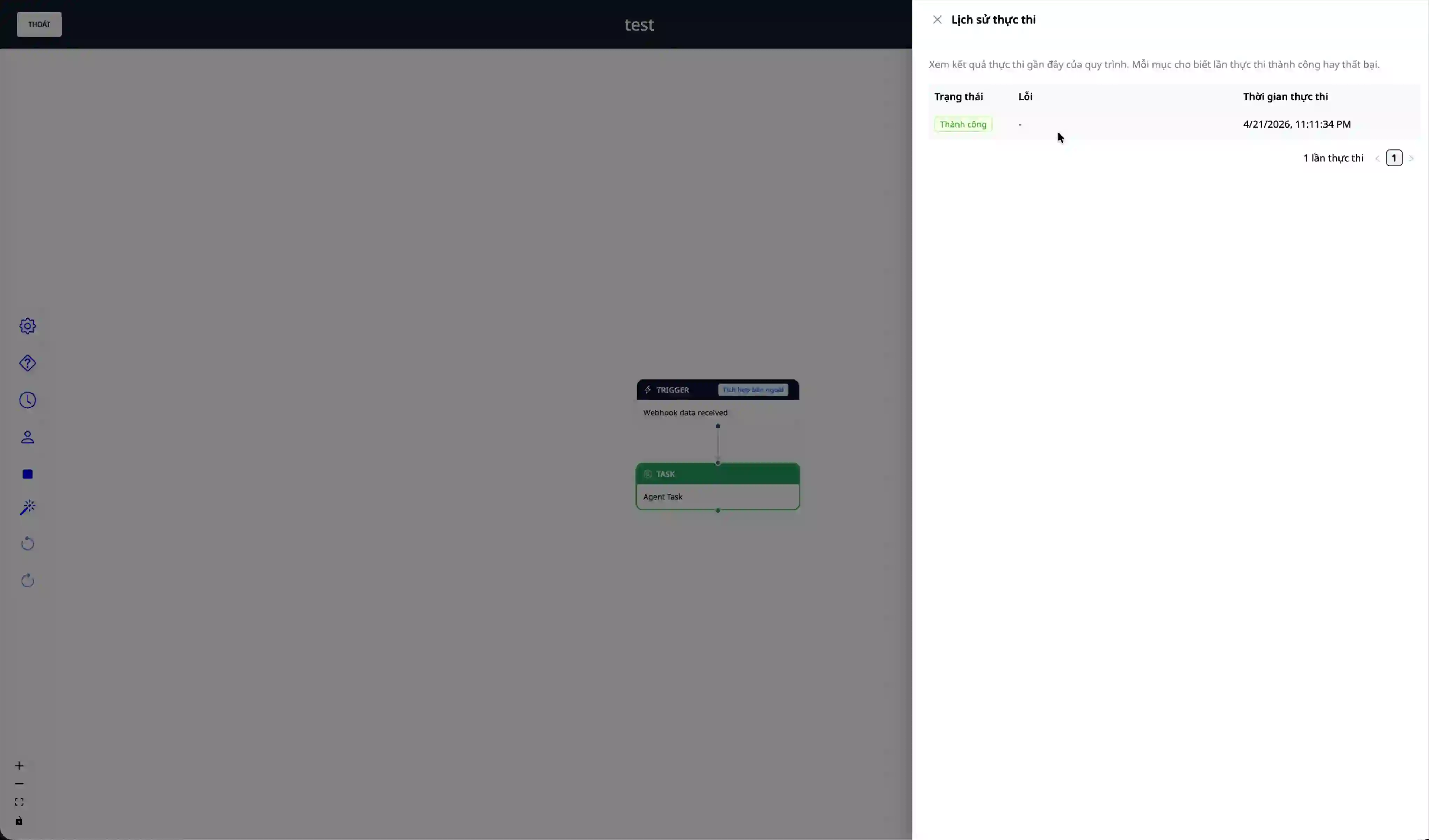
When an event is submitted, you can track the processing progress in the process's execution history. The AI Agent will record the processing results so that the business can check and audit them.
This document was created upon request:
Real-world case study: MM3.vn automates marketing content.
MM3, a business operating the website mm3.vn, used Integration Hub combined with an AI Agent to completely automate its content creation process – from market data collection, AI image generation, analytical writing, website publishing, social media posting, and automated SEO. The result: a reduction from 2-3 content staff to zero, with unlimited article output.
📖 Read the detailed case study about MM3.vn →
The core benefits of using Integration Hub
Saving time is the most direct and obvious benefit. Automating data synchronization between systems completely eliminates manual data entry, a task that is both time-consuming and prone to errors. Employees can focus on higher-value tasks instead of repetitive ones.
Leveraging existing infrastructure is a significant advantage for businesses that have invested in software systems. Instead of replacing all existing technology, businesses can simply connect GTG CRM to add AI and automation capabilities. This minimizes the risk of business disruption and protects the technology investment.
Increase sales efficiency with AI Agents capable of providing 24/7 customer service without downtime. Every opportunity is tracked and processed promptly, ensuring no leads are missed due to staff being busy or working outside of regular hours.
Flexible scalability is a strength of API architecture. Businesses can easily add new features or connect to other systems as business needs evolve. Not locked into a rigid platform, businesses can adapt and scale at their own pace.
Security control is ensured through a granular access management system with scope and tokens. Businesses can grant precise permissions to each integrated application, ensuring sensitive data is only accessed by authorized systems.
Two-way webhooks extend integration capabilities far beyond traditional API solutions. Businesses can not only proactively call APIs when needed, but also automatically receive data from external systems in real time.
Content automation is a unique capability of GTG CRM. By combining Webhooks with Automation and AI Agents, businesses can automatically generate articles, images, and social media posts from raw data. This is especially useful for businesses in the content or marketing sectors.
Automated SEO through a Website Builder integrated with Sitemap and Google Search Console ensures that all new content is quickly discovered and indexed by search engines, generating organic traffic for your business.
Important considerations during implementation.
Token security is a top priority. API tokens grant access to critical business data and should never be shared with outsiders or committed to source code. Tokens should be stored in environment variables or a dedicated secret management system. If a token is suspected of being compromised, revoke it and create a new one immediately.
Refreshing the token when changing permissions is a mandatory rule to remember. Every time a new scope is added to the application, the current token will not automatically have the new permissions. Businesses must recreate the token so that the new token includes all the configured permissions. Forgetting this step often leads to "Permission Denied" errors that are difficult to debug.
Securing webhooks through a signing secret is similar to securing tokens. This secret is only displayed once when the webhook is created, so it must be stored immediately. External systems sending events need to include this secret in the header so that GTG CRM can verify the validity of the request.
Rate limiting is a mechanism to protect the system from overload. APIs have a limit on the number of requests within a certain time period. Applications need to implement retry logic with exponential backoff and avoid calling the API too many times in a short period. If the rate limit is exceeded, the request will be rejected with HTTP status code 429.
Validating data before sending it to the API helps avoid unnecessary errors. Checking email format, string length, and other data constraints on the client side before calling the API saves API quota and improves the user experience.
Monitoring and logging are essential for early detection of integration issues. Track logs and automation execution history to ensure the webhook is receiving the correct data, the AI Agent is processing as expected, and no errors are being overlooked. GTG CRM provides a monitoring dashboard so businesses can track the integration status.
Prompt AI Agents need to be written clearly and specifically. The more detailed the instructions for handling each type of event, the more accurate the AI's results will be. Instead of writing "process event," write "when the event is order.completed, create a document recording the time and order information, then send a thank-you email to the customer using template A, and finally create a task for the sales team with a 24-hour deadline."
Conclude
GTG CRM's Integration Hub & API is a comprehensive integration solution that helps businesses connect their existing systems with cutting-edge AI technology without completely overhauling their technology infrastructure. Through detailed step-by-step instructions, from application creation and permission configuration to webhook setup and integration with AI agents, businesses can build intelligent automation processes and significantly save operational resources.
The MM3 case study clearly demonstrates the potential of this solution not only in automating simple tasks, but also in building the entire value chain from raw data to published content and automated SEO. Importantly, this solution does not require deep programming knowledge or a large technical team, but only a basic understanding of APIs and the ability to write instructions in natural language for the AI Agent.
With its detailed access control system, multi-layered security, and flexible scalability, Integration Hub is suitable for businesses of all sizes, from startups to large enterprises. Businesses can start with simple integrations such as contact list synchronization, then gradually expand to more complex processes such as content automation, automated customer service, or payment processing and invoicing.
For businesses just starting out, we recommend a step-by-step approach, thorough testing at each stage, and utilizing GTG CRM's free trial to familiarize yourself with the system before official deployment. Begin with a simple webhook test to understand how it works, then gradually upgrade to more complex tasks as you gain experience.
GTG CRM's support team is always ready to provide detailed advice on integration solutions tailored to each business's specific needs and current technology infrastructure. Don't hesitate to contact us for support during the implementation and optimization of the integration process.