

Feature Introduction
Customers ask questions in the middle of the night, repeating the same question ten times, on websites, Facebook, and Zalo—and if the response is slow or robotic, they leave. Many chatbots also "learn by rote" the entire content in the system, resulting in rambling answers, and even revealing unfinished drafts.
That ends today. GTG CRM's AI chatbot responds to customers 24/7 across all channels, with a more natural Vietnamese voice , suggests next steps via quick-click buttons , and gives you precise control over which messages are used in responses — all configurable directly in the CRM.
The Problems Businesses Are Facing
Responding to customers manually, outside of business hours, means missed opportunities — Customers wait too long and switch to competitors.
Chatbot responses are stiff and robotic — a poor experience, customers lose trust.
Bots learn from every article, even drafts — rambling answers easily reveal incomplete content.
Customers don't know what to ask next — the conversation easily ends abruptly, losing the opportunity to close the deal.
GTG CRM consolidates customer responses in one place: bots provide accurate data, within the scope you allow, and in a natural tone.
Highlights
1. Respond 24/7 across all channels, learn from your data.
Connect Facebook Messenger, Zalo OA, WhatsApp, and Live Chat on your website. The bot will respond based on the data you already have in your CRM — brand information, products, articles — ensuring accurate information, context, and your style. You can also write your own instructions to define how the bot addresses you and handles situations.
- Features : multi-channel + learning from business data + customized guidance.
- Benefits : Never miss a message, consistent information for all customers.
2. NEW — More natural conversations, suggesting next steps with quick-click buttons.
The bot now speaks more naturally: it gets straight to the answer, its sentences are concise and rhythmic, it uses appropriate Vietnamese pronouns (brother/sister/friend), and avoids clichés. When necessary, the bot asks a relevant question instead of guessing, and it never lets the conversation reach a dead end — at the end of each turn, the bot provides 2–3 next-step suggestions in the form of quick-click buttons for the user to simply tap and select.
- Features : Natural writing style + quick-click hints at the end of each turn.
- Benefits : Customers have smoother conversations, know what follow-up questions to ask, and it's easier to close a sale.
ℹ️ On text-only channels (Facebook/Zalo/WhatsApp), suggestions are displayed as text; on website and app Live Chat frames, they are tapable buttons—and remain visible to customers throughout the chat session.
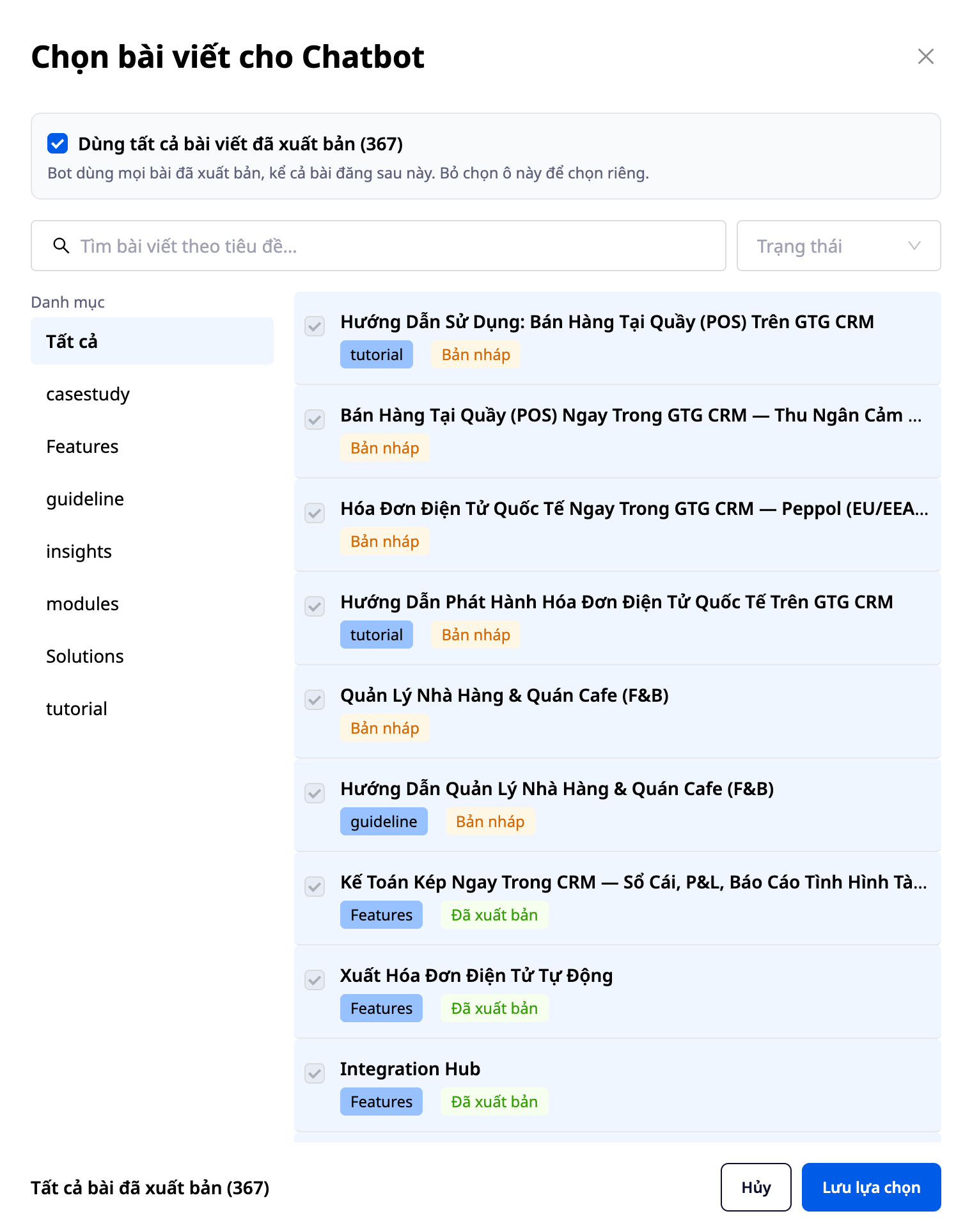
3. NEW — Select exactly which posts will be used to answer.
Instead of a generic "use posts" toggle switch, you now have three scope options : Off / All posts / Only selected posts . With "Only selected posts," a post selection pane opens allowing you to filter by category & status, search by title, select multiple posts (including selecting entire categories), and clearly see the availability status of each post (ready / processing / not processed).
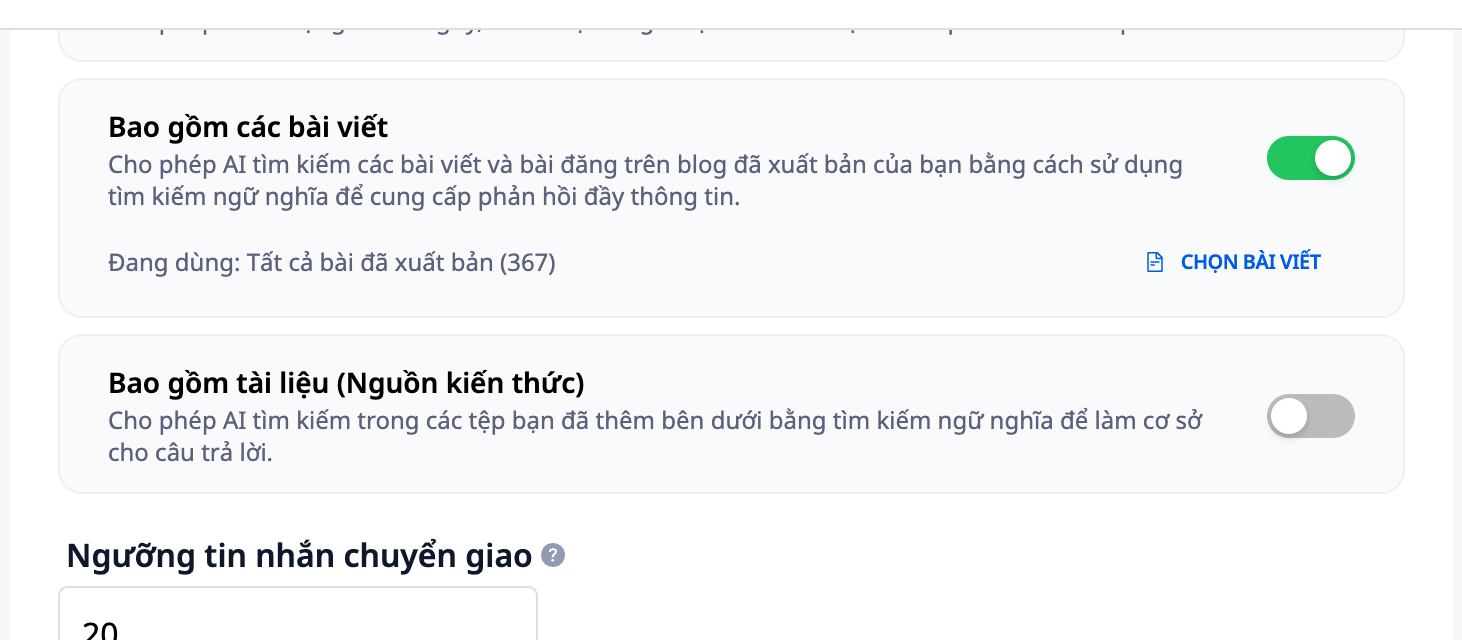
- Features : 3-level post scope + post selection frame with filters and availability status.
- Benefits : focused, concise answers that don't reveal drafts; you maintain control over the knowledge base the bot uses.
4. Balancing automation and human intervention.
Set a threshold for the number of messages the bot processes before forwarding them to staff, enable/disable the bot on each channel, and select the response language. The bot handles basic questions so staff can focus on closing deals and handling complex cases.
- Features : Switching threshold + Channel-based on/off + Multi-language support.
- Benefits : automatic operation at your desired level, without losing the feeling of being served.
Benefits for Businesses
24/7 multi-channel response — Don't miss a customer, even outside of business hours.
Natural writing style — Professional experience, greater customer trust.
Quick-click suggestions — Uninterrupted conversations, increased chances of closing a deal.
Choose the scope of the article — Respond in a focused, accurate, and unbiased manner, without revealing drafts.
Transfer threshold + multilingual — Automatic/human balance, serving multinational customers
Who is it suitable for?
- Online shop owners want to respond to customers instantly on their website and social media.
- The sales and customer service team wants to reduce repetitive questions and focus on the cases that require consultation.
- SMB businesses want a consistent, professional customer service experience 24/7.
How do I get started?
Go to the AI Chatbot settings in GTG CRM: connect the channel, select the post scope for the bot, write custom instructions, set the transfer threshold, then save and test the chat. Need detailed steps? See the Guide to Setting Up & Using AI Chatbot on GTG CRM .
Try it for free — no credit card required.


