

Feature Introduction
Is your customer service team having to open a separate call center software, write down phone numbers on paper, and then manually enter each call into the CRM? Regular customers call, and employees still have to ask, "What's your name, and what order did you order?" because the information is stored elsewhere. At the end of the month, the boss wants to know how many calls were made, how many were missed, and who answered the most calls – and no one can answer.
That ends today. GTG CRM brings the entire call center system into one : you get the call center number directly in the software , make and receive calls directly in your browser (no installation required, no landline needed), make internal calls between members, start multi-person conferences , record calls , and automatically create voice recordings categorized by speaker . Each call is automatically saved to the 360° customer profile.
The Problems Businesses Are Facing
Using a separate call center/calling software from the CRM system forces employees to switch between 2-3 applications, making it easy to miss information.
To get a call center number, you have to register with the network provider yourself and configure the technical settings — a major barrier for small businesses, and it can take days to even get a call made.
Manually importing call history into CRM — Time-consuming, results in incomplete and inaccurate data.
No audio recording or only fragmented recordings, no written content — Impossible to review, impossible to train staff, prone to disputes.
No call reports — The boss doesn't know the call volume, missed rate, or individual performance.
GTG CRM consolidates all data into a single source : phone numbers, calls, recordings, voice recordings, and reports are all located alongside the customer profile.
Highlights
1. Get the hotline number directly in GTG CRM.
No voice provider account or technical knowledge required. Simply select your country → choose your number → confirm , GTG CRM handles all the technical aspects behind the scenes, and the cost is transparently credited to your account.
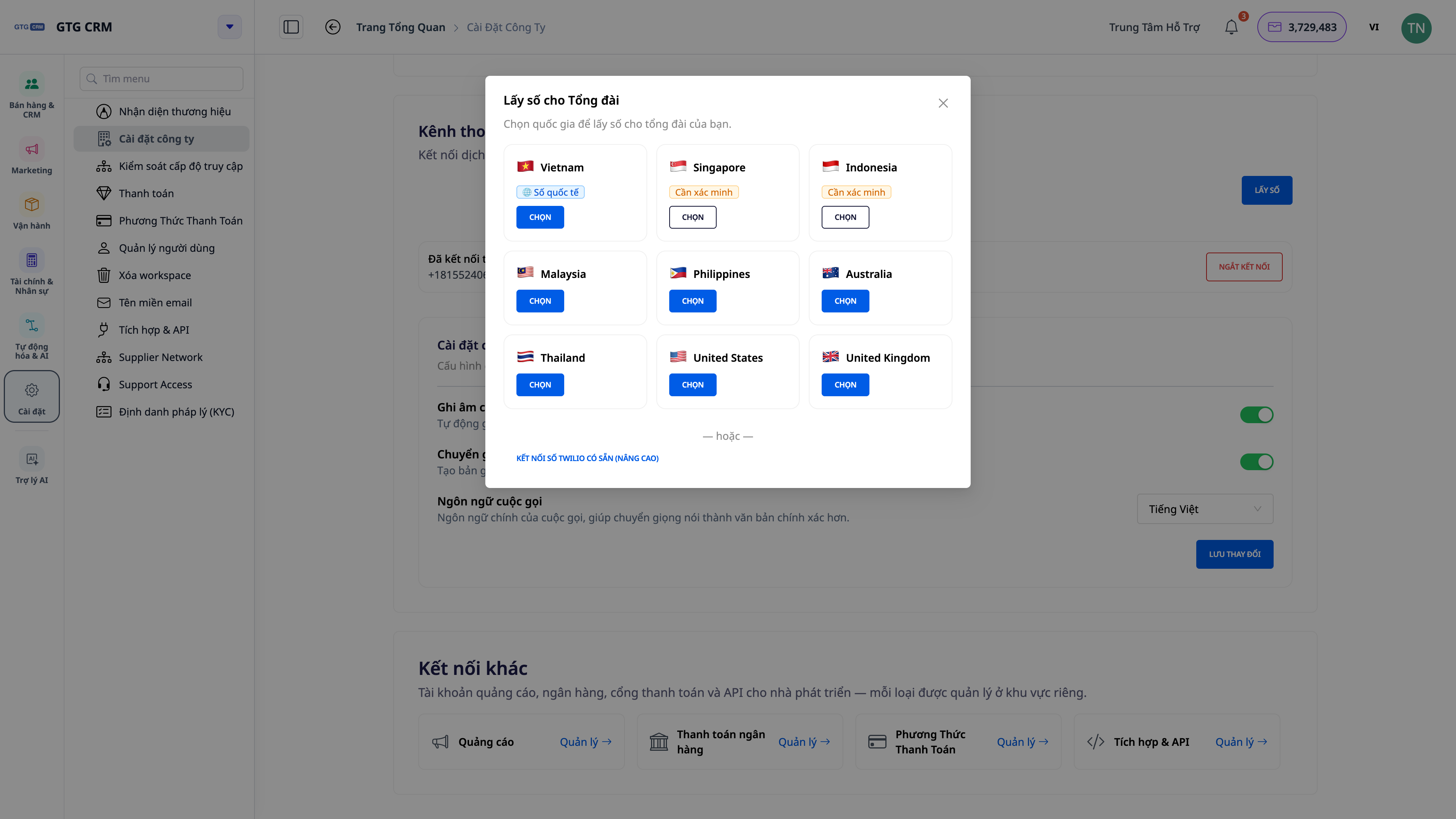
- There are numbers that can be dialed instantly to many countries — no need to wait for external registration procedures.
- Manage your number's lifecycle : renew, temporarily deactivate (while retaining your number), reconnect to the same number, or discard it entirely when not in use — you always have control over your costs.
- Already have a private number? There are still advanced options to connect your existing phone number.
ℹ️ Some countries require a one-time identity verification (KYC) check before issuing a number (see section 6). Vietnamese phone numbers (+84) are currently issued as international numbers .
2. Make and receive calls directly from your browser — includes a numeric keypad.
The entire call center is conveniently located in your browser. Press the numeric keypad for quick dialing, or click the call button directly on the customer profile. When a call comes in, a notification appears with caller information so you can answer or reject it .
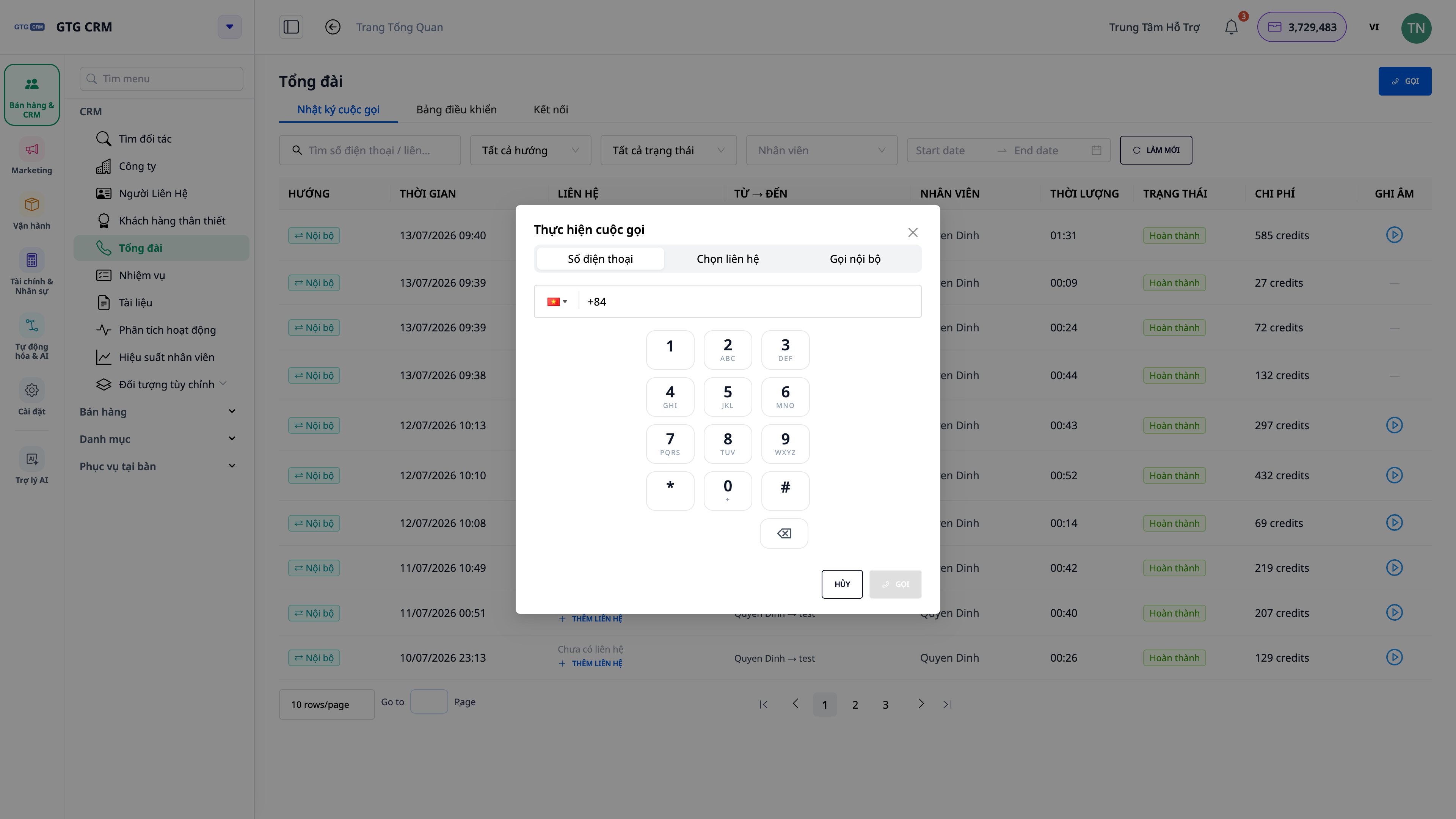
- No setup, no landline phone — just a browser and a headset with a microphone.
- Display customer information immediately upon receiving a call : if the number is already in the CRM, you see the name and history; if it's a new customer, you create a contact during the call.
- Talking and taking notes at the same time, creating tasks to do — without taking your eyes off the screen.
3. Internal calls between members
Need a quick call to a colleague? Open the Internal Calls tab, select a member (grouped by job title), and call directly from your browser —no external call charges. Real-time online/busy/offline status is displayed so you know who's available.
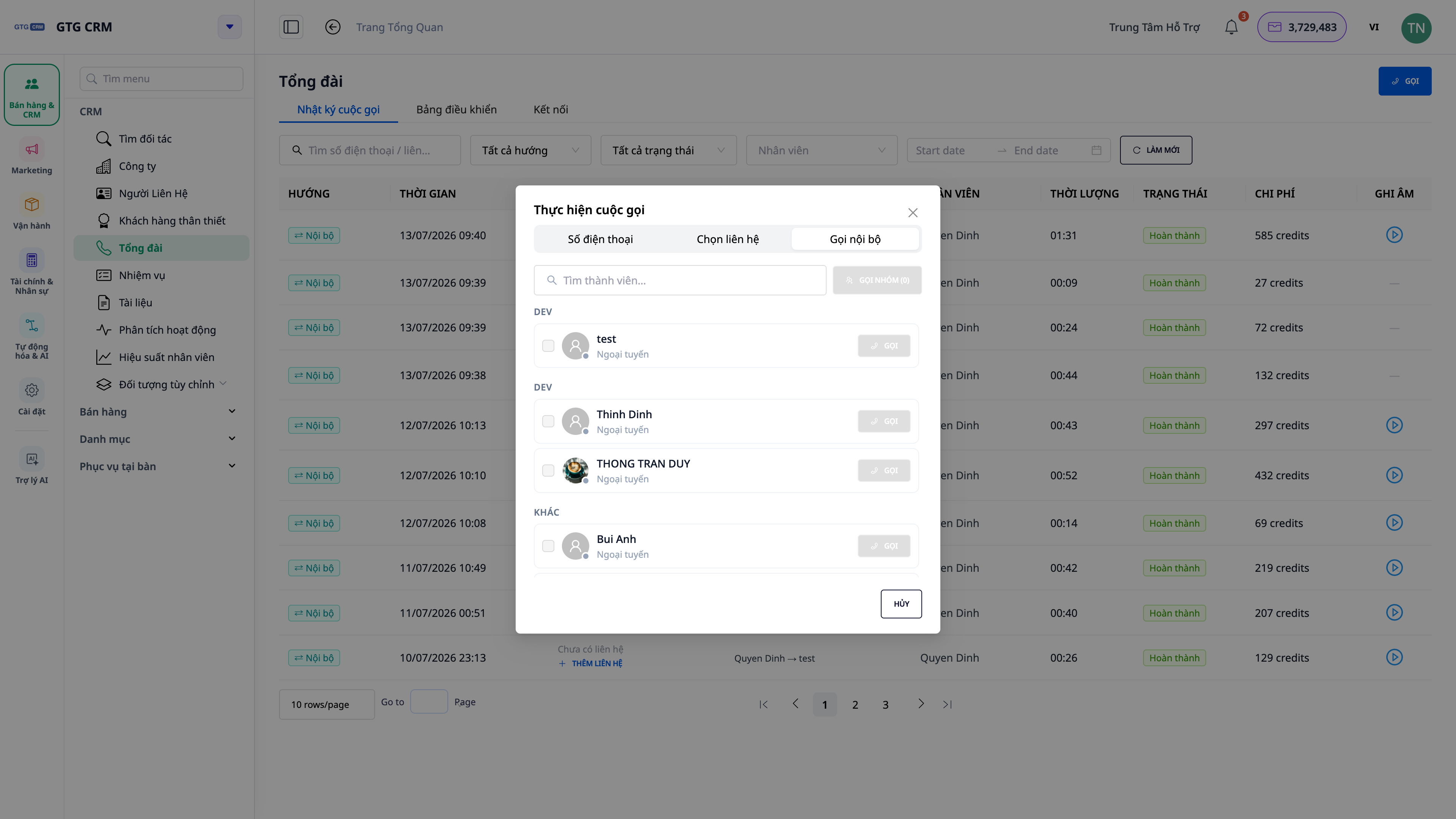
- Quick internal communication, no need for each other's individual phone numbers.
- Internal calls cost less than external calls.
4. Multi-person conferencing — add people in the middle of a call
Need to add a manager or technical team member to the call? Click "Add people" to invite more members to the conference call — the ongoing call won't be interrupted, and no one will be dropped.
- Handling situations that require the involvement of multiple departments (sales + technical + customer).
- The entire conference was recorded and transcripts were created as usual.
5. Call recording & voice recording by speaker
Turn on call recording to save the entire call , and turn on Voice-to-Text to automatically create a transcript —displayed as a clear conversation, distinguishing who said what , in chronological order.
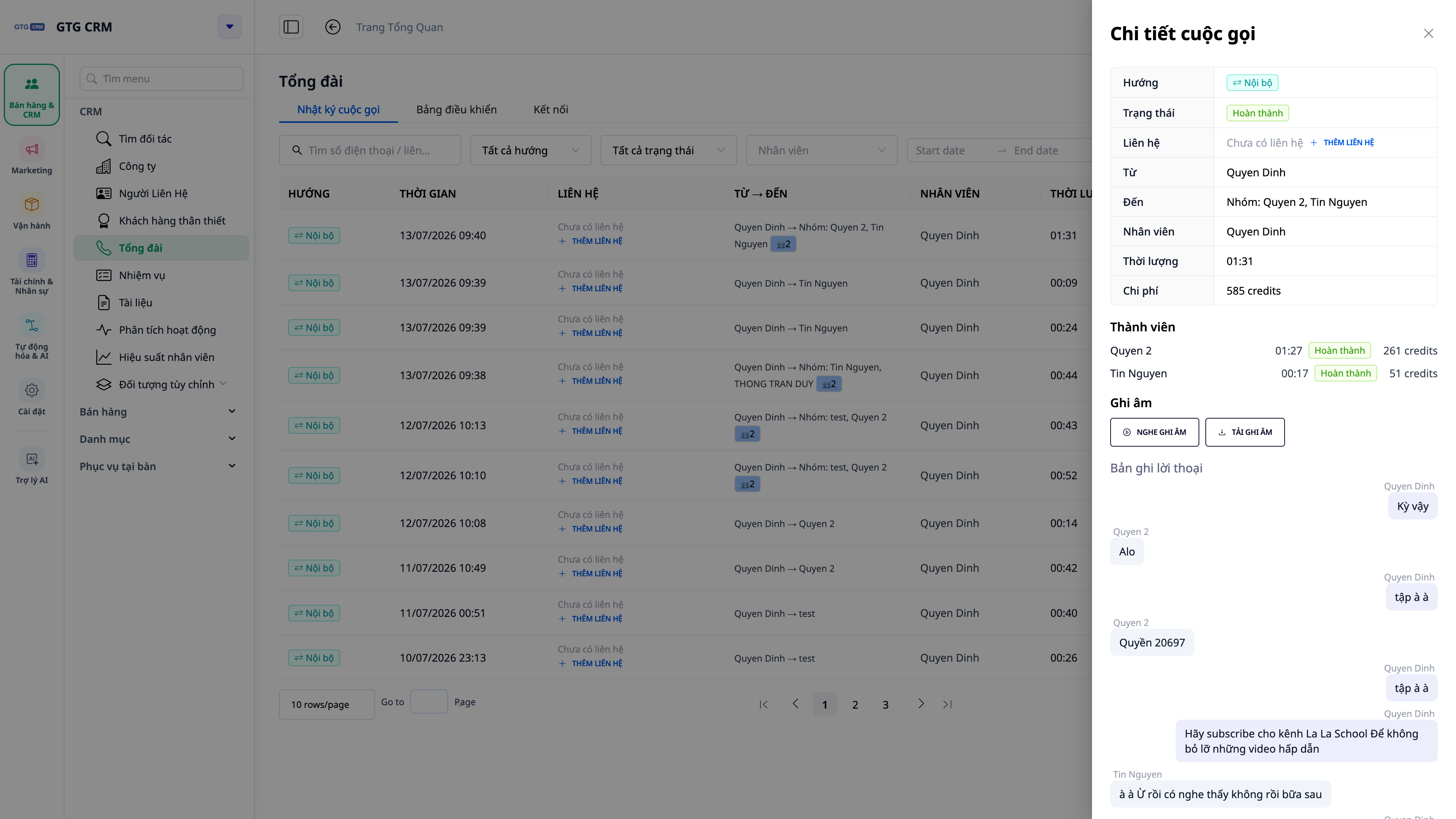
- Listen back anytime; the recording is securely stored on GTG's infrastructure.
- Read instead of listen : text-based transcripts enable quick lookup and searching, with support for Vietnamese.
- Training and dispute resolution are made easier with complete call evidence.
ℹ️ Recording and speech-to-text are toggle options for each workspace (in Call Settings). You have complete control over whether or not recording is enabled.
6. Verify KYC for numbers in countries with regulatory requirements.
For countries requiring identification, GTG CRM guides you through submitting your KYC verification application once directly within the software. A new number is only issued once your application is approved — no fees charged before approval , transparent and secure.
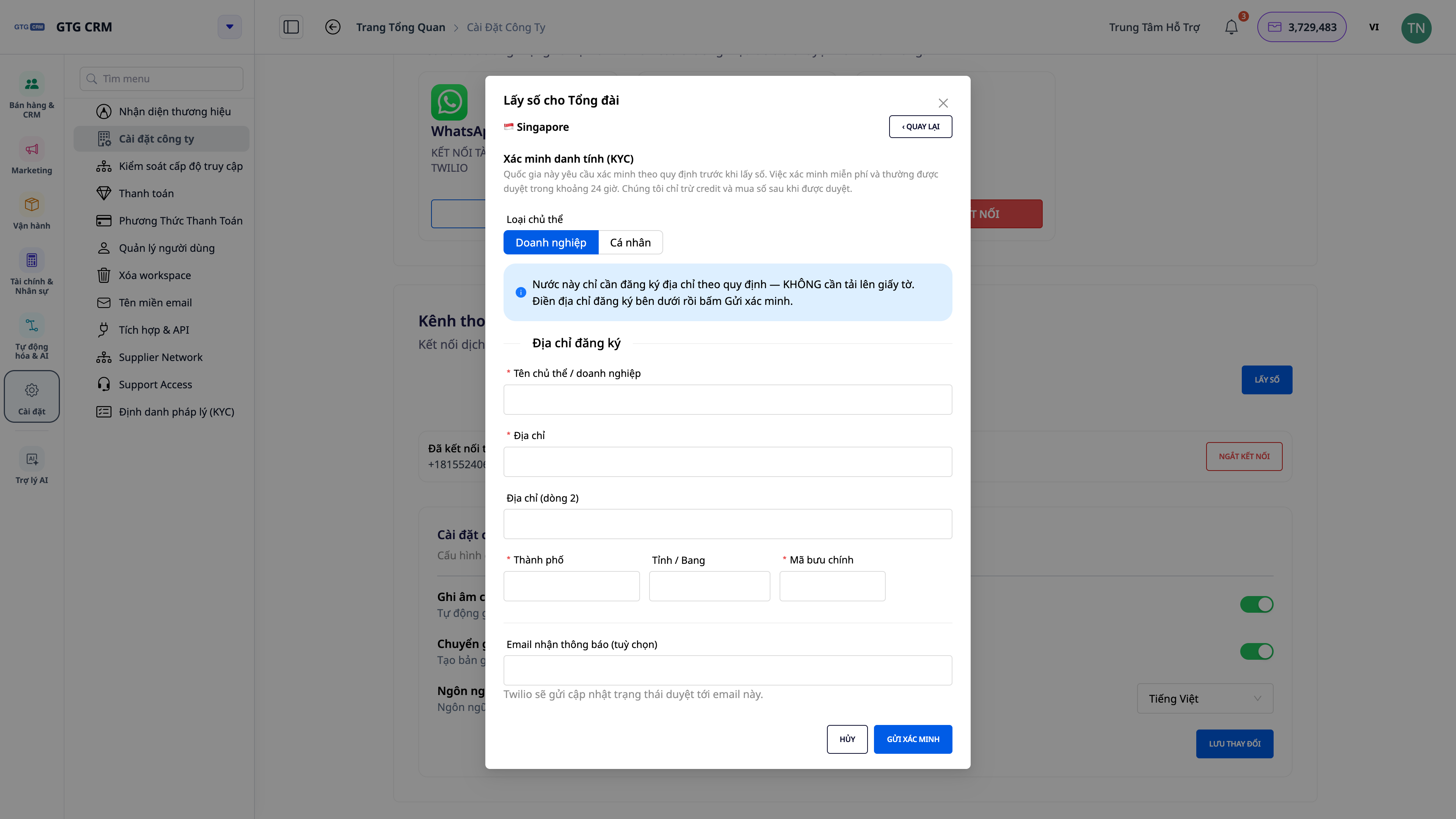
- You don't have to deal with the agency/network provider yourself — the process is streamlined and digitized within the CRM.
- The application status ("pending" / "approved" / "rejected") is clearly displayed.
7. Customer Logs, Dashboards & Timeline 360°
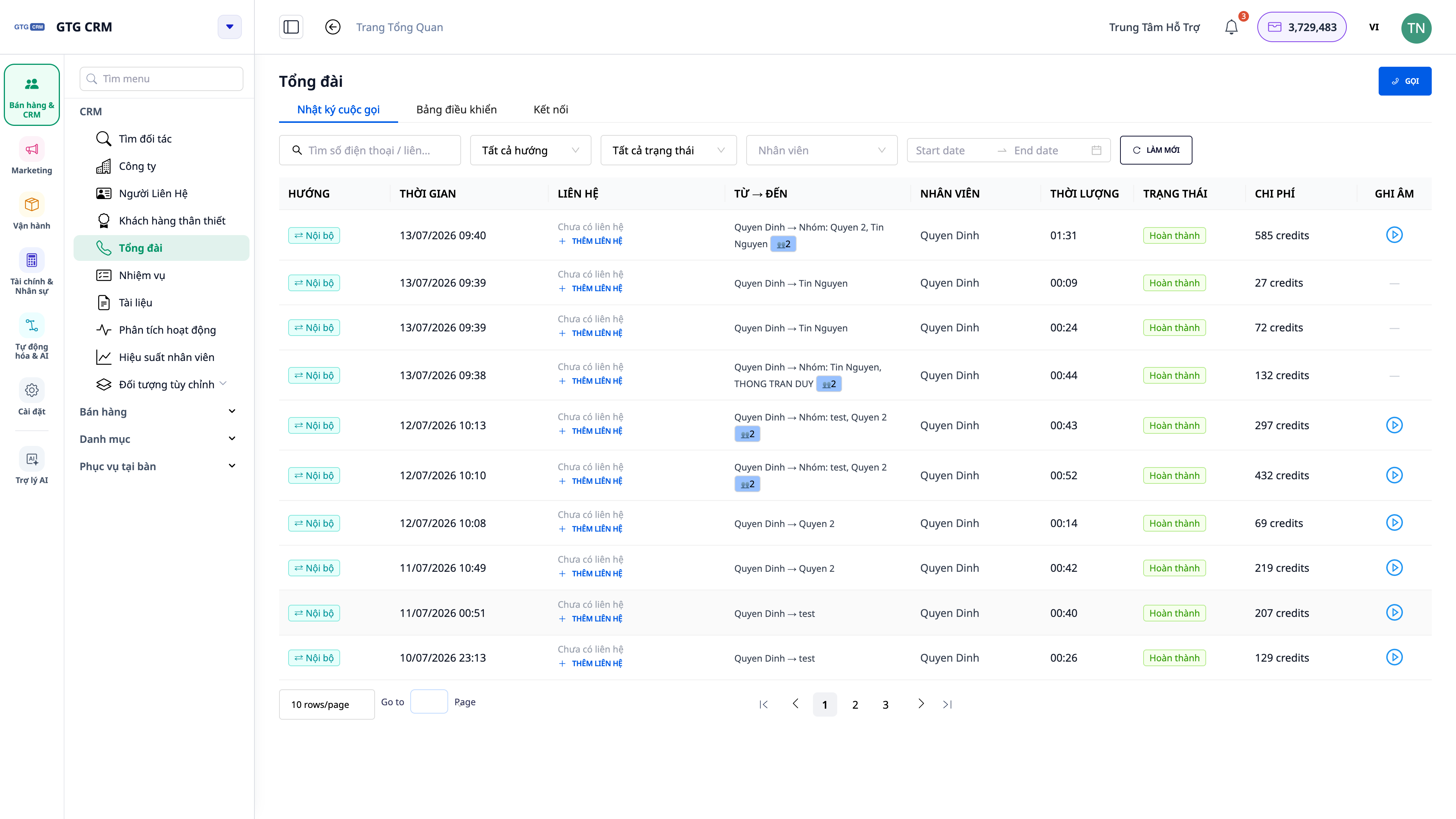
All calls are automatically entered into the Call Log (search, filter by call direction, employee, missed calls, with cost and a playback button) and onto the Dashboard (call volume, missed rate, total minutes, total cost, statistics by employee). Calls also appear directly on the relevant customer's 360° timeline .
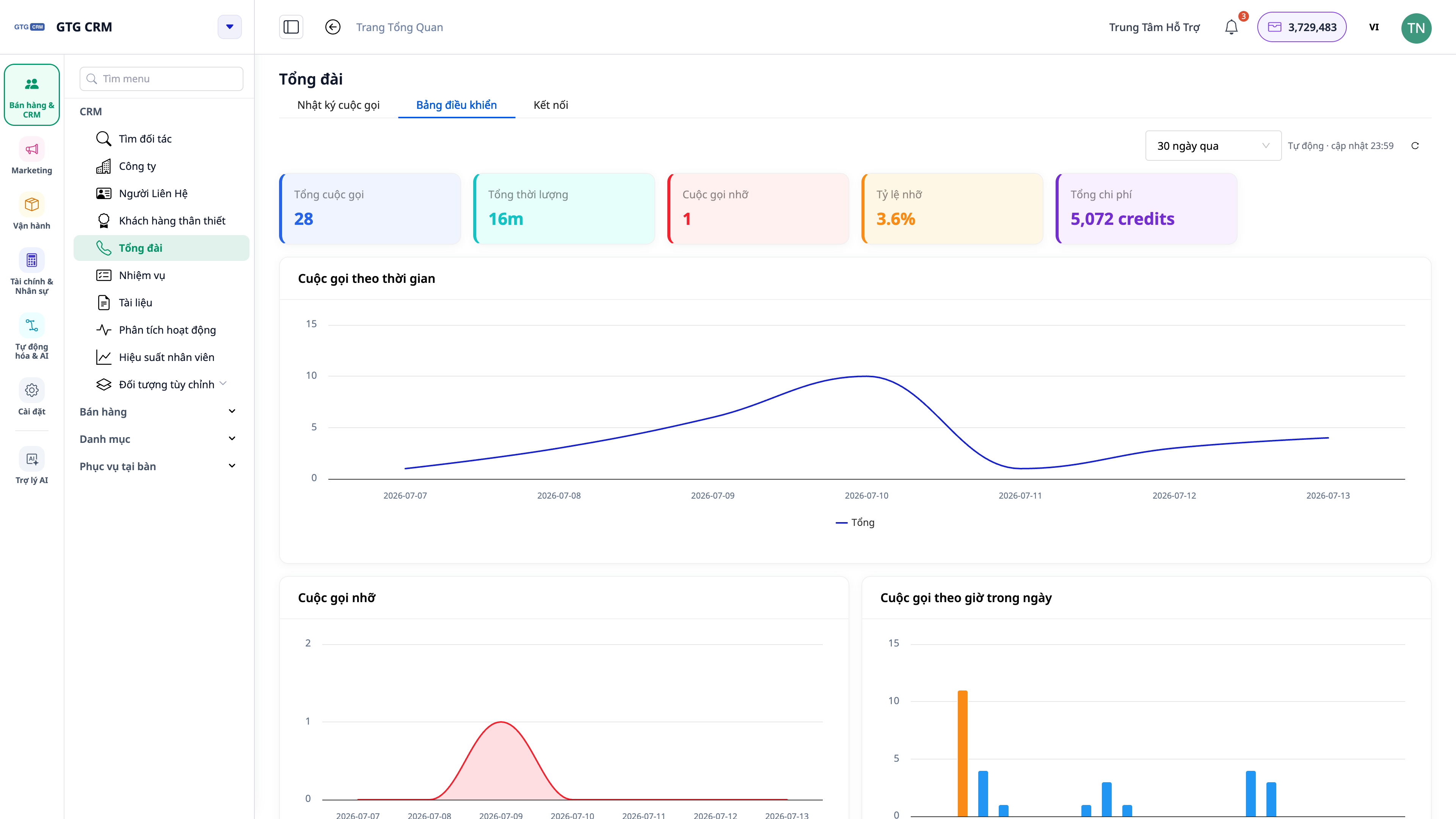
- The boss gets the overall picture; the team leader monitors individual performance.
- Staff can see the customer's full interaction history as soon as they open the profile.
Transparent Pricing — Calculated Based on Actual Seconds
Calls are charged by the actual second , not rounded minutes like traditional call centers — you don't pay for unused time.
Incoming/outgoing calls with customers — 5 credits/second
Internal calls between members — 3 credits/second (cheaper)
Time period — From connection to disconnection
The system holds credit at the start and only deducts the exact amount based on the actual seconds at the end , refunding the remaining balance — you'll never be charged more than the actual call time. Before each call, GTG CRM automatically checks your credit balance; if it's insufficient, the system notifies you and suggests topping up.
ℹ️ The cost of renting a call center phone number (monthly package, payable with credit) is charged separately from call charges and is always clearly displayed before you confirm.
Benefits for Businesses
Get numbers and call instantly in CRM — Start taking care of customers over the phone in minutes, no technical barriers.
Call via browser + numeric keypad — The whole team works from anywhere, all you need is a browser and a headset.
Internal calls — Fast, cost-effective internal coordination.
Conference calls and add-ons during a call — Handling complex situations requiring the involvement of multiple departments.
Audio recordings + speaker transcripts — For reference, training, and clear evidence when needed.
Log + Dashboard + 360° — Data-driven decision-making, no customer missed.
Charged by the second + credit check — Transparent costs, no waste.
Who is it suitable for?
- SMB business owners want a professional call center without having to invest in a physical PBX system.
- The telesales team needs to make calls quickly and record all information in the CRM.
- The customer service and support department needs to see the customer's call history immediately upon receiving a call.
- Team leaders/managers need to report call volume, missed call rates, and employee performance.
How do I get started?
In GTG CRM, go to the Call Center module, open the Connect tab to get the call center number (or connect to an existing number), enable Call Settings if you want to record calls, and then start calling. Detailed steps can be found in the article "How to Use Call Center on GTG CRM" .
Try it for free — no credit card required.


