
Customer Relationship Management (CRM) in GTG CRM helps businesses store, manage, and track all customer information from various channels, all centrally on a single platform. Now you can even analyze customer and company contacts directly within CRM, view the entire interaction history on a timeline , and identify the right next steps —no need to export to Excel.
Why do we need CRM?
Current state of businesses
In business, customer data is often scattered:
- Facebook : Customers message via Messenger
- Zalo : Customers can chat via Zalo Official Account.
- Email : Customers send emails inquiring about information.
- Landing Page : Customers fill out the registration form.
Problems when using Excel
Manually entering customer data into Excel — Time-consuming and prone to errors.
Each employee has their own file — Data is not synchronized, making it difficult to divide tasks.
Counting data using formulas on a spreadsheet — No overall picture, outdated data.
No interaction history — Missed customers, duplicate service
GTG CRM consolidates everything into a single data source : customers automatically come in from all channels, every interaction is recorded, and analytics are always based on all real-world data.
Customer data source
CRM automatically collects customer data from:
- Social media — Facebook Messenger (customers message via Fanpage)
- Email — Gmail (customers send emails to the business mailbox)
- Landing Page & Live Chat — registration form, leave your information via Live Chat
- Manual import — create direct contacts or import CSV in bulk
Highlights
1. Centralized contact list management
View and manage all customers in one table: Name, Email, Phone Number, Country, Status (New, In Progress, Converted…), Customer Source, Responsible Person.
- Customize the display columns : add/remove columns (Purchased Products, Notes, etc.), rearrange the order.
- Advanced filters : filter by date, status, address/product/source, and a combination of multiple conditions.
- Assigning responsibilities : assigning clients to individual staff members, switching roles as needed, and monitoring workload.
- Automatic business classification : contacts with company domain email addresses are separated into the "Business" list.
2. Contact & Company Analytics Tab — accurate metrics across all data
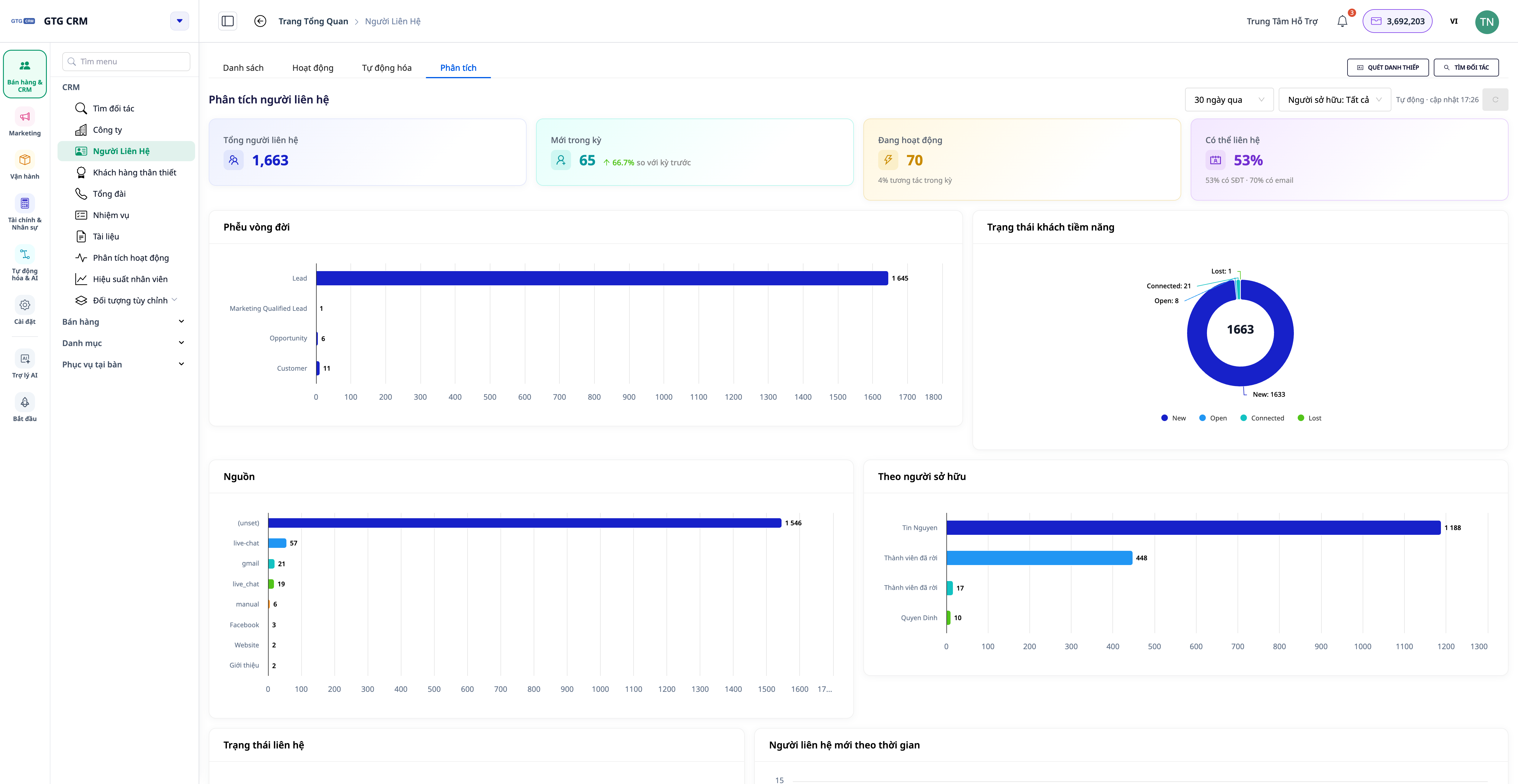
Right in the Contacts and Business menu, there's now an Analytics tab — a built-in dashboard that calculates across your entire contact list (no template limit), updated in real time.
- KPI Card : Total contacts · New contacts during the period (with trend ▲/▼ compared to the previous period) · Active contacts · Contactability rate (email/phone number).
- Lifecycle funnel : showing at which stage customers are picked up or dropped off — from potential to actual customer.
- Allocation by Source, Status, and Responsible Person : identify which channels are bringing in customers and who is holding the most customers.
- Data health : the percentage of contacts with email/phone number/person in charge/company.
- For Companies : allocation by industry, size, affiliated companies, and a summary of the pipeline by company.
💡 The dashboard automatically refreshes — the top right corner displays "Auto · HH:MM update", you don't have to reload the page to see the new figures.
3. Suggesting actions — turning data into tasks
The Analytics tab not only displays charts but also indicates the next steps . Each suggestion includes a quantity and a button that leads directly to a pre-filtered list of that specific customer group.
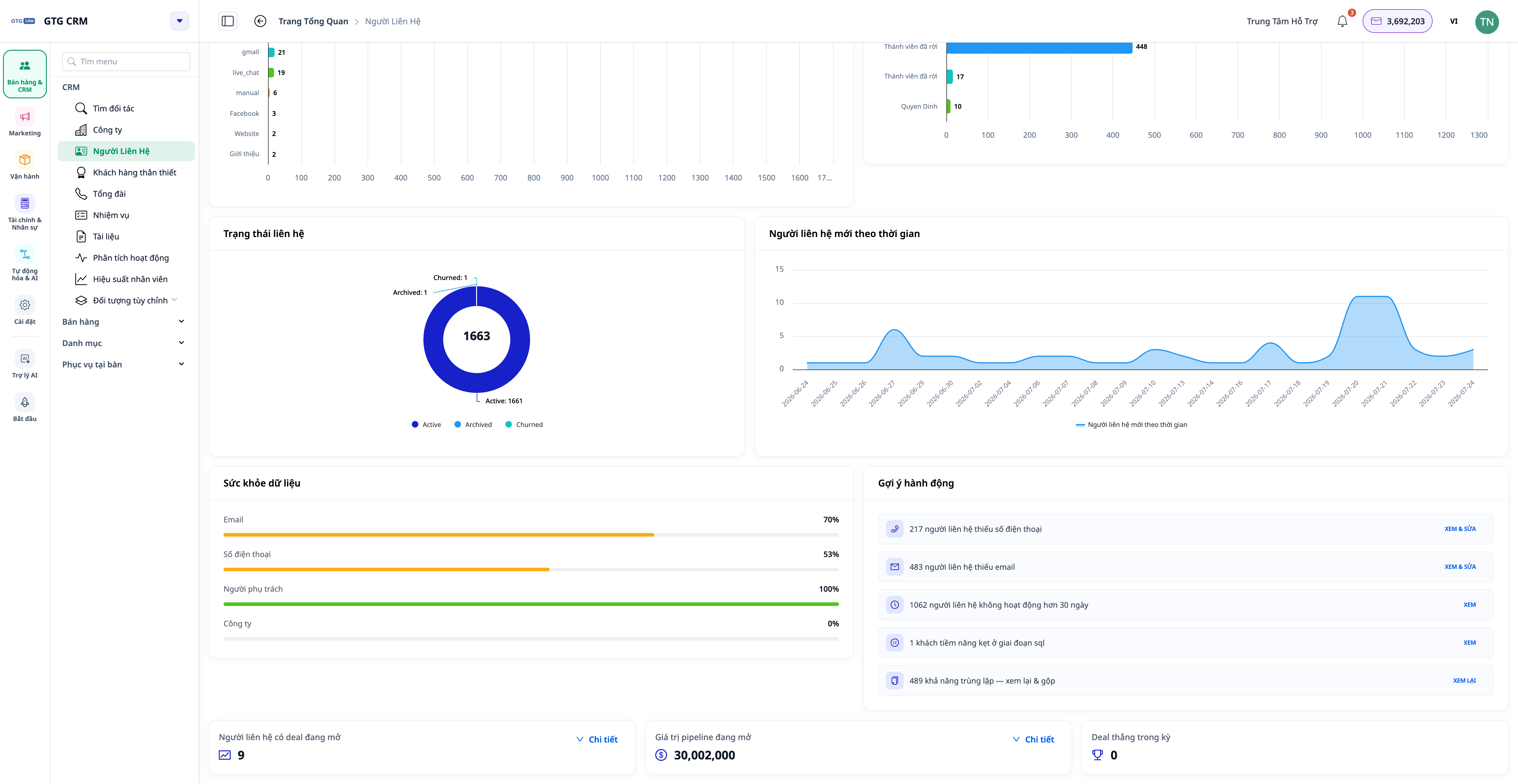
- "Contact missing phone number/email address" → open the correct group to add or import.
- "Inactive for > 30 days" → group needs re-care.
- "No one in charge yet" → assign immediately.
- "Stuck at a stage in the lifecycle" → the team needs a boost.
4. 360° Activity Timeline
Each contact and company has an Activity tab that displays all relevant events on an easy-to-read timeline : calls, emails, deals, orders… along with the name of the person who performed the action (instead of confusing identifiers) and a clear description of the action in your language.
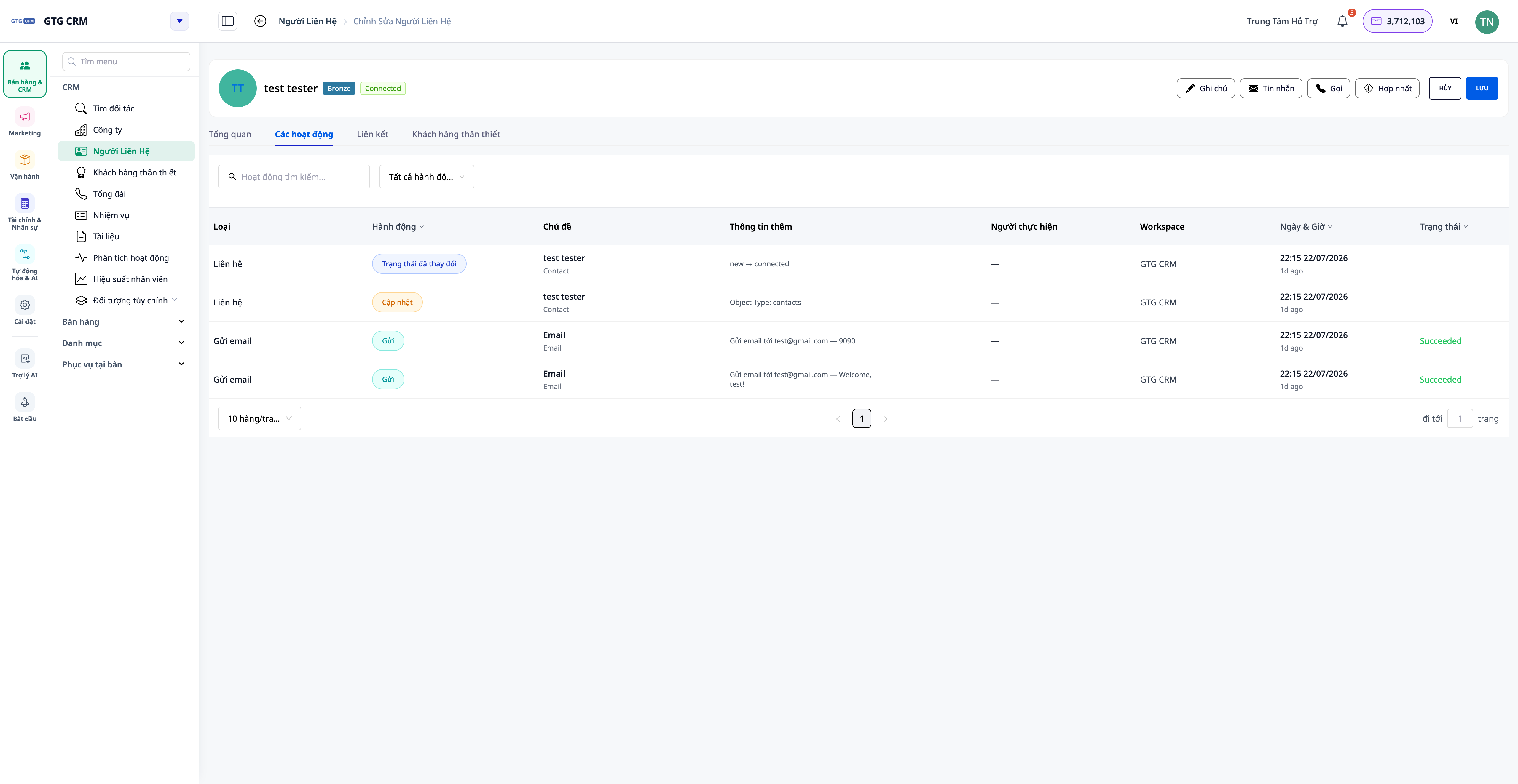
- For companies : the timeline also includes a scrolling summary of the activities of contacts, deals, and orders belonging to that company.
- At the list level : open the Activities tab to view the overall feed of all contacts/companies, filter by person / action type / date.
5. Attach files and links to the Task.
Each task in CRM can attach files from Asset Manager (PDF, DOCX, XLSX, images, videos, etc.) and external links (Google Sheets, Drive, Figma, etc.). Opening the task will show you all the necessary documents — no need to search elsewhere.
Benefits for Businesses
Automated multi-channel customer acquisition — No contacts missed, no manual entry.
Tab: Analyzing data across all sources — Making decisions based on the right data, not a truncated sample.
Action suggestions with pre-filtered lists — Know what to do next, save time.
360° Activity Timeline — Get a complete guest history in seconds.
Advanced filters + customizable columns — Find the right customer group extremely quickly
Assign responsibilities — Know exactly who is taking care of which customer, avoiding duplication.
Who is it suitable for?
- The Sales team manages potential customers, tracks the customer lifecycle funnel, and immediately addresses "hot" customer groups.
- Marketing team — segmenting customers by source, measuring which channels are effective.
- Customer care — view the entire interaction history on a single timeline.
- Managers & business owners — monitor the data health and workload of the entire team, keeping metrics up-to-date.
How do I get started?
In GTG CRM, customer data will automatically flow into the Contacts (or Business ) menu when you connect channels (Facebook, Zalo, Email) in the Settings section. Select the Analytics tab to view the dashboard, and open a contact/company and select the Activity tab to view the 360° timeline.
See the detailed step-by-step instructions in the article "Guide to using CRM on GTG CRM" .
Try it for free — no credit card required.


