

Customer data is "gold" in the digital age: it helps you understand behavior and is the key to driving growth. But data is only valuable when it is leveraged correctly. This article guides you through 3 systematic steps for analyzing customer data — and how to do it right within GTG CRM without exporting to Excel.
Why is Customer Data "Gold" in Sales?
In a fiercely competitive environment, sales are not just about introducing products. You need to answer: Who are the customers? What do they need? What is their purchasing behavior? This is where customer data proves its value — provided you have the tools to organize and analyze it scientifically.
Step 1: Build a Unified Data Foundation
A solid foundation for any strategy is a comprehensive, scientifically organized data source. Consolidate all customer information from multiple channels into a single location:
- Multi-channel collection: all customer information left from Landing Pages, Live Chat, Facebook, Email… automatically flows into the CRM.
- Centralized customer profiles: instead of fragmented information across multiple platforms, all data for each Lead and customer resides within a single profile.
This is where GTG CRM's data consolidation capabilities shine: all information is tightly managed and easily accessible.
Step 2: Evaluate and Segment Customers
Once data is centralized, you transform that volume of information into insightful conclusions — identifying your most promising customers and the sales opportunities that await.
- Smart segmentation: classify customers into groups (VIP customers, potential customers, existing customers…) based on source, status, and behavior.
- Lead scoring: look at interactions to identify "hot leads" that need immediate contact, optimizing time and increasing closing opportunities.
Step 3: Measure & Continuously Optimize
To ensure your sales strategy remains effective, you need to continuously monitor and adjust:
- Visual performance tracking: see performance at each stage of the sales funnel, by source, and by person in charge.
- Timely adjustments: use data to focus resources on customer groups and channels that deliver the best results.
Do it right in the CRM: Contact & Company Analytics Tabs
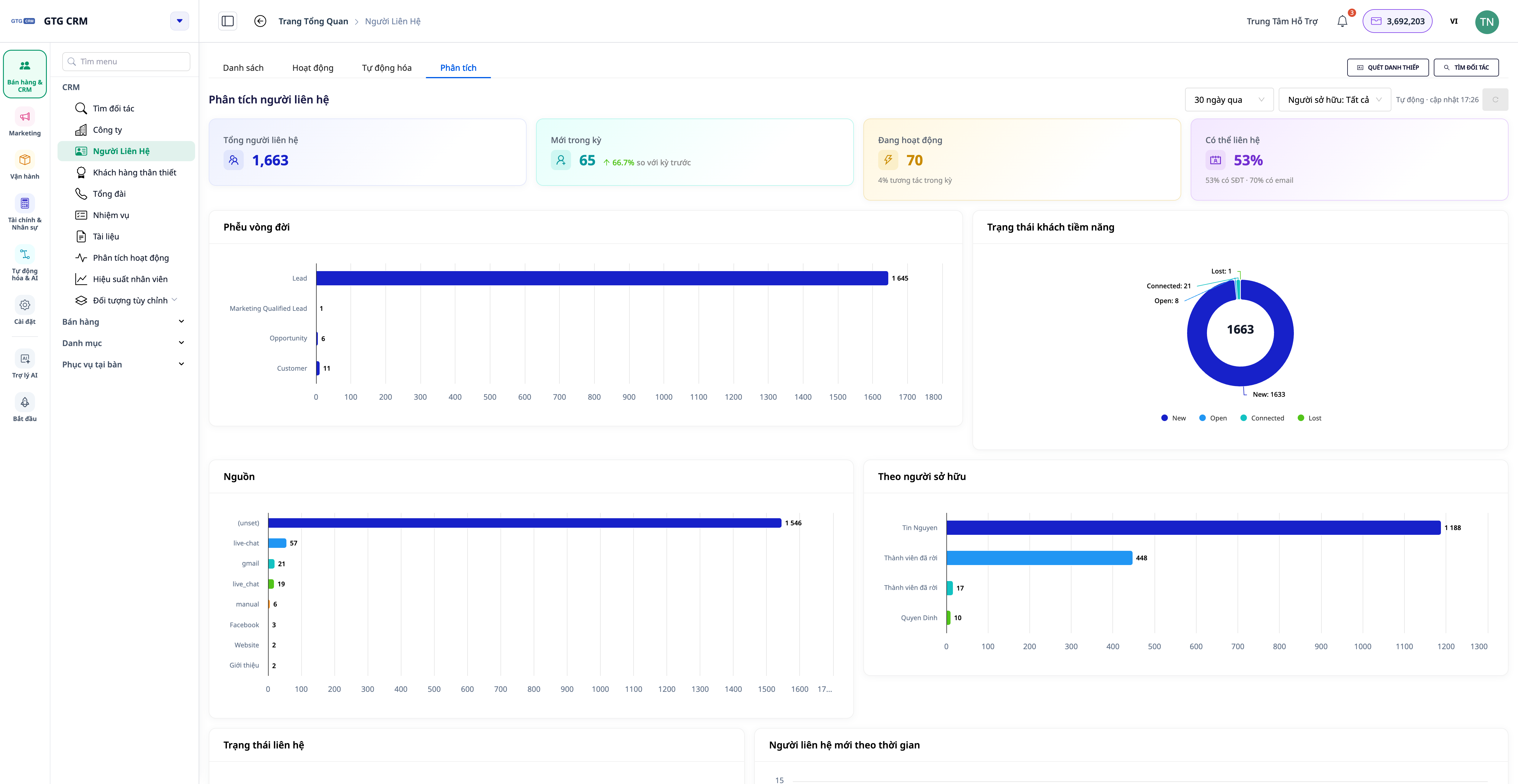
You no longer need to export Excel to perform these three steps. Directly on the Contacts and Companies menus, there is now an Analytics tab — a pre-built dashboard, calculated on the entire contact list (unlimited records) and updated in real-time:
- Customer growth over time and lifecycle funnel to see where customers are accumulating or dropping off.
- Distribution by Source, by status, and by person in charge — know which channels are bringing in customers.
- Data Health and Action Suggestions: the system identifies customer groups lacking information, inactive for a long time, or without a person in charge, with buttons to directly access pre-filtered lists for processing.
Conclusion
Customer data is "gold" — and leveraging it effectively is crucial for growth. With GTG CRM, you can easily consolidate multi-channel data, segment & score leads, and then continuously measure and optimize — all within the Analytics tab, no Excel export needed.
See detailed instructions on how to use the Analytics tab and the 360° Activity timeline in the CRM User Guide on GTG CRM.


