
Er du ved at forberede budgettet til en annoncekampagne på Facebook Ads, Google Ads eller SEO? Før du trykker på "Kør"-knappen, skal du sikre dig, at dit website er klar til at modtage og konvertere trafik. Et website, der ikke er optimeret, spilder ikke kun annoncebudgettet, men får dig også til at gå glip af muligheden for at nå potentielle kunder.
Dette indlæg giver dig en komplet tjekliste til at foretage en selvanalyse af dit website, før du starter annoncerne, og sikrer, at alle tekniske elementer, indhold og brugeroplevelse er optimeret for at opnå det højeste ROI.
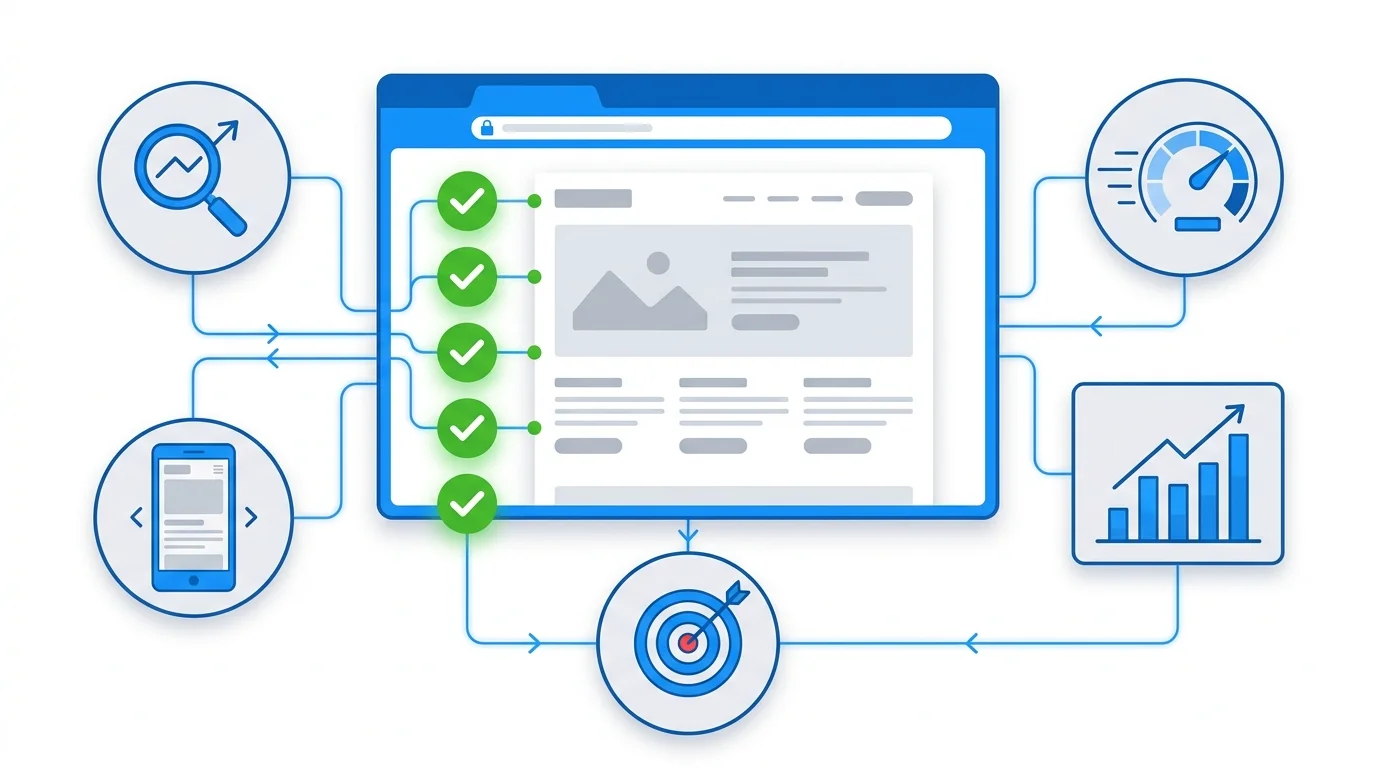
Overordnet Tjekliste: 6 Vigtige Kontrolgrupper
| Kontrolgruppe | Hovedformål | Prioritet |
|---|---|---|
| Technical SEO | Sikre stabil webstedsdrift, hurtig indlæsningstid | Meget høj |
| Indhold & Søgeord | Sikre, at indholdet matcher søgeintentionen | Meget høj |
| UX/UI & Landing Page | Optimere brugeroplevelsen, reducere bounce rate | Høj |
| Sporing & Attribution | Nøjagtigt måle kampagneeffektivitet, spore leads | Meget høj |
| CTA & Konvertering | Optimere konverteringspunkter, øge lead-indsendelser | Meget høj |
| On-page SEO | Optimere grundlæggende on-page elementer | Høj |
1. Teknisk SEO: Et Solidt Teknisk Fundament
Teknisk Tjekliste
- [ ] Sideindlæsningstid < 3 sekunder (tjek på PageSpeed Insights)
- Desktop score > 90
- Mobile score > 80
-
Core Web Vitals opnået "God" (LCP, FID, CLS)
-
[ ] 100% Mobilvenlig
- Fuldt responsivt design på desktop, tablet og mobil
- Ingen visningsfejl på mobile enheder
-
Tilstrækkelig stor font-størrelse, let-klikbare knapper (minimum 48x48px)
-
[ ] HTTPS korrekt installeret
- Gyldigt SSL-certifikat
-
Ingen blandede indholdsadvarsler
-
[ ] Sitemap.xml & robots.txt
- Sitemap indsendt til Google Search Console
-
Robots.txt blokerer ikke vigtige sider
-
[ ] Korrekt indeksering af sider
- Tjek
site:ditdomæne.compå Google - Kun sider med værdi er indekseret
-
Brug noindex til duplikerede eller unødvendige sider
-
[ ] Crawlability
- Ingen 404- eller 500-fejl på hovedsiderne
- Rimelig intern linking
- Klar URL-struktur, ingen overflødige parametre
Almindelige fejl at undgå: - Website indlæses for langsomt på mobil (> 5 sekunder) — 53% af brugerne vil forlade siden - Manglende SSL — Chrome viser "Ikke sikker", hvilket ødelægger tilliden øjeblikkeligt - Duplikerede sider uden brug af canonical tag
Tips fra GTG CRM: Hvis du bruger GTG CRMs Website Builder, er det responsive design indbygget med mulighed for individuel tilpasning for hvert breakpoint (desktop, tablet, mobil). Sitemap.xml og Robots.txt genereres også automatisk med en intuitiv editor — du kan indstille prioritet for hver side, tilføje brugerdefinerede URL'er eller redigere direkte med rå XML. SSL og HTTPS konfigureres også klar til både brugerdefinerede domæner og underdomænet ditbrand.gtgcrm.com.
Praktiske eksempler:
En kunde kørte Google Ads for en landingsside, der solgte kurser, men mobilens sidehastighed var 8 sekunder. Efter optimering af billeder (konvertering til WebP) og konfiguration af cache, faldt hastigheden til 2,5 sekunder — bounce rate faldt fra 78% til 42%, CPA faldt med 35%.
2. Indhold & Søgeord: Tal Kundens Sprog
Indholds Tjekliste
- [ ] Grundig søgeordsanalyse
- Primært søgeord i titel, H1, URL
- Sekundære søgeord fordelt naturligt i indholdet
-
LSI-søgeord for at øge konteksten
-
[ ] Indholdskvalitet
- Indhold på 800–2000 ord (afhængigt af emne)
- Løser kundens smertepunkter korrekt
-
Inkluderer data og statistikker som bevis
-
[ ] Korrekt overskriftsstruktur
- Kun 1 H1
- Logisk hierarki for H2, H3
-
Søgeord inkluderet i de primære overskrifter
-
[ ] Aktualitet
- Indhold opdateret inden for de sidste 6 måneder
-
Information er korrekt og ikke forældet
-
[ ] Intern linking
- Links til relaterede sider
-
Beskrivende ankertekst
-
[ ] Flersproget (hvis du målretter mod flere markeder)
- Hvert sprog har en separat URL til understøttelse af hreflang
Almindelige fejl at undgå: - Overdreven brug af søgeord (keyword stuffing) — Google straffer direkte - Tyndt indhold, der ikke løser brugerens problem - Direkte kopiering fra konkurrenter — mister E-E-A-T point
Tip fra GTG CRM: GTG CRM understøtter 10 sprog (Vietnamesisk, Engelsk, Thai, Kinesisk, Japansk, Koreansk, Fransk, Spansk, Indonesisk, Tysk) med separate URL-præfikser for hvert sprog (/vi/about, /en/about). Du kan vælge automatisk oversættelse med Google Translate eller AI Enhanced Translation, der bruger GPT-4o — oversætter med fokus på brandets og branchens kontekst, hvilket giver langt mere naturlige resultater end almindelig maskinoversættelse. Derudover hjælper AI Article Writer med at skabe kvalitetsindhold med den rette tone, eller forbedre eksisterende indhold (forkorte, udvide, rette grammatik).
Reelt eksempel:
En landingsside, der målretter sig mod søgeordet "CRM-software til mellemstore virksomheder", men indholdet handler om "CRM til store virksomheder" — uoverensstemmelse mellem søgeintention fører til lav Quality Score, høje CPC. Det er vigtigt at sikre, at indholdet matcher præcist det søgeord, du byder på.
3. UX/UI & Landingsside: Oplevelsen, der Afgør Konverteringer
UX/UI Tjekliste
- [ ] Klar, ikke-rodet layout
- Tilstrækkeligt med hvidt rum, ikke for overfyldt
-
Korrekt visuelt hierarki — brugerens øje ledes fra overskrift til CTA
-
[ ] Effektiv "above the fold"
- Tydeligt værditilbud lige i starten af siden
- Fremtrædende CTA-knap
-
Attraktivt hero-billede eller video
-
[ ] Simpel, konverteringsoptimeret formular
- Kun efterspørg de nødvendige oplysninger (maks. 3-5 felter)
- Tydelige labels
- Brugervenlige fejlmeddelelser
-
Takside eller redirect URL efter indsendelse
-
[ ] Social proof
- Udtalelser, casestudier
- Logoer fra partnere og kunder
-
Successtatistikker (hvis tilgængelige)
-
[ ] Nem navigation
- Simpel menu, ikke for mange niveauer
- Brødkrummesti til komplekse websites
-
Søgefunktionen fungerer godt
-
[ ] Optimeret mobil UX
- Tilstrækkelig store touch-mål (minimum 48x48px)
- Ingen pop-ups, der skjuler hovedindholdet
- Nem formularudfyldning på mobil
Almindelige fejl, du skal undgå: - Pop-ups vises, så snart man besøger siden — 67% af brugerne lukker dem med det samme - Formularer er for lange og spørger om for mange unødvendige oplysninger - CTA-knapper er utydelige, svære at se eller falder ind i baggrunden
Tips fra GTG CRM: GTG CRM's Website Builder tilbyder over 20 brancherelaterede skabeloner (Ejendom, Restauranter, Sundhed, Biler, Uddannelse, Spa, Teknologi...) og over 20 præfabrikerede sektioner (Hero Banner, Formularsektion, FAQ, Anmeldelser, Galleri...) som hjælper dig med at oprette professionelle landingssider på få minutter. Hver skabelon er allerede optimeret til responsivt design med specifikke justeringer til desktop, tablet og mobil. Brand Kit giver dig mulighed for at opsætte dit brand (farvepalet, skrifttyper, favicon) én gang — alle nye elementer arver automatisk indstillingerne, hvilket sikrer ensartethed på hele hjemmesiden.
Hvis du vil have det endnu hurtigere, giver AI Website Generation dig mulighed for at beskrive hjemmesiden med naturligt sprog — AI'en genererer sektioner med direkte forhåndsvisning, du skal blot redigere og udgive.
Reelle eksempler:
En landingsside til salg af software havde oprindeligt en formular med 12 felter. Efter at være reduceret til 4 felter (navn, e-mail, telefonnummer, firma) steg konverteringsraten fra 1,8% til 4,2% — en stigning på over 2 gange blot ved at forenkle formularen.
4. Tracking & Attribution: Præcis Måling for ROI-optimering
Dette er den vigtigste del, som mange virksomheder overser. Ingen præcis sporing = ingen viden om, hvilke annoncer der er effektive = spild af budget.
Sporingscheckliste
- [ ] Google Analytics 4 (GA4) opsat korrekt
- Sporingskode på alle sider
- Begivenhedssporing for vigtige handlinger (formularindsendelse, knapklik, scroll-dybde)
-
Konverteringsmål er opsat
-
[ ] Google Tag Manager (GTM) konfiguration
- Alle tags fungerer normalt
- Triggers opsat korrekt
-
Debug-tilstand testet grundigt før udgivelse
-
[ ] Konverteringssporing for hver annonceplatform
- Google Ads-konverteringssporing
- Facebook Pixel
-
Takkeside eller bekræftelsesbegivenhed
-
[ ] UTM-parametre
- Forbered UTM for hver kampagne
- Ensartet navngivningskonvention
-
Et regneark eller et system til styring af UTM
-
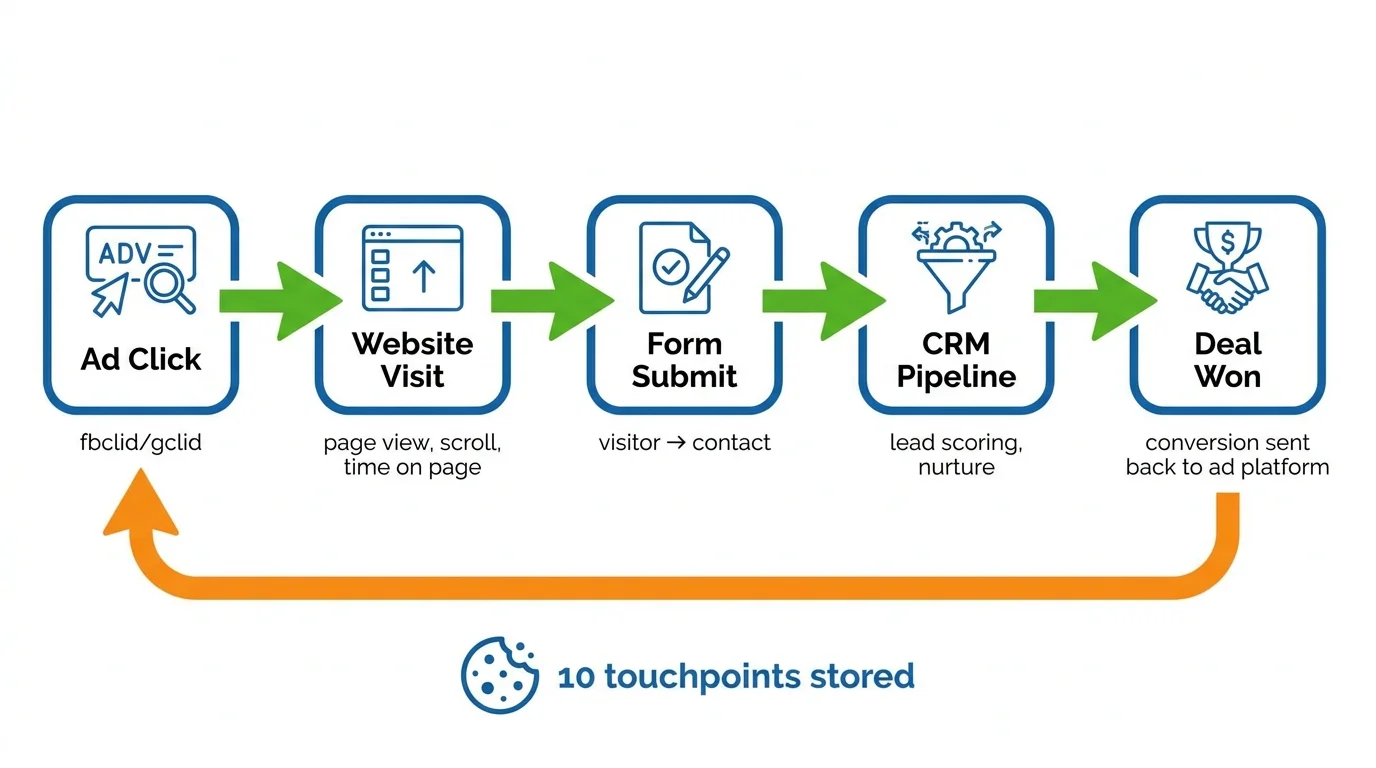
[ ] Attribution — sporing af lead-kilder fra start til slut
- Gem fbclid/gclid fra annonce-links
- Spor touchpoint-historik (Første Touch & Sidste Touch)
-
Når en handel er lukket → send konvertering tilbage til annonceplatformen (CAPI/Offline Conversion)
-
[ ] CRM-integration — leads fra hjemmesiden til CRM automatisk
- Leads fra formularer på hjemmesiden opretter automatisk en kontakt i CRM
- Sporing af lead-kilder (kilde/medium/kampagne/fbclid/gclid)
-
Klar attribution-model (Første Touch eller Sidste Touch)
-
[ ] Server-side sporing (undgår datatab pga. annonceblokering)
- Klient-side pixels blokeres af ca. 26% af desktops og ca. 80% af iOS
- Server-side begivenheder er nødvendige for at sikre præcis attribution
Almindelige fejl, du skal undgå: - GA4 installeret, men ingen begivenhedssporing opsat — du ved ikke, hvad brugerne gør på siden - Glemt at installere konverteringssporing — du kan ikke måle den reelle ROI - Uensartede UTM — rodede data, kan ikke analyseres - Kun baseret på klient-side pixels — mister 26-80% af konverteringsdata på grund af annonceblokering
Tips fra GTG CRM — Automatisk sporing, ingen manuel installation nødvendig:
GTG CRM har et indbygget Attribution SDK på alle websites og landingssider bygget på platformen. Hvis dit website ikke er bygget på GTG CRM, kan du stadig indlejre SDK'et med et kort script. SDK'et sporer automatisk:
| Hændelse | Indsamlede data |
|---|---|
| Sidevisning | URL, henviser, UTM-parametre, fbclid, gclid, IP, brugeragent |
| Sideafslutning | Tid på siden (ms), scrolldybde (%), antal sider i session |
| Formularafsendelse | Link mellem besøgs-ID og kontakt-ID i CRM |
| Tilføj til kurv | Produktdetaljer, antal |
| Start checkout | Indhold af indkøbskurv, samlet værdi |
| Køb | Transaktionskode, omsætning, produktliste |
Derudover gemmer GTG CRM op til 10 touchpoints i cookies, og understøtter både First Touch (hvilken kanal der bragte kunden ind første gang) og Last Touch (hvilken kanal der førte til konvertering). Når en lead lukker en handel eller foretager et køb, sender systemet automatisk konverteringen tilbage til Facebook (via CAPI) og Google (via Offline Conversion) — inklusive server-side events for at omgå annonceblokkere, hvilket sikrer, at annonceplatformen kan måle den faktiske ROI.
Hver side i Website Builder giver også mulighed for individuel konfiguration: Facebook Pixel ID, GA4 Measurement ID, Google Ads Conversion Labels, GTM Container ID og brugerdefinerede JS-snippets.
Praktisk eksempel:
En kunde kørte annoncer, men integrerede ikke CRM. Salgsteamet skulle indtaste leads manuelt — hvilket tog 2-3 dage — og mistede 40% af salgsmulighederne. Efter at have brugt GTG CRM med den indbyggede formular oprettes leads automatisk i CRM lige efter afsendelse, med fulde kildedata (UTM, fbclid), hvilket gør det muligt for salgsteamet at reagere inden for få minutter — konverteringsraten steg med 28%.
5. CTA & Konvertering: Vejled Klar Handling
CTA Tjekliste
- [ ] Fremtrædende CTA-knap
- Farve, der kontrasterer med baggrunden
- Tilstrækkelig stor størrelse, nem at klikke på
-
Rimelig placering (over fold + nederst i hovedindholdet)
-
[ ] Attraktiv CTA-tekst
- Handlingsorienteret: "Få gratis rådgivning", "Prøv nu", "Få et tilbud inden for 24 timer"
- Ikke generisk: undgå "Send", "Indsend"
-
Skab en følelse af hastværk, hvis relevant
-
[ ] Rimeligt antal CTA'er
- 1-2 hoved-CTA'er pr. side
-
Ikke for mange, der overvælder brugeren
-
[ ] CTA passende til funnel-stadie
- Top of funnel: "Lær mere", "Download gratis e-bog"
- Mid-funnel: "Tilmeld dig webinar", "Se demo"
-
Bottom of funnel: "Køb nu", "Kontakt salg"
-
[ ] Optimeret takkeside
- Tydelig bekræftelsesbesked
- Vejledning til næste skridt
-
Kan indeholde et yderligere tilbud eller næste CTA
-
[ ] Formular optimeret til konvertering
- Spørg kun om nødvendig information
- Inkluder GDPR-afkrydsningsfelt, hvis nødvendigt
- Antispam: honeypot, render token
- Opret automatisk kontakt i CRM ved afsendelse
Almindelige fejl at undgå: - Lysgrå CTA-knapper, der falder sammen med baggrunden - Generisk CTA-tekst: "Send", "Indsend" — skaber ikke motivation til handling - For mange forskellige CTA'er på en side — brugeren bliver forvirret og ved ikke, hvor de skal klikke
Tip fra GTG CRM: GTG CRM's Form Builder understøtter mange felttyper (tekst, e-mail, telefon, dropdown, afkrydsningsfelt, dato...) og kan indlejres på enhver side på 3 måder: widget.js (Shadow DOM, ingen CSS-konflikter), iframe eller direkte delbar URL. Hvert felt er mappet til en CRM-ejendom — når en kunde sender, oprettes eller opdateres kontakten automatisk. Formularerne har også indbygget spam-beskyttelse (honeypot + render token med HMAC-SHA256) og tæller automatisk visninger/afsendelser, så du kan overvåge konverteringsraten.
Derudover udløser hver formularafsendelse automatisk en Automation Workflow — du kan opsætte en velkomst-e-mail, en notifikation til salgsteamet eller et hvilket som helst andet relevant flow.
Praktisk eksempel:
Ændring af CTA-knappen fra "Send information" til "Modtag gratis tilbud inden for 24 timer" — klikrate steg med 62 %. Kombineret med GTG CRM Form Builder, der automatisk opretter kontakter og udløser en arbejdsgang for øjeblikkelig bekræftelses-e-mail — ingen leads går tabt.
6. On-page SEO: Optimer Hver Detalje
On-page SEO Tjekliste
- [ ] Optimeret title tag
- Længde 50–60 tegn
- Indeholder primært søgeord
-
Attraktiv, klik-fremmende
-
[ ] Meta description
- Længde 150–160 tegn
- Indeholder en kort CTA
-
Indeholder søgeord naturligt
-
[ ] URL-struktur
- Kortfattet, indeholder søgeord
- Ingen specialtegn
-
Små bogstaver, bindestreg (-) i stedet for understregning (_)
-
[ ] Billedoptimering
- Alt-tekst beskriver fuldt ud
- Filnavn indeholder søgeord
-
Komprimer billeder for at reducere størrelsen (WebP-format)
-
[ ] Schema markup
- Produkt-schema (hvis du sælger varer)
- FAQ-schema (hvis der er Q&A)
-
Organisation-schema
-
[ ] Open Graph & Social metadata
- OG image, OG title for hver side
- Twitter Card metadata
-
Korrekt forhåndsvisning ved deling på sociale medier
-
[ ] Intern linking
- Links til relaterede sider
- Varieret, naturlig ankertekst
Almindelige fejl, der skal undgås: - Duplicerede title tags på flere sider - Tomme meta descriptions eller automatisk generering fra sideindhold - Tomme alt-tekster til billeder eller kun "image1.jpg" - Ingen OG image — links delt på Facebook/Zalo ser dårlige ud
Tip fra GTG CRM: GTG CRM's Website Builder giver dig mulighed for at konfigurere SEO for hver side: Meta Title, Meta Description, URL Slug, Open Graph Image, Open Graph Title. Systemet opretter også automatisk dynamiske OG-billeder via API'en /api/og, hvis du ikke uploader dine egne billeder. Med det integrerede blogsystem har du en standard RSS 2.0 RSS-feed til syndikering — samt en Headless Content API til at sende indhold til WordPress, Ghost eller enhver platform, der understøtter RSS.
Bonus: Udnyt CRM til at Optimere Annonceeffektiviteten
En SEO-klar hjemmeside er kun det første skridt. For virkelig at optimere dit annonce-ROI har du brug for et system til at spore leads fra klik til lukket aftale. Her kommer CRM ind i billedet:
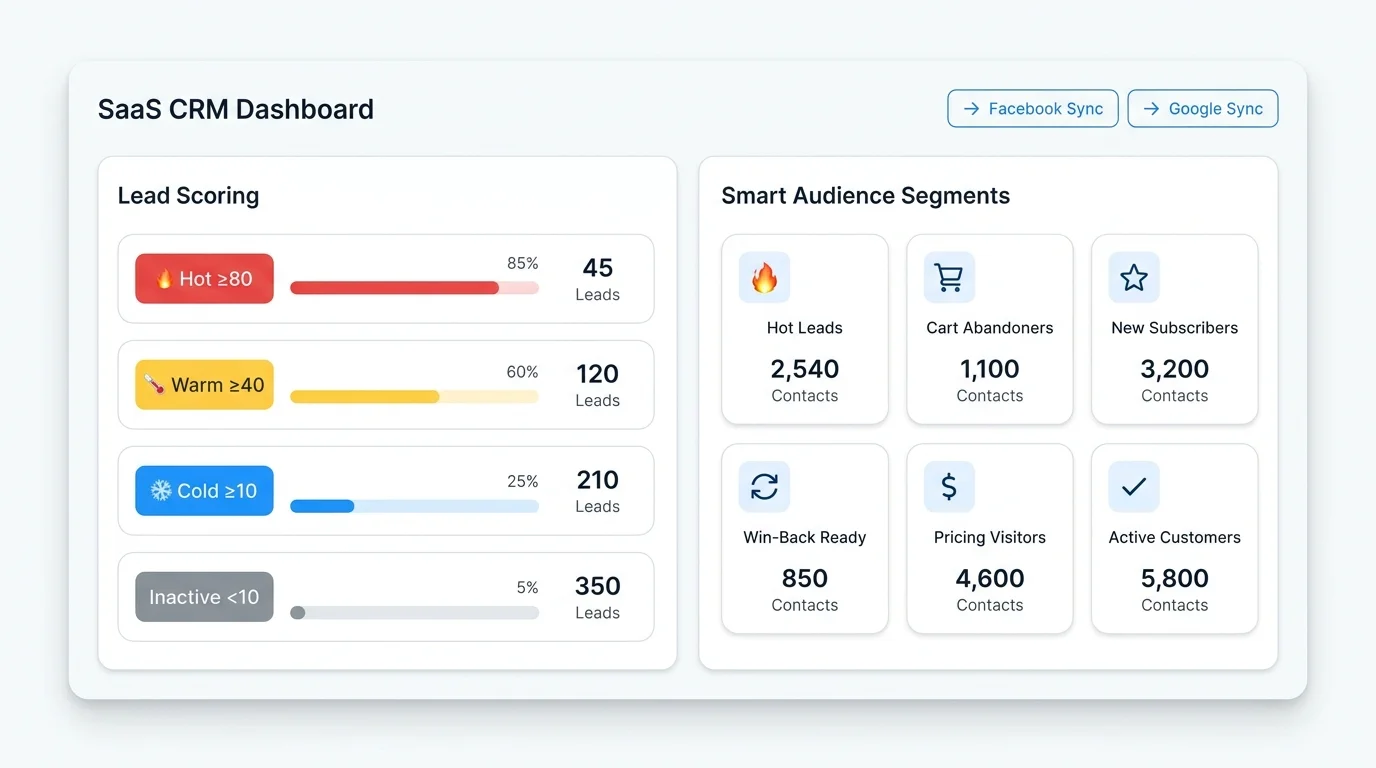
Automatisk Lead Scoring — ved, hvem der er "varmest"
GTG CRM beregner automatisk engagement-score baseret på 8 kanaler (e-mail, web, formular, aftale, social, e-handel, chat, stemme) inden for et 90-dages vindue og med vægt, der falder over tid:
| Tier | Score | Foreslået handling |
|---|---|---|
| Hot | ≥ 80 | Klar til at købe — prioriter at kontakte dem med det samme |
| Warm | ≥ 40 | Nurture med indhold, e-mail drip |
| Cold | ≥ 10 | Skal varmes op yderligere |
| Inactive | < 10 | Ikke aktiv for nylig |
Smart Segments — synkroniser målgrupper med annonceplatforme
GTG CRM har 10 AI Smart Segments, der automatisk opdateres (Hot Leads, Nye abonnenter, Cart Abandoners, Win-Back Ready, Pricing Visitors...). Hvert segment kan synkroniseres direkte til Facebook Custom Audiences eller Google Customer Match — hvilket giver dig mulighed for at målrette præcist med data, som annonceplatforme ikke har adgang til: e-mailhistorik, deal pipeline, lead scoring, chat-historik, opkald.
Engagement-Based Audiences — intelligent retargeting
Opret målgrupper baseret på reel adfærd: - Engaged visitors: tid på siden > 15 sekunder - High scroll depth: scroll > 50% af siden - High intent: > 3 minutter på siden OG scroll > 75% - Bounced visitors: < 15 sekunder — udeluk dem fra målgruppen for at spare budget
Disse målgrupper fungerer via både client-side pixel og server-side events (Facebook CAPI), hvilket sikrer, at data ikke går tabt på grund af annonceblokeringer.
Conversion Loop — luk handler, annoncer ved det straks
Når salg lukker en handel succesfuldt i CRM → systemet slår automatisk fbclid/gclid op fra kontaktens attribution history → sender Purchase event til Facebook CAPI eller Google Offline Conversion. Annonceplatformen modtager det faktiske konverteringssignal → optimerer budgivningsalgoritmen → ROAS øges over tid.
Handlingsplan: Hvad Gør Vi Nu?
Trin 1: Vurder din hjemmeside
Brug tjeklisten ovenfor og marker de punkter, der er fuldført. Prioriter fejlrettelser i rækkefølge:
- Kritiske: Teknisk SEO, Sporing & Attribution, CTA & Formularer
- Vigtige: UX/UI, On-page SEO, CRM-integration
- Rart at have: Schema markup, A/B-test, flersproget
Trin 2: Ret tekniske fejl først
Du bør ikke køre annoncer, mens der stadig er alvorlige tekniske fejl på hjemmesiden (langsom hastighed, manglende sporing, formularer der ikke virker). Dette er et direkte spild af budgettet.
Trin 3: Test grundigt før skalering
- Kør en lille kampagne med et lavt budget (5–10 mio. /md.)
- Overvåg metrics: bounce rate, tid på siden, konverteringsrate, CPA
- Kontroller om leads kommer korrekt ind i CRM, og om attribution er nøjagtig
- Juster baseret på faktiske data
Trin 4: Optimer løbende
En hjemmeside-audit er ikke en engangsforestilling. Du bør tjekke igen: - Ugentligt: Sporing fungerer korrekt, konverteringsrate, leadkvalitet - Månedligt: Teknisk SEO, indholdskvalitet, nøjagtighed af CRM-data - Kvartalsvis: UX/UI, A/B-testresultater, gennemgang af attributionsmodel
Værktøjer til Effektiv Hjemmeside-Audit
| Værktøj | Funktion |
|---|---|
| Google PageSpeed Insights | Test hastighed og Core Web Vitals |
| Google Search Console | Tjek indeksering, crawl-fejl, mobilbrugervenlighed |
| Google Tag Manager + GA4 | Opsætning og sporing af konverteringshændelser |
| GTG CRM | SEO-venlig website builder, CRM-integreret formularbygger, automatisk attribution tracking, server-side konvertering, Smart Segments til målgruppesynkronisering, lead scoring, workflow-automatisering |
Har Du Brug For Professionel Audit-Hjælp?
Hvis du: - Ikke har tid til at tjekke hvert punkt selv - Er usikker på, om sporing og attribution er sat korrekt op - Ønsker en detaljeret rapport og en konkret handlingsplan
Tilmeld dig en gratis hjemmesideaudit med GTG CRM i dag!
Vi vil hjælpe dig med at: - Udføre en omfattende analyse af din hjemmeside ud fra de 6 checklister ovenfor - Kontrollere, at sporing og attribution fungerer korrekt - Foreslå en prioriteret optimeringsplan baseret på ROI - Integrere form builder, attribution SDK og CRM for at måle effektiviteten fra klik til afsluttet handel - Opsætte Smart Segments og server-side events for at optimere annonceomkostningerne
Tilmeld dig en gratis hjemmesideaudit →
Omdan det, du lige har læst, til faktiske resultater — anvend det med det samme med GTG CRM, gratis.
Anvend nu

