

Feature Introduction
"Which of our team members are performing well, and who is struggling?" — a question every manager asks, but the answer is often based on intuition, or a few manually compiled spreadsheets at the end of the month that are already outdated by the time they're finished.
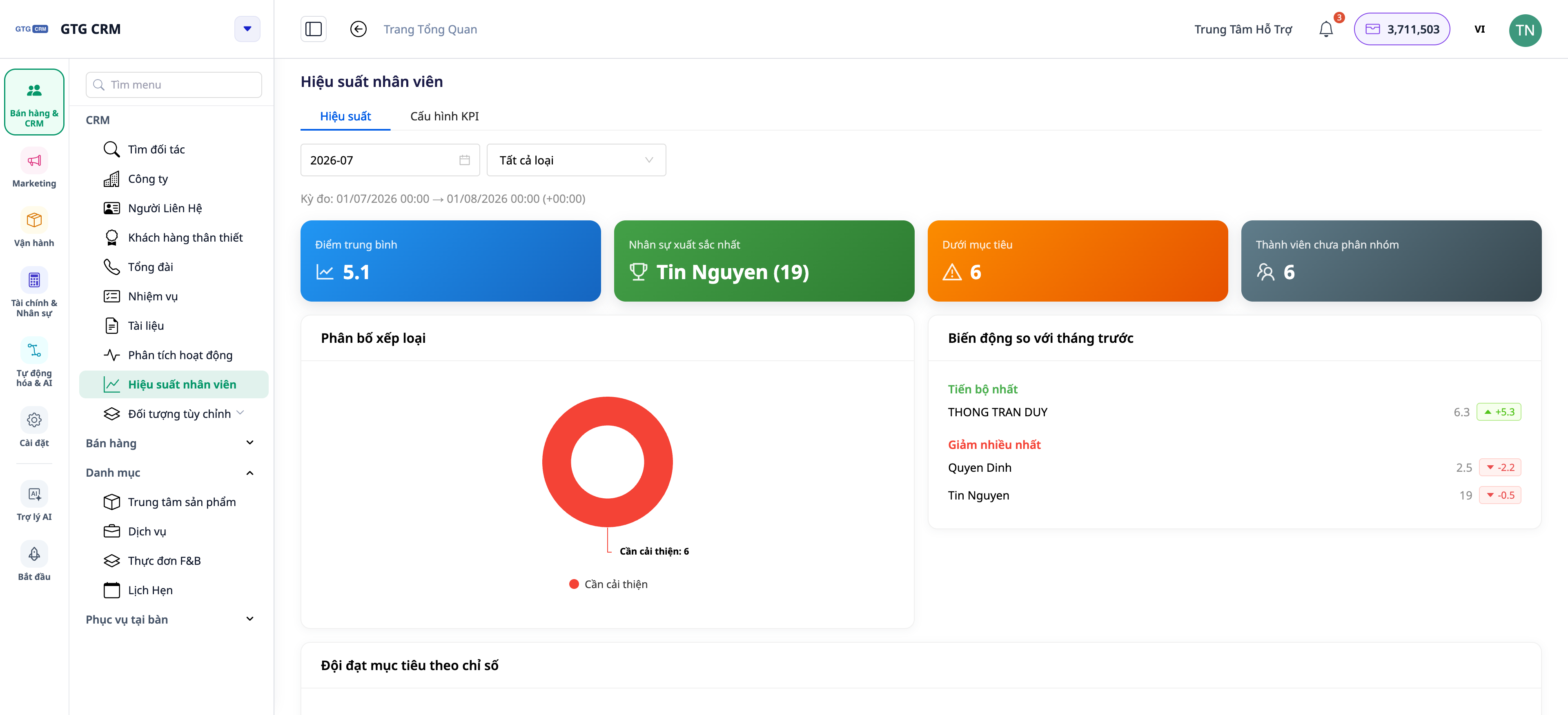
That ends today. GTG CRM has a Team & Member Performance area: KPIs for each person, drill-down for each member, and 15 activity metrics taken directly from what they actually do in the CRM — making calls, sending emails, creating/closing deals, handling tasks. And now, **dashboards update in real-time**: a colleague just closed a deal, the numbers on your dashboard automatically update — no need to press F5, and your current filters remain intact.
 Problems Businesses Are Facing
Subjective Team Evaluation — Unfair rewards/penalties, loss of top talent
Consolidating Data into Excel at Month-End — Time-consuming, outdated data, prone to errors
Not Differentiating "Leads Received This Period" vs. "Leads Currently Held" — Skewed evaluations, difficulty comparing new and long-term employees
Dashboards Only Update on Full Page Reload — Stale data remains static, requiring constant reloads (losing filters, losing scroll position)
GTG CRM pulls metrics directly from actual activities within the CRM, consolidating them into a performance area — no manual entry, no separate spreadsheets, and always up-to-date.
Highlights
1. Overview of the entire team's performance on one screen
Quickly see the whole team: each member with key metrics and their progress towards goals (KPIs).
Feature: Team overview dashboard by KPI.
Benefit: See at a glance who is leading and who needs support.
2. Drill-down for each member: Scorecard, Activities, Tasks
Click on a person to see details: KPI scorecard, activity log, workload — and even areas for improvement to note.
Feature: Detailed drill-down by individual member.
Benefit: Know exactly why someone is strong or weak in specific areas to provide targeted coaching.
3. 15 activity metrics derived from real actions
Metrics are based on actual actions within the CRM (calls, emails, deals, tasks…), thus reflecting true productivity rather than reported numbers.
Feature: 15 activity metrics.
Benefit: Evaluations based on real data, transparent to the entire team.
4. Differentiate "Leads Received This Period" vs. "Leads Currently Owned"
The system clearly separates the number of leads a person received during the reporting period from the number of leads they currently hold — two different perspectives to avoid skewed evaluations.
Feature: Separates leads by period and current leads.
Benefit: Fair comparison between new and long-term employees.
5. NEW — Dashboards auto-update in real-time
No more reloading the page to see new numbers. Dashboards within the CRM refresh automatically in the background on a regular cycle, update as soon as you return to the tab, and display a small status indicator **"Auto · Updated at HH:MM"** so you know how fresh the data is. There's still a manual **Refresh** button if you want an immediate update.
 Feature: background auto-refresh + update time indicator + manual refresh button.
Benefit: Always see the latest data without losing filters/scroll position; lighter on resources as it only refreshes when the tab is active.
Benefits for Businesses
Team Overview by KPI — Make personnel decisions based on data, not intuition
Member Drill-down — Coach the right people on their specific weaknesses
15 Performance Metrics — Transparent, fair evaluation & rewards
Period Lead vs Current Lead — Accurate assessment for both newcomers and veterans
Auto-updating Dashboard — Always see the latest numbers, no reloading, no lost context
Who Is It For?
SMB Business Owners who want to know how the team is performing without asking each person.
Sales / Customer Service Managers who need to track productivity and allocate leads effectively.
Operations Managers who need to measure workload and performance in real-time.
How To Get Started?
Go to the Team Performance section in your CRM, set up your teams/goals/ranking criteria, then open the performance tab to view — the dashboard will auto-update with new data. Need detailed steps? Check out the Guide to Setting Up KPIs & Team Member Performance.
Free Trial — no credit card required.


