
Introduktion til Funktioner
Sidst på måneden åbner du dit bankudtog og begynder at gennemgå hver linje: hvilken kundes betaling er dette for hvilken faktura? Hvad med dette gebyr, denne interne overførsel eller returkontanter fra salgsplatformen? Derefter åbner du Excel og indtaster manuelt for at få dine bøger til at stemme med banken. Det tager en hel eftermiddag, er let at lave fejl i, og hver gang du bliver spurgt "hvor kommer disse penge fra?", sveder du.
Det er slut fra i dag. GTG CRM forvandler dit bankudtog til et afstemningsområde direkte i det regnskabssystem, du bruger: klassificer hver transaktion til den korrekte konto, opsæt genanvendelige afstemningsregler for automatisk at foreslå lignende linjer, se afstemningstabeller og rapporter, og aktiver muligheden for automatisk bogføring af udligningsposter. Penge ⇄ fakturaer ⇄ hovedbog er nu lukket i en cyklus.
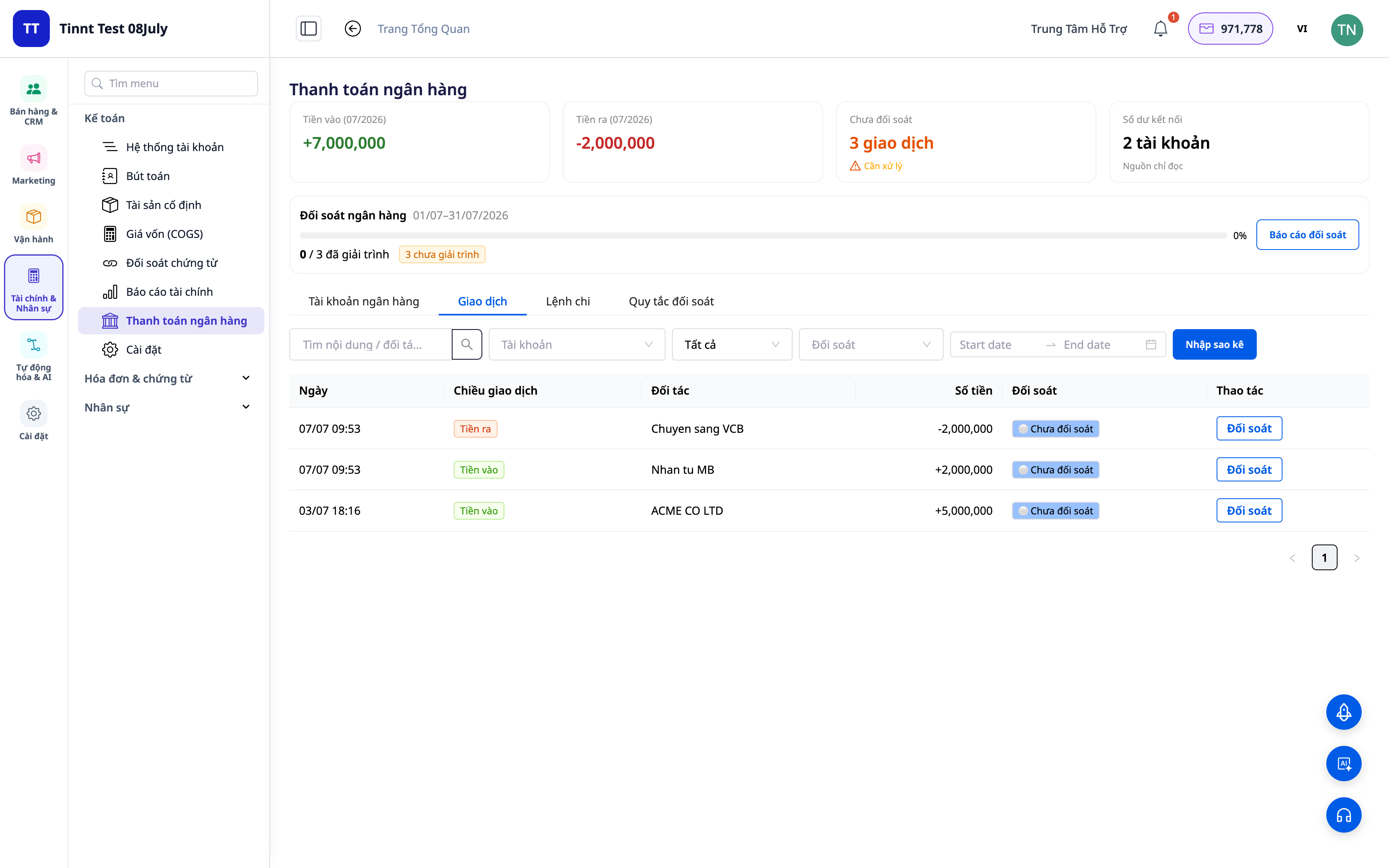
Problemer, Virksomheder Står Overfor
| Gammel Metode | Konsekvens |
|---|---|
| Gennemgå bankudtog manuelt, indtast i Excel | Timer spildt hver måned, let at indtaste fejl, umuligt at spore tilbage |
| Ikke at vide, hvilken pengestrøm der svarer til hvilken faktura | Uklar gæld, manglende/dobbelt betalinger opdages ikke |
| Bogføring i regnskabet adskilt fra banken | Ikke-stemmende tal, svært at forklare under skattekontrol |
| Returnerede COD-penge fra salgsplatforme/transportører er svære at skelne | Usikkerhed om, hvorvidt der er modtaget fuldt ud, kaotisk COD-afstemning |
GTG CRM samler alt i én enkelt datakilde: hver banktransaktion knyttes direkte til en regnskabskonto og (hvor det er relevant) til en faktura, og der genereres automatisk en udligningspost.
Højdepunkter
1. Klassificer transaktioner til den korrekte konto
For hver linje i dit kontoudtog, vælg hvad det er: omsætning, gebyr, intern overførsel, kontant-bank, COD osv. Systemet knytter transaktionen til den korrekte regnskabskonto (GL account).
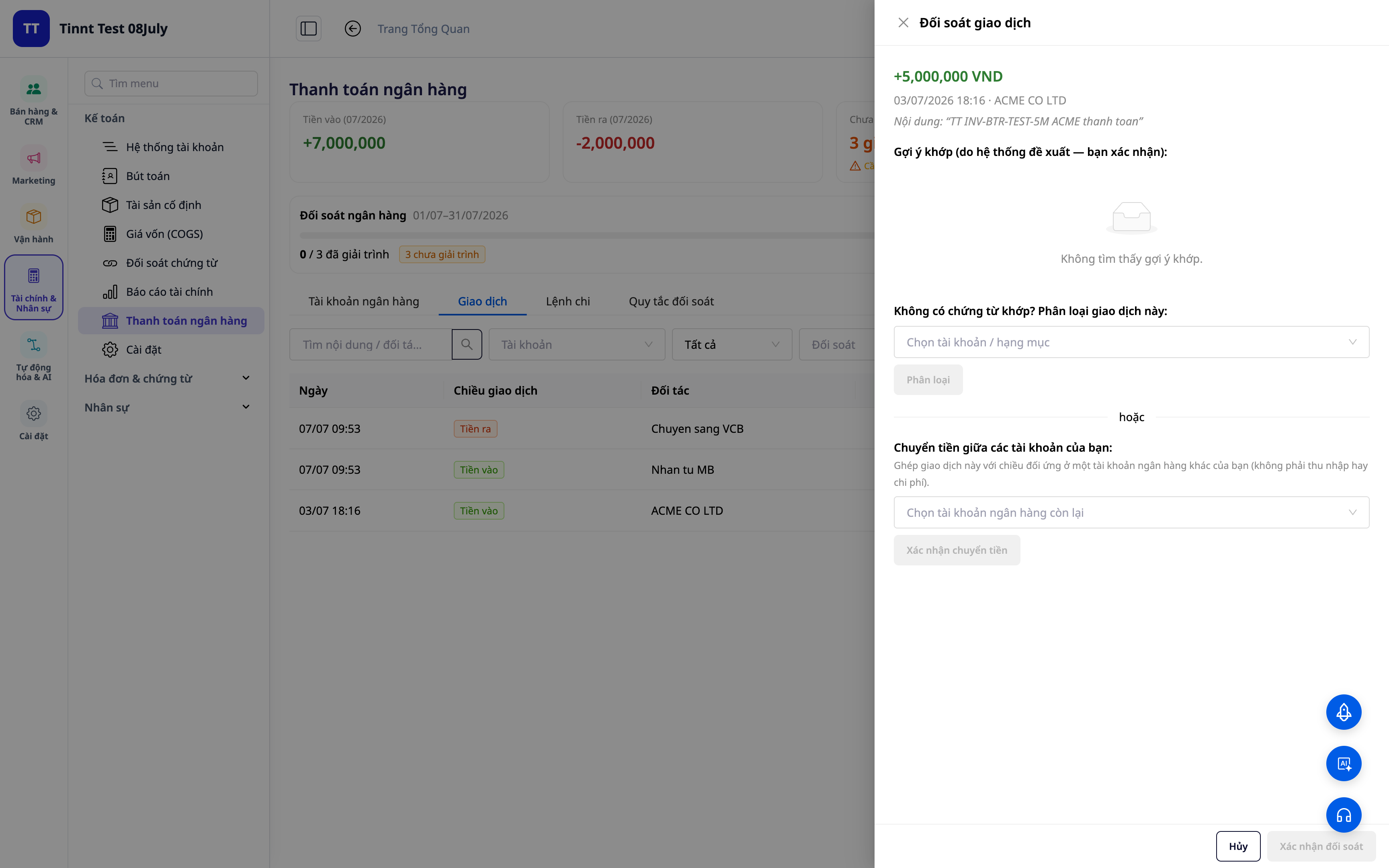
- Funktion: Klassificer transaktioner → tilsvarende regnskabskonto.
- Fordel: Hver pengeenhed ind/ud har en klar "adresse" i dine bøger.
2. Genanvendelige afstemningsregler — opsæt én gang, afstem automatisk
Opret regler baseret på indhold/partner/beløb: lignende transaktioner i fremtiden tildeles automatisk den korrekte type. Nye regler aktiveres øjeblikkeligt til øjeblikkelig anvendelse.
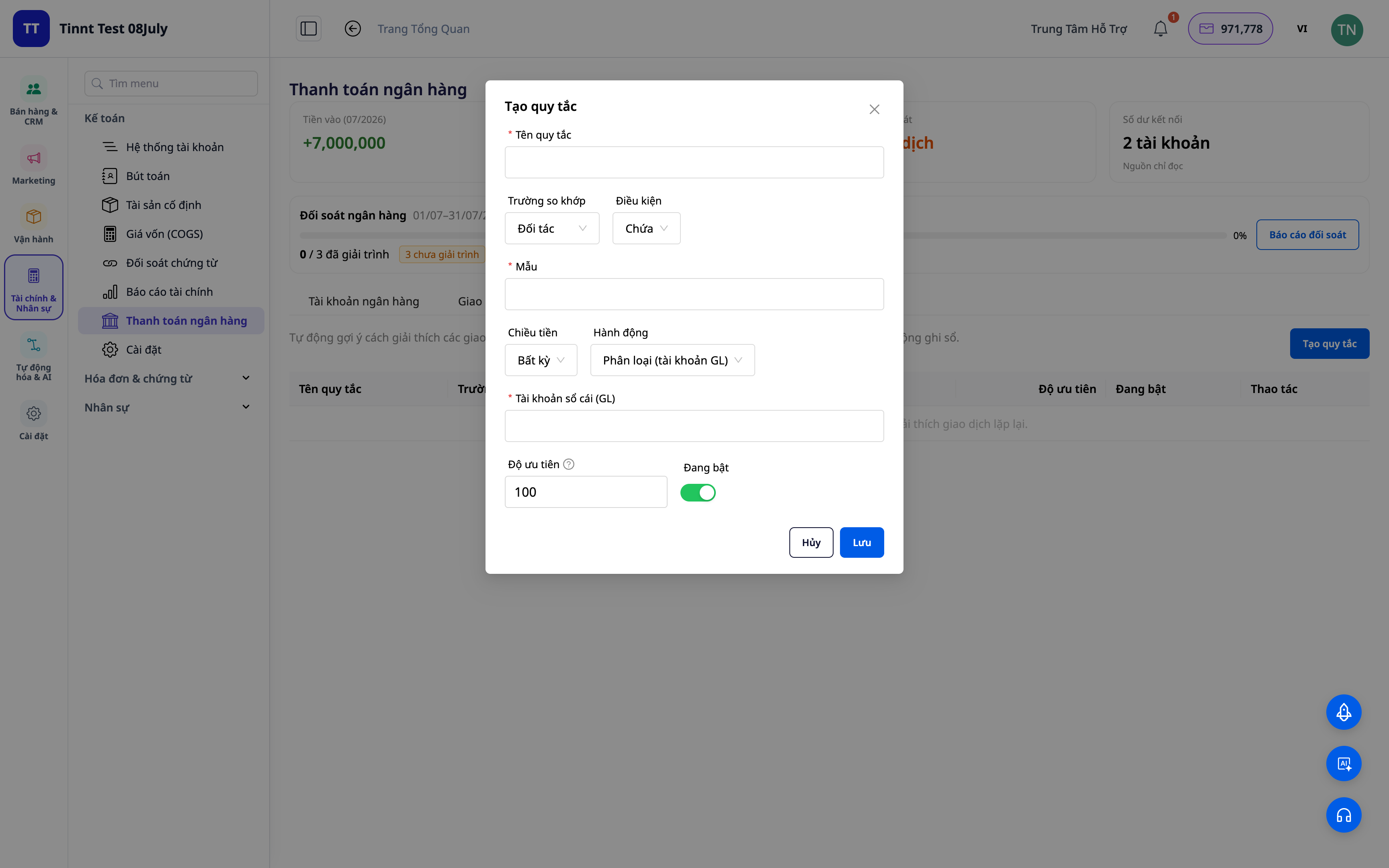
- Funktion: Et sæt genanvendelige afstemningsregler.
- Fordel: Fremtidige måneder bliver nemmere end tidligere — gentagne opgaver automatiseres.
3. Forslag til afstemning baseret på regler — du skal blot godkende
De regler, du har opsat, vil automatisk foreslå klassificeringen for lignende transaktioner — du skal blot se og godkende. Jo mere du bruger det, jo flere situationer dækker dit regelsæt, og jo hurtigere bliver afstemningen. Du har altid den endelige beslutning.
- Funktion: Foreslå afstemning af transaktioner baseret på regler (du godkender).
- Fordel: Håndter hurtigt gentagne linjer, mens du bevarer fuld kontrol.
ℹ️ Afstemning og forslag via regler er gratis. Kommer snart: en AI-assistent, der foreslår forklaringer for selv helt nye transaktioner.
4. Afstemningstabel + rapporter
Få et overblik: hvor meget er afstemt, hvor meget mangler, hvor er uoverensstemmelserne. Eksportér afstemningsrapporter til arkivering og forklaring.
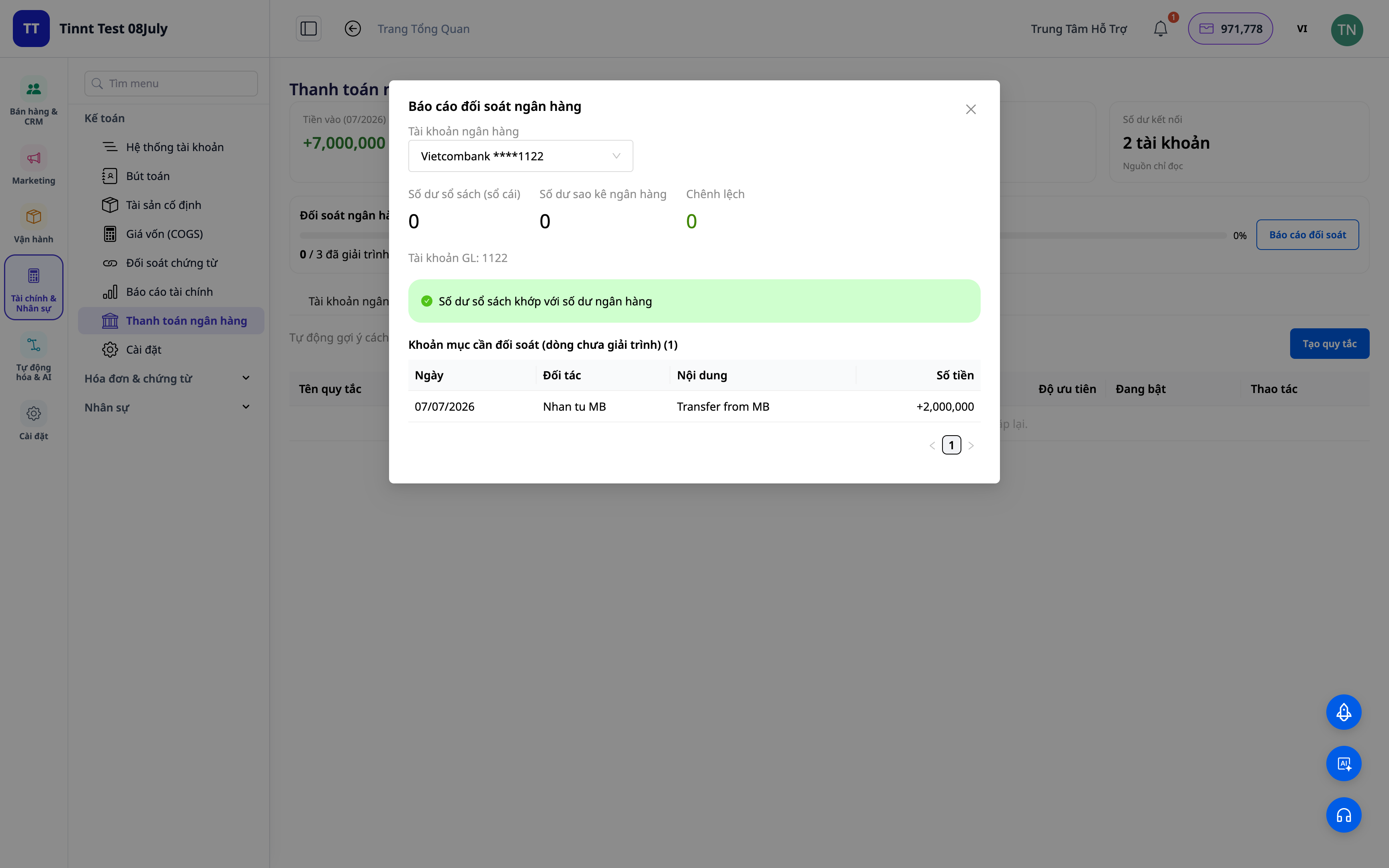
- Funktion: Afstemnings-dashboard + rapporter.
- Fordel: Se på én skærm med det samme, om bogen er afstemt med banken.
5. Automatisk oprettelse af afstemningsposter (valgfrit)
Aktivér indstillingen "bogfør": transaktioner, der kategoriseres / overføres / kontant-bank / COD, genererer automatisk **afstemningsposter** i overensstemmelse med bogføringsstandarder. Fjern linket til en transaktion, og posten bliver omvendt.
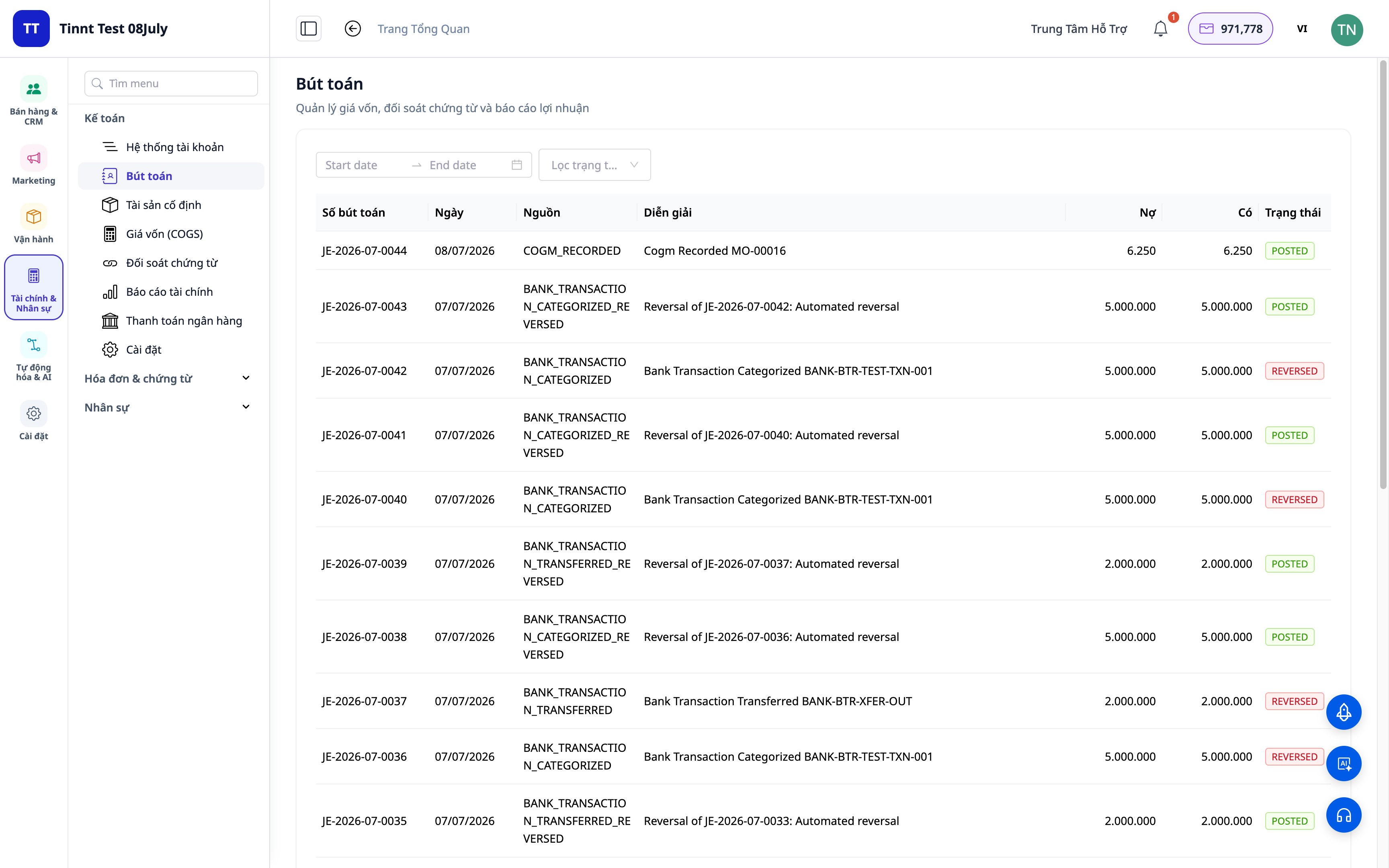
- Funktion: Automatisk bogføring af poster fra afstemte transaktioner.
- Fordel: Afstemning og bogføring er én opgave, ikke to — data er altid konsistente.
Fordele for Virksomheder
| Funktion | Reel fordel for dig |
|---|---|
| Kategorisering + afstemningsregler | Spar timer på manuel gennemgang af kontoudtog hver måned |
| Forslag til afstemning baseret på regler | Hurtig behandling af gentagne linjer, reducerer fejl |
| Afstemnings-dashboard + rapporter | Afslut bøger hurtigt, klar med dokumentation til skattekontrollen |
| Automatisk bogføring af poster | Hovedbogen matcher altid banken, ingen uoverensstemmelser |
| COD-afstemning | Kend præcist, om du har modtaget den fulde betaling for varerne |
Hvem Passer Det Til?
- Bogholdere / ledende bogholdere, der har brug for at afslutte bøger hurtigt og have bankafstemte data.
- Virksomhedsejere/enkeltmandsvirksomheder, der bruger bogføringspakken i GTG CRM og ønsker at kontrollere pengestrømmen.
- Sælgere med COD, der har brug for at afstemme betalinger fra platforme/transportører.
- Mellemstore virksomheder, der ønsker at mindske afhængigheden af separat bogføringssoftware.
Hvordan Kommer Man I Gang?
Gå til sektionen Bogføring ▸ Bankafstemning, upload kontoudtoget eller tilslut bankkontoen, og begynd derefter at kategorisere. Har du brug for detaljerede trin? Se artiklen Brugsvejledning: Bankafstemning på GTG CRM, og se også artiklen Dobbelt bogføring direkte i CRM for at forstå det samlede regnskabsmæssige billede.
Gratis prøveperiode — intet kreditkort kræves.


