
Introduktion til Funktioner
Du ved, du burde sende en påmindelse til kunder, der har forladt deres indkøbskurv, burde pleje nye leads, burde genaktivere afhoppede kunder — men det er umuligt at gøre manuelt, og det er skræmmende at opbygge en arbejdsgang fra bunden. Resultatet: omsætning siver væk på steder, der burde være nemme at redde.
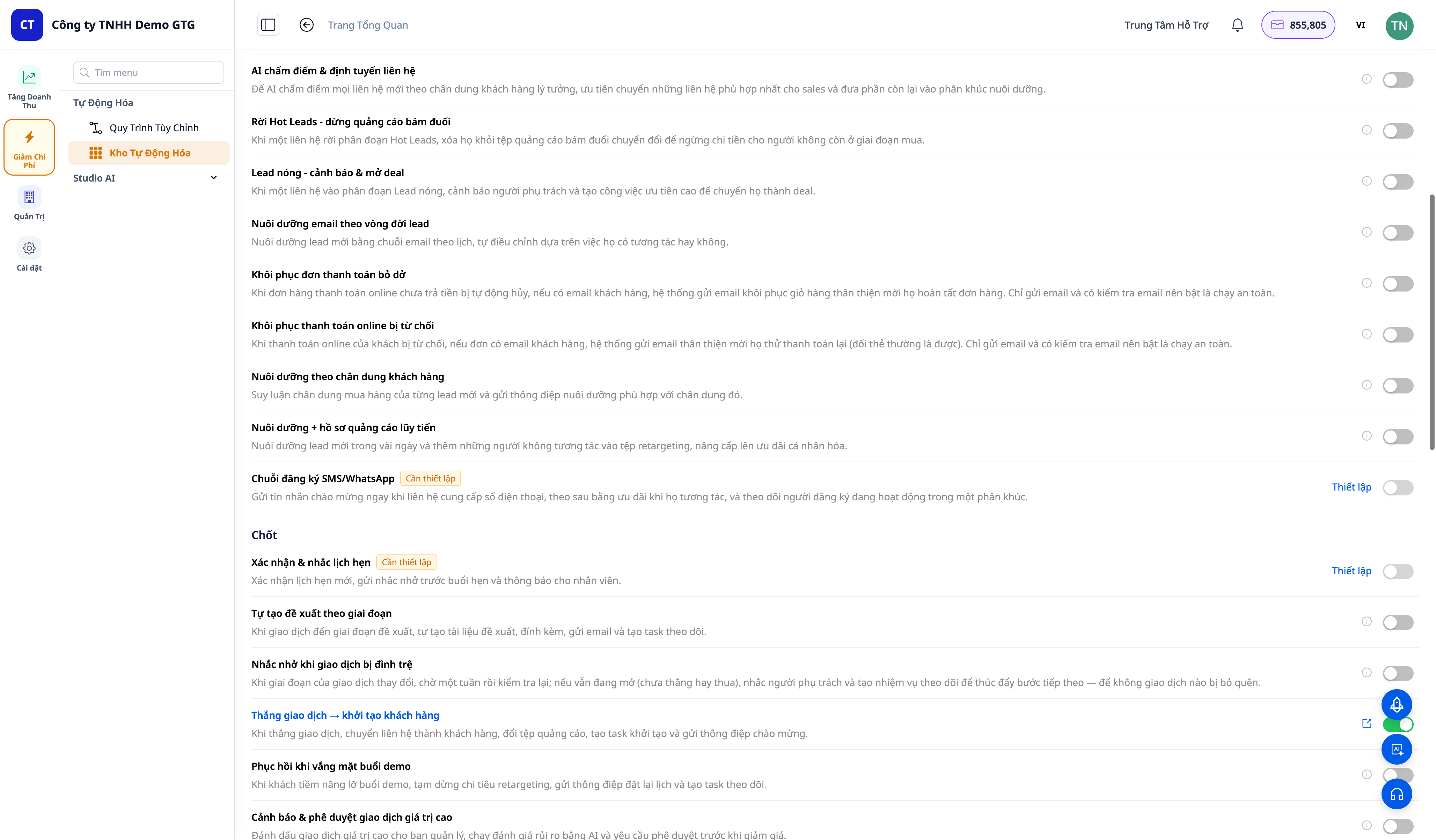
GTG CRM løser dette med en katalog over Indtægtsautomatisering (Revenue Automations) — over 30 færdige scenarier (playbooks), grupperet efter tragtfase, hvor hvert scenarie kun kræver et tryk på en kontakt for at blive aktiveret. Når aktiveret, bliver scenariet en arbejdsgang, du ejer — du kan åbne det og redigere e-mailindhold, forsinkelser, målgrupper efter din egen smag, og lade det køre automatisk.
Problemer Virksomheder Står Overfor
| Gammel metode | Konsekvens |
|---|---|
| Manuel påmindelse om indkøbskurv, betaling osv. | Ikke tid nok, misbrug af guldøjeblikke → mistede ordrer |
| Opbygning af arbejdsgange fra bunden | Teknisk frygt, tidskrævende, let at give op |
| Efterkøbspleje tilfældigt | Kunder vender ikke tilbage, ingen anmeldelser/NPS |
| Afhoppede kunder uden opfølgning | Permanente kundetab, ingen genaktivering |
| Nye leads uden pleje | Leads bliver kolde, spild af annonceomkostninger |
GTG CRM forvandler "bør" til et enkelt tryk: færdige scenarier, skabeloner til indhold, du skal bare finjustere og aktivere.
Højdepunkter
1. Over 30 Færdige Scenarier, Grupperet Efter Tragten
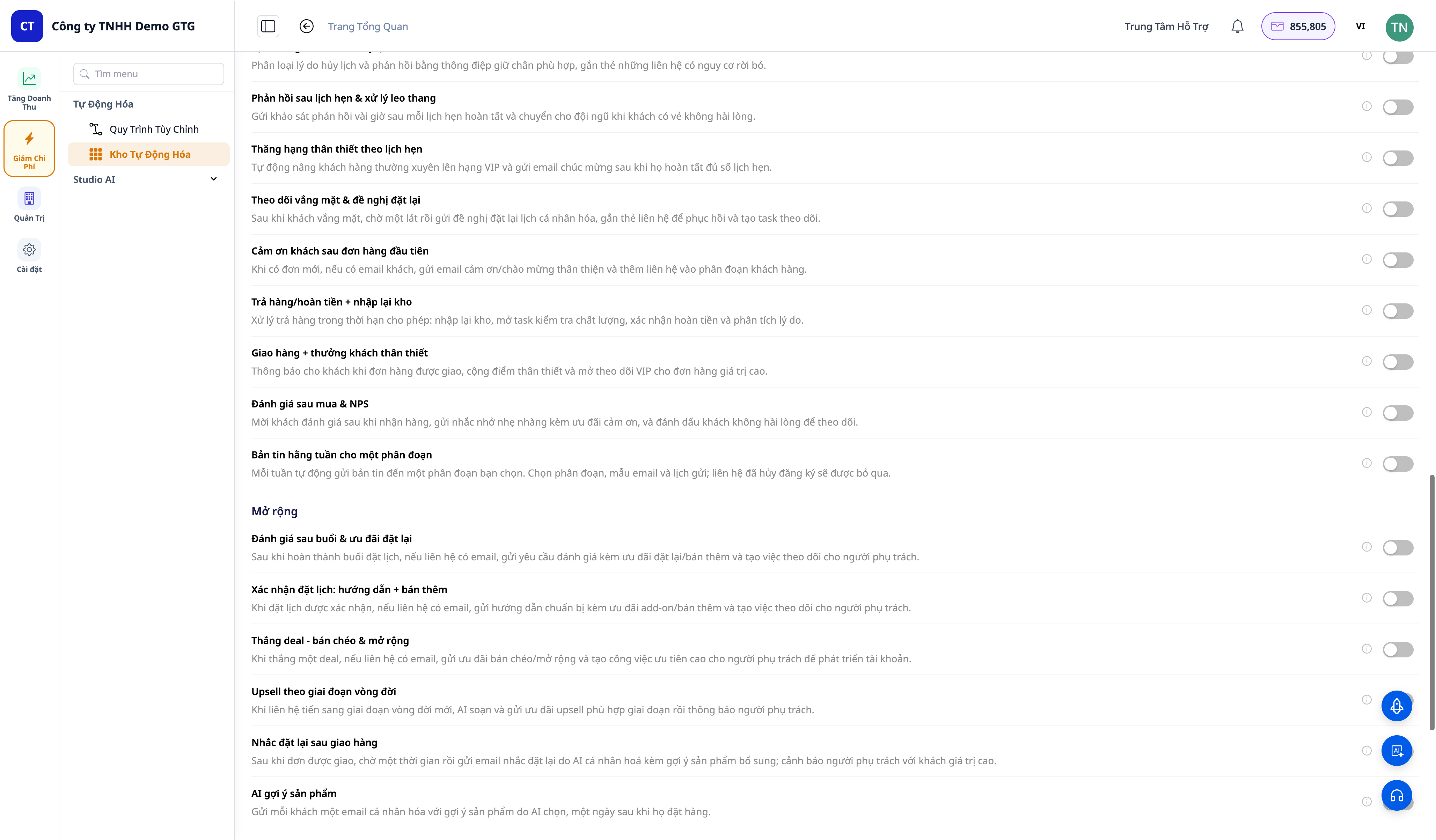
Scenarierne er grupperet efter fase: Acquire · Convert · Close · Retain · Expand · Win-back. Nogle eksempler:
- Indkøbskurv-gengivelse (cart-abandoned recovery)
- Genopretning af mislykket betaling (order payment-failed recovery)
- Genaktivering af annullerede ordrer (order-cancelled win-back) & tabte handler → genaktiveringskampagne
- Velkomst & pleje af nye leads (welcome & nurture) + pleje-e-mailkæde
- Vundet handel → kunde-onboarding, advarsel om handler med høj værdi + godkendelse
- Leverede ordrer → anmod om anmeldelser & NPS, returnerede ordrer → varelager-genindsættelse + refusion
- Tidsbestilling: bekræftelse & påmindelse, udeblivelse → ombook, annullering → fastholdelse
- Aktiveringssegmenter (segment entered/exited) & lead-formular → velkomst-e-mail
- Ugentlig nyhedsbrev broadcast til segment
2. Aktiver/Deaktiver med Ét Tryk — Og Du Ejer Arbejdsgangen
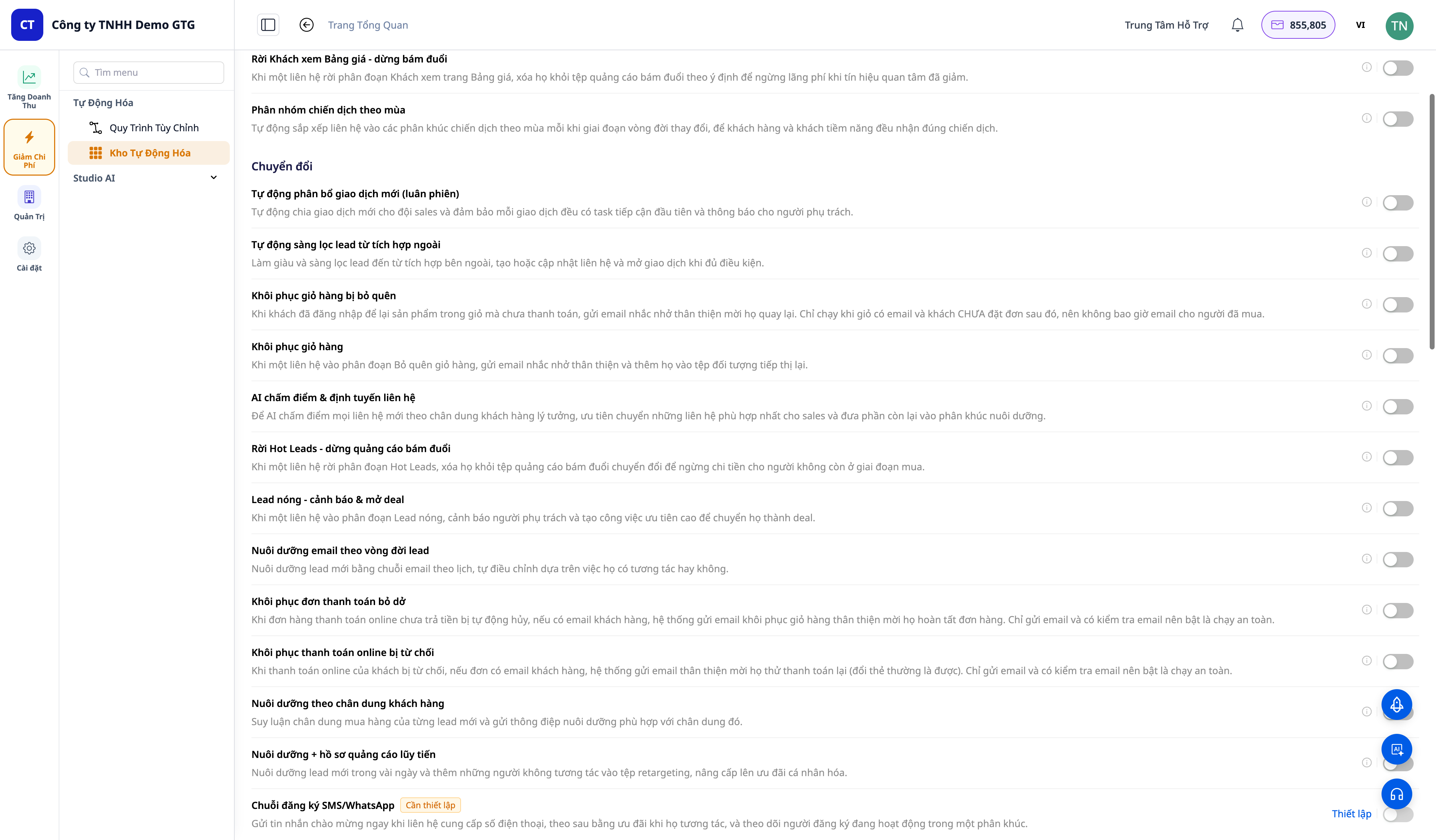
- Hvert scenarie har én kontakt. Aktiver det → scenariet bliver automatisk sat op (provisioned) og aktiveret med det samme, med et link til "Se arbejdsgang".
- Åbn "Se arbejdsgang" → du kommer til selve arbejdsgangseditoren for det pågældende scenarie (Trigger → trin → End). Du kan redigere e-mailindhold, forsinkelser, segmentmålgrupper, tærskler og derefter gemme.
- Deaktiver → scenariet bliver deaktiveret og skjult (konfiguration bevares, slettes ikke) — aktiver det igen, og det kører med det samme, ingen behov for at opbygge det igen.
3. Automatisk Aktivering på det Rigtige Tidspunkt Baseret på Kundeadfærd
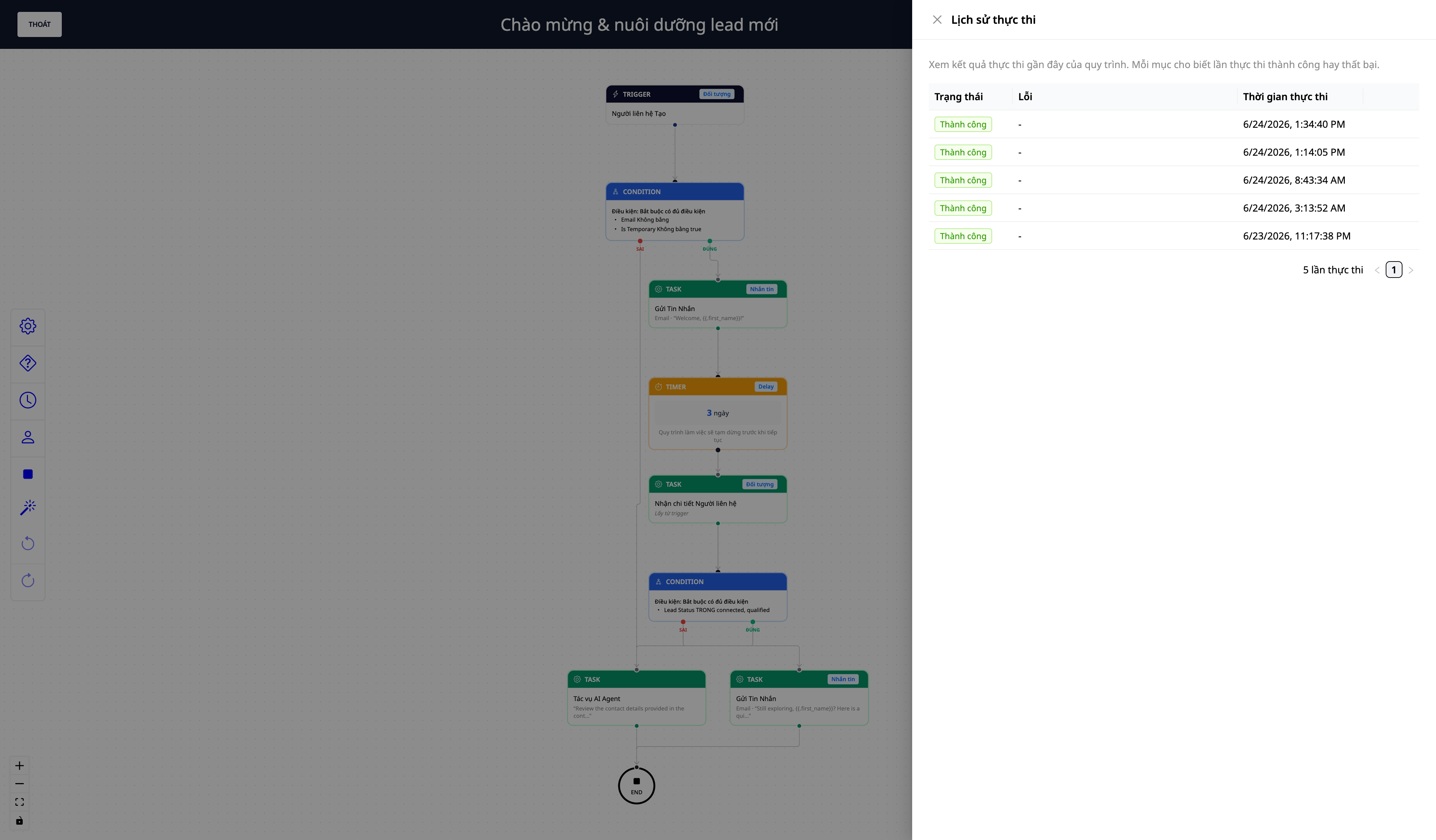
- Scripts kører automatisk, når en hændelse opstår i din CRM-skærm: opret kontakt, vind/tab aftale, lever/returner/annuller ordre, bekræft/no-show/annuller aftale, kunde kommer ind/ud af et segment, en formular indsendes osv.
- Du kan se eksekveringslogfiler for at se, hvilke scripts der er kørt, hvert trin succesfuldt eller om yderligere konfiguration er nødvendig.
- Segment-til-trigger forbindelse + indsendt formular → trigger + node for broadcast til segment udvider automatiseringen til marketing en-til-mange.
Fordele for virksomheder
| Funktion | Reelle fordele for dig |
|---|---|
| Over 30 færdige scripts | Du behøver ikke at bygge workflows fra bunden – bare slå dem til |
| Gendannelse af indkøbskurv / redning af betaling | Red indtægter, der ellers ville være tabt |
| Automatisk lead nurturing + win-back | Leads forbliver varme, og kunder der forlader dig, bliver trukket tilbage |
| Kundepleje efter køb (anmeldelser/NPS) | Kunder vender tilbage, giver anmeldelser, og tidlige tilbagemeldinger indsamles |
| Du ejer & kan redigere workflows | Tilpas indhold/målgrupper til din virksomhed |
| Slå konfiguration til/fra | Test frit, og slå til igen øjeblikkeligt |
Hvem er det egnet til?
- E-handels sælgere (ICP1) der ønsker at redde indkøbskurve, mislykkede betalinger, og pleje kunder efter køb.
- Servicevirksomheder / bookingsystemer der ønsker at automatisere bekræftelser, påmindelser, og fastholde kunder ved no-shows/aflysninger.
- Salgsteams der ønsker automatisk tildeling af aftaler, advarsler om store aftaler, og win-back af tabte aftaler.
- Alle SMB'er der ønsker automatiseret marketing uden behov for et teknisk team.
Hvordan kommer man i gang?
Gå til Automatisering → Omsætningsautomatisering (Revenue Automations), slå det første script til (f.eks. "Gendannelse af indkøbskurv"), åbn "Se workflow" for at redigere indholdet, og lad det køre. Se trin-for-trin vejledningen i artiklen "Sådan bruger du Omsætningsautomatisering".
ℹ️ Bemærk: Visse trin for afsendelse af e-mails/SMS/annoncer kræver en forbundet afsendelseskanal og udfyldning af kundeoplysninger, der skal udfyldes af dig (e-mailkonto, målgruppesegment-ID). Desuden afsender beskeder forbruger kreditter – dit workspace skal have tilstrækkelige kreditter til, at afsendelsestrinnet kan gennemføres fuldt ud.
Gratis prøveperiode – intet kreditkort kræves.


