
Introduktion til funktioner
Du er lige startet en virksomhed, eller har lige lanceret en ny produktlinje, og du sidder fast ved det første skridt: ikke at vide, hvor du skal hente varer fra. Du googler i timevis, gennemser snesevis af grupper, beder om numre i Zalo-grupper, og sætter det hele ind i et kaotisk Excel-ark — de fleste er døde spor, ingen tager telefonen. Det tager en hel eftermiddag at finde et par navne, og du er stadig ikke sikker på, om de laver præcis det, du har brug for.
Det slutter i dag.
GTG CRM hjælper dig nu med at finde leverandører, ikke kun gemme dem. Du går til Warehouse Management → Find Suppliers, beskriver, hvad du har brug for at købe, med dine egne almindelige ord ("leverandør af kosmetisk emballage, der opfylder fødevarestandarder i Ho Chi Minh City, MOQ under 1.000"), AI'en søger på nettet og returnerer en liste over rigtige kandidater, rangeret efter relevans — inklusive hjemmeside, område, kontaktoplysninger, årsag til egnethed og kildelink for din egen verificering. Et klik for at gemme de leverandører, du kan lide, i CRM'ens leverandørliste, og send derefter en e-mailanmodning om pris (RFQ) med det samme — alt sammen inden for det samme system.
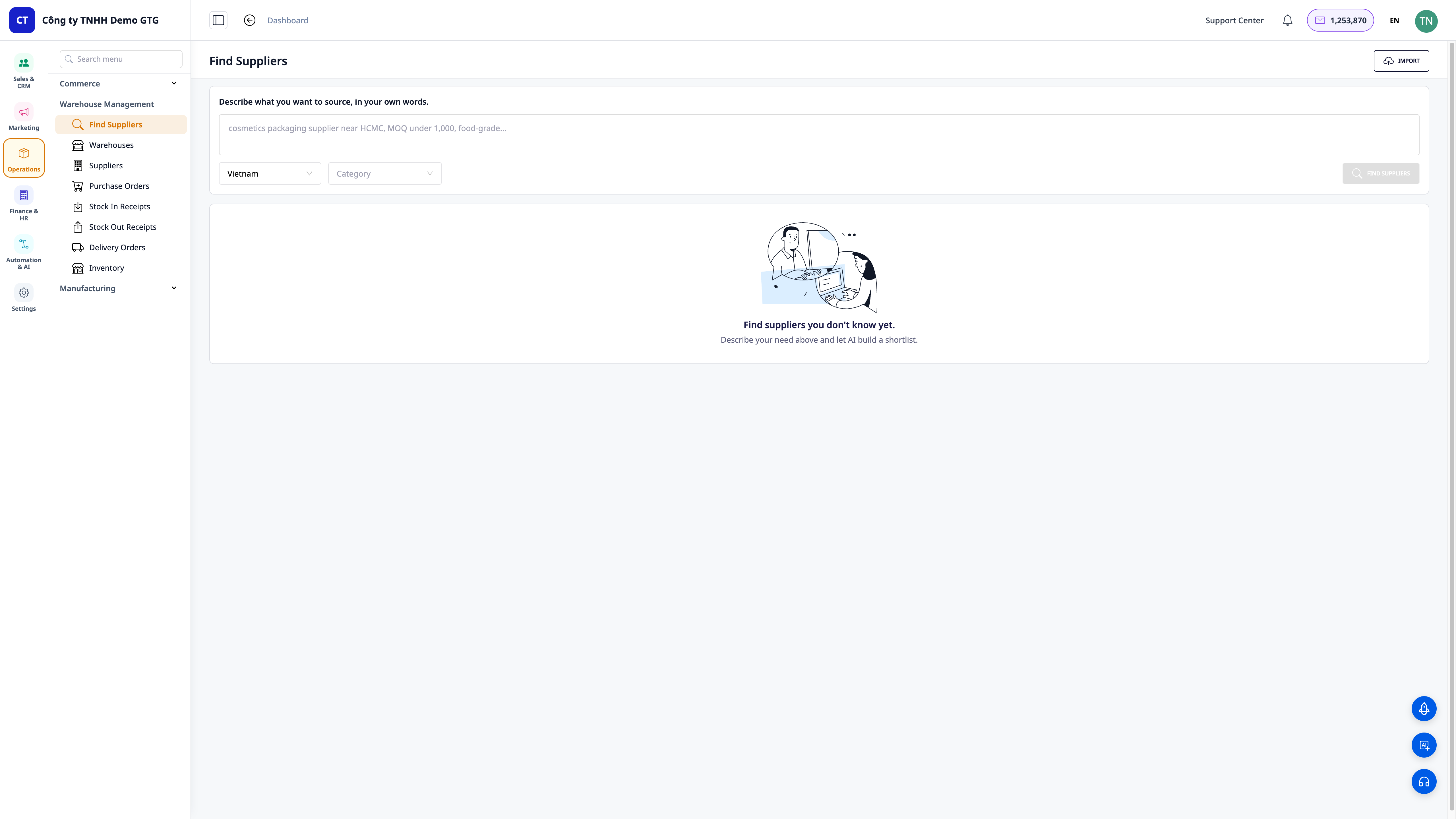
Problemer, virksomheder står over for
| Gammel metode | Konsekvens |
|---|---|
| Søger manuelt på Google, gennemgår grupper, spørger bekendte for at finde kontakter | Det tager en hel eftermiddag, de fleste er døde spor, ingen svarer |
| Skriver navne — numre — links ind i et spredt Excel-ark | Spredte, duplikerede data, ingen ved, hvem der er kontaktet |
| Ingen måde at verificere, om leverandører er reelle og laver det, de skal | Forkerte valg, tabt depositum, forsinkede produktionsplaner |
| Efter at have fundet dem, skal man stadig åbne et andet program for at skrive en e-mailanmodning om pris | Afbrudt proces, let at glemme, langsomme afgørelser |
GTG CRM samler alt i én enkelt datakilde: beskriv behovet → AI finder og rangerer reelle kandidater → gemmer i leverandørlisten (automatisk filtrering af duplikater efter CVR-nummer) → send forespørgsler om pris — i én ubrudt proces, uden at forlade skærmen.
Fremhævede funktioner
1. Beskriv med ord — AI returnerer en liste over reelle, rangerede kandidater
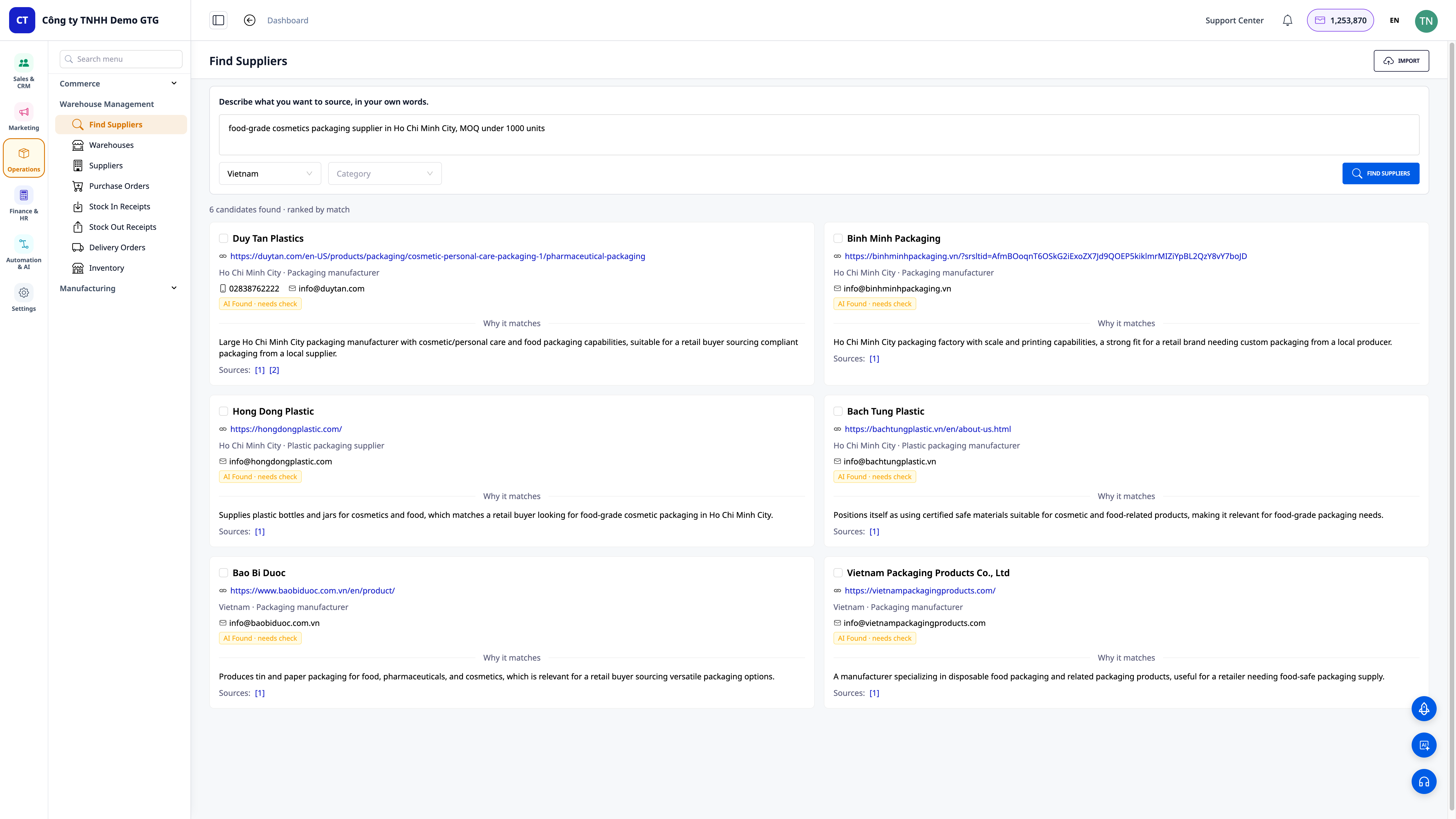
- Søg med naturligt sprog: du behøver ikke kende de "korrekte nøgleord" — beskriv det bare, som om du talte med en ven, AI'en forstår og leder for dig.
- Rangerede lister efter relevans: resultaterne viser tydeligt "antal kandidater fundet · rangering efter relevans", så du kan se de mest relevante kandidater øverst.
- Filtrer efter korrekt område, korrekt branche: vælg Land (standard Vietnam) og Branche for at indsnævre til den leverandørgruppe, du har brug for.
ℹ️ Funktionen er designet til at være international, med fokus på det vietnamesiske marked først — du kan finde lokale leverandører eller udvide til udlandet.
2. Hver kandidat er en verificerbar profil
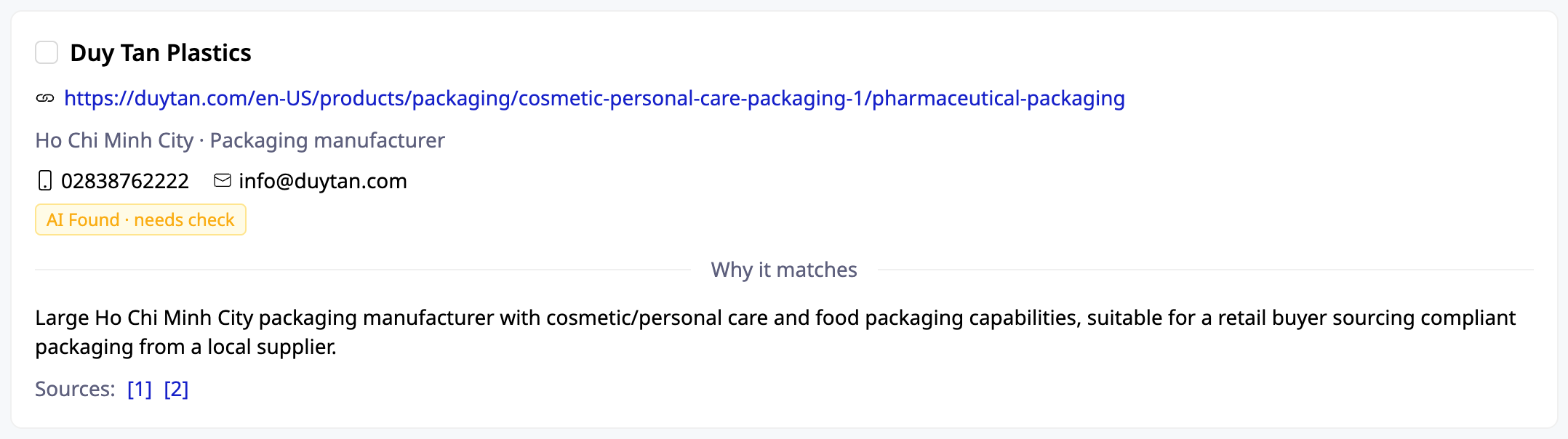
- Tilstrækkelige oplysninger til at træffe en beslutning: firmanavn, hjemmeside, område (f.eks. Ho Chi Minh City), telefonnummer/e-mail, hvis tilgængeligt.
- "Årsag til egnethed" (Why it matches): AI'en forklarer, hvorfor denne kandidat passer til det behov, du har beskrevet — du behøver ikke gætte.
- Kildelink (Sources): hvert kort indeholder kilden, så du kan klikke ind og verificere selv, for at undgå falske kontakter. Du bestemmer, ikke AI'en.
3. Ét klik for at gemme i CRM — automatisk deduplikering efter skattestatus
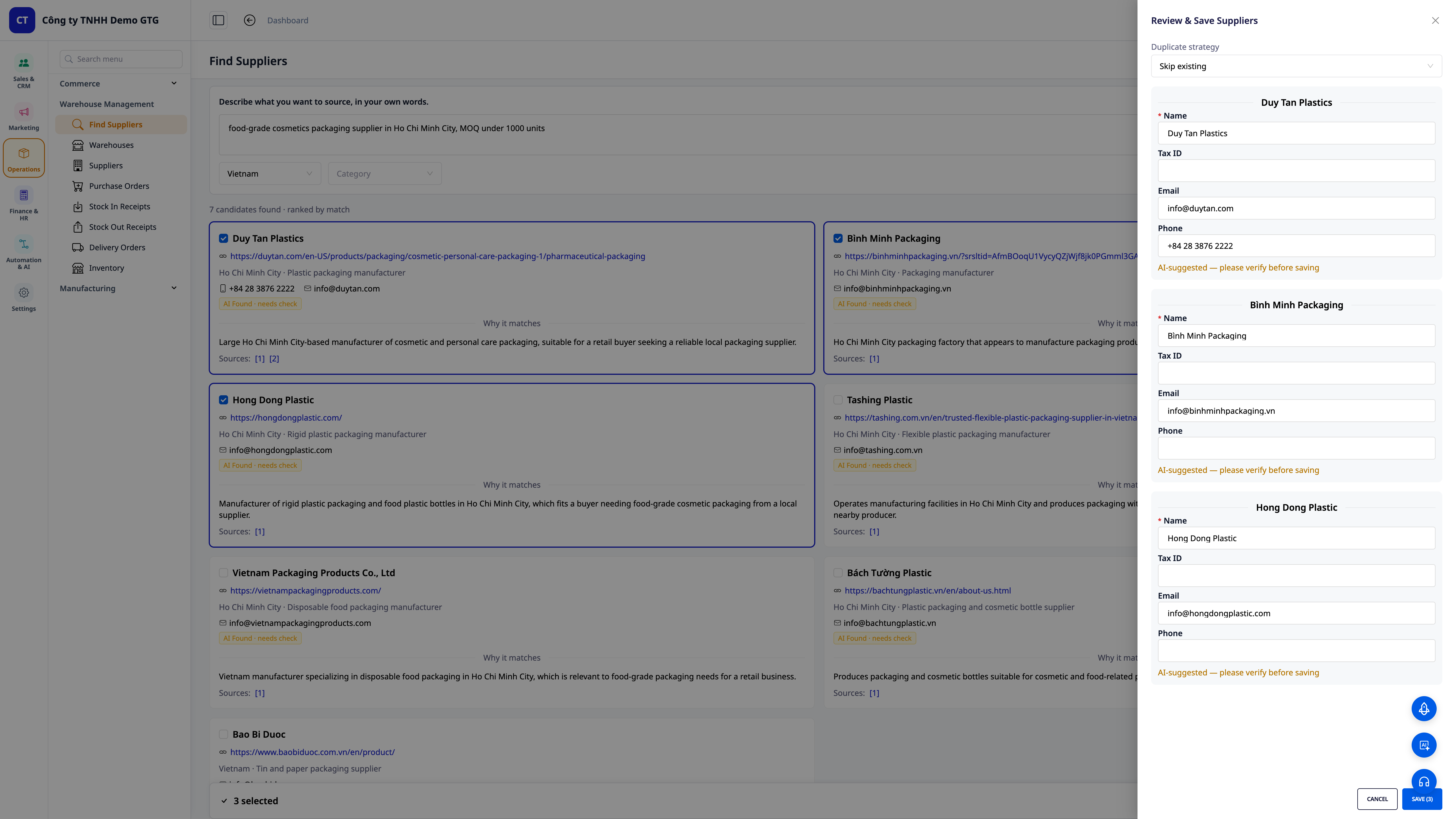
- Vælg — Rediger — Gem: marker de leverandører, du kan lide, rediger hurtigt Navn/Skattenummer/E-mail/Telefon direkte i bakken, og gem dem alle på én gang i din leverandørliste.
- Intelligent duplikatkontrol: vælg, hvordan du vil håndtere dubletter (ignorer, hvis de allerede findes / opdater den gamle) — systemet deduplikerer efter skattenummer, så din kontaktliste altid er ren og ikke svulmer op af dubletter.
- Sømløs overgang til prisanmodning: leverandøren er allerede i CRM, du kan sende en e-mail-prisanmodning (RFQ) med det samme uden at skulle indtaste oplysningerne igen.
4. Har du allerede en liste? Masseimport — AI matcher automatisk kolonner
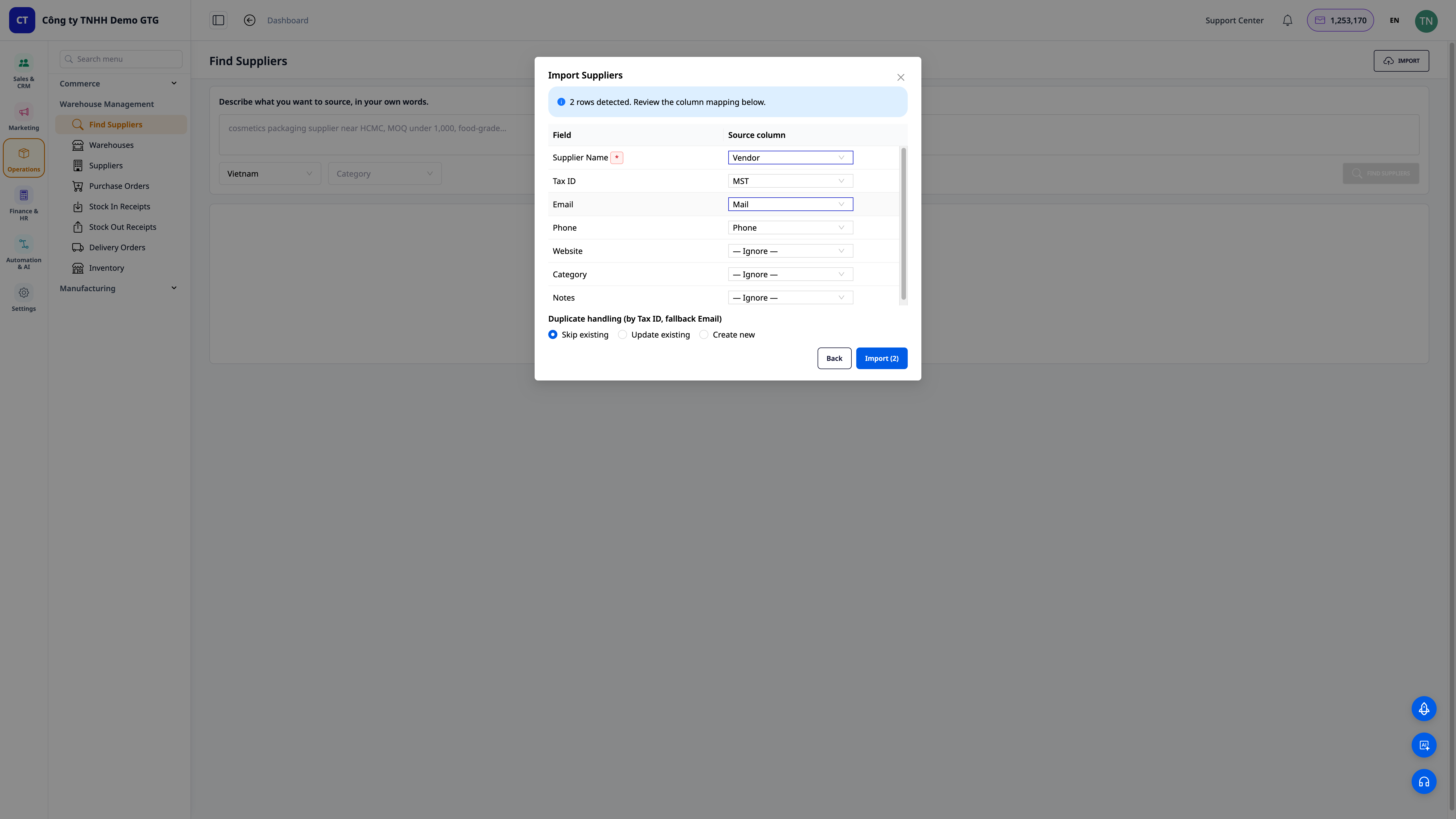
- Importer filer i ethvert format: træk og slip CSV/Excel-filer, du allerede har — ingen grund til at ændre dem, så de passer til vores skabelon.
- AI matcher kolonner automatisk: systemet genkender automatisk "Leverandør → Leverandørnavn", "Skattenummer → Skattenummer", "E-mail → E-mail"... du skal bare gennemgå og justere, før du importerer.
- Håndtering af dubletter ved import: vælg ignorér / opdater / opret ny, deduplikering efter skattenummer (backup efter e-mail) — overfør hele din eksisterende liste til CRM på få minutter.
💡 Tip: Du kan også bede om hjælp fra CRM's AI-assistent — bare skriv "find mig 5 leverandører af [produkt]" — og modtag straks en forkortet liste, som du kan gemme.
Fordele for virksomheder
| Funktion | Reelle fordele for dig |
|---|---|
| Find leverandører med AI baseret på en mundtlig beskrivelse | Fra nul til en liste over relevante kontakter på få minutter, i stedet for at bruge en hel time på at google |
| Rangeret liste + årsager til egnethed + kildelinks | Vælg den rigtige fra starten, reducer risikoen for at vælge forkert og miste depositum |
| Ét klik gem, deduplikering efter skattenummer | Leverandørkontaktlisten er altid ren, uden dubletter, og kan bruges langsigtet |
| Masseimport af filer i ethvert format, AI matcher kolonner | Importer gamle data hurtigt ind i systemet uden manuel indtastning |
| Send prisanmodninger direkte i CRM | En sammenhængende proces: find — vælg — anmod om pris, hurtigere afgørelser |
Hvem passer det til?
- Nye virksomhedsejere / startups uden en forsyningskæde, der sidder fast ved trinnet "ved ikke, hvor jeg skal hente varer fra".
- Ejere af onlinebutikker (Shopee/Lazada/TikTok), der ønsker at udvide deres produktsortiment og hurtigt har brug for nye leverandører.
- SMB-virksomheder inden for produktion, F&B, kosmetik, detailhandel, der har brug for at finde yderligere backup-leverandører for ikke at være afhængige af én enkelt kilde.
- Indkøbs- / driftsteam, der ønsker at administrere leverandørkontakter centralt og sende prisanmodninger direkte i CRM.
Hvordan kommer du i gang?
Gå til Warehouse Management → Find Suppliers, beskriv, hvad du har brug for at købe, vælg Land/Branche, og klik på Find Suppliers. Vælg de ønskede kandidater for at gemme dem i CRM, eller klik på Import for at importere din eksisterende liste. Se trin-for-trin-vejledningen i artiklen "Brugsanvisning: Find Leverandører med AI på GTG CRM".
Gratis prøveperiode — intet kreditkort krævet.


