

AI Biz Email: Δημιουργήστε και στείλτε επαγγελματικά email marketing σε λίγα λεπτά
Το AI Biz Email είναι ένας έξυπνος βοηθός που βοηθά τις επιχειρήσεις να δημιουργήσουν και να στείλουν επαγγελματικά email marketing σε λίγα λεπτά. Αντί να χάνετε ώρες σχεδιάζοντας email, συντάσσοντας περιεχόμενο και ανησυχώντας για τεχνικά ζητήματα, απλά μιλήστε με την AI σε φυσική γλώσσα - η AI θα δημιουργήσει αυτόματα όμορφα email με εικόνες και περιεχόμενο που ταιριάζουν με την επωνυμία σας.
Αυτή η δυνατότητα είναι ιδιαίτερα χρήσιμη όταν χρειάζεται να στείλετε μαζικά email σε πελάτες χωρίς να θέλετε να επηρεάσετε την αξιοπιστία (reputation) των επίσημων email σας. Το GTG CRM σας βοηθά να προστατεύσετε το κύριο domain email σας χρησιμοποιώντας ένα δικό σας, επαληθευμένο domain, διασφαλίζοντας ότι τα email σας παραδίδονται πάντα στα εισερχόμενα αντί για spam.
Κατάλληλο για καταστάσεις όπως: αποστολή email καλωσορίσματος σε νέους πελάτες, ανακοινώσεις προσφορών, τακτικά newsletters, ή οποιαδήποτε καμπάνια marketing που απαιτεί προσέγγιση εκατοντάδων πελατών ταυτόχρονα.
Βασικές Λειτουργίες
- Αυτόματη δημιουργία email με AI: Απλά εισάγετε το αίτημά σας στα Βιετναμέζικα, και η AI δημιουργεί ένα πλήρες email με επαγγελματική κεφαλίδα, περιεχόμενο και εικόνες μέσα σε δευτερόλεπτα.
- Προστασία αξιοπιστίας email: Χρησιμοποιήστε ένα δικό σας, επαληθευμένο domain για την αποστολή email marketing, αποφεύγοντας την επίδραση στα επίσημα email της επιχείρησής σας.
- Ενσωμάτωση Επωνυμίας (Brand Identity): Τα αυτόματα email χρησιμοποιούν το λογότυπο, τα χρώματα και τις πληροφορίες της επωνυμίας που έχουν προκαθοριστεί.
- Εύκολη μαζική αποστολή: Στείλτε σε πολλαπλές διευθύνσεις email ταυτόχρονα με μια απλή εντολή.
- Παρακολούθηση αποτελεσματικότητας σε πραγματικό χρόνο: Μάθετε αμέσως ποιος άνοιξε το email, ποιο ήταν το ποσοστό ανοίγματος για να αξιολογήσετε την αποτελεσματικότητα της καμπάνιας.
- Στρατηγικές συμβουλές: Η AI μπορεί να αναλύσει και να προτείνει αποτελεσματικές στρατηγικές email marketing βασισμένες σε πραγματικά δεδομένα.
Οδηγίες Χρήσης
Βήμα 1: Επαλήθευση Domain Email (Email Verification)
Πριν στείλετε email marketing, πρέπει να επαληθεύσετε το domain email σας για να προστατεύσετε την αξιοπιστία των κύριων email σας. Αυτό διασφαλίζει ότι όταν οι πελάτες σας επισημάνουν τα email marketing ως spam, τα επίσημα email σας θα συνεχίσουν να λειτουργούν κανονικά.
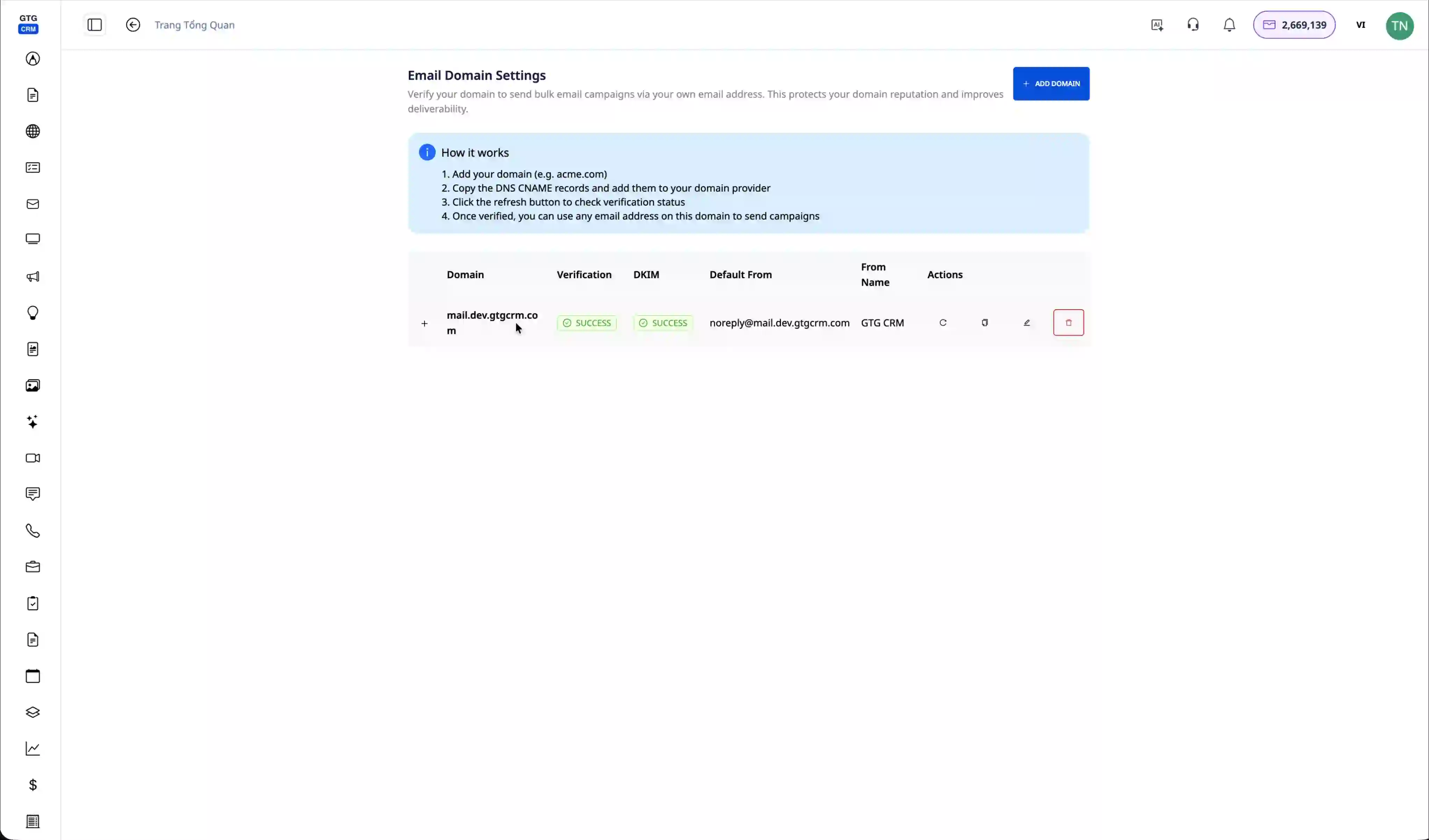
Μεταβείτε στην ενότητα διαχείρισης του workspace και θα δείτε το επαληθευμένο domain email (π.χ., mail.dev.gtgcrm.com). Κατά την αποστολή email, το σύστημα θα χρησιμοποιήσει αυτόματα αυτό το domain αντί για το προσωπικό σας email.
Βήμα 2: Ρύθμιση Εγγραφών DNS (Εάν δεν έχει επαληθευτεί)
Εάν το domain δεν έχει επαληθευτεί, το σύστημα θα εμφανίσει μια λίστα με τις εγγραφές DNS που πρέπει να ρυθμιστούν.
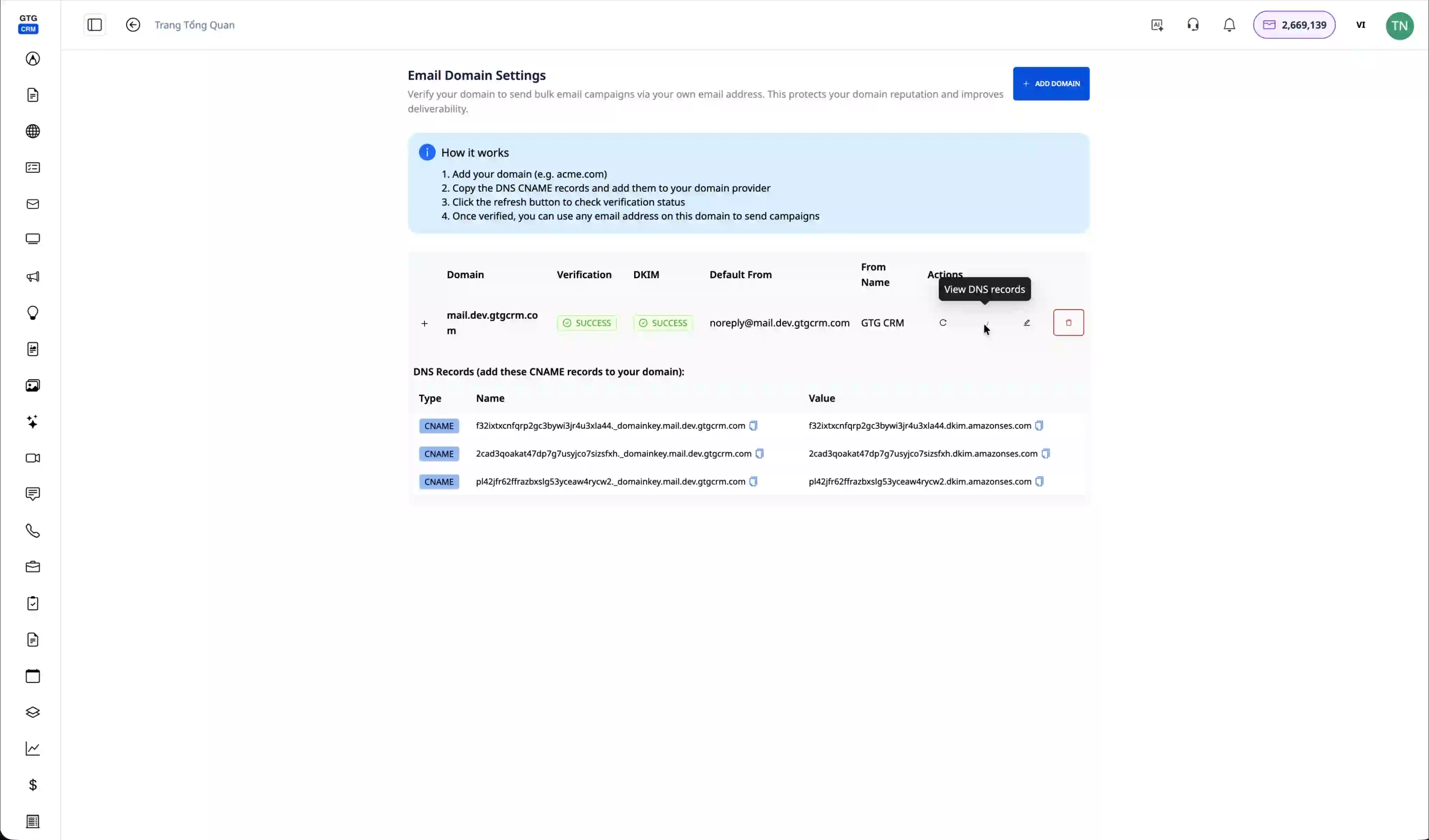
Κάντε κλικ στο "View DNS Record" για να δείτε λεπτομερώς τις εγγραφές που πρέπει να προσθέσετε. Πρέπει να αποκτήσετε πρόσβαση στη σελίδα διαχείρισης DNS του domain σας (συνήθως στον πάροχο ονομάτων τομέα σας) και να προσθέσετε αυτές τις εγγραφές για να αποδείξετε ότι είστε ο ιδιοκτήτης του domain.
Βήμα 3: Ρύθμιση Επωνυμίας (Brand Identity)
Πριν δημιουργήσετε email, ρυθμίστε τις πληροφορίες της επωνυμίας σας, ώστε η AI να μπορεί να δημιουργεί email που ταιριάζουν με την εταιρική σας εικόνα.
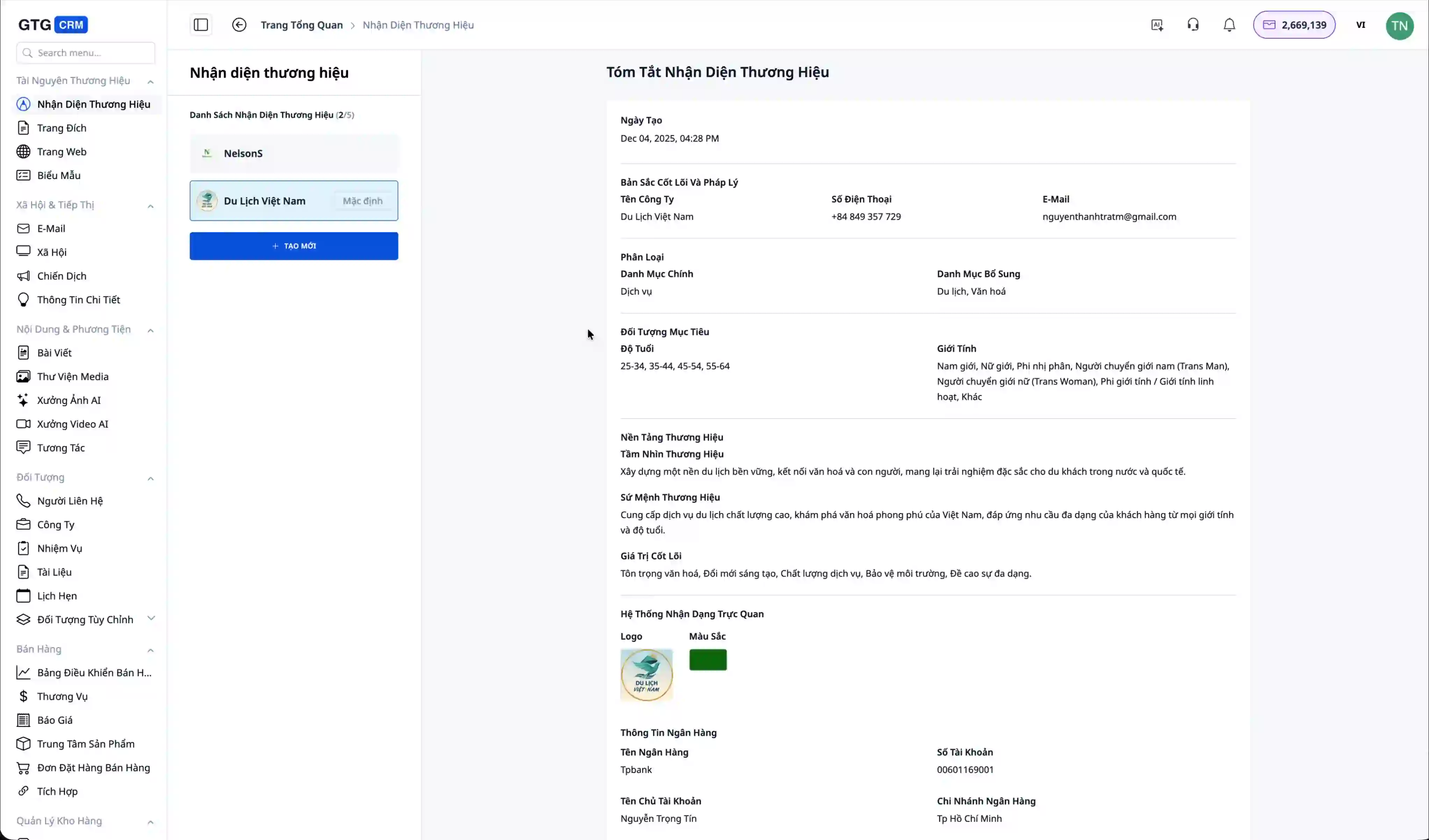
Μεταβείτε στην ενότητα "Brand Identity" και εισάγετε πληροφορίες όπως το λογότυπο, τα κύρια χρώματα, το όνομα της εταιρείας. Για παράδειγμα, στο βίντεο είναι "Du lich Viet Nam" - αυτές οι πληροφορίες θα εμφανίζονται αυτόματα σε όλα τα email που δημιουργούνται από την AI.
Βήμα 4: Ανοίξτε τον Βοηθό AI Biz Email
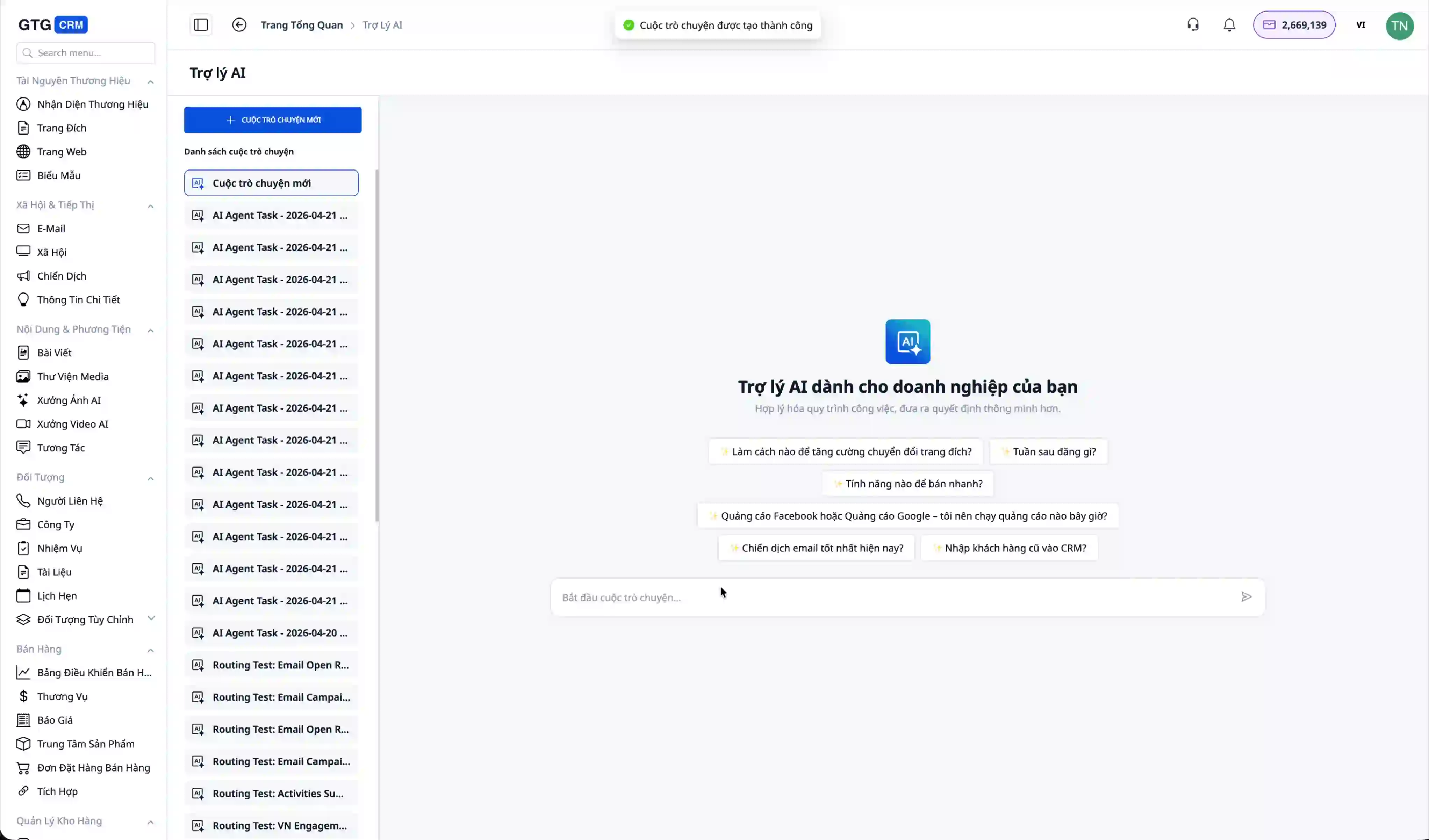
Μεταβείτε στην ενότητα "Email" στο κύριο μενού. Θα δείτε μια λίστα με τα email που έχουν σταλεί προηγουμένως (εάν υπάρχουν). Κάντε κλικ στο κουμπί "Δημιουργία νέας συνομιλίας" για να ξεκινήσετε τη συνεργασία με την Τεχνητή Νοημοσύνη.
Βήμα 5: Αίτημα δημιουργίας email από την Τεχνητή Νοημοσύνη
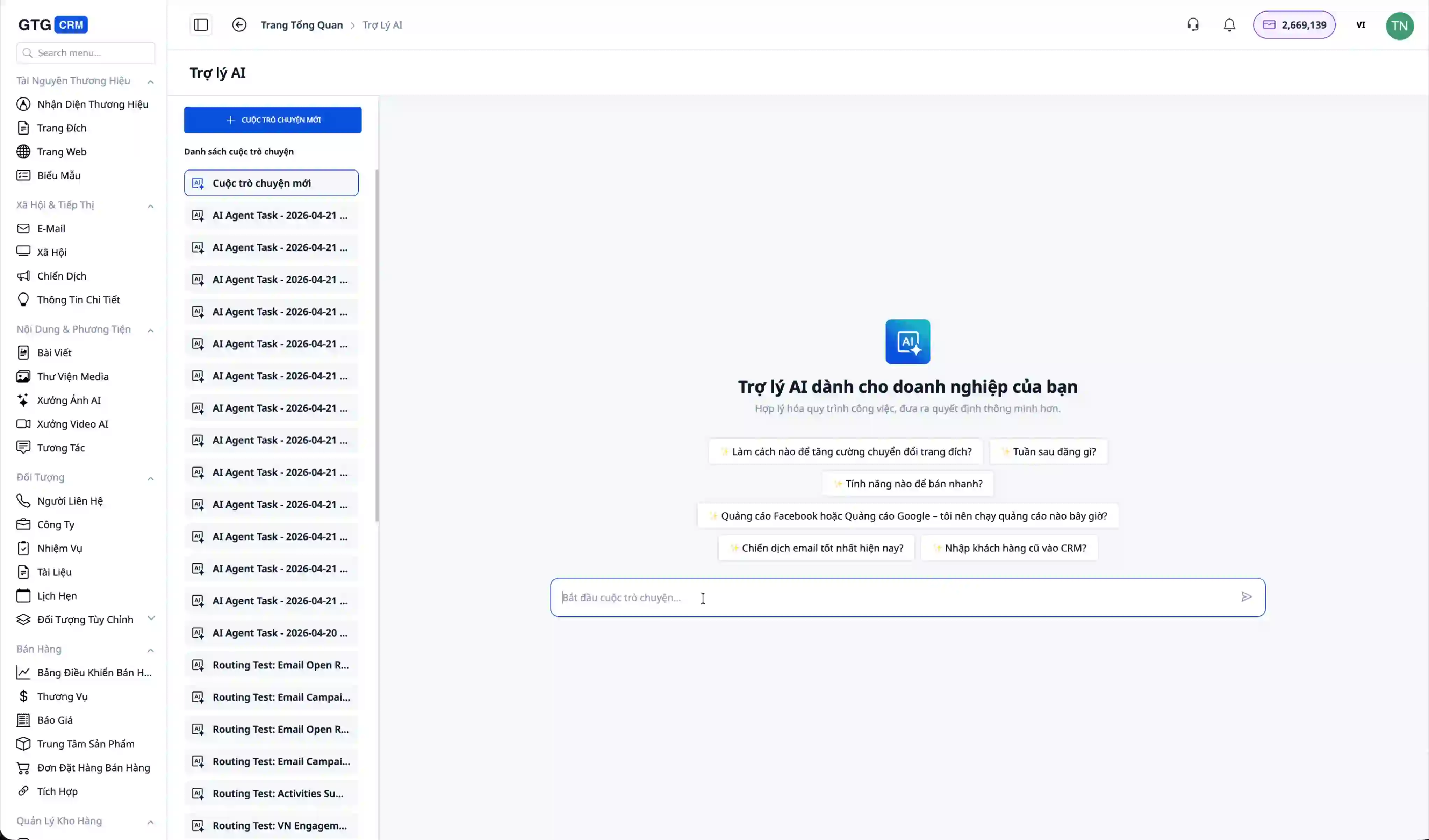
Στη διεπαφή συνομιλίας με την Τεχνητή Νοημοσύνη, απλώς εισαγάγετε το αίτημά σας στα ελληνικά, για παράδειγμα: "Δημιούργησέ μου ένα welcome email". Η Τεχνητή Νοημοσύνη θα το κατανοήσει και θα αρχίσει να επεξεργάζεται το αίτημα.
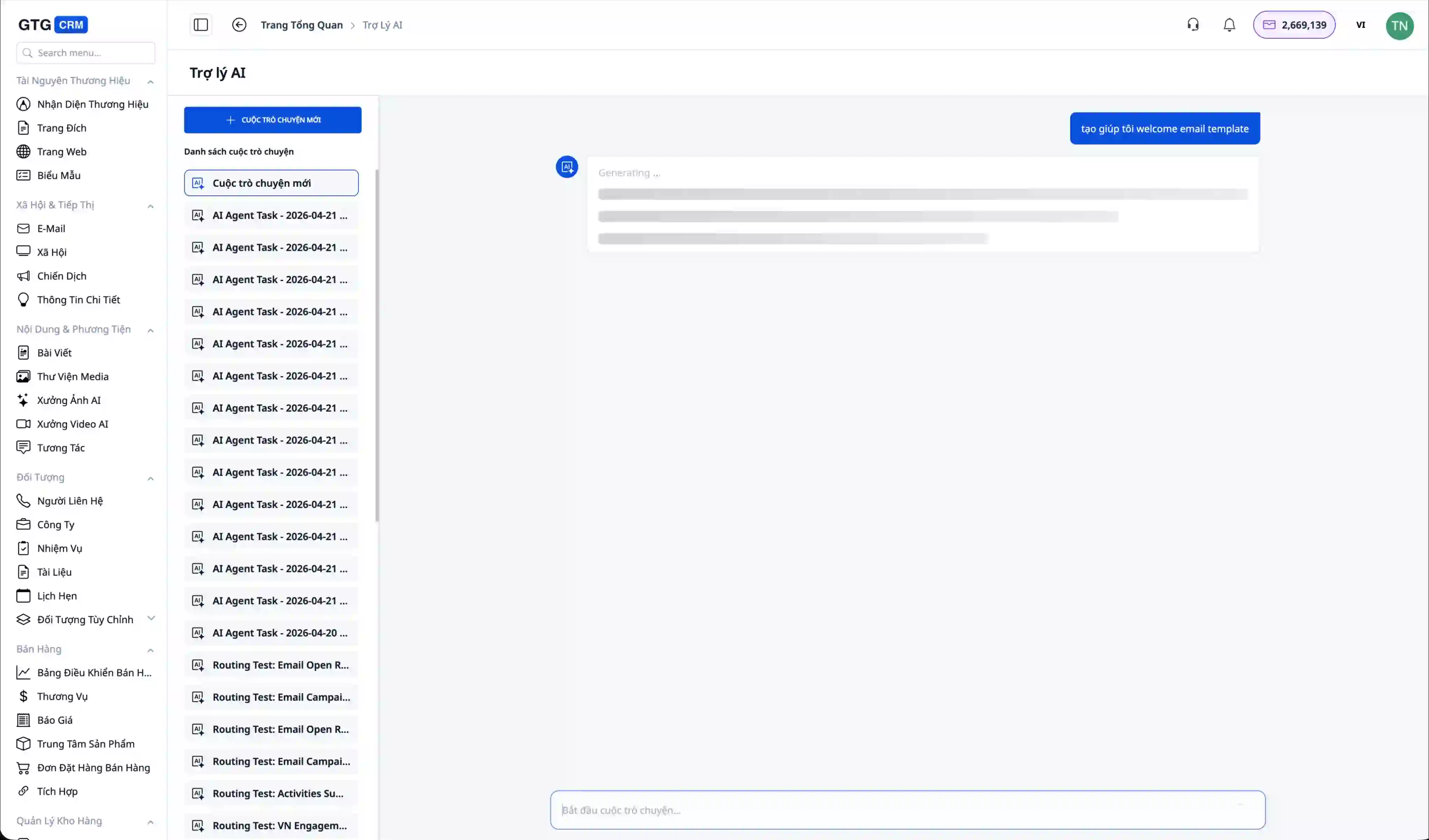
Η διαδικασία δημιουργίας email συνήθως διαρκεί 15-20 δευτερόλεπτα. Η Τεχνητή Νοημοσύνη όχι μόνο γράφει το περιεχόμενο, αλλά σχεδιάζει επίσης ένα επαγγελματικό email με κεφαλίδα, υποσέλιδο, εικόνες και όμορφη διάταξη.
Βήμα 6: Προεπισκόπηση του δημιουργημένου email
Μετά την ολοκλήρωση, η Τεχνητή Νοημοσύνη θα εμφανίσει μια προεπισκόπηση του email απευθείας στη συνομιλία. Θα δείτε το email με το λογότυπο της επωνυμίας (π.χ. Du lich Viet Nam), εικόνες και περιεχόμενο έτοιμο σε επαγγελματικό στυλ.
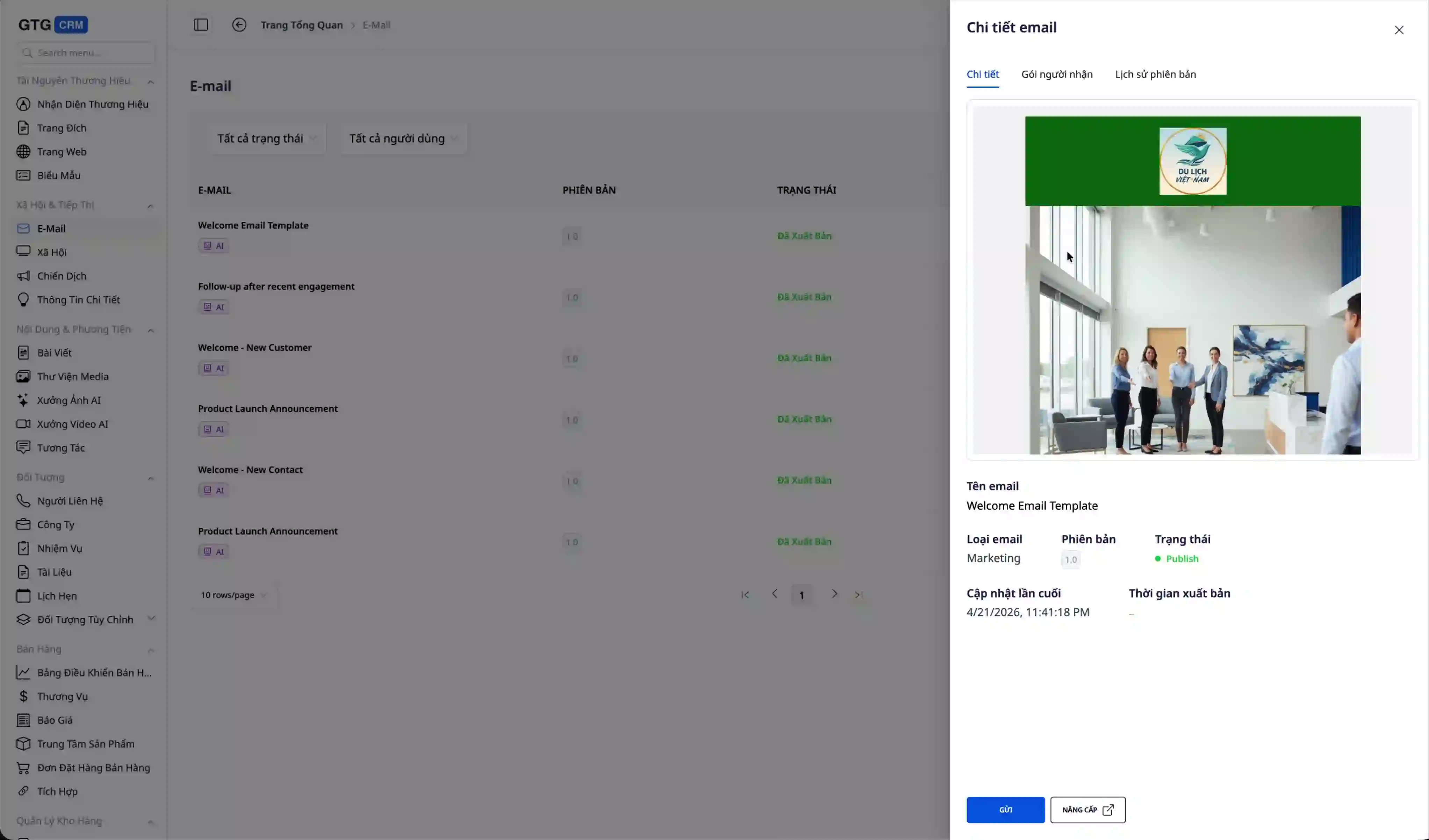
Το email περιλαμβάνει όλα τα στοιχεία: κεφαλίδα με λογότυπο, κύριο περιεχόμενο με εικόνες, υποσέλιδο με στοιχεία επικοινωνίας. Όλα αυτά λαμβάνονται αυτόματα από την Ταυτότητα Επωνυμίας που έχετε διαμορφώσει.
Βήμα 7: Αποστολή email στους πελάτες
Αφού είστε ικανοποιημένοι με το email, μπορείτε να ζητήσετε από την Τεχνητή Νοημοσύνη να το στείλει αμέσως.
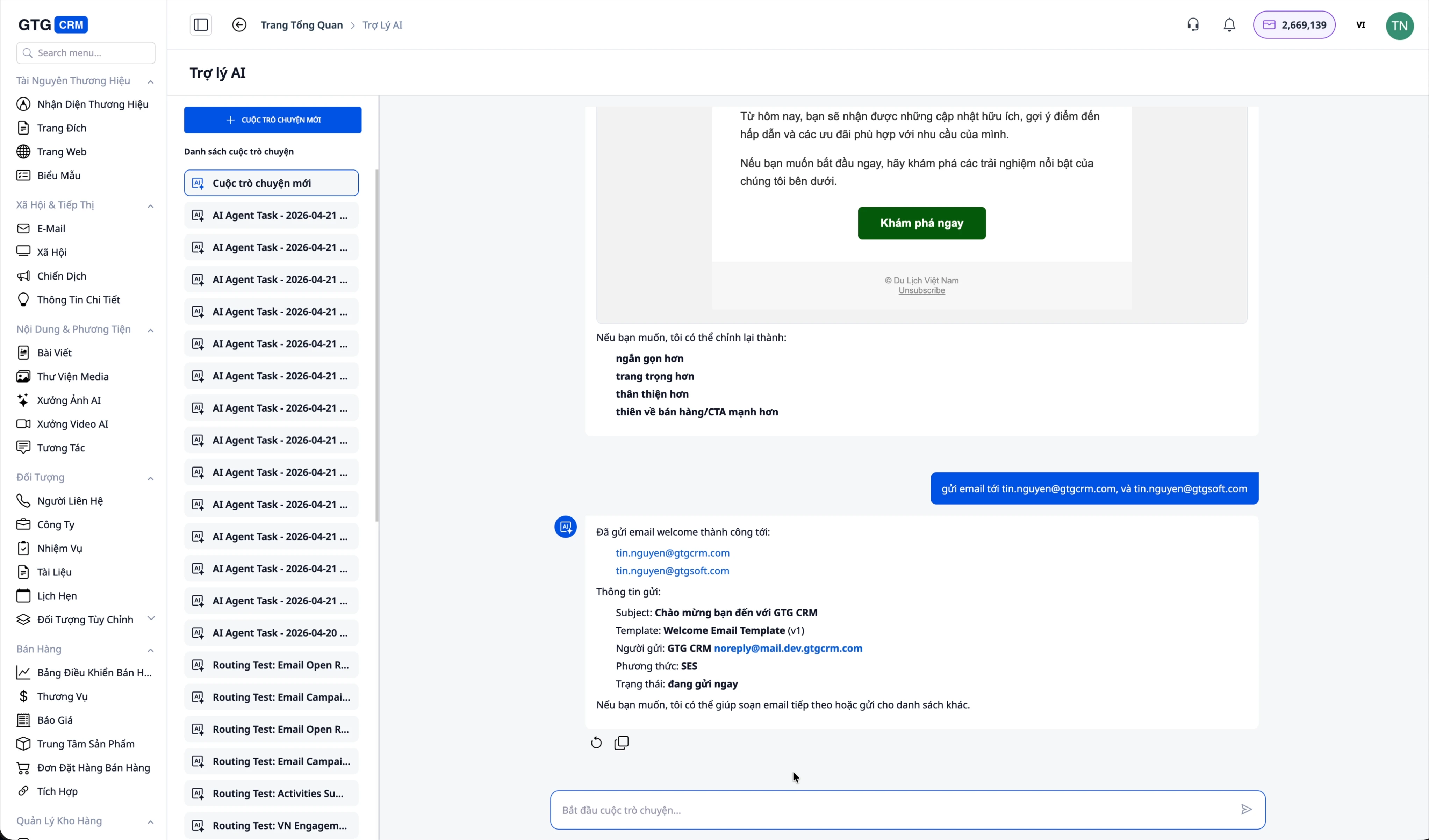
Εισαγάγετε μια απλή εντολή όπως: "Στείλε το email στις διευθύνσεις tin.nguyen@gtgcrm.com και tin.nguyen@gtvsoft.com". Η Τεχνητή Νοημοσύνη θα στείλει αυτόματα το email σε όλες τις καθορισμένες διευθύνσεις.
Το σύστημα επιβεβαιώνει ότι το email στάλθηκε επιτυχώς στις διευθύνσεις. Μπορείτε να είστε σίγουροι ότι το email έφτασε στους παραλήπτες.
Βήμα 8: Έλεγχος των ληφθέντων email
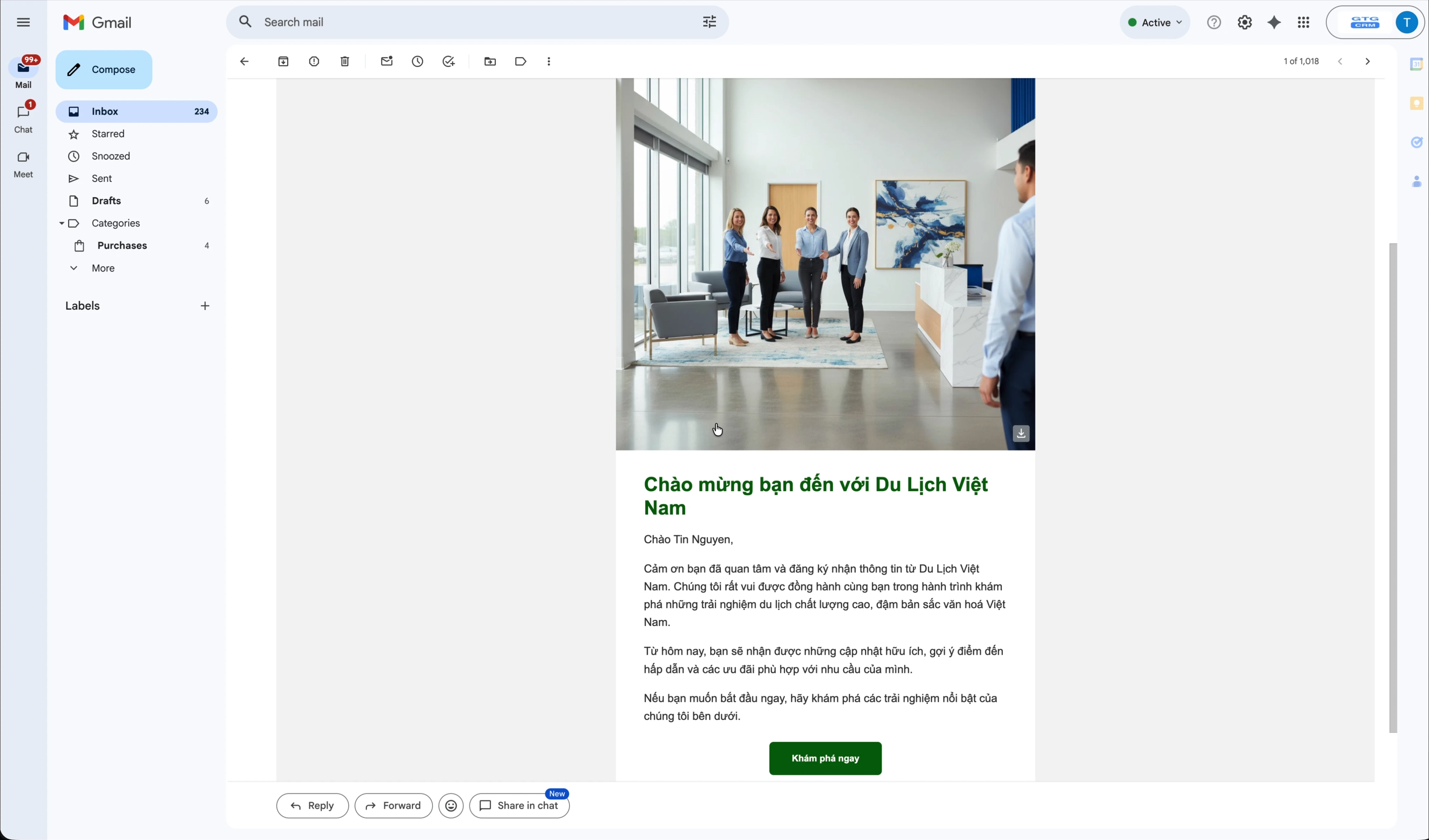
Ανοίξτε το γραμματοκιβώτιο του παραλήπτη για να ελέγξετε. Το email θα εμφανιστεί με ωραία εμφάνιση, πλήρεις εικόνες και περιεχόμενο όπως σχεδιάστηκε.
Βήμα 9: Παρακολούθηση της απόδοσης της καμπάνιας
Ένα σημαντικό χαρακτηριστικό του AI Biz Email είναι η δυνατότητα παρακολούθησης του ποιος άνοιξε το email σας.
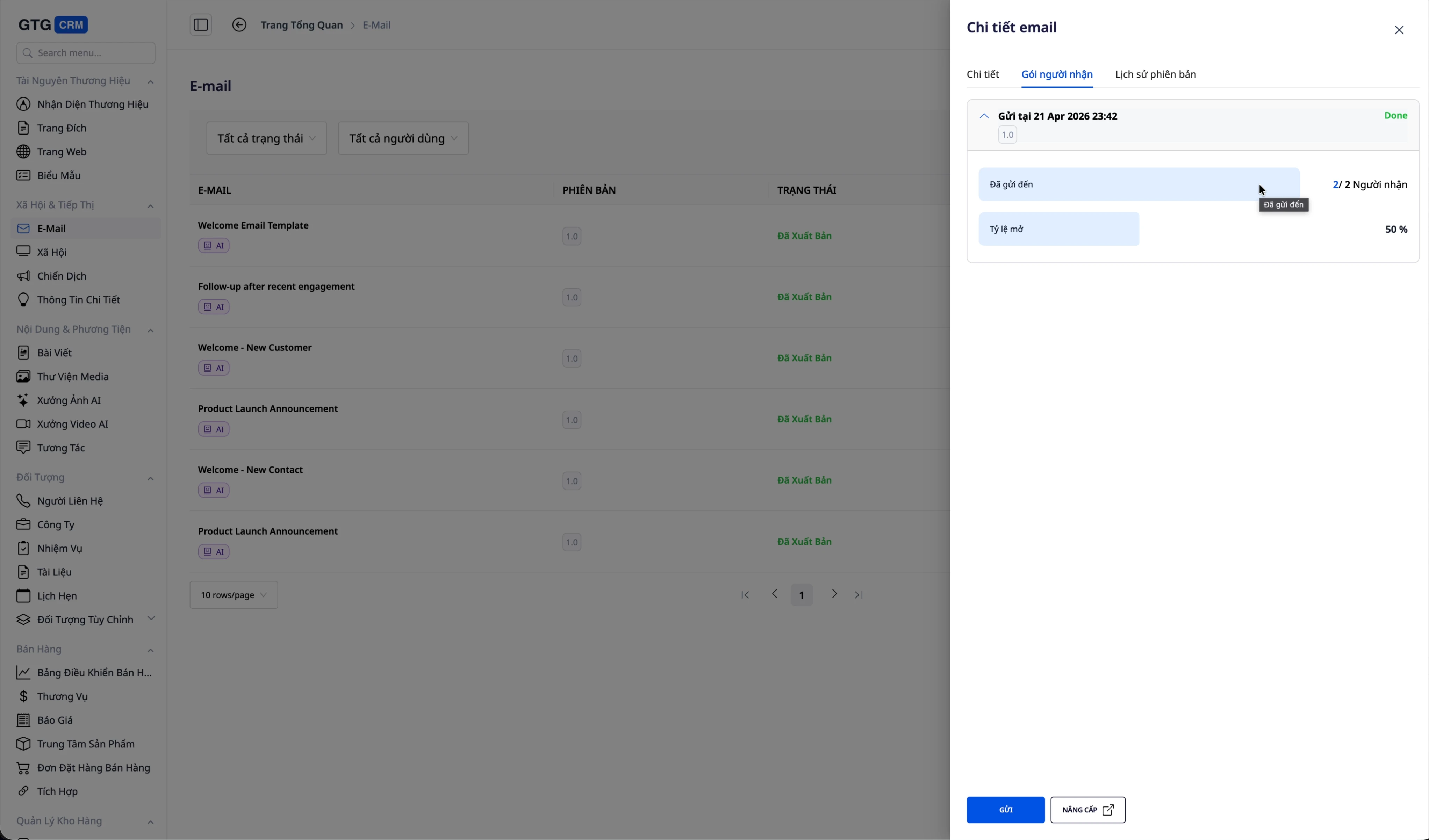
Επιστρέψτε στη διεπαφή του GTG CRM, μεταβείτε στην ενότητα λεπτομερειών του email που στάλθηκε. Κάντε κλικ στο "Παραλήπτες" για να δείτε τη λίστα. Θα δείτε:
- Συνολικός αριθμός παραληπτών
- Αριθμός email που στάλθηκαν επιτυχώς
- Ποσοστό ανοίγματος (Open Rate)
- Λεπτομερής λίστα ποιος άνοιξε, ποιος δεν άνοιξε
Σε αυτό το παράδειγμα, το ποσοστό ανοίγματος είναι 50% (1 στους 2 άτομα άνοιξαν το email). Αυτές οι πληροφορίες σας βοηθούν να αξιολογήσετε την απόδοση της καμπάνιας και να προσαρμόσετε τη στρατηγική σας ανάλογα.
Βήμα 10: Συμβουλές στρατηγικής με την Τεχνητή Νοημοσύνη
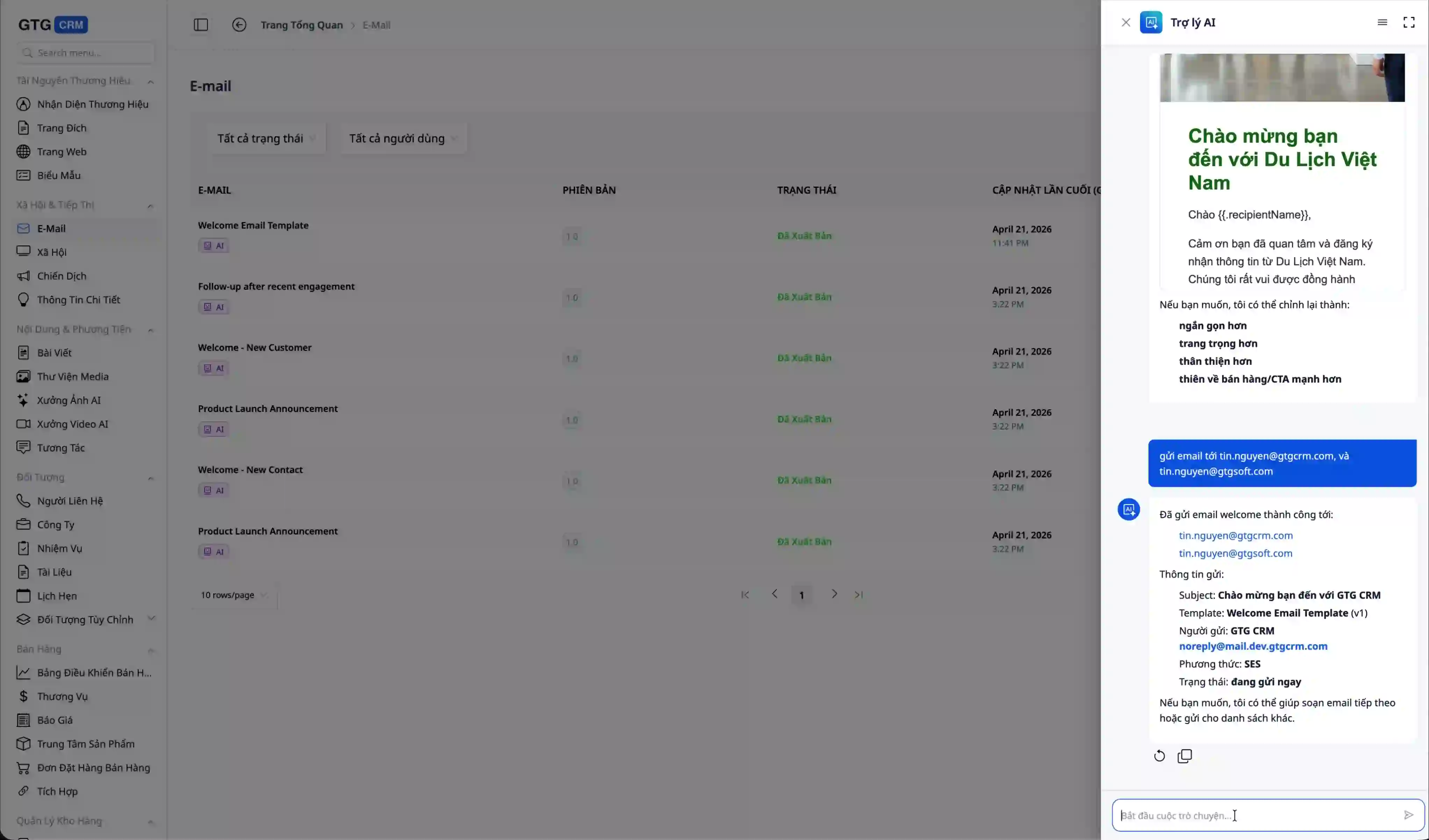
Μπορείτε να συνεχίσετε να συνομιλείτε με την AI για συμβουλές, για παράδειγμα:
- "Ποια στρατηγική email είναι πιο αποτελεσματική;"
- "Ποιοι ανοίγουν περισσότερο τα email;"
- "Πώς μπορώ να αυξήσω το ποσοστό ανοίγματος email;"
Η AI θα αναλύσει πραγματικά δεδομένα από τις καμπάνιες σας και θα δώσει συγκεκριμένες συμβουλές, βοηθώντας στη βελτιστοποίηση της αποτελεσματικότητας του marketing.
Σύνοψη
Στο πλαίσιο των μικρομεσαίων επιχειρήσεων που χρειάζονται να κάνουν marketing ταχύτερα, διατηρώντας παράλληλα μια επαγγελματική εικόνα, το AI Biz Email αποτελεί μια πιο ρεαλιστική προσέγγιση στο πρόβλημα του email marketing. Αντί να δαπανώνται πολύτιμοι χρόνοι στη σύνταξη περιεχομένου, στον σχεδιασμό email και στην αντιμετώπιση τεχνικών βημάτων, οι επιχειρήσεις μπορούν να χρησιμοποιήσουν την AI για να δημιουργήσουν email που ταιριάζουν με την επωνυμία τους, να τα στείλουν μαζικά μέσω επαληθευμένου domain και να παρακολουθήσουν την αποτελεσματικότητά τους μέσα στην ίδια διαδικασία.
Η αξία αυτής της λειτουργικότητας δεν έγκειται μόνο στην ταχύτητα. Το σημαντικότερο είναι ότι βοηθά τις επιχειρήσεις να προστατεύσουν την αξιοπιστία του κύριου email τους, να διατηρήσουν τη συνέπεια της επωνυμίας σε κάθε καμπάνια και να έχουν στη διάθεσή τους πραγματικά δεδομένα, όπως το ποσοστό ανοίγματος, για την αξιολόγηση της αποτελεσματικότητας. Συνδυάζοντας τη δημιουργία email, την αποστολή email και την παροχή συμβουλών στρατηγικής σε έναν βοηθό AI, το AI Biz Email όχι μόνο εξοικονομεί χρόνο, αλλά βοηθά επίσης τις επιχειρήσεις να εφαρμόζουν πιο δομημένο, πιο μετρήσιμο και πιο επεκτάσιμο email marketing στη διαδικασία της φροντίδας πελατών.


