

Το παρακάτω άρθρο θα εξηγήσει τι είναι το Zalo OA, τις κατηγορίες εταιρικών λογαριασμών OA, τα οφέλη του επαληθευμένου OA και θα παρέχει λεπτομερείς οδηγίες για την επιτυχή εγγραφή ενός λογαριασμού OA.
Τι είναι ο Εταιρικός Επίσημος Λογαριασμός Zalo (OA);
Zalo Official Account (OA) είναι ένας επίσημος λογαριασμός για επιχειρήσεις στο Zalo, ο οποίος επιτρέπει την άμεση σύνδεση με πελάτες μέσω διαφόρων λειτουργιών όπως chat, broadcast, chatbot, φωνητικές κλήσεις και δημοσιεύσεις.
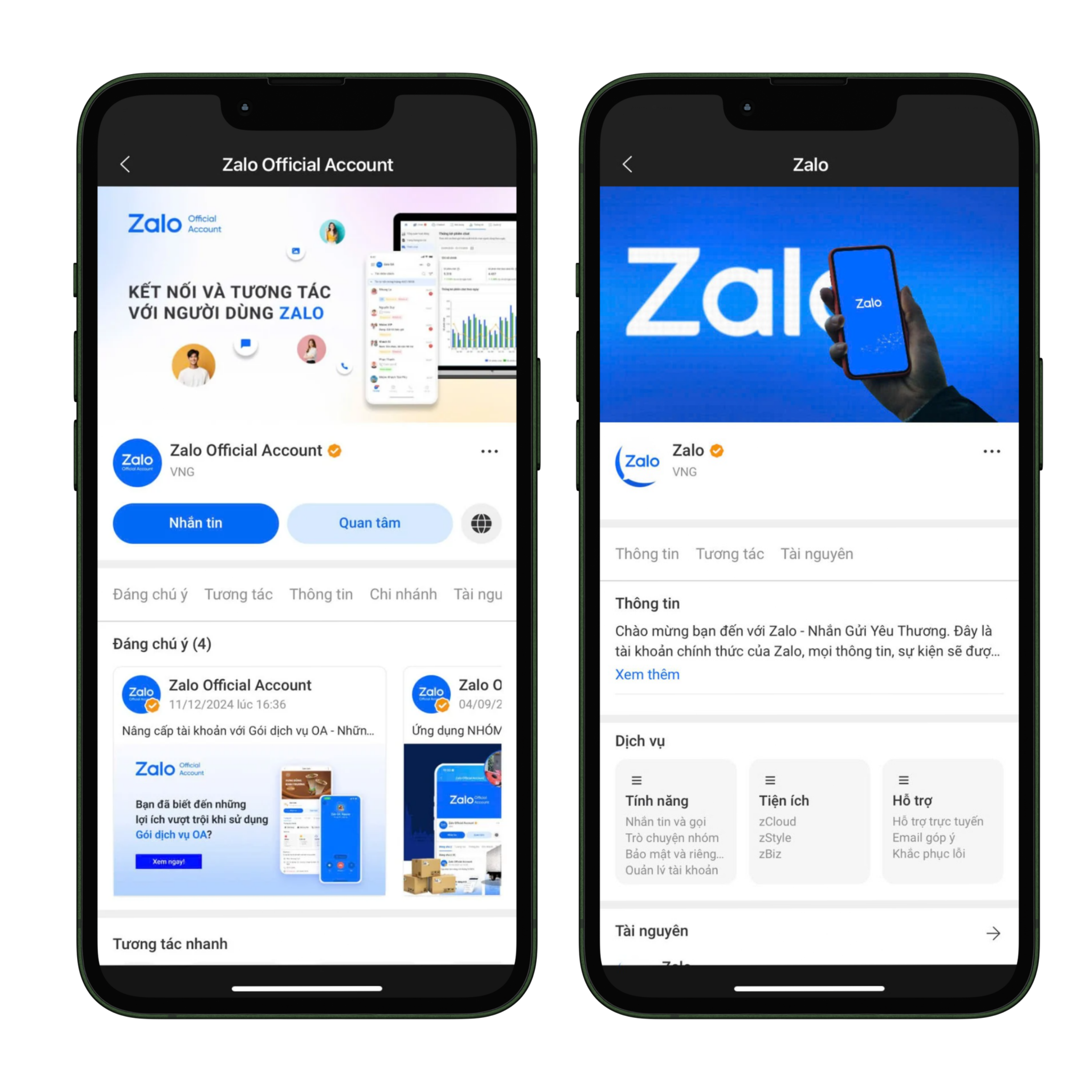
Διεπαφή Zalo OA
Επί του παρόντος, υπάρχουν δύο δημοφιλείς τύποι OA για επιχειρήσεις:
- Προφίλ διαφήμισης: είναι ένας τύπος λογαριασμού για ιδιώτες ή επιχειρήσεις χωρίς άδεια εμπορικής δραστηριότητας, που μπορεί να χρησιμοποιηθεί μόνο για διαφημίσεις στο Zalo και δεν υποστηρίζει λειτουργίες όπως μηνύματα, broadcast, δημοσιεύσεις, chatbot ή φωνητικές κλήσεις, αλλά μπορεί να συμπληρωθεί με άδεια εμπορικής δραστηριότητας για αναβάθμιση σε επαληθευμένο OA και πλήρη χρήση των λειτουργιών.
- Επαληθευμένο OA: είναι ένας τύπος λογαριασμού για επιχειρήσεις ή εμπόρους που διαθέτουν άδεια εμπορικής δραστηριότητας, φέρει πράσινο σήμα επαλήθευσης για αύξηση της αξιοπιστίας, επιτρέπει σε πολλούς διαχειριστές να διαχειρίζονται ταυτόχρονα σε πολλές συσκευές και υποστηρίζει όλες τις λειτουργίες για την εξυπηρέτηση πελατών και την ανάπτυξη ηλεκτρονικού εμπορίου.
Οφέλη από τη χρήση επαληθευμένου OA
Η αναβάθμιση και χρήση επαληθευμένου OA όχι μόνο βοηθά τις επιχειρήσεις να συμμορφώνονται με τις νομικές απαιτήσεις, αλλά προσφέρει επίσης πολλά πρακτικά οφέλη στην οικοδόμηση της επωνυμίας και την ανάπτυξη πελατών.
- Υψηλότερη αξιοπιστία: το πράσινο σήμα επαλήθευσης κάνει τους πελάτες να αισθάνονται ασφαλείς κατά την αλληλεπίδραση.
- Πλήρη εργαλεία: αποστολή μηνυμάτων, δημοσίευση άρθρων, chatbot, φωνητικές κλήσεις, broadcast.
- Ευέλικτη διαχείριση: επιτρέπει σε πολλούς διαχειριστές να διαχειρίζονται από κοινού.
- Υποστήριξη ηλεκτρονικού εμπορίου: συνδυασμός με διαφημίσεις Zalo για αύξηση της αποτελεσματικότητας προσέγγισης πελατών.
Εάν η επιχείρησή σας θέλει να αξιοποιήσει το Zalo ως μέρος μιας στρατηγικής πολλαπλών καναλιών, διαβάστε το άρθρο: 7 καλύτερα εργαλεία διαχείρισης μηνυμάτων πολλαπλών καναλιών σήμερα
Διαδικασία Εγγραφής για Εταιρικό Zalo OA
Βήμα 1: Πρόσβαση και σύνδεση
- Επισκεφθείτε oa.zalo.me
- Συνδεθείτε με τον προσωπικό σας λογαριασμό Zalo.
- Επιλέξτε Δημιουργία Επίσημου Λογαριασμού.
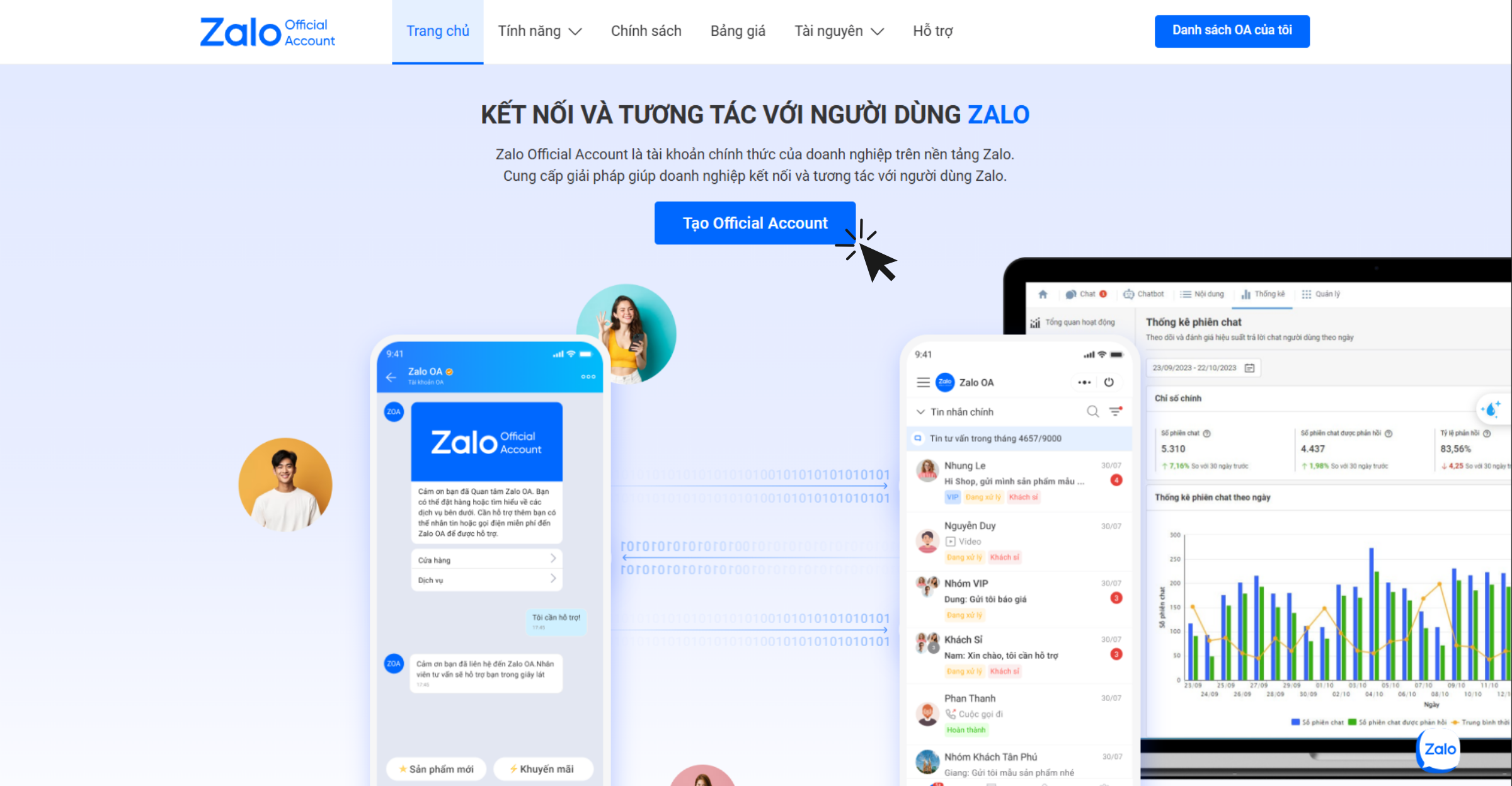
Πρόσβαση και σύνδεση για δημιουργία Zalo OA
Βήμα 2: Σύνδεση μέσω κωδικού QR
- Χρησιμοποιήστε την εφαρμογή Zalo για σάρωση του κωδικού QR για σύνδεση.
- Απαιτήσεις: Ένας επαληθευμένος αριθμός τηλεφώνου Βιετνάμ (+84) για το Zalo.
Βήμα 3: Συμπληρώστε τα στοιχεία του λογαριασμού
Κατά τη δημιουργία ενός OA, οι επιχειρήσεις πρέπει να εισάγουν πλήρεις πληροφορίες σύμφωνα με τις απαιτήσεις του Zalo για να διασφαλίσουν την ακρίβεια και τη διαφάνεια:
- Κατηγορία δραστηριότητας: Επιλέξτε τη σωστή κατηγορία κλάδου που αντιστοιχεί στην άδεια εγγραφής της επιχείρησης ή του ατομικού εμπορίου για να αποφύγετε την απόρριψη της επαλήθευσης.
- Όνομα Επίσημου Λογαριασμού: Το όνομα του OA πρέπει να συμμορφώνεται με τους κανονισμούς του Zalo. Μπορεί να είναι το όνομα της επιχείρησης/ατομικού εμπορίου που αναγράφεται στην άδεια εγγραφής, το εμπορικό σήμα που έχει προστατευτεί από το Γραφείο Ιδιοκτησίας του Πνεύματος, ή το όνομα του προϊόντος/υπηρεσίας/έργου που πωλείται αν δεν εμπίπτει στις δύο προηγούμενες περιπτώσεις.
- Πληροφορίες εισαγωγής: Η περιγραφή πρέπει να είναι σύντομη, κατανοητή, να δηλώνει σαφώς τον κλάδο και να μην προκαλεί σύγχυση στον αναγνώστη.
- Εικόνα προφίλ: Χρησιμοποιήστε το επίσημο λογότυπο ή μια χαρακτηριστική εικόνα προϊόντος/υπηρεσίας για να βοηθήσετε τους πελάτες να αναγνωρίσουν εύκολα την επωνυμία.
- Εικόνα εξωφύλλου: Πρέπει να είναι μια εικόνα που σχετίζεται άμεσα με τον τομέα ή τα προϊόντα της επιχείρησης για να αυξήσει τον επαγγελματισμό.
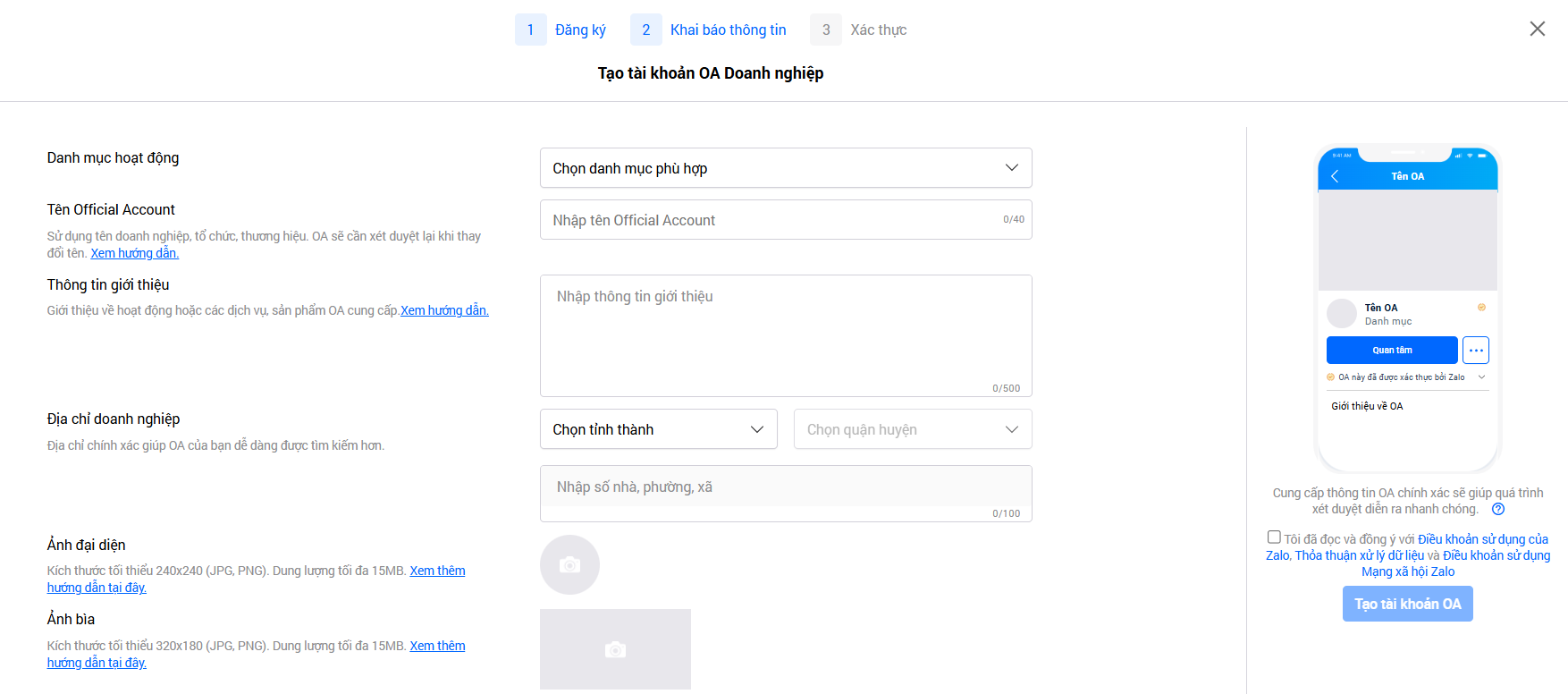
Δήλωση έγκυρων πληροφοριών σύμφωνα με την πολιτική του Zalo
➞ Πατήστε Δημιουργία λογαριασμού OA.
Βήμα 4: Επαλήθευση OA
Μετά τη δημιουργία επιτυχώς ενός OA, οι επιχειρήσεις πρέπει να προχωρήσουν στην επαλήθευση εντός 14 ημερών για να ολοκληρώσουν τη διαδικασία εγγραφής. Μόλις επαληθευτεί, ο λογαριασμός θα λάβει ένα πράσινο σημάδι (tick) και θα αξιοποιήσει πλήρως τις λειτουργίες υποστήριξης πωλήσεων, μάρκετινγκ και εξυπηρέτησης πελατών στο Zalo.
Υπάρχουν τρεις δημοφιλείς τρόποι επαλήθευσης:
- Επαλήθευση με βάση το όνομα της επιχείρησης ή του καταστήματος: Ισχύει για επιχειρήσεις, ατομικά εμπόρια, καταστήματα ή επιχειρηματικές τοποθεσίες που έχουν εγγραφεί νόμιμα.
- Επαλήθευση με βάση προστατευόμενο εμπορικό σήμα: Ισχύει όταν η επιχείρηση κατέχει εμπορικό σήμα που έχει λάβει δίπλωμα προστασίας από το Γραφείο Ιδιοκτησίας του Πνεύματος.
- Επαλήθευση με βάση ειδικό κλάδο: Απευθύνεται σε επιχειρήσεις που δραστηριοποιούνται σε κλάδους με προϋποθέσεις ή χρησιμοποιούν όνομα διαφορετικό από τους δύο παραπάνω τρόπους.
Μετά την υποβολή του φακέλου επαλήθευσης, ο διαχειριστής θα λάβει ειδοποίηση σχετικά με τον χρόνο επεξεργασίας και το αποτέλεσμα από το σύστημα OA Zalo Official Account. Συνήθως, η διαδικασία απάντησης διαρκεί 2-3 εργάσιμες ημέρες, αλλά σε ορισμένες περιπτώσεις μπορεί να διαρκέσει περισσότερο.
Σημαντική σημείωση:
- Η επιχείρηση μπορεί να λάβει OA μόνο εάν δραστηριοποιείται σε νόμιμους κλάδους, σύμφωνα με το νόμο του Βιετνάμ.
- Οι τομείς που απορρίπτονται περιλαμβάνουν συγχυτικές ή δόλιες χρηματοοικονομικές δραστηριότητες, όπως δυαδικά δικαιώματα, έκδοση κρυπτονομισμάτων, συναλλαγές κρυπτονομισμάτων, δημοπρασίες με προσφορές ή παρόμοια μοντέλα.
- Επιχειρήσεις στον χρηματοπιστωτικό τομέα, τον τραπεζικό τομέα και τους ασφαλιστικούς τομείς υποχρεούνται να επαληθεύσουν τους λογαριασμούς τους πριν χρησιμοποιήσουν OA, συμπεριλαμβανομένων, ενδεικτικά, των ακόλουθων δραστηριοτήτων: πιστώσεις, καταθέσεις, μετοχές, ψηφιακά πορτοφόλια, υπηρεσίες ενδιάμεσων πληρωμών, ασφάλιση, ασφαλιστικοί πράκτορες και φορολογικές υπηρεσίες.
Για να αξιοποιήσετε πλήρως την κίνηση από το Zalo OA, μπορείτε να διαβάσετε περισσότερα: Ακολουθήστε σωστά, οι πωλήσεις αυξάνονται αυτόματα: Πώς να "ζεστάνετε" τους ψυχρούς δυνητικούς πελάτες με Email Marketing
Συμπέρασμα
Στην αγορά του Βιετνάμ, ο επίσημος λογαριασμός Zalo είναι ένα απαραίτητο εργαλείο για τις επιχειρήσεις, ώστε να χτίσουν επωνυμία, να διατηρήσουν σχέσεις με πελάτες και να προωθήσουν τις διαδικτυακές πωλήσεις. Ειδικότερα, ο επαληθευμένος OA όχι μόνο ενισχύει την εμπιστοσύνη, αλλά και ξεκλειδώνει πλήρη λειτουργικότητα για την υποστήριξη αποτελεσματικών πωλήσεων και μάρκετινγκ. Οι επιχειρήσεις θα πρέπει να εγγραφούν και να επαληθεύσουν το OA σήμερα, ώστε να αξιοποιήσουν πλήρως τη δύναμη της πλατφόρμας Zalo – μιας εφαρμογής ανταλλαγής μηνυμάτων που χρησιμοποιείται καθημερινά από δεκάδες εκατομμύρια Βιετναμέζους.
Μετατρέψτε όσα μόλις διαβάσατε σε πραγματικά αποτελέσματα — εφαρμόστε τα τώρα με το GTG CRM, δωρεάν.
Εφαρμόστε τώρα

