

Εισαγωγή Λειτουργιών
«Ποιος στην ομάδα αποδίδει καλά, ποιος δυσκολεύεται;» — μια ερώτηση που όλοι οι managers κάνουν, αλλά η απάντηση βασίζεται συνήθως στο ένστικτο, ή σε μερικά χειροποίητα spreadsheets στο τέλος του μήνα που είναι ήδη ξεπερασμένα μόλις ολοκληρωθούν.
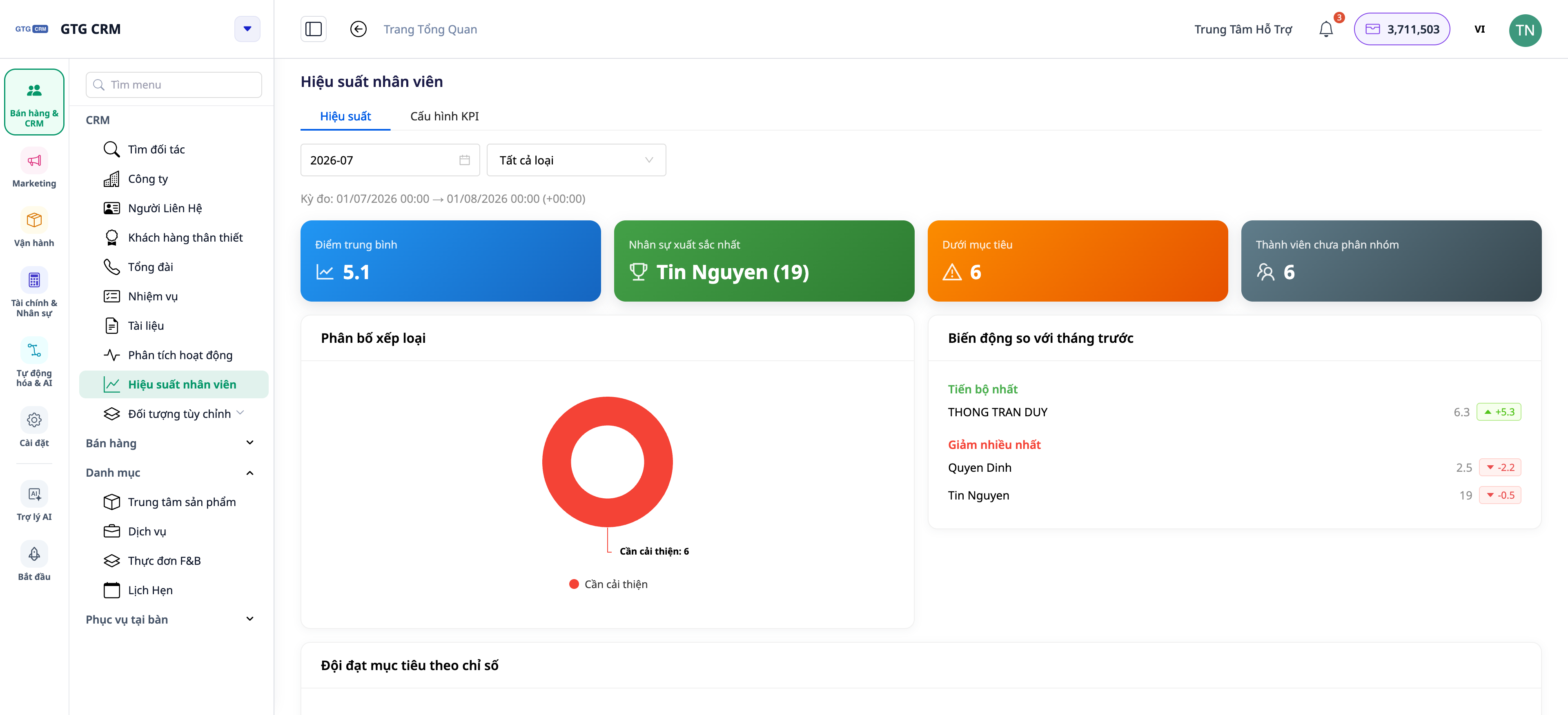
Αυτό τελειώνει από σήμερα. Το GTG CRM διαθέτει την ενότητα Απόδοση Ομάδας & Μελών: KPIs για κάθε άτομο, αναλυτική επισκόπηση ανά μέλος, και 15 δείκτες δραστηριότητας που λαμβάνονται απευθείας από το τι κάνουν στην πραγματικότητα στο CRM — κλήσεις, emails, δημιουργία/κλείσιμο deals, διαχείριση εργασιών. Και τώρα, η οθόνη αναφορών ενημερώνεται αυτόματα σε πραγματικό χρόνο: ο συνάδελφος μόλις έκλεισε ένα deal, ο αριθμός στο dashboard σας ενημερώνεται αυτόματα — χωρίς να χρειάζεται να πατήσετε F5, χωρίς να χάσετε το φίλτρο που βλέπετε.
 Προβλήματα που Αντιμετωπίζουν οι Επιχειρήσεις
Αξιολόγηση ομάδας βάσει αισθήματος — Άδικες επιβραβεύσεις/ποινές, απώλεια καλών υπαλλήλων
Συλλογή δεδομένων σε Excel στο τέλος του μήνα — Επίπονο, παλιά δεδομένα, εύκολο να γίνει λάθος
Μη διάκριση μεταξύ "leads που λήφθηκαν εντός περιόδου" και "leads που διακρατούνται" — Εσφαλμένη αξιολόγηση, δύσκολη σύγκριση για νέους/παλιούς υπαλλήλους
Dashboard που ενημερώνεται μόνο κατά την επαναφόρτωση ολόκληρης της σελίδας — Τα παλιά δεδομένα παραμένουν σταθερά, χρειάζεται συνεχής επαναφόρτωση (απώλεια φίλτρων, απώλεια τρέχουσας θέσης)
Το GTG CRM παίρνει τα δεδομένα απευθείας από τις πραγματικές δραστηριότητες στο CRM, τα συγκεντρώνει σε μια ενότητα απόδοσης — δεν χρειάζεται χειροκίνητη εισαγωγή, δεν χρειάζονται ξεχωριστά spreadsheets, και είναι πάντα ενημερωμένο.
Κύρια Σημεία
1. Επισκόπηση απόδοσης ολόκληρης της ομάδας σε μία οθόνη
Γρήγορη επισκόπηση της ομάδας: κάθε μέλος με τους βασικούς δείκτες και το επίπεδο επίτευξης σε σχέση με τον στόχο (KPI).
Λειτουργία: πίνακας επισκόπησης ομάδας ανά KPI.
Όφελος: βλέπετε με μία ματιά ποιος προηγείται, ποιος χρειάζεται υποστήριξη.
2. Αναλυτική επισκόπηση ανά μέλος: Scorecard, Δραστηριότητες, Εργασίες
Πατήστε σε ένα άτομο για να δείτε τις λεπτομέρειες: κάρτα βαθμολογίας KPI, ροή δραστηριότητας, όγκος εργασίας — και τα "Αδύναμα σημεία" που χρειάζονται προσοχή.
Λειτουργία: αναλυτική επισκόπηση ανά μέλος.
Όφελος: γνωρίζετε ακριβώς γιατί κάποιος είναι δυνατός/αδύναμος σε συγκεκριμένα σημεία για να τον εκπαιδεύσετε σωστά.
3. 15 δείκτες δραστηριότητας από πραγματικές ενέργειες
Οι δείκτες βασίζονται σε πραγματικές ενέργειες στο CRM (κλήσεις, emails, deals, tasks…), επομένως αντικατοπτρίζουν την πραγματική παραγωγικότητα αντί για δηλωμένα νούμερα.
Λειτουργία: 15 δείκτες δραστηριότητας.
Όφελος: αξιολόγηση βασισμένη σε πραγματικά δεδομένα, διαφανής για όλη την ομάδα.
4. Διάκριση "Lead που λήφθηκε εντός περιόδου" vs "Lead που κατέχεται"
Το σύστημα διαχωρίζει σαφώς τον αριθμό των leads που έλαβε ένα άτομο κατά την περίοδο αναφοράς από τον αριθμό των leads που κατέχει την παρούσα στιγμή — δύο διαφορετικές οπτικές, αποφεύγοντας την εσφαλμένη αξιολόγηση.
Λειτουργία: διαχωρισμός leads ανά περίοδο και τρεχόντων leads.
Όφελος: δίκαιη σύγκριση μεταξύ νέων και παλιών υπαλλήλων.
5. ΝΕΟ — Dashboard που ενημερώνεται αυτόματα σε πραγματικό χρόνο
Όχι πια επαναφόρτωση σελίδας για να δείτε νέα νούμερα. Τα dashboards στο CRM ανανεώνονται αυτόματα στο παρασκήνιο σε τακτά χρονικά διαστήματα, ενημερώνονται αμέσως μόλις επιστρέψετε στην καρτέλα, και εμφανίζουν μια μικρή γραμμή κατάστασης "Αυτόματη · ενημέρωση στις ΩΩ:ΛΛ" για να γνωρίζετε μέχρι ποια στιγμή είναι φρέσκα τα δεδομένα. Υπάρχει ακόμα ένα κουμπί Ανανέωση χειροκίνητα αν θέλετε άμεση ενημέρωση.
 Λειτουργία: αυτόματη ανανέωση στο παρασκήνιο + ένδειξη στιγμής ενημέρωσης + κουμπί χειροκίνητης ανανέωσης.
Όφελος: βλέπετε πάντα τα πιο πρόσφατα δεδομένα χωρίς να χάνετε φίλτρα/θέσεις προβολής. ελαφρύ για τον υπολογιστή γιατί ανανεώνεται μόνο όταν η καρτέλα είναι ανοιχτή.
Οφέλη για την Επιχείρηση
Συνολική επισκόπηση ομάδας ανά KPI — Λήψη αποφάσεων προσωπικού βασισμένες σε δεδομένα, όχι στο συναίσθημα
Αναλυτική επισκόπηση μελών — Εκπαίδευση των σωστών ανθρώπων, στα σωστά αδύναμα σημεία
15 δείκτες απόδοσης — Διαφανής, δίκαιη αξιολόγηση & επιβράβευση
Lead βάσει περιόδου vs υπάρχοντα — Σωστή αξιολόγηση τόσο για νέους όσο και για παλιούς συνεργάτες
Αυτο-ενημερούμενο Dashboard — Βλέπετε πάντα τους τελευταίους αριθμούς, χωρίς επαναφόρτωση, χωρίς απώλεια πλαισίου
Σε Ποιους Απευθύνεται;
Ιδιοκτήτες ΜΜΕ που θέλουν να γνωρίζουν πώς αποδίδει η ομάδα τους χωρίς να ρωτούν τον καθένα ξεχωριστά.
Διευθυντές Πωλήσεων / Εξυπηρέτησης Πελατών που χρειάζονται παρακολούθηση της παραγωγικότητας και ορθολογική κατανομή leads.
Διευθυντές Λειτουργίας που χρειάζονται μέτρηση του φόρτου εργασίας και της απόδοσης σε πραγματικό χρόνο.
Πώς να Ξεκινήσετε;
Μεταβείτε στην ενότητα Απόδοση Ομάδας (Team Performance) στο CRM, ορίστε ομάδες/στόχους/κριτήρια αξιολόγησης, και ανοίξτε την καρτέλα απόδοσης για να δείτε — το dashboard θα ενημερώνεται αυτόματα με νέα δεδομένα. Χρειάζεστε λεπτομερείς οδηγίες; Δείτε το άρθρο Οδηγός Ρύθμισης KPI & Απόδοσης Μελών.
Δωρεάν δοκιμή — δεν απαιτείται πιστωτική κάρτα.


