
Εισαγωγή στις Δυνατότητες
Ένα γενικό chatbot μπορεί να έχει ο καθένας, αλλά οι πελάτες σας δεν κάνουν γενικές ερωτήσεις. Ρωτούν "το κατάστημα κάνει παραδόσεις Κυριακή;", "έχουν το μέγεθος M σε μπλε χρώμα;", "ποια είναι η πολιτική επιστροφών του καταστήματος;". Ένα bot που δεν γνωρίζει τίποτα για την επιχείρησή σας θα απαντήσει λάθος, ή χειρότερα — θα επινοήσει απαντήσεις, κάνοντας τους πελάτες να χάσουν την εμπιστοσύνη τους από το πρώτο κιόλας μήνυμα.
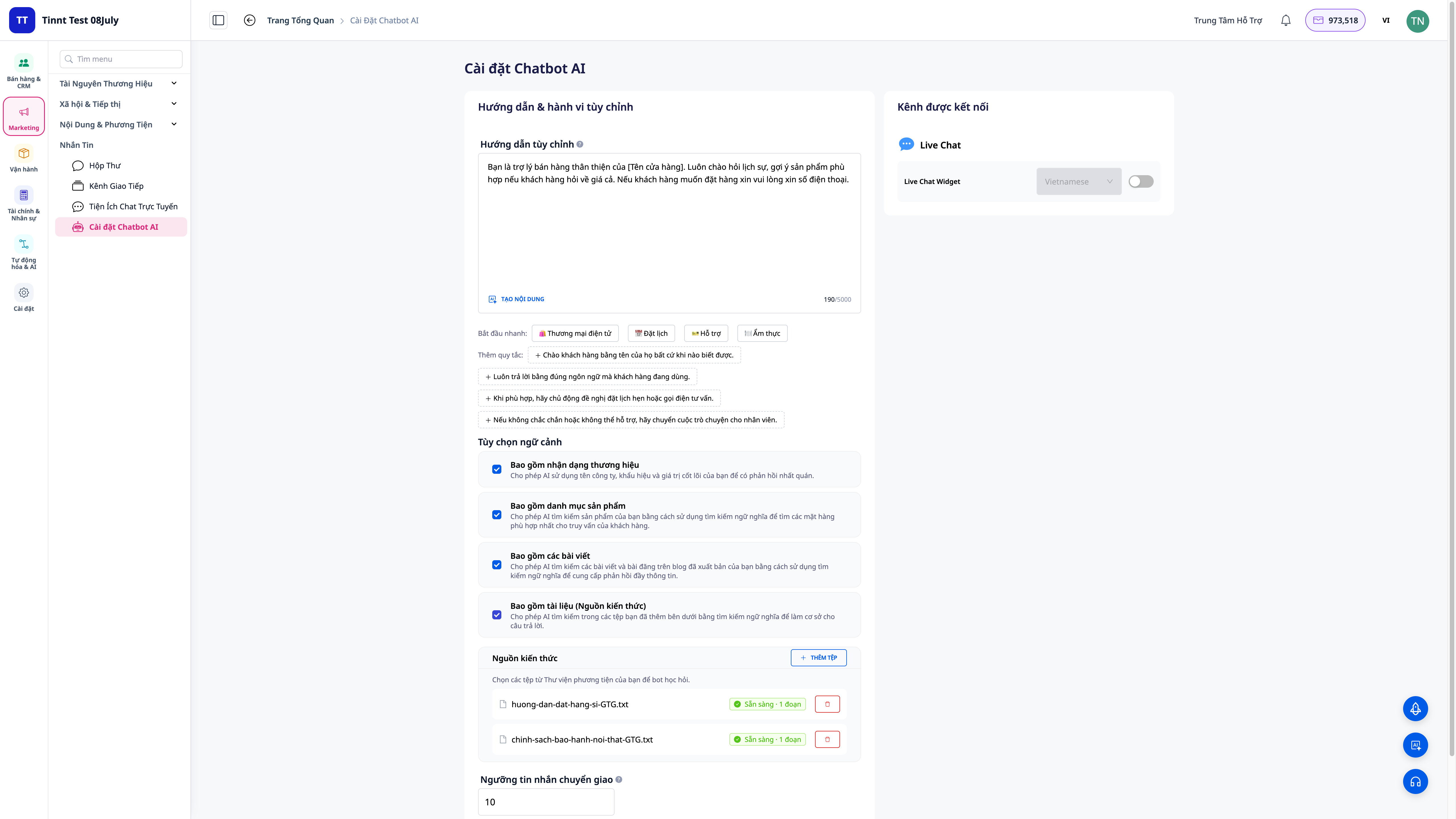
Τώρα, το AI chatbot σας απαντά από τα δικά σας έγγραφα.
Εσείς ανεβάζετε έγγραφα (πολιτικές, τιμοκαταλόγους, FAQ, οδηγίες προϊόντων), το σύστημα τα επεξεργάζεται και επιτρέπει στο bot να αναζητά για να απαντήσει σωστά βασιζόμενο σε αυτό το περιεχόμενο — συνδυάζοντας σημασιολογική αναζήτηση και αναζήτηση λέξεων-κλειδιών για την πιο ακριβή απάντηση. Μπορείτε να ενεργοποιείτε/απενεργοποιείτε ομάδες δυνατοτήτων του bot, και το bot μπορεί να κάνει πραγματική εργασία για τους πελάτες: να αναζητά παραγγελίες, να ελέγχει αποθέματα, να δημιουργεί αιτήματα υποστήριξης, να κάνει κρατήσεις — εντός ασφαλών ορίων, σεβόμενο την ιδιωτικότητα.
Προβλήματα που Αντιμετωπίζουν οι Επιχειρήσεις
| Παλιά μέθοδος | Συνέπεια |
|---|---|
| Γενικό bot που δεν γνωρίζει την επιχείρησή σας | Λάθος απαντήσεις ή επινοήσεις, οι πελάτες χάνουν την εμπιστοσύνη τους |
| Προσωπικό που πρέπει να παραμένει online 24/7 για να απαντά επαναλαμβανόμενες ερωτήσεις | Δαπανηρό σε προσωπικό, αργές απαντήσεις εκτός ωραρίου, οι πελάτες φεύγουν |
| Ασυνέπειες στις απαντήσεις μεταξύ των υπαλλήλων | Παραπλανητικές πληροφορίες, παράπονα |
| Το bot δεν μπορεί να κάνει πραγματική εργασία (έλεγχος παραγγελίας, απόθεμα) | Εξακολουθεί να απαιτείται μεταφορά σε άνθρωπο, καμία άμεση επίλυση |
Με τις Πηγές Γνώσης, το bot απαντά βασιζόμενο στα σωστά έγγραφα που παρέχετε και κάνει πραγματική εργασία — μειώνοντας το φορτίο για το προσωπικό, ενώ διατηρεί την ποιότητα.
Κύρια Χαρακτηριστικά
1. Ανεβάστε έγγραφα — το bot μαθαίνει από το δικό σας περιεχόμενο
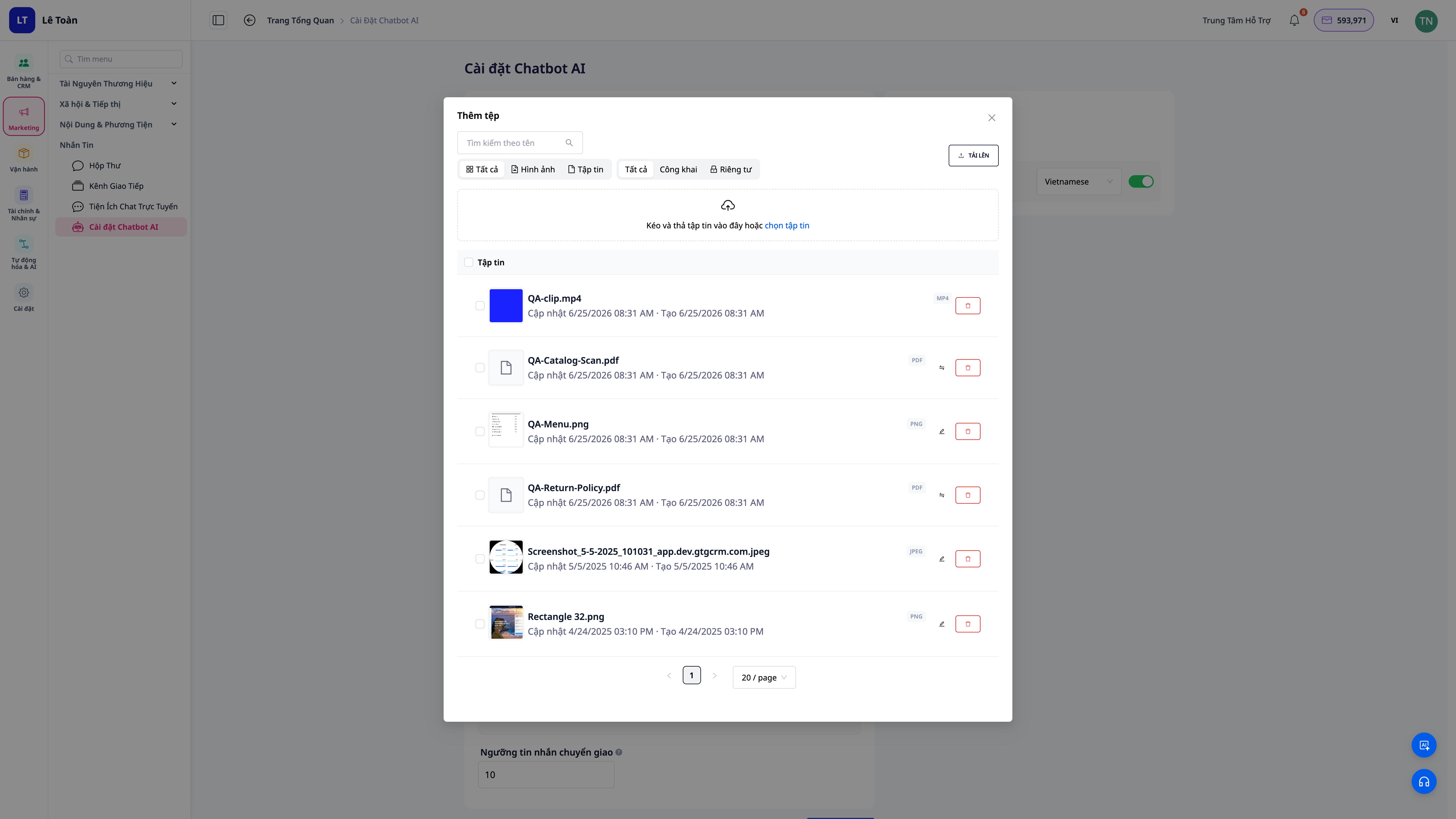
- Πολλά είδη εγγράφων: πολιτικές, τιμοκατάλογοι, FAQ, οδηγίες προϊόντων — ανεβάστε τα και το σύστημα τα επεξεργάζεται αυτόματα.
- Επεξεργασία στο παρασκήνιο: τα έγγραφα φορτώνονται και προετοιμάζονται για αναζήτηση από το bot, δεν χρειάζεται να κάνετε κάτι επιπλέον.
- Εύκολη ενημέρωση: το bot απαντά λάθος ή ελλιπώς; Προσθέστε έγγραφα, και το bot θα ενημερώσει τις απαντήσεις του.
2. Η πιο ακριβής απάντηση — συνδυασμός σημασιολογικής αναζήτησης και λέξεων-κλειδιών
- Σημασιολογική αναζήτηση: κατανοεί το νόημα της ερώτησης ακόμα κι αν ο πελάτης χρησιμοποιεί διαφορετικές λέξεις από το έγγραφο.
- Συνδυασμός λέξεων-κλειδιών: εντοπίζει σωστά ορολογίες, κωδικούς προϊόντων, συγκεκριμένα ονόματα πολιτικών.
- Απαντήσεις βασισμένες σε έγγραφα: το bot αντλεί τις απαντήσεις από το περιεχόμενο που παρείχατε αντί να επινοεί.
3. Ενεργοποίηση/απενεργοποίηση μεμονωμένων δυνατοτήτων του bot
- Έλεγχος του τι μπορεί να κάνει το bot: ενεργοποιήστε/απενεργοποιήστε ομάδες δυνατοτήτων ώστε το bot να κάνει μόνο ό,τι έχετε επιτρέψει.
- Ασφάλεια βάσει δικαιωμάτων: οι αναζητήσεις σέβονται το εύρος δεδομένων του ιδιοκτήτη του λογαριασμού, χωρίς να εκθέτουν πληροφορίες εκτός εύρους.
4. Το bot κάνει πραγματική εργασία για τους πελάτες
| Ο πελάτης ρωτά | Το bot κάνει |
|---|---|
| "Πού βρίσκεται η παραγγελία μου;" | Ελέγχει την παραγγελία και απαντά την πραγματική κατάσταση |
| "Έχουν το μέγεθος M σε μπλε χρώμα;" | Ελέγχει το απόθεμα, απαντά με ακρίβεια |
| "Θέλω να κλείσω τραπέζι το Σάββατο βράδυ" | Κάνει κράτηση για τον πελάτη |
| "Χρειάζομαι βοήθεια με την επιστροφή" | Δημιουργεί ένα αίτημα υποστήριξης, κοινοποιεί την πολιτική |
Οφέλη για την Επιχείρηση
| Χαρακτηριστικό | Πρακτικό όφελος για εσάς |
|---|---|
| Bot απαντήσεων από τα έγγραφά σας | Σωστό επαγγελματικά, δεν επινοεί, πελάτες εμπιστεύονται |
| Συνδυασμός σημασιολογικής αναζήτησης + λέξεων-κλειδιών | Ακριβέστερες απαντήσεις, ακόμη κι αν ο πελάτης ρωτάει διαφορετικά |
| Ενεργοποίηση/απενεργοποίηση λειτουργίας κατά βούληση | Έλεγχος του bot για να κάνει μόνο τα επιτρεπόμενα, ασφάλεια δεδομένων |
| Bot για αναζήτηση παραγγελιών/έλεγχο αποθέματος/δημιουργία εγγράφων/κρατήσεις | Άμεση εξυπηρέτηση πελατών, μείωση φόρτου προσωπικού |
| Αυτόματη λειτουργία 24/7 | Άμεσες απαντήσεις εκτός ωραρίου, δεν χάνετε πελάτες λόγω αναμονής |
Σε Ποιους Απευθύνεται;
- Καταστήματα ηλεκτρονικού εμπορίου που λαμβάνουν πολλές επαναλαμβανόμενες ερωτήσεις σχετικά με προϊόντα, αποθέματα, παραγγελίες, επιστροφές.
- Εστιατόρια, υπηρεσίες κρατήσεων που θέλουν το bot να δέχεται κρατήσεις τραπεζιών/ραντεβού αυτόματα.
- Επιχειρήσεις με σαφή έγγραφα και πολιτικές που θέλουν το bot να απαντά σωστά αντί για γενικότητες.
Πώς να Ξεκινήσετε;
Μεταβείτε στη ρύθμιση του AI Chatbot, ανοίξτε τις Πηγές Γνώσης (Knowledge Sources), ανεβάστε τα έγγραφά σας, ενεργοποιήστε τις λειτουργίες που θέλετε να χειριστεί το bot. Δείτε τις οδηγίες βήμα προς βήμα στο άρθρο "Οδηγός Εγκατάστασης Πηγών Γνώσης για το AI Chatbot στο GTG CRM".
Δωρεάν δοκιμή — δεν απαιτείται πιστωτική κάρτα.


