
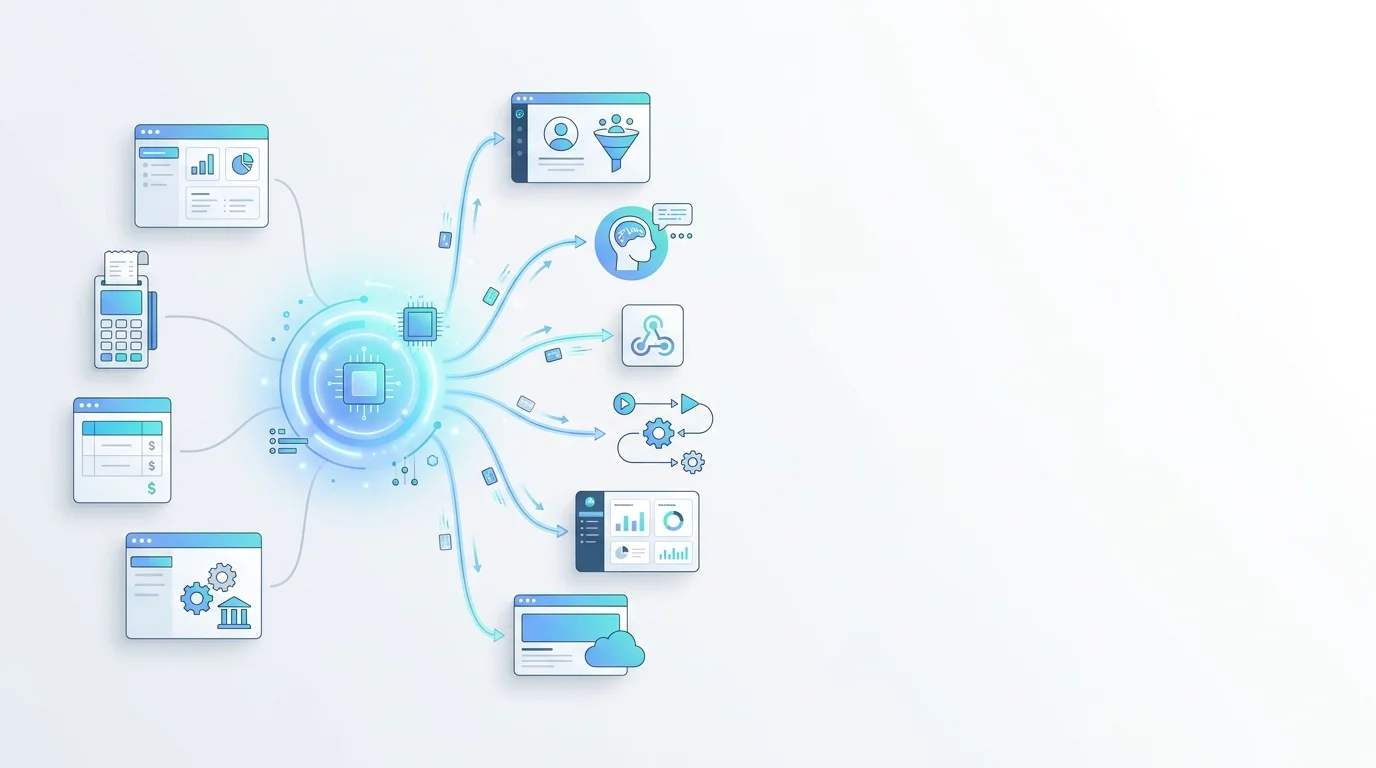
Kaasaegses ärikeskkonnas kasutavad ettevõtted sageli mitmeid erinevaid tarkvarasüsteeme, mis teenivad eraldi eesmärke. Need võivad olla müügihaldustarkvara, raamatupidamissüsteem, turundustööriist või spetsiaalselt arendatud sisesed rakendused. Igaüks neist süsteemidest sisaldab väärtuslikke andmeid ja mängib ettevõtte toimimises olulist rolli.
Suurim väljakutse ei ole andmete puudus, vaid asjaolu, et need andmed paiknevad hajusalt mitmel eri platvormil. Töötajad peavad süsteemide vahel edasi-tagasi liikuma, sisestama sama teabe korduvalt käsitsi ning neil puudub terviklik ülevaade kliendist. See ei raiska mitte ainult aega, vaid suurendab ka vigade riski ja ärivõimaluste kaotamise tõenäosust.
GTG CRM-i Integration Hub & API on loodud selle probleemi põhjalikuks lahendamiseks. Selle asemel, et nõuda ettevõttelt kõigi olemasolevate süsteemide väljavahetamist, loob see lahendus silla, mis ühendab süsteemid omavahel. Andmed saavad vabalt liikuda platvormide vahel, protsessid automatiseeritakse ning mis kõige olulisem — AI Agent saab sekkuda töötlemisse, et tõsta tegevuse tõhusust.
See dokument juhendab samm-sammult, kuidas ettevõte saab eduka integratsiooni ellu viia: alates rakenduse loomisest ja ligipääsuõiguste seadistamisest kuni API kasutamiseni andmete lugemiseks ja kirjutamiseks, webhookide seadistamiseni automaatsete sündmuste vastuvõtmiseks ning lõpuks AI Agentiga ühendamiseni, et luua täiesti automaatseid nutikaid töövooge.
Põhiliste funktsioonide ülevaade
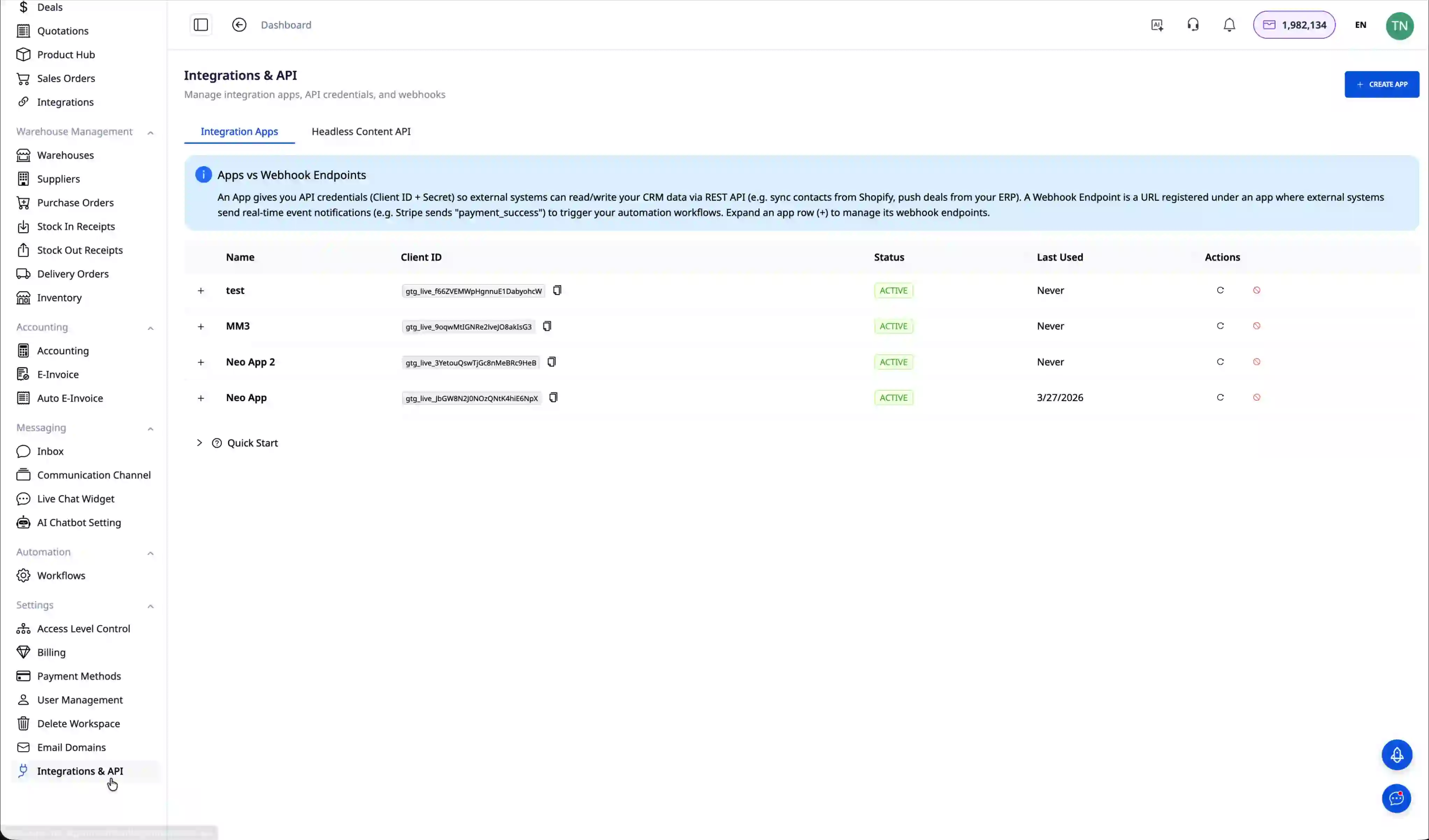
Integration Hub & API pakub terviklikku tööriistakomplekti, mis võimaldab ettevõttel ühendada GTG CRM-i ükskõik millise rakendusega standardse RESTful API protokolli kaudu. Süsteem haldab API tokenit koos detailse scope-põhise õiguste mehhanismiga, mis tagab kõrge turvalisuse ja võimaldab täpselt kontrollida iga integreeritud rakenduse ligipääsuõigusi.
AI Agent Integration on oluline eristav omadus, mis võimaldab ettevõttel kasutada tehisintellekti andmete automaatseks töötlemiseks ja keerukate ülesannete täitmiseks ilma programmeerimiseta. Ettevõte saab hallata mitut erineva rolliga AI Agentit, kusjuures iga Agent on koolitatud kindla kasutusotstarbe jaoks.
Kahepoolne andmete sünkroonimine GTG CRM-i ja väliste süsteemide vahel aitab ettevõttel säilitada ühtset ülevaadet kliendiandmetest. Täielik API dokumentatsioon koos curl-käskude näidetega muudab arendajate jaoks integreerimise ja veaotsingu lihtsaks. Ettevõte saab pärida kontaktide, ülesannete ja tehingute loendeid ning uuendada teavet reaalajas.
Webhooki lõpp-punkt võimaldab vastu võtta andmeid välissüsteemidest automaatselt, ilma pideva pollinguta. Kui Webhook ühendada Automationi ja AI Agentiga, saab ettevõte üles ehitada täiesti automaatsed sündmuste töötlemise protsessid. Ökosüsteemi integreeritud Website Builder võimaldab luua veebilehe otse GTG CRM-ist koos täielike SEO-funktsioonide ja automaatse Sitemapiga.
Juhised kasutamiseks samm-sammult
Samm 1: Integratsioonirakenduse loomine
Esimene samm integratsiooni alustamiseks on uue rakenduse loomine GTG CRM-is. Minge menüüsse "Tích hợp & API" ja vajutage nuppu "Tạo ứng dụng mới". Andke rakendusele tähendusrikas nimi, et seda oleks hiljem lihtne hallata, näiteks "Tích hợp hệ thống bán hàng" või "Ứng dụng mobile". Pärast nime sisestamist vajutage lõpetamiseks "Tạo".
Samm 2: Ligipääsuõiguste seadistamine
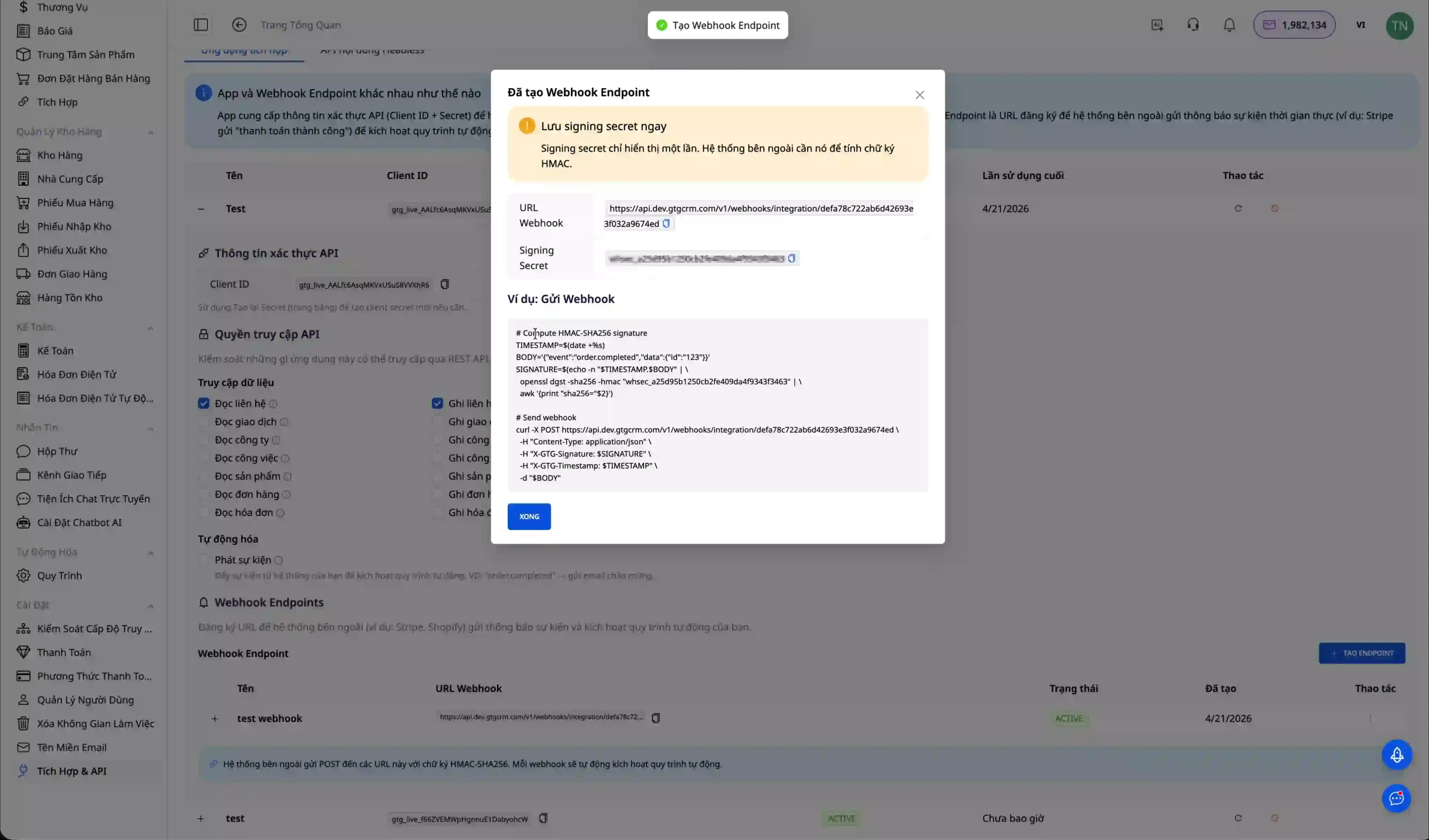
Scope-põhine õiguste süsteem võimaldab täpselt kontrollida, mida rakendus saab CRM-i andmetega teha. Pärast rakenduse loomist valige äsja loodud rakendus ja avage vahekaart "Quyền truy cập" või "Scopes". Siin näete loendit õigustest, mida saab anda.
Kui rakendus peab lugema ainult kontaktteavet, vali scope "contacts.read". Kui on vaja kontakte luua ja värskendada, lisa scope "contacts.write". Et rakendus saaks lugeda süsteemis olevate AI Agentide teavet, anna õigus "agents.read". Kui soovid, et rakendus saaks AI Agentilt tegevusi küsida, tuleb anda õigus "agents.execute". Pärast vajalike õiguste valimist klõpsa salvestamiseks, et konfiguratsioon värskendada.
2. samm: API Tokeni loomine
Token on autentimisvõti, mille abil väline rakendus saab GTG CRM-i API-t turvaliselt kasutada. Rakenduse detailvaates leia jaotis "API Token" ning klõpsa "Tạo Token" või "Generate Token". Token kuvatakse vaid üks kord vormingus, mis algab "gtg_", seega kopeeri see kohe ja salvesta turvalisse kohta. Seda tokenit tuleb kasutada kõigi API päringute Authorization päises.
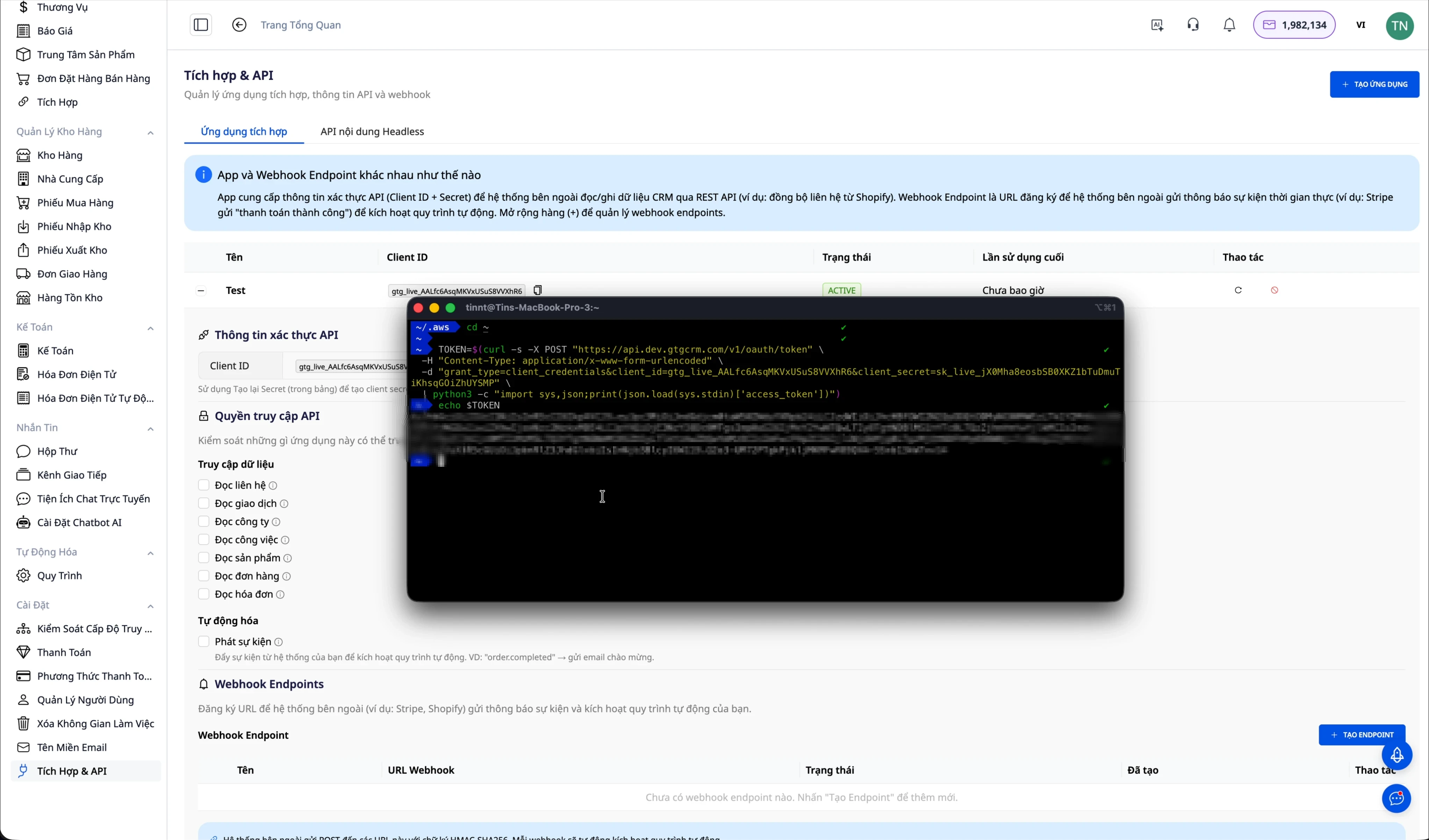
Oluline märkus: kui lisad rakendusele pärast tokeni loomist uusi õigusi, siis vana token ei saa neid uusi õigusi automaatselt. Pead looma uue tokeni, et kõik seadistatud juurdepääsuõigused oleksid olemas.
4. samm: API ühenduse testimine
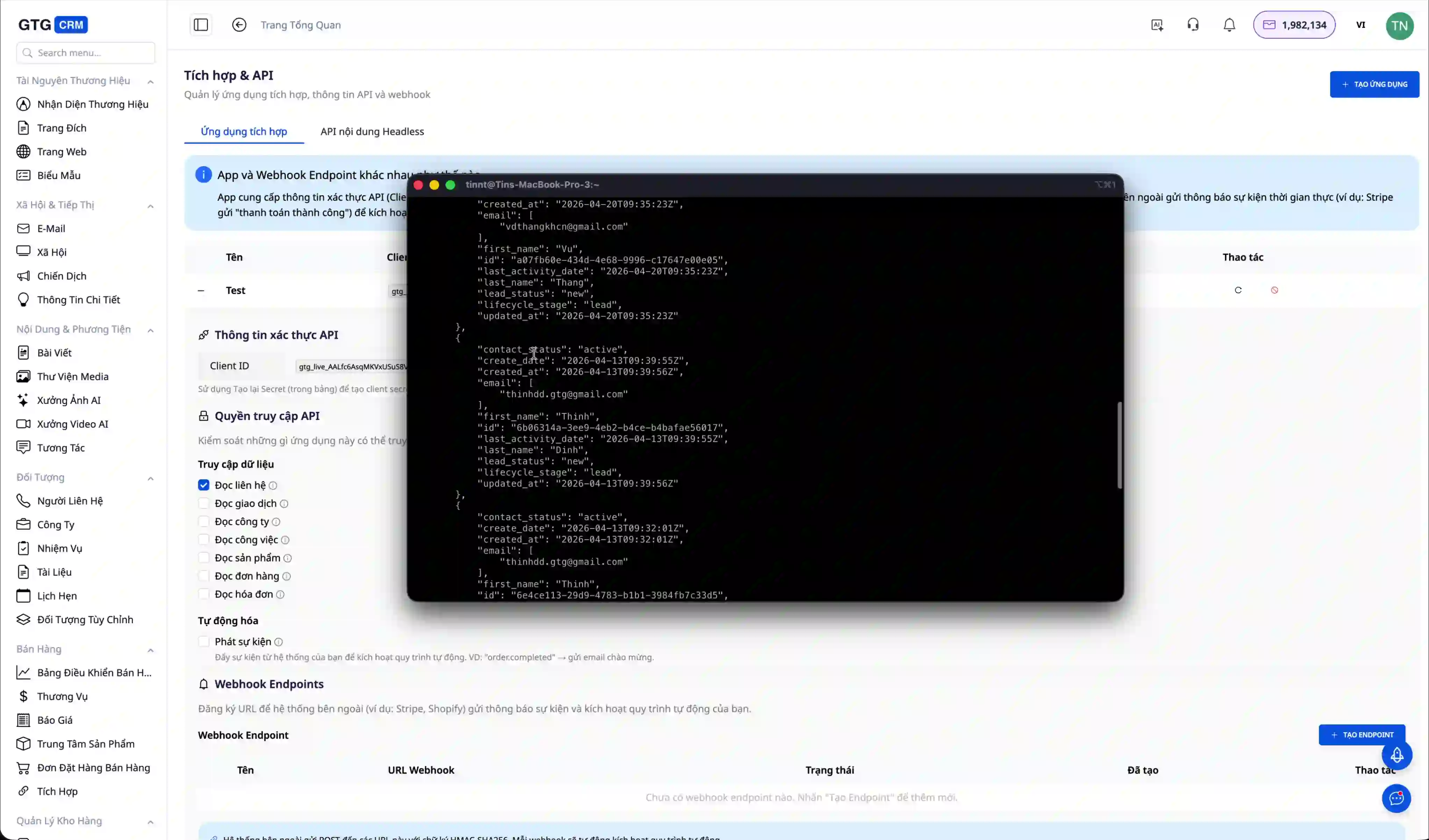
Pärast tokeni saamist on järgmine samm kontrollida, kas integratsioon töötab õigesti. Kõige lihtsam viis on kasutada terminalist curl käsku. Allolev näide illustreerib, kuidas GTG CRM-ist kontaktide loendit pärida.
curl -X GET https://api.gtgcrm.com/v1/integration/contacts \
  -H "Authorization: Bearer YOUR_API_TOKEN"
Kui ühendus õnnestub ja tokenil on piisavad õigused, saad vastuseks JSON-vormingus andmed, mis sisaldavad kontaktide loendit koos kogu vajaliku teabega, nagu ID, nimi, e-post, telefoninumber ja muud andmeväljad.
{
  "data": [
    {
      "id": "contact_123",
      "name": "Nguyễn Văn A",
      "email": "nguyenvana@example.com",
      "phone": "0901234567"
    }
  ]
}
5. samm: Integreerimine sinu süsteemiga
Pärast edukat testimist saad API-d oma tegelikku rakendusse integreerida. Allpool on näide Node.js-iga, mis on üks populaarsemaid keeli backend-arenduses. See koodinäide illustreerib, kuidas GTG CRM-is kontaktide loendit pärida ja uut kontakti luua.
const axios = require('axios');

const API_URL = 'https://api.gtgcrm.com/v1/integration';
const API_TOKEN = 'your_api_token_here';

async function getContacts() {
  const response = await axios.get(`${API_URL}/contacts`, {
    headers: {
      'Authorization': `Bearer ${API_TOKEN}`
    }
  });
  return response.data;
}

async function createContact(contactData) {
  const response = await axios.post(`${API_URL}/contacts`, contactData, {
    headers: {
      'Authorization': `Bearer ${API_TOKEN}`,
      'Content-Type': 'application/json'
    }
  });
  return response.data;
}
Sarnaselt võid kasutada ka mis tahes muud programmeerimiskeelt, näiteks Pythonit, PHP-d, Java-t või C#-i, et integreerida. Üldpõhimõte on alati saata token Authorization päises vormingus "Bearer YOUR_TOKEN" ja kasutada POST- või PUT-päringute puhul Content-Type väärtust "application/json".
6. samm: AI Agenti kasutamine tegelikus tööprotsessis
Et näha Integration Hubi tegelikku väärtust, vaatame üht realistlikku äristsenaariumi. Kui uus klient lõpetab registreerumise ettevõtte e-poes, võib kogu protsess olla automatiseeritud, selle asemel et töötaja peaks käsitsi looma CRM-is profiili ja saatma tervituse-kirja.
Tööprotsess on järgmine. Kõigepealt täidab klient veebipoe veebisaidil registreerumisvormi. Veebisaidi backend kutsub seejärel kohe GTG CRM API-d, et luua uus kontakt koos kogu kliendiinfoga, nagu nimi, e-post, telefoninumber ja kliendiallika teave.
curl -X POST https://api.gtgcrm.com/v1/integration/contacts \
  -H "Authorization: Bearer YOUR_TOKEN" \
  -H "Content-Type: application/json" \
  -d '{
    "name": "Trần Thị B",
    "email": "tranthib@example.com",
    "phone": "0987654321",
    "source": "Website"
  }'
Kohe pärast kontakti loomist GTG CRM-is tuvastab AI Agent automaatselt, et see on uus klient veebisaidilt. Agent analüüsib kliendiandmeid, et saata isikupärastatud tervituskiri, mitte üldine mall. Samal ajal loob Agent müügimeeskonnale järeltegevuse ülesande, mille kohaselt tuleb kliendile 24 tunni jooksul helistada, et teda nõustada.
Selle automaatse protsessi eelised on väga selged. Klient saab tervituskirja kohe pärast registreerumist, mis jätab professionaalse mulje ja suurendab usaldust. Käsitsi tegevusi pole vaja, mis säästab aega ja vähendab vigu. E-kiri on kliendiinfo põhjal isikupärastatud, mitte üldine sisu. Müügimeeskonda teavitatakse ja neil on konkreetne ülesanne järelkontakti võtmiseks, et ükski võimalus ei läheks kaotsi. Kõik need tegurid aitavad ühiselt suurendada konversioonimäära leadist tegeliku kliendini.
7. samm: Webhooki seadistamine automaatsete andmete vastuvõtmiseks
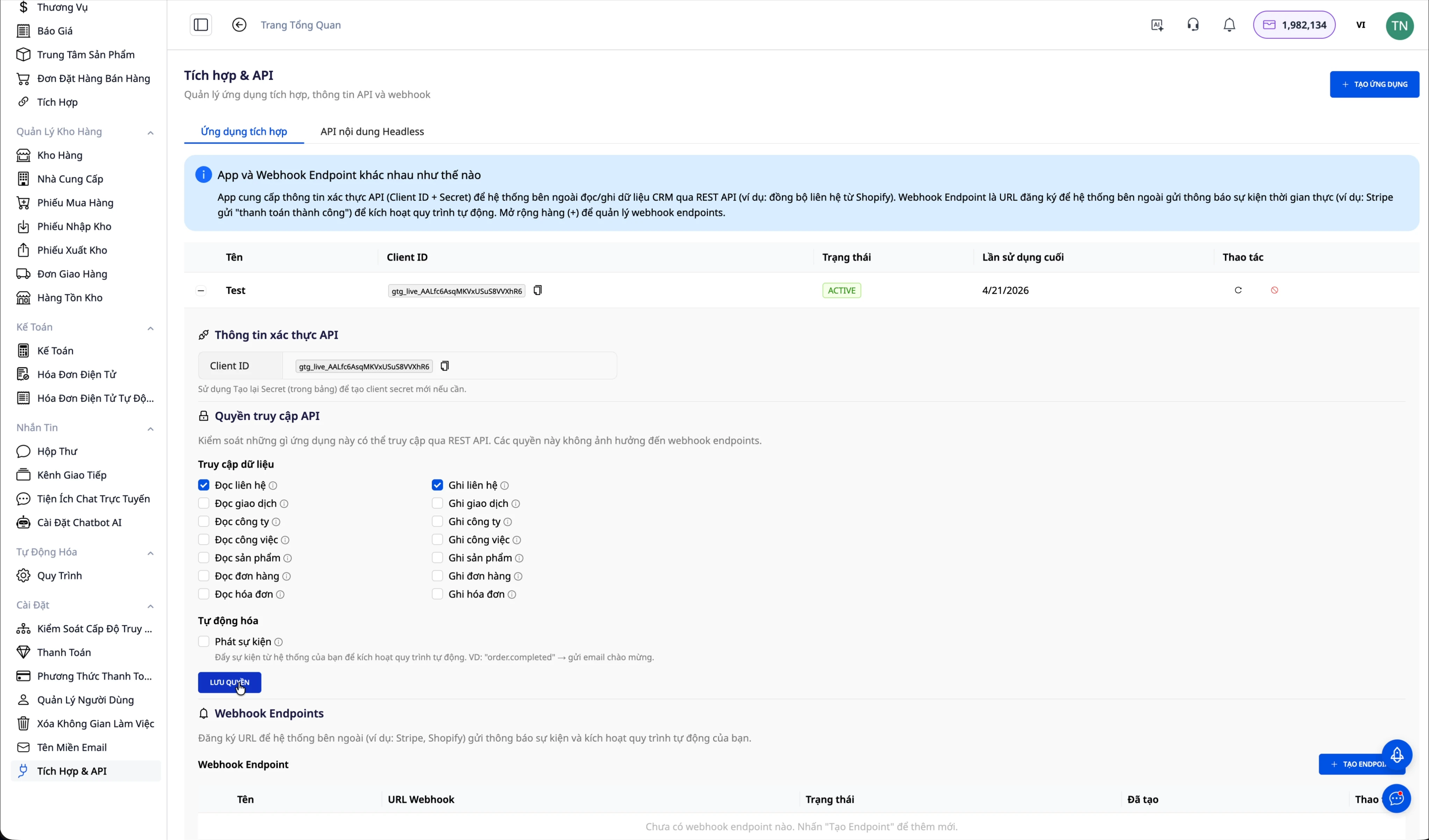
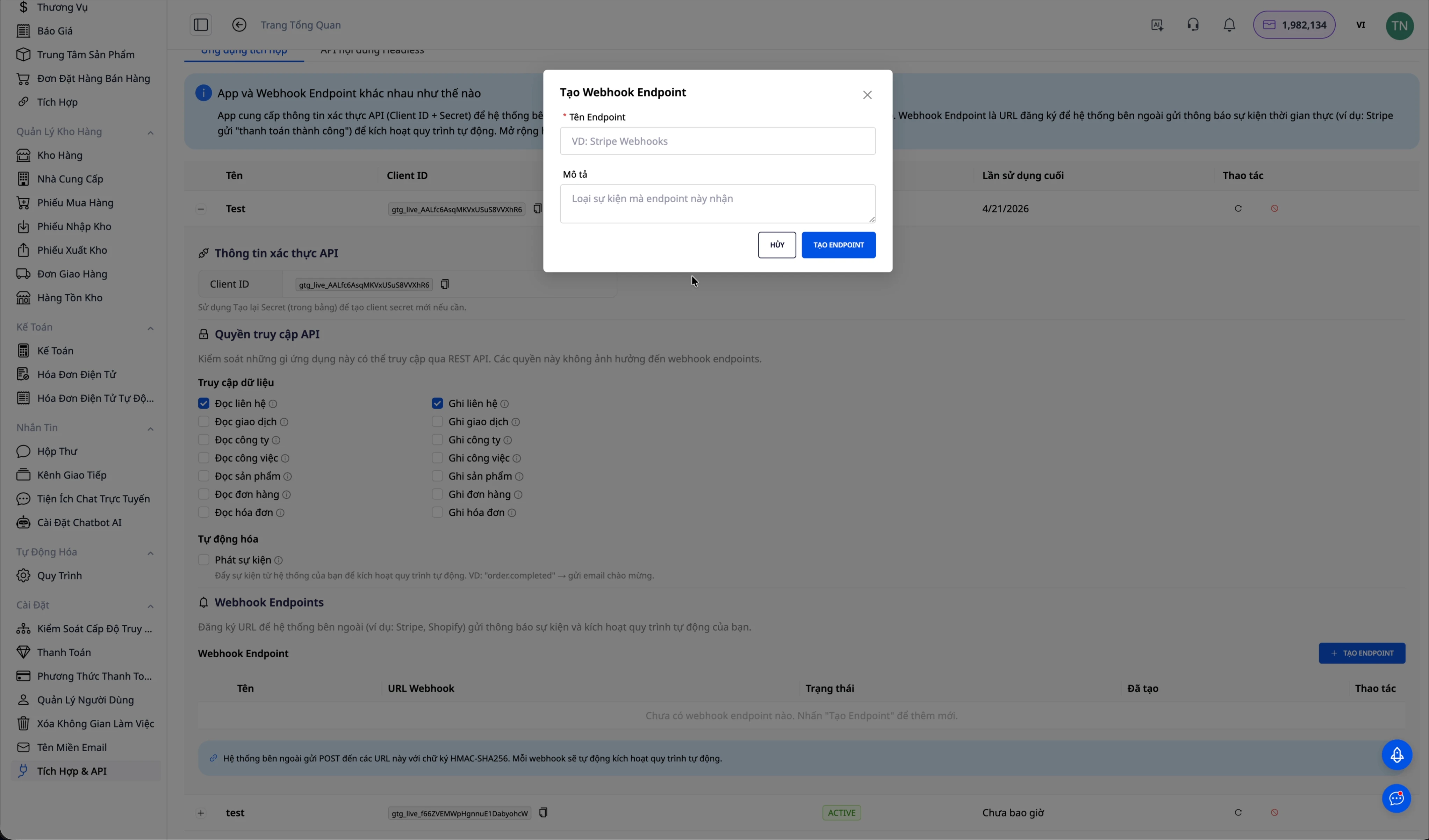
Webhook on tehnoloogia, mis võimaldab välistel süsteemidel sündmuse toimumisel aktiivselt andmeid GTG CRM-i saata, selle asemel et neid pidevalt pollinguga kontrollida. Alustamiseks minge lehele "Tích hợp & API" ja valige vahekaart "Webhook", seejärel klõpsake "Tạo Webhook mới" ning andke webhookile tähenduslik nimi.
Pärast loomist annab süsteem teile kaks olulist teavet. Webhook URL on endpoint, kuhu väline süsteem saadab andmed HTTP POST-i kaudu. Signing Secret on salakood, mida kasutatakse kinnitamaks, et päring pärineb tõesti volitatud süsteemist, mitte võltsallikast.
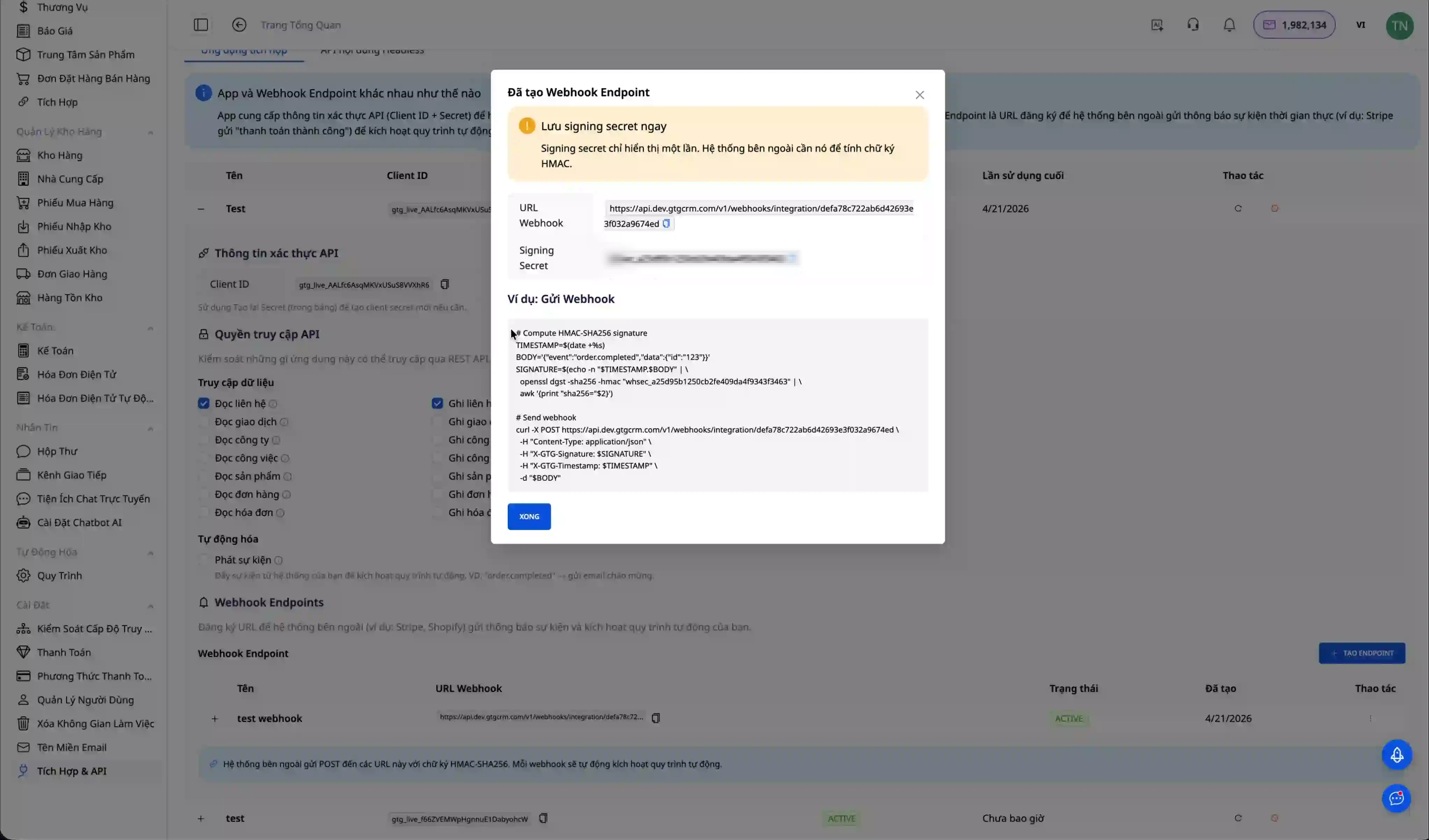
Väga oluline märkus on see, et Signing Secret kuvatakse webhooki loomisel ainult ühe korra. Kopeerige ja salvestage see kohe ettevõtte turvalisse saladuste haldussüsteemi. Kui te selle saladuse kaotate, peate looma uue webhooki.
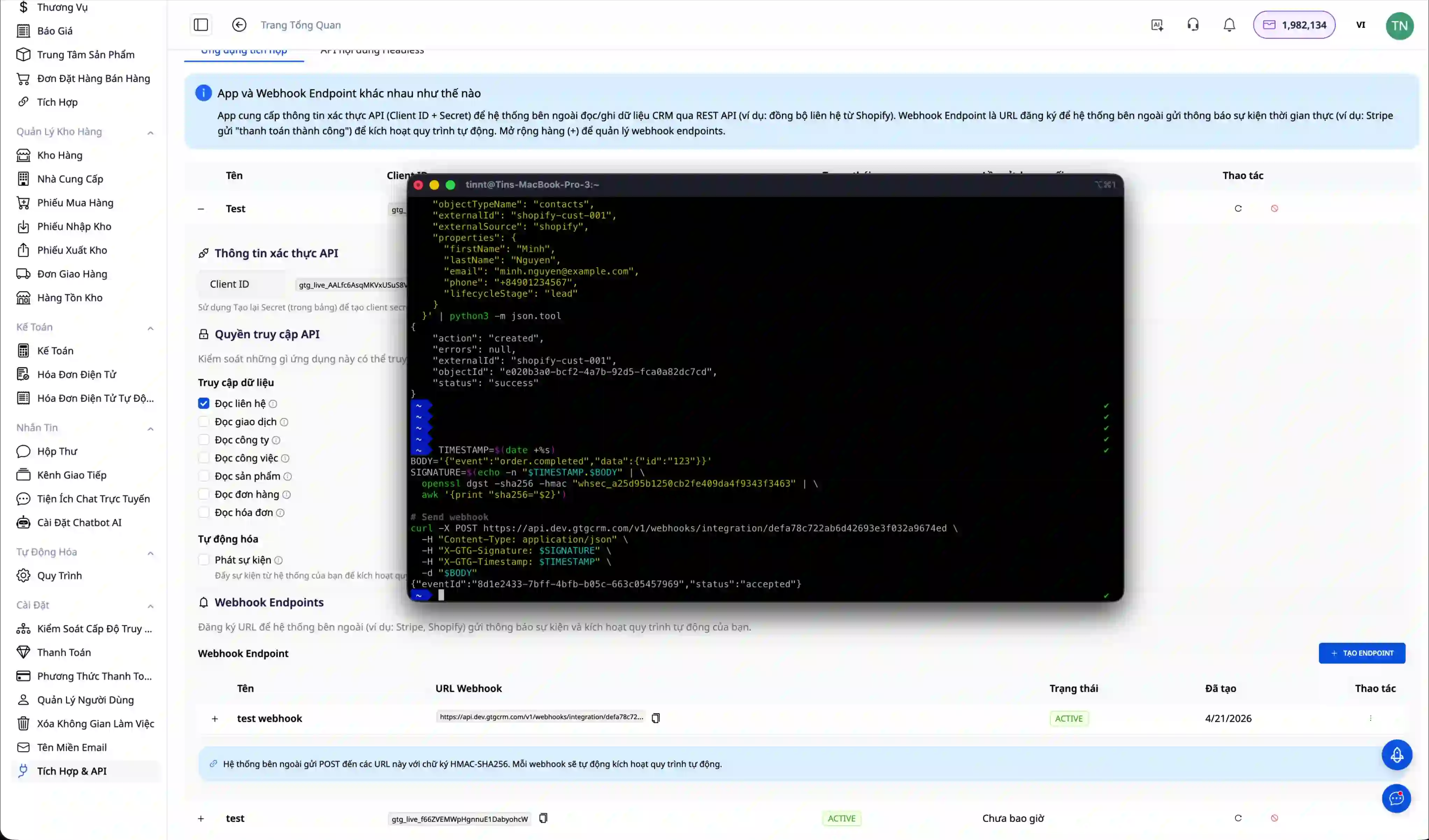
Webhooki korrektse toimimise kontrollimiseks saatke curl-käsuga test-sündmus. Päring peab sisaldama Content-Type päist väärtusega application/json ja X-Webhook-Signature päist, mis sisaldab signatuuri salakoodi autentimiseks.
curl -X POST "YOUR_WEBHOOK_URL" \
  -H "Content-Type: application/json" \
  -H "X-Webhook-Signature: YOUR_SIGNING_SECRET" \
  -d '{
    "event": "order.completed",
    "eventId": "evt_123456",
    "data": {
      "orderId": "ORD-001",
      "customerName": "Nguyễn Văn A",
      "amount": 500000
    }
  }'
Kui webhook töötab õigesti, näete seda sündmust saabunud sündmuste loendis.
8. samm: Webhooki ühendamine automatiseerimise ja AI Agentiga
Integratsioonikeskuse tegelik jõud avaldub täielikult alles siis, kui ühendada Webhook automatiseerimisprotsessi ja AI Agentiga. See võimaldab ettevõttel luua nutikaid töövooge, mis reageerivad automaatselt väliste süsteemide sündmustele ilma käsitsi sekkumiseta.
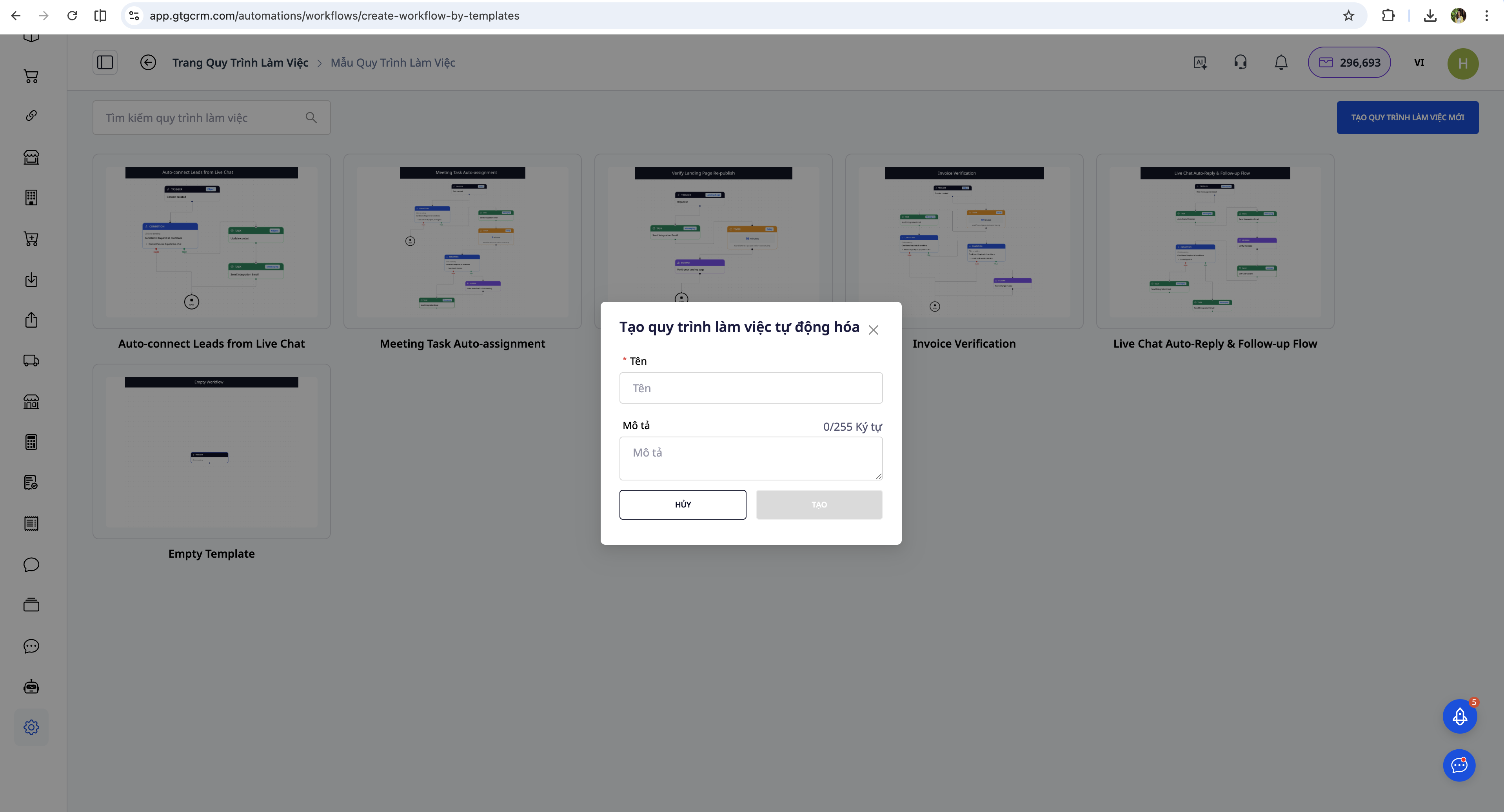
Protsessi seadistamiseks avage GTG CRM-is menüü "Tự động hóa" ja klõpsake "Tạo quy trình mới".
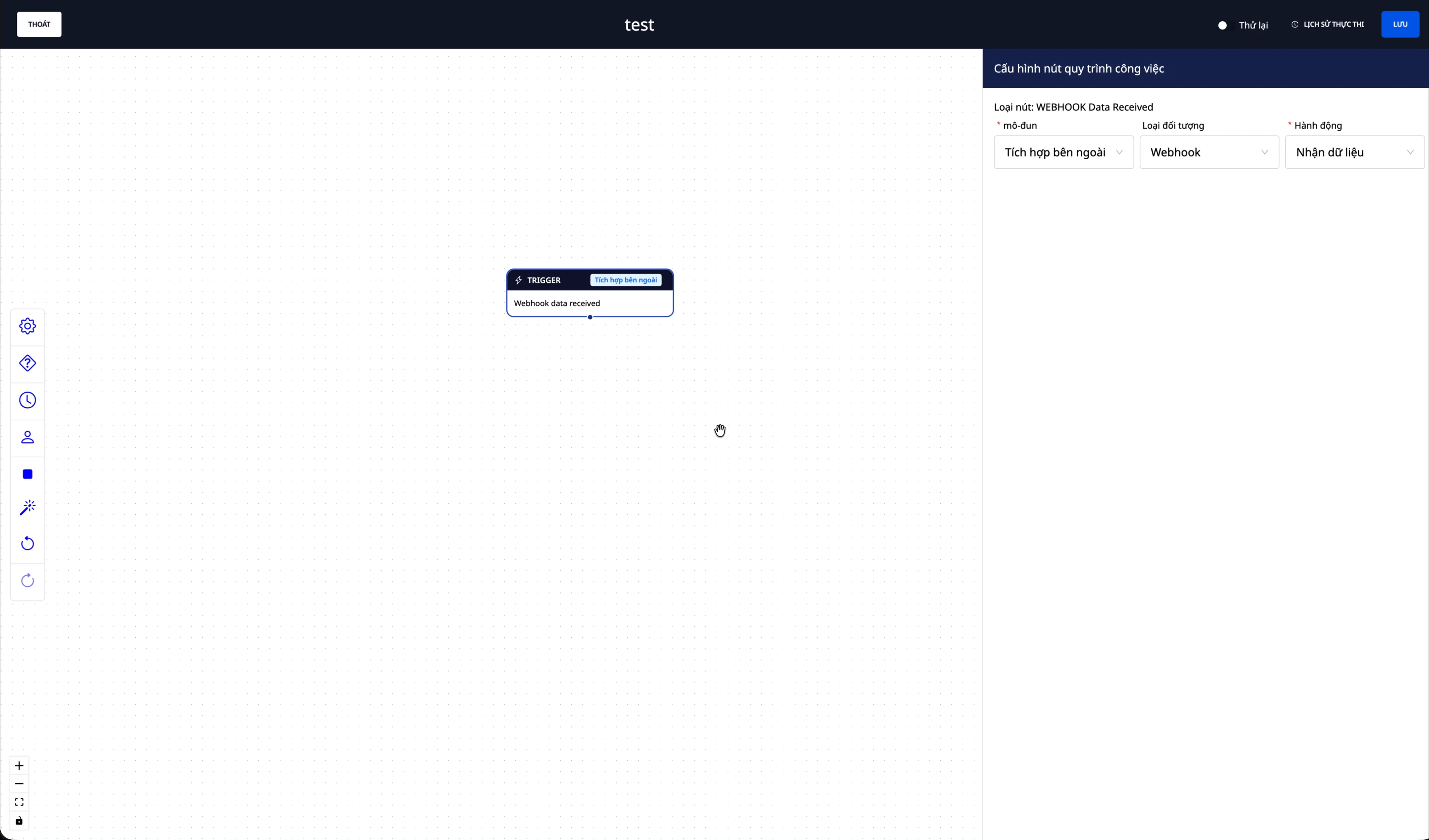
Kõige olulisem osa on triggeri seadistamine, et protsess teaks, millal käivituda. Valige moodul "Väline integratsioon", objekt "Webhook" ja tegevus "Võta andmed vastu". See tähendab, et iga kord, kui webhook saab sündmuse välisest süsteemist, käivitub see protsess automaatselt.
Pärast triggeri seadistamist lisage protsessi AI Agenti tegevus. Klõpsake tegevuse lisamist, valige moodul "AI" ja seejärel valige "AI Agenti tegevus". Siin kirjutate juhised sellele, kuidas AI Agent peaks webhookist saadud andmeid töötlema.
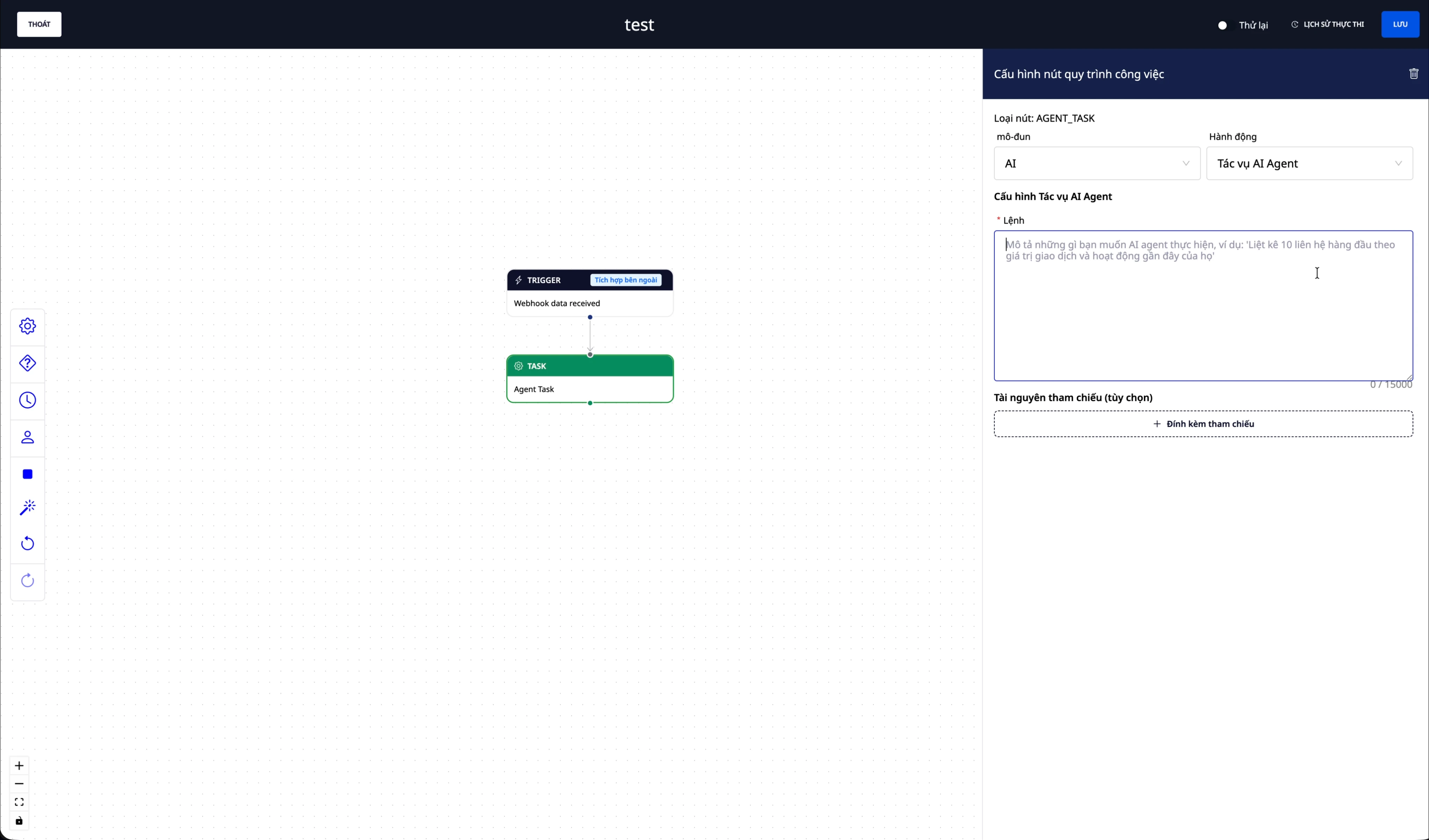
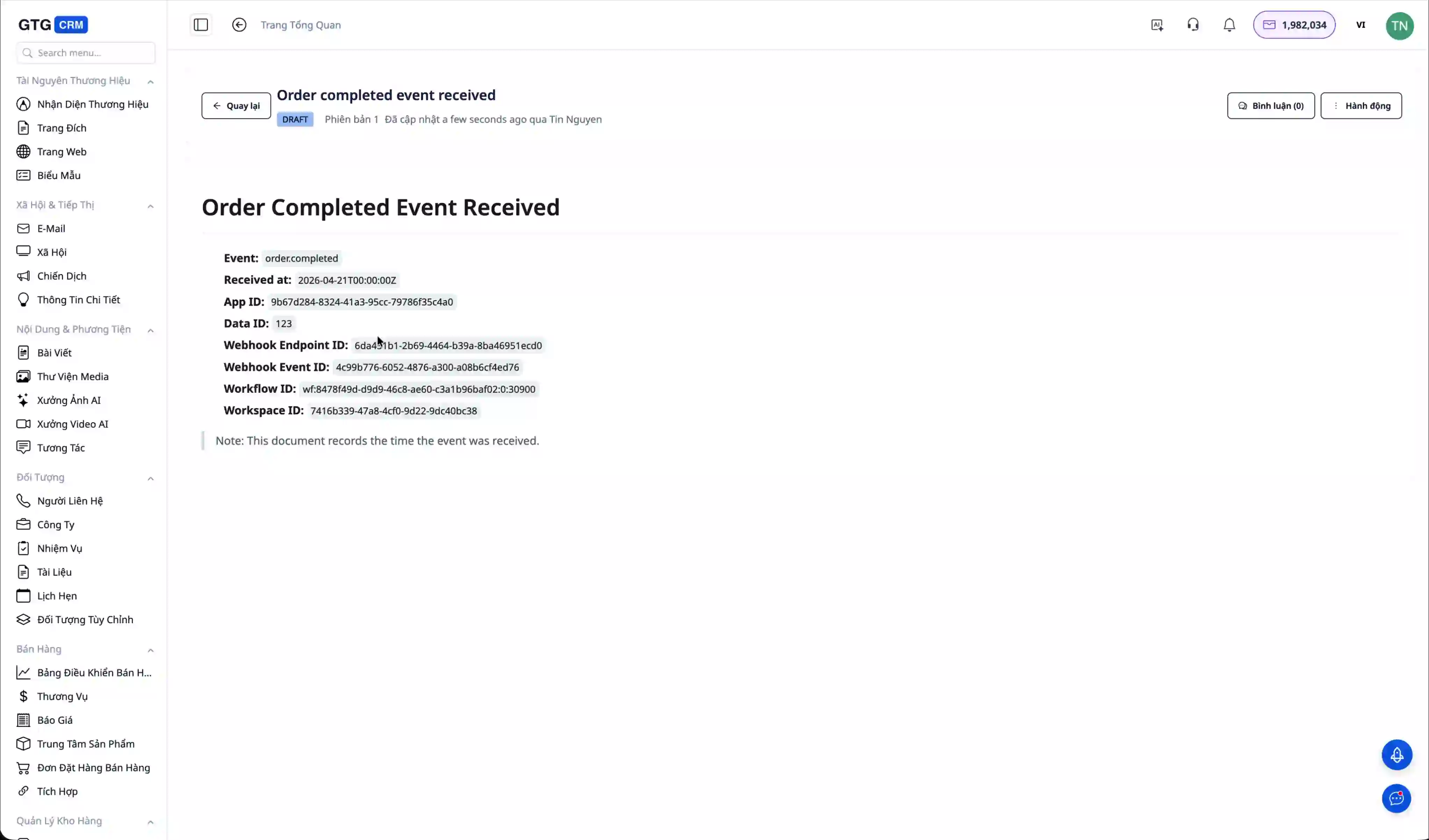
AI Agentile prompti kirjutamise osa on koht, kus ettevõte väljendab oma äriloogikat. Näiteks võite kirjutada: "Kui sündmus on order.completed, loo dokument, mis märgib sündmuse vastuvõtmise aja ja tellimuse info. Seejärel saada kliendile tänumeil ja teavita müügitiimi."
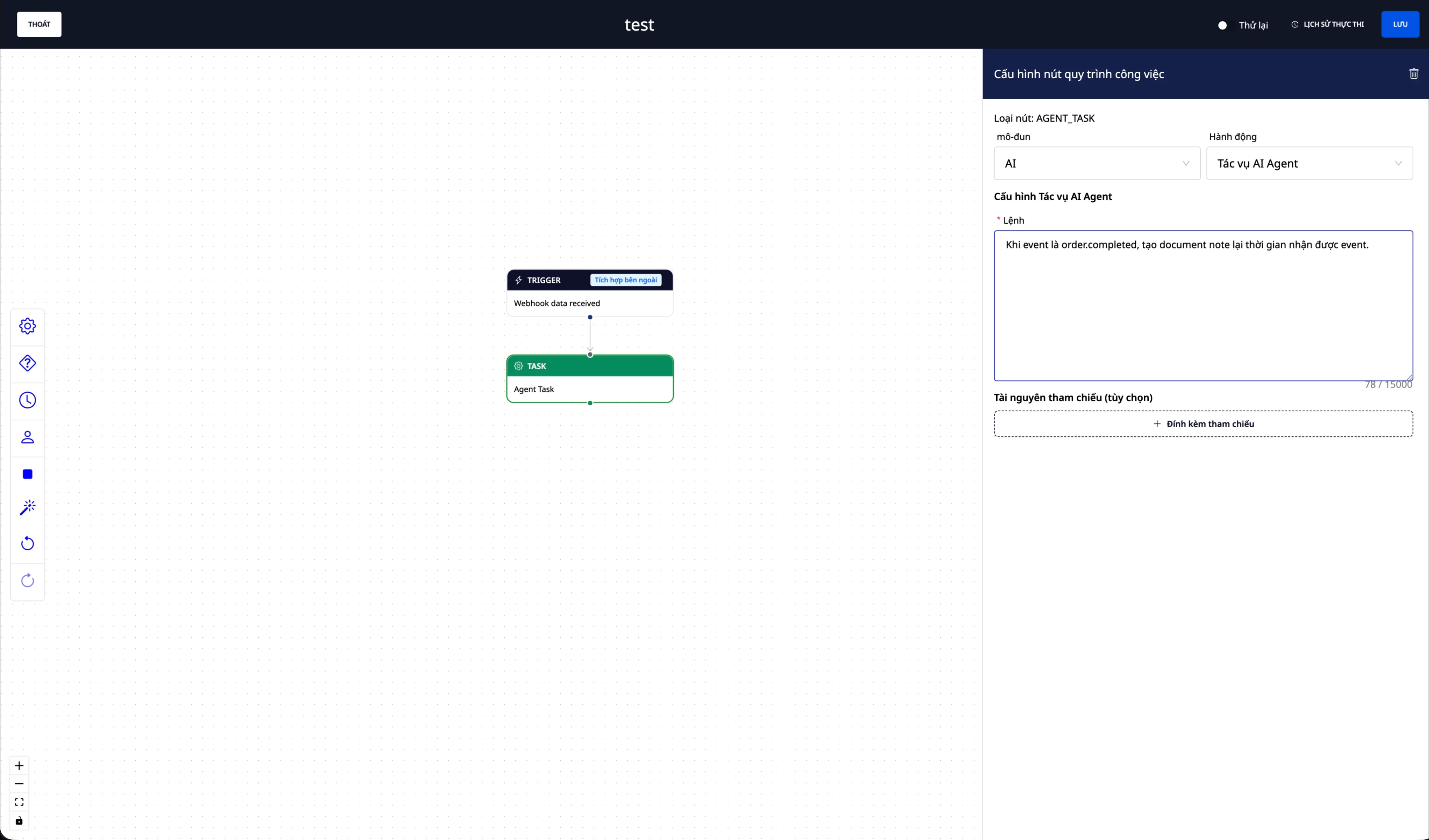
Pärast seadistuse lõpetamist muutke protsessi olekuks "Aktiivne". Edaspidi, iga kord kui väline süsteem saadab sündmuse webhooki, täidab AI Agent automaatselt juhiste järgi vajalikud tegevused.
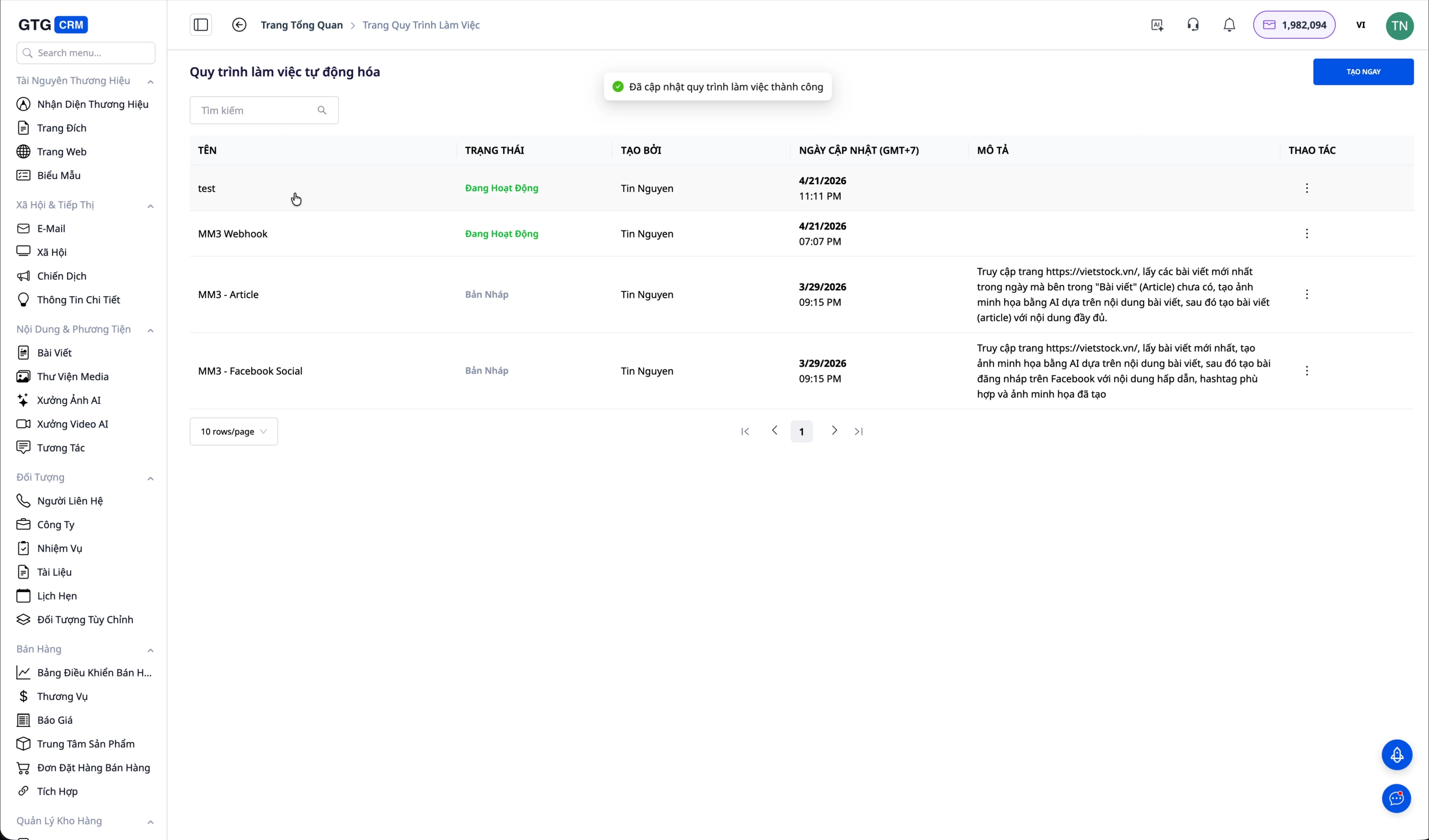
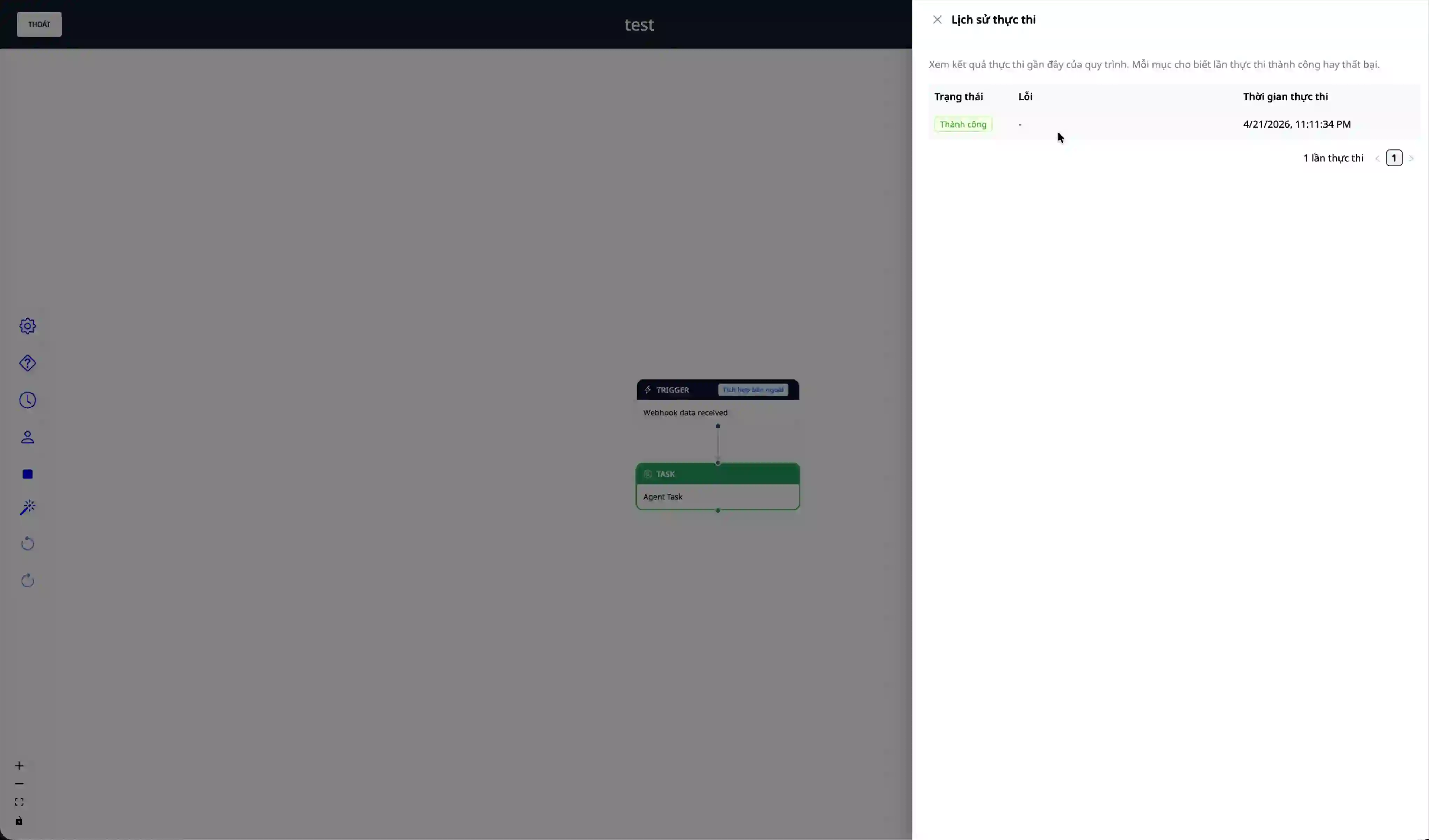
Kui sündmus saadetakse, saate töötlemisprotsessi jälgida protsessi täitmise ajaloos. AI Agent salvestab töötlemistulemused, et ettevõte saaks neid kontrollida ja auditeerida.
Soovi järgi loodud dokument:
Praktiline juhtum: MM3.vn automatiseerib turundussisu
MM3 on ettevõte, mis haldab veebisaiti mm3.vn ning on kasutanud Integration Hubi koos AI Agentiga, et täielikult automatiseerida sisu loomise protsess – alates turuandmete vastuvõtmisest, AI-piltide loomisest ja analüüsartiklite kirjutamisest kuni veebisaidile avaldamise, sotsiaalmeediasse postitamise ja automaatse SEO-ni. Tulemus: 2–3 sisulooja asemel 0, artiklite arv on piiramatu.
📖 Loe MM3.vn detailset juhtumiuuringut →
Integration Hubi kasutamise peamised eelised
Ajasääst on kõige otsesem ja kergemini märgatav eelis. Andmete sünkroonimise automatiseerimine süsteemide vahel kõrvaldab täielikult käsitsi andmesisestuse, mis on nii ajakulukas kui ka veaohtlik töö. Töötajad saavad keskenduda suurema väärtusega ülesannetele, mitte korduvatele tegevustele.
Olemasoleva taristu ärakasutamine on oluline eelis ettevõtetele, kes on juba tarkvarasüsteemidesse investeerinud. Selle asemel, et kogu olemasolev tehnoloogia välja vahetada, peab ettevõte lihtsalt GTG CRM-i ühendama, et lisada AI ja automatiseerimise võimekus. See vähendab äritegevuse katkestuse riski ja kaitseb tehtud tehnoloogiainvesteeringut.
Müügitulemuste parandamine tänu AI Agentile, mis suudab kliente hooldada kakskümmend neli seitse ilma puhkuseta. Kõiki võimalusi jälgitakse ja käsitletakse õigel ajal, nii et ükski lead ei jää märkamata, sest töötaja on hõivatud või väljaspool tööaega.
Paindlik laiendatavus on API arhitektuuri tugevus. Ettevõte saab hõlpsalt lisada uusi funktsioone või ühenduda mitme teise süsteemiga, kui ärivajadused kasvavad. Kuna ettevõte ei ole lukustatud jäiga platvormi külge, saab ta end kohandada ja laieneda omas tempos.
Turvalisuse kontroll on tagatud üksikasjaliku juurdepääsuõiguste haldussüsteemi kaudu, mis kasutab scope’e ja token’eid. Ettevõte saab anda täpseid õigusi igale integreeritud rakendusele, tagades, et tundlikele andmetele pääsevad ligi ainult volitatud süsteemid.
Kahepoolne webhook laiendab integratsioonivõimalusi kaugemale traditsioonilistest API lahendustest. Ettevõte saab mitte ainult vajaduse korral API-d aktiivselt kutsuda, vaid ka vastu võtta välistest süsteemidest andmeid automaatselt reaalajas.
Sisu automatiseerimine on GTG CRM-i ainulaadne võime. Kui Webhooki kombineerida Automationi ja AI Agentiga, saab ettevõte toorandmetest automaatselt luua artikleid, pilte ja sotsiaalmeediapostitusi. See on eriti kasulik sisuloo- või turundusvaldkonna ettevõtetele.
Automaatne SEO Website Builderi kaudu, mis on integreeritud Sitemap’i ja Google Search Console’iga, tagab, et kõik uued sisud avastavad otsingumootorid ja indekseerivad need kiiresti, tuues ettevõttele loomulikku liiklust.
Olulised märkused rakendamisel
Tokeni turvalisus on esmatähtis. API token annab ligipääsu ettevõtte olulistele andmetele, mistõttu ei tohi seda kunagi jagada kõrvalistega ega commit’ida source code’i. Tokenit tuleks hoida keskkonnamuutujas või spetsiaalses secret-halduse süsteemis. Kui on kahtlus, et token on lekkinud, tuleks see kohe tühistada ja luua uus token.
Refresh token õiguste muutmisel on reegel, mida tuleb kindlasti meeles pidada. Iga kord, kui rakendusele lisatakse uus scope, ei saa olemasolev token automaatselt neid uusi õigusi. Ettevõte peab tokeni uuesti looma, et uus token sisaldaks kõiki seadistatud õigusi. Selle sammu unustamine viib sageli keeruliselt tõrkeotsitava veani "Permission Denied".
Webhooki turvamine signing secret’i kaudu on sarnane tokeni turvamisega. See secret kuvatakse webhooki loomisel ainult ühe korra, seega tuleb see kohe salvestada. Väline süsteem, mis event’e saadab, peab lisama selle secret’i päisesse, et GTG CRM saaks requesti kehtivust kontrollida.
Rate limiting on mehhanism süsteemi kaitsmiseks ülekoormuse eest. API-l on teatud aja jooksul tehtavate request’ide arv piiratud. Integreeritud rakendus peab rakendama retry logic’ut koos exponential backoff’iga ja vältima API liiga sagedast kutsumist lühikese aja jooksul. Kui rate limit ületatakse, lükatakse request tagasi HTTP staatusekoodiga 429.
Andmete valideerimine enne API-sse saatmist aitab vältida tarbetuid vigu. Kontrolli e-posti aadressi vormingut, stringi pikkust ja muid andmepiiranguid kliendipoolel enne API kutsumist. See aitab säästa API kvooti ja parandab kasutajakogemust.
Jälgimine ja logimine on vajalikud integratsiooniprobleemide varajaseks avastamiseks. Jälgi logisid ja automatiseerimise täitmise ajalugu, et veenduda, et webhook saab andmeid õigesti, AI Agent töötleb neid ootuspäraselt ja ühtegi viga ei jää märkamata. GTG CRM pakub jälgimise töölauda, et ettevõte saaks integratsiooni seisu jälgida.
AI Agenti prompt tuleb kirjutada selgelt ja konkreetselt. Mida detailsemalt on kirjeldatud, kuidas igat tüüpi event’i töödelda, seda täpsem on AI töötlemistulemus. Selle asemel, et kirjutada "event’i töödelda", kirjuta "kui event on order.completed, loo dokument, mis fikseerib aja ja tellimuse info, seejärel saada kliendile tänumeil malliga A ning lõpuks loo müügitiimile task tähtajaga 24 tundi".
Kokkuvõte
GTG CRM-i Integration Hub & API on terviklik integratsioonilahendus, mis aitab ettevõttel ühendada olemasolevad süsteemid kaasaegse AI-tehnoloogiaga ilma kogu tehnoloogilist taristut ümber ehitamata. Läbi üksikasjalike juhiste, alates rakenduse loomisest ja õiguste seadistamisest kuni webhooki seadistamise ja AI Agentiga kombineerimiseni, saab ettevõte ehitada nutikaid automatiseerimisprotsesse ja säästa märkimisväärselt tegevusressursse.
MM3 tegelik juhtumiuuring tõestas selgelt selle lahenduse potentsiaali mitte ainult lihtsate ülesannete automatiseerimisel, vaid ka terve väärtusahela loomisel alates toorandmetest kuni avaldatud sisu ja automaatse SEO-ni. Oluline on see, et see lahendus ei nõua sügavaid programmeerimisteadmisi ega suurt tehnilist meeskonda, vaid ainult põhiteadmisi API-dest ja oskust kirjutada AI Agentile juhiseid loomulikus keeles.
Tänu detailsele õiguste haldusele, mitmekihilisele turvalisusele ja paindlikule skaleeritavusele sobib Integration Hub igas suuruses ettevõtetele, alates idufirmadest kuni suurkorporatsioonideni. Ettevõte võib alustada lihtsate integratsioonidega, näiteks kontaktide nimekirja sünkroonimisega, ning seejärel järk-järgult laiendada keerukamatele protsessidele, nagu sisu automatiseerimine, automaatne klienditeenindus või maksete töötlemine ja arvete väljastamine.
Uutele ettevõtetele on soovitatav tegutseda samm-sammult, testida põhjalikult igas etapis ning kasutada GTG CRM-i tasuta proovipaketti, et süsteemiga enne ametlikku kasutuselevõttu tuttavaks saada. Alustage lihtsast test-webhookist, et mõista, kuidas see töötab, ning liikuge seejärel kogemuse kasvades järk-järgult keerukamate ülesannete juurde.
GTG CRM-i tugitiim on alati valmis andma põhjalikku nõu ettevõtte tegevuse eripärade ja praeguse tehnoloogilise taristu jaoks sobivate integratsioonilahenduste kohta. Ärge kartke ühendust võtta, et saada tuge rakendamise ja integratsiooniprotsessi optimeerimise käigus.


