

Í þessari grein munum við skoða hvað fyrirtæki þurfa að undirbúa áður en þau birta Facebook-auglýsingar og allt ferlið við að setja upp og greiða fyrir auglýsingar.
Undirbúið Facebook auglýsingareikninginn ykkar.
Til að keyra Facebook auglýsingar þarftu að hafa auglýsingareikning. Það eru tvær algengar gerðir:
- Persónulegir reikningar: auðvelt að búa til, næstum allir eiga einn.
- Facebook viðskiptareikningur (Viðskiptastjóri): hannaður sérstaklega fyrir fyrirtæki, en einstaklingar geta einnig stofnað einn.
Fyrirtækjum er bent á að nota viðskiptareikning til að:
- Forgangsaðgangur að nýjum uppfærslum á eiginleikum.
- Facebook veitir hraðari aðstoð þegar vandamál koma upp.
- Faglegt stjórnunarviðmót, auðvelt að stjórna mörgum aðdáendasíðum, reikningum og starfsfólki.
Undirbúið aðdáendasíðuna ykkar á Facebook.
Facebook leyfir ekki beinar auglýsingar frá persónulegum reikningum. Allt auglýsingaefni verður að vera sent í gegnum aðdáendasíðu.
Vel viðhaldið aðdáendasíða mun:
- Auka traust í augum viðskiptavina.
- Það hjálpar auglýsingum að ná auðveldlega til réttra markhópa.
- Hámarka viðskiptahlutfall pantana.
Athugið: Aðdáendasíðan þín er „andlit vörumerkisins“ á kerfinu, svo samstilltu myndir, efni og samskiptaáætlun frá upphafi.
Undirbúið alþjóðlegt greiðslukort.
Eftir að hafa stofnað aðgang og aðdáendasíðu er síðasta skilyrðið fyrir því að auglýsingar virki greiðslumáti. Þetta er nauðsynlegt skilyrði til að auglýsingar virki. Facebook samþykkir nú:
- Alþjóðleg kredit-/debetkort (Visa, Mastercard, JCB).
- Sum rafræn veski í Víetnam eru meðal annars Momo og VNPay.
- Alþjóðlegt fyrirframgreitt kort.
Með því að velja rétta greiðslumáta geturðu stjórnað fjárhagsáætlun þinni fyrirbyggjandi og forðast truflanir á herferðum.
Ferlið við að setja upp og greiða fyrir Facebook auglýsingar.
Til að tengja greiðslukortið þitt við auglýsingareikninginn þinn geturðu fylgt þessum skrefum:
Skref 1: Skráðu þig inn á Facebook reikninginn sem þú notar til að birta auglýsingarnar.
Skref 2: Farðu í Auglýsingastjórann þar sem þú sérð allar herferðir þínar, auglýsingahópa og árangur.
Skref 3: Í valmyndinni vinstra megin skaltu velja táknið Reikningur og greiðslur til að byrja að bæta við nýrri greiðslumáta.
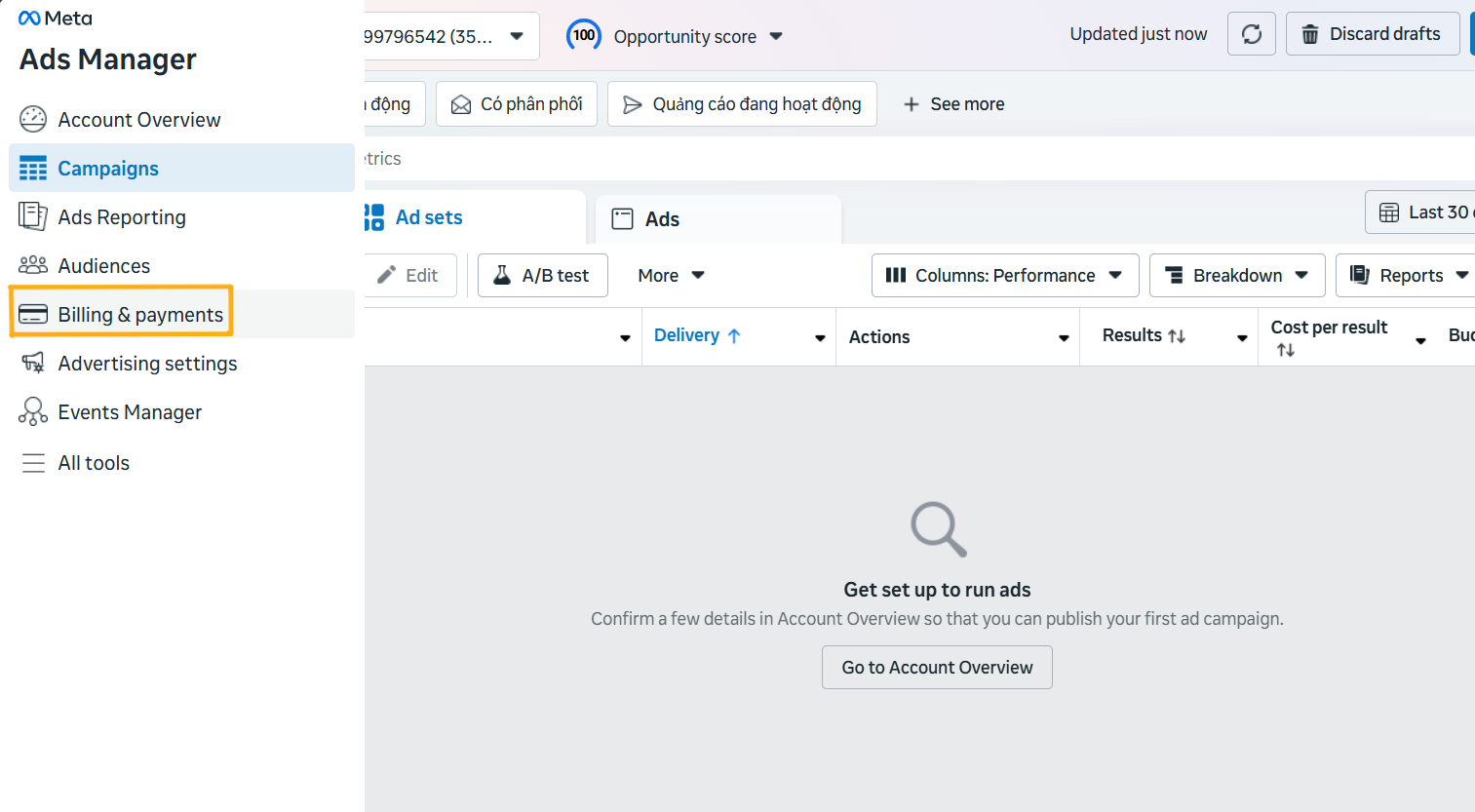
Settu upp greiðslumöguleika í Auglýsingastjóra.
Hér verður þú vísað á greiðslusíðuna til að bæta við greiðslumáta.
Skref 4: Smelltu á Bæta við greiðslumáta.
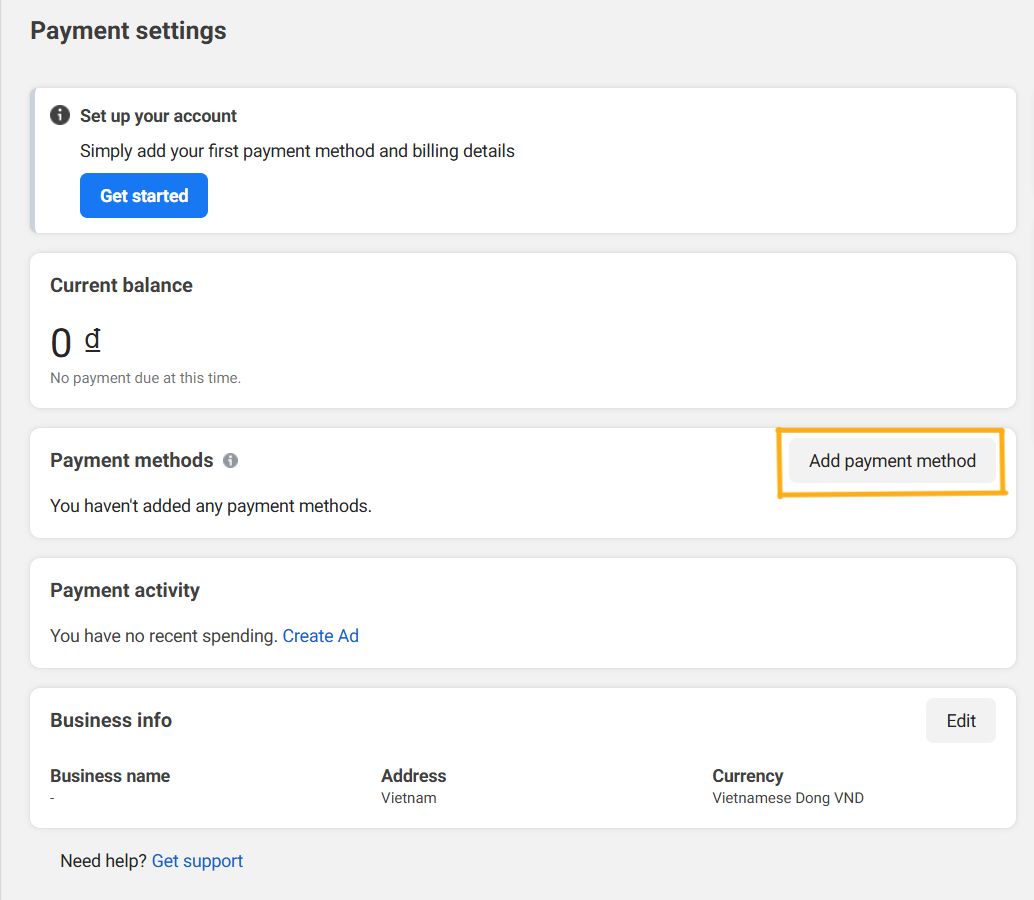
Bæta við greiðslumáta
Skref 5: Gakktu úr skugga um staðsetningu, gjaldmiðil og tímabelti og smelltu síðan á Næsta.
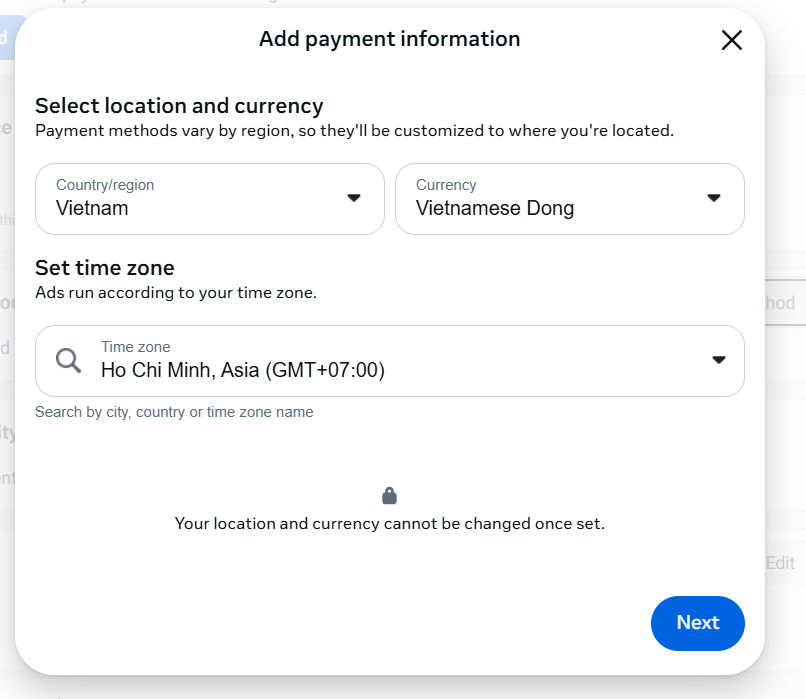
Bæta við greiðsluupplýsingum
Skref 6: Veldu greiðslumáta. Bankakort (debet- eða kreditkort) eru studd um allan heim, en rafræn veski eins og Momo og VNPay eru aðeins fáanleg í Víetnam.
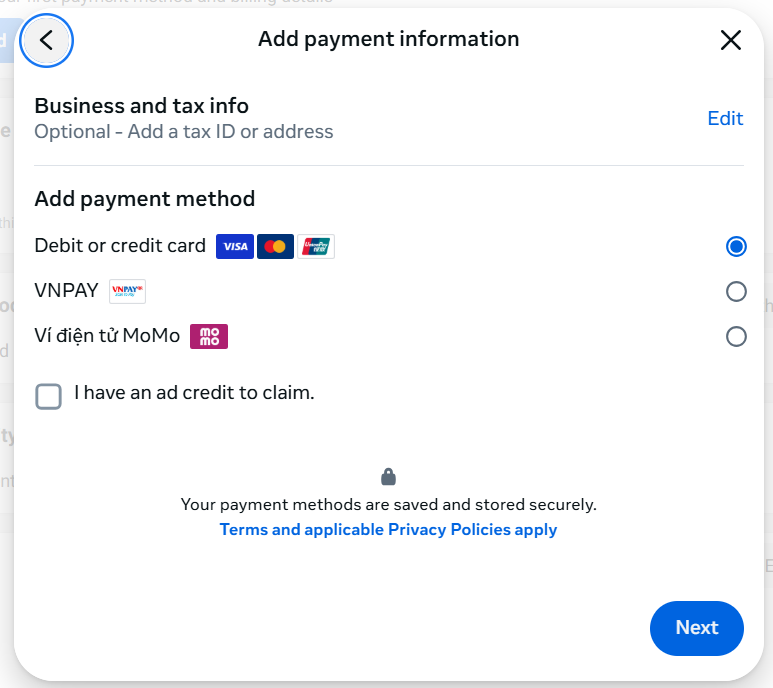
Veldu greiðslumáta fyrir auglýsingar.
Skref 7: Sláðu inn réttar kortupplýsingar, þar á meðal kortanúmer, gildistíma og CVV/CVC öryggiskóða, og smelltu síðan á Vista til að ljúka.
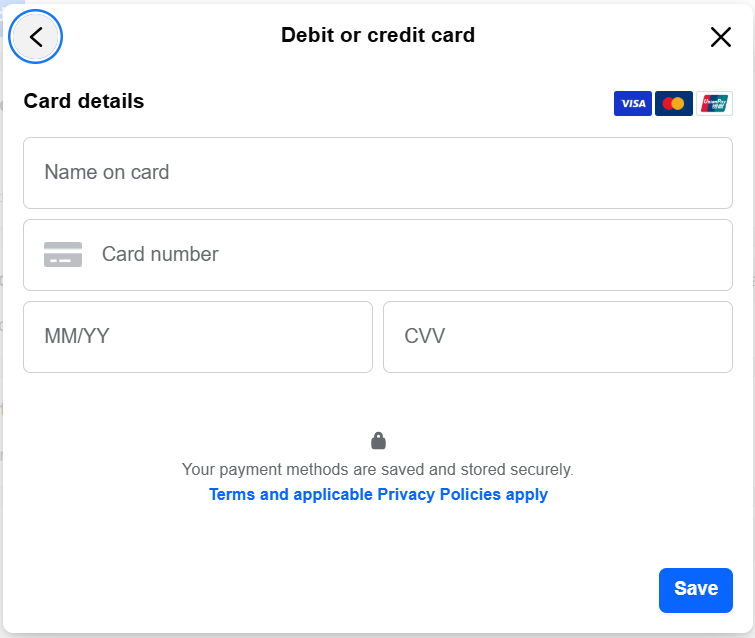
Sláðu inn kortupplýsingar
Skref 8: Ef kortið er gilt birtist það á greiðslulistanum. Þú getur líka bætt við fleiri kortum sem afrit.
Mikilvægar athugasemdir þegar greitt er fyrir Facebook auglýsingar
- Gakktu alltaf úr skugga um að kortið þitt sé gilt og að inneign eða lánsfjárhæð sé nægjanleg.
- Það er góð hugmynd að setja upp margar greiðslumáta sem varaaðferð.
- Athugaðu reglulega greiðslutilkynningar þínar til að forðast truflanir.
- Með rafrænum veskjum er mikilvægt að fylgjast með áfyllingarmörkum til að stjórna fjárhagsáætlun þinni á skilvirkan hátt.
Ljúka
Til að keyra árangursríkar Facebook-auglýsingar þurfa fyrirtæki að vera vel undirbúin: auglýsingareikning, hágæða aðdáendasíðu, alþjóðlegt greiðslukort og ítarlegan skilning á greiðsluferlinu. Þetta eru mikilvægir grunnþættir sem ákvarða hvort auglýsingaherferðin gangi vel fyrir sig og skili árangri.
Vel heppnuð herferð byggir ekki aðeins á nákvæmu efni og markmiðssetningu, heldur einnig á traustum tæknilegum og fjárhagslegum innviðum. Þegar grunnurinn er kominn á sinn stað sparar þú tíma og peninga í tilraunum og hámarkar tekjur strax frá fyrstu herferðum.
Breyttu því sem þú varst að lesa í áþreifanlegar niðurstöður — notaðu það núna með GTG CRM, ókeypis.
Sækja um núna

