

Inngangur að eiginleikum
„Hverjir í teyminu okkar standa sig vel og hverjir eiga í erfiðleikum?“ – þetta er spurning sem stjórnendur spyrja, en svörin eru oft byggð á innsæi eða nokkrum úreltum mánaðarlokatöflureiknum sem úreltast um leið og þeim er lokið.
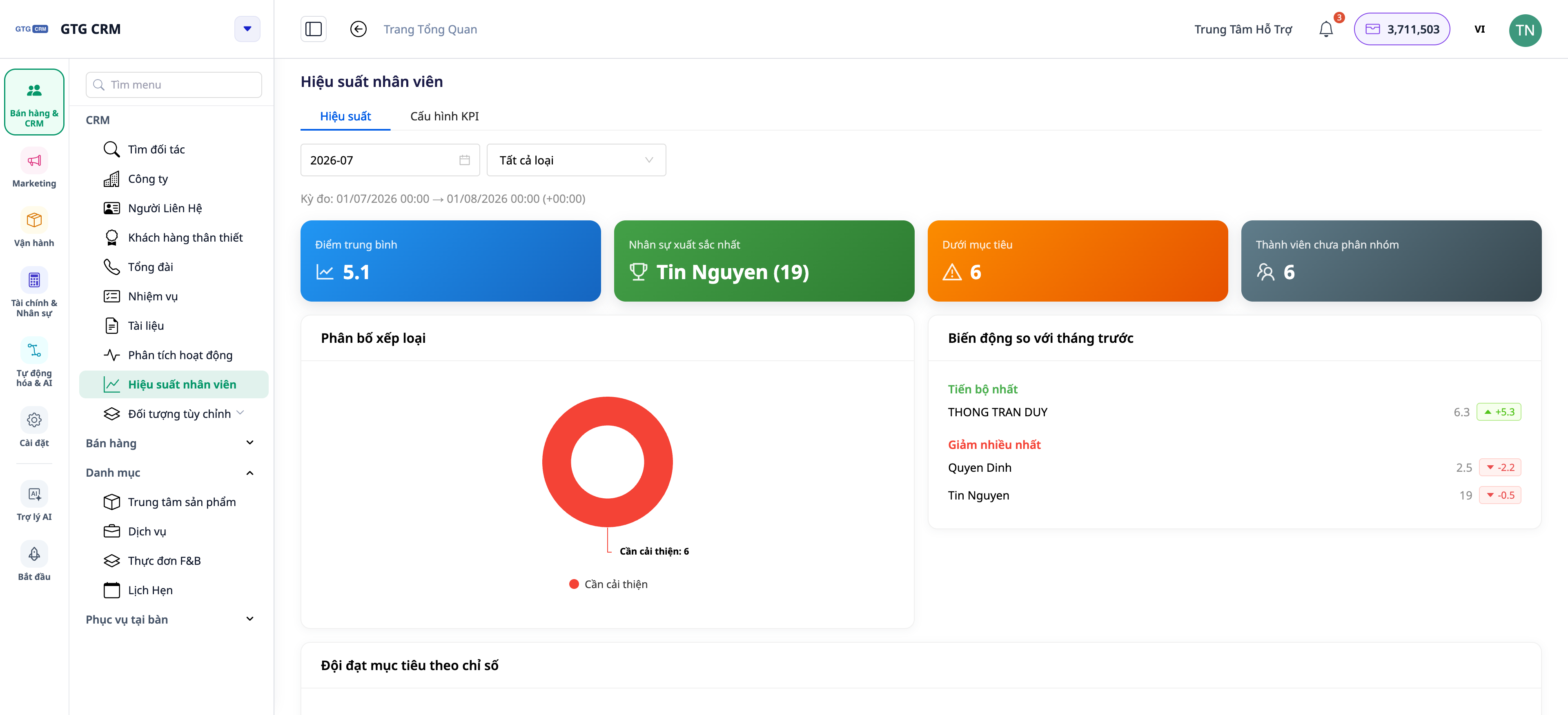
Því lýkur í dag. GTG CRM býður upp á frammistöðu teymis og meðlima: Lykilárangursvísa (KPI) á mann, ítarlegar upplýsingar um hvern meðlim og 15 frammistöðuvísa sem eru fengnir beint úr raunverulegu starfi þeirra í CRM kerfinu — að hringja, senda tölvupóst, búa til/loka samninga, vinna úr verkefnum. Og nú uppfærist skýrsluskjárinn sjálfkrafa í rauntíma : þegar samstarfsmaður lokar samningi, þá hoppa tölurnar á mælaborðinu sjálfkrafa — þú þarft ekki að ýta á F5, núverandi sía tapast ekki.
 Vandamálin sem fyrirtæki standa frammi fyrir
Að dæma lið út frá huglægum tilfinningum — Ósanngjörn umbun/refsing, tap á hæfileikaríkum leikmönnum.
Að sameina gögn í Excel í lok mánaðarins — Tímafrek, úrelt gögn, viðkvæm fyrir villum.
Að ekki er greint á milli „leiðbeininga sem bárust á tímabilinu“ og „leiðbeininga sem eru nú þegar í vörslu“ — Þetta leiðir til skekktrar matsgerðar, sem gerir það erfitt að bera saman nýjar/reyndar leiðir.
Mælaborðið uppfærist aðeins þegar öll síðan er endurhlaðin — gömul gögn eru kyrrstæð og þurfa stöðugar endurhleðslur (tapast síur, tapast núverandi skoðunarstaða).
GTG CRM tekur gögn beint úr raunverulegum rekstri innan CRM kerfisins og sameinar þau í eitt afkastasvið — engin handvirk færsla, engin aðskilin töflureikni og alltaf uppfært.
Hápunktar
1. Yfirlit yfir frammistöðu liðsins á einum skjá.
Stutt yfirlit yfir teymið: hver meðlimur með lykilmælikvörðum og frammistöðu miðað við markmið (KPI).
Eiginleiki : Yfirlitsmælaborð teymisins byggt á lykilárangursvísum (KPI).
Kostir : Með því að skoða einn skjá geturðu séð hverjir eru í forystu og hverjir þurfa stuðning.
2. Kafaðu ítarlega í hvern meðlim: Stigatafla, Verkefni
Smelltu á einstakling til að sjá upplýsingar: KPI-stigakort, verkefnaflæði, vinnuálag — og jafnvel atriði sem „Stendur ekki vel“ til að taka fram.
Eiginleiki : Ítarleg yfirlitsgreining fyrir hvern meðlim.
Ávinningur : Að vita nákvæmlega hvar einstaklingur er sterkur/veikur gerir kleift að þjálfa hann markvisst.
3. 15 frammistöðuvísar sem eru fengnir úr raunverulegum aðstæðum.
Mæligildin í CRM eru byggð á raunverulegum aðgerðum (símtölum, tölvupósti, samningum, verkefnum o.s.frv.), þannig að þau ættu að endurspegla framleiðni nákvæmlega frekar en tilkynntar tölur.
Eiginleikar : 15 afkastavísar.
Kostir : Mat byggt á raunverulegum gögnum, gegnsætt fyrir allt teymið.
4. Gerðu greinarmun á „Leiðum sem bárust á tímabilinu“ og „Leiðum sem eru í eigu fyrirtækisins nú þegar“
Kerfið aðgreinir skýrt fjölda leiða sem einstaklingur fær á skýrslutímabilinu frá fjölda leiða sem viðkomandi hefur nú þegar — tvö mismunandi sjónarhorn, sem forðast hlutdrægt mat.
Eiginleiki : Aðgreinir tengiliði eftir tímabili og fyrirliggjandi tengiliði.
Kostir : Sanngjörn samanburður á nýliðum og þeim sem hafa notað þær lengi.
5. NÝTT — Mælaborðið uppfærist sjálfkrafa í rauntíma.
Ekki lengur þörf á að endurhlaða síður til að sjá nýjustu tölurnar. CRM mælaborð endurnýjast í bakgrunni með reglulegu millibili, uppfærast sjálfkrafa þegar þú kemur aftur á flipann og birta litla stöðulínu „Sjálfkrafa · Uppfærist kl. HH:MM“ til að láta þig vita hversu nýleg gögnin eru. Það er ennþá handvirkur uppfærsluhnappur ef þú vilt fá uppfærslu samstundis.
 Eiginleikar : Sjálfvirk endurnýjun í bakgrunni + vísir fyrir uppfærslutíma + handvirk endurnýjunarhnappur.
Kostir : Sjáðu alltaf nýjustu gögnin án þess að missa núverandi síu/stöðu; létt því það endurnýjast aðeins þegar flipinn er opinn.
Ávinningur fyrir fyrirtæki
Yfirlit teymisins byggt á lykilárangursvísum — Gagnadrifin, ekki tilfinningaleg, ákvarðanir í mannauðsmálum
Þjálfa teymismeðlimi ítarlega — Þjálfa rétta fólkið, taka á réttum veikleikum.
15 frammistöðuvísar — Gagnsæi og sanngirni í mati og umbunum
Leiðsögn eftir tíma samanborið við núverandi leiðsögn — Sanngjörn mat fyrir bæði nýliða og reynslumikla.
Mælaborð uppfærist sjálfkrafa — Sjáðu alltaf nýjustu tölurnar, engin endurhleðsla, ekkert tap á samhengi.
Fyrir hverja hentar þetta?
Eigendur lítilla og meðalstórra fyrirtækja vilja vita hvernig teyminu þeirra gengur án þess að þurfa að spyrja hvern og einn fyrir sig.
Sölu-/þjónustustjórar þurfa að fylgjast með framleiðni og úthluta viðskiptavinum á viðeigandi hátt.
Rekstrarstjórnun krefst þess að mæla vinnuálag og afköst í rauntíma.
Hvernig byrja ég?
Farðu í hlutann um liðsframmistöðu í CRM-kerfinu þínu, settu upp lið/markmið/einkunnir og opnaðu síðan flipann „frammistaða“ til að skoða það — mælaborðið uppfærist sjálfkrafa þegar ný gögn eru tiltæk. Þarftu ítarleg skref? Sjáðu leiðbeiningar um uppsetningu lykilárangursvísa og liðsframmistöðu .
Prófaðu það frítt — engin þörf á kreditkorti.


