
Kynning á eiginleikum
GTG CRM hefur löngum verið öflugt fyrir vörusölu: vörulistar, birgðir, pantanir, reikningar. En ef þú selur þjónustu — umboðsskrifstofur, ráðgjöf, heilsulindir/kliníkur, lausamenn, B2B birgja — þá hefur þú þurft að „smala“ áður: búa til þjónustu sem falsaða vöru án birgða, og án raunverulegs samnings (aðeins tilboð, engir undirskriftir, engir undirritaðir aðilar, engir greiðslutímasettir).
Frá og með deginum í dag styður GTG CRM sölu á þjónustu sem fyrsta flokks borgara: vörulisti (Catalog) sem inniheldur bæði vörur og þjónustu, blandað tilboð (tilboð sem inniheldur bæði vörur og þjónustu), og raunverulegan Samning (Contract) — með viðskiptavin sem annar aðili (B-aðili), skilagreiðslumarkmiðum, tvítyngdur, sendan & undirritaðan, og síðan útgefnir reikningar á köflum → sjálfkrafa færðir á reikningsbókina.
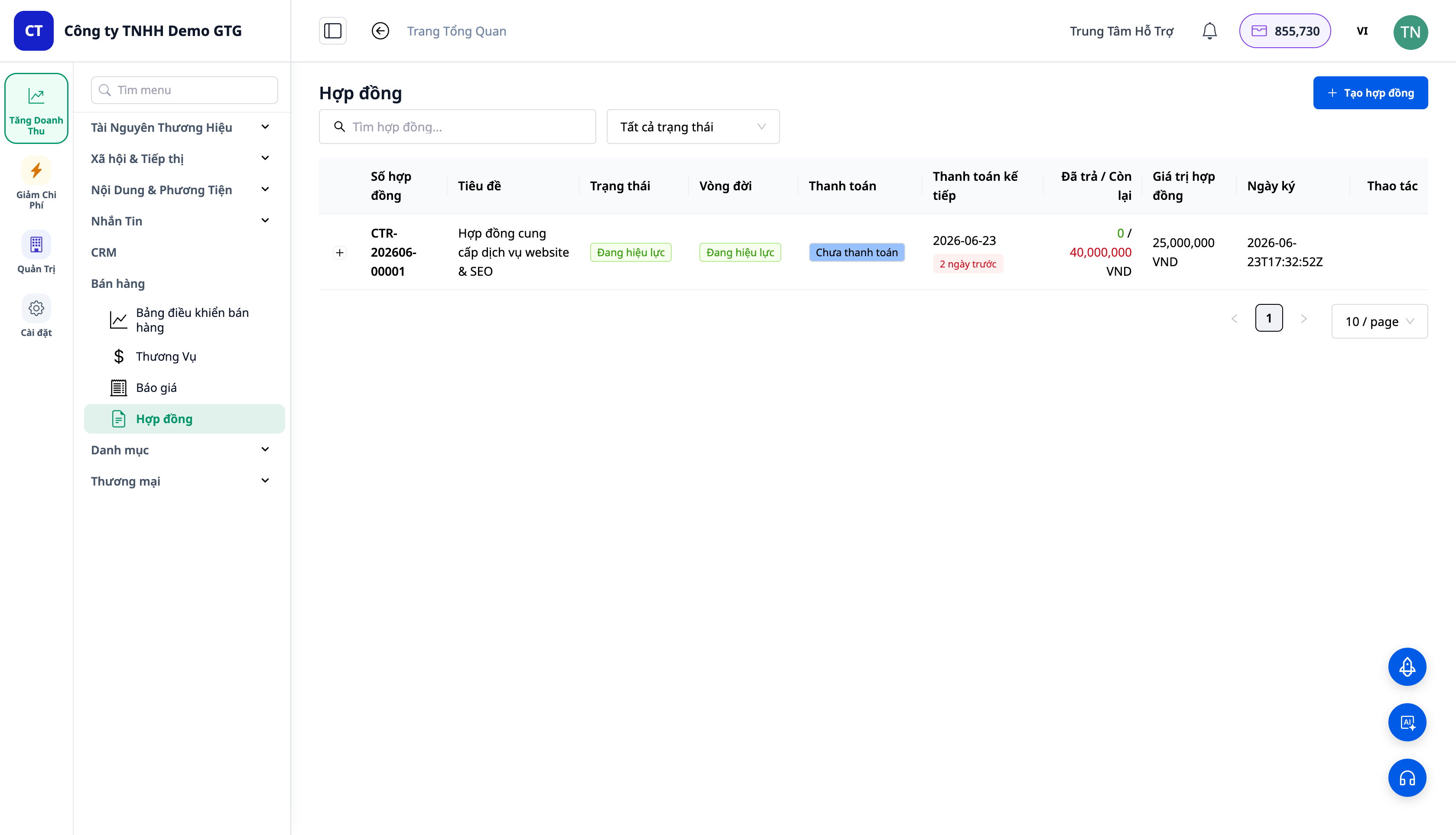
Vandamál sem fyrirtæki standa frammi fyrir
| Gamla aðferðin | Afleiðingar |
|---|---|
| Þjónusta þarf að vera búin til sem „fölsuð vara án birgða“ | Rof í vörulista, ranghugmyndir um birgðir |
| Eitt tilboð fyrir vörur, sér samningur fyrir þjónustu | Tvö skjöl, tvisvar samið |
| Engir samningar með B-aðila / skilagreiðslumarkmiðum | Erfitt að skuldbinda, erfitt að samþykkja áfanga |
| Word samningur + greiðsluseftirlit á Excel | Gleymdar greiðslur, veit ekki hversu mikið er óborgað |
| Eftir undirskrift er tekjuskrift sjálfvirk | Gleymdist að gefa út reikning, gleymdist að bóka |
GTG CRM tengir saman eina flæði: þjónusta → blandað tilboð → samningur → senda & undirrita → reikningar á köflum → tekjubókun & greiðsla inn – engin smölun, engin tvöföld innsláttur.
Hápunktar
1. Einn Vörulisti (Catalog) Fyrir Bæði Vörur og Þjónustu
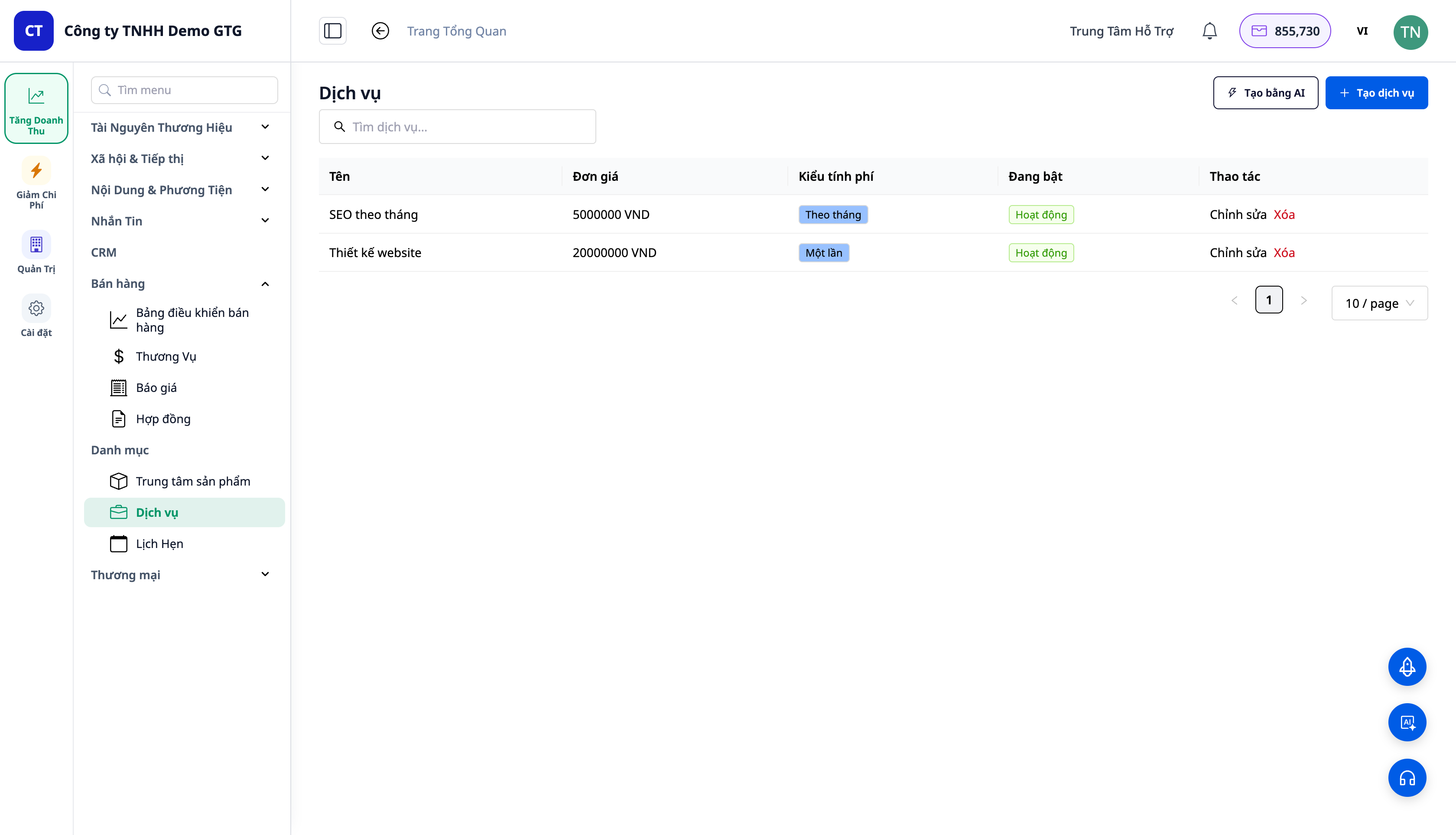
- Í valmyndinni CRM → Catalog: Vörur, Þjónusta, Tímapantanir — þar sem er skilgreint „hvað þú selur“, allt undir einum titli.
- Þjónusta hefur verð og greiðsluhringrás: einu sinni (one-time) eða reglulega (recurring — mánaðarlega...). Vörur geta einnig verið regluleg skráning.
- Sama samþætta listi er það sem tilboðs-/samningsvalari notar — veldu bæði vörur og þjónustu á sama stað.
2. Blandað Tilboð — Eitt Tilboð, Bæði Vörur Og Þjónustu
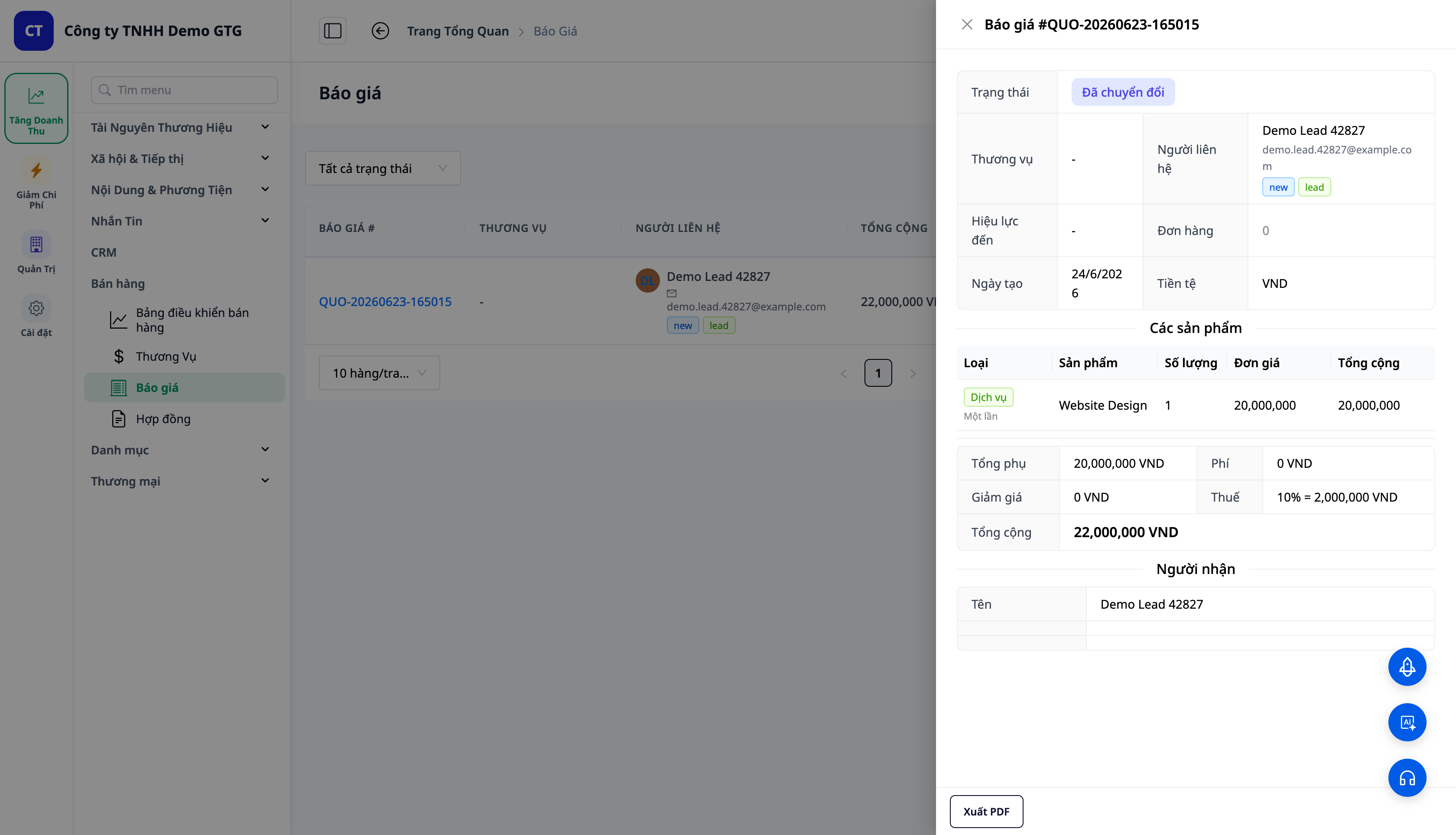
- Bættu við línum af gerðinni Þjónusta (td „Vefhönnun“, „SEO mánaðarlega“) og línum af gerðinni Vara (td „Hýsingarleyfi“ × 3) innan sama tilboðs.
- Hver lína hefur Tegundarmerki (Þjónusta = græn, Vara = blá); þjónustulína sýnir greiðsluhringrás.
- Tilboð DRAFT → SENT → ACCEPTED; þegar Samþykkt, birtist hnappurinn Convert to Contract (umbreyta í samning).
3. Raunverulegur Samningur — B-aðili, Samþykki, Tvötyngdur
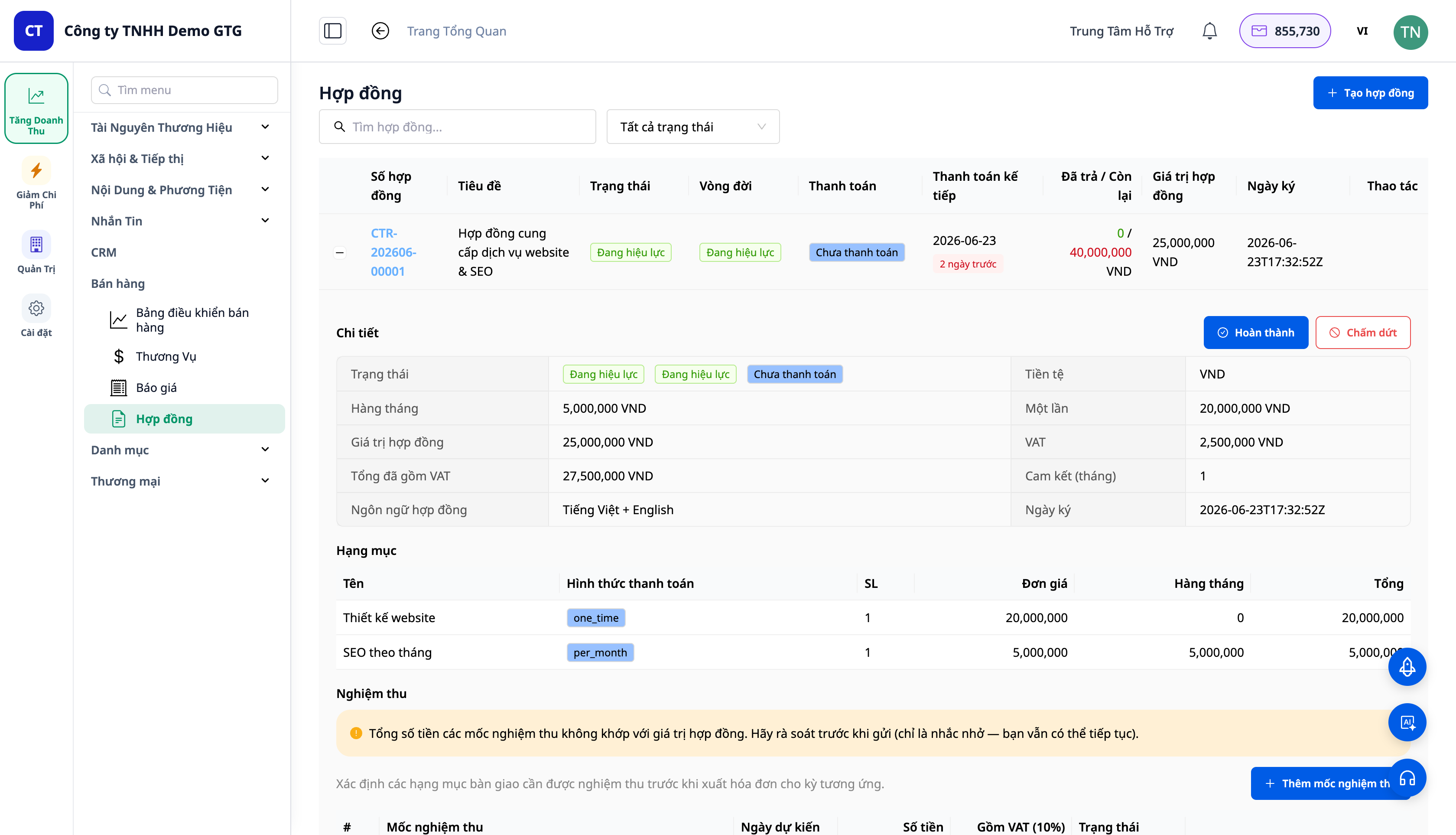
- Breyta í samning heldur sama sniði/tímabili á hverri línu; heildarfjárhæðin er skipt í heildarfjárhæð í einu lagi og heildarfjárhæð á mánuði + virðisaukaskattur.
- Aðili B (Party B) getur verið einstaklingur eða fyrirtæki; upplýsingar (löglegt nafn, kennitala, heimilisfang, fulltrúi) er hægt að fylla út sjálfkrafa þegar fyrirtækjagögn eru til staðar — þökk sé eiginleika til að auðga fyrirtækisupplýsingar.
- Viðtökuskref (Nákvæmnispróf) er sett við stofnun samnings, sem leiðir til greiðsludagskrá.
- Tungumálasamningar (hámark 2 tungumál) + tölvupóstur á viðkomandi tungumáli, með vörumerkjum.
- Samningur getur einnig haldið beinar vörulínur (án tilboðs) — samningur inniheldur bæði vörur og þjónustu.
4. Senda → Undirrita → Útgefa reikninga í áföngum
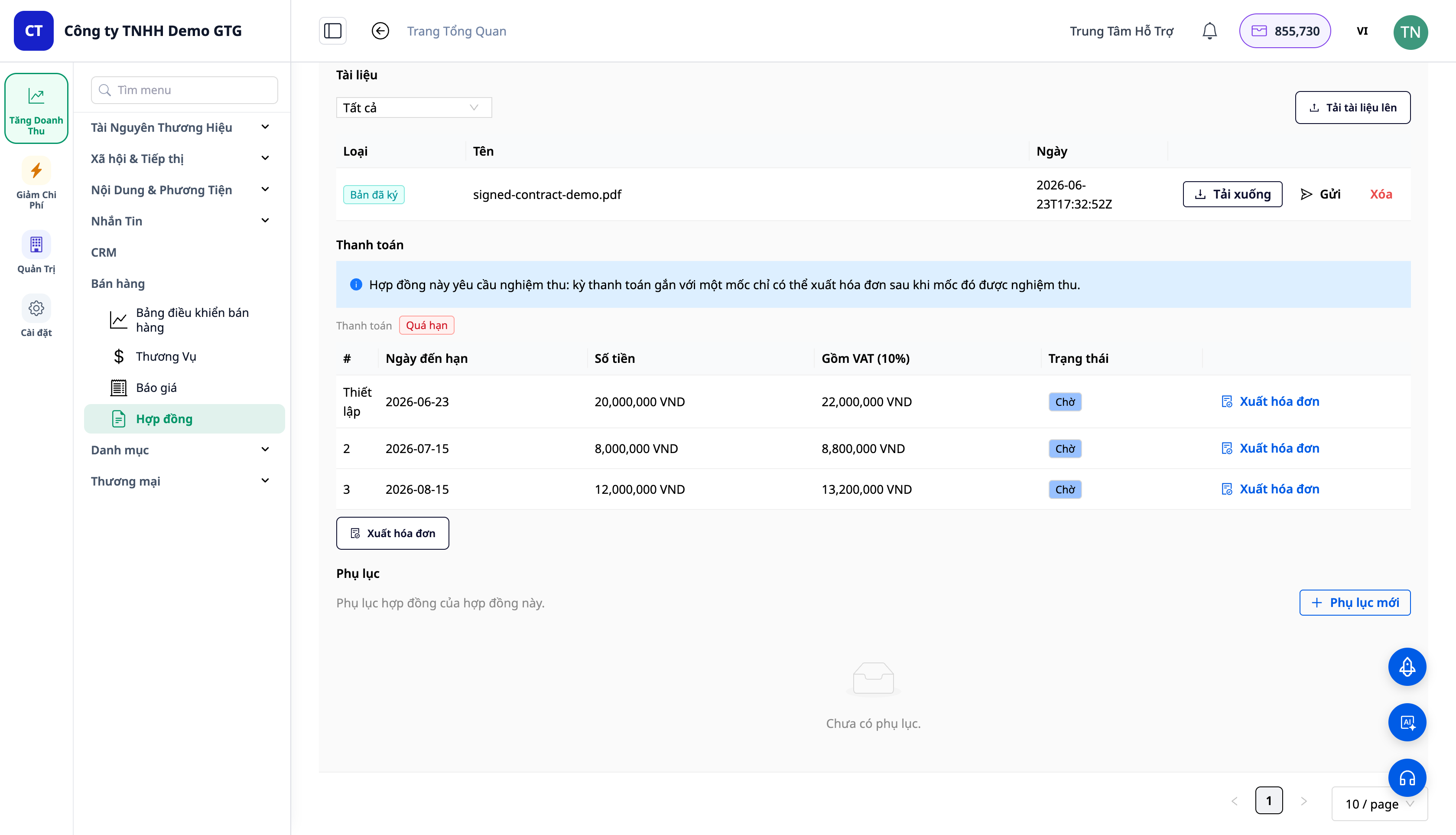
Skilvirk og lögleg undirritunarferli:
- Senda til viðskiptavinar: kerfið býr til samning í sniði Word (.docx) (hægt að breyta/semja um) og sendir til viðskiptavinar. Staða DRAFT → SENT.
- Viðskiptavinur undirritar utan kerfis (pappír/rafrænt eintak) og sendir til baka.
- Hlaða upp undirrituðu eintaki: viðhengi við undirritaða skrá (geymd í kerfinu) → skráir undirritaðan og tíma undirritunar. SENT → SIGNED → ACTIVE.
- Útgefa reikninga í áföngum: fyrir hvern greiðsluáfanga, skoða forskoðun reiknings → staðfesta → gefa út reikning í gegnum núverandi ERP/reikningsflæði.
ℹ️ Athugasemd: Útgefa reikninga krefst þess að vinnusvæði sé tengt við rafrænan reikningsveitanda / skattveitanda. Allt flæðið við að búa til þjónustu, tilboð, samninga, senda & hlaða niður undirrituðu eintaki virkar enn eðlilega; aðeins skrefið við að gefa út reikninga krefst þessarar tengingar.
5. Reikningar → Sjálfvirk bókun á reikningaskrá
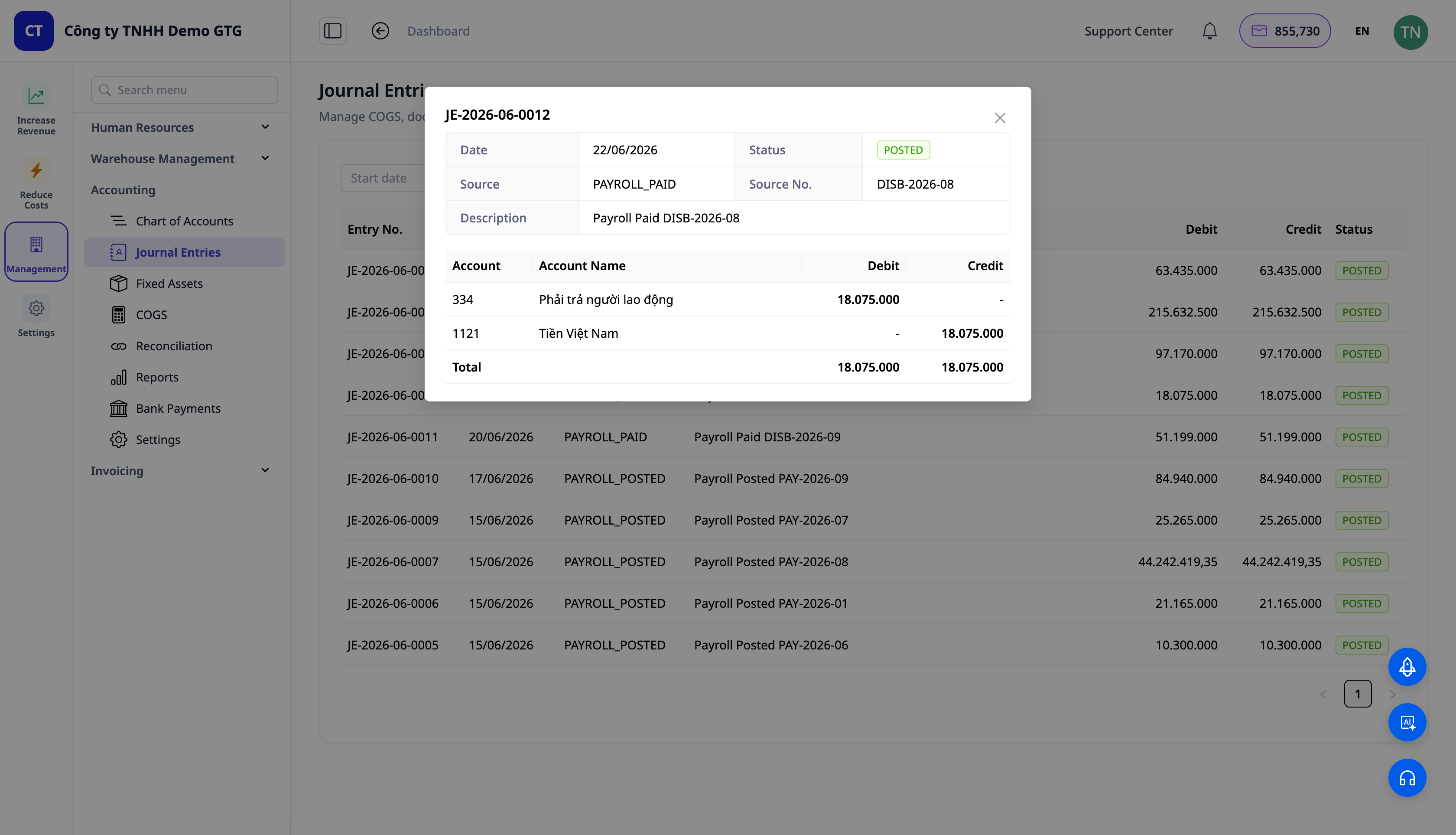
- Undirritaður samningur = skuldbinding, ekki fjármálaviðskipti ennþá — svo engin færsla er gerð við undirritun.
- Þegar reikningur er gefinn út er gert bókhald: Debet Kröfur (131) / Kredit Tekjur (511) / Kredit Virðisaukaskattur (3331) — keyrir í gegnum rétta sjálfvirka reikningsbókarvél fyrir reikninga sem fyrir er.
- Þegar greiðsla er móttekin: Debet Peningar (111/112) / Kredit Kröfur (131).
Allt endurnýtir núverandi sjálfvirka bókarvél — engin „sérsmíðuð“ GL númer, flæði er þitt og þú getur breytt því.
Ávinningur fyrir fyrirtæki
| Eiginleiki | Raunverulegur ávinningur fyrir þig |
|---|---|
| Einn verslun (vörur + þjónusta) | Engar „gervi vörur“ lengur, hreinar og réttar vörulistar |
| Blandað tilboð | Eitt skjal í stað tveggja; minna um að skrifa aftur |
| Samningur með Aðila B + viðtökuskref | Skýrar skuldbindingar, viðtöku á áföngum |
| Reikningar í áföngum samkvæmt dagskrá | Gleymir ekki að innheimta, veit alltaf hversu mikið er ótekið |
| Reikningar → sjálfvirkar færslur | Tekjur bókfærðar rétt, engin handvirk innsláttur |
| Sjálfvirk fylling fyrirtækisupplýsinga | Aðili B & kennitala fyllt út fyrir samninga/reikninga |
Hverjum hentar þetta?
- Markaðs- / auglýsingastofur (ICP3) sem selja mánaðarþjónustupakka.
- Ráðgjafar, sjálfstætt starfandi, B2B birgjar sem þurfa samninga og reikninga í áföngum.
- Spa, heilsugæslustöðvar, þjálfunarmiðstöðvar sem selja þjónustu ásamt vörum.
- Fyrirtæki sem selja bæði vörur og þjónustu sem vilja eitt tilboð / einn samning.
Hvernig á að byrja?
Farðu í CRM → Vörulisti → Þjónusta til að búa til fyrstu þjónustuna, búa síðan til blandað tilboð og breyta því í samning. Sjá leiðbeiningar skref fyrir skref í greininni „Leiðbeiningar um sölu þjónustu og samninga“.
Ókeypis prufa – ekkert kreditkort þarf.


