

Introductie van functies
"Welk teamlid presteert goed, wie loopt achter?" — een vraag die elke manager stelt, maar het antwoord is vaak gebaseerd op gevoel, of enkele handmatige spreadsheets die verouderd zijn tegen de tijd dat ze klaar zijn aan het einde van de maand.
Dat eindigt vandaag. GTG CRM heeft de sectie Team & Lid Prestaties: KPI's per persoon, diepgaande analyse per lid, en 15 activiteitsstatistieken rechtstreeks uit wat ze daadwerkelijk doen in de CRM — bellen, e-mails versturen, deals maken/sluiten, taken afhandelen. En nu, het rapportscherm wordt in realtime bijgewerkt: een collega heeft zojuist een deal gesloten, het getal op je dashboard springt omhoog — geen F5 nodig, geen verloren filters.
 Problemen waar bedrijven mee kampen
Teambeoordeling op basis van gevoel — Oneerlijke beloningen/straffen, verlies van goede medewerkers
Verzamelen van statistieken in Excel aan het einde van de maand — Kost veel werk, verouderde statistieken, gemakkelijk fouten maken
Geen onderscheid tussen "leads ontvangen in de periode" en "leads in bezit" — Verkeerde beoordeling, moeilijk te vergelijken voor nieuwe/ervaren medewerkers
Dashboard wordt alleen bijgewerkt bij het opnieuw laden van de hele pagina — Verouderde statistieken blijven stilstaan, continu herladen nodig (verlies van filters, verlies van huidige positie)
GTG CRM haalt statistieken rechtstreeks uit de daadwerkelijke activiteiten in de CRM, verzamelt ze in één prestatiesectie — geen handmatige invoer nodig, geen aparte spreadsheets, en altijd up-to-date.
Highlights
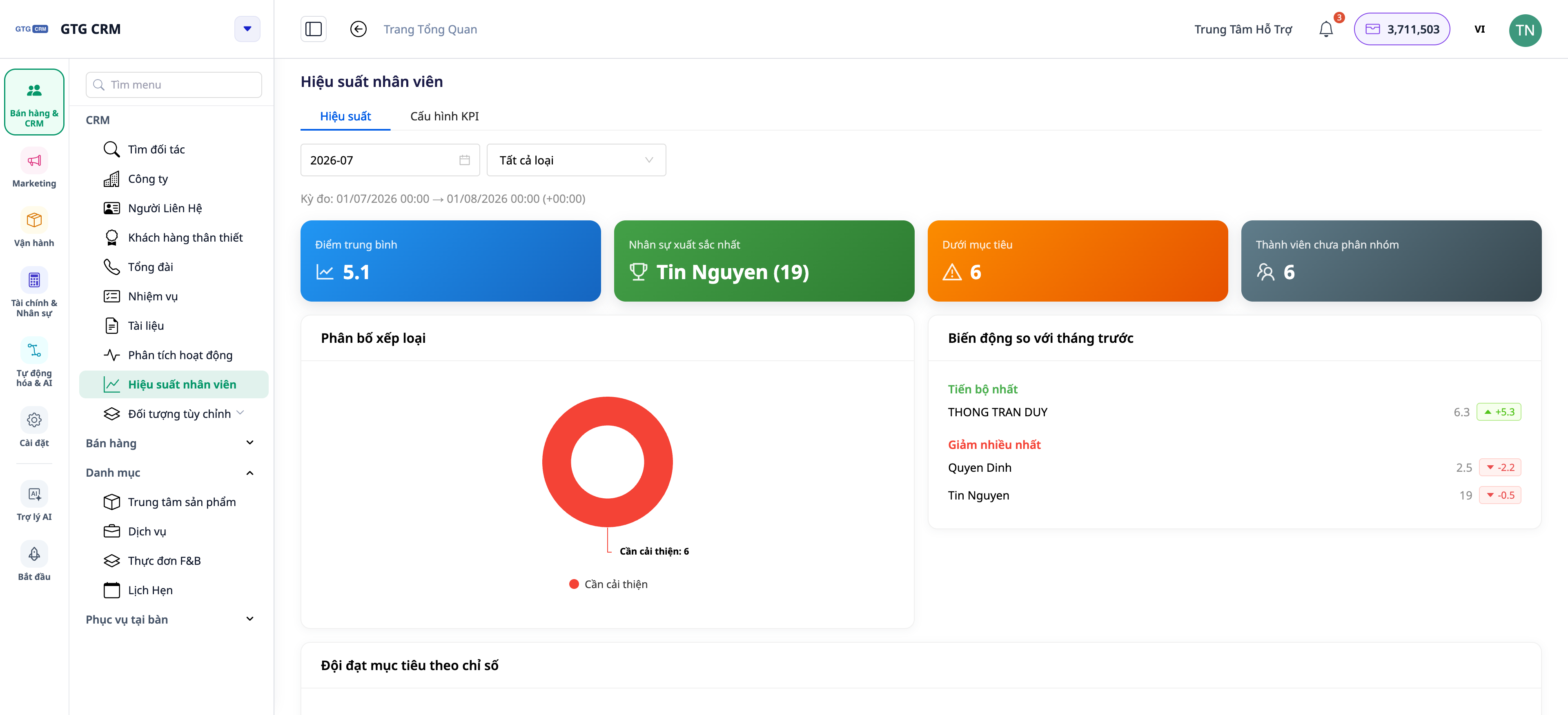
1. Overzicht van teamprestaties in één scherm
Bekijk het hele team snel: elk lid met de belangrijkste statistieken en de prestatie ten opzichte van het doel (KPI).
Functie: overzichtstabel van het team per KPI.
Voordeel: met één scherm zie je wie voorop loopt en wie ondersteuning nodig heeft.
2. Diepgaande analyse per lid: Scorecard, Activiteiten, Taken
Klik op een persoon voor details: KPI-scorekaart, activiteitenlogboek, werklast — en ook de aandachtspunten "Niet goed".
Functie: gedetailleerde analyse per lid.
Voordeel: precies weten waarom iemand sterk/zwak is op bepaalde gebieden, om de juiste coaching te bieden.
3. 15 activiteitsstatistieken uit daadwerkelijke activiteiten
Statistieken gebaseerd op daadwerkelijke acties in de CRM (bellen, e-mailen, deals, taken...), dus ze weerspiegelen de productiviteit in plaats van gerapporteerde cijfers.
Functie: 15 activiteitsstatistieken.
Voordeel: beoordeling gebaseerd op echte gegevens, transparant voor het hele team.
4. Onderscheid tussen "Lead ontvangen in de periode" vs "Lead in bezit"
Het systeem onderscheidt duidelijk het aantal leads dat een persoon in de rapportageperiode heeft ontvangen van het aantal leads dat ze momenteel in bezit hebben — twee verschillende perspectieven, om verkeerde beoordelingen te voorkomen.
Functie: onderscheid tussen leads per periode en huidige leads.
Voordeel: eerlijke vergelijking tussen nieuwe en ervaren medewerkers.
5. NIEUW — Dashboard wordt automatisch realtime bijgewerkt
U hoeft de pagina niet meer opnieuw te laden om nieuwe cijfers te zien. De dashboards in de CRM worden periodiek op de achtergrond ververst, worden automatisch bijgewerkt zodra u terugkeert naar het tabblad, en tonen een kleine statusregel "Automatisch · bijgewerkt om HH:MM" zodat u weet hoe recent de gegevens zijn. Er is nog steeds een knop Vernieuwen handmatig als u direct wilt bijwerken.
 Functie: achtergrondverversing + indicator van bijwerkingsmoment + handmatige vernieuwingsknop.
Voordeel: altijd de meest recente statistieken zien zonder filters/positie te verliezen; licht voor de computer omdat alleen wordt vernieuwd wanneer het tabblad open is.
Voordelen voor bedrijven
Teamoverzicht per KPI — Beslissingen over personeel baseren op gegevens, niet op gevoel
Diepgaande analyse per lid — De juiste personen trainen op de juiste zwakke punten
15 prestatie-indicatoren — Transparant, eerlijk bij beoordeling & beloning
Leads per periode vs. huidige — Juiste beoordeling voor zowel nieuwkomers als veteranen
Automatisch bijgewerkte dashboard — Altijd de nieuwste cijfers zien, niet opnieuw laden, geen contextverlies
Voor Wie Geschikt?
MKB-bedrijfseigenaren die willen weten hoe hun team presteert zonder iedereen te hoeven vragen.
Sales Managers / Klantenservice Managers die productiviteit willen volgen en leads eerlijk willen verdelen.
Operations Managers die werkdruk en prestaties in realtime willen meten.
Hoe Beginnen?
Ga naar de sectie Team Performance in de CRM, stel groepen/doelstellingen/classificaties in, en open vervolgens het prestatiedashboard om het te bekijken — het dashboard wordt automatisch bijgewerkt met nieuwe gegevens. Gedetailleerde stappen nodig? Bekijk de handleiding KPI & Team Prestaties Instellen.
Gratis proberen — geen creditcard nodig.


