
Introductie van Functionaliteit
Aan het einde van de maand opent u uw bankafschrift en begint u regel voor regel te doorzoeken: dit bedrag is van welke klant voor welke factuur? Dat andere is een vergoeding, een interne overschrijving, of het geld van de marktplaats dat terugkomt? Vervolgens opent u Excel en typt u handmatig om uw boekhouding in overeenstemming te brengen met de bank. Het kost een hele ochtend, is nog steeds foutgevoelig, en elke keer dat u wordt gevraagd "waar komt dit geld vandaan?", zweet u het uit.
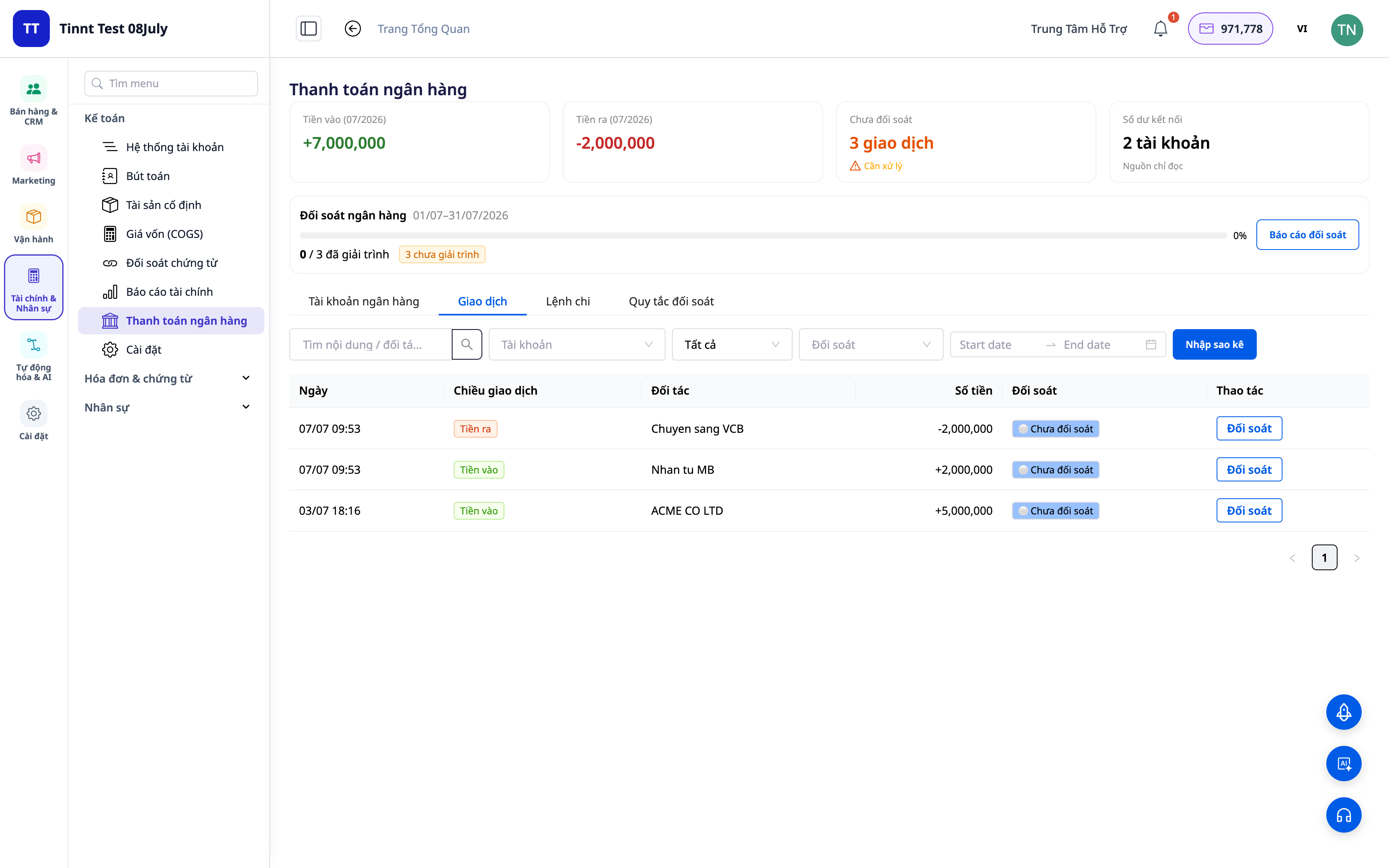
Dat stopt vanaf vandaag. GTG CRM transformeert uw bankafschrift in een afstemmingsruimte direct binnen het boekhoudsysteem dat u gebruikt: categoriseer elke transactie naar het juiste account, stel herbruikbare afstemmingsregels in om automatisch suggesties te doen voor vergelijkbare regels, bekijk afstemmings- en rapportagetabellen, en schakel de optie in om automatisch afstemmingsboekingen te genereren. Geld ⇄ factuur ⇄ grootboek wordt een gesloten cirkel.
Problemen Waarmee Bedrijven Geconfronteerd Worden
| Oude Methode | Gevolgen |
|---|---|
| Bankafschriften handmatig doorzoeken, overtypen in Excel | Uren per maand verloren, makkelijk verkeerde invoer, niet traceerbaar |
| Niet weten welke geldstroom bij welke factuur hoort | Onduidelijke openstaande posten, gemiste/dubbele incasso's niet gedetecteerd |
| Boekhoudkundige registraties los van de bank bijhouden | Niet-overeenstemmende cijfers, moeilijk te verklaren bij belastingcontroles |
| Geld van marktplaatsen/vervoerders dat terugkomt, moeilijk te onderscheiden | Niet duidelijk of alles ontvangen is, rommelige COD-afstemming |
GTG CRM brengt alles samen in één enkele databron: elke banktransactie wordt rechtstreeks gekoppeld aan het boekhoudaccount en (indien van toepassing) aan de factuur, en genereert automatisch een afstemmingsboeking.
Hoogtepunten
1. Transacties categoriseren naar het juiste account
Kies voor elke regel op uw afschrift wat het is: omzet, vergoeding, interne overschrijving, contant geld-bank, COD... Het systeem koppelt de transactie aan het juiste boekhoudaccount (GL account).
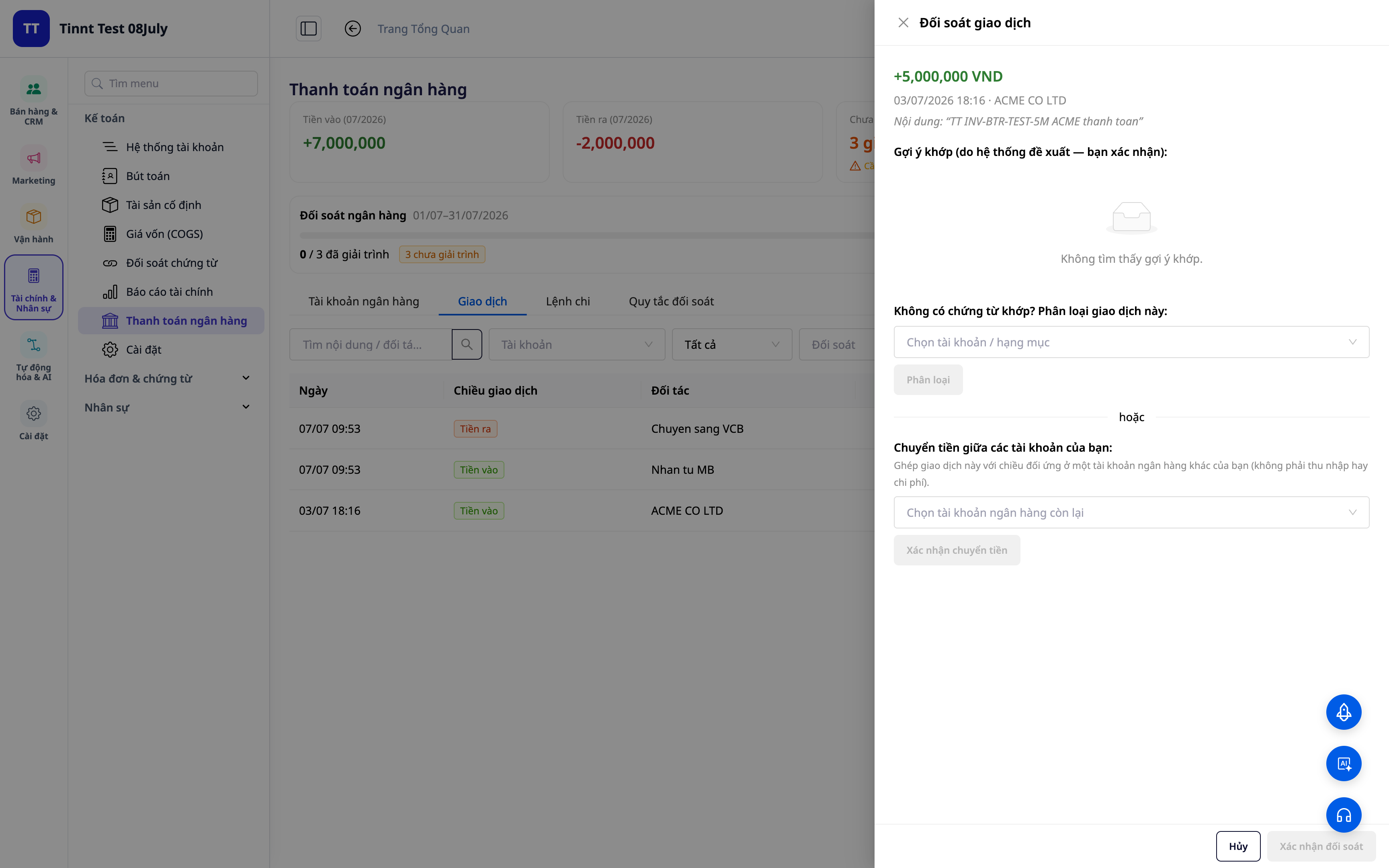
- Functionaliteit: transacties categoriseren → overeenkomstig boekhoudaccount.
- Voordeel: elke euro die in/uit gaat, heeft een duidelijk 'adres' in de boekhouding.
2. Herbruikbare afstemmingsregels — één keer instellen, automatisch afstemmen
Stel regels in op basis van inhoud/tegenpartij/bedrag: soortgelijke transacties in de toekomst worden automatisch correct toegewezen. Nieuwe regels worden direct geactiveerd om onmiddellijk te worden toegepast.
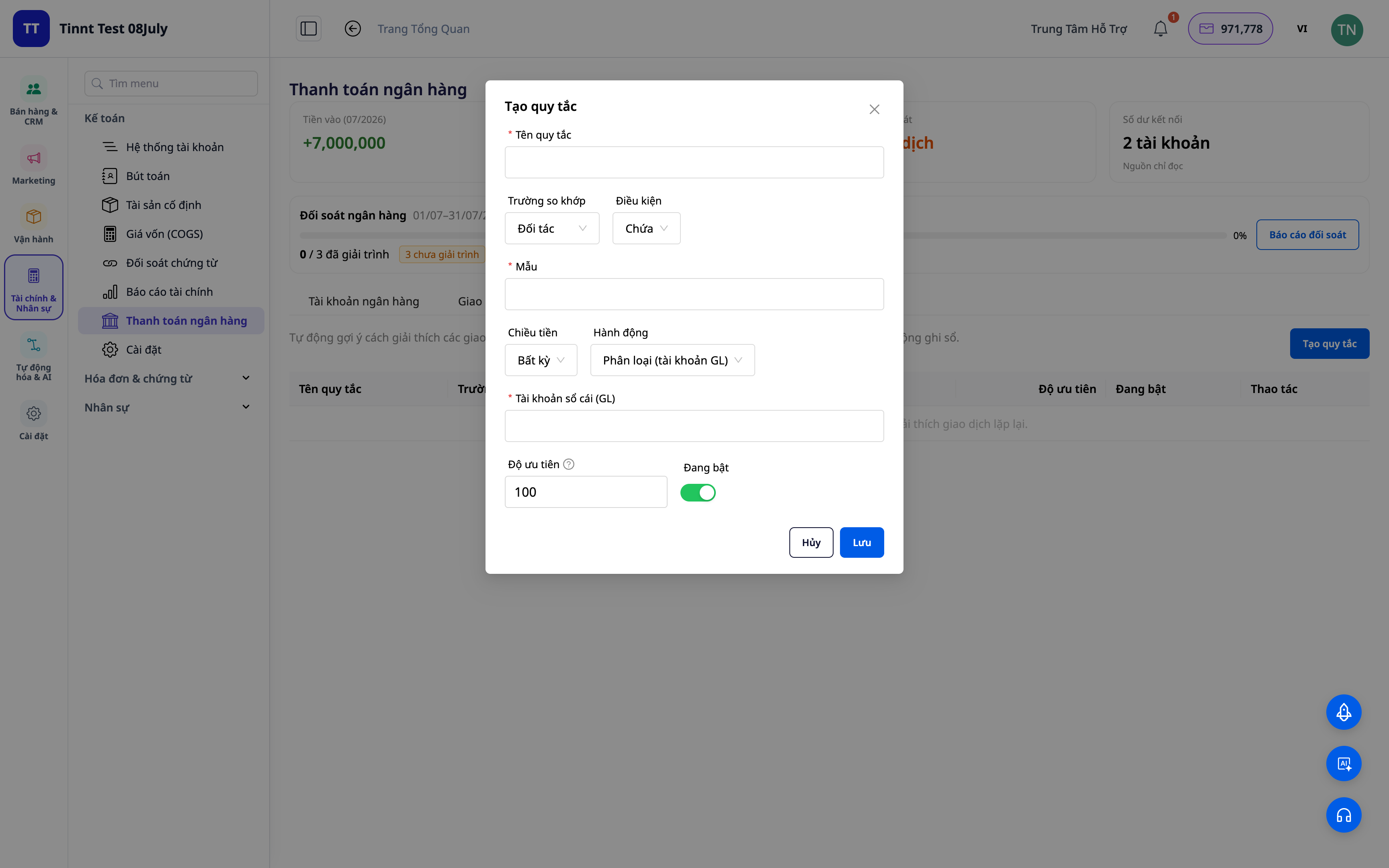
- Functionaliteit: herbruikbare set afstemmingsregels.
- Voordeel: elke volgende maand is makkelijker dan de vorige — herhalend werk wordt geautomatiseerd.
3. Afstemmingssuggesties op basis van regels — u hoeft alleen maar goed te keuren
De door u ingestelde regels suggereren automatisch hoe om te gaan met vergelijkbare transacties — u hoeft alleen maar te bekijken en goed te keuren. Hoe meer u gebruikt, hoe meer situaties de regelset dekt, en hoe sneller de afstemming verloopt. U behoudt altijd de uiteindelijke controle.
- Functionaliteit: suggesties voor het afstemmen van transacties op basis van regels (u keurt goed).
- Voordeel: snelle verwerking van herhalende regels met volledige controle.
ℹ️ Afstemmen en suggesties met regels zijn gratis. Binnenkort beschikbaar: een AI-assistent die oplossingen voorstelt, zelfs voor volledig nieuwe transacties.
4. Afstemmingstabel + rapporten
Krijg een overzicht: hoeveel is afgestemd, hoeveel blijft open, waar zitten de verschillen. Genereer een afstemmingsrapport voor uw archief en ter verantwoording.
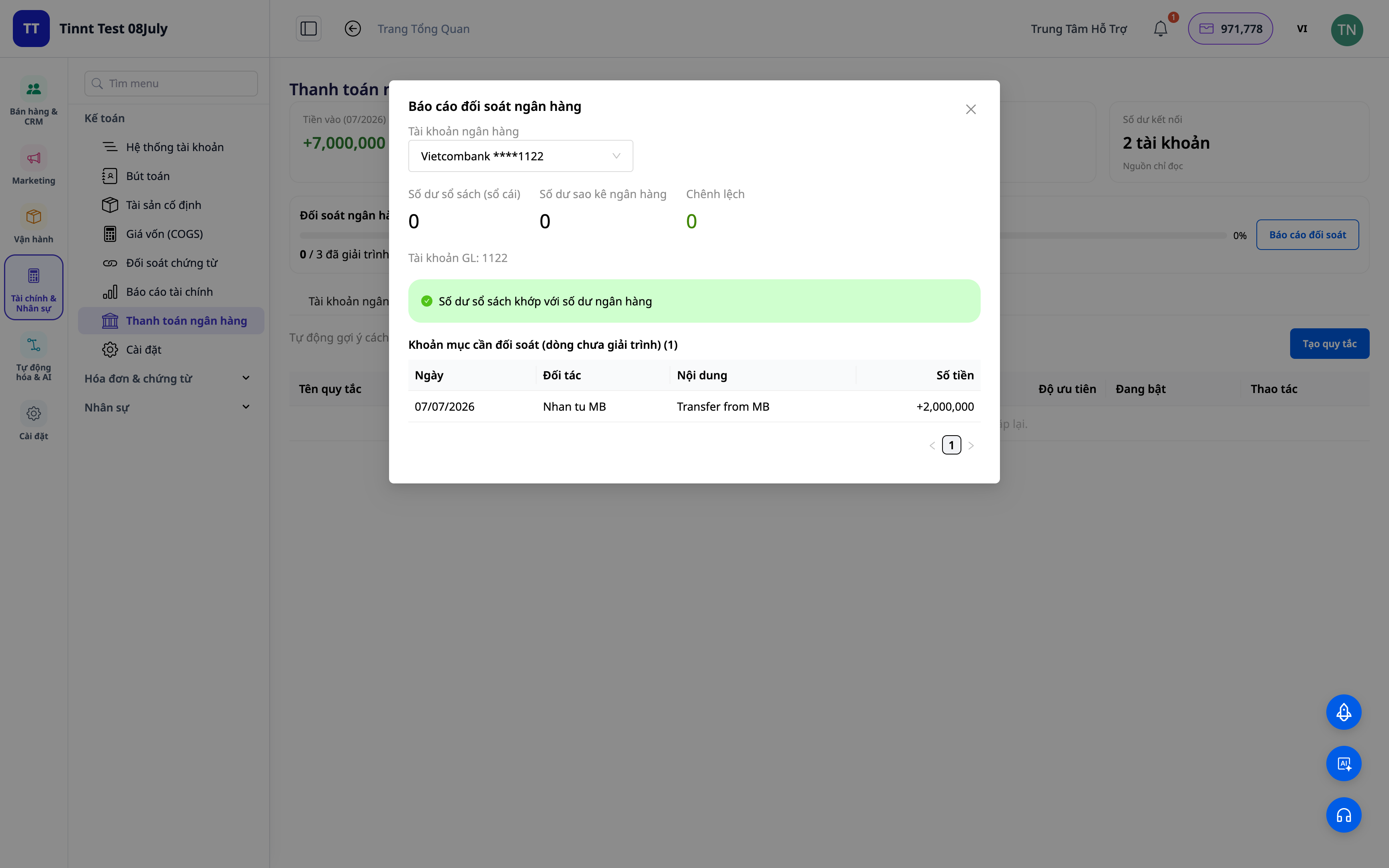
- Functie: afstemmingsdashboard + rapporten.
- Voordeel: met één scherm weet u direct of het grootboek is afgestemd met de bank.
5. Automatische boeking van afstemmingsboekingen (optioneel)
Schakel de optie "in grootboek opnemen" in: de divisie-/overboekings-/contant-bank-/COD-transacties genereren automatisch correcte boekhoudkundige afstemmingsboekingen. Als u de koppeling van een transactie ongedaan maakt, wordt de boeking teruggedraaid.
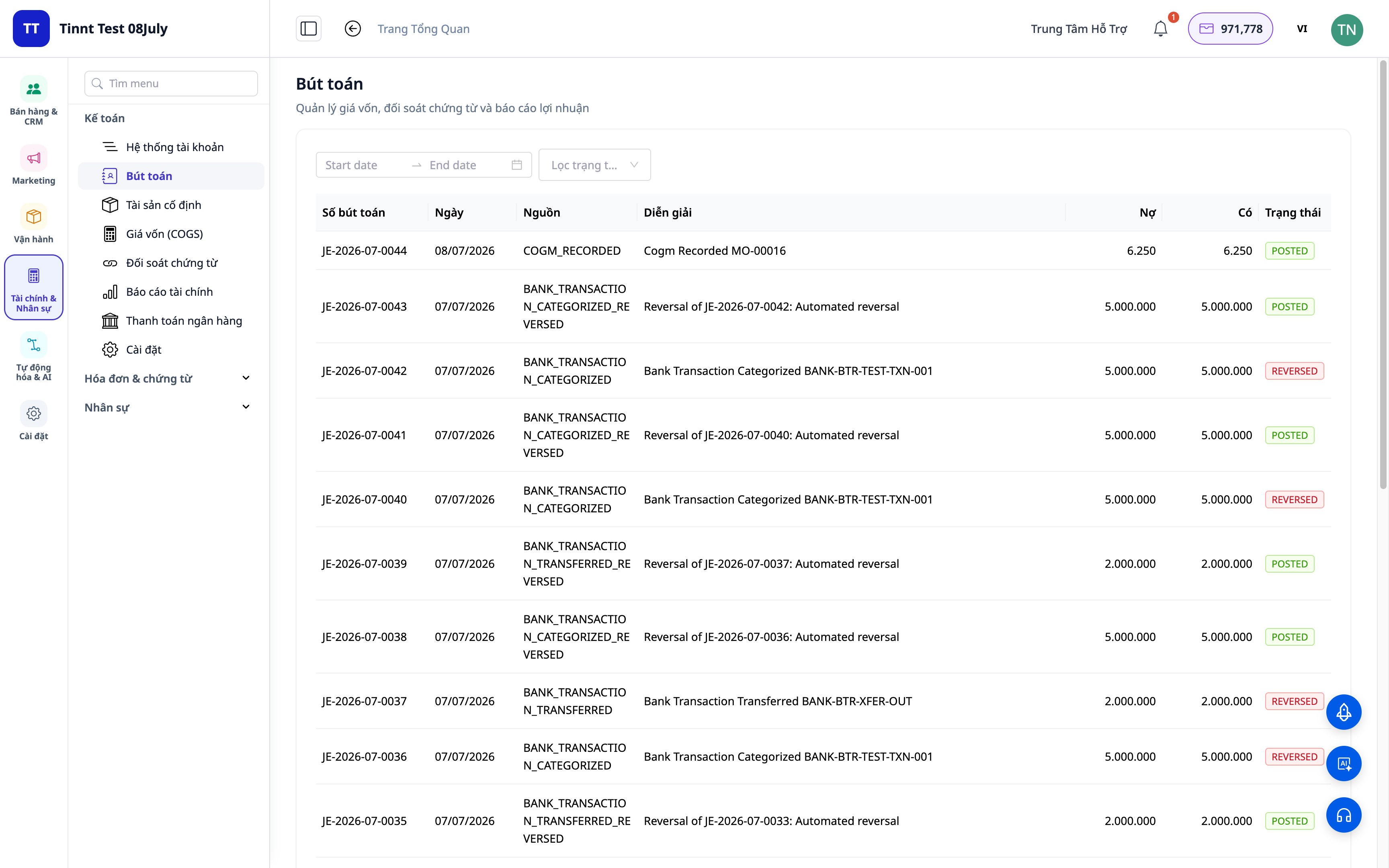
- Functie: automatisch boekingen maken op basis van afgestemde transacties.
- Voordeel: afstemmen en boeken is één taak, geen twee — de cijfers zijn altijd consistent.
Voordelen voor Bedrijven
| Functie | Praktisch voordeel voor u |
|---|---|
| Classificatie + afstemmingsregels | Bespaart elke maand uren handmatig bankafschriften controleren |
| Suggesties voor afstemming op basis van regels | Verwerkt herhalende regels snel, vermindert fouten |
| Afstemmingsdashboard + rapporten | Sluit de maand snel af, dossiers klaar voor belastingcontroles |
| Automatische boeking van boekingen | Grootboek is altijd afgestemd met de bank, geen afwijkingen |
| Afstemming COD | Weet u precies of u voldoende geld voor de goederen heeft ontvangen |
Voor Wie Is Het Geschikt?
- Accountants / Hoofd Accountants die de maand snel willen afsluiten en zeker willen zijn van bankafstemming.
- Bedrijfseigenaren/MKB'ers die de boekhoudpakket in GTG CRM gebruiken en de geldstromen willen controleren.
- COD Verkopers die de door de expediteur/verzender geretourneerde bedragen moeten afstemmen.
- Middelgrote bedrijven die minder afhankelijk willen zijn van losse boekhoudsoftware.
Hoe Te Beginnen?
Ga naar de sectie Boekhouding ▸ Bankafstemming, laad een bankafschrift of verbind uw bankrekening, en begin met classificeren. Heeft u gedetailleerde stappen nodig? Bekijk de gids Gebruikershandleiding: Bankafstemming op GTG CRM, en raadpleeg ook het artikel Dubbel Boekhouden Rechtstreeks in CRM om het algemene boekhoudkundige beeld te begrijpen.
Gratis proberen — geen creditcard nodig.


