

Upravljajte uporabniškimi dovoljenji, varujte podatke in zagotovite varno delovanje z našim prilagodljivim sistemom dovoljenj v GTG CRM.
Kaj je upravljanje dovoljenj?
Upravljanje dovoljenj v GTG CRM je funkcija, ki podjetjem pomaga jasno definirati:
- Kaj lahko vsak uporabnik vidi
- Katere podatke lahko ureja
- Katere dejanja lahko izvaja v sistemu
Z nastavitvijo predhodno določenih vlog (role) s specifičnimi dovoljenji podjetje zagotovi, da vsakdo opravlja le svoje delo.
Zakaj podjetja potrebujejo upravljanje dovoljenj?
Ko podjetje začne uporabljati več ljudi v istem sistemu, če ni jasno upravljanje dovoljenj:
❌ Tveganja brez upravljanja dovoljenj
| Problem | Posledica |
|---|---|
| 🔓 Podatki so prosto dostopni | Informacije o strankah in prihodkih so razkrite |
| 🔄 Delo se prekriva | Več ljudi obravnava isto nalogo |
| ⚠️ Nekontrolirane napake | Pomotoma izbrisani ali spremenjeni pomembni podatki |
| 📊 Razkritje občutljivih informacij | Zaposleni vidijo plače, stroške, strategije |
✅ Prednosti z upravljanjem dovoljenj
| Prednost | Opis |
|---|---|
| 🔒 Varno delovanje | Vsak vidi/naredi le svoj del naloge |
| ✅ Izogibanje napakam | Nihče ne izbriše/spremeni pomembnih podatkov po pomoti |
| 📈 Enostavno skaliranje | Dodajte nove zaposlene samo z dodelitvijo vloge |
| 📋 Enostavno upravljanje | Jasno, kdo kaj počne, odgovornosti so določene |
Privzete vloge v GTG CRM
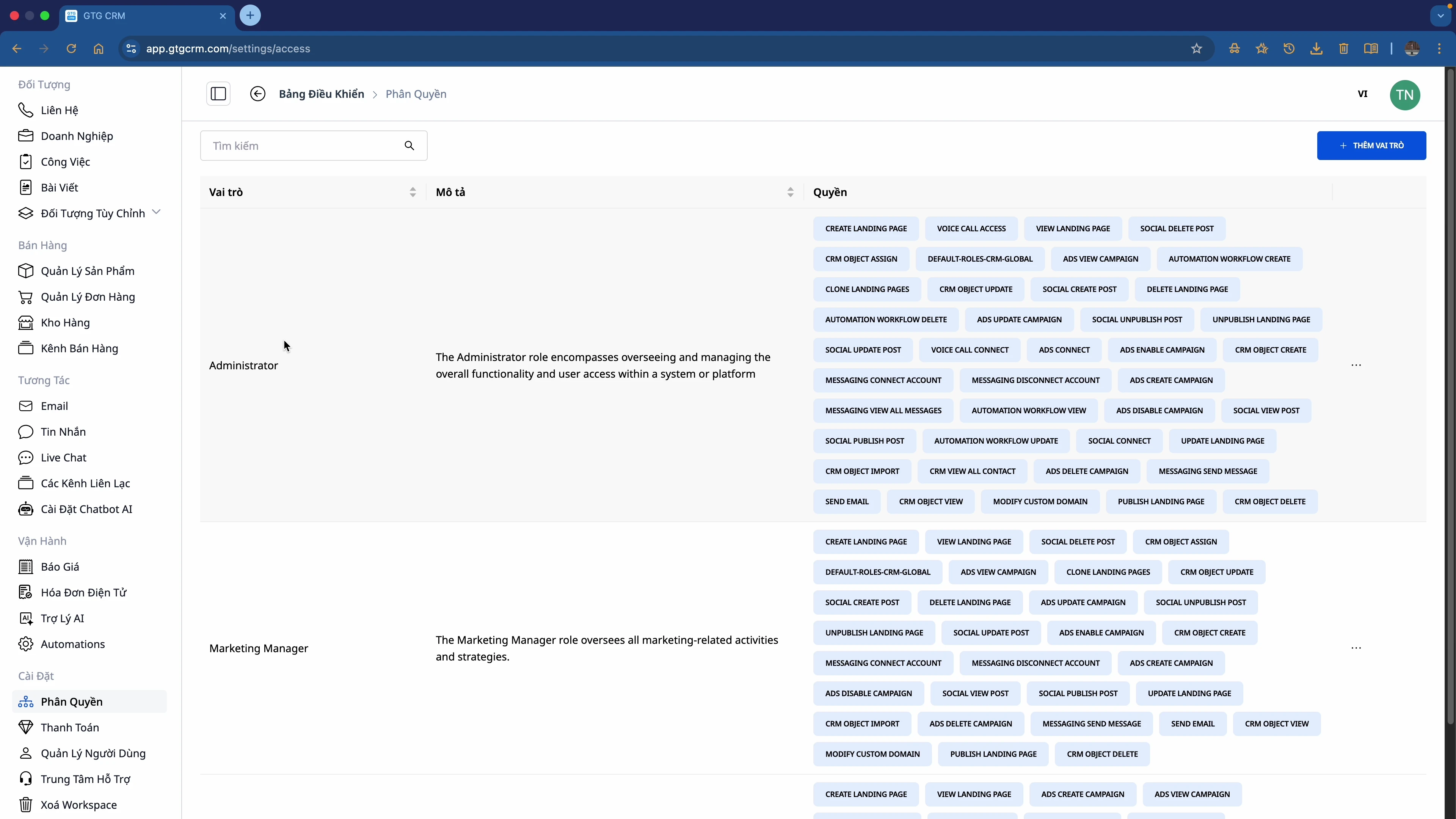
GTG CRM ponuja 3 privzete vloge:
1. 👑 Administrator
- Najvišja dovoljenja v sistemu
- Lahko izvaja vsa dejanja na platformi
- Upravlja uporabnike, dovoljenja, sistemske nastavitve
2. 📊 Marketing Manager
- Upravlja marketinške kampanje
- Pregleduje poročila in statistike
- Upravlja marketinško ekipo
3. 📝 Marketing Staff
- Izvaja dnevna marketinška opravila
- Omejena dovoljenja v primerjavi z Managerjem
Podrobna funkcionalnost upravljanja dovoljenj
🎛️ Dovoljenja po modulu
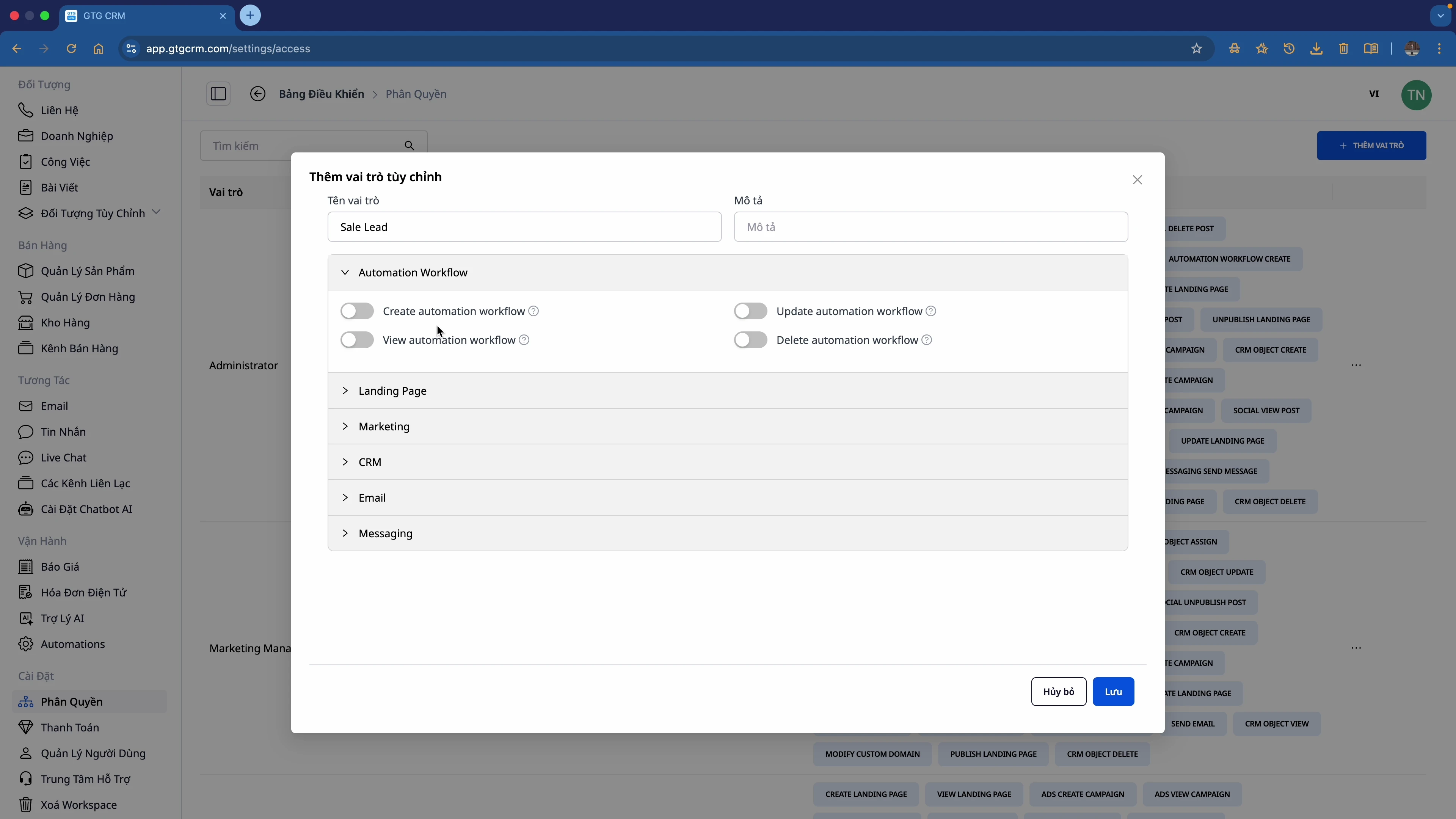
Dovoljenja lahko prilagodite za vsak modul:
| Modul | Dovoljena dovoljenja |
|---|---|
| Delovni tok avtomatizacije | Ustvari, Ogled, Posodobi, Izbriši |
| Vstopna stran | Ustvari, Posodobi, Objavljeno, Neobjavljeno, Izbriši |
| Trženje | Ogled objav v družabnih omrežjih, Upravljanje kampanj |
| CRM | Ogled vseh stikov, Uvoz, Izvoz, Uredi |
| E-pošta | Ustvari, Pošlji, Ogled poročil |
| Sporočila | Ogled, Odgovori, Upravljanje kanalov |
🔀 Vklop/Izklop
Vsako dovoljenje je mogoče vklopiti/izklopiti s stikalom:
- ✅ Vklopljeno: Dovoljuje izvedbo dejanja
- ❌ Izklopljeno: Ne dovoljuje
Postopek dodelitve dovoljenj
┌─────────────┐    ┌─────────────┐    ┌─────────────┐
│  Ustvari Role   │ ─► │  Po meri     │ ─► │  Dodeli Role   │
│  novo        │    │  Dovoljenja  │    │  uporabniku  │
└─────────────┘    └─────────────┘    └─────────────┘
      │                  │                  │
      ▼                  ▼                  ▼
   Daj ime,           Vklopi/izklopi       Izberi uporabnika,
   opis              posamezna dovoljenja  izberi vlogo
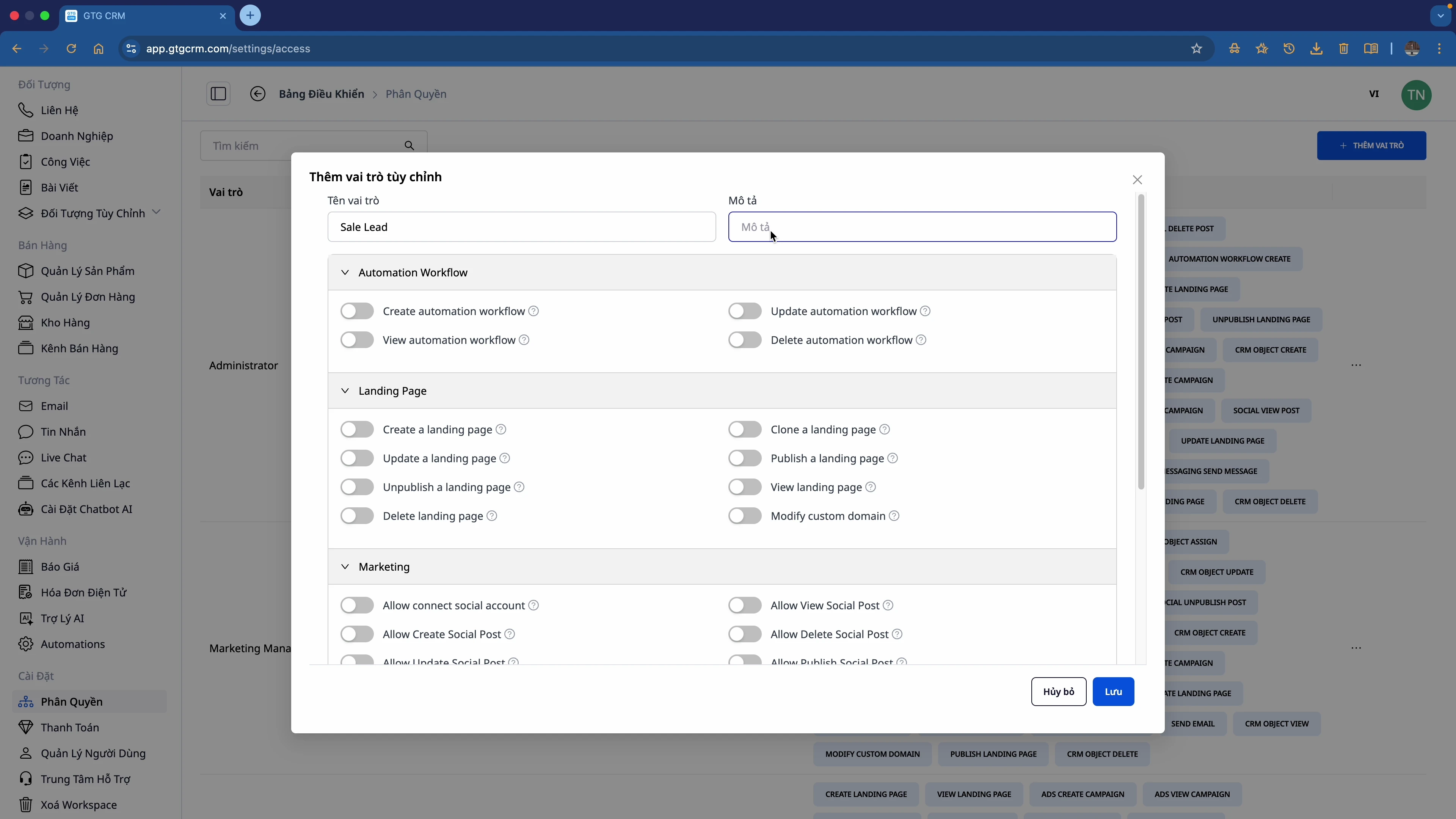
Primer: Ustvarjanje vloge "Prodaja"
Dodeljena dovoljenja:
- ✅ CRM: Vsa dovoljenja (Ogled, Uvoz, Izvoz, Uredi)
- ✅ Sporočila: Vsa dovoljenja
- ✅ E-pošta: Vsa dovoljenja
- ✅ Avtomatizacija: Ustvari, Ogled, Posodobi (brez Brisanja)
- ✅ Vstopna stran: Ustvari, Posodobi, Objavljeno, Ogled (brez Neobjavljeno, Brisanje)
- ⚠️ Trženje: Samo ogled objav v družabnih omrežjih
Dovoljenja, ki niso dodeljena:
- ❌ Brisanje delovnega toka avtomatizacije
- ❌ Neobjavi/Izbriši vstopno stran
- ❌ Upravljanje trženjskih kampanj
Ciljna publika
| Vloga | Potrebe po dodelitvi dovoljenj |
|---|---|
| 👔 Izvršni direktor/Lastnik | Popoln administrator |
| 📊 Vodja | Pregled poročil + Vodenje ekipe |
| 💼 Prodaja | CRM + Sporočila + E-pošta |
| 📢 Trženje | Kampanje + Vstopne strani + Oglasi |
| 🎧 Podpora | Sporočila + Vstopnice |
| 📦 Skladišče | Središče za izdelke + Naročila |
Povzetek
S funkcijo Dodeljevanje dovoljenj v GTG CRM:
✅ Razširite ekipo in obdržite nadzor
✅ Zaščitite pomembne podatke podjetja
✅ Izogibajte se napakam zaradi nenadzorovanega dostopa
✅ Delujte profesionalno kot veliko podjetje
Začnite zdaj
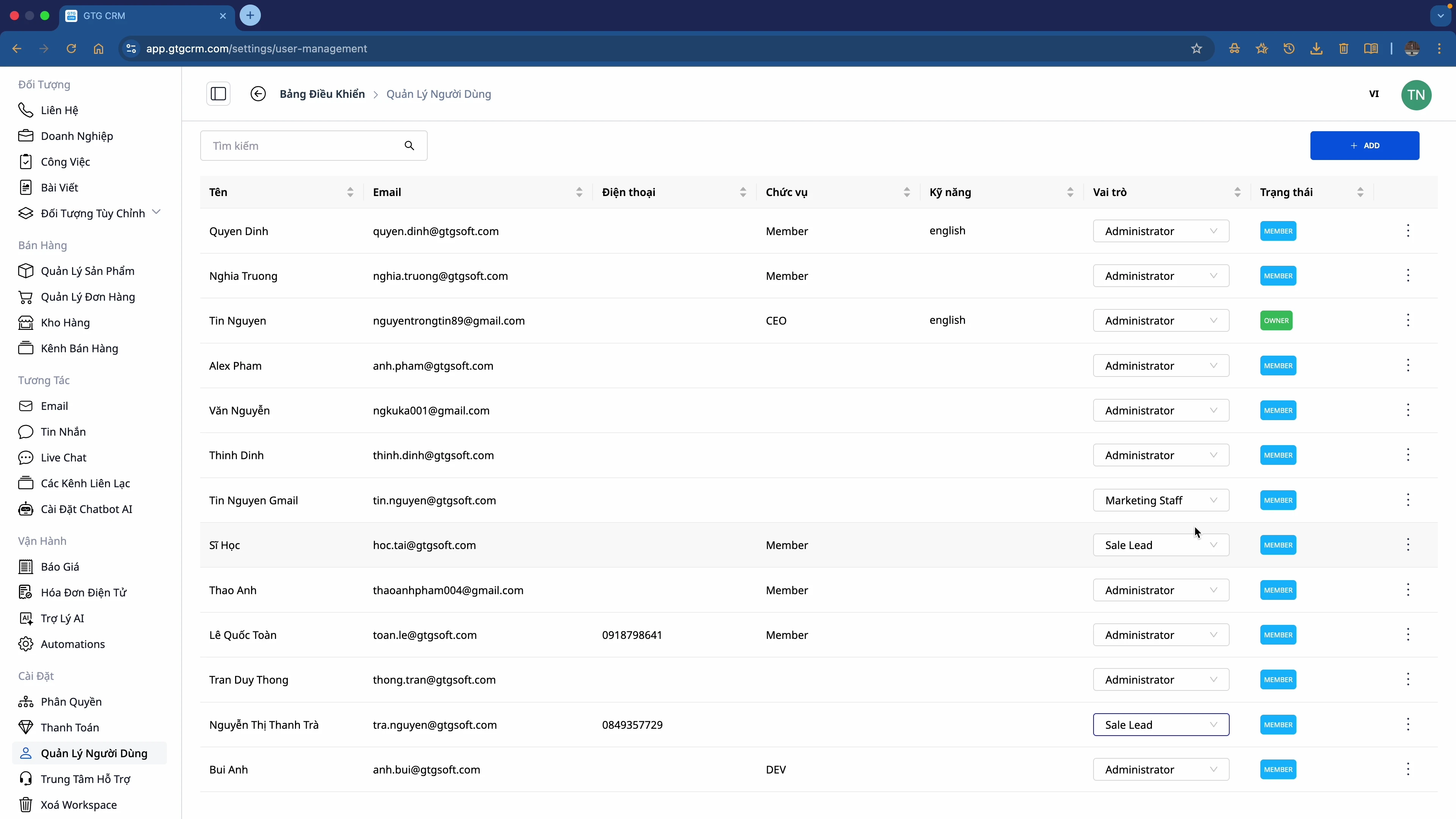
- Pojdite na Nastavitve → Dodeljevanje dovoljenj
- Ustvarite vloge, ki ustrezajo vaši organizaciji
- Dodelite vloge posameznim članom
- Brez skrbi razširite svojo ekipo!
💡 Nasvet: Začnite z vgrajenimi vlogami in jih nato prilagodite glede na dejanske potrebe vašega podjetja.
Ste pripravljeni preizkusiti to funkcijo brezplačno za vaše podjetje?
Brezplačni preizkus

