
Funktionsintroduktion
Du ved med sikkerhed én ting: Det er langt billigere at beholde en eksisterende kunde end at finde en ny. Men i din CRM ser alle kunder ens ud — der er ingen måde at vide, hvem der er den konsekvente store indkøber, hvem der plejede at være en VIP-kunde, men ikke har været tilbage i tre måneder, hvem der kun købte én gang og så forsvandt. Du vil gerne anerkende de fortjente og genvinde dem, der er ved at forlade dig, men du har ingen data til at gøre det systematisk.
GTG CRM gør det nu automatisk for dig.
Loyalty-funktionen scorer automatisk hver kontakt baseret på købsadfærd (nylighed, hyppighed, værdi), rangerer dem i niveauer, som du selv navngiver og farvelægger, og kører automatisk plejescenarier, når nogen stiger eller falder i niveau. Points genberegnes hver nat med en mekanisme, der falder over tid — så kunder, der ikke har handlet i et stykke tid, vil automatisk miste point, hvilket hjælper dig med tidligt at opdage dem, der er ved at forsvinde.
Problemer, Virksomheder Står Overfor
| Gammel metode | Konsekvens |
|---|---|
| Alle kunder i CRM er ens, ingen klassificering | Ved ikke, hvem der skal prioriteres, anerkender de forkerte personer |
| Husker VIP-kunder via hukommelse eller separate Excel-filer | Går glip af personer, forældede tal, ingen opdateringer |
| Opdager først en kunde, der forlader dig, når omsætningen er faldet | Opdager kunden er mistet for sent til at genvinde |
| Manuel, impulsiv pleje | Uensartet, nogle får pleje, andre glemmes |
GTG CRM omdanner købsadfærd til dagligt opdaterede point og kundenniveauer, direkte på kontaktprofiler og lister — og udløser derefter automatisk det rigtige plejescenarie på det rette tidspunkt.
Højdepunkter
1. Automatisk scoring baseret på købsadfærd
- Tre kernefaktorer: point baseret på nylighed (recency), hyppighed (frequency) og købsværdi (monetary) — en model, der er bevist inden for detailhandel.
- Forudindstillet konfiguration baseret på forretningsmodel: vælg en passende forudindstilling (detail, service, abonnement...) og finjuster derefter vægtningen efter din egen mening.
- Genberegnes hver nat, falder over tid: kunder, der ikke har handlet i et stykke tid, vil automatisk miste point — du kan se, hvem der er ved at blive kold, før du mister dem helt.
2. Niveauer defineret af dig — egne navne og farver
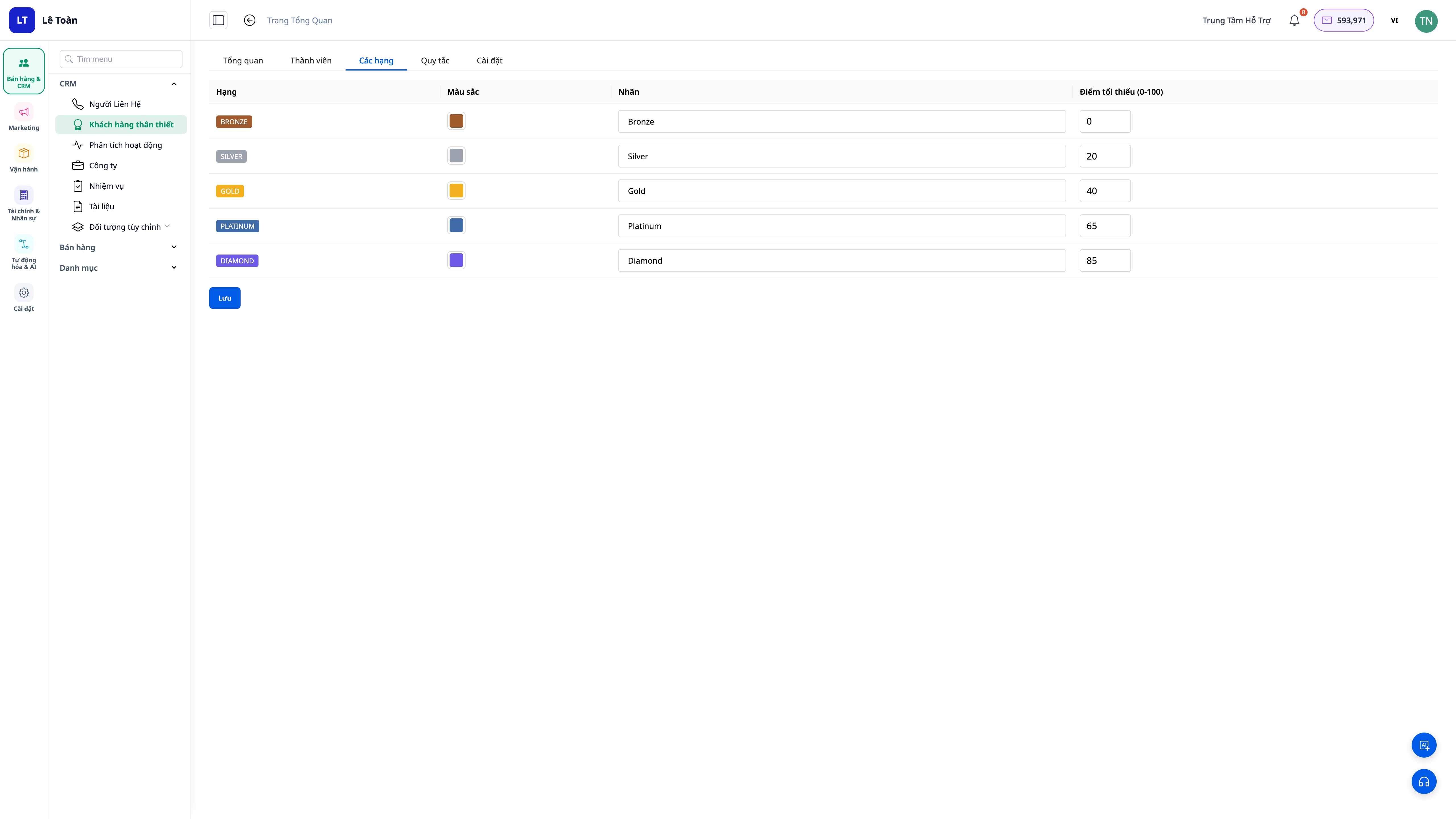
- Fuld tilpasning: navngiv niveauerne (f.eks. Bronze / Sølv / Guld / Diamant) og vælg en individuel farve for hvert niveau.
- Tillad eller bloker for fald i niveau: slå muligheden for nedgradering til/fra for at passe til din politik.
- Synlig der, hvor du arbejder: niveau-ikoner vises på kontaktlisterne, og der er en separat Loyalty-fane på kundeprofiler.
3. Automatiske plejescenarier ved niveauændring
- Stigning i niveau: send automatisk takke-beskeder, belønninger eller tildel opgaver til den ansvarlige medarbejder.
- Fald i niveau / afkøling: udløs automatisk et genvundne (win-back) scenarie på det rette tidspunkt, i stedet for at lade kunderne stille og roligt forlade dig.
- Ingen behov for at starte fra bunden: skabelon-scenarier (playbooks) er forudinstalleret, når du aktiverer Loyalty, du skal bare bruge dem eller redigere dem.
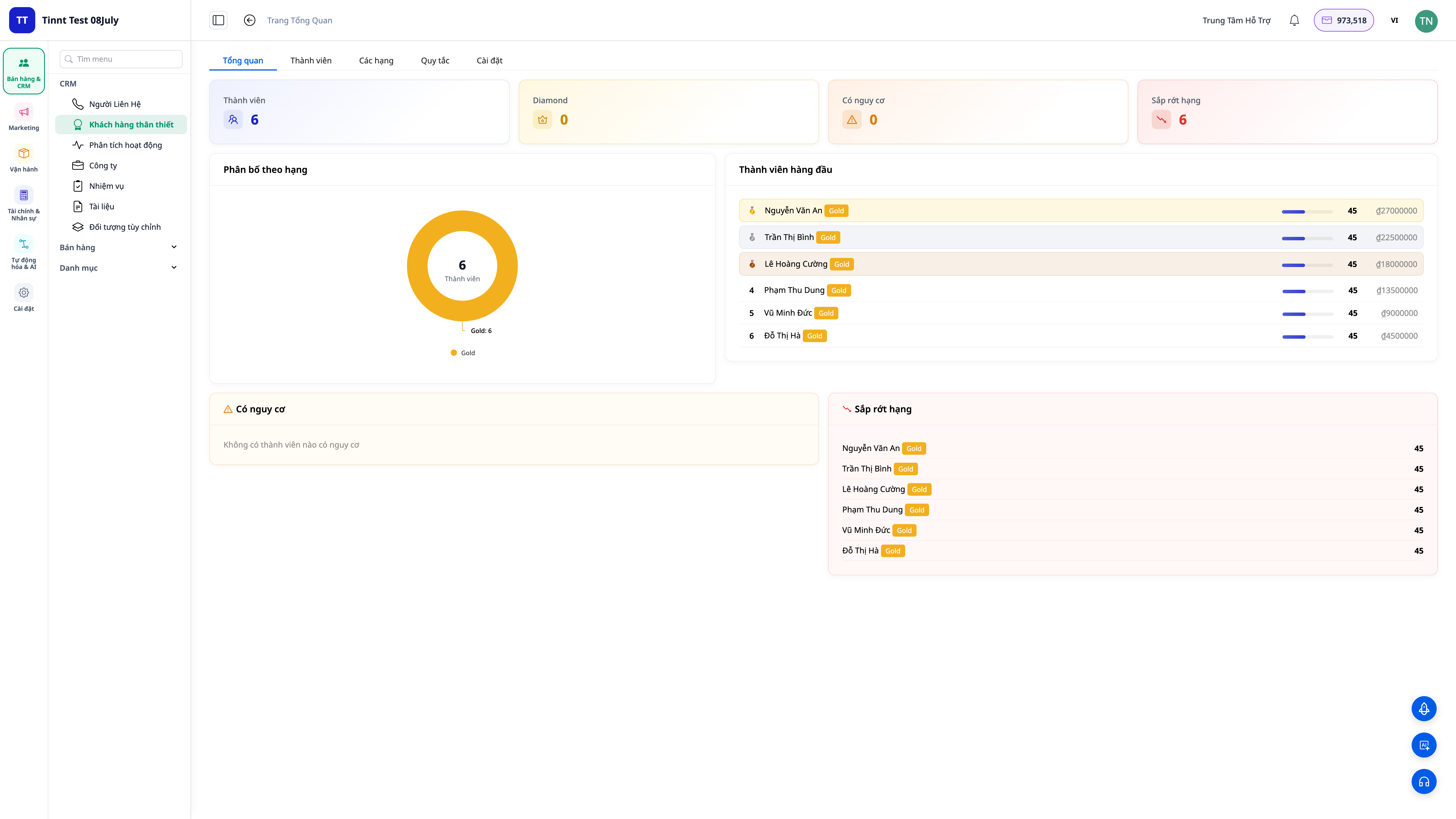
4. Loyalty Dashboard — et overblik, der forklarer alt
- Oversigt Dashboard: antal kunder pr. kategori, fordeling, tendenser.
- Leaderboard: hurtigt overblik over de mest værdifulde topkunder.
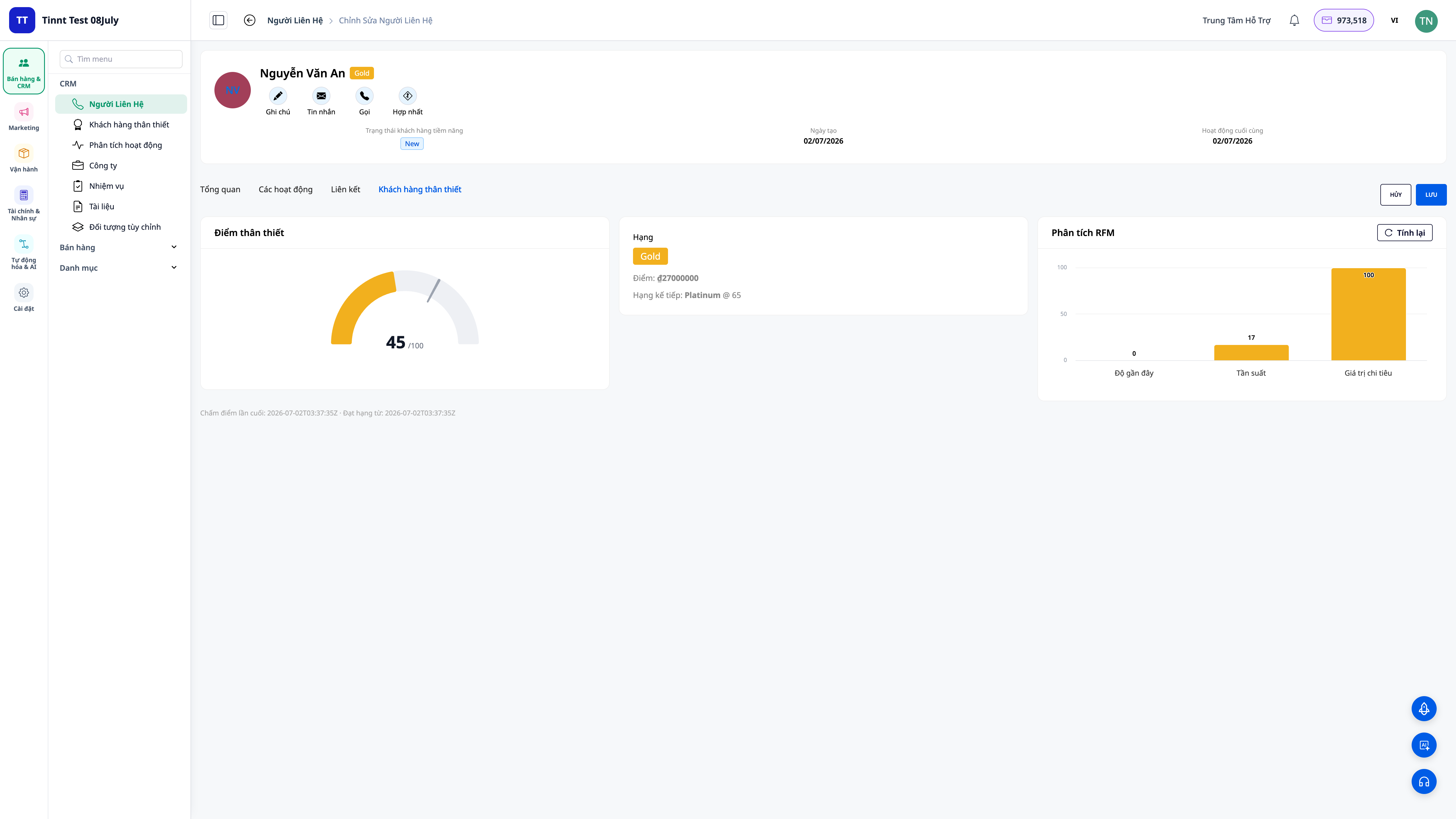
- På hver profil: nuværende score, rang, og historik for rangændringer for hver kunde.
Fordele For Virksomheden
| Funktion | Konkrete fordele for dig |
|---|---|
| Automatisk Recency/Frequency/Monetary scoring | Præcist vide, hvem der er de mest værdifulde kunder — ingen gætteri |
| Brugerdefinerede kategorier med navne + farver | Klar kundesegmentering, tak digte til de rigtige personer |
| Score reduceres over tid, genberegnes hver nat | Tidlig opdagelse af kunder, der er ved at forlade, for at kunne gribe ind |
| Automatiske kundeplejescenarier ved rangændring | Konsekvent kundepleje, ingen mangler, ingen tilfældighed |
| Dashboard + rang-badges i listen | Prioriter beslutninger direkte på arbejdsflowet |
Hvem Er Det Til?
- Detailhandlere, F&B, kosmetik, modebutikker med en tilbagevendende kundebase, der ønsker at fastholde og øge kundernes livstidsværdi.
- Servicevirksomheder / abonnementsvirksomheder der har brug for tidlig opdagelse af kunder, der er ved at opsige deres abonnement.
- Salgsteam / kundeserviceteams der ønsker at prioritere de rigtige kundegrupper og automatisere taknemmelighed og fastholdelsesindsatser.
Hvordan Kommer Man I Gang?
Gå til sektionen CRM → Loyalty, aktiver programmet, vælg en standard scoring-preset baseret på din forretningsmodel, navngiv og farvelæg de forskellige rangniveauer. Systemet vil automatisk score og rangere dine kunder allerede samme nat. Se trin-for-trin guide til opsætning af Loyalitetsprogrammet, læs den praktiske historie Fra engangskunde til loyal kunde, og lær hvordan du optimerer kundedata i CRM for mere præcis scoring.
Gratis prøveperiode — ingen kreditkort nødvendig.


