
Bạn sẽ làm được gì sau hướng dẫn này
Khai dữ liệu nền (đơn vị tính, tổ sản xuất, phân loại sản phẩm) → dựng công thức sản phẩm (BOM) → tạo và chạy một lệnh sản xuất → lập lịch theo công suất bằng biểu đồ Gantt → vận hành ngay tại xưởng bằng màn hình cảm ứng và bảng andon (MES) → xem hệ thống tự tính giá vốn thành phẩm và ghi bút toán → chạy hoạch định (MRP) để biết cần mua và cần làm gì. Từ nguyên liệu đến thành phẩm có giá vốn chính xác, tất cả trong cùng một hệ thống.
Chưa nắm tổng quan tính năng? Xem trước bài Quản Lý Sản Xuất để hiểu module làm được gì.
Chuẩn bị trước
1. Đăng nhập GTG CRM, được cấp quyền Manufacturing (Xem/Thao tác cho BOM, Lệnh sản xuất; và quyền Costing riêng để xem giá thành/chênh lệch). — Quyền sản xuất do quản trị workspace cấp; số giá vốn chỉ hiện với người có quyền Costing.
2. Đã có Hệ thống tài khoản (Chart of Accounts) trong Kế toán. — Để bút toán giá vốn thành phẩm (COGM) ghi được vào sổ cái.
3. Đã tạo các sản phẩm/nguyên liệu và có kho hàng. — Lệnh sản xuất trừ nguyên liệu từ kho nguồn và nhập thành phẩm vào kho đích.
4. (Cho Bước 7–8) Bật "Màn hình xưởng thời gian thực" trong Cài đặt Sản xuất; thợ vận hành được cấp quyền vận hành xưởng. — Bật màn hình xưởng thời gian thực bằng một công tắc; thợ chỉ chạy được trạm khi có quyền vận hành.
Bước 1 — Khai dữ liệu nền (Đơn vị tính, Tổ sản xuất, Phân loại sản phẩm)
- Mở Manufacturing ▸ Settings. Các đơn vị chuẩn (kg, g, L, cái, hộp, giờ…) đã có sẵn; thêm đơn vị riêng nếu cần.
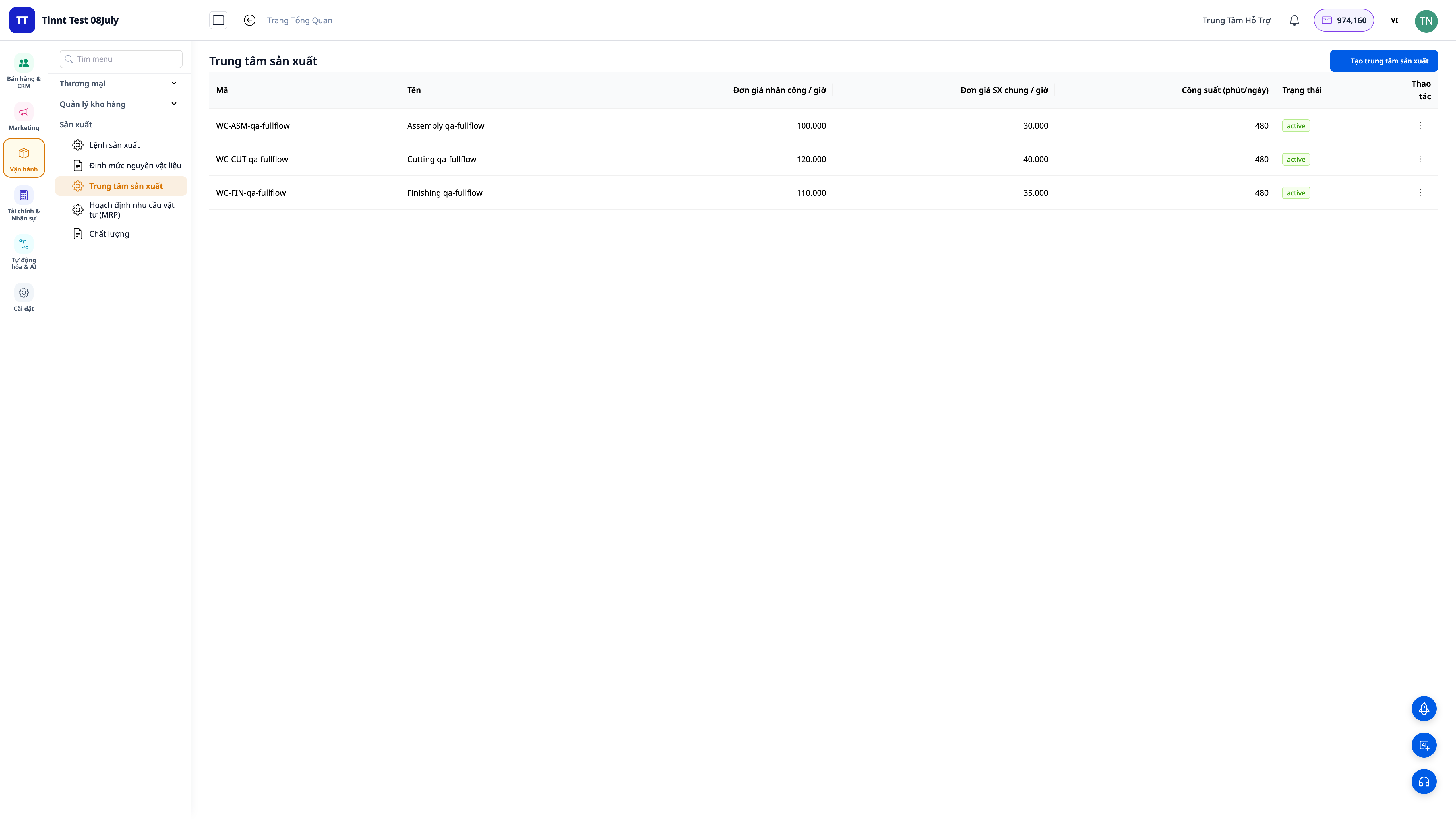
- Vào Work Centers (Tổ sản xuất): tạo các tổ nơi công việc diễn ra (Cắt, Lắp ráp, Hoàn thiện…). Đặt đơn giá nhân công và chi phí chung mỗi giờ cho từng tổ — hai con số này chạy vào giá vốn.
- Với từng sản phẩm, đánh dấu loại: Nguyên liệu / Linh kiện / Thành phẩm / Bao bì, và đặt đơn vị tồn kho.
✅ Kết quả mong đợi: Có danh sách đơn vị tính, ít nhất một tổ sản xuất kèm đơn giá nhân công + chi phí chung/giờ, và các sản phẩm đã được phân loại đúng.
Bước 2 — Dựng công thức sản phẩm (BOM)
- Vào Manufacturing ▸ Bills of Materials ▸ New.
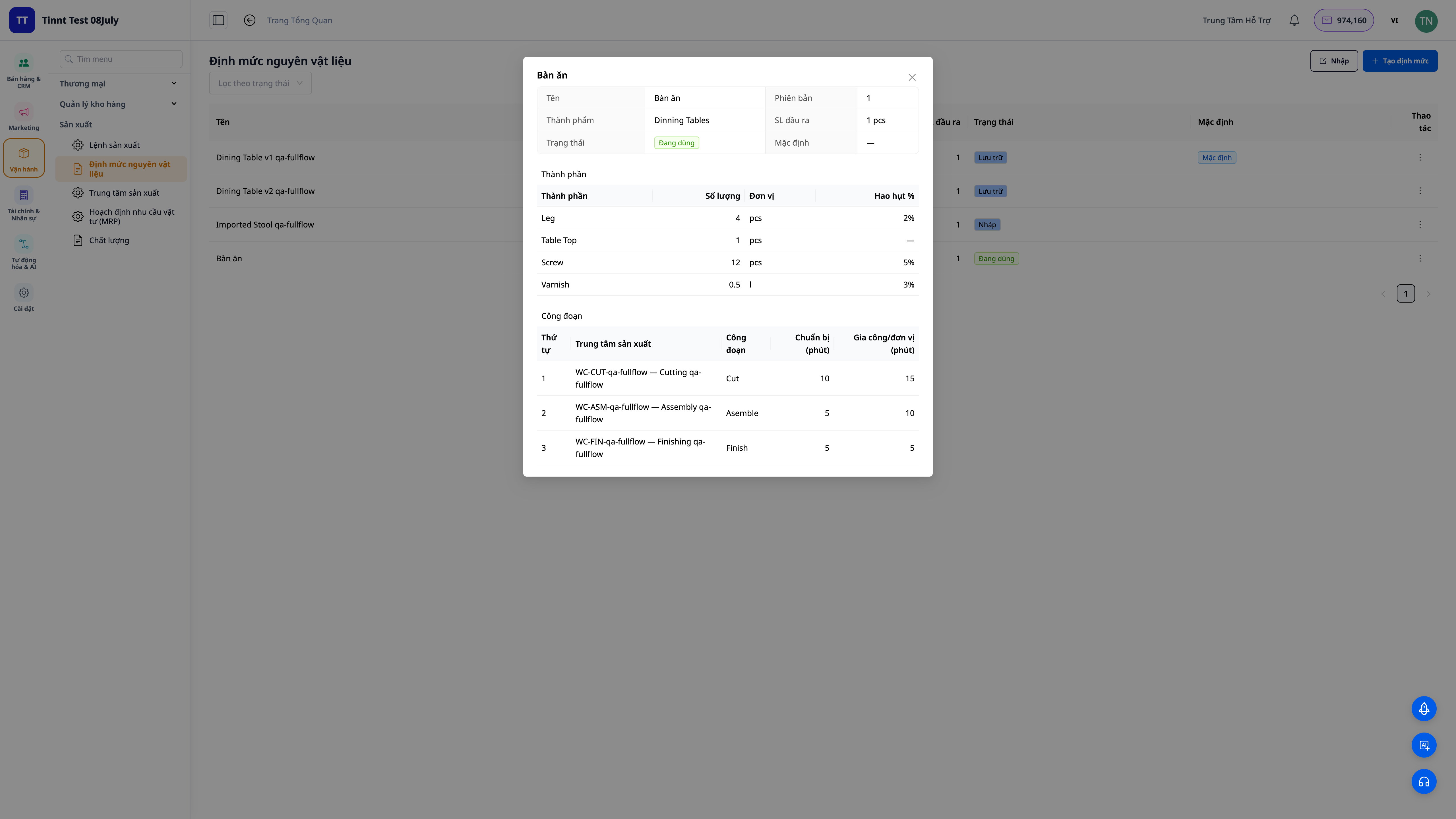
- Chọn thành phẩm, rồi liệt kê từng nguyên liệu: số lượng, đơn vị, % hao hụt (scrap).
- Thêm các công đoạn (routing): mỗi công đoạn chạy ở tổ nào, thời gian chuẩn bị + thời gian chạy mỗi đơn vị.
- Bấm Activate (Kích hoạt) khi công thức sẵn sàng.
✅ Kết quả mong đợi: BOM ở trạng thái Activated, hiển thị đủ nguyên liệu (kèm hao hụt) và các công đoạn. Nếu một linh kiện tự nó có BOM riêng, hệ thống nhận đây là công thức nhiều cấp.
💡 Mẹo: Đã có danh sách nguyên liệu/BOM trong Excel? Dùng mẫu tải về, hoặc kéo thẳng file của bạn vào và để AI khớp cột — đỡ phải gõ lại tay.
Bước 3 — Tạo lệnh sản xuất
- Vào Manufacturing ▸ Production Orders ▸ New.
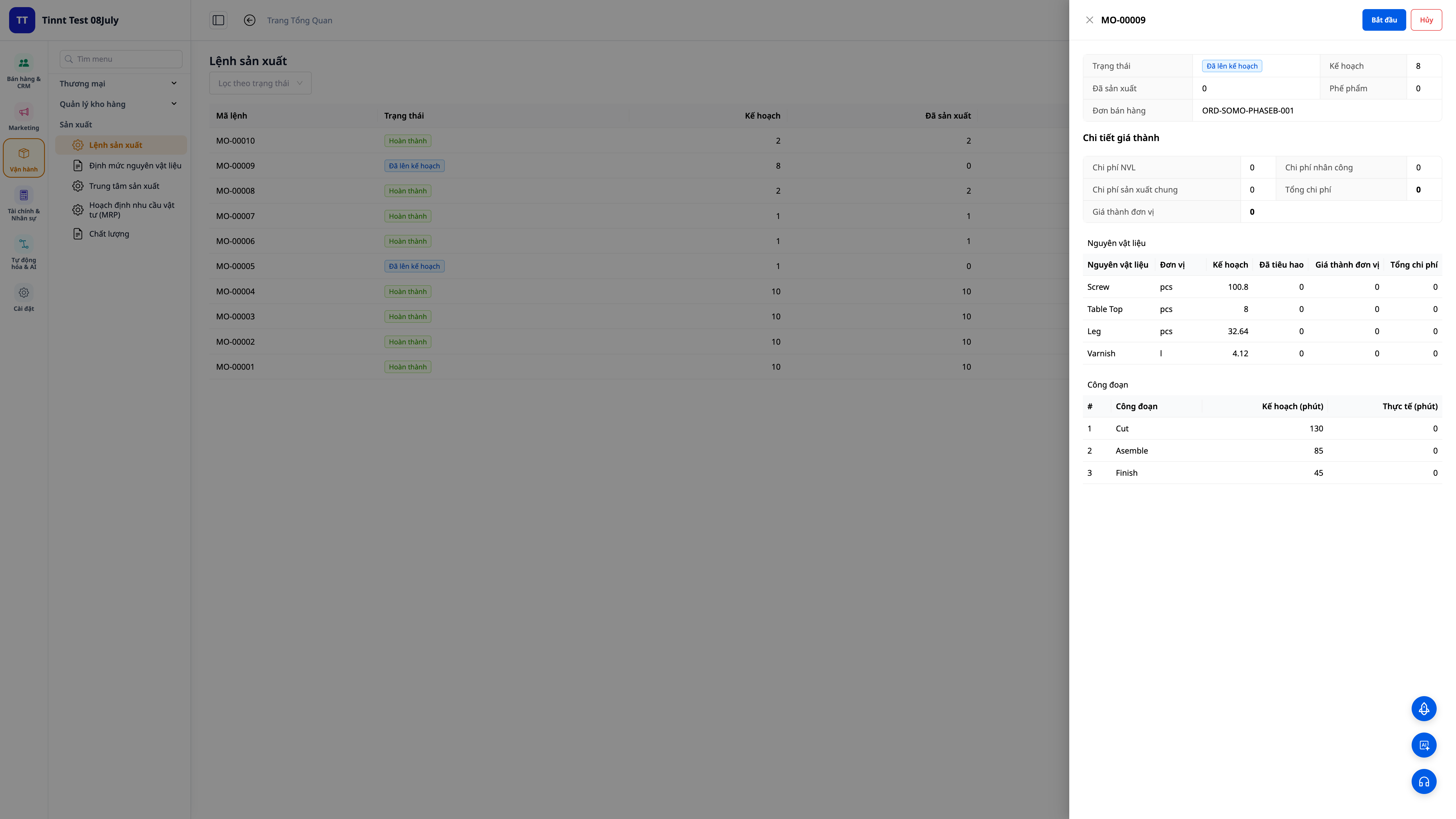
- Chọn sản phẩm, công thức (BOM) và số lượng cần làm.
- Chọn kho nguồn (lấy nguyên liệu) và kho đích (nhập thành phẩm).
✅ Kết quả mong đợi: Lệnh sản xuất được tạo, hệ thống tự bung công thức ra danh sách nguyên liệu và công đoạn cần đúng cho số lượng đó (đã cộng hao hụt).
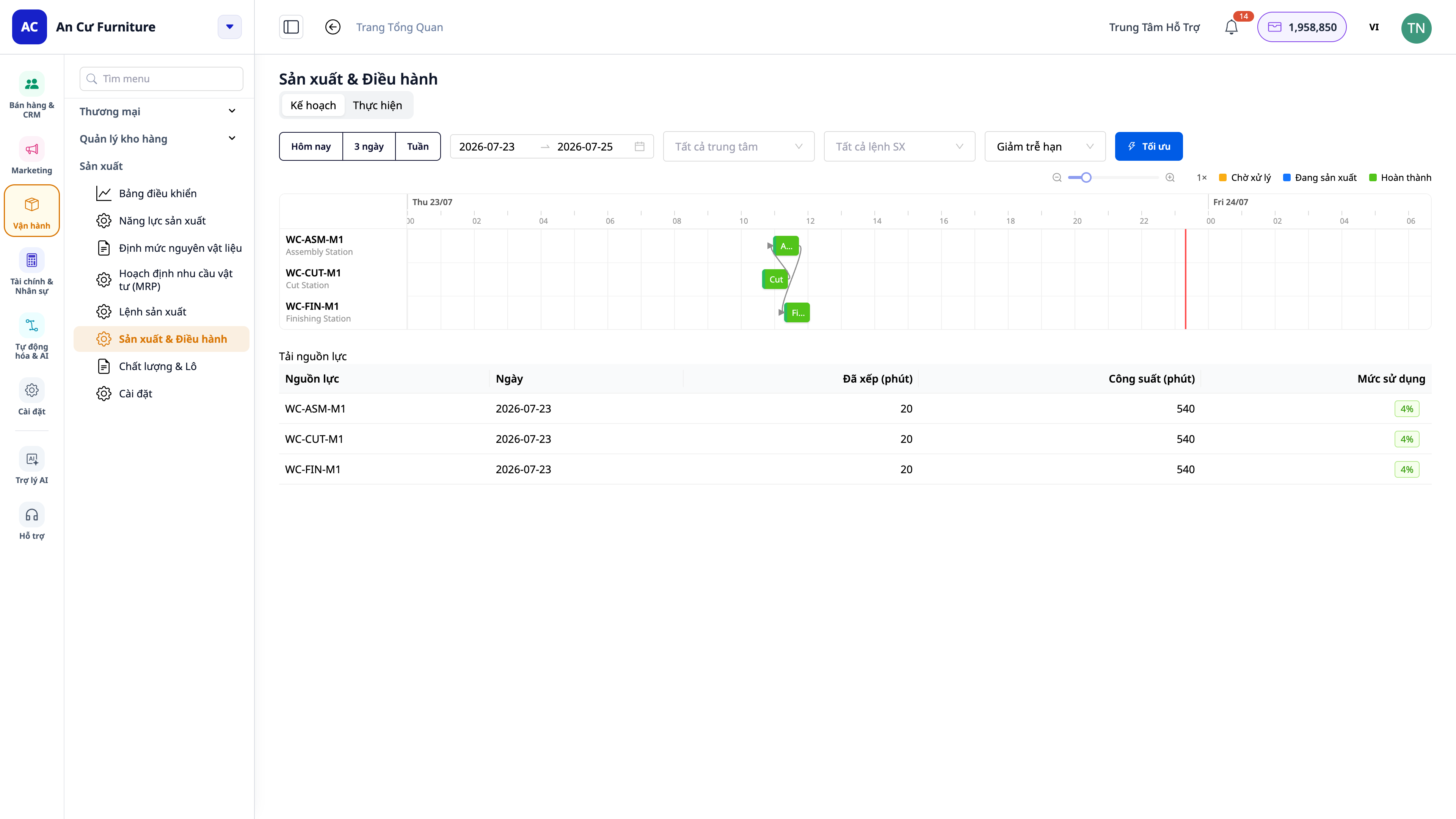
Bước 4 — Lập lịch sản xuất theo công suất (biểu đồ Gantt)
- Vào Manufacturing ▸ Production ▸ Plan — màn hình lập lịch dạng biểu đồ Gantt. Trước tiên khai máy móc/tổ sản xuất kèm lịch làm việc (calendar) và công suất nếu chưa có.
- Hệ thống xếp các công đoạn của các lệnh vào các máy/tổ theo công suất hữu hạn; mỗi công đoạn là một thanh trên dòng thời gian.
- Bấm Today (Hôm nay) / 3 days (3 ngày) / Week (Tuần) — hoặc chọn khoảng ngày — để đóng khung đúng giai đoạn bạn muốn xem.
- Nhìn các thanh để thấy ngày hoàn thành dự kiến, tổ nào đang dồn việc, và thời gian chuyển đổi (changeover) giữa hai sản phẩm khác nhau trên cùng một máy.
✅ Kết quả mong đợi: Các công đoạn được xếp lịch theo nguồn lực và lịch làm việc; nút Hôm nay / 3 ngày / Tuần đổi khung thời gian trên trục Gantt ngay lập tức; bạn thấy ngày hoàn thành dự kiến, điểm nghẽn và thời gian chuyển đổi.
Bước 5 — Vận hành ngay tại xưởng: máy trạm cho thợ (MES)
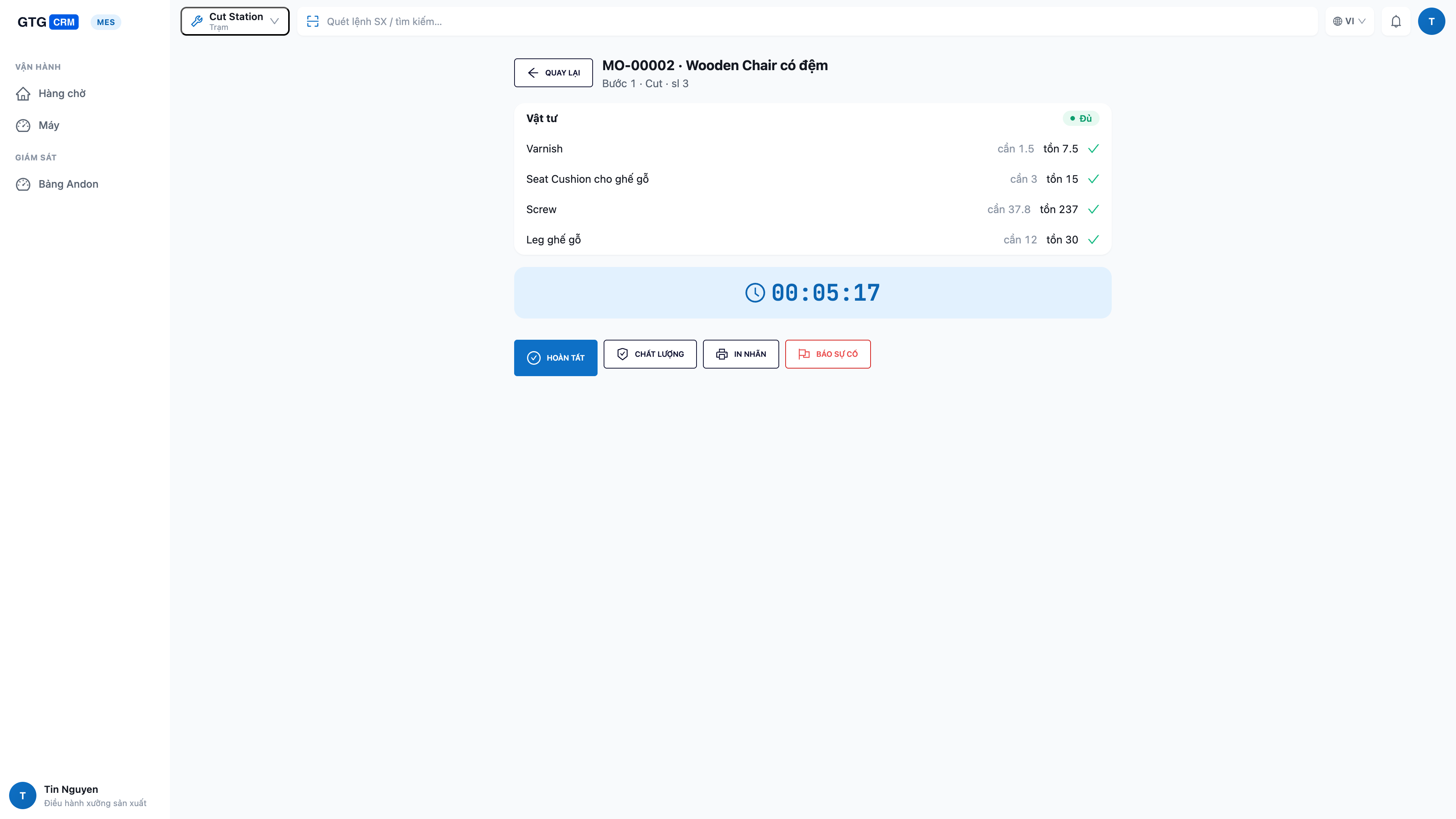
- Đảm bảo đã bật "Màn hình xưởng thời gian thực" (Bước chuẩn bị 4). Trên máy tính bảng tại trạm, mở ứng dụng Màn Hình Xưởng, đăng nhập và chọn trạm (Work Center) của tổ đó.
- Thợ thấy hàng chờ các công đoạn của đúng trạm mình; việc sẵn sàng nằm trên đầu. Chạm vào một việc để mở chi tiết (công thức + kiểm tra nguyên liệu: cần bao nhiêu / còn bao nhiêu / thiếu bao nhiêu).
- Chạm Bắt đầu (Start) để chạy — nguyên liệu bị trừ khỏi kho. Làm xong chạm Hoàn thành (Complete) và nhập số làm được, số hỏng, thời gian dừng.
- Khi cần, chuyển trạng thái máy (đang chạy / rảnh / chuyển đổi / dừng), làm bước kiểm tra chất lượng, hoặc in tem lô ngay tại trạm.
- Máy hỏng hay thiếu nguyên liệu? Chạm Báo sự cố (andon) — một chạm để báo động lên quản lý.
✅ Kết quả mong đợi: Việc đã Bắt đầu rời khỏi hàng chờ và chuyển sang "đang chạy"; sau khi Hoàn thành, số làm được/số hỏng được ghi ngay, lệnh sản xuất cập nhật tiến độ; báo sự cố gửi thông báo tới quản lý.
ℹ️ Phân quyền: thợ vận hành chỉ chạy công đoạn ở trạm của mình; việc phát lệnh (Release) và lập kế hoạch dành cho người quản lý sản xuất. Nếu nút bị mờ, bạn chưa được cấp quyền tương ứng — liên hệ quản trị workspace.
Bước 6 — Theo dõi cả chuyền trên bảng andon
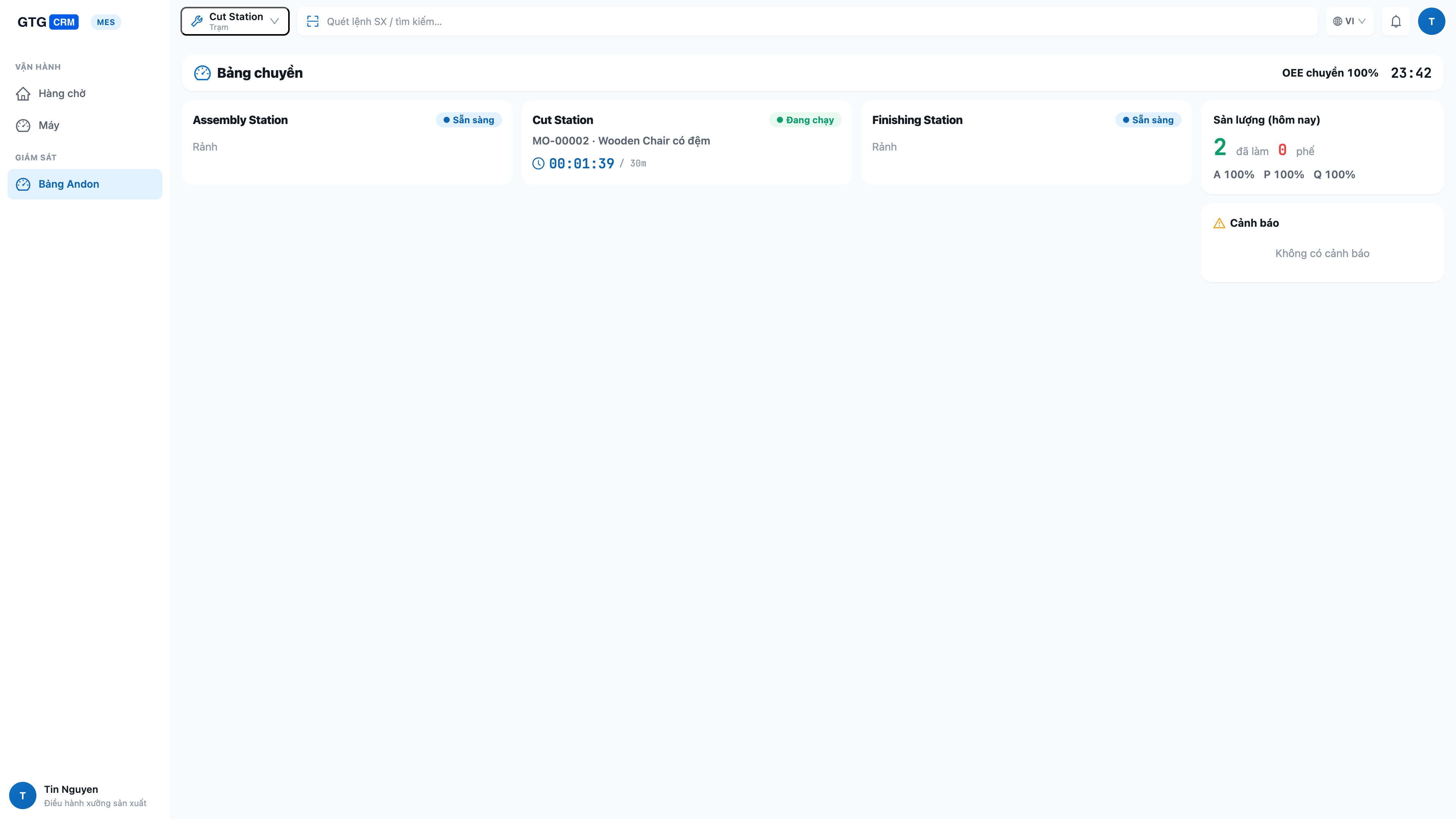
- Trên một màn hình lớn treo tường, mở ứng dụng Màn Hình Xưởng ở chế độ Bảng điều hành (Andon) — chế độ này xem tất cả các trạm.
- Xem trạng thái trực tiếp của từng trạm (đang chạy / rảnh / chuyển đổi / dừng), việc đang làm và tiến độ, cùng năng suất và chỉ số OEE của cả chuyền.
✅ Kết quả mong đợi: Bảng hiện mọi trạm với trạng thái theo thời gian thực; trạm dừng hoặc chỗ thiếu nguyên liệu hiện nổi bật; số liệu tự cập nhật khi thợ bấm chạy/hoàn thành ở các máy trạm.
Bước 7 — Hoàn thành lệnh và xem giá vốn tự tính
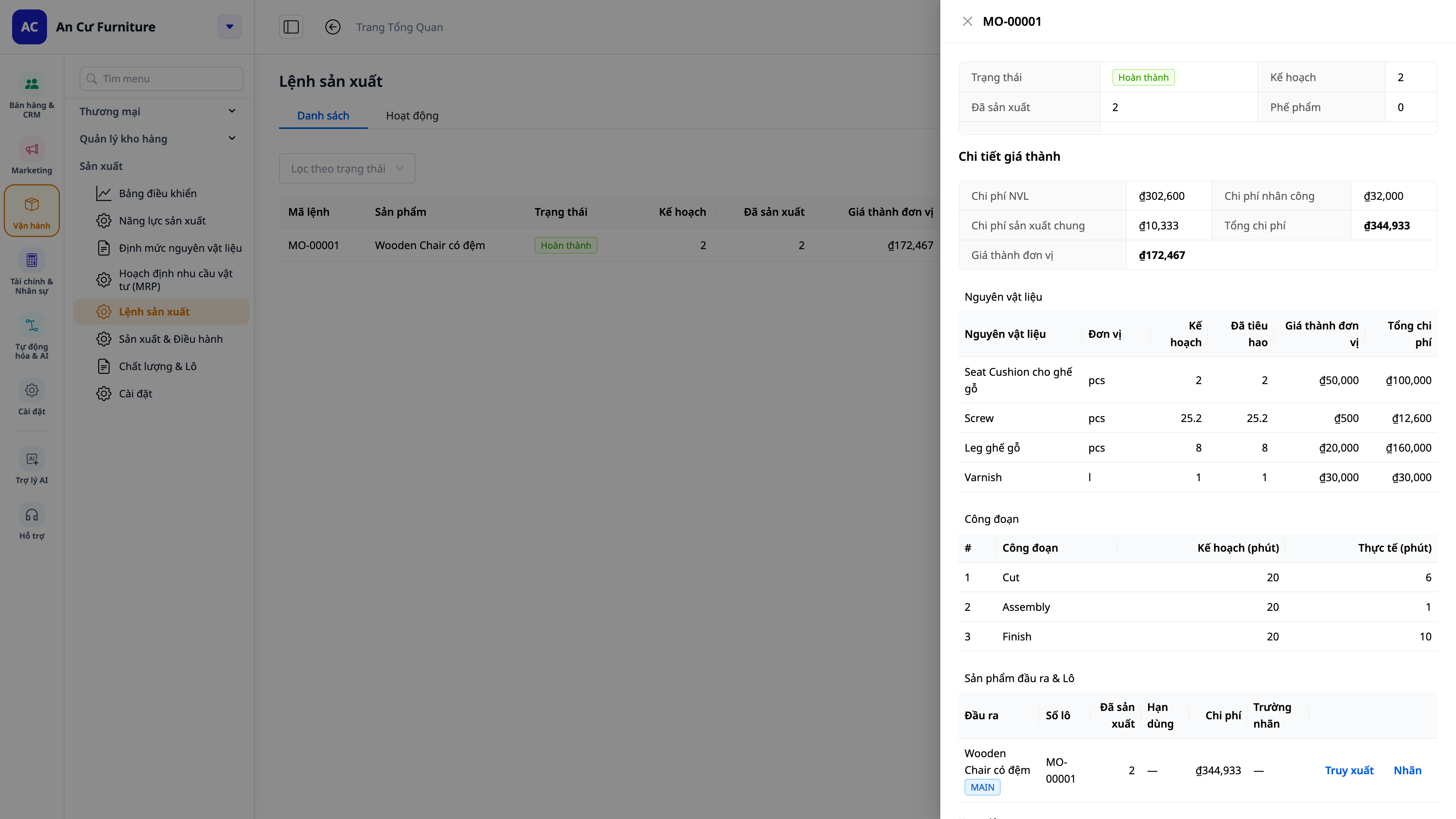
- Khi công đoạn cuối của lệnh hoàn thành (từ máy trạm ở Bước 5, hoặc bấm Complete trong portal), hệ thống chốt số làm được.
✅ Kết quả mong đợi: Hệ thống tính giá vốn đơn vị = (nguyên liệu + nhân công + chi phí chung) ÷ số lượng làm được — dồn đúng từ số thực làm và số hỏng ghi ở từng công đoạn; thành phẩm nhập kho đích đúng giá vốn đó; một bút toán giá vốn thành phẩm (COGM) được ghi vào sổ cái. Nếu bạn đã đặt giá thành chuẩn, lệnh hiện thêm phần chênh lệch (thực tế so với chuẩn).
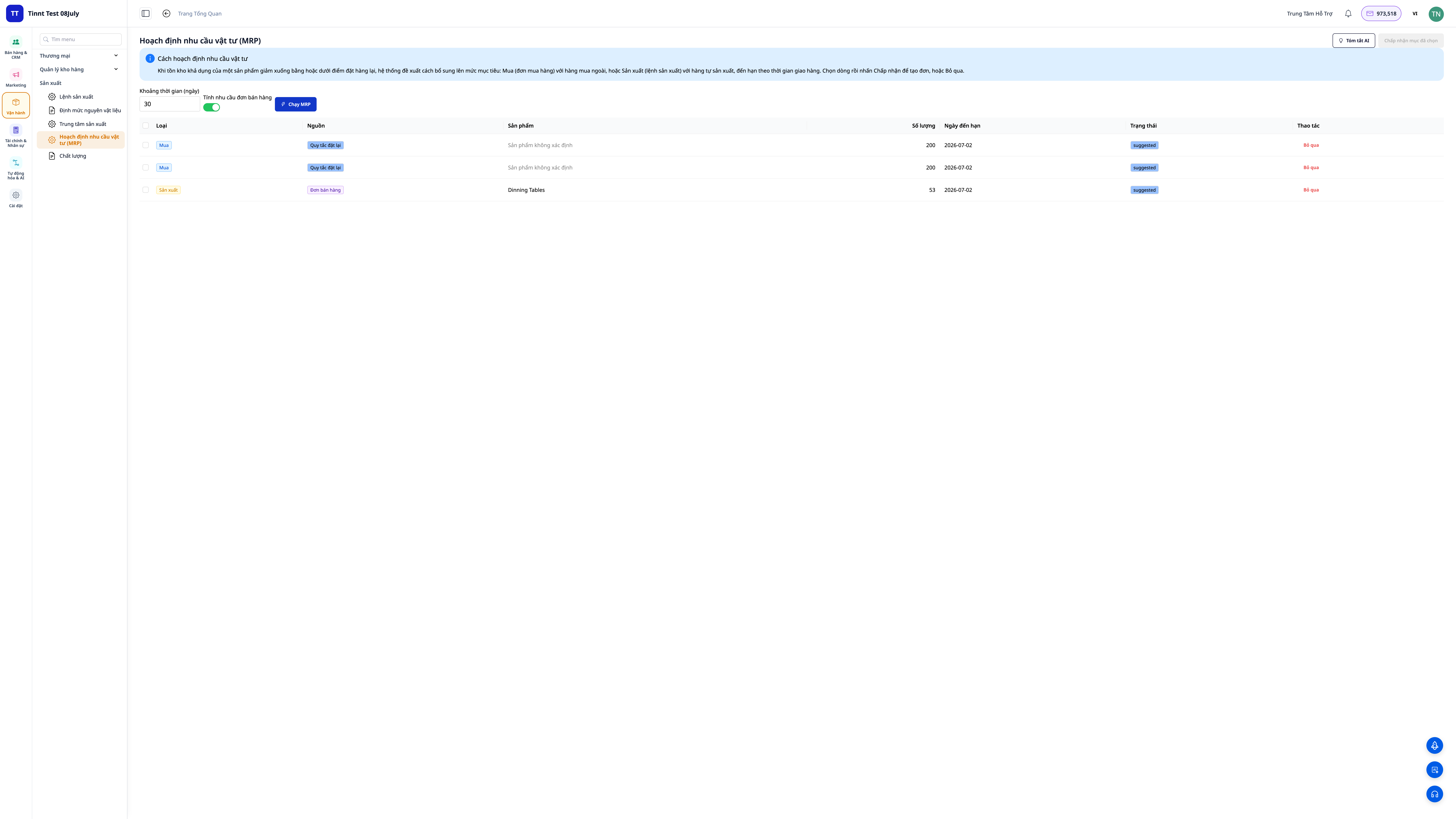
Bước 8 — Hoạch định mua và làm (MRP)
- Đặt định mức tồn kho (tối thiểu / điểm đặt lại / mục tiêu) cho từng sản phẩm.
- Vào Manufacturing ▸ Planning (MRP). Nếu muốn tính theo đơn khách, bật "Include sales-order demand" trước khi chạy.
- Bấm Run. Xem các gợi ý Purchase Orders (cần mua) và Manufacturing Orders (cần làm), mỗi gợi ý ghi rõ nguồn.
- Duyệt và chấp nhận các gợi ý muốn dùng — gợi ý "làm" được chấp nhận sẽ thành lệnh sản xuất.
✅ Kết quả mong đợi: Danh sách gợi ý mua/làm hiện ra, mỗi dòng có tag nguồn (định mức tồn kho / đơn bán / cả hai); các gợi ý "làm" được chấp nhận chuyển thành lệnh sản xuất mới.
Bước 9 — Khai đồng/phụ phẩm và truy vết lô
- Trong công thức (BOM), khai thêm đồng/phụ phẩm (outputs) nếu một mẻ cho ra nhiều loại thành phẩm/phụ phẩm.
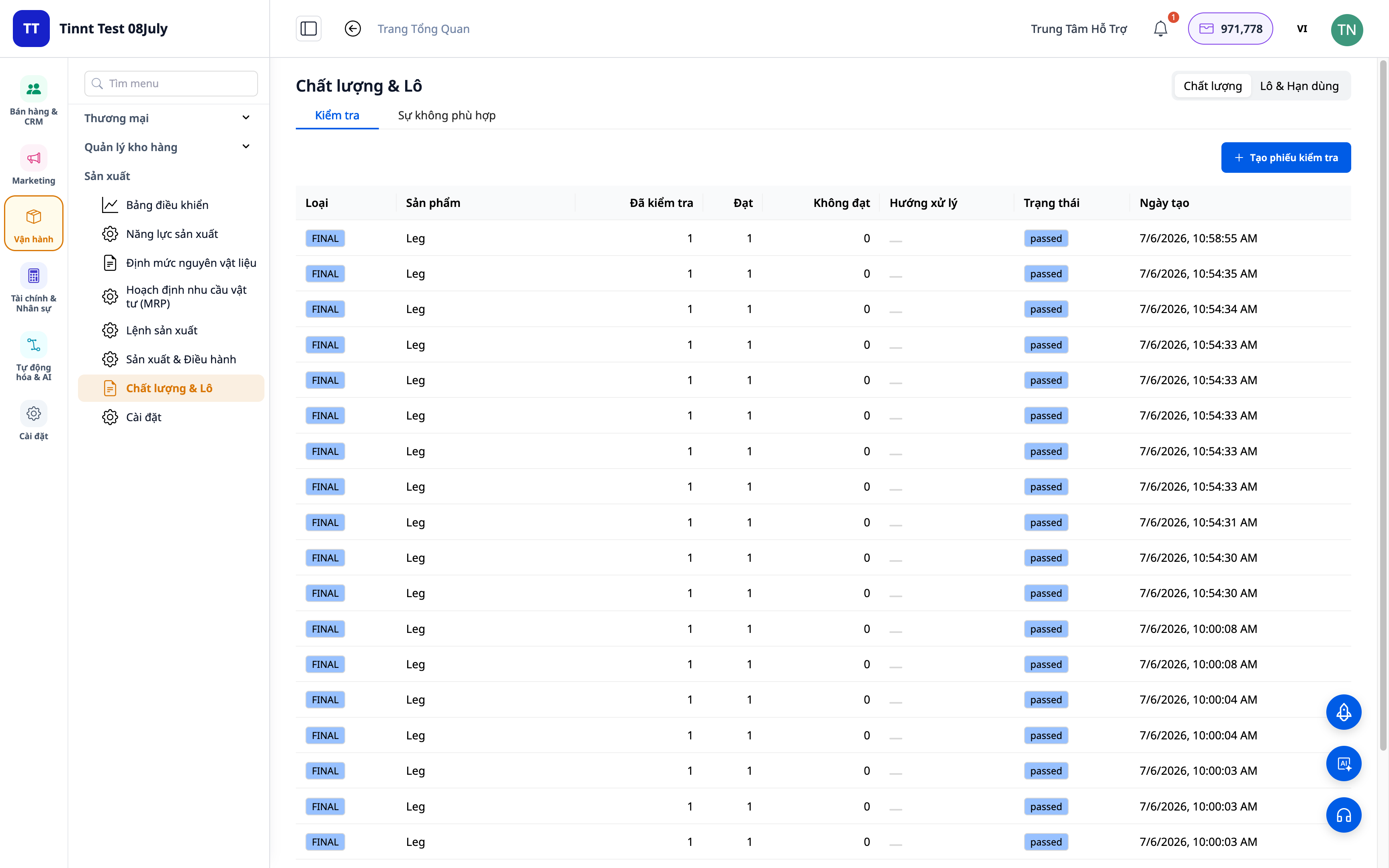
- Khi hoàn thành lệnh, hệ thống gán số lô cho thành phẩm. Vào Lot Traceability để xem phả hệ (mẻ này dùng nguyên liệu lô nào) và hạn dùng.
- Đặt hạn dùng cho nguyên liệu/thành phẩm để nhận cảnh báo trước khi tới hạn.
✅ Kết quả mong đợi: Thành phẩm có lô; tra được phả hệ nguyên liệu; nguyên liệu/thành phẩm sắp hết hạn hiện cảnh báo. Số lượng lẻ (đơn vị phân số) nhập được bình thường.
Bước 10 — Đọc cố vấn MRP và in tem lô
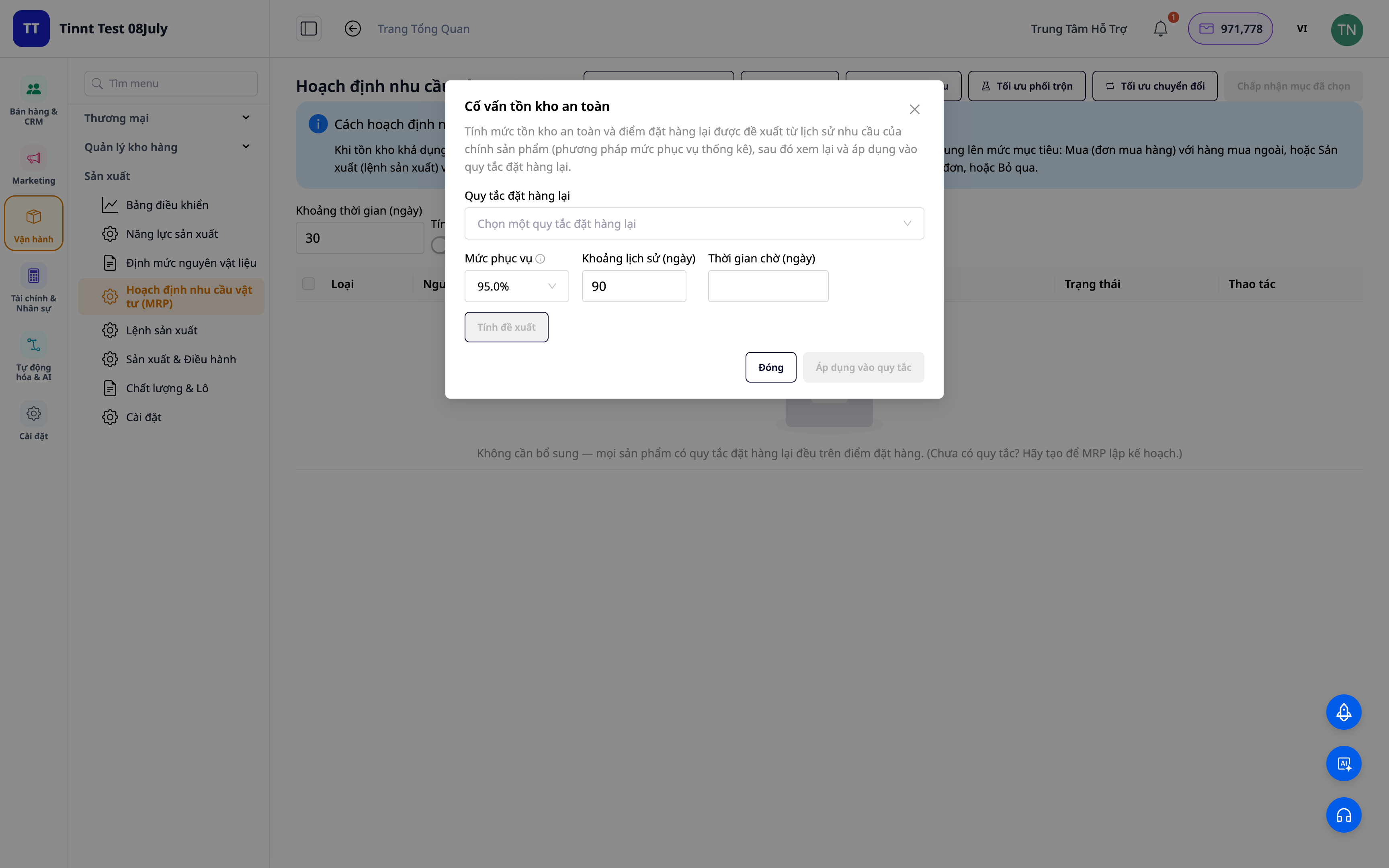
- Trong Planning (MRP), mở các cố vấn: tồn an toàn, cỡ lô, phối trộn, tối ưu chuyển đổi máy, dự báo nhu cầu — trình bày bằng ngôn ngữ dễ hiểu, gọi đúng tên sản phẩm.
- Xem chỉ số OEE/SPC để đánh giá hiệu suất thiết bị và chất lượng.
- Từ một lô thành phẩm, bấm In tem lô (PDF) để in nhãn dán.
✅ Kết quả mong đợi: Các cố vấn hiển thị gợi ý rõ ràng theo tên sản phẩm; xem được chỉ số OEE/SPC; tem lô xuất ra file PDF in được.
Bảng tra nhanh kết quả mong đợi
Khai tổ sản xuất — Đơn giá nhân công + chi phí chung/giờ đã đặt
Kích hoạt BOM — Trạng thái Activated, đủ nguyên liệu + công đoạn
Tạo lệnh sản xuất — Công thức tự bung ra nguyên liệu và công đoạn
Lập lịch Gantt (Bước 4) — Công đoạn xếp theo công suất; nút Hôm nay/3 ngày/Tuần đổi khung thời gian; thấy changeover
Máy trạm cho thợ (Bước 5) — Bắt đầu/Hoàn thành tại trạm, nhập số làm được/số hỏng, báo sự cố một chạm
Bảng andon (Bước 6) — Mọi trạm hiện trạng thái thời gian thực + OEE cả chuyền
Hoàn thành lệnh (Bước 7) — Giá vốn đơn vị tự tính (dồn từ từng công đoạn), thành phẩm nhập kho đúng giá, bút toán COGM ghi vào sổ
Chạy MRP — Gợi ý mua/làm kèm nguồn nhu cầu
Truy vết lô (Bước 9) — Thành phẩm có lô, tra được phả hệ + cảnh báo hạn dùng
Cố vấn MRP / in tem (Bước 10) — Gợi ý theo tên sản phẩm; tem lô xuất PDF
Lưu ý
- Số giá vốn và chênh lệch chỉ hiển thị với người có quyền Costing.
- Bản vá giá vốn hàng tự sản xuất là áp dụng từ nay về sau — các lệnh sản xuất cũ trước khi bật tính năng không được tính lại giá vốn ngược.
- Màn hình xưởng thời gian thực cần được bật trong Cài đặt Sản xuất; thợ vận hành cần được cấp quyền vận hành xưởng để chạy công đoạn, còn phát lệnh (Release) là việc của người quản lý.
- Máy trạm và bảng andon dùng chung một ứng dụng: một máy tính bảng đặt ở mỗi trạm (chế độ máy trạm), một màn hình lớn cho cả chuyền (chế độ bảng andon).
- Bạn không cần giữ tồn thủ công cho đơn bán — đơn bán đã giữ phần tồn cần, và thành phẩm làm ra chảy thẳng vào phần giữ đó.
- Bút toán giá vốn cần Hệ thống tài khoản đã thiết lập trong Kế toán để ghi sổ được.

