
Feature Introduction
Generic chatbots are common, but your customers don't ask generic questions. They ask, "Does the store deliver on Sundays?", "Is size M in blue in stock?", "What is the shop's return policy?". A bot that knows nothing about your business will answer incorrectly, or worse — make up answers, causing customers to lose trust from the very first message.
Now your AI chatbot answers from your own documents.
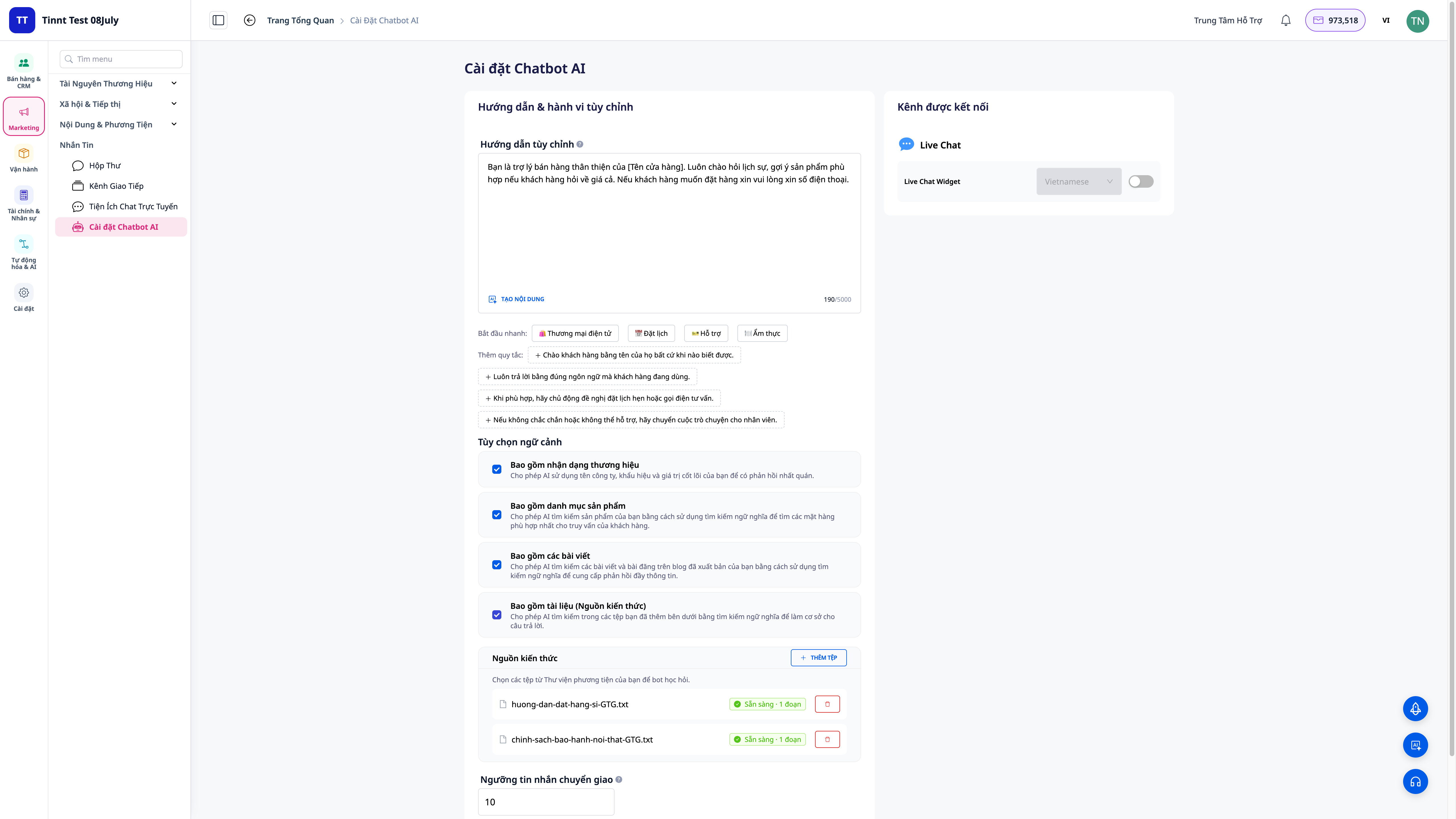
You upload documents (policies, price lists, FAQs, product guides), the system processes them and allows the bot to search to answer correctly based on that content — combining semantic search with keyword search to get the most accurate answer. You can enable/disable specific bot capabilities, and the bot can perform real tasks for customers: track orders, check inventory, create support tickets, schedule appointments — within safe limits, respecting privacy.
Problems Businesses Are Facing
| Old Approach | Consequences |
|---|---|
| Generic bots know nothing about your business | Incorrect or fabricated answers, customer distrust |
| Staff must be available 24/7 to answer repetitive questions | High labor costs, slow response outside business hours, lost customers |
| Inconsistent answers from different staff members | Misinformation, complaints |
| Bots cannot perform real tasks (order tracking, inventory checks) | Still requires human intervention, no immediate resolution |
With Knowledge Sources, the bot answers based on the exact documents you provide and can perform real tasks — reducing the workload for staff while maintaining quality.
Highlights
1. Upload documents — the bot learns from your exact content
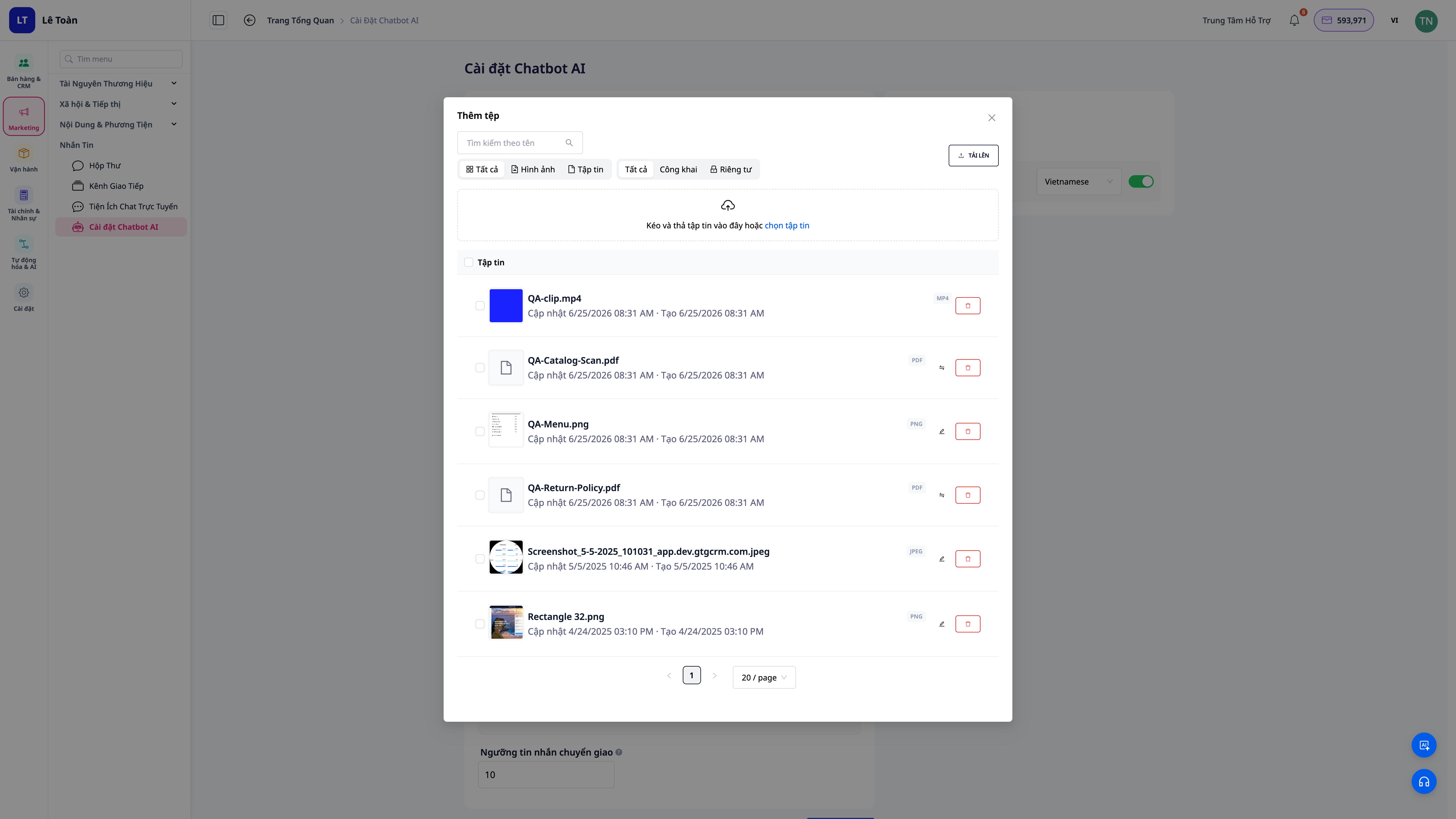
- Multiple document types: policies, price lists, FAQs, product guides — upload them and the system processes them automatically.
- Background processing: documents are loaded and prepared for bot retrieval, you don't need to do anything else.
- Easy updates: bot answers incorrectly or is missing information? Add more documents, and the bot updates its answers.
2. Most accurate answers — combining semantic and keyword search
- Semantic search: understands the meaning of the question even if the customer uses different wording than in the documents.
- Keyword combination: captures specific terms, product codes, and policy names accurately.
- Answers based on documents: the bot retrieves answers from the content you provide instead of making them up.
3. Enable/disable bot capabilities
- Control what the bot can do: enable/disable specific capability groups so the bot only performs actions you allow.
- Secure by permission: retrieval actions respect the data scope of the account owner, not exposing information outside that scope.
4. Bot performs real tasks for customers
| Customer asks | Bot does |
|---|---|
| "Where is my order?" | Tracks the order and provides the actual status |
| "Is size M in blue in stock?" | Checks inventory and provides an accurate answer |
| "I want to book a table for Saturday night" | Schedules an appointment for the customer |
| "I need help with a return" | Creates a support ticket and shares the policy |
Benefits For Your Business
| Feature | Real benefits for you |
|---|---|
| Bot answers from your documents | Accurate to your business, no fabrication, builds customer trust |
| Combined semantic + keyword search | More precise answers, even if customers ask differently |
| Enable/disable capabilities at will | Control bot actions within permitted scope, data security |
| Bot tracks orders/checks inventory/creates tickets/schedules | Immediate resolution for customers, reduces staff workload |
| 24/7 automatic support | Instant replies outside business hours, no lost customers due to long waits |
Who Is It For?
- Online shops receiving many repetitive questions about products, inventory, orders, and returns.
- Restaurants and appointment-based services wanting automated table or appointment bookings.
- Businesses with clear documentation and policies wanting the bot to provide accurate, not generic, answers.
How To Get Started?
Go to the AI Chatbot configuration section, open Knowledge Sources, upload your documents, and enable the capabilities you want the bot to handle. See step-by-step instructions in the article "Guide to Setting Up Knowledge Sources for AI Chatbot on GTG CRM".
Try for free — no credit card required.


