
Feature Introduction
You've just started a business, or launched a new product line, and you're stuck at the very first step: not knowing where to source your products. You spend hours Googling, browsing dozens of groups, collecting contacts from Zalo groups, and then dump everything into a messy Excel file — most of them are dead ends, no one answers the phone. Finding a few potential leads takes half a day, and you're still not sure if they can provide exactly what you need.
That ends today.
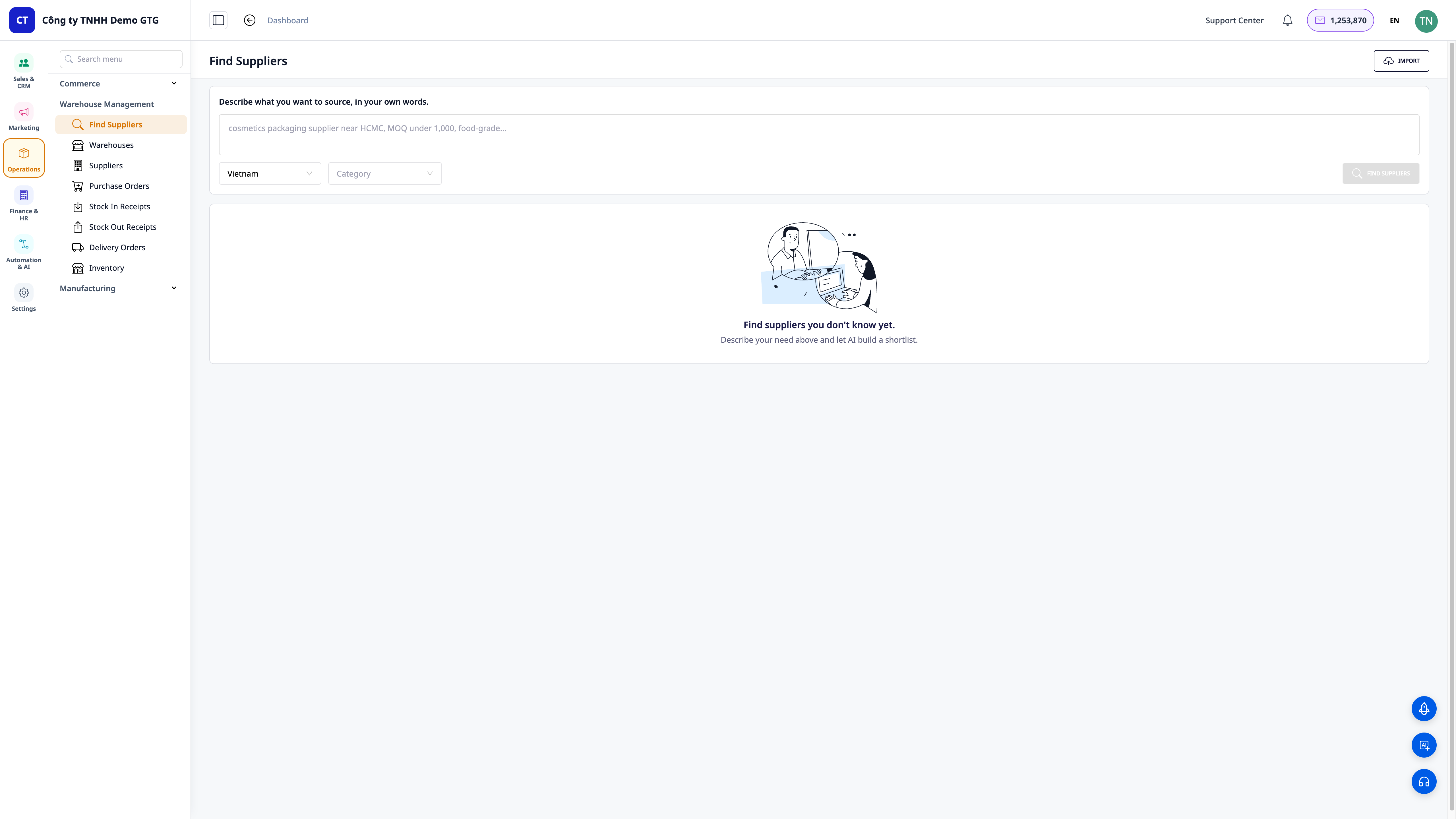
GTG CRM now helps you find suppliers, not just store their information. Go to Warehouse Management → Find Suppliers, describe what you need to buy in your own everyday language ("cosmetic packaging supplier with food-grade certification in Ho Chi Minh City, MOQ under 1,000"), and our AI will search the web and return a list of real, ranked candidates based on suitability — complete with website, region, contact information, reasons for suitability, and source links for your verification. With a single click, save the suppliers you like to your CRM's supplier directory, and send out price inquiries (RFQs) immediately — all within the same system.
Problems Businesses Face
| Old Method | Consequences |
|---|---|
| Self-Googling, browsing groups, asking acquaintances for leads | Takes half a day, most leads are dead, no one responds |
| Manually copying names, numbers, links into scattered Excel files | Disorganized data, duplicates, no one knows who has been contacted |
| No way to verify if suppliers are real and can provide exactly what's needed | Wrong choices, lost deposits, delayed product launches |
| After finding them, still need to open another software to draft price inquiry emails | Disrupted workflow, easy to forget, slow decision-making |
GTG CRM consolidates everything into a single data source: describe your needs → AI finds and ranks real candidates → save to supplier directory (automatically deduplicates by tax ID) → send price inquiries — seamlessly, without leaving the screen.
Key Features
1. Describe in Your Own Words — AI Returns Ranked List of Real Candidates
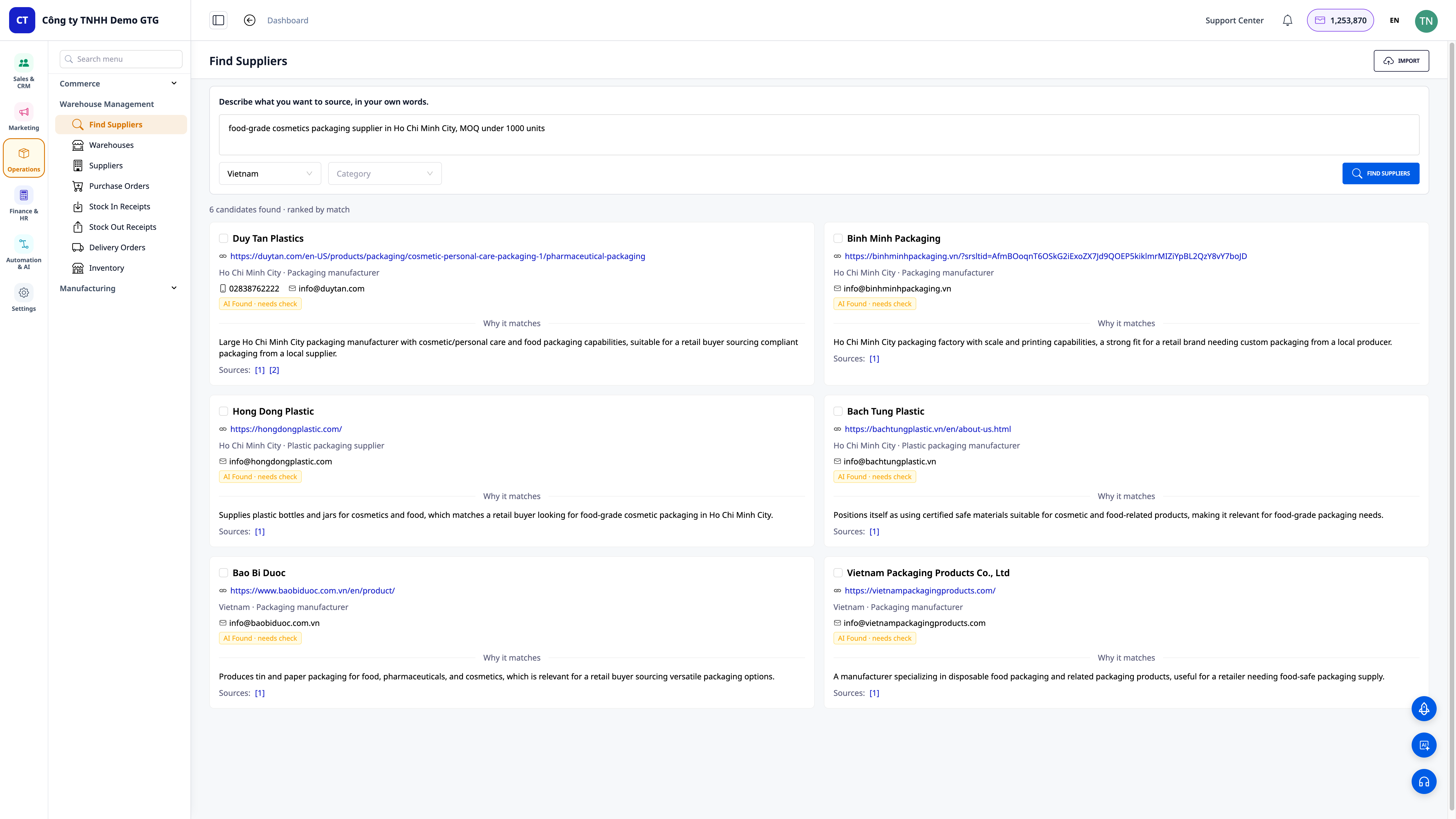
- Search in Natural Language: You don't need to know "standard keywords" — just describe it as if you were talking to a friend, and the AI understands and searches for you.
- Ranked List by Suitability: The results clearly show "X candidates found · ranked by match", so you can see the most promising candidates from the top down.
- Filter by Correct Region and Industry: Select Country (default Vietnam) and Industry to narrow down to the specific supplier pool you need.
ℹ️ This feature is designed for multi-country use, prioritizing the Vietnamese market first — you can find domestic suppliers or expand internationally.
2. Each Candidate is a Verifiable Profile
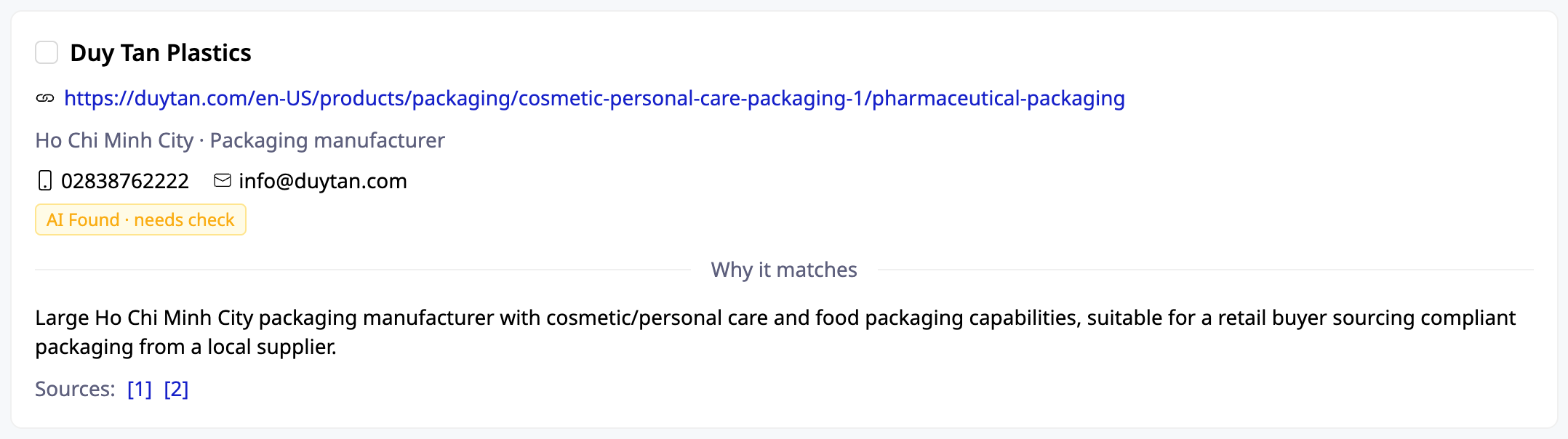
- Sufficient Information for Decision-Making: Company name, website, region (e.g., Ho Chi Minh City), phone number/email when available.
- "Why it Matches": The AI explains why this candidate matches your described needs — you don't have to guess.
- Source Links: Each card includes sources for you to click and verify yourself, avoiding fake leads. You decide, not the AI.
3. One-Click Save to CRM — Automatic Deduplication by Tax ID
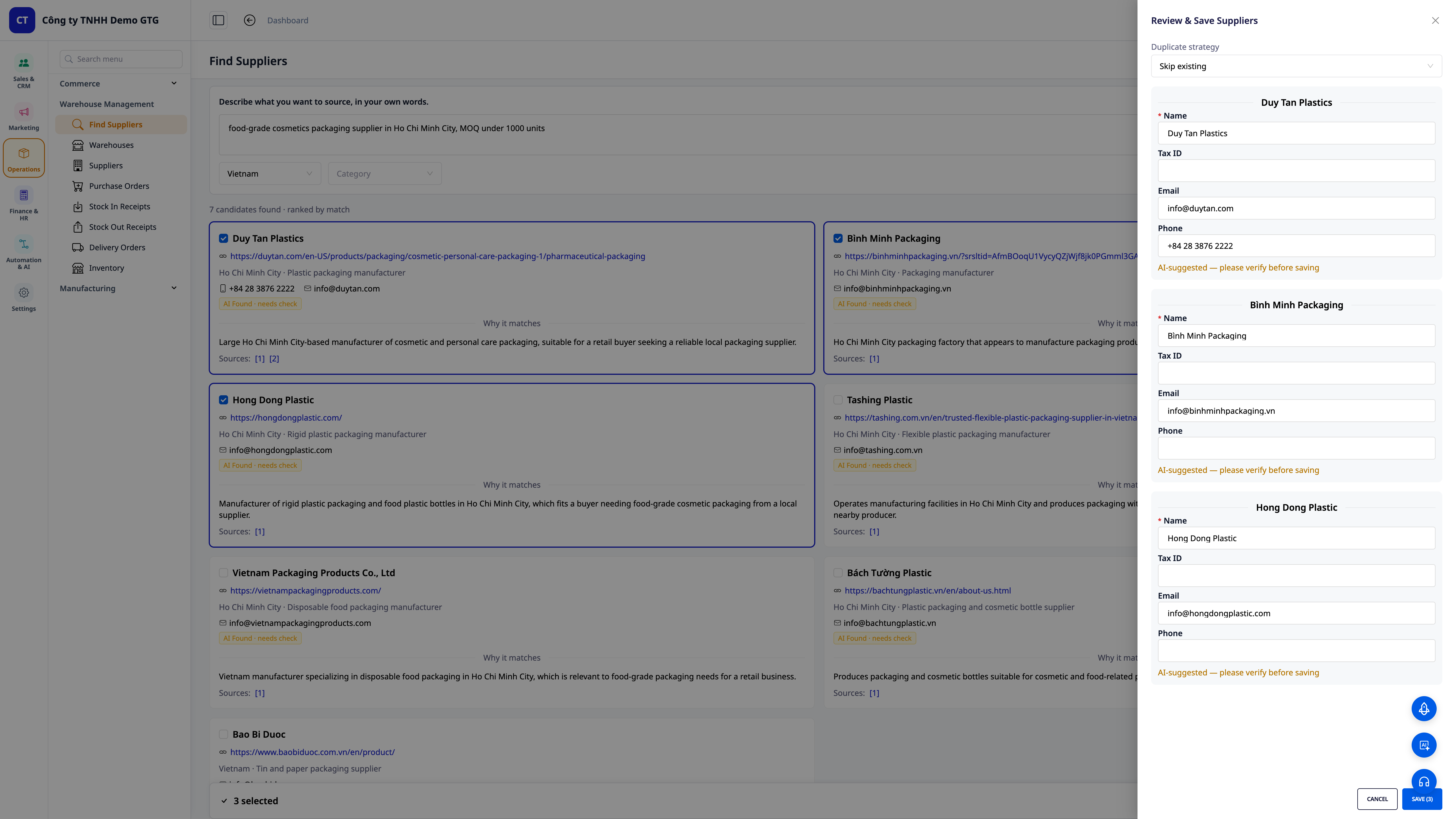
- Select — Edit — Save: Tick the suppliers you like, quickly edit the Name/Tax ID/Email/Phone within the drawer, and save them all at once to your supplier directory.
- Smart Deduplication: Choose how to handle duplicates (skip if already exists / update existing) — the system deduplicates by Tax ID, so your directory remains clean and doesn't bloat with duplicates.
- Seamless Transition to Price Inquiry: Suppliers are already in the CRM, so you can send out price inquiries (RFQs) immediately, without re-entering information.
4. Already Have a List? Bulk Import — AI Matches Columns Automatically
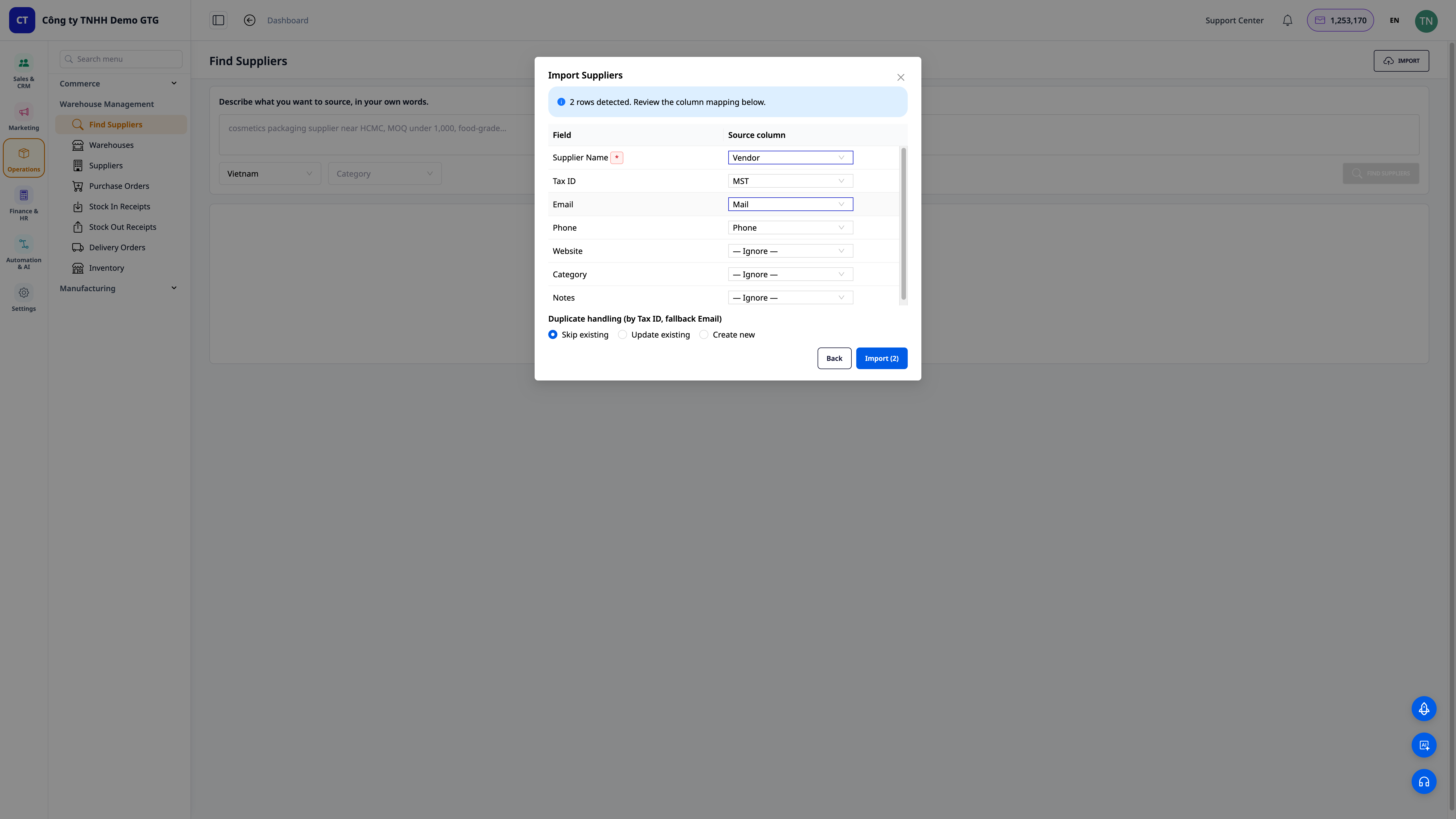
- Import Files in Any Format: Drag and drop your existing CSV/Excel files — no need to reformat them to our template.
- AI Auto-Matches Columns: The system automatically recognizes "Vendor → Supplier Name", "MST → Tax ID", "Mail → Email"… You just need to review and edit before importing.
- Handle Duplicates During Import: Choose to skip / update / create new, with deduplication by tax ID (with email as a fallback) — transfer your entire old list into the CRM in minutes.
💡 Tip: You can also ask the AI Assistant within the CRM — just message "find me 5 suppliers for [product]" — and receive a condensed list to save immediately.
Benefits for Your Business
| Feature | Actual Benefits for You |
|---|---|
| Find suppliers with AI from a verbal description | From zero to a list of viable contacts in minutes, instead of half a day Googling |
| Ranked list + reasons for matching + source links | Choose correctly from the start, reducing the risk of wrong choices and lost deposits |
| One-click save, deduplication by tax ID | Supplier directory always clean, no duplicates, long-term usability |
| Bulk import of any file, AI column matching | Bring old data into the system quickly, no manual re-entry |
| Send price inquiries directly within CRM | Seamless workflow from finding to selecting to inquiring, faster closing |
Who Is It For?
- New business owners / startups without an established supply chain, stuck at the "where to source" stage.
- Online store owners (Shopee/Lazada/TikTok) looking to expand their product range and needing new suppliers quickly.
- SMBs in manufacturing, F&B, cosmetics, and retail looking for additional backup suppliers to avoid dependence on a single source.
- Procurement / Operations departments wanting to manage a centralized supplier directory and send price inquiries directly within the CRM.
How to Get Started?
Go to Warehouse Management → Find Suppliers, describe what you need to buy, select Country/Industry, and click Find Suppliers. Choose the candidates you like to save them to the CRM, or click Import to bring in your existing list. See step-by-step instructions in the article "User Guide: Finding Suppliers with AI on GTG CRM".
Free Trial — no credit card required.


