
Funktsiooni tutvustus
Kas soovid oma turgu laiendada, aga ei tea, kust alustada? Sa kulutad tunde Google'is trükkides, fännilehti sirvides, nimesid faili kopeerides – veedad tunde vaid mõne tekstirea hankimisega ja sa pole isegi kindel, kas sihtid õiget sihtrühma. Uute klientide ja partnerite leidmine, mis peaks olema kasvustrateegia, muutub aeganõudvaks käsitsi tehtavaks ülesandeks.
See lõpeb täna. GTG CRM-il on partnerite ja müügivihjete leidmise tööriist: sa lihtsalt kirjeldad suuliselt, keda otsid (tööstusharu, piirkond, tüüp), tehisintellekti assistent leiab veebist päris ettevõtted ja kontaktid , salvestab sinu otsinguajaloo ja laseb sul importida kõige asjakohasemad tulemused otse CRM-i kontaktide ja ettevõtete jaotisse . Saa minutitega puhas nimekiri, lisa hooliv skript ja hakka ühendust võtma – kõik ühes kohas.
Probleemid, millega ettevõtted silmitsi seisavad
| Vana viis | Tagajärjed |
|---|---|
| Otsi Google'ist/fännilehelt ja kopeeri käsitsi. | See võttis terve päeva, andmed olid killustatud ja kergesti kahe silma vahele jäetud. |
| Osta ujuvaid noteeringuid | Vale sihtrühm, aegunud andmed, ebaefektiivne |
| Pärast otsimist ei saanud ma tulemusi salvestada. | Järgmine kord alusta otsast peale. |
| See nimekiri on väljaspool CRM-i. | Ilma korraliku hoolitsuse ja tähelepanuta võivad võimalused kergesti käest libiseda. |
GTG CRM koondab otsingu-, salvestamis-, importimis- ja hooldusülesanded ühte töövoogu otse teie olemasolevas CRM-is.
Tähtsündmused
1. Suulised kirjeldused, tehisintellekt avastab päris ettevõtteid ja inimesi.
Tippige oma vajadused loomulikus keeles (nt „kohvikukett Ho Chi Minhi linnas vajab pakenditarnijat” või „mööblifirma Hanois”). Tehisintellekt tagastab veebist pärit reaalsete ettevõtete/kontaktide loendi.
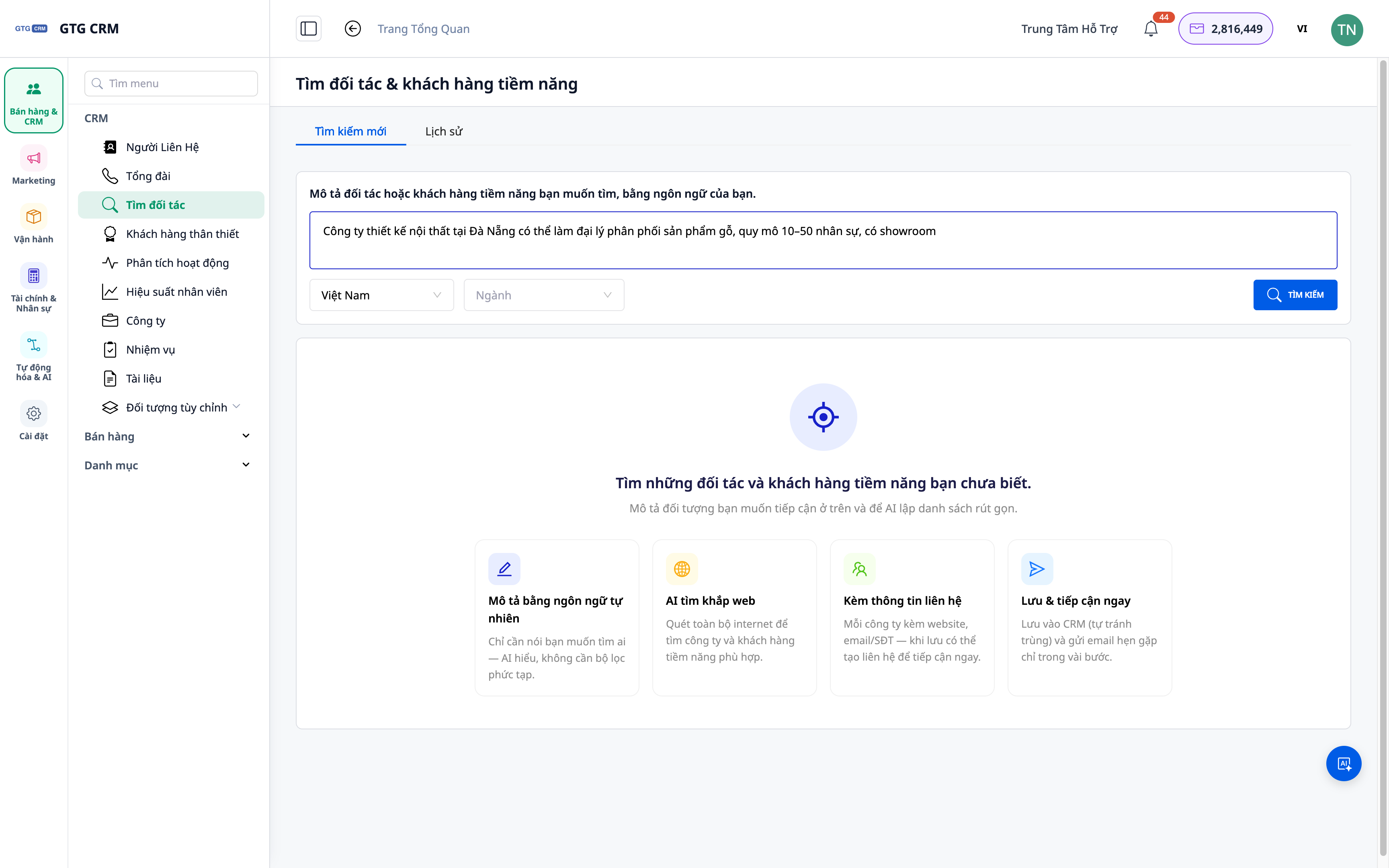
- Funktsioon : Otsi loodusliku kirjelduse järgi.
- Eelis : Pole vaja keerukat otsingusüntaksit – nagu võiks arvata.
2. Tulemused hõlmavad nii ettevõtet kui ka kontaktisikut.
Tagastatud nimekiri sisaldab lisaks ettevõtete nimedele ka asjakohast kontaktteavet, mis aitab teil õigete inimesteni jõuda.
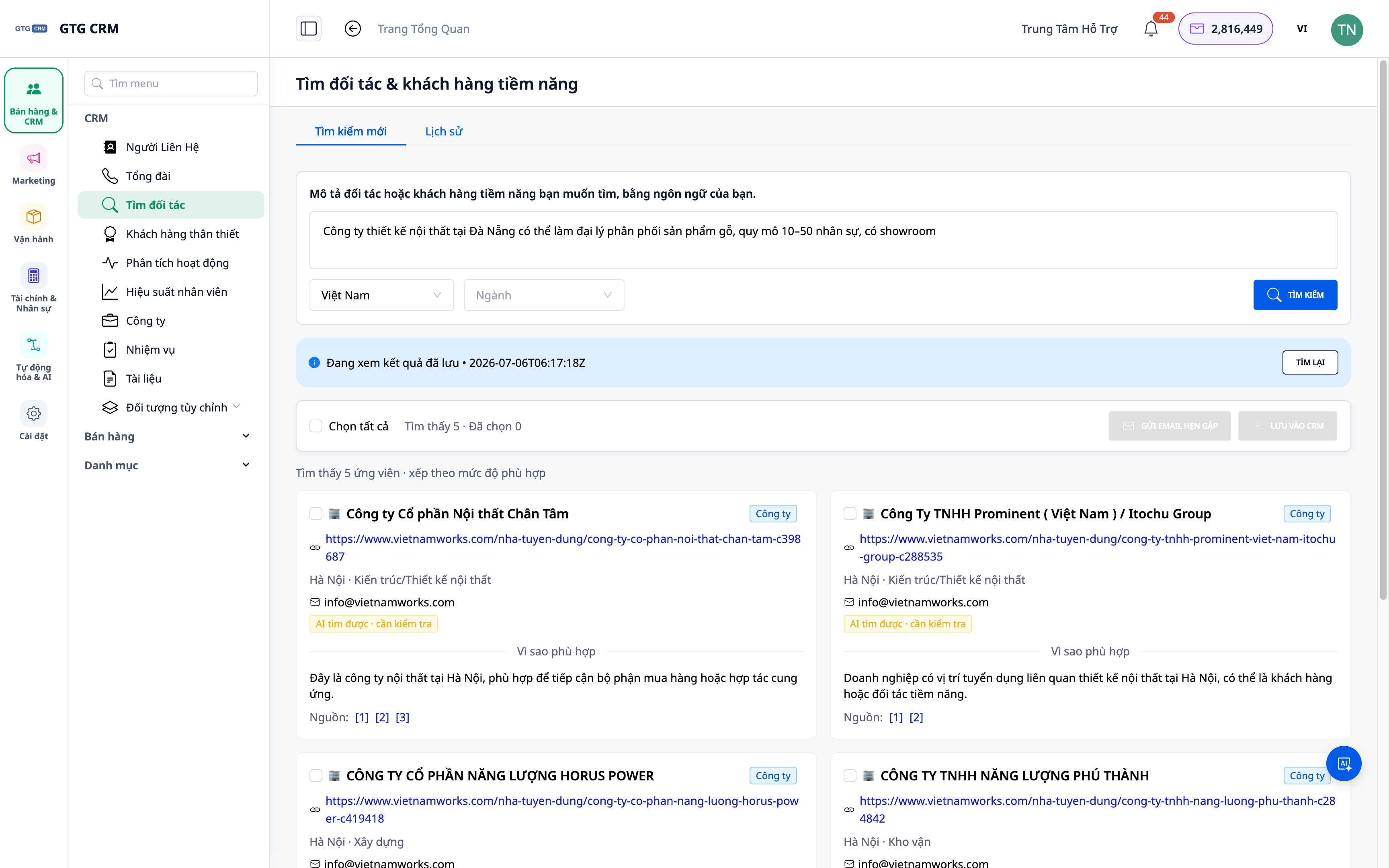
- Omadused : Ettevõtte ja üksikisiku tasemel tulemused.
- Kasu : Lühendab teed otsustajani.
3. Salvesta otsinguajalugu – vaata üle, käivita uuesti
Iga kord, kui tulemus leitakse, salvestatakse see: saate vana tulemuse igal ajal uuesti avada või päringu uuesti käivitada.
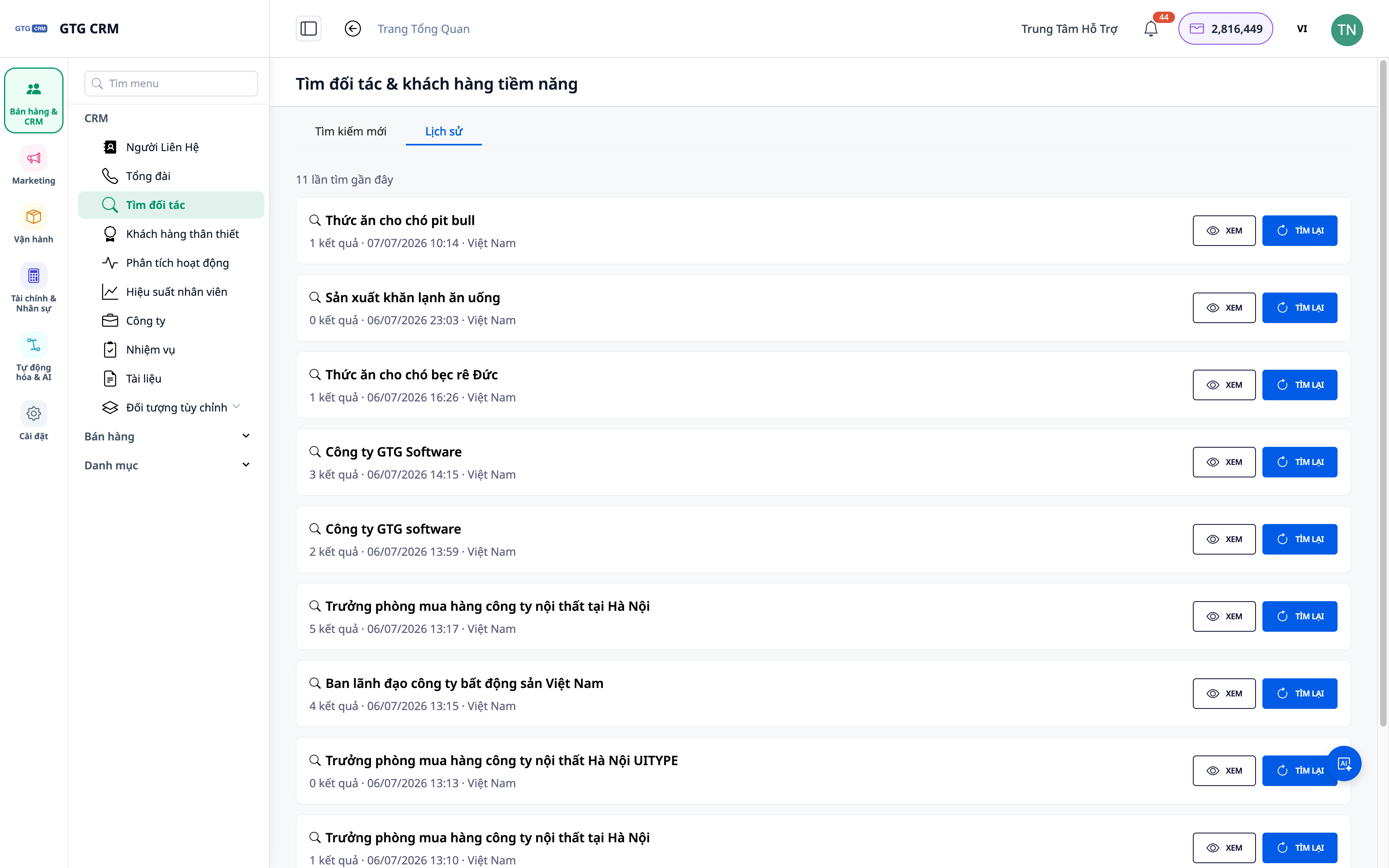
- Funktsioon : otsinguajalugu salvestatakse.
- Eelised : Pole vaja nullist alustada; suurenda oma potentsiaali järk-järgult.
4. Impordi otse kontaktide ja ettevõtete rakendusse ning määra hooldusplaan.
Valige asjakohased tulemused ja importige need CRM-i kontakti/ettevõttena; seejärel lisage ühenduse võtmise alustamiseks automaatne järelpärimise skript.
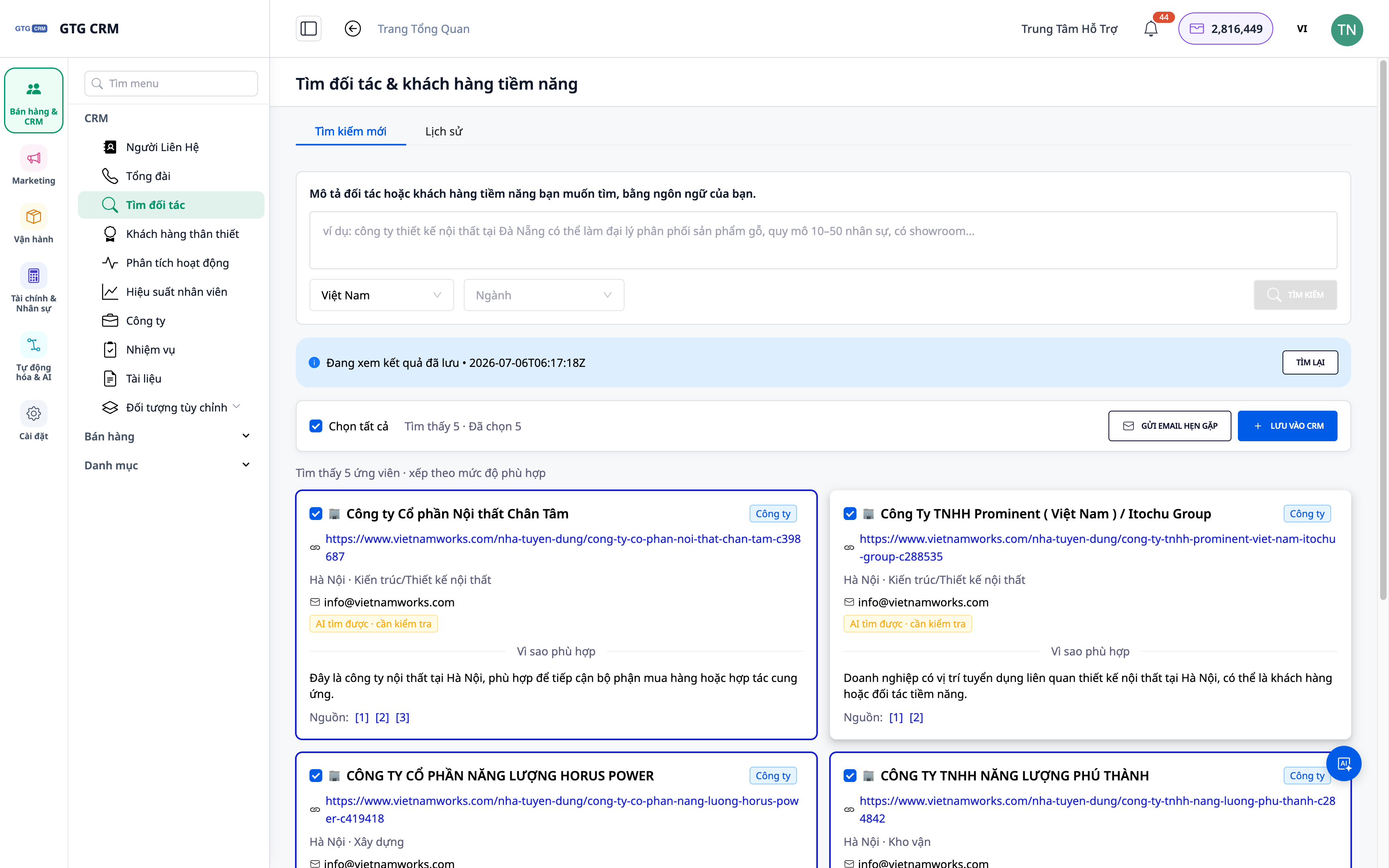
- Omadused : Importige tulemused kontaktide/ettevõtete alla + lisage tegevuskavasse.
- Eelised : Nimekirjast tegudeni, hooldus vaid mõne hiireklõpsuga.
ℹ️ Iga otsing maksab väikese summa krediiti; tulemused sõltuvad veebis avalikult kättesaadavatest andmetest.
Ettevõtete eelised
| Omadused | Praktiline kasu teile |
|---|---|
| Otsi loodusliku kirjelduse järgi | Hankige potentsiaalsete kandidaatide nimekiri minutitega. |
| Ettevõte + Inimesed Tulemused | Õigete inimesteni, õige sihtrühmani jõudmine. |
| Otsinguajalugu | Ehita oma potentsiaalne inventar järk-järgult, ära alusta otsast peale. |
| Impordi otse CRM-i | Ära jäta võimalust kasutamata; saa abi otse süsteemis. |
Kellele see sobib?
- Müügi-/äriarenduse (BD) meeskond vajab pidevalt uusi kliente/partnereid.
- Agentuur tuvastab kampaania jaoks potentsiaalsed kliendid valdkonna/piirkonna järgi.
- Ettevõtete omanikud laiendavad oma turgu ja soovivad proaktiivselt partnereid otsida.
💡 Kas vajad klientide asemel tarnijaid (ostjaid)? Tutvu meie tehisintellektil põhineva tarnijaotsingu funktsiooniga.
Kuidas alustada?
Mine jaotisse Kontaktid ▸ Leia potentsiaalseid partnereid ja kliente , kirjelda, keda otsid, ja alusta. Vajad üksikasjalikke samme? Vaata juhendit potentsiaalsete partnerite ja klientide leidmiseks tehisintellekti abil .
Proovi tasuta – krediitkaarti pole vaja.


