
Um eiginleika
Að ráða góða starfsmenn er oft brotakennd keðja: að skrifa starfslýsingu, birta á LinkedIn, safna ferilskrám með tölvupósti, opna hverja skrá handvirkt til að lesa, skipuleggja viðtöl, semja boðskort, og svo skrá upplýsingar um nýráðna starfsmenn í mannauðskerfið. Hvert skref notar sitt eigið tól, hvert tól krefst nýrrar gagnafærslu.
GTG CRM samþættir allt ráðningarferlið (ATS) á einn stað — og lætur gervigreindina sjá um erfiðustu verkin: að skrifa starfslýsingar, finna umsækjendur á LinkedIn, lesa ferilskrár og meta hæfni. Þegar þú smellir á Ráða, verður umsækjandinn sjálfkrafa starfsmaður með drög að ráðningarsamningi — tengist beint við mannauðs- og launadeild.
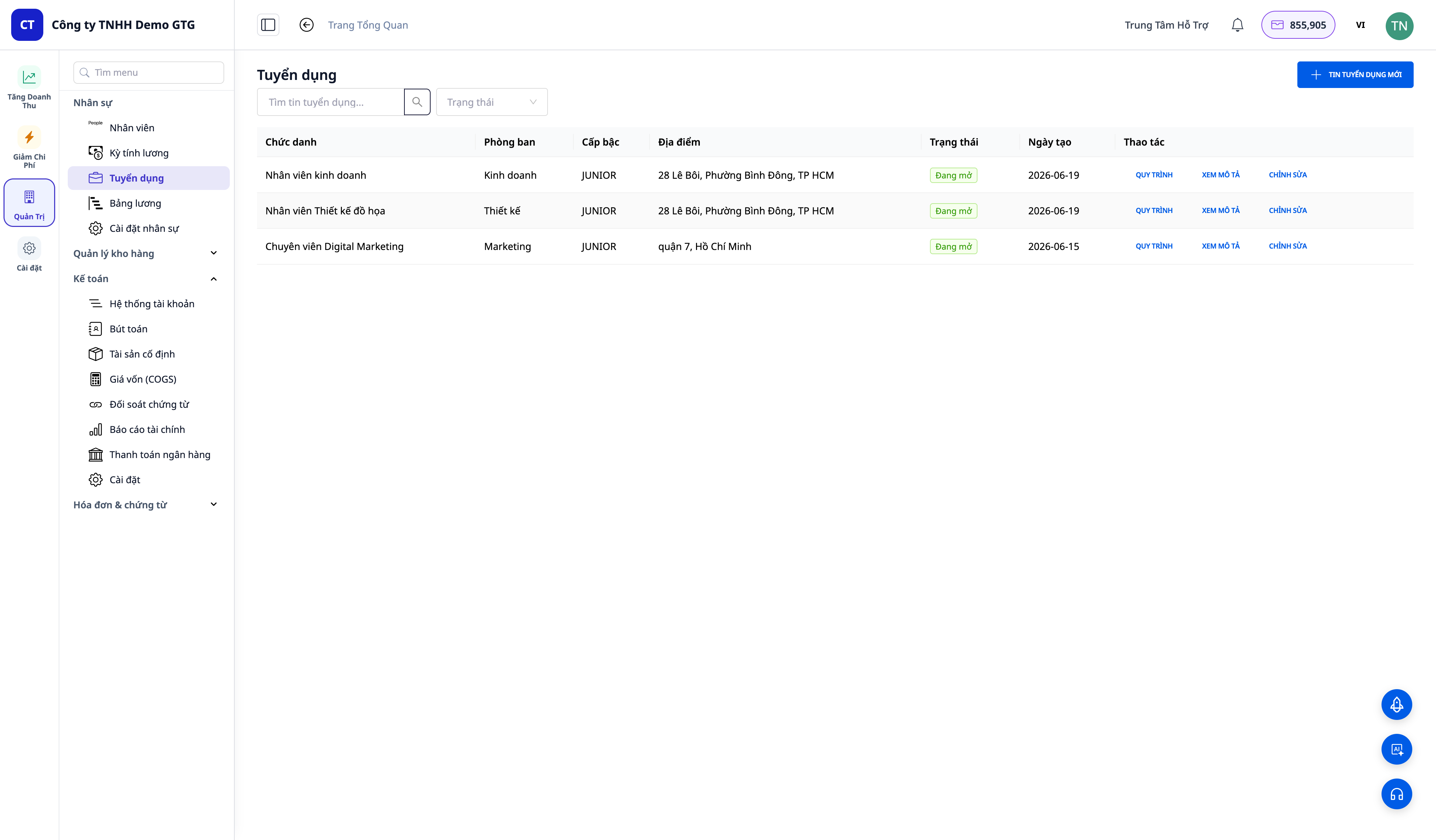
Vandamál sem fyrirtæki standa frammi fyrir
| Gamlta aðferðin | Afleiðingar |
|---|---|
| Skrifa starfslýsingar handvirkt í hvert skipti | Tímabært, skortur á samræmi |
| Leita að umsækjendum handvirkt á LinkedIn | Veltir klukkustundum, auðvelt að missa af réttum einstaklingi |
| Lesa hverja ferilskrá og „meta með tilfinningum“ | Hlutdrægt, erfitt að bera saman, auðvelt að missa af hæfileikaríkum umsækjendum |
| Stjórna umsækjendum með Excel/tölvupósti | Sér ekki alla pípuna, missir af því hvar hver er |
| Nýráðna starfsmenn skráðir aftur í mannauðskerfið | Tvisvar sinnum gagnafærsla, auðvelt að gera mistök |
GTG CRM breytir ráðningum í óaðfinnanlegan straum: starfslýsing → uppruni → síun → viðtal → tilboð → ráða → starfsmaður — allt innan sama kerfis og þú notar til að stjórna viðskiptum þínum.
Hápunktar
1. Búa til starfslýsingar + starfstitla með gervigreind
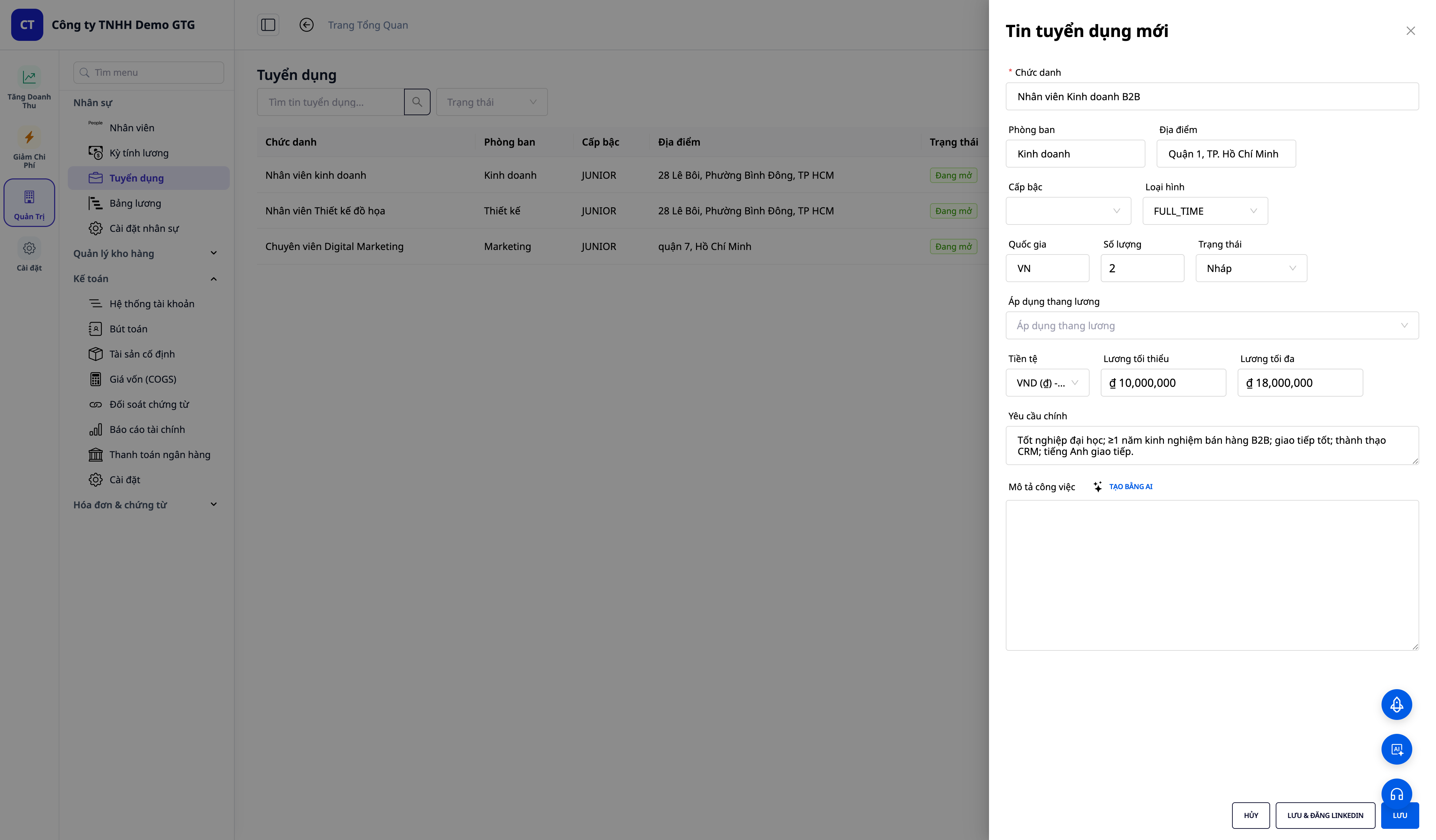
- Búðu til starfslýsingar (titill, deild, staðsetning, stig, tegund, fjöldi).
- Sláðu inn nokkrar helstu kröfur, smelltu á ✨ Búa til með gervigreind — innan nokkurra sekúndna færðu fullkomna, uppbyggða starfslýsingu (JD) (yfirlit yfir hlutverk, ábyrgð, kröfur, aukapunkta, ávinning).
- Notaðu launabil (salary band): ef vinnusvæðið hefur virkt launaskjal, veldu launabil til að fylla sjálfkrafa út launabil fyrir starfslýsinguna.
- Vista & birta á LinkedIn: vistaðu starfslýsinguna og opnaðu ritilinn fyrir starfslýsingar skrifaðar af gervigreind, birtu beint á tengdan LinkedIn reikning.
2. Leita að umsækjendum á LinkedIn
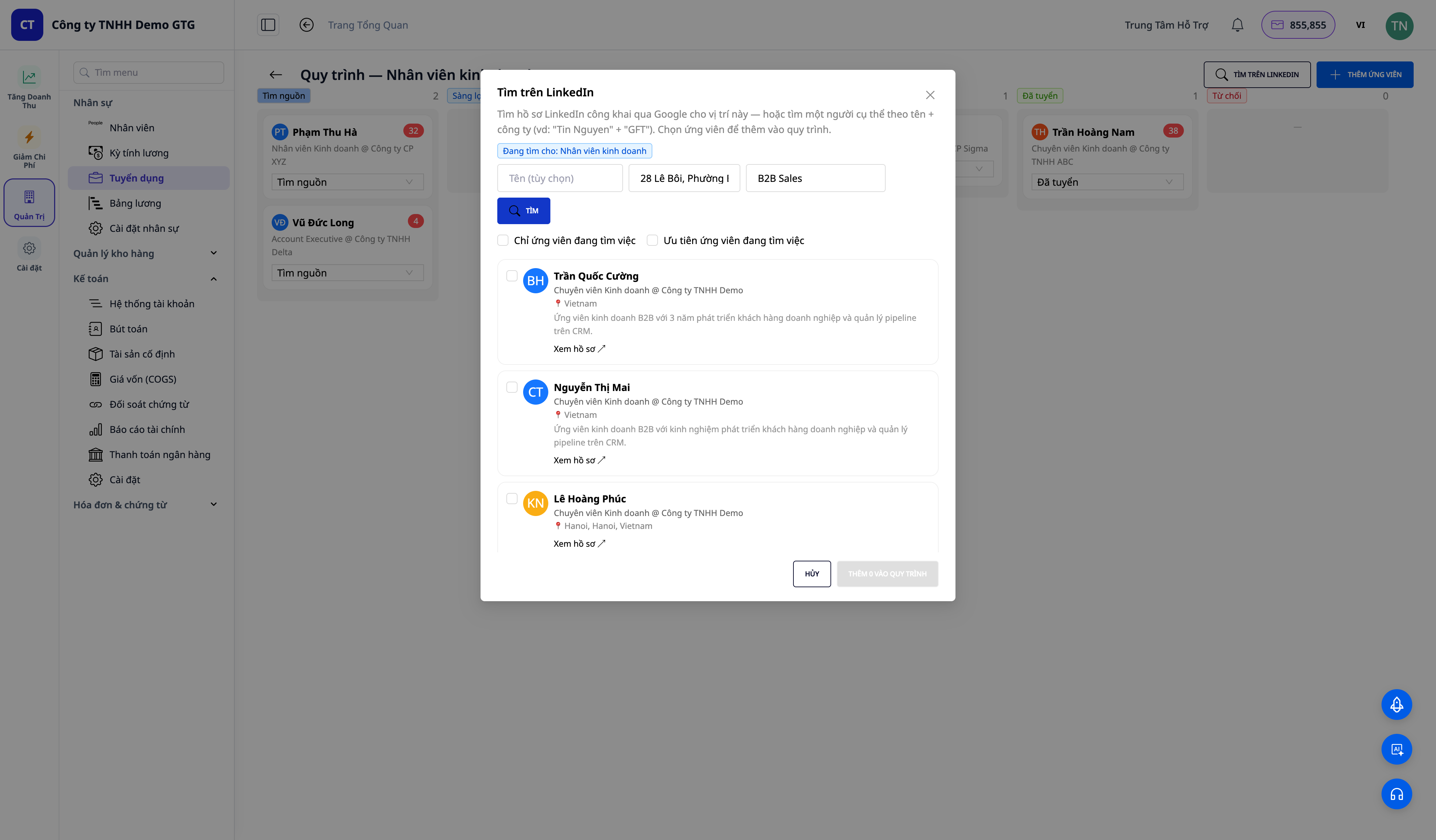
- Leitaðu að opinberum umsækjendum á LinkedIn eftir hlutverki (staðsetning fyllt sjálfkrafa út úr starfslýsingunni) eða eftir nafni + fyrirtæki tiltekins einstaklings.
- Hver niðurstaða sýnir nafn, titil @ fyrirtæki, staðsetningu, stutt lýsing og merki „leitar að vinnu“ (Open to work / Likely open / Employed) þegar hægt er að álykta það.
- Hlaða meira til að sjá fleiri umsækjendasíður, sía „aðeins umsækjendur sem leita að vinnu“, og síðan Bæta við í ferlið viðeigandi umsækjendur.
3. Lesa ferilskrár með gervigreind + meta hæfni
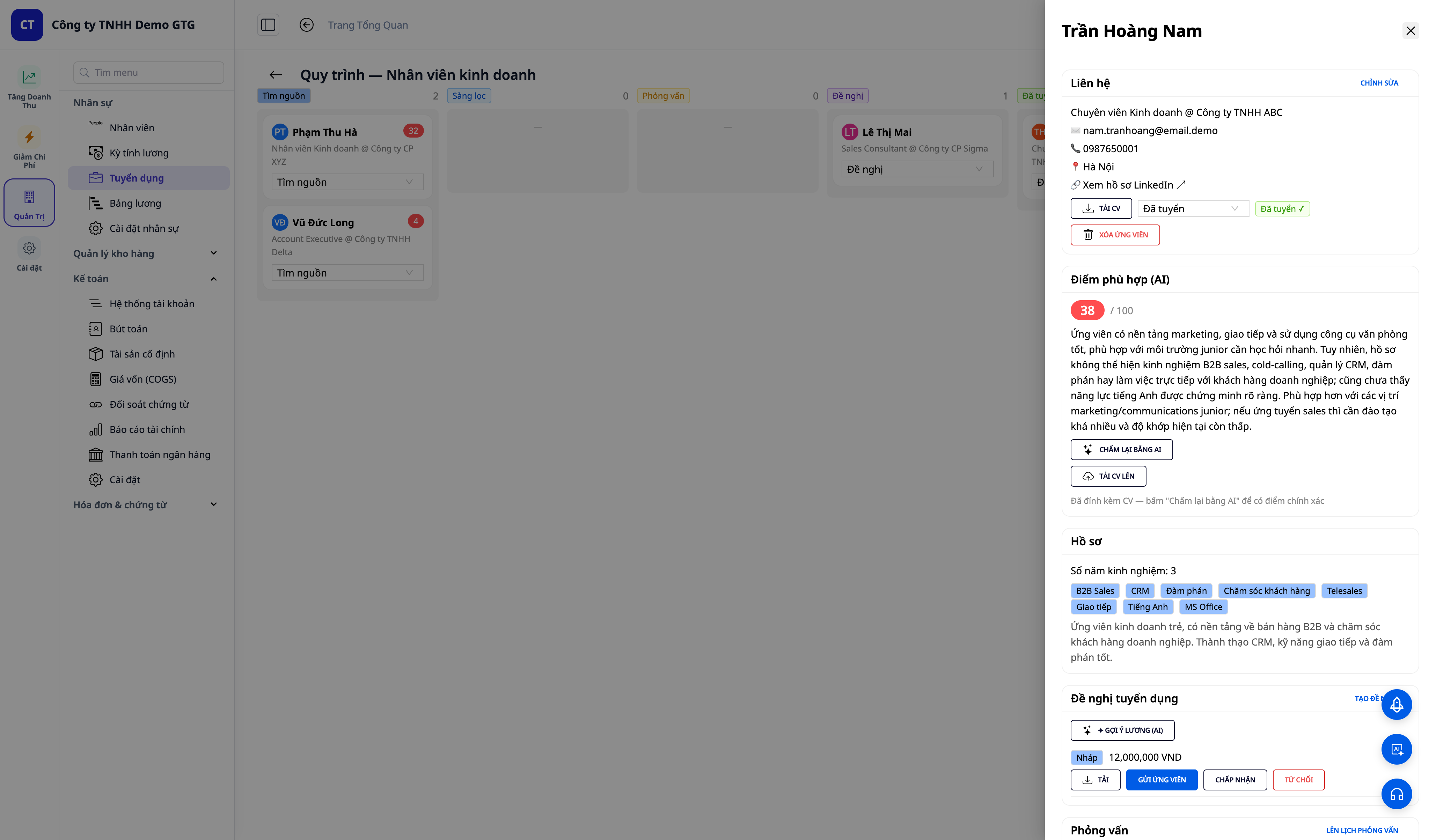
- Draga og sleppa ferilskrám (PDF/DOCX) — gervigreind sækir sjálfkrafa nafn, tölvupóst, símanúmer, titil, færni, reynslu, starfsferil í form.
- Gervigreind metur hæfni 0–100 með 2-3 setninga útskýringu; litakóðað stig (grænt ≥75, gult 50–74, rautt <50) til að bera saman fljótt.
- Bæta við ferilskrá fyrir umsækjanda sem fyrir er og síðan Meta aftur með gervigreind til að fá nákvæmara mat byggt á raunverulegum ferilskráargögnum.
4. Kanban ferli — Fylgstu með öllum umsækjendum
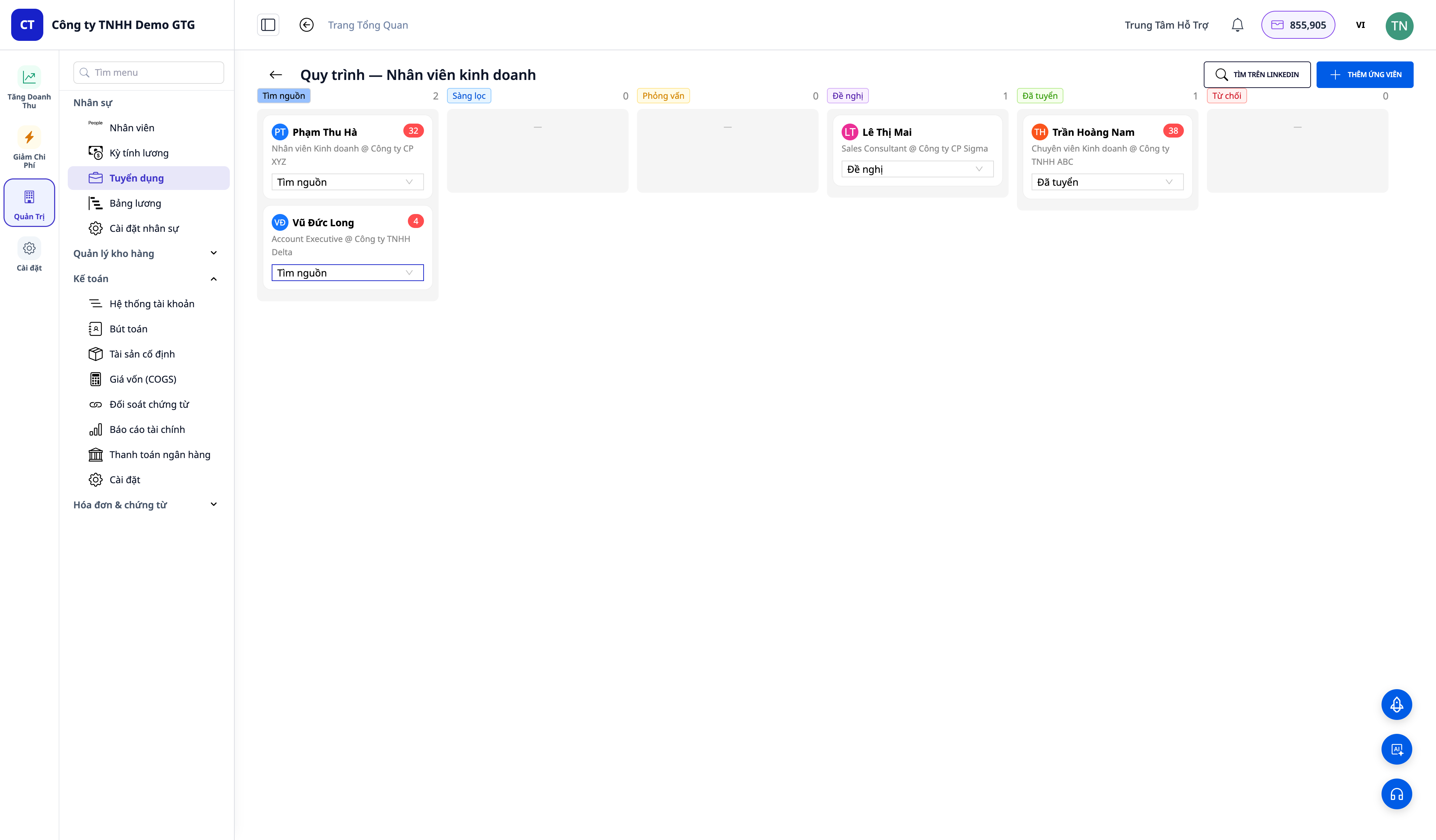
- Kanban-tafla með 6 dálkum: Leit · Einkunn · Viðtal · Tilboð · Ráðinn · Hafnað.
- Draga umsækjendur á milli dálka; umsækjendakort innihalda samskiptaupplýsingar (netfang, sími, LinkedIn tengill, CV niðurhal), gervigreindareinkunn, ferilskrá, tilboð, viðtal og minnisblöð sem varðveitast varanlega.
5. Tilboð & Viðtal — Búðu til og sendu samstundis innan kerfisins
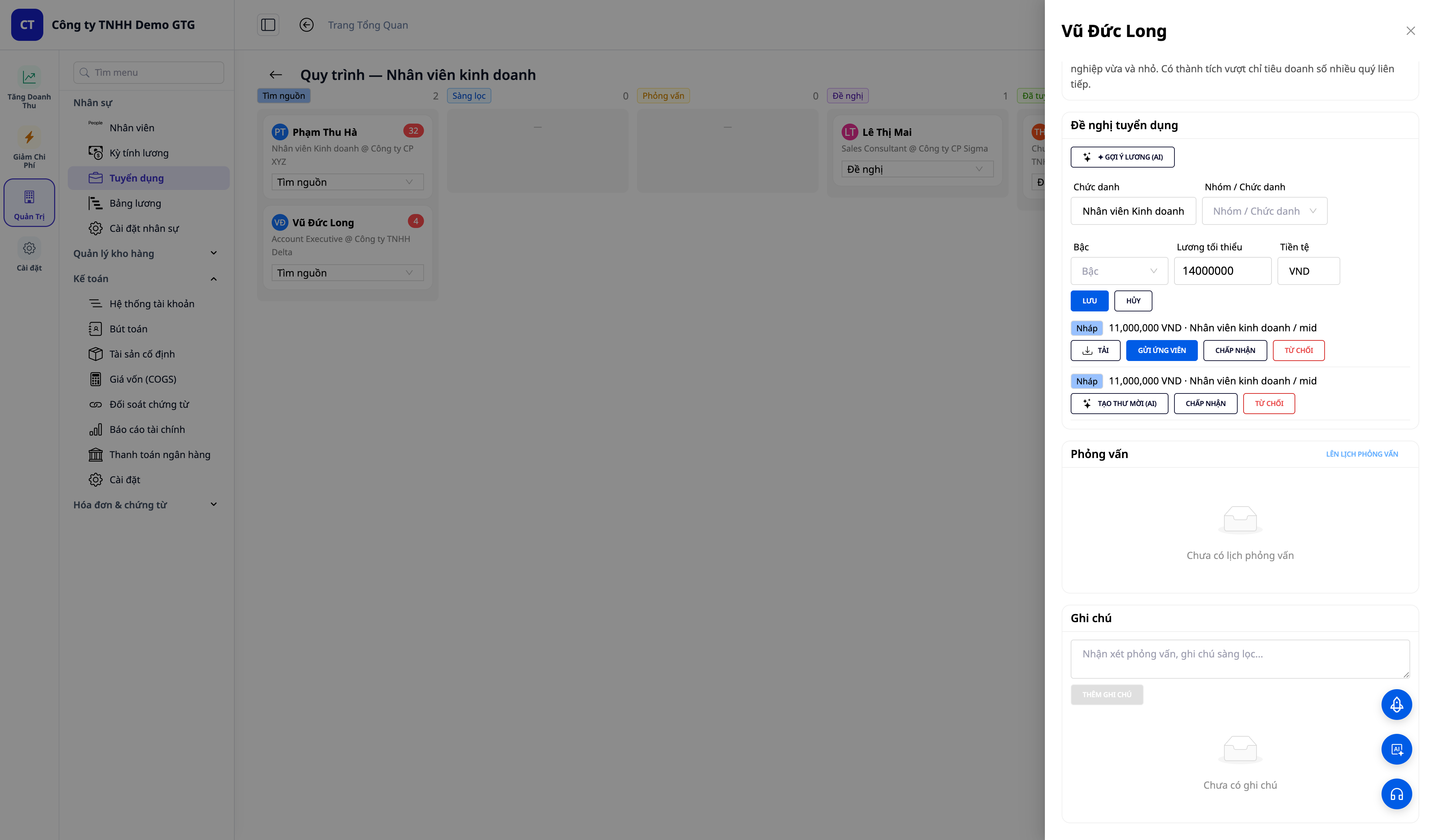
- Búðu til tilboð (stöðuheiti, laun, gjaldmiðill) → smelltu á Hlaða niður (Download) beint á tilboðinu til að fá tilboðsbréf í .docx formi (sniðmát eftir löndum) → Senda umsækjanda með tölvupósti (senda frá pósthólfi fyrirtækisins þíns).
- Áætlaðu viðtal (tími, form, tengill, viðmælandi) → Senda boð — tölvupóstur sýnir tíma samkvæmt tímabelti notanda, heiti tölvupóstsins ber nafn fyrirtækisins.
6. Ráða → Sjálfvirk yfirfærsla í starfsmannaskrá
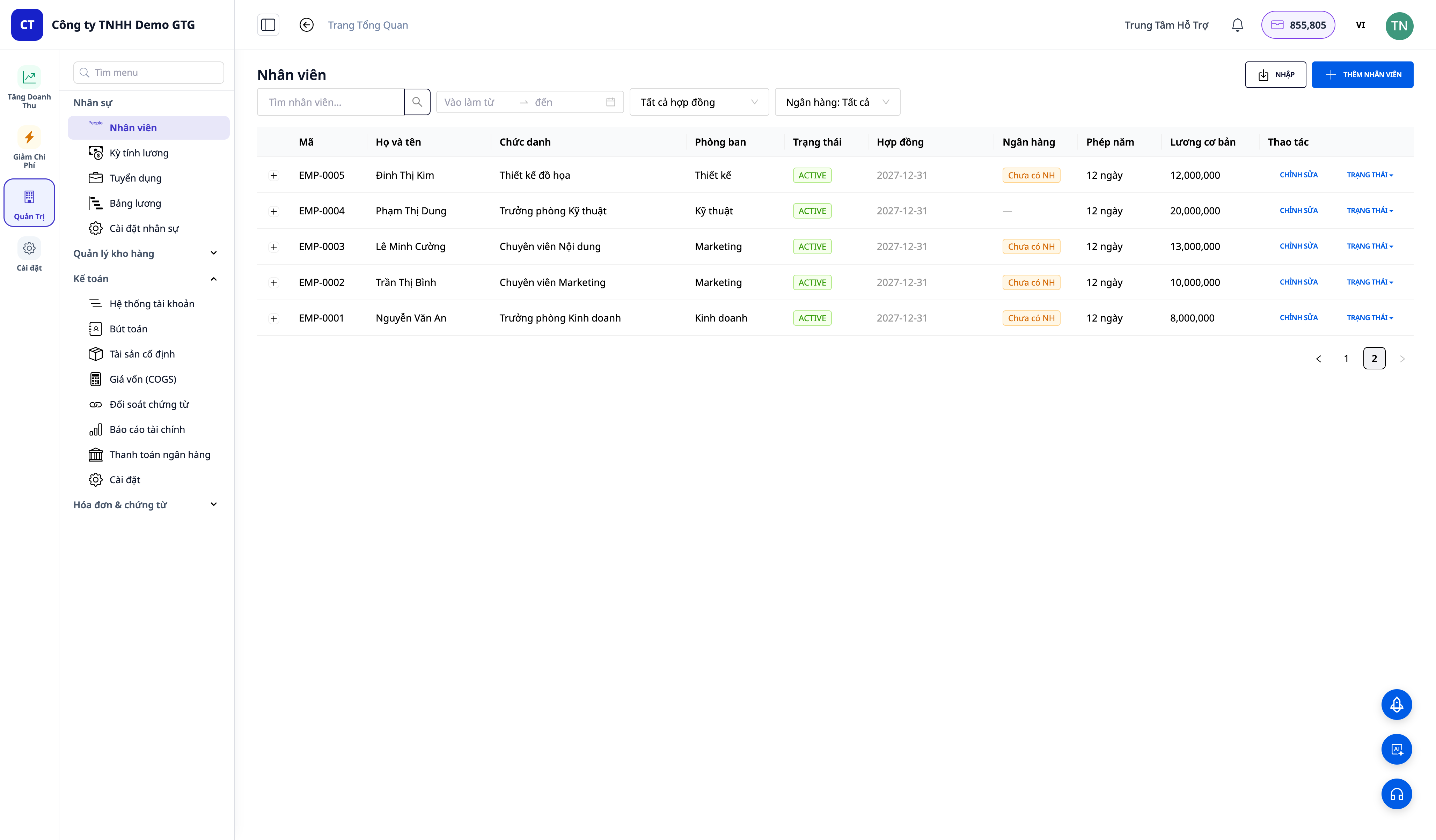
- Smelltu á Ráða (Hire) á umsækjanda með samþykktu tilboði → kerfið býr strax til starfsmannaskrá (EMP-xxxx) með ferilskrá og upplýsingum sem fylgja með.
- Drög að ráðningarsamningi er búin til út frá tilboðinu (laun + launaflokkur) — mannauðsdeildin þarf aðeins að skoða og Virkja.
- Það er engin leið að komast í dálkinn Ráðinn án þess að stofna starfsmann — ferlið tryggir hreinar gagna.
Ávinningur fyrir fyrirtæki
| Eiginleiki | Raunverulegur ávinningur fyrir þig |
|---|---|
| Gervigreind starfslýsing | Hraðari, faglegri og samkvæmari birting á auglýsingum |
| Leita á LinkedIn | Virkt samskipti við rétta fólkið, ekki bíða eftir umsækjendum |
| Lesa CV + gervigreindareinkunn | Hlutlaus samanburður umsækjenda, engir hæfileikar fara framhjá |
| Kanban-tafla | Vita alltaf hver er hvar, enginn umsækjandi týnist |
| Sjálfvirk ráðning í starfsmannaskrá | Engin tvöföld gagnafærsla; beintengt launum/ráðningarsamningi |
| Tilboð & viðtal í kerfinu | Senda frá fyrirtækispósthólfi, á réttum tíma |
Lokið ráðningu – Tilbúinn til vinnu strax (NÝTT)
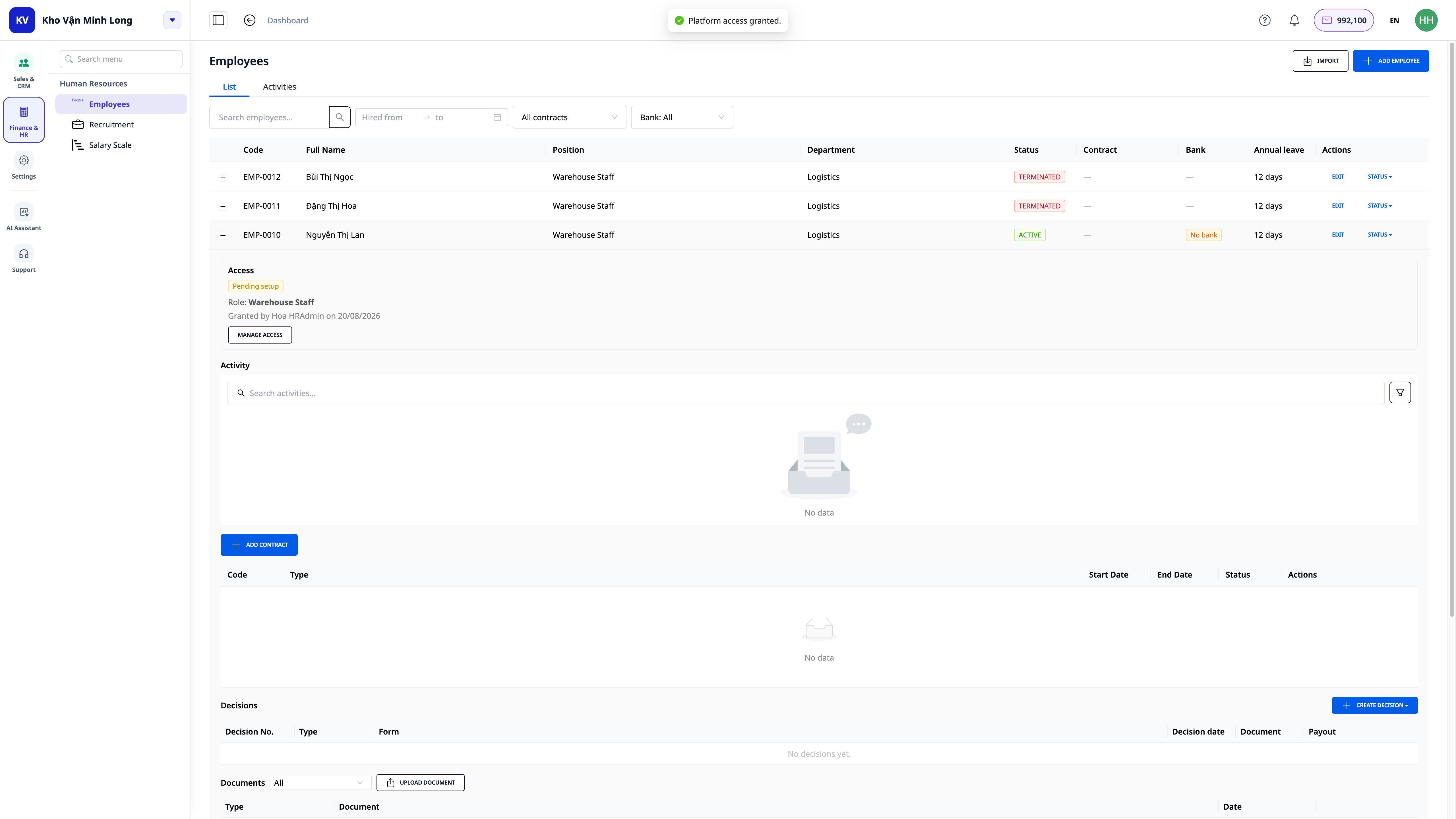
„Sjálfvirk ráðning í starfsmannaskrá“ hér að ofan er aðeins stofnun starfsmannaskrár. En hvað með innskráningu í GTG CRM til að vinna? Beint á starfsmannaskrá sem var nýbúið að búa til, er hnappur Veita aðgangsheimildir: veldu hlutverk (þegar tilbúin eftir stöðu), staðfestu að sæti verði bætt við, og þá er því lokið — nýi starfsmaðurinn fær tölvupóst og getur byrjað strax á fyrsta degi, án þess að bíða eftir að einhver muni eftir að bjóða þeim sérstaklega á öðrum stað. Sjá nánar í Starfsmannastjórnun & Laun.
Hverjum hentar þetta?
- SMB fyrirtæki sem eru að stækka starfsmannahóp sinn og vilja faglegar ráðningar án þess að kaupa sérstakan ATS hugbúnað.
- Ráðendur / Mannauðsstarfsmenn sem þurfa stað til að stjórna öllum umsækjendum og ferli.
- Fyrirtæki / umboðsskrifstofur sem ráða reglulega og vilja virkt upphaf leitartækja á LinkedIn.
Hvernig á að byrja?
Farðu í Starfsmannamál → Ráðningar (Recruitment), búðu til fyrstu ráðningarbirtu og láttu gervigreind skrifa starfslýsinguna. Sjá skref-fyrir-skref leiðbeiningar í greininni „Leiðbeiningar um notkun Ráðninga / ATS“.
ℹ️ Athugið: Að búa til stöður með gervigreind, lesa ferilskrá + meta og finna LinkedIn heimildir er með kreditgjöld – vinnusvæðið þarf að hafa nægilegt kredit. Til að senda tilboð / viðtalsboð þarf tengdan tölvupósthólf. Umsóknarmyndir sóttar frá LinkedIn nota stafrófsmyndir (opinberar heimildir hlaða ekki niður myndum).
Ókeypis prufa – ekkert kreditkort þarf.


