
Funkcijų pristatymas
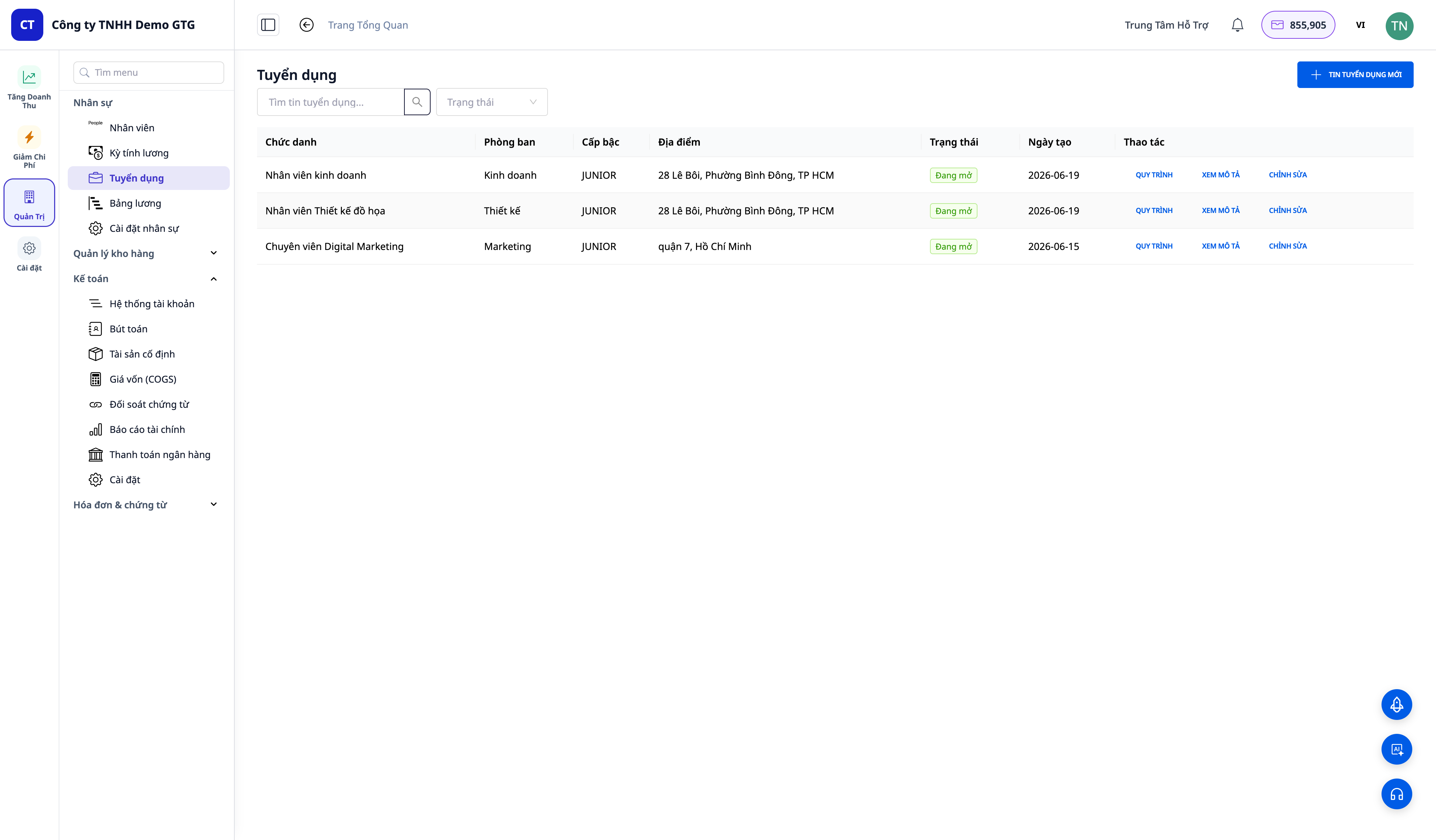
Geras darbuotojas dažnai yra atskirų veiksmų seka: parašyti darbo skelbimą, paskelbti „LinkedIn“, rinkti CV el. paštu, atidaryti kiekvieną failą ranka, suplanuoti interviu, parengti kvietimo laišką, o tada įvesti į personalo sistemą informaciją apie priimtą kandidatą. Kiekvienam žingsniui – po vieną įrankį, kiekvienam įrankiui – vienas duomenų įvedimas.
GTG CRM apjungia visą atrankos procesą (ATS) vienoje vietoje – ir leidžia dirbtinio intelekto atlikti sunkiausią darbą: rašyti pareigų aprašymus, ieškoti kandidatų „LinkedIn“, skaityti CV ir vertinti jų tinkamumą. Kai paspausite Priimti, kandidatas automatiškai taps darbuotoju su parengtu darbo sutarties juodraščiu – susiejant su Personalo ir atlyginimų moduliais.
Problemos, su kuriomis susiduria įmonės
| Senas metodas | Rezultatas |
|---|---|
| Rankinis JD rašymas kiekvieną kartą | Laiko švaistymas, nenuoseklumas |
| Rankinė kandidatų paieška „LinkedIn“ | Valandų švaistymas, lengva praleisti tinkamus žmones |
| Kiekvieno CV skaitymas ir „subjektyvus vertinimas“ | Subjektyvumas, sunku palyginti, lengva praleisti gerus kandidatus |
| Kandidatų valdymas „Excel“ / el. paštu | Nepastebimas visas procesas, neaišku, kas kur yra |
| Priimtas kandidatas – pakartotinis įrašas į HR | Duomenų įvedimas du kartus, lengva padaryti klaidų |
GTG CRM paverčia atranką nuosekliu srautu: darbo skelbimas → paieška → atranka → interviu → pasiūlymas → priėmimas → darbuotojas – visa tai toje pačioje platformoje, kurią naudojate verslui valdyti.
Pagrindiniai privalumai
1. Darbo skelbimų kūrimas + Pareigų aprašymai su DI
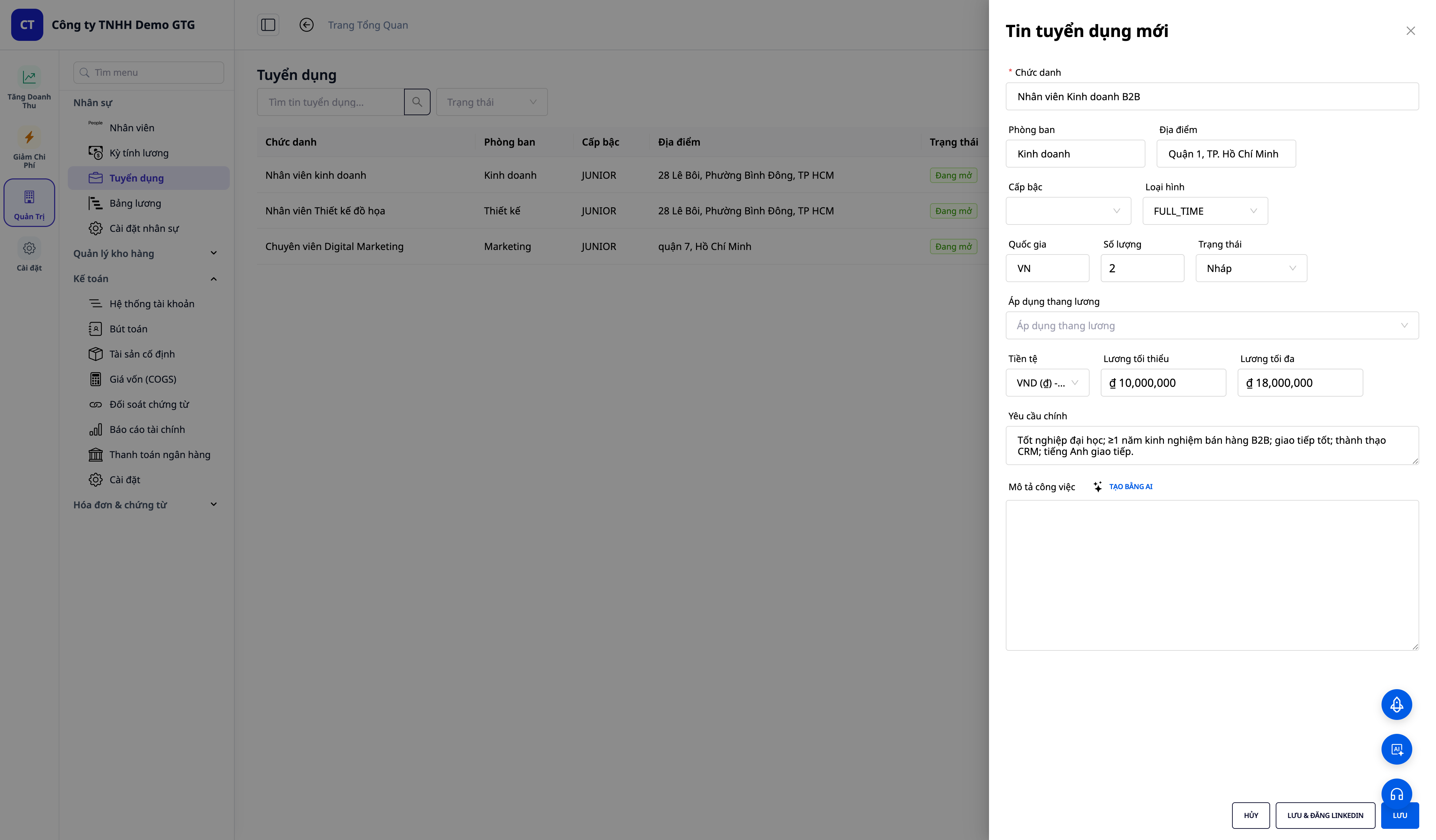
- Sukurkite darbo skelbimą (pareigos, skyrius, vieta, lygis, tipas, kiekis).
- Įveskite keletą pagrindinių reikalavimų, paspauskite ✨ Sukurti su DI – per kelias sekundes gausite išsamų, struktūrizuotą pareigų aprašymą (JD) (pareigų santrauka, atsakomybės, reikalavimai, privalumai, naudos).
- Taikyti atlyginimų intervalą (salary band): jei darbo vietoje jau yra galiojanti atlyginimų lentelė, pasirinkite atlyginimo intervalą, kad automatiškai užpildytumėte atlyginimo diapazoną darbo skelbimui.
- Išsaugoti ir skelbti „LinkedIn“: išsaugokite skelbimą, tada atidarykite anksčiau DI parašyto darbo skelbimo rengyklę ir skelbkite tiesiogiai susietoje „LinkedIn“ paskyroje.
2. Kandidatų paieška „LinkedIn“
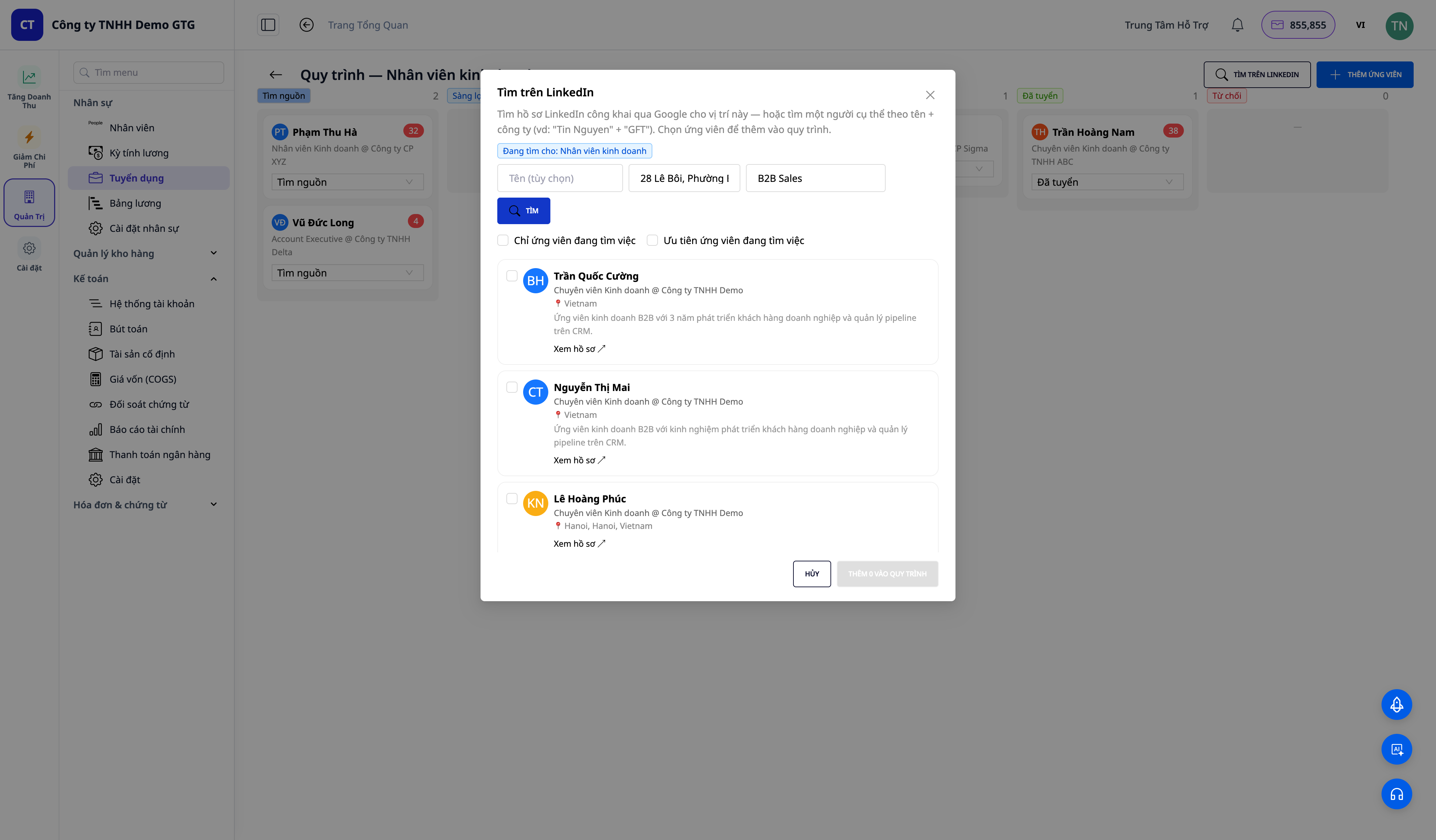
- Ieškokite viešų kandidatų „LinkedIn“ pagal pareigas (vieta automatiškai užpildoma iš darbo skelbimo) arba pagal konkretaus asmens vardą + įmonę.
- Kiekvienas rezultatas rodo vardą, pareigas @ įmonėje, vietą, trumpą aprašymo ištrauką ir ženklą „ieško darbo“ (Open to work / Likely open / Employed), kai tai galima nuspėti.
- Įkelti daugiau, kad pamatytumėte naujus kandidatų puslapius, filtruokite „tik ieško darbo“, tada pridėkite prie proceso tinkamus kandidatus.
3. CV skaitymas su DI + Tinkamumo vertinimas
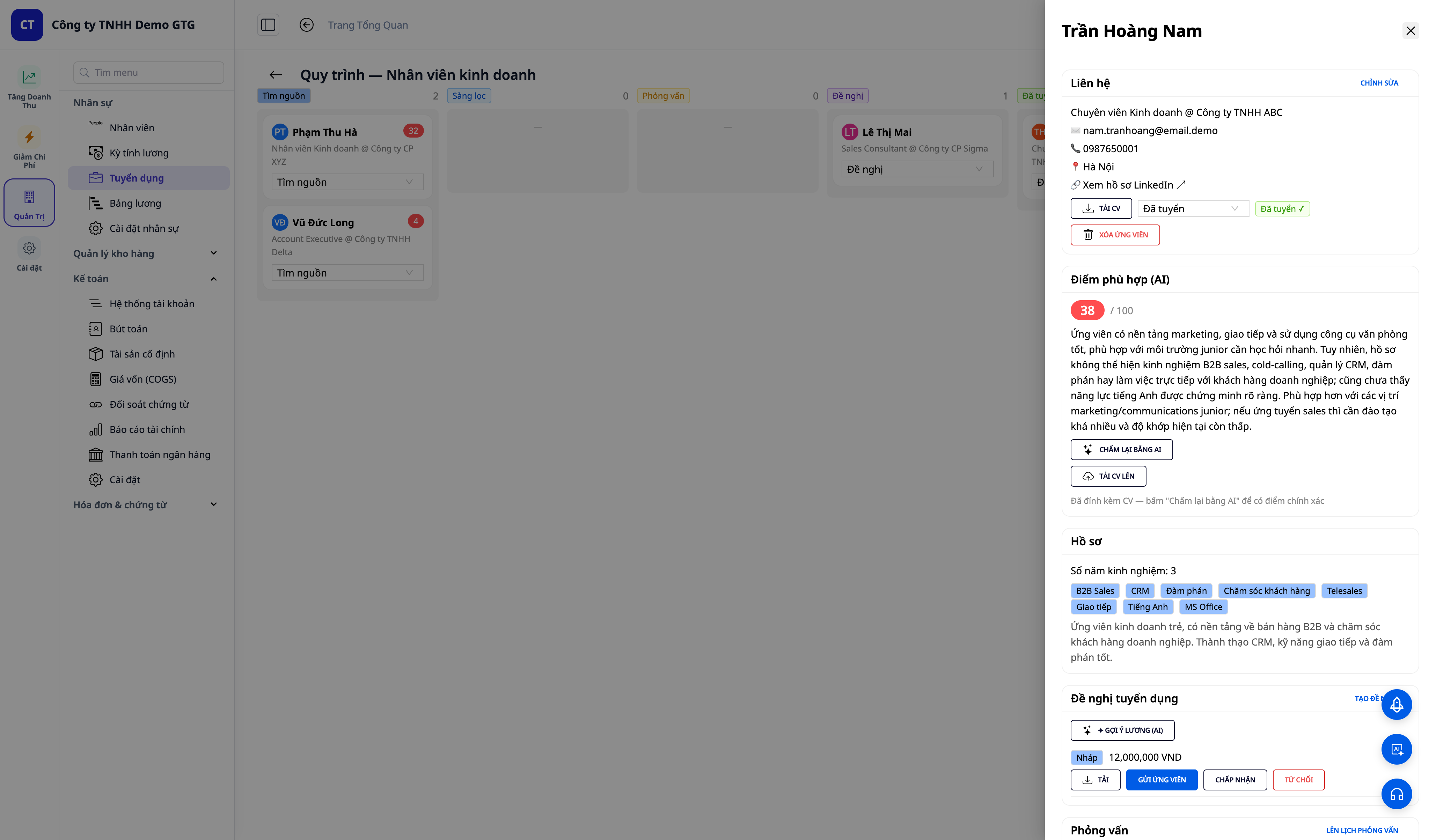
- Vilkti ir mesti CV (PDF/DOCX) – DI automatiškai ištraukia vardą, el. paštą, telefoną, pareigas, įgūdžius, patirtį, darbo istoriją į formą.
- DI vertina tinkamumą 0–100 su 2-3 sakinių paaiškinimu; spalvoti balų kortelės (žalia ≥75, geltona 50–74, raudona <50) greitam palyginimui.
- Pridėkite CV prie jau esančio kandidato, tada įvertinkite iš naujo su DI, kad gautumėte tikslesnius balus pagal tikrus CV duomenis.
4. Kanban procesas – visų kandidatų stebėjimas
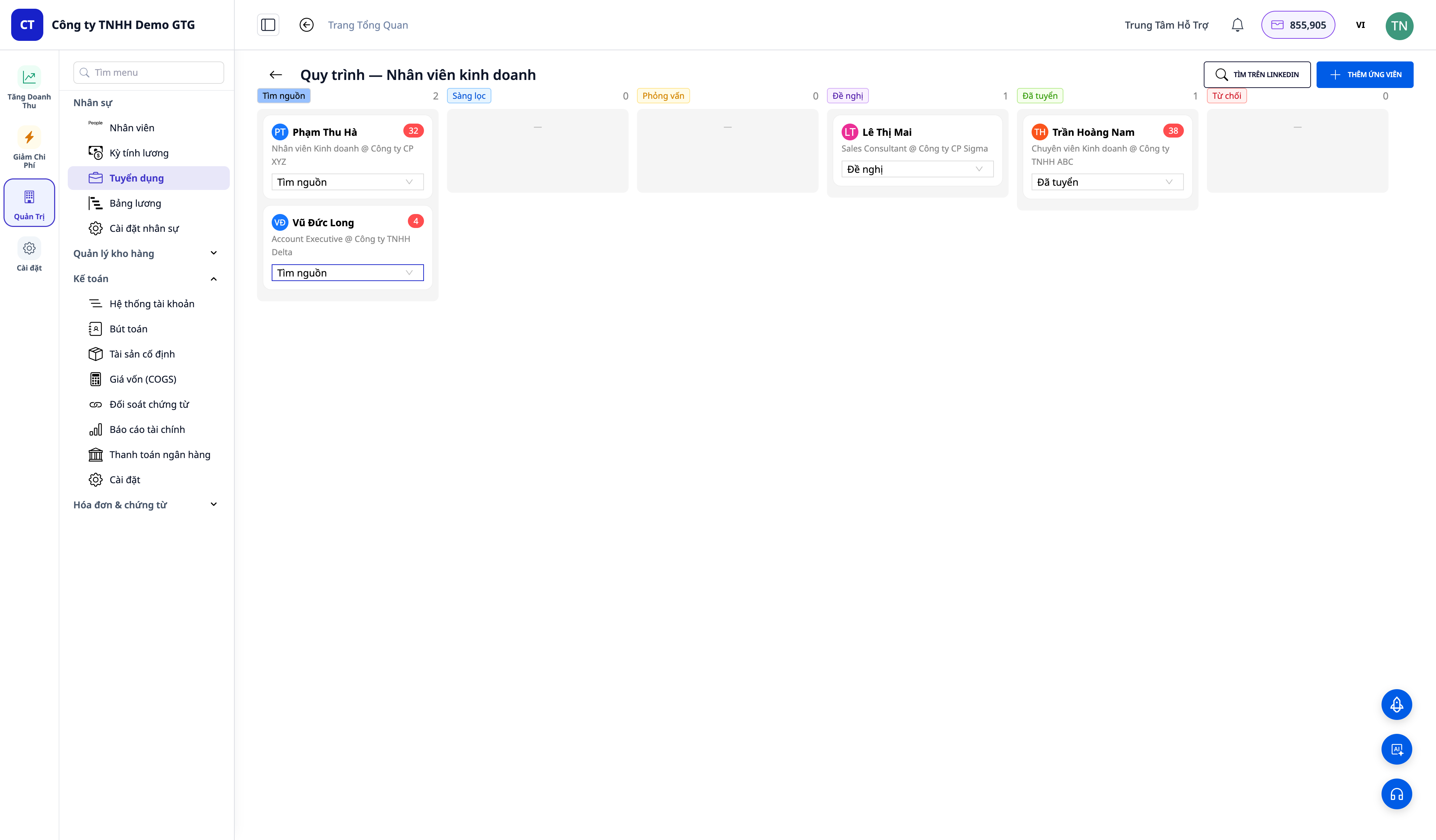
- 6 stulpelių „Kanban“ lentelė: Šaltiniai · Atranka · Interviu · Pasiūlymas · Įdarbinti · Atmesti.
- Vilkite kandidatus tarp stulpelių; kandidatų kortelėse yra kontaktinė informacija (el. paštas, telefonas, „LinkedIn“ nuoroda, CV atsisiuntimas), DI balai, profilis, pasiūlymas, interviu ir pastabos, saugomos nuolat.
5. Pasiūlymas ir interviu — ruoškite ir siųskite tiesiai sistemoje
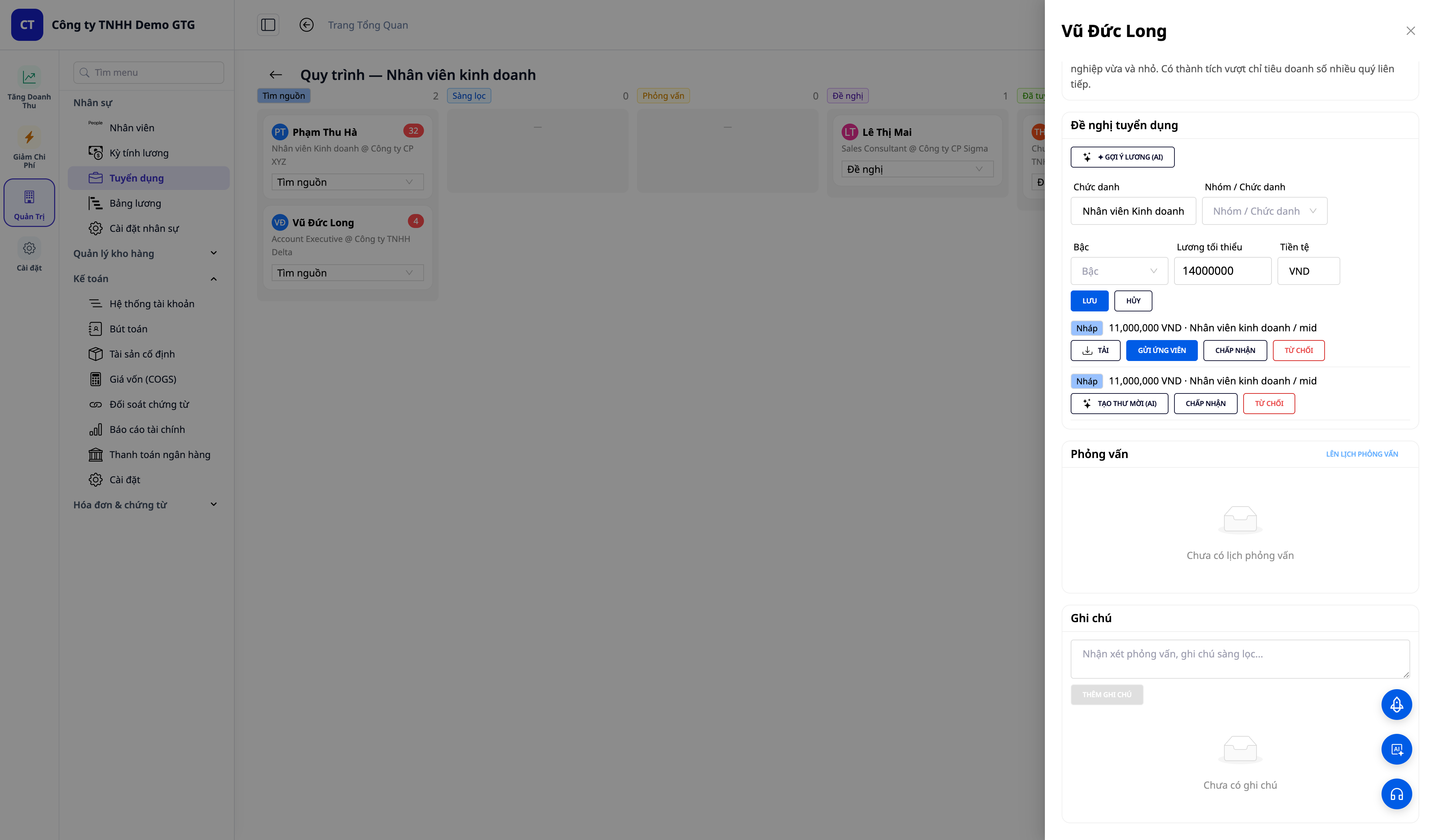
- Sukurkite pasiūlymą (pareigos, alga, valiuta) → spustelėkite Atsisiųsti tiesiai ant pasiūlymo, kad gautumėte darbo pasiūlymą .docx formatu (pagal šalį) → siųskite kandidatui el. paštu (siunčiama iš jūsų įmonės pašto dėžutės).
- Suplanuokite interviu (laikas, formatas, nuoroda, interviuotojas) → siųskite kvietimą — el. laiške laikas rodomas pagal vartotojo laiko juostą, el. laiško tema yra įmonės pavadinimas.
6. Įdarbinti → Automatiškai tapti darbuotoju
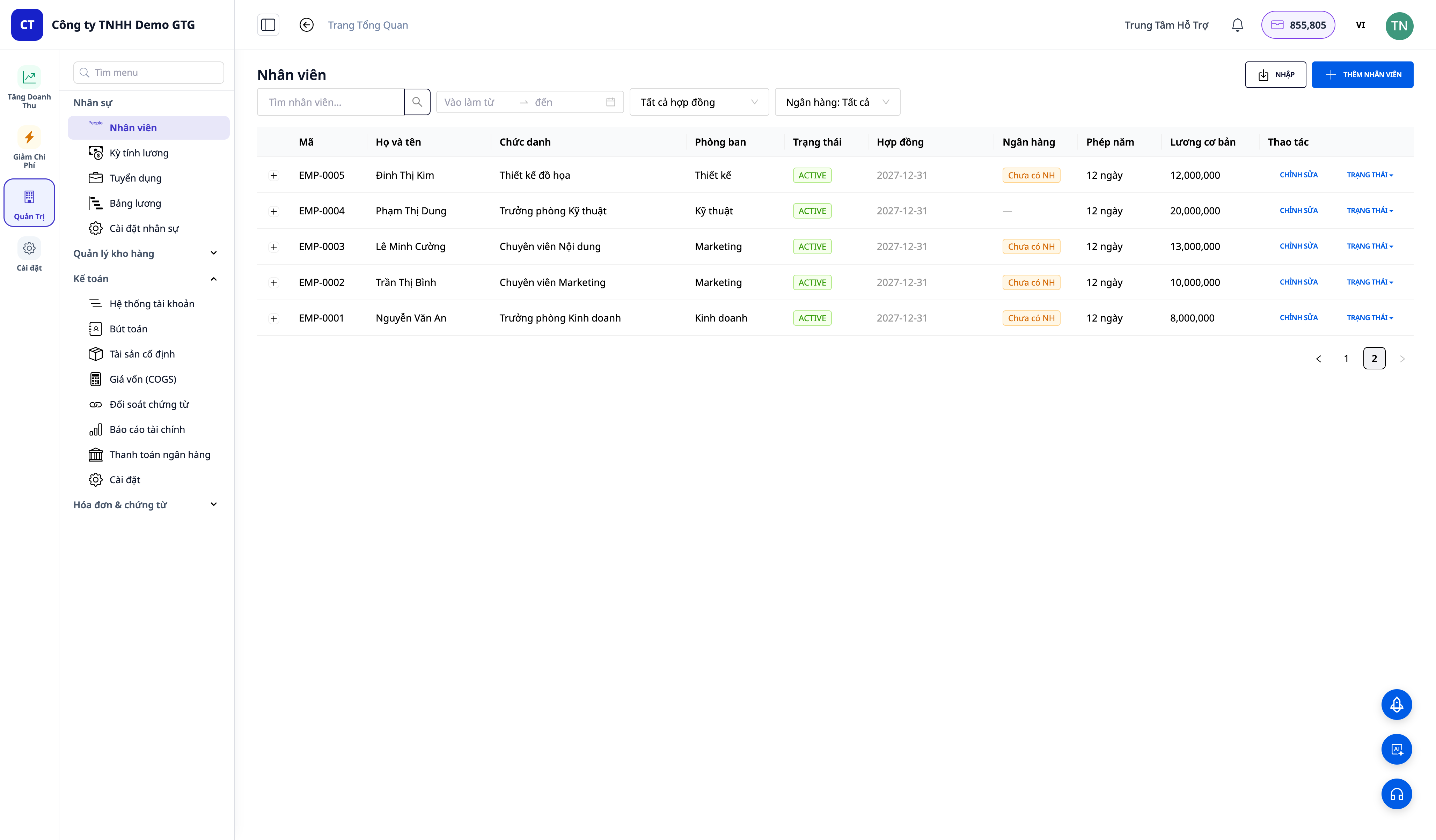
- Spustelėkite Įdarbinti ant kandidato, kuriam buvo priimtas pasiūlymas → sistema iš karto sukuria darbuotojo profilį (EMP-xxxx) su perkeltu CV ir profiliu.
- Nuo pasiūlymo (atlyginimas + pareigos) sukuriamas juodraštis darbo sutartis — personalo skyrius tereikia peržiūrėti ir suaktyvinti.
- Nėra būdo patekti į stulpelį „Įdarbinti“, nesukūrus darbuotojo — procesas užtikrina švarius duomenis.
Nauda įmonei
| Funkcija | Reali nauda jums |
|---|---|
| DI sukuriamas pareiginis aprašymas | Skupo kelis kartus greitesnis skelbimų paskelbimas, profesionalumas, nuoseklumas |
| Ieškoti kandidatų „LinkedIn“ | Aktyviai pasiekti tinkamus žmones, nelaukiant, kol kandidatai ateis patys |
| CV skaitymas + DI balai | Objektyvus kandidatų palyginimas, neišleidžiant gerų specialistų |
| „Kanban“ lenta | Visada žinokite, kas kur yra, neprarandant kandidatų iš akių |
| Įdarbinimas → automatinis darbuotojas | Nebereikia dvigubai įvesti duomenų; tiesioginis ryšys su atlyginimu/darbo sutartimi |
| Pasiūlymas ir interviu sistemoje | Siunčiama iš įmonės pašto, tinkamu laiko juostos nustatymu |
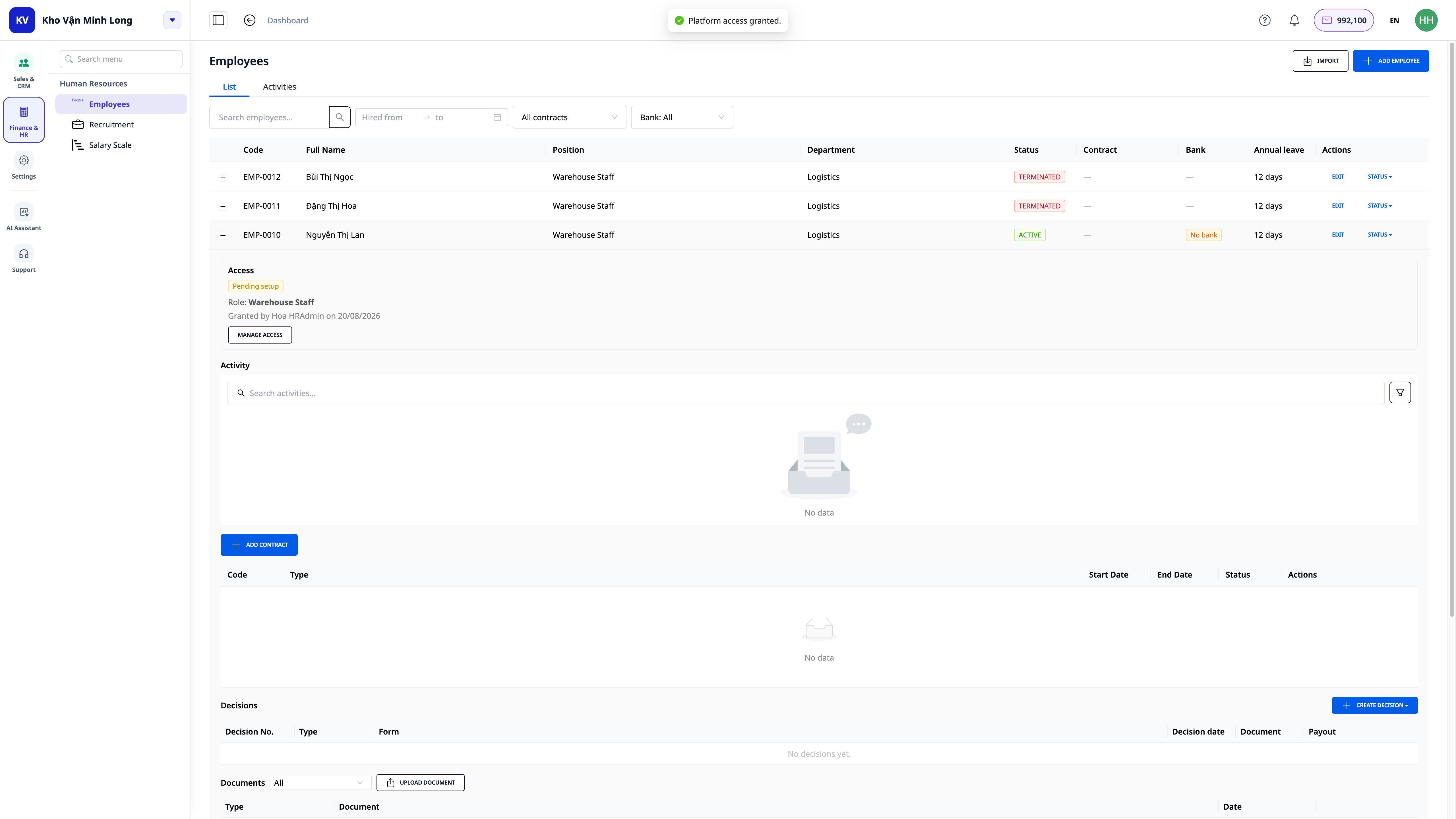
Įdarbinti – ir iš karto pradėti dirbti (NAUJA)
Aukščiau pateiktas „Įdarbinti → automatinis darbuotojas“ yra tik personalo profilio sukūrimas. O kaip prisijungti prie GTG CRM, kad galėtumėte dirbti? Tiesiai prie naujai sukurto darbuotojo profilio yra mygtukas Suteikti prieigą: pasirinkite vaidmenį (siūlomi pagal įdarbinimo poziciją), patvirtinkite, kad bus pridėtas papildomas „seat“, ir baigta — naujas darbuotojas gauna el. laišką ir gali pradėti dirbti pirmąją dieną, nereikia laukti, kol kas nors kitame ekrane jį pakvies. Daugiau informacijos rasite Personalas ir atlyginimų skaičiavimas.
Kam tinka?
- Besiplečiančios SMB įmonės, norinčios profesionaliai vykdyti įdarbinimą, nepirkdamos atskiros ATS programinės įrangos.
- Įdarbintojai / personalo specialistai, kuriems reikia vietos valdyti visus kandidatus ir procesus.
- Įmonės / agentūros, kurios dažnai įdarbina ir nori aktyviai ieškoti šaltinių „LinkedIn“.
Kaip pradėti?
Eikite į Personalo → Įdarbinimas (Recruitment), sukurkite pirmąjį įdarbinimo skelbimą ir leiskite DI parašyti pareigų aprašymą. Žingsnis po žingsnio instrukcijas rasite straipsnyje „Įdarbinimo / ATS naudojimo vadovas“.
ℹ️ Pastaba: Naujienų kūrimas dirbtiniu intelektu, CV skaitymas + vertinimas ir „LinkedIn“ profilių paieška yra mokama paslauga su kreditais — jūsų darbo erdvėje turi būti pakankamai kreditų. Siunčiant pasiūlymus / kvietimus į pokalbį reikalinga prijungta el. pašto dėžutė. Kandidatų profilio nuotraukos, rastos „LinkedIn“, naudojamos kaip inicialai (viešai prieinamas šaltinis, kuriame nėra nuotraukų).
Nemokamas bandomasis laikotarpis — kredito kortelė nereikalinga.


