

In het tijdperk van bloeiende e-commerce is verkopen op meerdere e-commerceplatforms (Shopee, Lazada, TikTok Shop) de onvermijdelijke trend geworden voor verkopers. Het beheren van bestellingen van verschillende kanalen brengt echter vaak veel problemen met zich mee: gemakkelijk over het hoofd zien van bestellingen, moeilijk de voorraad controleren, veel tijd verspillen aan het wisselen tussen platforms.
GTG CRM is er om dit probleem volledig op te lossen door alle bestellingen van e-commerceplatforms naar één enkele oplossing te brengen. U hoeft zich niet aan te melden bij elk afzonderlijk platform, u kunt alle bestellingen direct in GTG CRM volgen, verwerken en uit voorraad leveren, waardoor het verkoopproces wordt geoptimaliseerd en geen enkele bestelling wordt gemist.
Dit artikel leidt u stap voor stap door de meest effectieve manier om multi-channel bestellingen te synchroniseren en te beheren in GTG CRM.
Hoofdkenmerken
Automatische bestelsynchronisatie van Shopee, Lazada, TikTok Shop naar één enkele oplossing
Geconcentreerd orderbeheer — Bekijk en verwerk alle bestellingen van meerdere kanalen op één plek
Uniform magazijnbeheer — Houd de voorraad synchronisch bij op alle verkoopplatforms
Automatisch verzendlabel genereren zodra een bestelling is "Bevestigd" - u hoeft niet te wachten op 'Onderweg'
Automatische generatie van elektronische facturen in overeenstemming met de overheidsvoorschriften
Geconsolideerde omzetrapportage van alle verkoopplatforms
Snelle verwerking — Geen noodzaak om tussen meerdere platforms te wisselen
Handleiding voor multi-channel bestelsynchronisatie
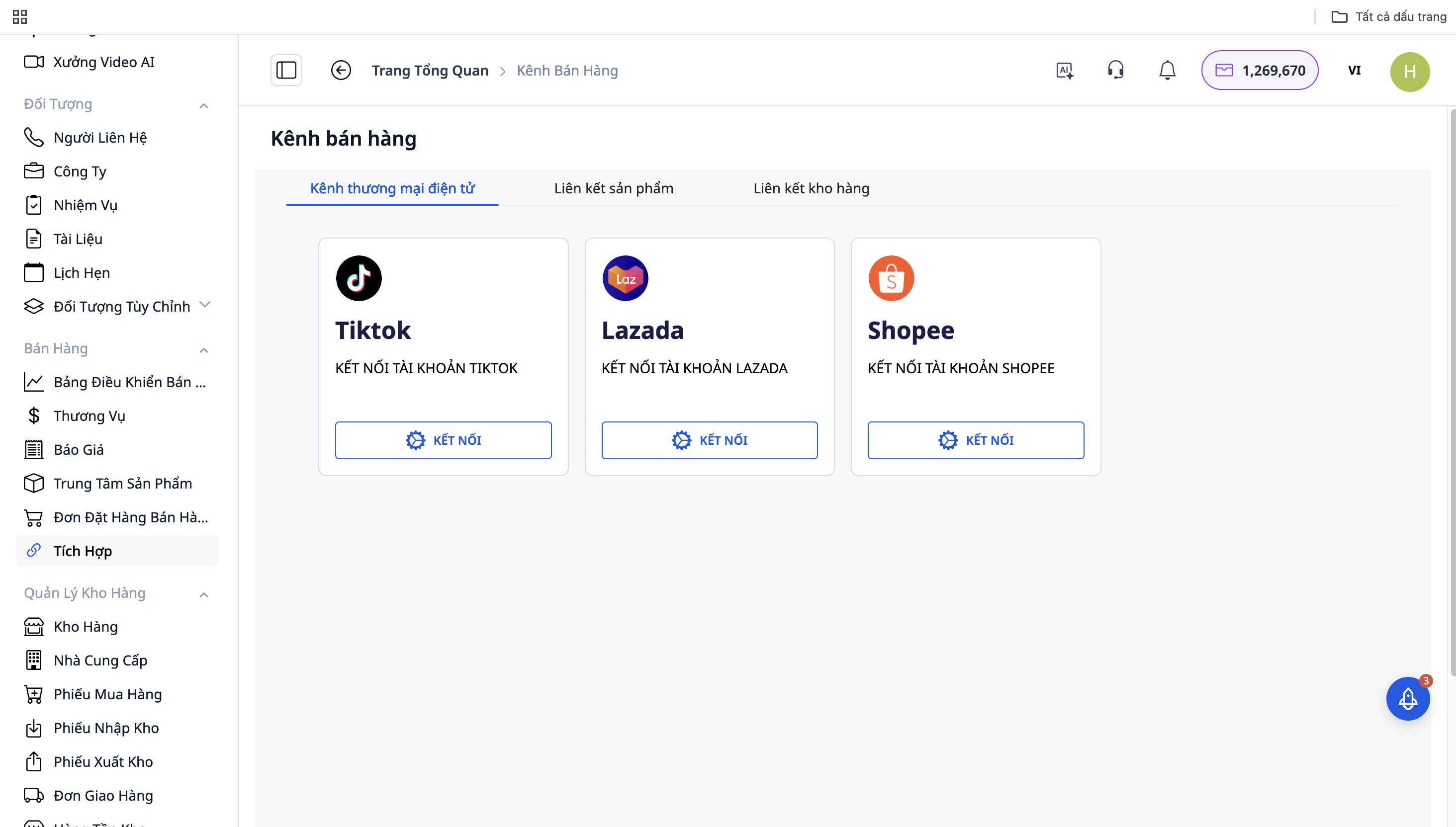
Stap 1: Verbinding maken met e-commerceplatforms
Ga naar "Instellingen" → "Integraties van verkoopplatforms"
Selecteer het platform waarmee u verbinding wilt maken: Shopee / Lazada / TikTok Shop
Klik op "Verbinden" en log in met uw shopaccount
Sta GTG CRM toe om toegang te krijgen tot order- en productgegevens
Herhaal dit voor de overige platforms
Stap 2: Automatische bestelsynchronisatie
Na succesvolle verbinding synchroniseert GTG CRM automatisch bestellingen van de platforms naar het systeem:
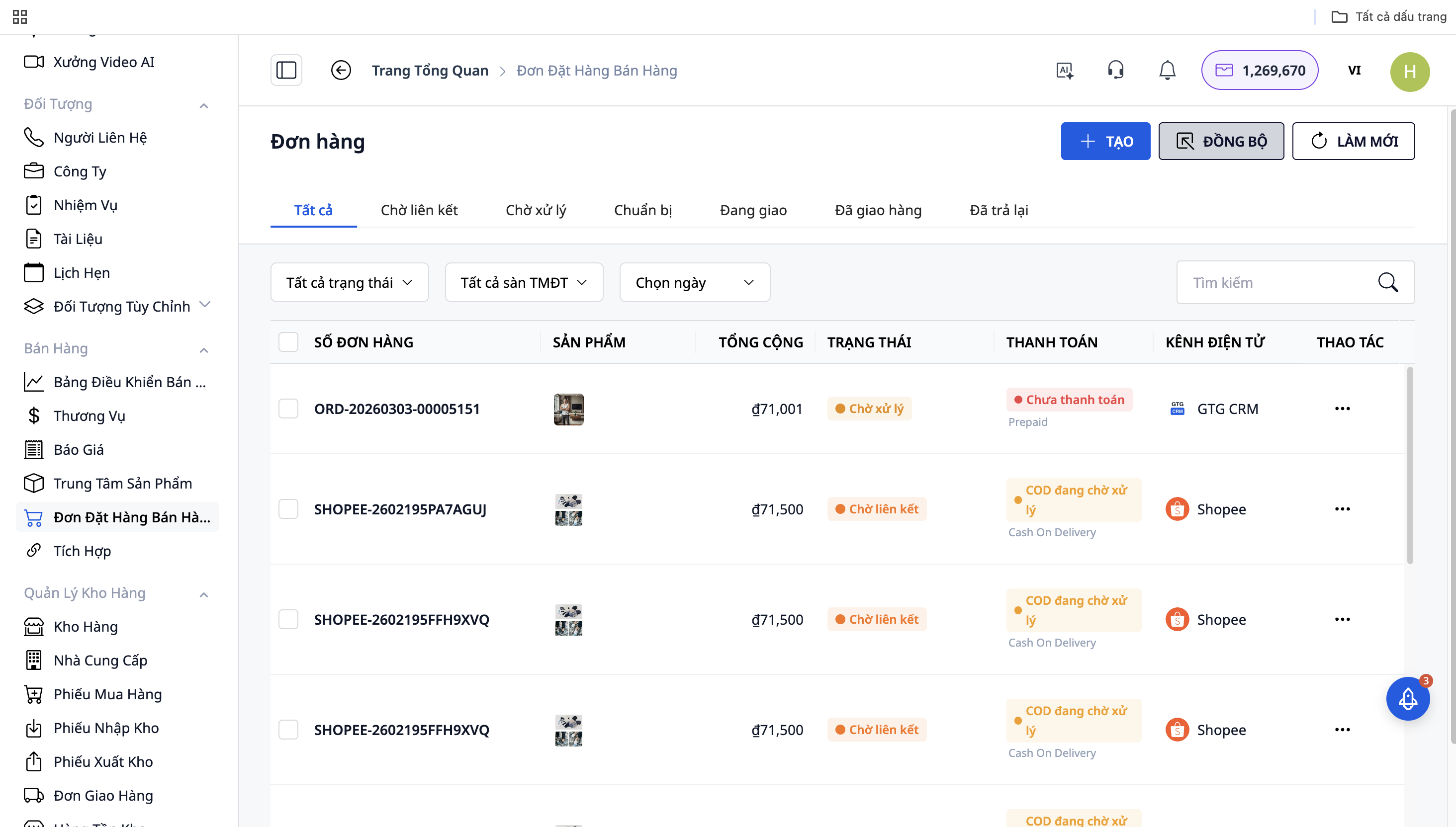
Alle bestellingen van Shopee, Lazada, TikTok Shop worden weergegeven in "Verkooppagina"
Elke bestelling heeft een bronicoon (platformlogo) ter onderscheiding
Bestellingen worden in realtime bijgewerkt
Stap 3: Bestellingen verwerken
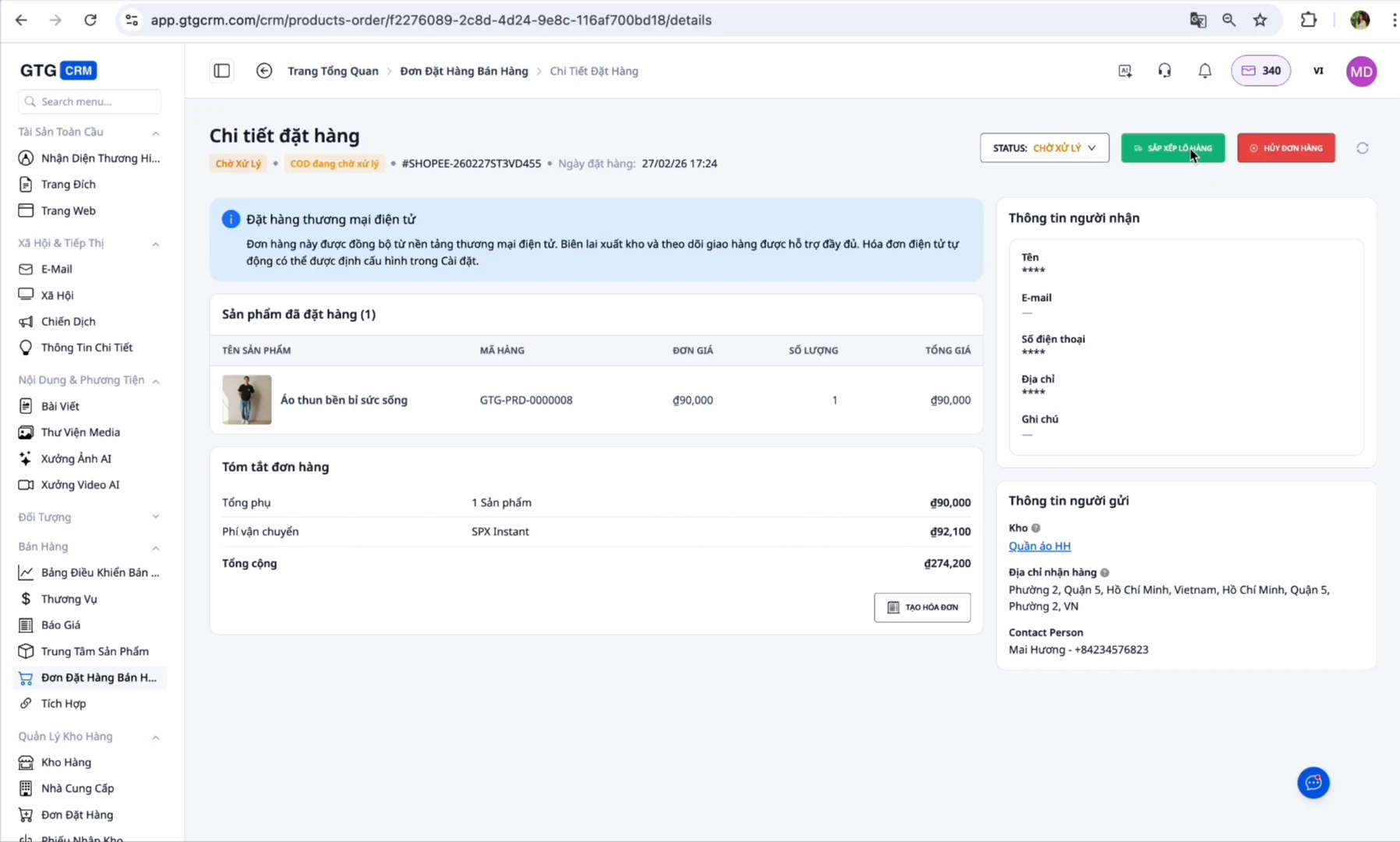
Bij nieuwe bestelling: De bestelling heeft de status "On Hold" of "Te verwerken"
Bevestig de bestelling: Wijzig de status naar "Onderweg"
Pakket voorbereiden: Ga naar de sectie "Verzendingen", klik op "Label afdrukken" om het verzendlabel te genereren
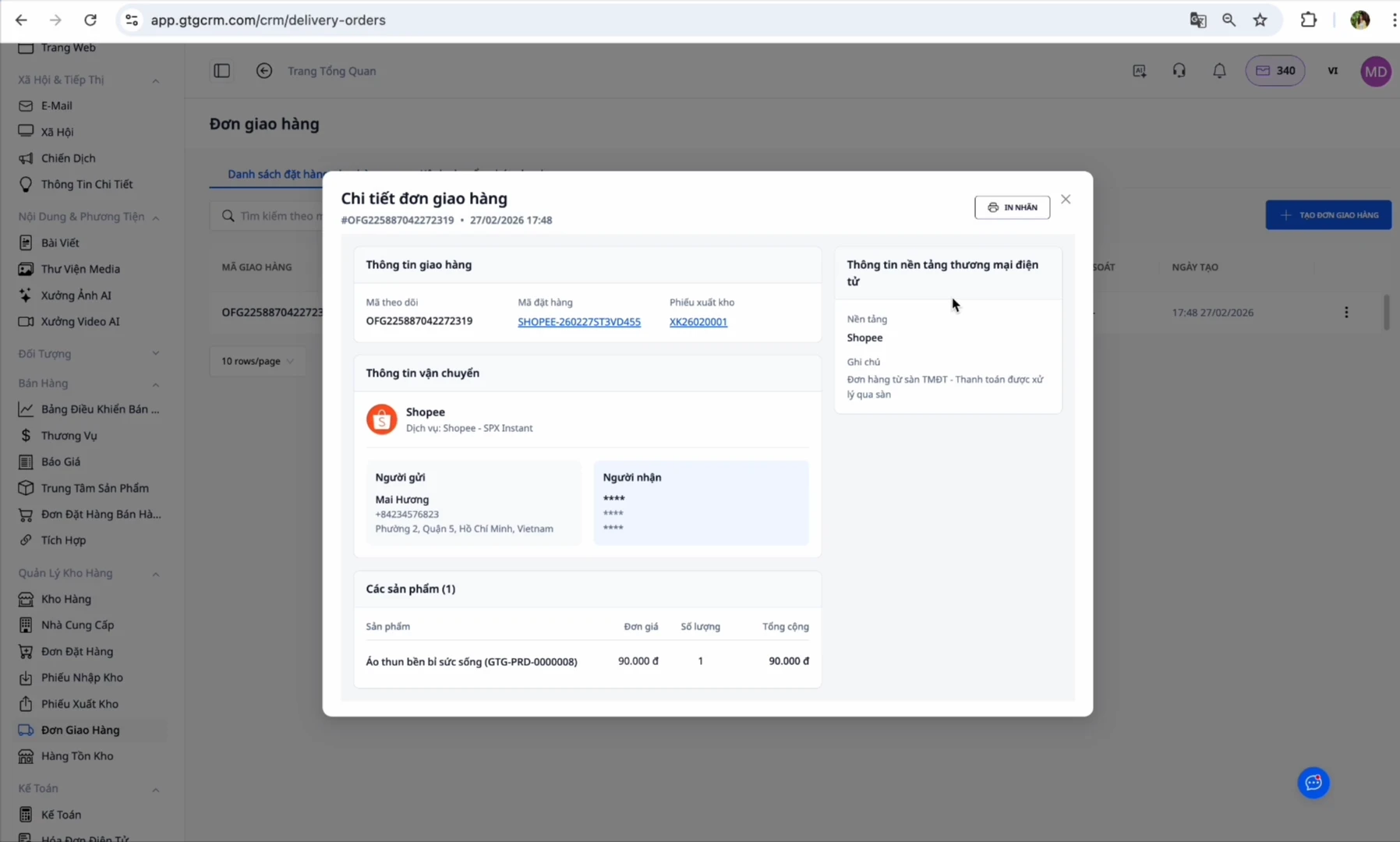
Op dit punt genereert GTG CRM automatisch een verzenddocument:
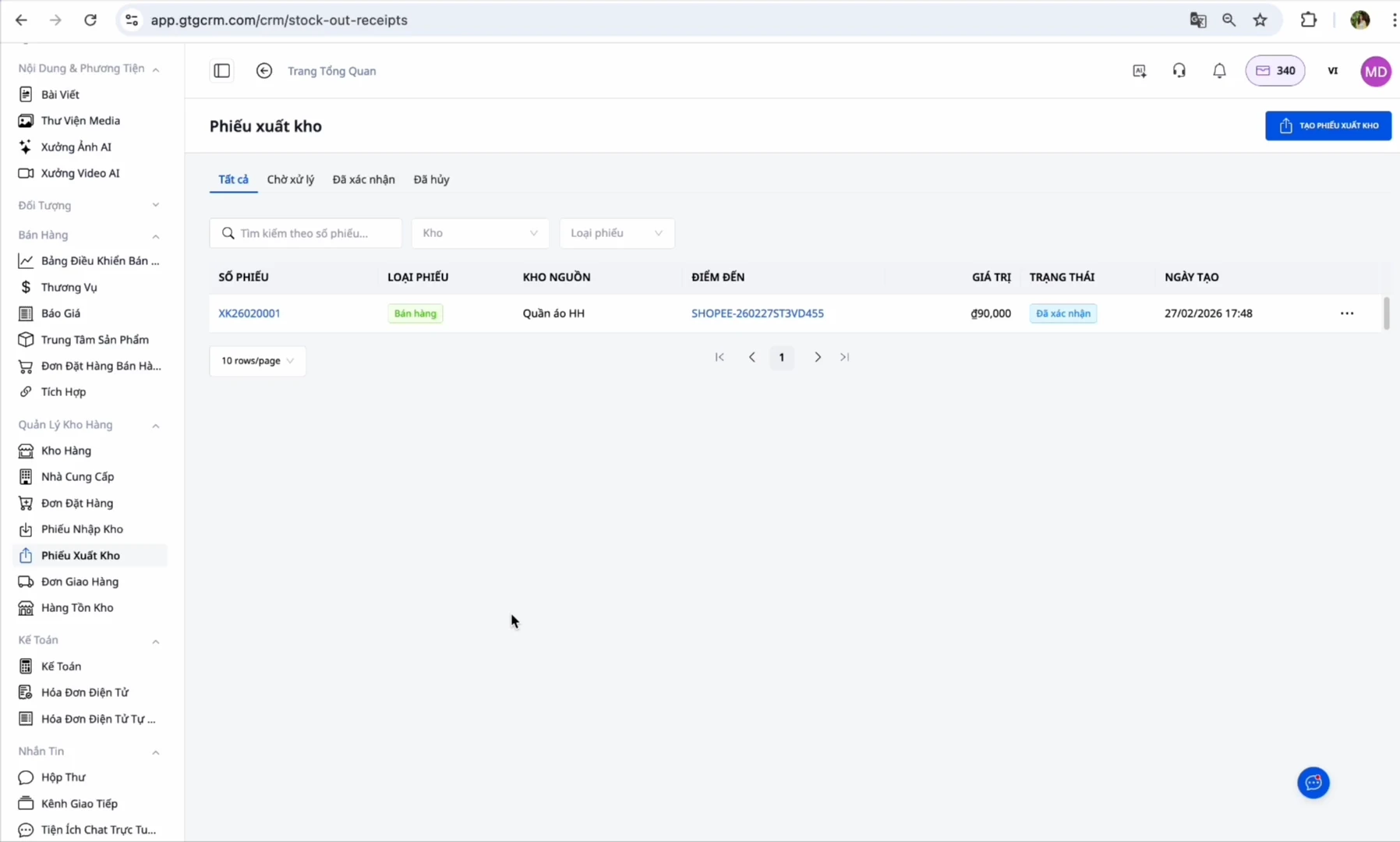
Verzenden: Ga naar het zojuist aangemaakte verzendbewijs → Klik op "Bevestig verzending" (Deze stap doet u zelf, deze trekt de voorraad af en registreert de kostprijs. Nadat u hebt bevestigd, genereert het systeem automatisch een elektronische factuur), waarna het systeem automatisch een elektronische factuur genereert (indien ingesteld)
Voltooid: Wanneer de klant de goederen succesvol heeft ontvangen, verandert de bestelling in "Voltooid"
Voordelen van het gebruik van GTG CRM
Tijdbesparing: U hoeft niet op elke aparte marktplaats in te loggen, beheer al uw bestellingen op één plek
Geen gemiste bestellingen: Automatische synchronisatie zorgt ervoor dat u nooit een bestelling mist
Nauwkeurige voorraadcontrole: De voorraadhoeveelheid wordt gesynchroniseerd op alle kanalen
Automatisering van processen: Verzendbewijzen worden voor u gegenereerd, u hoeft alleen maar op bevestigen te klikken, de elektronische factuur wordt daarna automatisch gegenereerd
Eenvoudige belastingaangifte: Het systeem verzamelt inkoopfacturen en genereert automatisch uitgaande facturen volgens de overheidsvoorschriften
Geaggregeerde rapporten: Bekijk omzet en winst van alle kanalen op één dashboard
Belangrijke opmerkingen
Over SKU's:
Zorg ervoor dat de SKU op GTG CRM 100% overeenkomt met de SKU op de e-commerce marktplaatsen
Als SKU's verschillend zijn → Het systeem kan de voorraad niet synchroniseren
Eén product = Eén unieke SKU op alle kanalen
Over automatische facturering:
Als u de marktplaatsen (Shopee/Lazada/TikTok) hebt gemachtigd voor automatische facturering → Schakel de automatische facturering op GTG CRM NIET in om dubbele facturering te voorkomen
Schakel deze functie alleen in als u de marktplaats niet hebt gemachtigd (let op: alleen van toepassing op bestellingen van e-commerce marktplaatsen)
Over magazijnadressen:
Voer het magazijnadres correct in, want dit is de plek waar de koerier de goederen zal ophalen
Zorg ervoor dat er tijdens kantooruren altijd iemand verantwoordelijk is in het magazijn
Over bestelstatussen:
U moet de verzending bevestigen voordat automatische facturering kan plaatsvinden
Corrigerende facturen kunnen alleen worden aangemaakt nadat de oorspronkelijke factuur is uitgegeven
Conclusie
GTG CRM is een allesomvattende oplossing waarmee multichannel-verkopers hun bestellingen van Shopee, Lazada en TikTok Shop zo efficiënt mogelijk kunnen beheren. In plaats van in te loggen op elke afzonderlijke marktplaats, tijd te verspillen aan het wisselen en gemakkelijk bestellingen te missen, opent u gewoon GTG CRM en kunt u direct alle bestellingen verwerken.
Met name dankzij de automatiseringsfuncties, van het aanmaken van verzendbewijzen tot het genereren van elektronische facturen, helpt GTG CRM u om te voldoen aan de wettelijke factureringseisen zonder extra inspanningen. Het intelligente voorraadsynchronisatiesysteem zorgt ervoor dat u altijd nauwkeurige controle heeft over uw voorraad, en voorkomt dat u meer verkoopt dan de beschikbare hoeveelheid.
Met GTG CRM kunt u zich concentreren op verkopen en het laten groeien van uw bedrijf, in plaats van tijd te verliezen aan handmatige operationele taken. Dit is de onmisbare tool voor elke multichannel-verkoper in het tijdperk van e-commerce 4.0.


