Form 01/CNKD for the household still shows the normal tax amount, with no 30% reduction? This usually happens because the software is waiting for you to enter the expected 2026 full-year revenue. Until you enter it, GTG CRM keeps the normal tax amount.
What to do, if the household's cumulative revenue (year to date) is already over 1 billion and expected 2026 full-year revenue does not exceed 10 billion: go to Finance & HR → Accounting → Financial Reports → Tax Reports tab, create Form 01/CNKD, and click Enter on the expected revenue line (the steps are in "Two steps in the software"). For example, if the sample household enters expected revenue of 6,000,000,000, the "30% reduction applied" line appears and the Q2 personal income tax falls from 1,500,000 to 1,050,000. Creating the form and clicking Save does not submit anything to the tax authority. You can change it later using the Edit button.
Household businesses can also claim the tax reduction using the form in the Appendix of Decree 398 (Form No. 01 of the Appendix), submitted outside the software. See "Claiming the reduction outside the software".
This article is for household business owners or the people who handle taxes for them, filing personal income tax quarterly. For companies (corporate income tax filing), see the section "Companies: Form 03/TNDN" in the article "Guide to Using the Accounting & E-Invoice Suite". Haven't set up accounting yet? Follow the Guide to using the accounting and e-invoice suite first.
Two steps in the software
In any quarter where cumulative revenue is already over 1 billion, complete the two steps below. In quarters where it is not yet over 1 billion, you don't need to do this yet. See "Who qualifies for the reduction".
Go to Finance & HR → Accounting → Financial Reports → Tax Reports tab, select Tax return for household businesses (01/CNKD), choose 2026 and a quarter where cumulative revenue is over 1 billion, then click Create return. The Create return button requires permission to prepare and export tax returns, which by default belongs to the Administrator and Accountant groups. Users who can only view reports will not be able to click this button and will not see the Enter button.
Directly below the cumulative revenue row from the beginning of the year is a row Expected revenue for full-year 2026 (used for all 4 quarters) marked Needs your answer.
How to estimate: take the revenue already recorded since the start of the year, add the amount you expect for the remaining months, including income received outside invoices (see "Actual revenue different from the books"). If the figure is close to 10 billion, consult the household's tax advisor before saving. Note: if the household's cumulative revenue from the start of the year exceeds 10 billion in any quarter, the household is not eligible for the 30% reduction (for the entire year), and any household that has already filed with the reduction must pay the difference in tax that was reduced; see "When cumulative revenue exceeds 10 billion".
Click Enter on that row, type the estimated figure, then click Save. This figure is entered only once, and every quarter that has this row will show the same number. The row always has an Edit button and a Change history link so you can see who entered which figure and when. The process is the same whether the household calculates tax as a percentage of revenue or based on income.
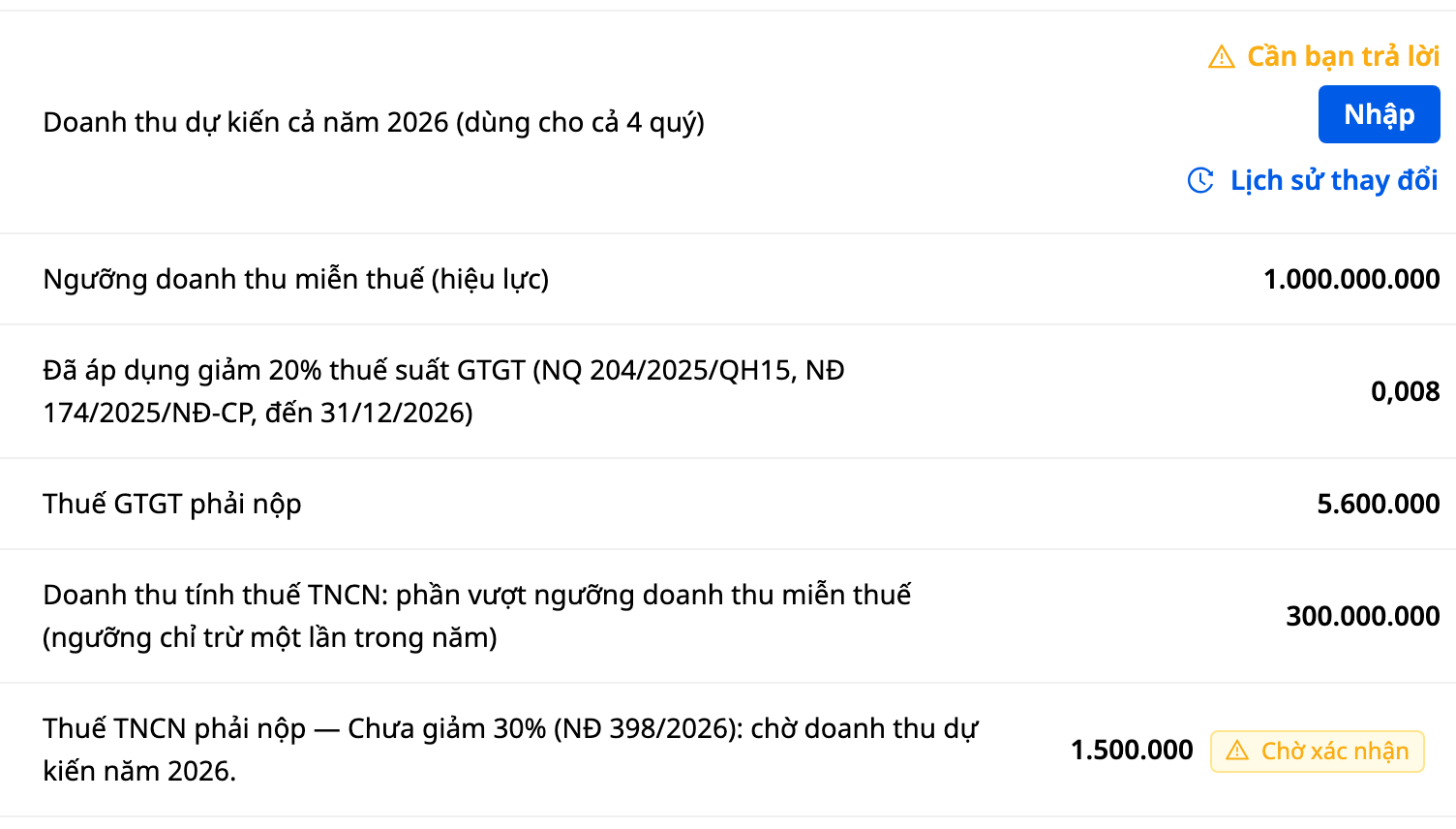
If nothing has been entered yet, the text "Not reduced by 30% (Decree 398/2026): awaiting expected 2026 revenue" appears at the end of the label for the Personal Income Tax payable row (households calculating tax as a percentage of revenue, as shown in the image below). Households calculating tax based on income will see this text at the end of the label for the Applicable PIT rate row. Example household in the image: quarter 2 report, quarter revenue of 700,000,000, cumulative revenue of 1,300,000,000 (quarter 1 was 600,000,000; these revenue rows are located above the image). Between the expected revenue row and the Personal Income Tax payable row there are four other rows, all shown in the image.
In the first quarter where cumulative revenue exceeds 1 billion, households calculating tax as a percentage of revenue will see an additional row "Revenue subject to PIT: portion above the tax-exempt revenue threshold (the threshold is deducted only once per year)"; tax is calculated on this amount. In the image, this row shows 300,000,000 (cumulative revenue of 1,300,000,000 minus 1,000,000,000), and Personal Income Tax payable is 1,500,000.
After saving, if the figure you entered does not exceed 10 billion, the table displays an additional separate row "Reduced by 30% (Decree 398/2026) based on 2026 revenue entered by you …". The Personal Income Tax payable row remains the same row, but now shows the tax amount reduced by 30%. For this example household, entering 6,000,000,000 reduces the quarter 2 Personal Income Tax payable from 1,500,000 to 1,050,000.
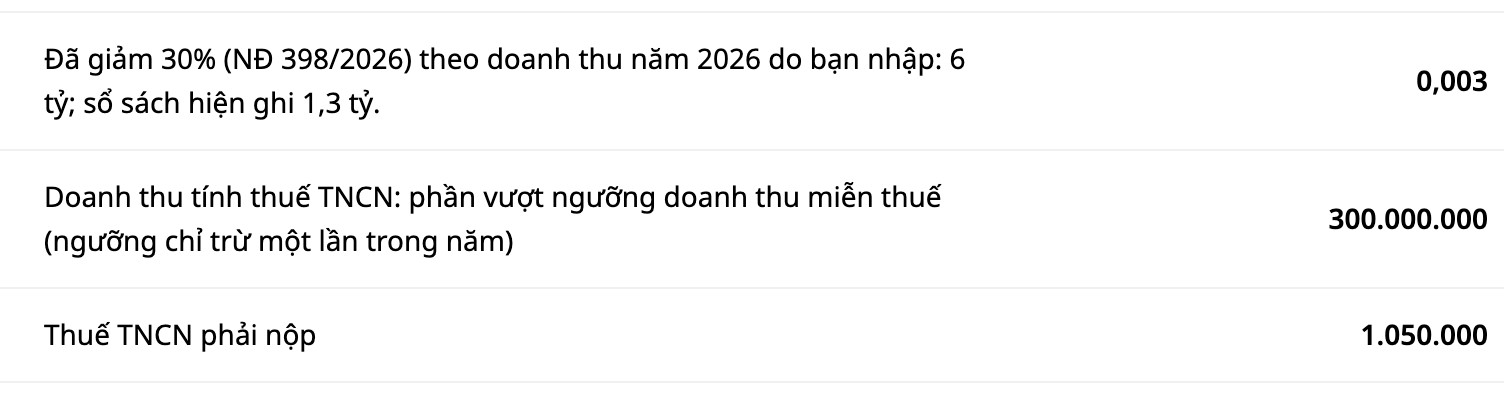
In the image above, the example household entered 6,000,000,000: the row "Reduced by 30% … 6 billion; books currently show 1.3 billion" appears, the taxable revenue row remains 300,000,000, and Personal Income Tax payable is 1,050,000. The rate box in the image is rounded; the tax payable amount next to it is the exact figure.
If the total annual revenue you enter for the household exceeds 10 billion VND, the software does not apply the 30% reduction (Article 2, Clause 4(a) of Decree 398 for households that declare tax reductions using the declaration form in the Appendix, when expected revenue in the tax period does not exceed 10 billion VND).
Don't see the input row? It's usually due to one of the following reasons:
- the quarter you're viewing doesn't have a return yet: click Create return first;
- the cumulative revenue recorded in the ledger through the end of that quarter is not yet over 1 billion VND (income received outside invoices in GTG CRM is not counted in this figure; see "Actual revenue differs from the books");
- the account only has permission to view reports.
The two steps above make GTG CRM display the tax amount reduced by 30% for households with expected revenue of no more than 10 billion VND. To file a tax reduction with the tax authority, use the tax reduction form in the Appendix: see "Filing the tax reduction outside the software".
Who qualifies for the reduction
The reduction applies to resident individuals engaged in production or business activities, including individuals who register to establish a household business or persons authorized by household members to act as representatives of a household business (Article 2, Clause 1 of Decree 398). GTG CRM does not check whether the household head is a resident individual: see "What GTG CRM does not do yet".
Decree 398/2026/ND-CP (effective from 29/10/2026, guiding Resolution 43/2026/QH16) assesses the 10 billion VND threshold based on revenue in 2026 or 2027 itself, not revenue of the previous year. Revenue of exactly 10 billion VND still qualifies for the reduction; only revenue exceeding 10 billion VND does not (Article 2). Since the year is not over, no one knows that figure yet, so taxpayers make their own estimates, and GTG CRM does not estimate on your behalf. For a household business, the 1 billion VND threshold is assessed based on cumulative revenue from the beginning of the year.
For a household with cumulative revenue of 1 billion VND or less up to the end of the quarter being viewed: no personal income tax is payable for that quarter, and there is no expected revenue input row. Basis: Article 4, Clause 1 and Article 8, Clause 1 of Decree 68/2026, as amended by Decree 141/2026: the obligation to declare and pay tax begins from the quarter in which revenue exceeds 1 billion VND.
For any quarter in which cumulative revenue in the ledger does not exceed 1 billion VND, you do not need to complete the two steps above in the software for that quarter. A household whose annual revenue does not exceed 1 billion VND must still notify the tax authority of its actual revenue for the year no later than January 31 of the following year (Article 8, Clause 1, Point a of Decree 68/2026/ND-CP, as amended by Decree 141/2026/ND-CP). GTG CRM does not prepare this notice.
Actual revenue differs from the books (Article 5, Clause 1 of Decree 68/2026)
The amount you enter is the household's total annual revenue, determined according to Article 5 of Decree 68/2026, including income received outside invoices. The "Cumulative revenue from the beginning of the year" column only counts orders and invoices in the ledger, along with the opening balance you declared, so it may be lower than the actual figure. Subsidies, bonuses, support, or compensation received outside invoices are still revenue under Article 5, Clause 1, but GTG CRM does not automatically add them to this column.
Included in household revenue (amounts the household receives or is entitled to): all sales proceeds, processing fees, and service provision fees, including price subsidies, surcharges, and overtime charges that the household is entitled to, regardless of whether payment has been collected; bonuses received; amounts received from sales target support, promotions, and payment discounts; support received in cash or in kind; compensation for breach of contract and other compensation related to business activities; and other revenue the household receives, regardless of whether payment has been collected. Not included: commercial discounts, sales price reductions, and the value of goods returned.
(Article 5, Clause 1 of Decree 68/2026/ND-CP; referenced by Article 2, Clause 3 of Decree 398.)
Some activities have their own revenue calculation method under Article 5, Clause 2 of Decree 68/2026/NĐ-CP: processing; installment or deferred-payment sales; delivering goods to agents and acting as an agent; leasing assets; services where the customer pays in advance for multiple years; transportation; and construction and installation. If your household business engages in any of these, determine revenue under Article 5 together with your household's tax agent.
If your revenue under Article 5 has exceeded 1 billion VND but your ledger has not, the expected revenue line will not appear. In that case, GTG CRM has not yet shown an entry field, so it has not calculated the reduction for you. Add up those amounts yourself, calculate the tax under Article 5, and file the declaration with your household's tax agent. Ask your accountant about the filing and payment obligations from the quarter in which revenue exceeds 1 billion VND (Article 8, Clause 1 of Decree 68/2026). If your revenue under Article 5 has exceeded 10 billion VND but your ledger has not, the repayment line will not appear. In that case, calculate the reduced tax that must be repaid together with your accountant.
Tax Reduction Declaration Outside the Software
The tax reduction declaration form accompanying Decree 398 (Form No. 01 in the Appendix) is submitted outside the software, together with the quarterly, six-monthly, or annual tax filing (Article 2, Clause 4(a) of Decree 398). This is not the 01/CNKD return within the software. GTG CRM does not yet generate this form for you, so ask your household's tax agent to complete it using the form in the Appendix to the decree.
The Appendix to the decree contains three personal income tax (PIT) forms. Form No. 01 in the Appendix is the household's tax reduction declaration form. Form No. 03 is used for adjustments when revenue exceeds 10 billion VND (Article 2, Clause 4(c)).
When Cumulative Revenue Exceeds 10 Billion VND
If your household's cumulative revenue from the beginning of the year exceeds 10 billion VND in any quarter, the household is no longer eligible for the 30% reduction, and this applies to the entire year, not just from that quarter. If the household has already filed a tax reduction, it must pay back the PIT amount that was reduced and file an adjustment using Form No. 03 attached to Decree 398 (not the 03/TNDN corporate income tax return). Submit this together with the tax filing for the period in which cumulative revenue from the beginning of the year exceeded 10 billion VND (Article 2, Clause 4(c) of Decree 398). This additional tax payment is not subject to late payment interest up to the filing deadline for that period (same clause). Ask your accountant how much additional amount you need to pay.
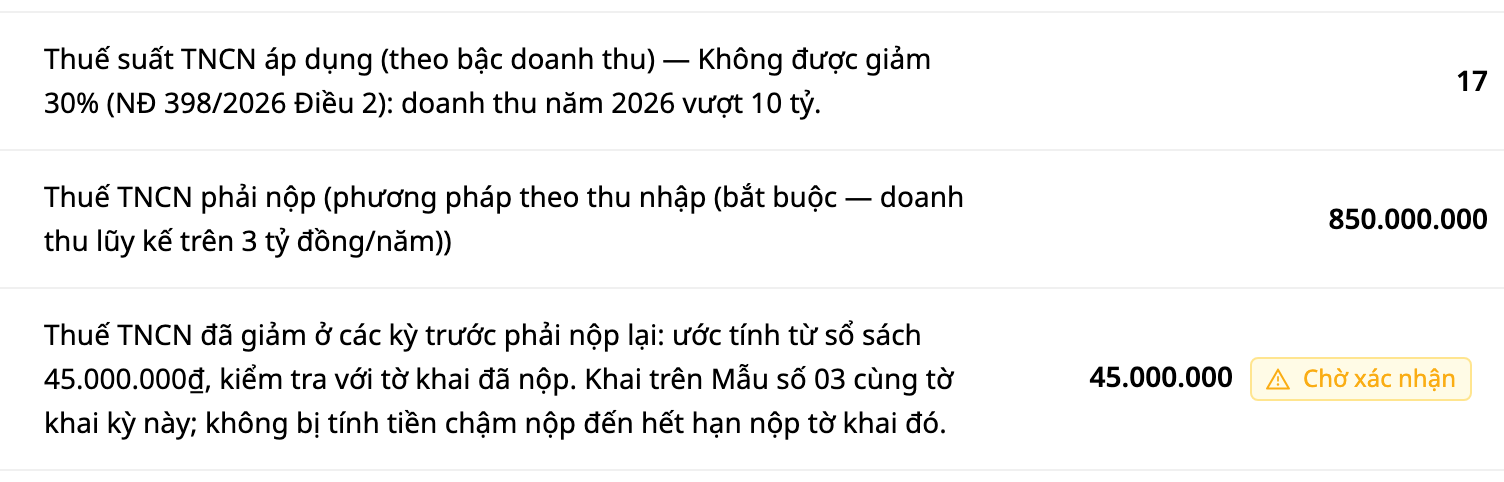
- In the quarter where the threshold is exceeded: the label reads “30% reduction not allowed,” and there is an additional line, PIT reduced in previous periods that must be repaid. This amount is calculated for each previous quarter and equals 30% of the PIT for that quarter. For quarters taxed on income, the tax is (revenue minus expenses entered) multiplied by the tax rate. For quarters taxed on a percentage of revenue, the tax is the portion of annual revenue exceeding 1 billion VND (this threshold is deducted only once, from the first quarter) multiplied by the tax rate for the industry group. This figure is always labeled as an estimate, so check it against the returns you have already filed. For a quarter taxed on income where the household has not yet entered expenses, the amount cannot be estimated yet, and this line states that clearly.
- Subsequent quarters: only the “30% reduction not allowed” label remains, and the repayment line does not repeat. If you reopen the return for the earlier quarter, you will see the normal tax amount (not reduced). The return you filed is not changed; the reduced amount to be repaid appears on the line for the quarter in which the threshold was exceeded.
- If the household has never entered expected revenue in GTG CRM: GTG CRM has not applied a reduction for that household, so no repayment line appears. If you applied the reduction yourself on a return filed outside GTG CRM and annual revenue exceeds 10 billion VND, you must still pay back the reduced tax and file an adjustment (Article 2, Clause 4(c) of Decree 398).
- If the household claimed reductions in earlier quarters and then revised its expected revenue to above 10 billion VND: the repayment line and its conditional introduction (“If the household claimed a PIT reduction in earlier periods based on the old expected figure, the reduced amount must be repaid”) appear only in the quarter in which the household's ledger exceeds 10 billion VND. If you entered an expected figure above 10 billion VND but the ledger has not reached that level, no repayment line appears. GTG CRM does not apply further reductions in later quarters. However, if actual revenue for the full year does not exceed 10 billion VND, the household can still file an adjustment to claim the reduction (Article 2, Clause 4(d) of Decree 398). The returns the household has filed are the reference for determining which quarters had reductions claimed.
For example, in the Q3 reports of two households with the same revenue: Q1 is 1.2 billion, Q2 is 1.2 billion, and Q3 is 8 billion. Cumulative revenue of 10.4 billion exceeds 10 billion, so the reductions for the earlier quarters no longer apply. The first household calculates tax as a percentage of revenue: Q1 tax is 1,000,000 (the portion of that quarter's revenue above 1 billion is 200,000,000), and Q2 tax is 6,000,000. The amount to pay back in Q3 is therefore 2,100,000, which is 30% of 7,000,000. The second household calculates tax based on income (revenue minus expenses). It entered an expected 6,000,000,000, while the ledger recorded 10,400,000,000. Its Q1 and Q2 tax is 75,000,000 each. The label reads "No 30% reduction allowed," the estimated amount to pay back is 45,000,000, and its status is "Pending confirmation." The image below shows the household that calculates tax based on income. The household in the "Two steps in the software" section is a different household, so its figures cannot be compared directly with these.
Quarter with returned goods
When returned goods or downward adjustments in a quarter exceed sales revenue, the revenue line for that quarter shows a negative number (for example, -200,000,000). GTG CRM does not display negative tax. The tax payable for that quarter shows 0, along with a sentence explaining the reason. The wording below is what GTG CRM prints on the report.
Household that calculates tax as a percentage of revenue (tax calculated on the period's revenue): the VAT payable line shows 0 with "— this period's returned goods or downward adjustments exceed revenue, so no VAT arises; GTG CRM does not deduct tax already paid on the reduced amount from the tax return; this is overpaid tax, which will be offset or refunded (Law 108/2025 Art. 15, Decree 68/2026 Art. 12): consult your tax accountant." The sentence about overpaid tax appears only once on the report, on this line. The PIT payable line shows 0 with "— this period's returned goods or downward adjustments exceed revenue, so no PIT arises." For industries without a VAT line, the sentence about overpaid tax appears on the PIT line instead of the VAT line.
Household that calculates tax based on income (revenue minus expenses): the PIT payable line shows 0 with "— this period's expenses or returned goods exceed revenue, so no PIT arises," without the sentence about overpaid tax. Unlike the household that calculates tax as a percentage of revenue, this household also deducts expenses, so if expenses exceed revenue, the result is also 0.
A quarter becomes tax-exempt after returned goods are recorded. For example, in Q2 a household has revenue of 1.2 billion and has paid tax. In Q4, returned goods of 400,000,000 reduce cumulative revenue to 800,000,000, which no longer exceeds the 1 billion threshold. In Q4, both payable lines show 0 with "(exempt — cumulative revenue does not exceed the threshold)." The VAT payable line gets one additional sentence: ". If actual revenue for the full year does not exceed the threshold, the tax already paid may be offset or refunded (Decree 68, Art. 12.2): consult the tax authority." The PIT payable line does not include this sentence. A household that has never exceeded the threshold, or whose Q1 report does not include this sentence. A year with revenue of exactly 1 billion is still tax-exempt.
GTG CRM only describes what the software does: it does not automatically deduct or refund tax paid in prior periods. Offsetting or refunding is decided by the household's tax agent and the tax authority.
What GTG CRM does not do yet
- It does not check whether the household head is a resident individual (Article 2, clause 1 of Decree 398). You confirm this condition yourself. If you are unsure, consult an accountant or the tax authority that manages you.
- It does not generate the tax reduction filing form (Form No. 01 in the Appendix) or Form No. 03 accompanying Decree 398. Fill them in using the forms in the Appendix of the decree.
- It does not automatically deduct tax paid in prior periods on the returned goods from this period's return. Ask the household's tax agent about that amount.
- For business households: it only adds up revenue in your GTG CRM account, whereas Article 2, clause 4(c) of Decree 398 considers the total actual revenue of all of an individual's business activities. If you run business elsewhere, add that revenue yourself and consult an accountant.
GTG CRM calculates and sends reminders; it does not file taxes on your behalf and does not make decisions for you. If you have no accountant, ask the tax authority that manages you or the person who prepares your tax returns for you.
If you encounter other situations:
- If the household still submits the tax reduction form in the Appendix outside the software: see the section "Tax reduction filing outside the software".
- If the quarter has returned goods or the quarter is tax-exempt after returned goods: see the section "The quarter has returned goods".
- If you do not see the input row: see the paragraph "Don't see the input row?" in the section "Two steps in the software".
- When the household's cumulative revenue from the beginning of the year exceeds 10 billion in a quarter: the household is not eligible for the 30% reduction; a household that has already claimed the reduction must pay the reduced tax amount in addition and make an adjustment declaration using Form No. 03 together with the tax filing records for that period (Article 2, Clause 4(c) of Decree 398); see the section "When cumulative revenue exceeds 10 billion".
Immediate action required: go to Finance & HR → Accounting → Financial Reports → Tax Reports tab, create the 01/CNKD tax return for a quarter that has cumulative revenue over 1 billion, and click Enter on the expected revenue row marked "Needs your answer". Creating the tax return and saving does not submit anything to the tax authority; you can edit it using the Edit button.