Monthly software plans often leave you torn between two worries. If you buy a large plan, you lose the leftover credits any month you don't use them all. If you buy a small one, you can run out halfway through a campaign. This article shows you how to answer "how many credits does my month need?" before you buy, using the public price list and the calculator on the Pricing page. You don't need to log in.
Two plans in one table
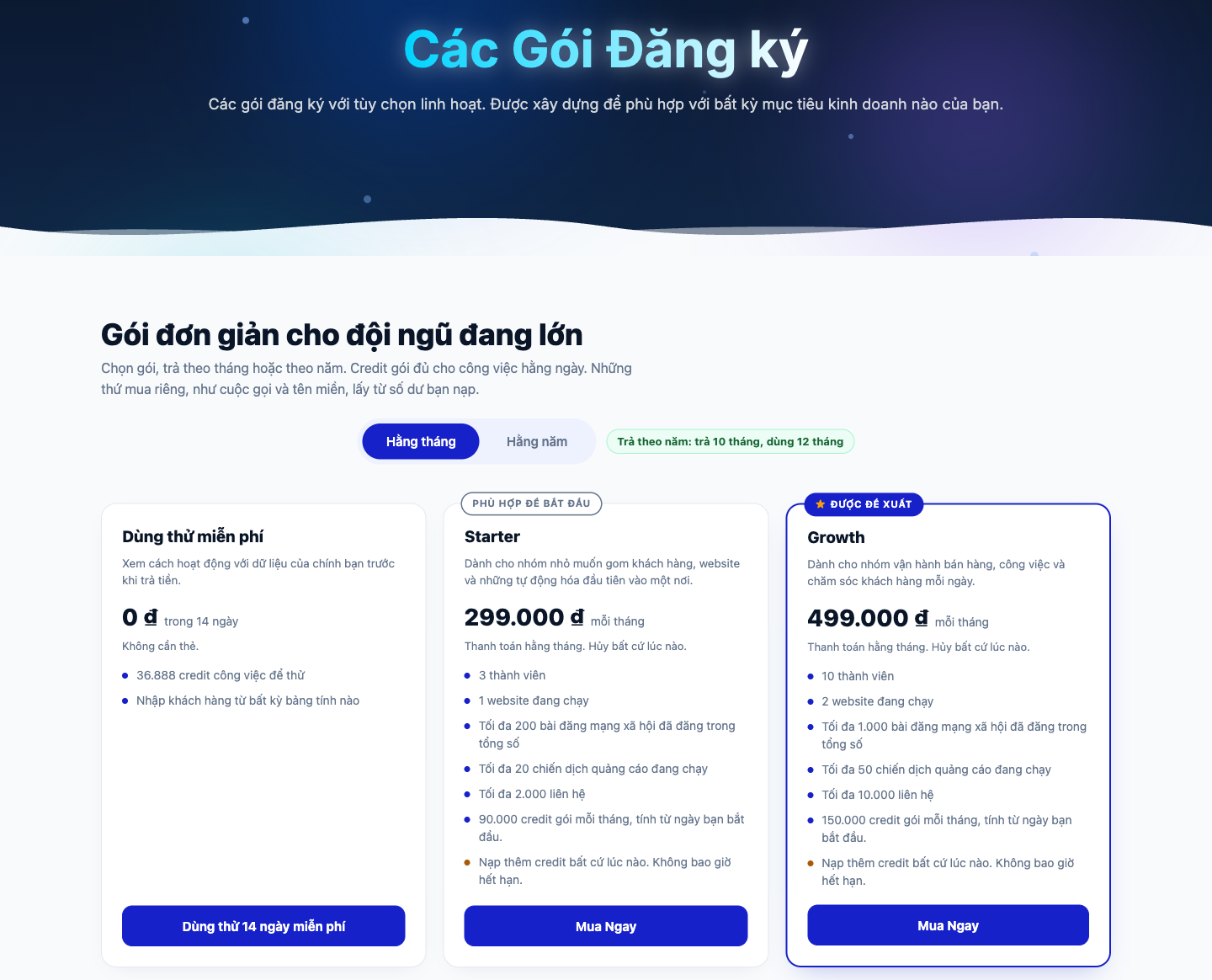
GTG CRM currently has two paid plans. Which one fits you depends on two things: credits (the work GTG does for you, such as sending emails or generating images) and limits (the number of team members, websites, contacts, and a few other things). Credits are harder to predict, so this article starts with credits.
| Starter | Growth | |
|---|---|---|
| Monthly price | 299,000đ | 499,000đ |
| Annual price | 2,990,000đ | 4,990,000đ |
| Plan credits per month | 90,000 | 150,000 |
| Team members | 3 | 10 |
| Active websites | 1 | 2 |
| Social media posts published (total) | up to 200 | up to 1,000 |
| Active ad campaigns | up to 20 | up to 50 |
| Contacts | up to 2,000 | up to 10,000 |
Paying annually means you pay for 10 months and get 12. Starter on the annual plan works out to about 249,000đ per month, and Growth to about 416,000đ per month. The annual plan is paid once, but the credits still arrive every month.
When plan credits arrive and when they run out
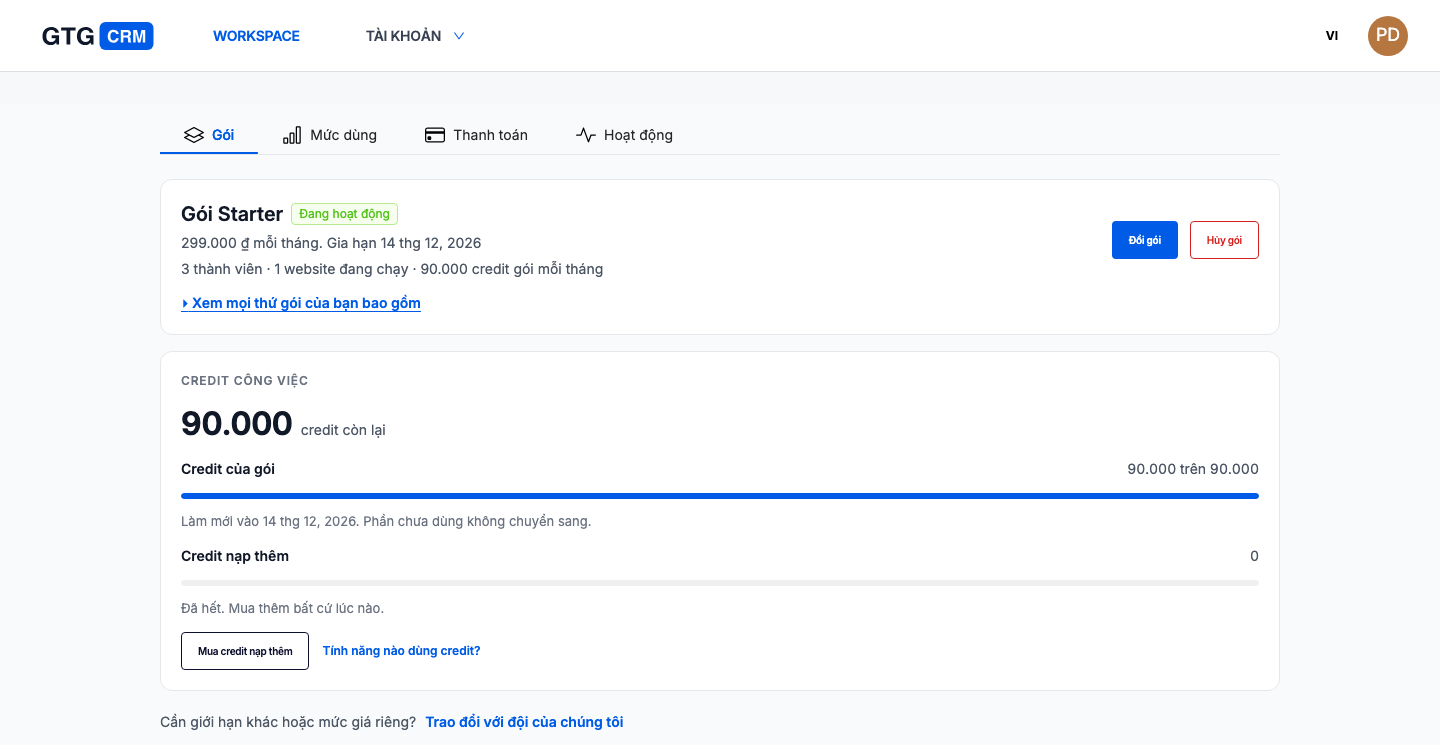
Plan credits arrive on the day you start your plan, and on that same day of each following month. If you start on the 13th, the credits arrive on the 13th of every month. The first time, you receive the full credit amount for your plan, no matter which day of the month you start.
Unused credits don't carry over to the next period. They expire right when the new credits arrive, and that date is always shown on the Plan tab under Billing. So choose your plan based on a typical month, not your busiest one. If a month is busier than usual, you can top up with extra credits (see below).
How many credits each task costs
This table comes from the public price list, as of November 18, 2026. Credit costs are today's prices and may change, so the figures on the Pricing page are always the correct ones.
| Task | Credits |
|---|---|
| 20 per email | |
| Automation run | 20 per run |
| Website chatbot reply | 148 per reply |
| Standard image | 1,500 per image |
| Product link scan | 830 per scan |
| Supplier search | 460 per run |
| AI documents and research | 50 to 600 per run |
Documents have a range, from 50 to 600 credits each time. The other rows are a fixed number for each use.
Calculate your whole month in three steps
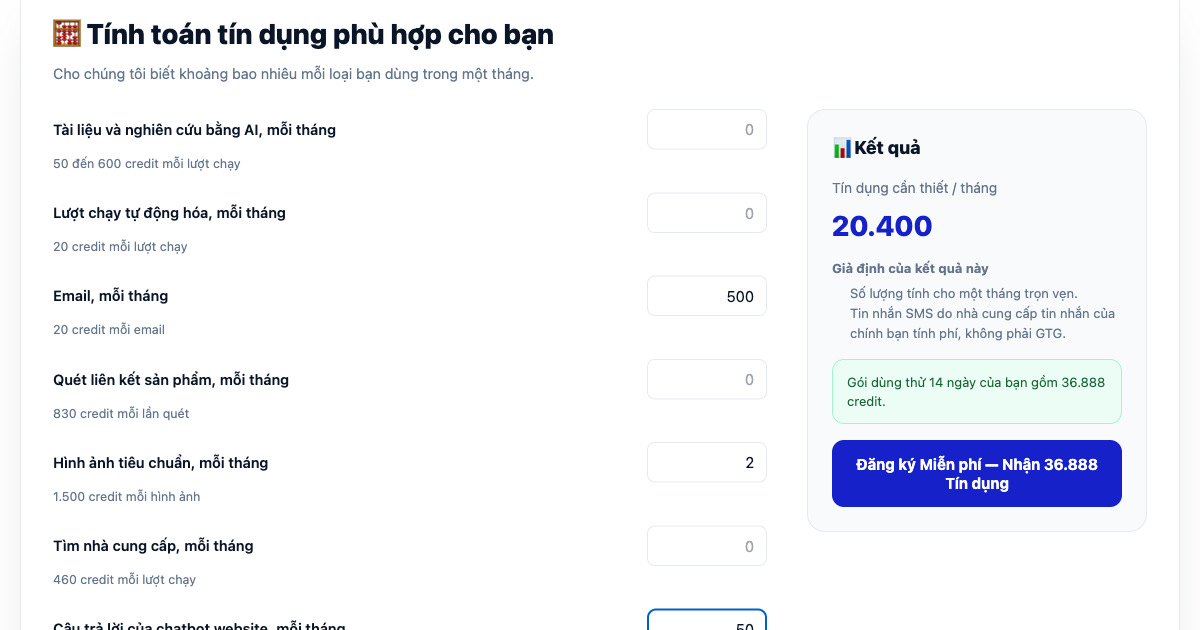
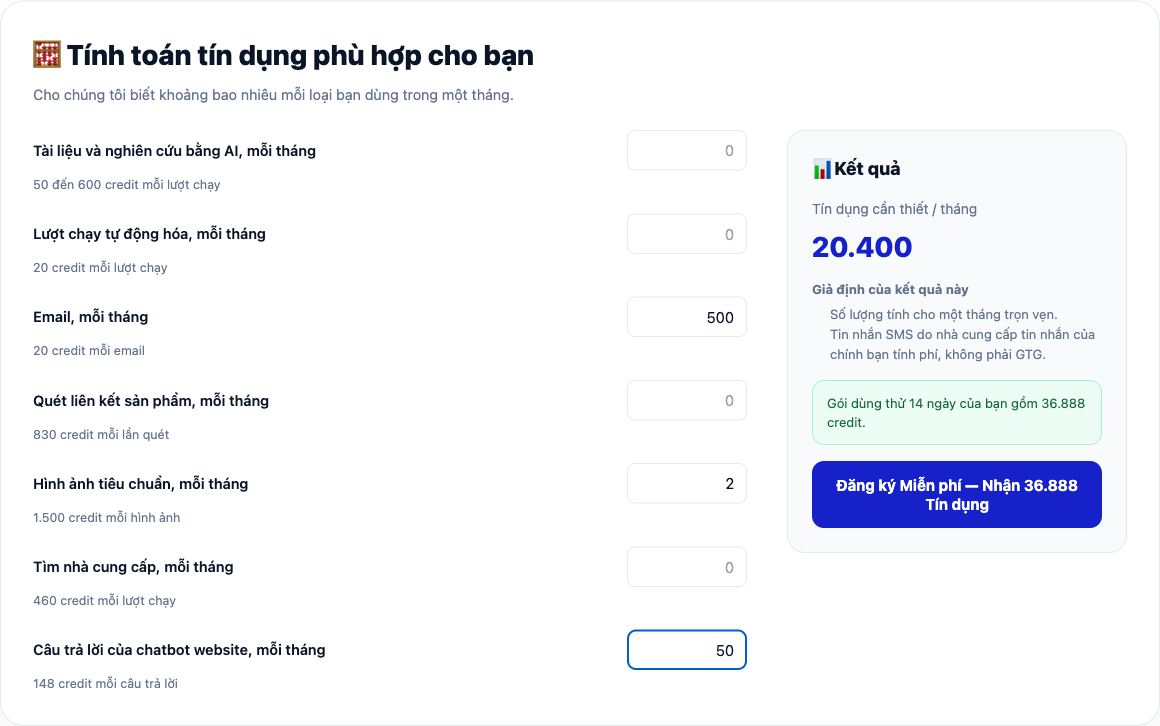
- Open the Pricing page and scroll down to the credit calculator, where there are boxes to enter how many times you use each feature per month.
- Enter how many times you expect to use each type of task in one month. The calculator works on a full calendar month.
- Read the number in the Result box. If you enter documents, the result is a range shown as "X to Y."
Three hypothetical examples (not real customers)
A small shop. In the month, it sends 500 emails, creates 2 images, and lets the chatbot answer 50 questions.
- 500 emails × 20 = 10,000
- 2 images × 1,500 = 3,000
- 50 replies × 148 = 7,400
- Total: 20,400 credits.
This figure fits comfortably within the 36,888 trial credits. With Starter (90,000 credits), there are 69,600 credits left over, and that surplus expires at the end of the period.
A busier business. In the month, it sends 2,000 emails, runs 300 automation workflows, has the chatbot answer 100 questions, creates 4 images, runs 3 supplier searches, scans 1 product link, and creates 5 documents.
- 2,000 emails × 20 = 40,000
- 300 runs × 20 = 6,000
- 100 replies × 148 = 14,800
- 4 images × 1,500 = 6,000
- 3 supplier searches × 460 = 1,380
- 1 scan × 830 = 830
- 5 documents × 50 to 600 = 250 to 3,000
- Total: 69,260 to 72,010 credits.
This exceeds the 36,888 trial credits, but Starter is enough: 17,990 to 20,740 credits are left over.
A team that sends a lot of email and has a busy chatbot. In the month, it sends 4,000 emails, runs 500 automation workflows, has the chatbot answer 300 questions, and creates 6 images.
- 4,000 emails × 20 = 80,000
- 500 runs × 20 = 10,000
- 300 replies × 148 = 44,400
- 6 images × 1,500 = 9,000
- Total: 143,400 credits.
Growth (150,000 credits) is enough, with 6,600 left over. Starter falls short by 53,400 credits, so you would need an extra top-up pack of 100,000 credits for 250,000 VND. Starter plus that top-up pack comes to 549,000 VND for that month, while Growth costs 499,000 VND, and Growth also offers a higher limit. The unused top-up credits, 46,600, never expire, so they are not lost.
The calculator only adds up the seven types of tasks in the table. Any task not listed in the table is not included in this figure.
What happens if you run out of credits mid-month?
You can buy top-up credits using the Buy top-up credits button on the Plans tab. There are three top-up packs:
| Top-up credits | Price |
|---|---|
| 50,000 | 125,000 VND |
| 100,000 | 250,000 VND |
| 250,000 | 600,000 VND |
Top-up credits never expire and are used after your plan credits. This means that as long as you have plan credits left, you won't touch your top-up credits, and any top-up credits you have stay intact for the following month.
If you're only a little short, one top-up pack is all you need. For example, if you use Starter and need 100,000 credits this month, you're 10,000 short, so a 50,000-credit pack for 125,000 VND covers it, bringing the total for that month to 424,000 VND.
If you run out of work credits, features that require credits will pause, and no tasks will be left half-finished. Everything resumes right away once you choose a plan or top up your credits.
Which features don't use credits?
Ten business management modules are free on every plan and don't require credits: CRM, HR, Point of Sale (POS), Accounting, Food & Beverage (F&B), Contracts, Tax and Statutory Reports, Recruitment, Warehouse and Inventory, and Production. Tasks with a price in the table above still consume credits, no matter which module you use them in.
GTG doesn't charge for chat messages or in-app messages. SMS is billed by your own messaging provider. Email uses credits, as shown in the table above.
Free trial, billing, and cancellation
- Free trial: 14 days, 36,888 credits, no card required. You can import contacts from any spreadsheet and try it with your own data before paying.
- Renewal: plans paid by card renew automatically each period. The renewal date appears on the Plan tab.
- Cancellation: cancel at any time. Your plan stays active until the end of the period you've paid for, after which no new plan credits are issued. Any top-up credits you've purchased remain available. Only the workspace owner or billing manager can cancel a plan.
- Refunds: fees already paid are non-refundable, unless required by law.
What the pricing table doesn't tell you
The table only covers actions that have published prices. It does not list every feature of GTG CRM, and a feature not appearing in the table doesn't mean it's free. The table also doesn't convert credits into specific monetary amounts for each action. If you're unsure about the price of an action before using it, contact the GTG support team.
Where to start
If you're not sure, start with the 14-day free trial, then choose a plan based on how many credits you actually use.
Free trial — no credit card required.