
Εισαγωγή χαρακτηριστικών
Παράγετε αγαθά για να πουλήσετε — ψήσιμο, ράψιμο, ανάμειξη καλλυντικών, συναρμολόγηση εξαρτημάτων — αλλά στο τέλος κάθε μήνα δεν μπορείτε ακόμα να απαντήσετε στην απλούστερη ερώτηση: πόσο κοστίζει η κατασκευή ενός από τα προϊόντα μου; Τα υλικά καταγράφονται, το κόστος εργασίας υπολογίζεται νοερά και το κόστος των μηχανημάτων «εκτιμάται». Και αυτή τη στιγμή, στη μέση μιας βάρδιας παραγωγής, δεν ξέρετε καν πού βρίσκεται η γραμμή συναρμολόγησης, ποιος σταθμός είναι μπλοκαρισμένος ή ποια παρτίδα έχει σχεδόν ολοκληρωθεί .
Από σήμερα και μετά, δεν χρειάζεται πλέον να μαντεύετε.
Το GTG CRM διαθέτει μια ενότητα Διαχείρισης Παραγωγής που είναι ενσωματωμένη απευθείας στα υπάρχοντα συστήματα Απογραφής, Προμηθειών και Λογιστικής σας. Εσείς ορίζετε τον τύπο του προϊόντος σας (χαρακτηρισμός υλικού - BOM), η εντολή παραγωγής υπολογίζει αυτόματα τη σωστή ποσότητα υλικών που απαιτούνται, αφαιρεί το απόθεμα στην αρχή και υπολογίζει αυτόματα το κόστος των τελικών προϊόντων = υλικά + εργασία + γενικά έξοδα παραγωγής κατά την ολοκλήρωση. Τα τελικά προϊόντα καταχωρούνται στο απόθεμα στην ακριβή τιμή και η καταχώριση του κόστους πωληθέντων προϊόντων καταγράφεται απευθείας στα λογιστικά βιβλία — τέλος στα τελικά προϊόντα με «μηδενικό κόστος πωληθέντων προϊόντων».
Η νέα ενημέρωση φέρνει την παραγωγή απευθείας στο εργοστάσιο : προγραμματισμός με βάση την πραγματική χωρητικότητα χρησιμοποιώντας γραφήματα Gantt και μια οθόνη εργοστασίου σε πραγματικό χρόνο (MES) — ένας σταθμός εργασίας με οθόνη αφής για τους χειριστές σε κάθε σταθμό, μαζί με έναν επιτοίχιο πίνακα ελέγχου (andon) για να βλέπετε ολόκληρη τη γραμμή με μια ματιά.
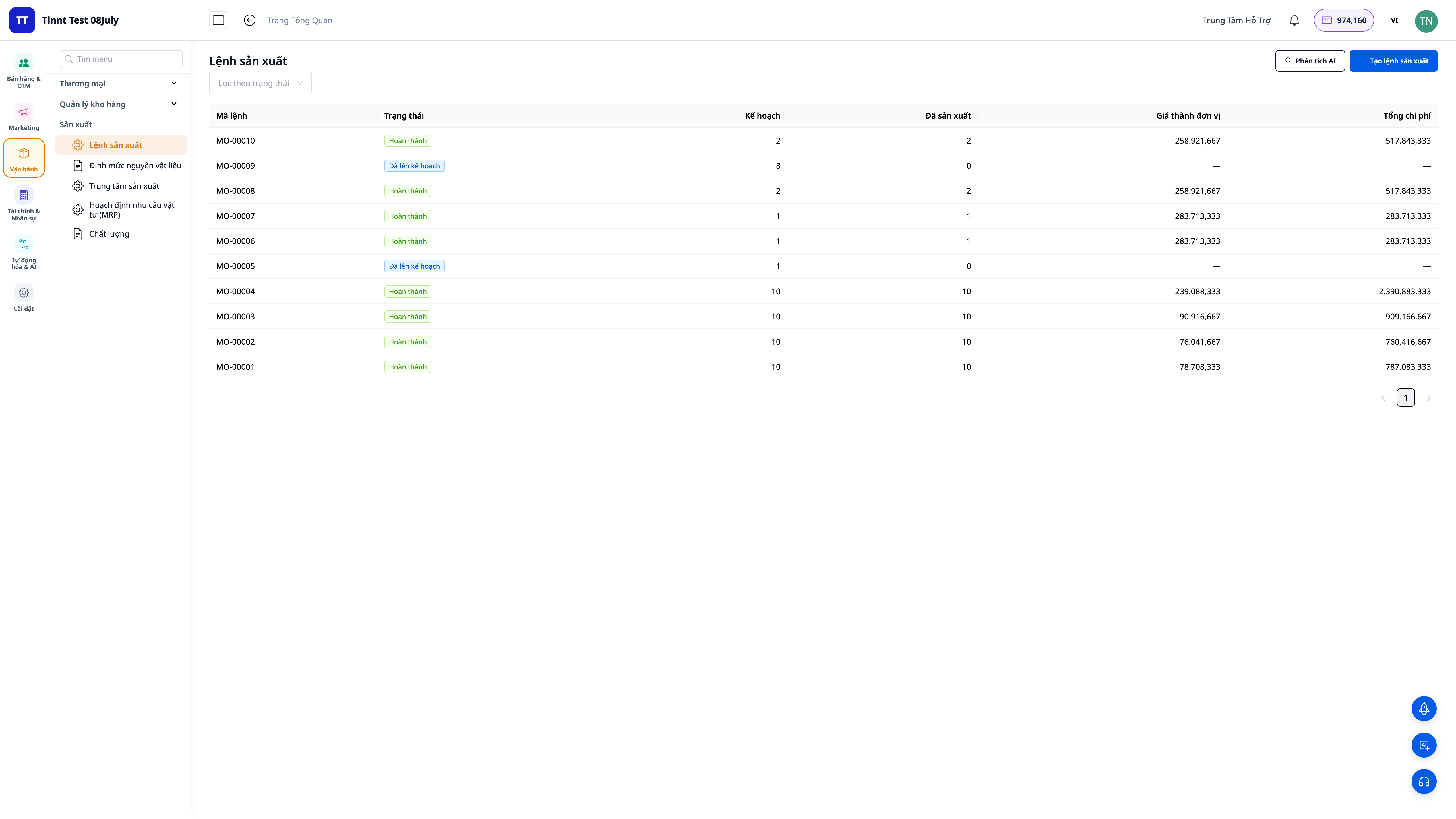
Τα προβλήματα που αντιμετωπίζουν οι επιχειρήσεις
Καταγράψτε τα υλικά σε ένα σημειωματάριο, υπολογίστε νοερά το κόστος εργασίας — Χωρίς να γνωρίζετε το πραγματικό κόστος των πωληθέντων αγαθών, ορίζετε λανθασμένη τιμή πώλησης και αυτό που νομίζετε ότι είναι κέρδος είναι στην πραγματικότητα ζημία.
Αβέβαιος/η αν θα υπάρχουν αρκετά υλικά για την επερχόμενη παραγγελία — εξαντλούνται τα υλικά κατά την παραγωγή ή υπάρχει μεγάλο απόθεμα που δεσμεύει κεφάλαιο.
Τα τελικά προϊόντα καταγράφονται στο απόθεμα με "κόστος πωληθέντων αγαθών 0" επειδή το λογισμικό δεν μπορεί να το υπολογίσει — Η αναφορά κερδών και ζημιών είναι εσφαλμένη, το κόστος πωληθέντων αγαθών (COGS) είναι ανακριβές.
Είναι αδύνατο να γνωρίζει κανείς πού βρίσκεται ο ιμάντας μεταφοράς κατά τη διάρκεια μιας βάρδιας ή ποιος σταθμός είναι μπλοκαρισμένος — οι παραγγελίες καθυστερούν μόνο μετά την υποβολή της παραγγελίας, οι εργαζόμενοι μένουν σε αναμονή και οι διευθυντές πρέπει να τρέξουν στο εργοστάσιο για να ρωτήσουν.
Καταγράψτε τα ολοκληρωμένα και τα αποτυχημένα στοιχεία, τον χρόνο εκτέλεσης σε χαρτί και εισαγάγετε ξανά τα δεδομένα στο τέλος της ημέρας — Καθυστερημένα και λανθασμένα δεδομένα, αποκλίσεις στο κόστος των πωληθέντων αγαθών και αδυναμία ανάθεσης ευθύνης.
Η αποθήκη, οι αγορές, η λογιστική και η παραγωγή διαχειρίζονται όλα από ξεχωριστά προγράμματα λογισμικού — με αποτέλεσμα την επαναλαμβανόμενη εισαγωγή δεδομένων και τα ασυνεπή στοιχεία.
Το GTG CRM ενσωματώνει τα πάντα σε μία διαδικασία: δημιουργία τύπου → προγραμματισμός → έκδοση παραγγελίας στο σταθμό → άμεση έναρξη/ολοκλήρωση από τον εργαζόμενο στο εργοστάσιο → αφαίρεση υλικών → υπολογισμός κόστους πωληθέντων προϊόντων → απόθεμα τελικών προϊόντων → λογιστική καταχώριση — όλα σε μία συνεχή διαδικασία εντός του ίδιου συστήματος που χρησιμοποιείτε για πωλήσεις και τιμολόγηση.
Ανταύγειες
1. Πολυεπίπεδος Πίνακας Υλικών (BOM) — η «φόρμουλα» του προϊόντος
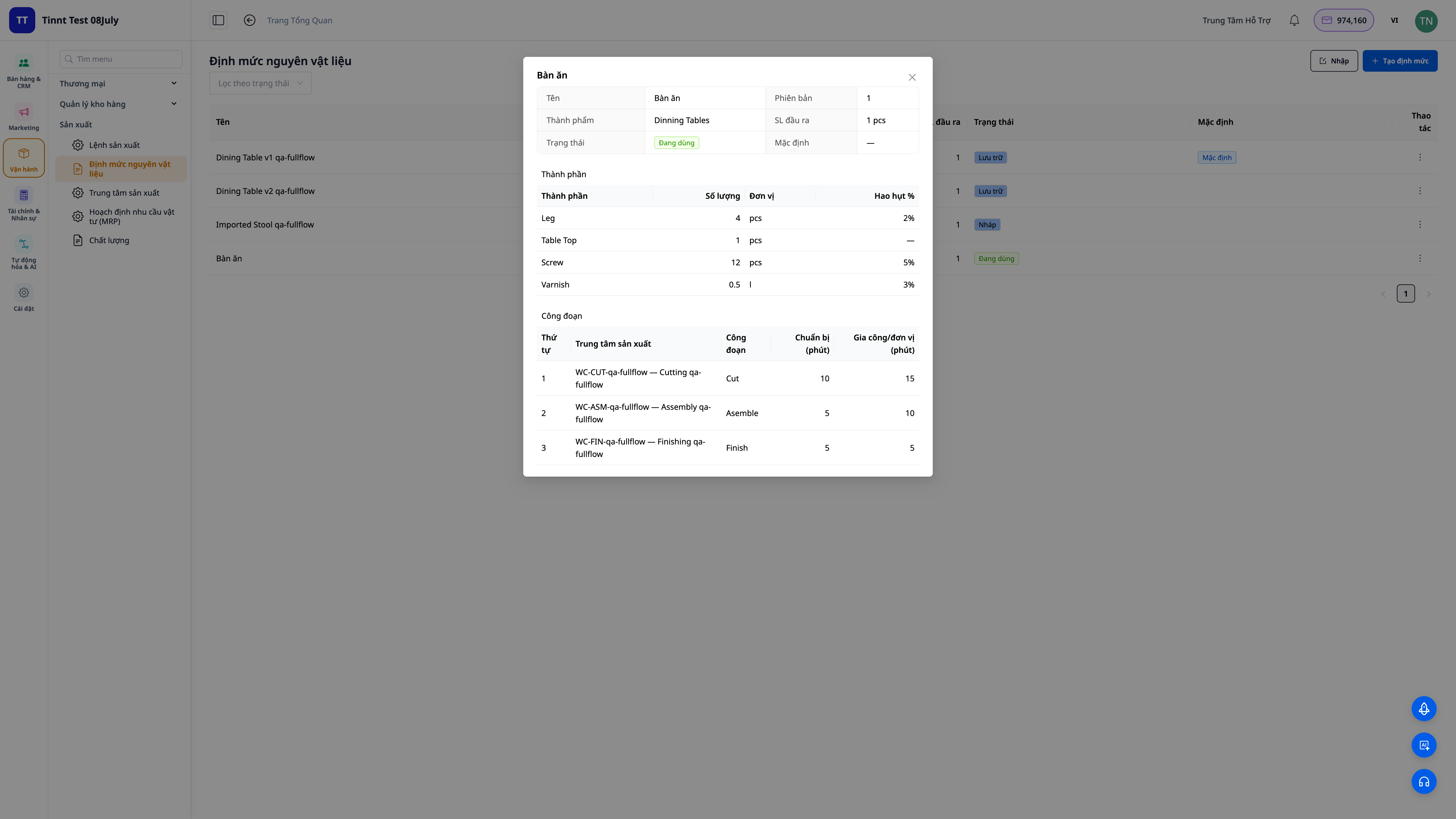
- Μόλις ολοκληρωθεί, για μακροπρόθεσμη χρήση : καταγράψτε κάθε υλικό (ποσότητα, μονάδα, ποσοστό απώλειας) και κάθε στάδιο (ποια ομάδα εκτελεί την εργασία, χρόνος προετοιμασίας + χρόνος εκτέλεσης).
- Πολλαπλά στάδια : ένα συστατικό του τύπου μπορεί να είναι ένα ημιτελές προϊόν με τον δικό του τύπο — το σύστημα ξεδιπλώνεται σε όλα τα στάδια.
- Ενεργοποίηση όταν είστε έτοιμοι : διατηρήστε πολλαπλές εκδόσεις της συνταγής, χρησιμοποιήστε μόνο την ενεργοποιημένη έκδοση.
2. Οι εντολές παραγωγής υπολογίζουν αυτόματα το υλικό και το κόστος των πωληθέντων αγαθών.
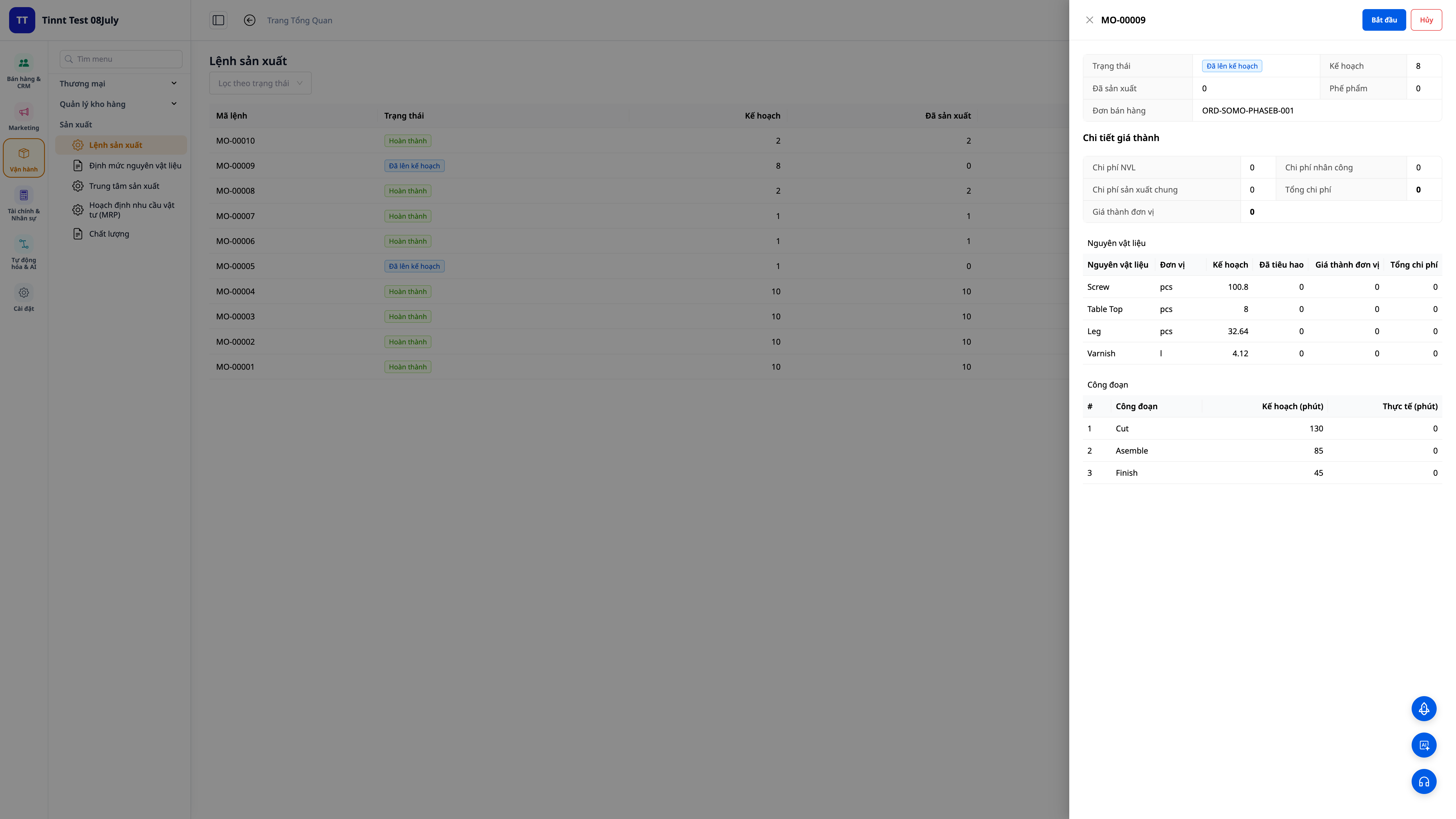
- Αυτοδημιουργημένη φόρμουλα : επιλέξτε προϊόν, φόρμουλα, ποσότητα — το σύστημα υπολογίζει τη σωστή ποσότητα συστατικών και βημάτων που απαιτούνται (συμπεριλαμβανομένων των απωλειών).
- Αφαίρεση αποθέματος στην αρχή : τα υλικά αφαιρούνται από το απόθεμα όταν κάνετε κλικ στο κουμπί Έναρξη. Μια έλλειψη υλικών θα ενεργοποιήσει μια άμεση προειδοποίηση.
- Υπολογίστε το κόστος των πωληθέντων αγαθών κατά την ολοκλήρωση : εισαγάγετε την ποσότητα που παρήχθη και τον πραγματικό χρόνο που απαιτήθηκε — το σύστημα υπολογίζει το μοναδιαίο κόστος των πωληθέντων αγαθών = (υλικά + εργασία + γενικά έξοδα) ÷ παραγόμενη ποσότητα και το τελικό προϊόν αποθηκεύεται στην αποθήκη στην ακριβή τιμή.
3. Το Κόστος Πωληθέντων Αγαθών (ΚΠΑΓ) καταγράφεται απευθείας στα λογιστικά βιβλία — υπολογίζεται με ακρίβεια με βάση την πραγματική παραγωγή.
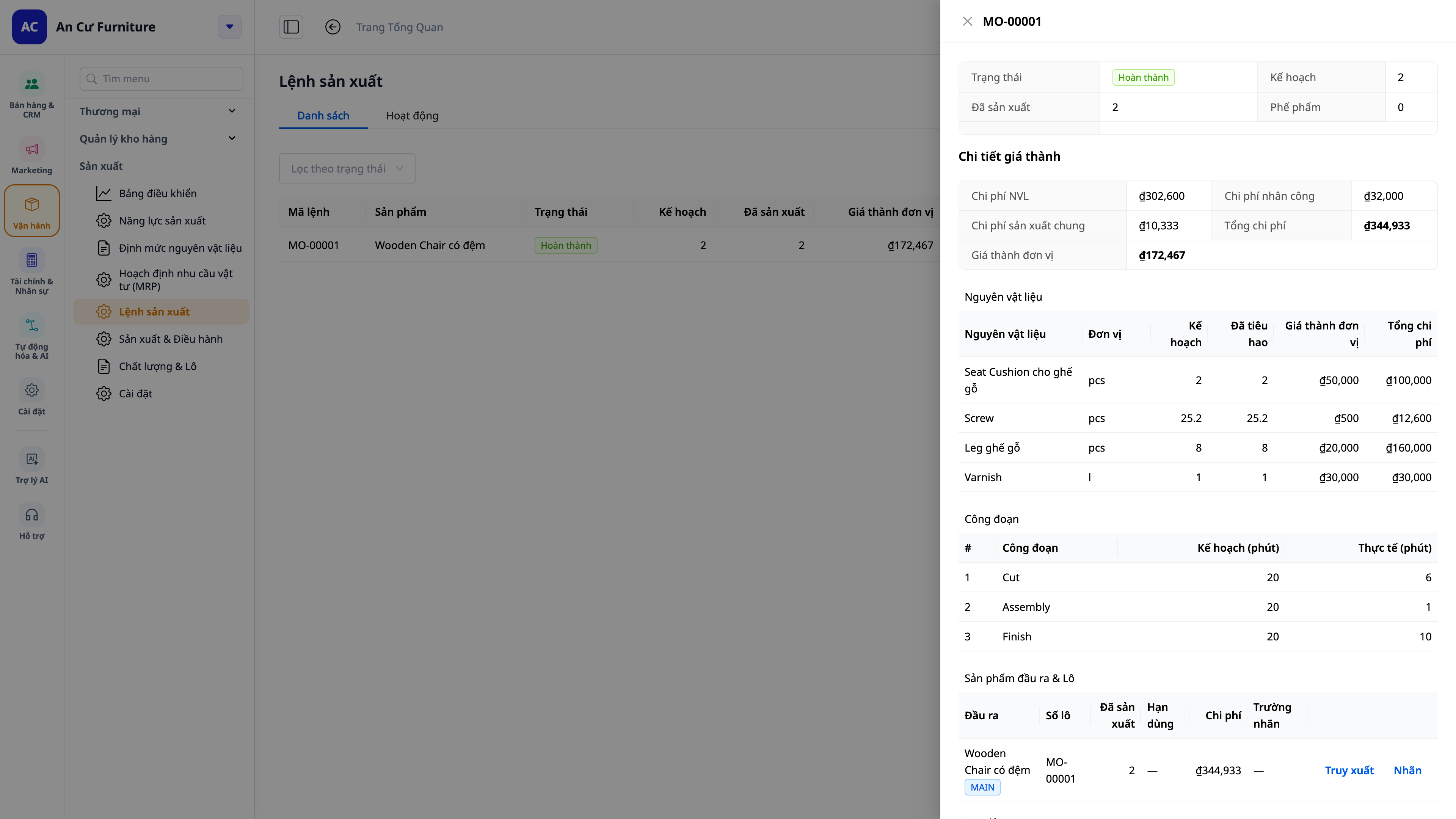
- Τέλος στα τελικά προϊόντα μηδενικού κόστους : τα προϊόντα αυτοπαραγωγής έχουν πάντα μια βάση κόστους, επομένως το κόστος πωληθέντων αγαθών (COGS) και οι αναφορές κερδών/ζημιών είναι ακριβείς.
- Υπολογίστε με ακρίβεια το κόστος των προϊόντων που πωλούνται από το εργοστάσιο : ο αριθμός των παραγόμενων ειδών, ο αριθμός των ελαττωματικών ειδών και οι ώρες λειτουργίας που καταγράφονται από τους εργαζόμενους σε κάθε στάδιο υπολογίζονται όλα με ακρίβεια στο κόστος των προϊόντων που πωλούνται για την παρτίδα — τέλος στην επαναπληκτρολόγηση από χαρτί στο τέλος της ημέρας, κάτι που θα προκαλούσε αποκλίσεις.
- Αυτόματη καταχώριση ημερολογίου : Το Κόστος Πωληθέντων Αγαθών (ΚΠΑΓ) καταγράφεται αυτόματα στο βιβλίο συναλλαγών, σύμφωνα με το λογιστικό σας σύστημα.
- Η λογιστική και η παραγωγή είναι ενσωματωμένες : δεν απαιτείται χειροκίνητη συμφωνία μεταξύ των δύο προγραμμάτων λογισμικού.
4. Σχεδιασμός Αγορών και Παραγωγής (MRP) — συμπεριλαμβανομένων των προσαρμοσμένων παραγγελιών.
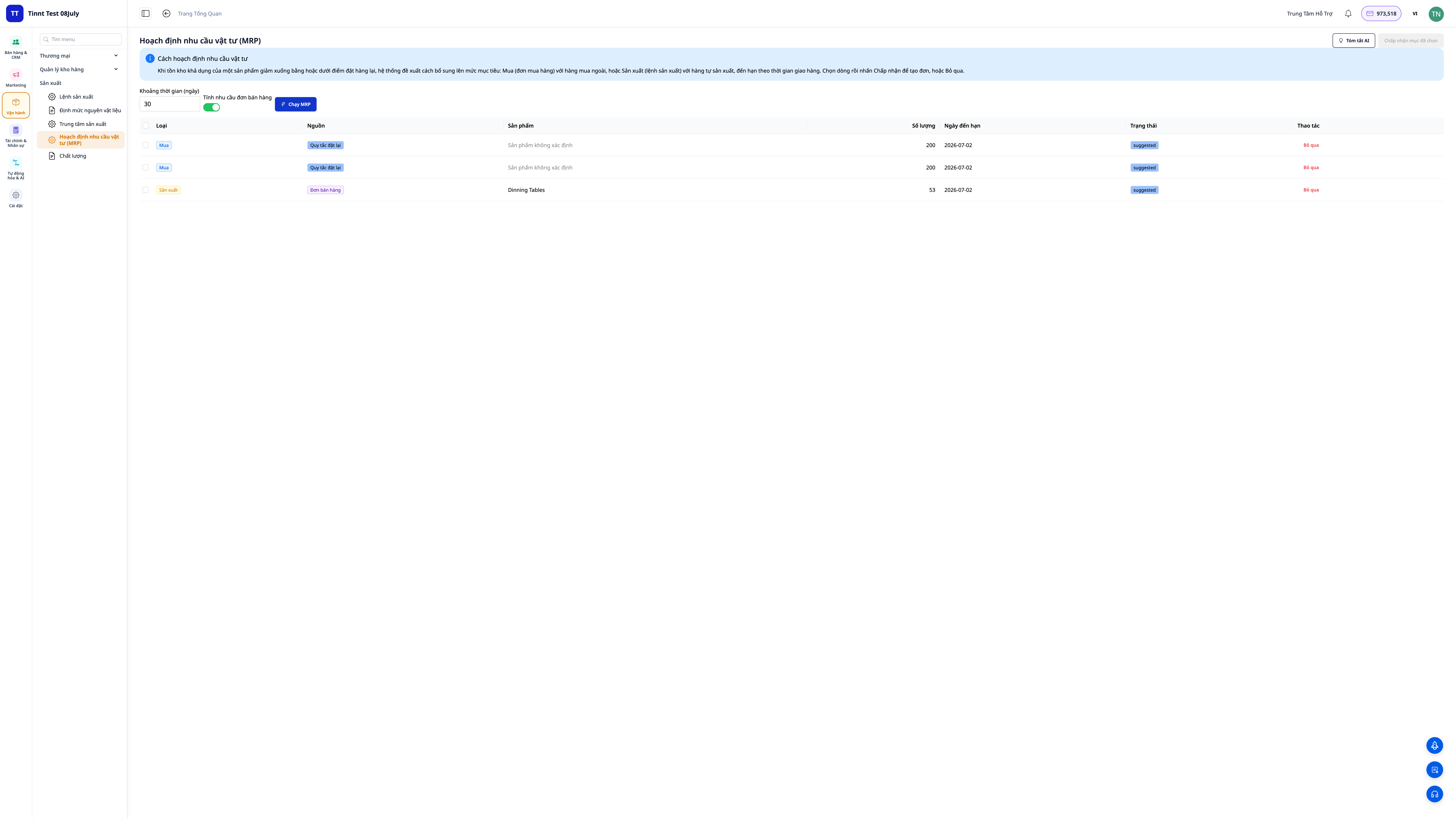
- Ορίστε τα επίπεδα αποθέματος (ελάχιστο/σημείο επαναφοράς/στόχο) για κάθε προϊόν και, στη συνέχεια, εκτελέστε τον Σχεδιασμό Προϊόντος (MRP): το σύστημα συγκρίνει τη ζήτηση με το απόθεμα και προτείνει εντολές αγοράς (για αγορά) και εντολές παραγωγής (για κατασκευή).
- Για ανοιχτές παραγγελίες πωλήσεων : ενεργοποιήστε την επιλογή "συμπερίληψη ζήτησης από παραγγελίες πωλήσεων" για σχεδιασμό με βάση τις παραγγελίες πελατών — το σύστημα αφαιρεί την παραγγελθείσα ποσότητα από το απόθεμα και τις ποσότητες παραγωγής, υποδεικνύοντας την σωστή επεξεργασία της ποσότητας που λείπει.
- Να γνωρίζετε γιατί έγινε η πρόταση : κάθε πρόταση θα πρέπει να αναφέρει σαφώς την πηγή (επίπεδο αποθέματος, παραγγελία πώλησης ή και τα δύο).
5. Από την παραγωγή έως την παραγγελία — άμεσα συνδεδεμένη με τις παραγγελίες πωλήσεων.
- Από την παραγγελία πώλησης : ανοίξτε την παραγγελία, δείτε την καρτέλα Σχέδιο Παραγωγής — δείχνει πόσα έχουν παραγγελθεί, πόσα είναι σε απόθεμα, πόσα παράγονται και πόσα χρειάζονται ακόμα. Κάντε κλικ στην επιλογή "Δημιουργία Παραγγελίας Παραγωγής" για τα είδη που λείπουν. Η παραγγελία συνδέεται άμεσα με αυτήν την παραγγελία πώλησης.
- Παρακολούθηση προόδου : η γραμμή προόδου στην παραγγελία πώλησης θα εμφανίζει την ένδειξη "Σε παραγωγή" και στη συνέχεια την ένδειξη "Έτοιμη" όταν ολοκληρωθεί. Θα δοθεί μια διακριτική υπενθύμιση κατά την παράδοση εάν η παραγωγή δεν έχει ολοκληρωθεί ακόμη (χωρίς να σας εμποδίσει να την παραδώσετε).
6. Έλεγχος ποιότητας και διακύμανση κόστους
- Έλεγχος ποιότητας : Καταγραφή των επιθεωρήσεων κατά την παραλαβή των πρώτων υλών, κατά την παραγωγή ή σε τελικά προϊόντα (επιτυχία/αποτυχία, ενέργειες που ελήφθησαν: αποδοχή/επαναεπεξεργασία/απόρριψη/καραντίνα). Ανοίξτε μια Αναφορά Μη Συμμόρφωσης (NCR) με διορθωτικές ενέργειες και κλείστε την όταν ολοκληρωθεί.
- Διαφορά από το πρότυπο : Εάν έχει οριστεί ένα πρότυπο κόστος για το προϊόν, κάθε ολοκληρωμένη παραγγελία δείχνει με σαφήνεια τη διαφορά (πραγματικό κόστος σε σύγκριση με το πρότυπο για υλικά, εργασία και γενικά έξοδα) — αποκαλύπτοντας αμέσως γιατί μια παρτίδα υπερβαίνει ή υπολείπεται του προϋπολογισμού.
💡 Ο βοηθός τεχνητής νοημοσύνης βοηθά : εξηγεί τις αποκλίσεις κόστους, σκιαγραφεί σχέδια διορθωτικών ενεργειών (CAPA) και ερμηνεύει τα αποτελέσματα του MRP σε εύκολα κατανοητή γλώσσα.
7. Προγραμματισμός βάσει πραγματικής χωρητικότητας — Προγραμματισμός με γράφημα Gantt
Δεν πρόκειται μόνο για το να γνωρίζουμε τι πρέπει να κάνουμε, αλλά και πότε να το κάνουμε : δημιουργία μηχανημάτων/μονάδων παραγωγής μαζί με χρονοδιαγράμματα εργασίας, προγραμματισμός διαδικασιών σύμφωνα με πεπερασμένη χωρητικότητα και σχεδίαση ενός διαγράμματος Gantt — κάθε διαδικασία είναι μια γραμμή στη χρονογραμμή που έχει αντιστοιχιστεί στη σωστή μηχανή/μονάδα.
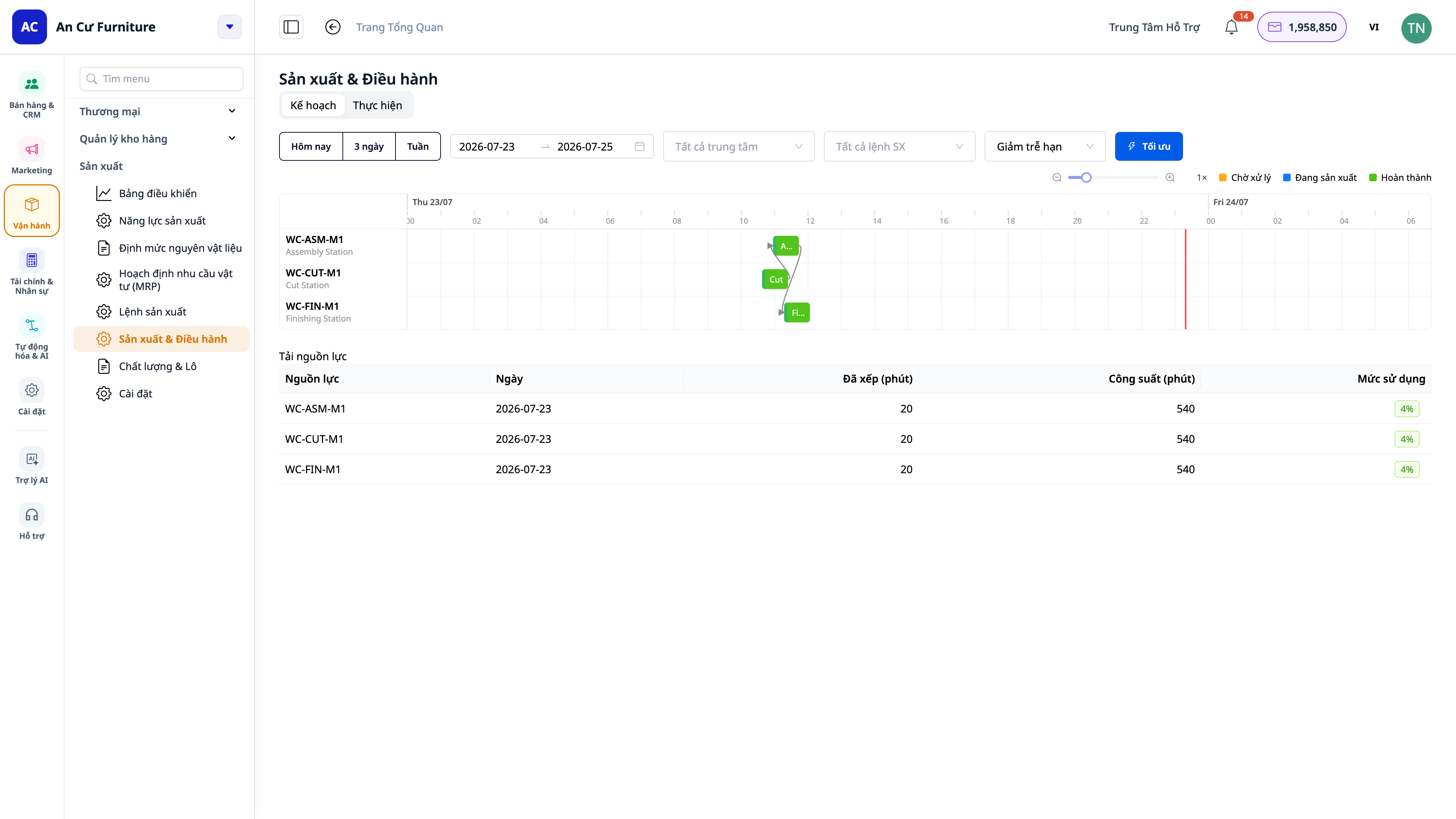
- Προβολή ανά χρονικό πλαίσιο : Κάντε κλικ στην επιλογή Σήμερα / 3 Ημέρες / Εβδομάδα (ή επιλέξτε ένα εύρος ημερών) για να οριοθετήσετε την συγκεκριμένη περίοδο που θέλετε να δείτε.
- Οπτικός προγραμματισμός : προβλέψτε τα σημεία συμφόρησης, εντοπίστε ποιες ομάδες είναι υπερφορτωμένες με εργασία και δείτε την προβλεπόμενη ημερομηνία ολοκλήρωσης για κάθε εργασία.
- Συμπερίληψη του χρόνου αλλαγής : όταν ένα μηχάνημα/σετ μεταβαίνει από το ένα προϊόν στο άλλο που απαιτεί χρόνο καθαρισμού/ρύθμισης — αυτός ο χρόνος λαμβάνεται υπόψη στο χρονοδιάγραμμα ώστε η προβλεπόμενη ημερομηνία παράδοσης να είναι πιο ρεαλιστική.
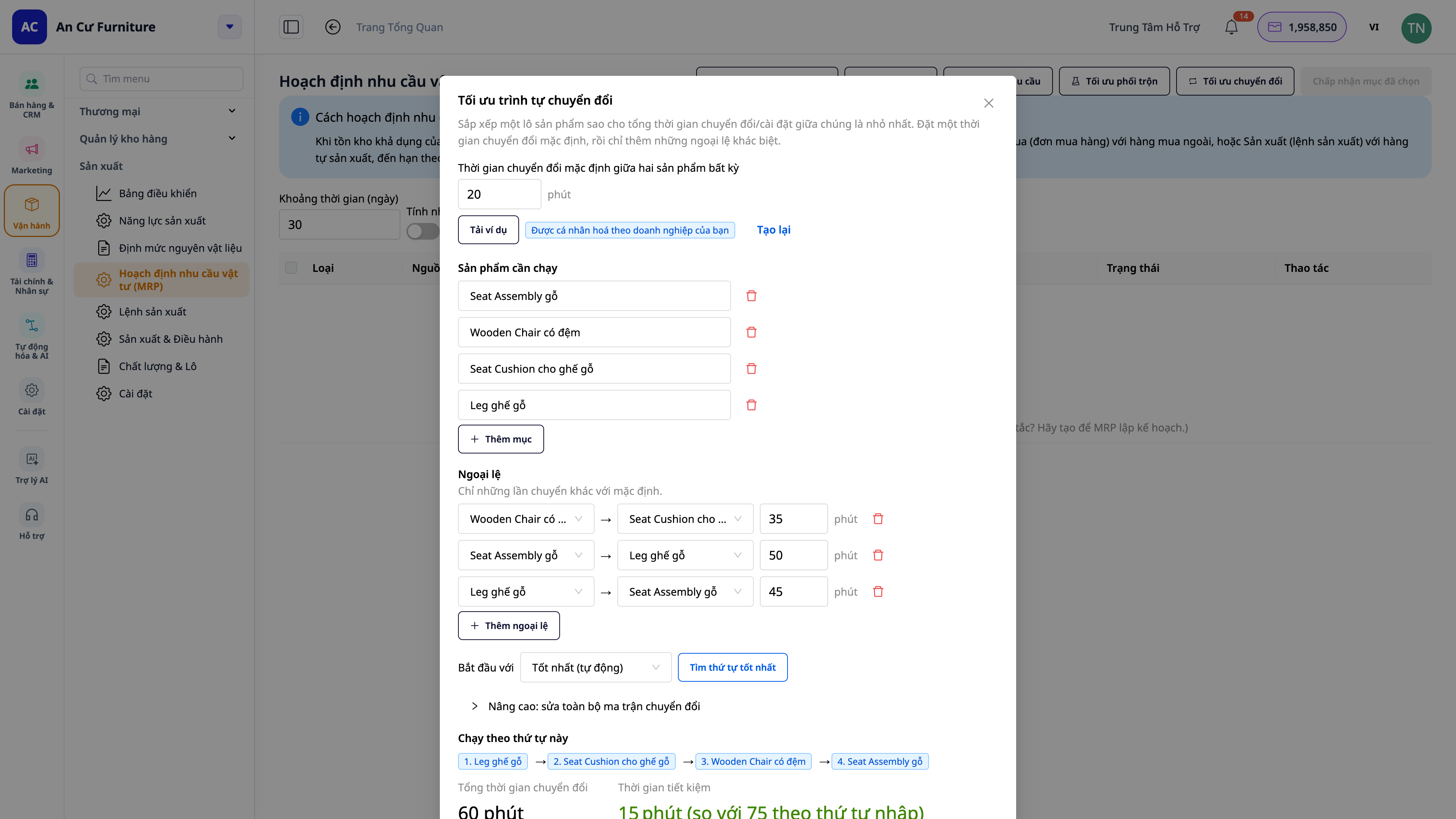
- Πλεονεκτήματα : Υπόσχεται μια ρεαλιστική ημερομηνία παράδοσης, αποφεύγει την υπερφόρτωση μιας ομάδας με εργασία και μειώνει τον χρόνο διακοπής λειτουργίας λόγω αλλαγής παρόχου.
8. Παρακολούθηση εργαστηρίου σε πραγματικό χρόνο (MES) — σταθμός εργασίας για τεχνίτες και πίνακας ένταξης
Αυτό είναι το βήμα για να μεταφέρετε την παραγωγή απευθείας στο εργοστάσιο . Ενεργοποιήστε την "Παρακολούθηση Εργοστασίου σε Πραγματικό Χρόνο" στις Ρυθμίσεις Παραγωγής με έναν μόνο διακόπτη και, στη συνέχεια, ανοίξτε την εφαρμογή Παρακολούθηση Εργοστασίου στο tablet σε κάθε σταθμό (και μια μεγάλη οθόνη τοποθετημένη στον τοίχο για ολόκληρη τη γραμμή).
Σταθμός εργασίας για χειριστές — μια εφαρμογή με οθόνη αφής, με δυνατότητα αφής για εκτέλεση, χωρίς να χρειάζεται να περιηγηθείτε στο λογισμικό CRM:
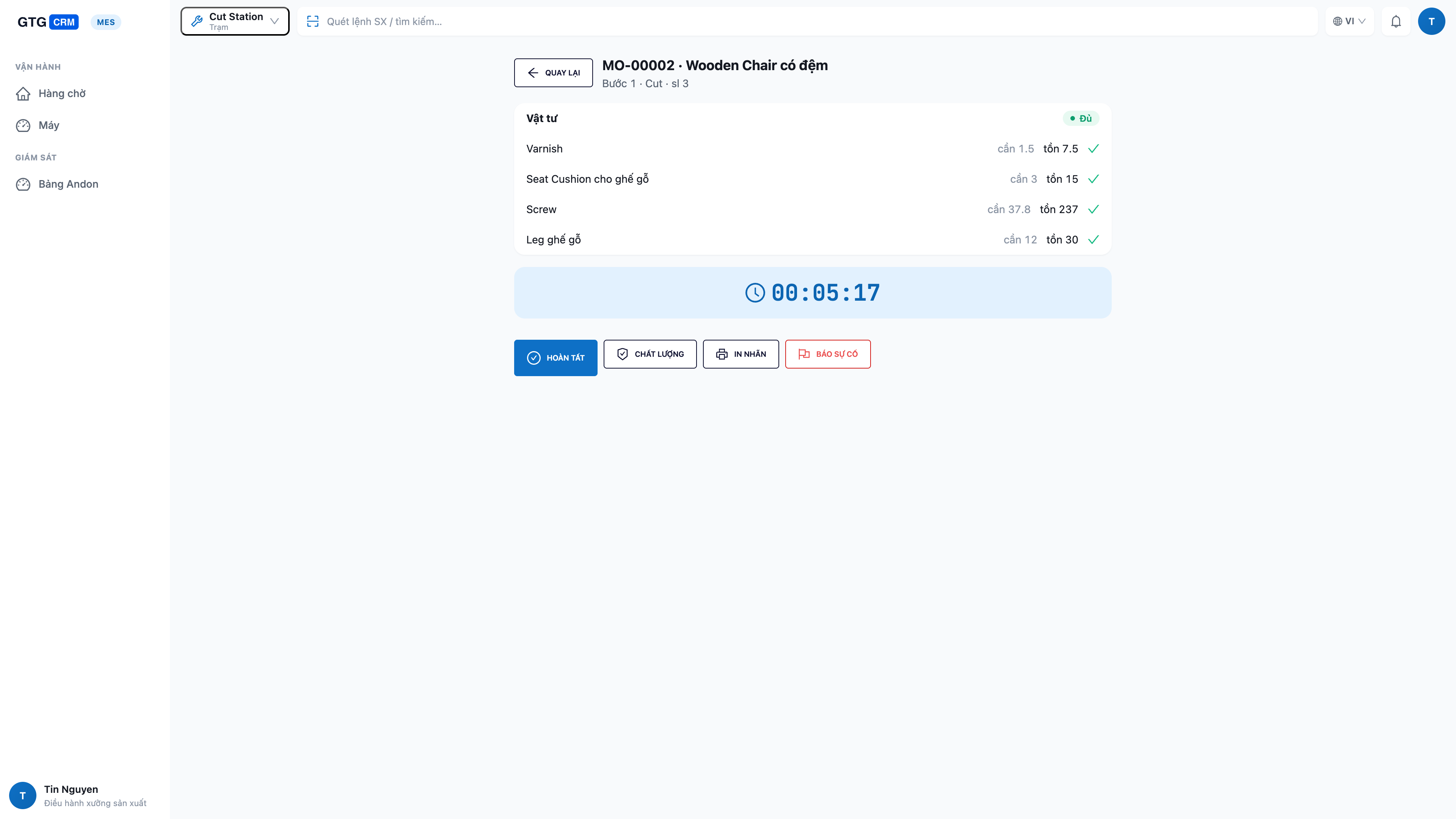
- Βλέπω μόνο την εργασία του σταθμού μου : ουρές για τις συγκεκριμένες εργασίες αυτού του σταθμού και την κατάσταση "έτοιμος" που εμφανίζεται πάνω από το κεφάλι μου.
- Ελέγξτε τα υλικά σας πριν ξεκινήσετε μια εργασία: ελέγξτε αμέσως αν έχετε αρκετά υλικά (πόσα χρειάζονται / πόσα έχουν απομείνει / πόσα λείπουν) — μην ξεκινήσετε μια εργασία και μετά να ανακαλύψετε ότι σας λείπουν.
- Έναρξη → Ολοκλήρωση επί τόπου : πατήστε Έναρξη , όταν τελειώσετε πατήστε Ολοκλήρωση και εισαγάγετε τον αριθμό των ολοκληρωμένων εργασιών, τον αριθμό των αποτυχημένων εργασιών και τον χρόνο διακοπής λειτουργίας — τα δεδομένα εισάγονται αμέσως στο σύστημα και προστίθενται απευθείας στο κόστος των πωληθέντων αγαθών.
- Κατάσταση μηχανήματος στα χέρια σας : εναλλαγή μεταξύ καταστάσεων λειτουργίας / αδράνειας / εναλλαγής / παύσης απευθείας στην οθόνη.
- Αναφορά σφάλματος με ένα άγγιγμα (andon) : δυσλειτουργία μηχανήματος ή έλλειψη υλικών — με το πάτημα ενός μόνο κουμπιού αποστέλλεται άμεση ειδοποίηση στη διοίκηση , εξαλείφοντας την ανάγκη αναζήτησης κάποιου.
- Έλεγχος ποιότητας και εκτύπωση ετικετών παρτίδας στον σταθμό : όταν απαιτείται, εκτέλεση ελέγχου ποιότητας και εκτύπωση ετικετών παρτίδας επί τόπου.
Πίνακας ελέγχου εργοστασίου (andon) — μια μεγάλη οθόνη για ολόκληρη τη γραμμή παραγωγής:
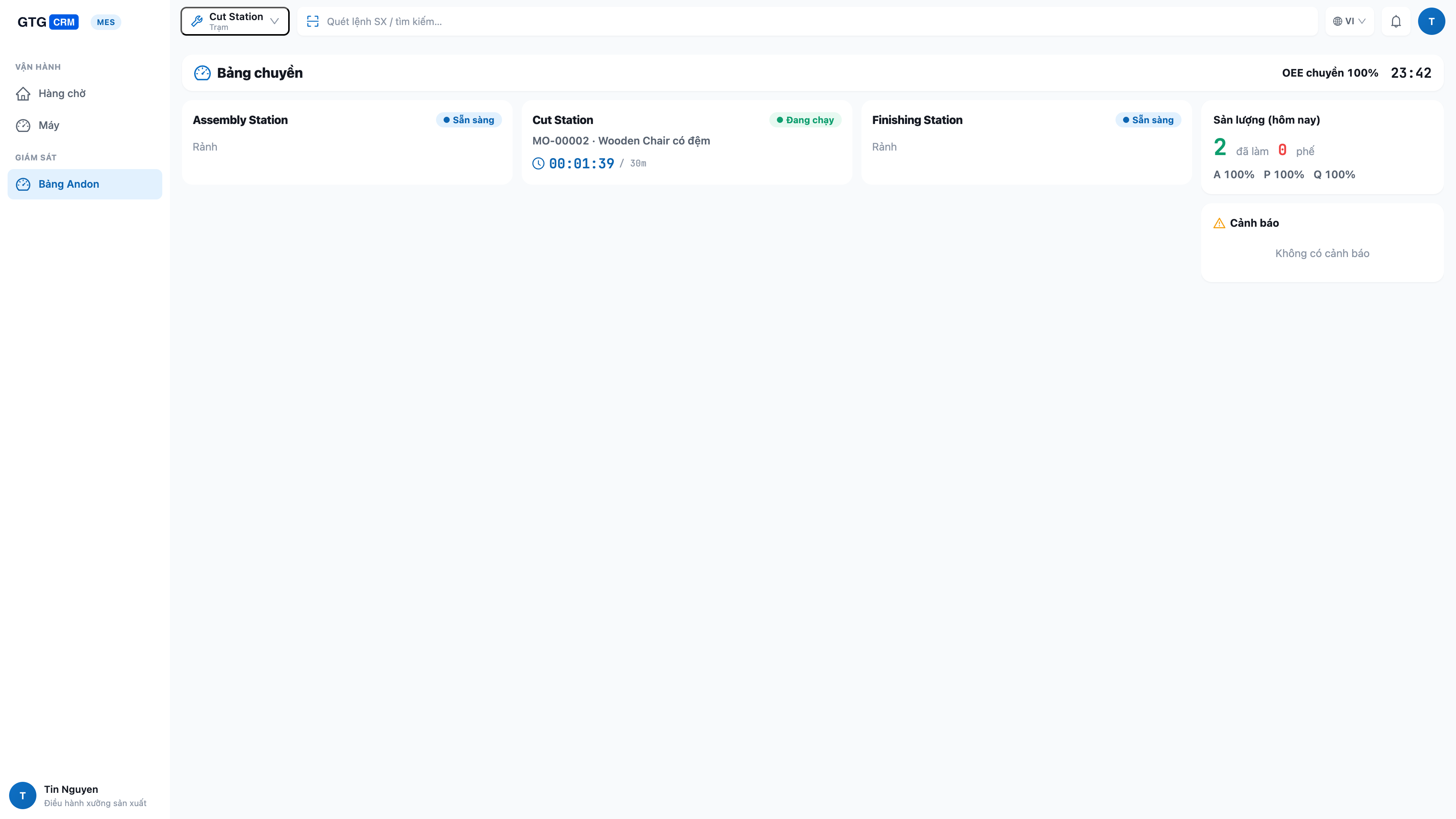
- Ολόκληρη η διαδικασία μεταφοράς με μια ματιά : κάθε σταθμός με ζωντανή κατάσταση (σε λειτουργία/αδράνεια/εναλλαγή/σταματημένος), τρέχουσα εργασία και πρόοδο.
- Τα προβλήματα εντοπίζονται αμέσως : επισημαίνονται ποια πρατήρια δεν λειτουργούν και πού υπάρχουν ελλείψεις καυσίμων, ώστε να μπορούν να αντιμετωπιστούν άμεσα.
- Παραγωγικότητα & OEE για ολόκληρη τη γραμμή παραγωγής : αριθμός ολοκληρωμένων ειδών, αριθμός ελαττωματικών ειδών και δείκτης απόδοσης εξοπλισμού (OEE) για ολόκληρη τη γραμμή, με συνεχή ενημέρωση.
- Τα αυτοματοποιημένα μηχανήματα και η χειρωνακτική εργασία μοιράζονται έναν ενιαίο πίνακα ελέγχου : είτε η διαδικασία ξεκινά αυτόματα από το μηχάνημα είτε εκτελείται χειροκίνητα από τον εργαζόμενο, όλα εμφανίζονται με συνέπεια στον ίδιο πίνακα ελέγχου — κατάλληλο τόσο για εργαστήρια συνδεδεμένα με μηχανήματα όσο και για εργαστήρια που λειτουργούν με μηχανήματα.
ℹ️ Σαφής ανάθεση εξουσιών : οι χειριστές εκτελούν τις διαδικασίες μόνο στον σταθμό που τους έχει ανατεθεί. Ο σχεδιασμός και η έκδοση εντολών αφήνονται στον διευθυντή παραγωγής — ο καθένας κάνει τη δουλειά του, με ασφάλεια και υπευθυνότητα.
9. Χαλκός/υποπροϊόντα, κλασματικές μονάδες και ιχνηλάτηση παρτίδας
- Παραπροϊόντα/υποπροϊόντα : Μια παρτίδα μπορεί να παράγει πολλαπλούς τύπους τελικών προϊόντων ή υποπροϊόντων — δηλώστε τα απευθείας στη συνταγή.
- Μονάδες κλάσματος : η εισαγωγή περιττών ποσοτήτων (π.χ., 1,25 kg) δεν θα διακόπτει πλέον τη λίστα προϊόντων.
- Ιχνηλάτηση παρτίδας + γενεαλογικό δέντρο + ημερομηνία λήξης : Κάθε παρτίδα έχει τη δική της παρτίδα, επιτρέποντάς σας να εντοπίσετε ποια παρτίδα πρώτων υλών χρησιμοποιήθηκε (γενεαλογικό δέντρο) και να λαμβάνετε προειδοποιήσεις πριν το τελικό προϊόν/πρώτες ύλες φτάσουν στην ημερομηνία λήξης τους.
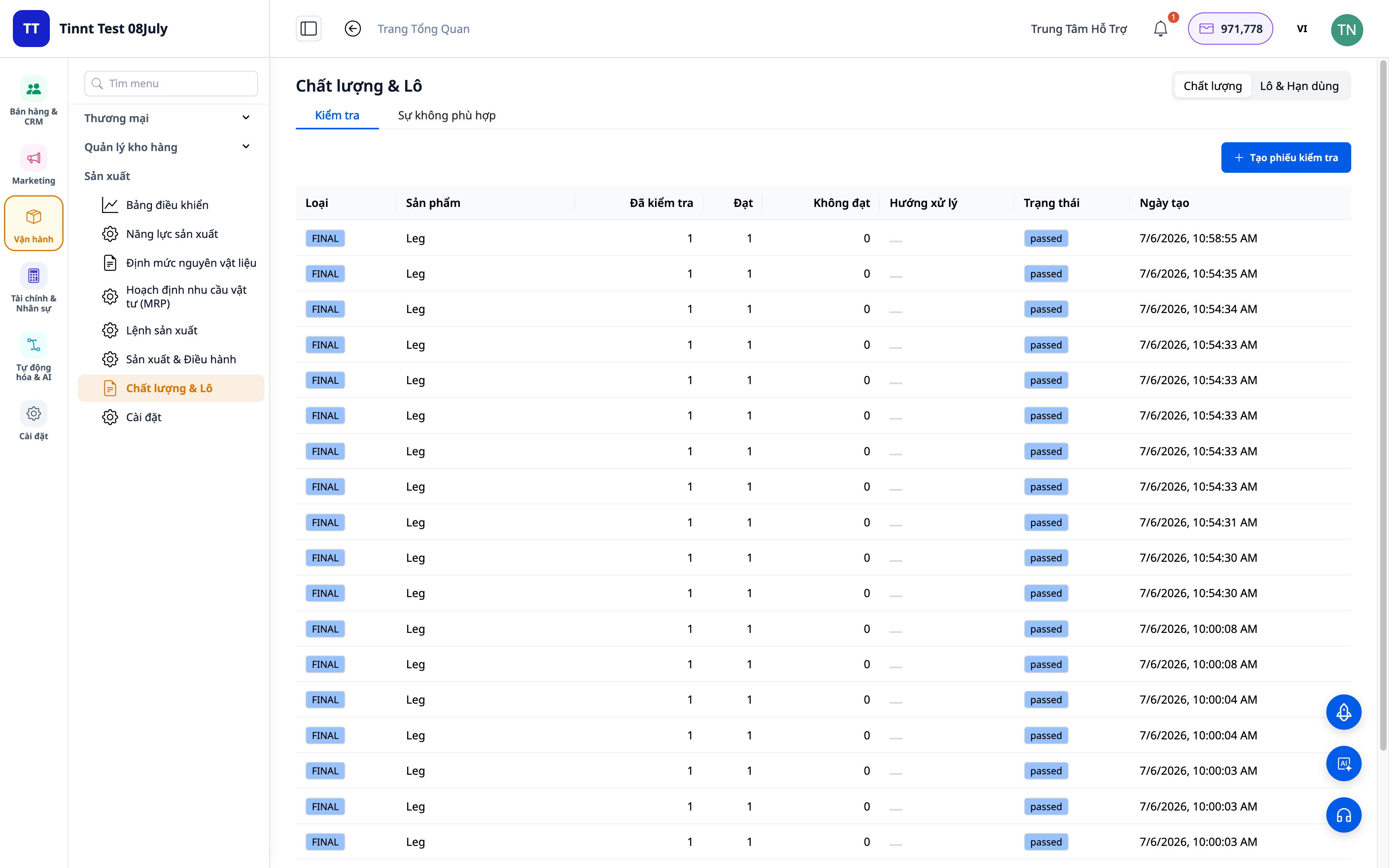
- Πλεονεκτήματα : Σε περίπτωση προβλημάτων ποιότητας, εντοπίστε την πηγή του προβλήματος εντός λεπτών· αποτρέψτε τη λήξη των προϊόντων.
10. Έξυπνη συμβουλευτική MRP, OEE/SPC και εκτύπωση ετικετών παρτίδας.
- Σύμβουλος MRP : προτείνει ασφαλή επίπεδα αποθεμάτων, μεγέθη παρτίδων, ανάμειξη υλικών, βελτιστοποιημένη αλλαγή μηχανημάτων και πρόβλεψη ζήτησης — παρουσιάζονται με σαφήνεια, χρησιμοποιώντας σωστά ονόματα προϊόντων και όχι δυσανάγνωστους κωδικούς.
- OEE/SPC : Παρακολούθηση της απόδοσης του εξοπλισμού και της μεταβλητότητας της ποιότητας για βελτίωση.
- Εκτύπωση ετικετών παρτίδας (PDF) : εκτύπωση ετικετών παρτίδας για τελικά προϊόντα για επικόλληση και παρακολούθηση.
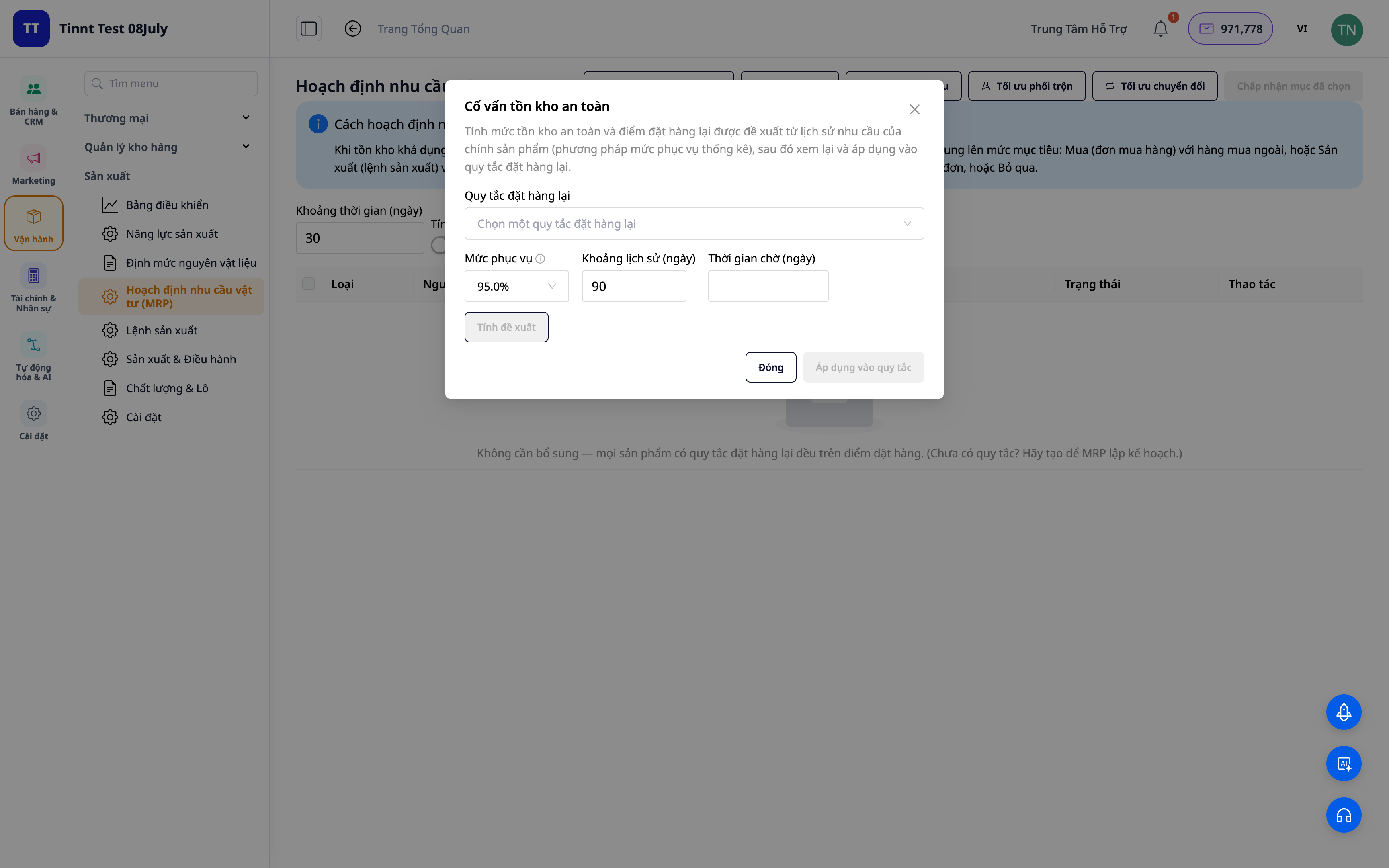
- Οφέλη : Αποφάσεις αγοράς/παραγωγής/λήψης αποθέματος βάσει σαφών προτάσεων, μειωμένη σπατάλη και λιγότερος χρόνος διακοπής λειτουργίας.
Οφέλη για τις επιχειρήσεις
Πολυεπίπεδος Πίνακας Υλικών (BOM) — Τυποποιημένοι τύποι, που διασφαλίζουν ότι όλοι λαμβάνουν τις σωστές προδιαγραφές και το σωστό κόστος.
Αυτόματος υπολογισμός κόστους για παραγγελίες παραγωγής — Γνωρίζοντας ακριβώς πόσο κοστίζει η κατασκευή ενός προϊόντος — ορίζοντας τη σωστή τιμή πώλησης.
Άμεσο Κόστος Πωληθέντων Αγαθών (COGM) — Ακριβής αναφορά κερδών και ζημιών, τέλος στα τελικά προϊόντα «μηδενικής αξίας».
Ο αριθμός των ολοκληρωμένων ειδών/ο αριθμός των ελαττωματικών ειδών καταγράφεται σε κάθε στάδιο — Το κόστος των πωληθέντων αγαθών υπολογίζεται με ακρίβεια σύμφωνα με τα πραγματικά στοιχεία, χωρίς αποκλίσεις καθώς επανεγγράφεται στο τέλος της ημέρας.
MRP (Διαδικασία Διαχείρισης) βάσει παραγγελιών πελατών — Δεν εξαντλούνται τα υλικά κατά την παραγωγή, δεν δεσμεύεται το απόθεμα.
Παραγωγή από άμεση σε άμεση παραγωγή για μεμονωμένες πωλήσεις — Κάνοντας ακριβώς αυτό που χρειάζεται ο πελάτης, όταν το χρειάζεται και παραδίδοντας χωρίς αποτυχίες.
Έλεγχος ποιότητας + απόκλιση — Ελέγξτε τις απώλειες, γνωρίζετε αμέσως ποια παρτίδα είναι ασύμφορη και γιατί.
Χρονοπρογραμματισμός Gantt με βάση τη χωρητικότητα + τη μετάβαση — Υπόσχεται ρεαλιστικές ημερομηνίες παράδοσης, αποφεύγει την υπερφόρτωση οποιασδήποτε μονάδας, μειώνει τον χρόνο διακοπής λειτουργίας.
Παρακολούθηση εργαστηρίου σε πραγματικό χρόνο (MES) — Δείτε πού βρίσκεται η μεταφορική ταινία αυτή τη στιγμή. Οι εργαζόμενοι αναφέρουν/ολοκληρώνουν εργασίες επί τόπου.
Ολόκληρος ο πίνακας ελέγχου της γραμμής παραγωγής — Τα προβλήματα εντοπίζονται αμέσως, η διοίκηση τα χειρίζεται άμεσα, χωρίς να χρειάζεται να βιαστείτε να πάτε στο εργοστάσιο για να ζητήσετε βοήθεια.
Ιχνηλάτηση παρτίδας + παρακολούθηση ημερομηνίας λήξης — Εντοπισμός της ρίζας του προβλήματος, αποτρέποντας την εμφάνιση ληγμένων προϊόντων.
Σύμβουλος MRP + OEE/SPC — Μείωση σπατάλης, ελαχιστοποίηση του χρόνου διακοπής λειτουργίας, διατήρηση επαρκούς αποθέματος.
Για ποιον είναι κατάλληλο;
- Μικρές και μεσαίες μονάδες παραγωγής : τρόφιμα, ποτά, καλλυντικά, ένδυση, έπιπλα, μηχανήματα, εκτυπώσεις, είδη οικιακής χρήσης.
- Το εργοστάσιο διαθέτει πολλαπλούς σταθμούς/γραμμές παραγωγής που απαιτούν παρακολούθηση της προόδου και κατανομή χωρητικότητας σε πραγματικό χρόνο, καθώς και την επιθυμία να αποφευχθεί η ανάγκη να κατέβει κανείς στο εργοστάσιο για να ρωτήσει κάθε σταθμό ξεχωριστά.
- Οι ιδιοκτήτες καταστημάτων που παράγουν τα δικά τους προϊόντα (κέικ, χειροποίητα είδη, μεταποιημένα προϊόντα) θέλουν να γνωρίζουν το πραγματικό κόστος των πωλούμενων προϊόντων για να καθορίσουν τις τιμές.
- Η εταιρεία θέλει να εγκαταλείψει το ξεχωριστό λογισμικό Excel/παραγωγής και να το ενσωματώσει σε ένα ενιαίο σύστημα για πωλήσεις, απογραφή και λογιστική.
Πώς μπορώ να ξεκινήσω;
Μεταβείτε στην Κατασκευή στο σύστημα, δηλώστε τη Μονάδα Μέτρησης και την Ομάδα Παραγωγής, δημιουργήστε έναν Πίνακα Υλικών (BOM) για ένα προϊόν και, στη συνέχεια, δημιουργήστε την πρώτη σας εντολή παραγωγής. Θέλετε να διαχειρίζεστε τις λειτουργίες απευθείας στο εργοστάσιο; Ενεργοποιήστε την "Παρακολούθηση Εργοστασίου σε Πραγματικό Χρόνο" στις Ρυθμίσεις Κατασκευής και, στη συνέχεια, ανοίξτε την εφαρμογή Παρακολούθηση Εργοστασίου σε ένα tablet σε κάθε σταθμό και σε μια μεγάλη οθόνη για την πλακέτα ANDON. Έχετε μια λίστα υλικών/BOM στο Excel; Σύρετε το αρχείο και αφήστε την Τεχνητή Νοημοσύνη να αντιστοιχίσει αυτόματα τις στήλες. Δείτε τον οδηγό χρήστη Διαχείρισης Παραγωγής βήμα προς βήμα ή διαβάστε την πραγματική ιστορία " Από τις Πρώτες Ύλες έως τα Τελικά Προϊόντα — Μάθετε το ακριβές κόστος των πωληθέντων αγαθών, η τιμολόγηση δεν είναι πλέον μια εικασία ".
Δοκιμάστε το δωρεάν — δεν απαιτείται πιστωτική κάρτα.


