Are you planning to build an e-commerce website but don't know what you need to prepare? Or is your current website experiencing low traffic and difficult to find on Google?
The answer lies in the website structure . A well-optimized e-commerce website should not only be visually appealing but also designed with a clear architecture, making it easy for Google to crawl and index, while also creating a good customer experience – thereby increasing conversion rates.
This article will help you understand what components a SEO-optimized e-commerce website needs , how to organize its structure effectively, and avoid common mistakes that hinder ranking – while also guiding you on how to implement it directly on the GTG CRM platform.
What is a website optimized for SEO?
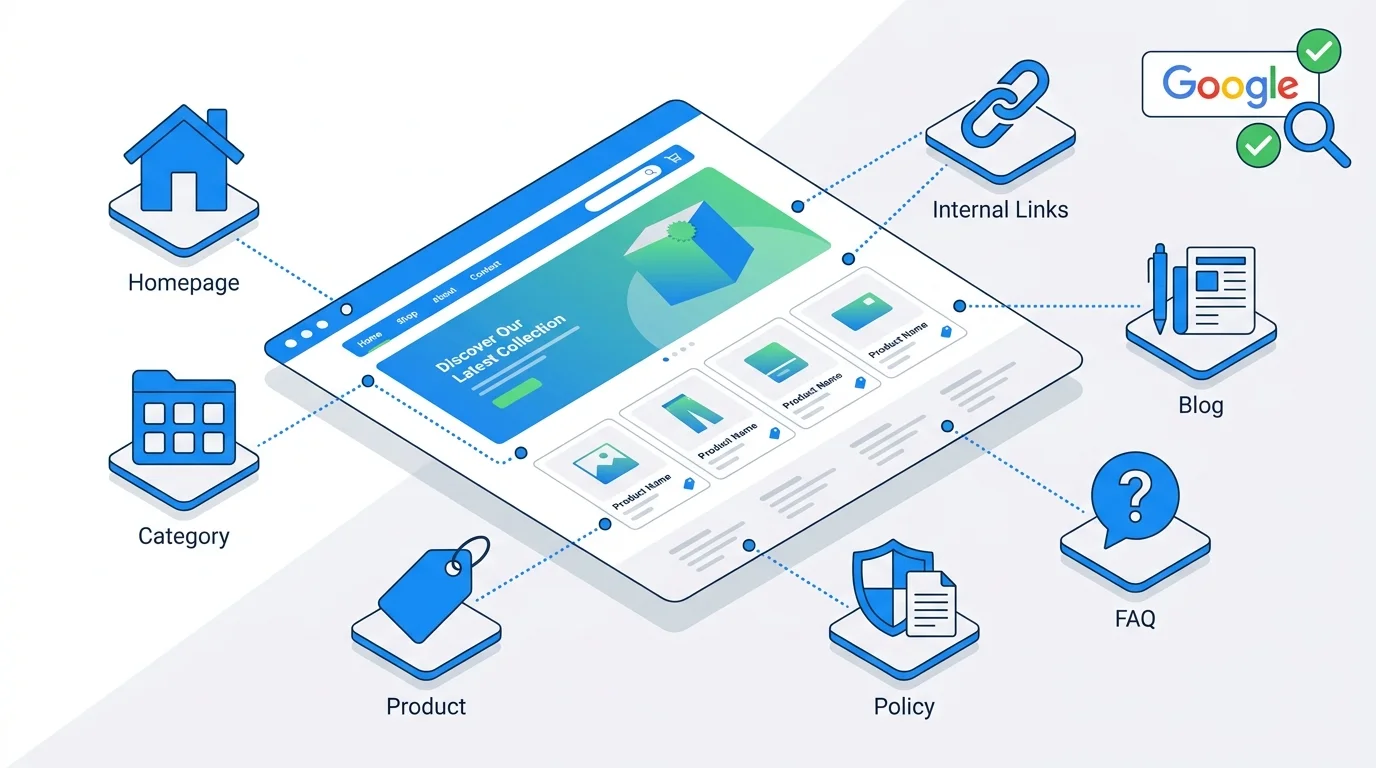
A website optimized for SEO is one designed with a clear, easy-to-navigate structure, which helps to:
- Google can easily crawl and rank important pages.
- Users find products quickly → increased conversion rate
- Optimizing internal linking distributes SEO power evenly across the entire website.
If your website structure is disorganized, Google will have difficulty understanding what your website sells, which pages are important, and ultimately – it won't rank for you .
With GTG CRM Website Builder , you can build this entire structure using an intuitive drag-and-drop interface, or let AI automatically create a complete website from just a short description of your business.
What are the components of a standard SEO-optimized e-commerce website structure?
A complete e-commerce website needs the following seven main components . GTG CRM supports 14 page types with over 100 ready-made components — you just drag and drop and customize.
1. Homepage
Role: - The customer's first point of contact - Represents the brand and core values - Guides customers to the main product categories
Key SEO factors: - Optimized title tag with brand name and main keyword - H1 tag clearly describing what the website sells - Internal links to main categories and blog
In GTG CRM, the homepage is created from the following sections:
| Section | Application |
|---|---|
| Hero (13 variations) | Main banner with CTA — available in split, center, overlay, gallery, triple... formats. |
| Featured Products (5 variations) | Display featured products — carousel, grid, minimal, sidebar |
| Category: Carousel | Display product catalog in carousel format. |
| Articles Featured | Featured blog post |
| Testimonials (4 variants) | Customer reviews — cards, quote, quote2 |
| SEOConfig | Configure the title, description, and OG metadata for the page. |
Note: The homepage should not be too long, focusing on navigation rather than cramming information. GTG CRM allows you to choose to display products by "All", "By Category", or "Hand-picked" with customizable quantities and order.
2. Product Listing Page
Role: - Group similar products - Help customers filter and select products easily - Primary SEO goal → optimize for major keywords
For example: - Selling cosmetics: categories like "Skin cream", "Facial cleanser" - Selling fashion: "Men's shirts", "Women's jeans"
Key SEO factors: - Standard URL: domain.com/products (customize page_path in GTG CRM) - H1 heading with main keyword - Category description to increase relevance - Filters and product sorting
On GTG CRM: - Use the ProductListPage section with built-in filters and sorting - Combine HeroCenterBanner + Breadcrumb to optimize the user experience - Hierarchical category system — managed in CRM, automatically displayed on the website - Products can be synchronized from TikTok Shop , Lazada , Shopee or created manually
3. Product Detail Page
Role: - Closing sales - Providing complete product information - Optimizing conversions
Key SEO + Conversion factors: - Title tag includes product name + keyword - Detailed product description (not copied from the supplier) - High-quality images + alt text - Clear CTA button: "Add to cart", "Buy now"
On GTG CRM: - The ProductDetail section displays full details: name, price, rich-text description, images, and variations (color, size). - Integrated reviews and favorites (enable/disable as needed). - The FeaturedProducts section below displays related products. - Supports multiple variations on the same page — each variation has its own SKU, price, inventory, and image. - AI product creation : product description → AI automatically generates 3 images, specifications, category, tags, and SKU.
Tip: GTG CRM manages variations on a single product page instead of separating them into individual variations — which is SEO-friendly.
4. Policy Pages
Role: - Increases trust - Google highly values websites with complete legal information.
The following pages are required: - Privacy Policy - Terms of Service - Shipping Policy - Return Policy
On GTG CRM: - Privacy and Terms pages are available with PrivacyBanner and ParagraphSection sections - Add links to SimpleFooter (8 footer variations) for easy access from any page - When using AI to build a website , Privacy and Terms pages are automatically generated
Note: The policy page doesn't need strong keyword optimization, but it's mandatory for Google to consider the website trustworthy.
5. FAQ (Frequently Asked Questions) page
Role: - Answering customer questions - Increasing the visibility of rich snippets on Google (question/answer boxes)
Key SEO factors: - Write questions using natural language that customers commonly search for - Provide concise and comprehensive answers
On GTG CRM: - 6 FAQ section variations (FAQSection, FAQSection1–5) — choose the layout that suits your design - When using AI to create a website , the FAQ page is pre-built with industry-specific content - Combine with the Hero section above to create a professional FAQ page
Examples of questions: "How long does delivery take?", "Do you support cash on delivery (COD)?", "What is your return policy?"
6. Blog / Content Hub
Role: - Drive traffic from Google through useful content - Build an expert brand - Create internal links to products and categories
Key SEO factors: - Writing articles centered around keywords related to the product - Linking to products/categories naturally - Regular updates
On GTG CRM — a complete blogging system:
| Features | Detail |
|---|---|
| Article sections | 10+ variations: ArticlesFeatured, ArticlesGrid, ArticlesBlog, ArticleTechNews, FeaturedArticleSlider... |
| Comments & Likes | Enable/disable on a per-post basis, automatic or manual approval, one-level reply. |
| Comment moderation | Content → Comment Moderation — filter by state, bulk action |
| RSS Feed | RSS 2.0 automatically updates when new posts are published. |
| Export content | RSS XML, JSON, Markdown ZIP (compatible with Hugo/Jekyll/Gatsby) |
| Headless API | Public API with API Key ( X-Api-Key ) for integrating content into other systems. |
| AI writes articles. | Content → Article Editor — AI automatically creates articles; you only need to edit them. |
Example applications: - Selling cosmetics → writing a blog post: "How to choose the right moisturizer for dry skin" - Selling fashion → writing a blog post: "Office outfit ideas for women in 2025"
Tip: Use AI Article Writer to create articles quickly, then edit and optimize them — saving up to 80% of your content writing time.
7. Internal Linking
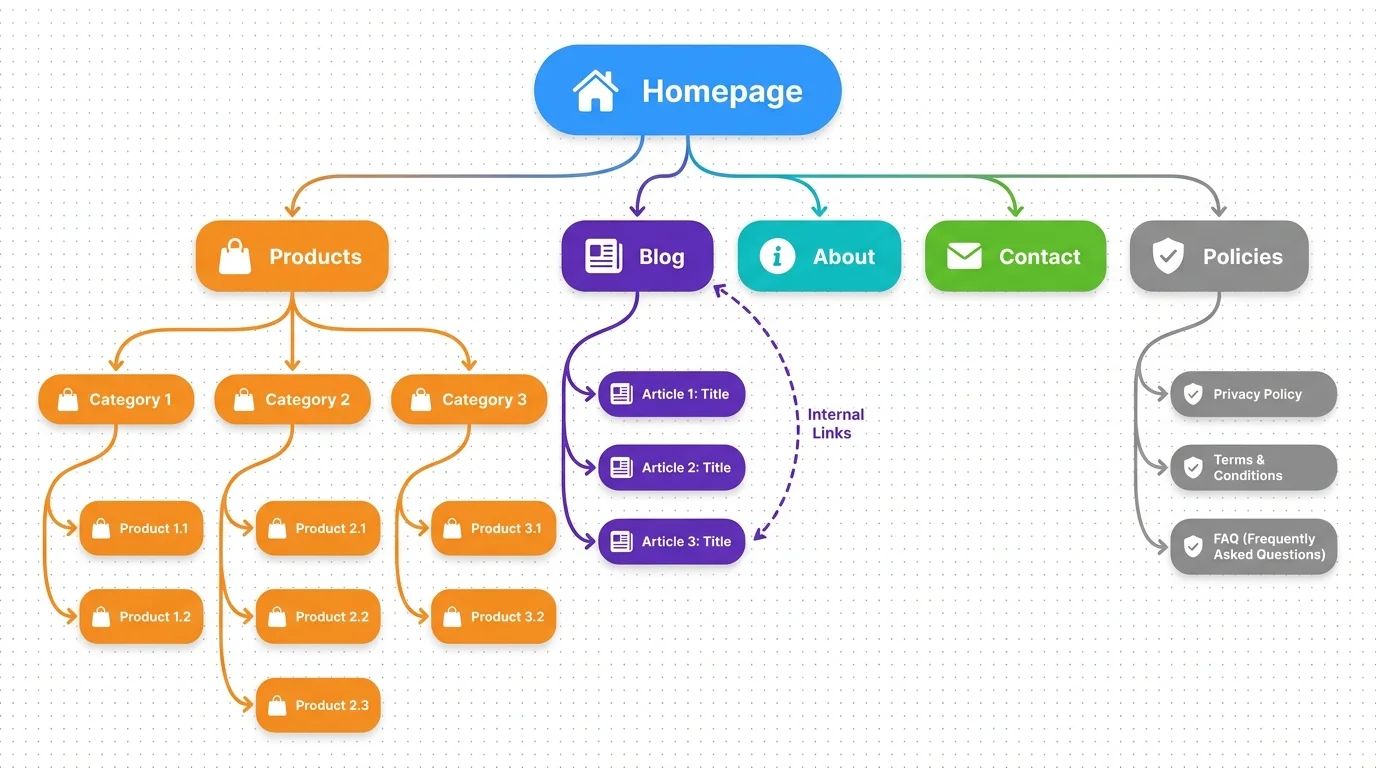
Role: - Helps Google understand the website structure - Distributes "link juice" (SEO power) evenly to important pages
Internal linking principle: - Homepage → link to category (via CategoryCarousel, DynamicMenu) - Category → link to product (via ProductListPage) - Blog → link to category + related product (via article content) - Product → link to related product (via FeaturedProducts)
On GTG CRM: - Dynamic Menu in the header automatically creates links to pages - Breadcrumb section displays hierarchical paths on every page - FeaturedProducts automatically links to related products - ArticlesFeatured displays related articles on product pages or the homepage
Note: Avoid linking too many links from one page (maximum 100–150 links).
Configuring SEO on GTG CRM
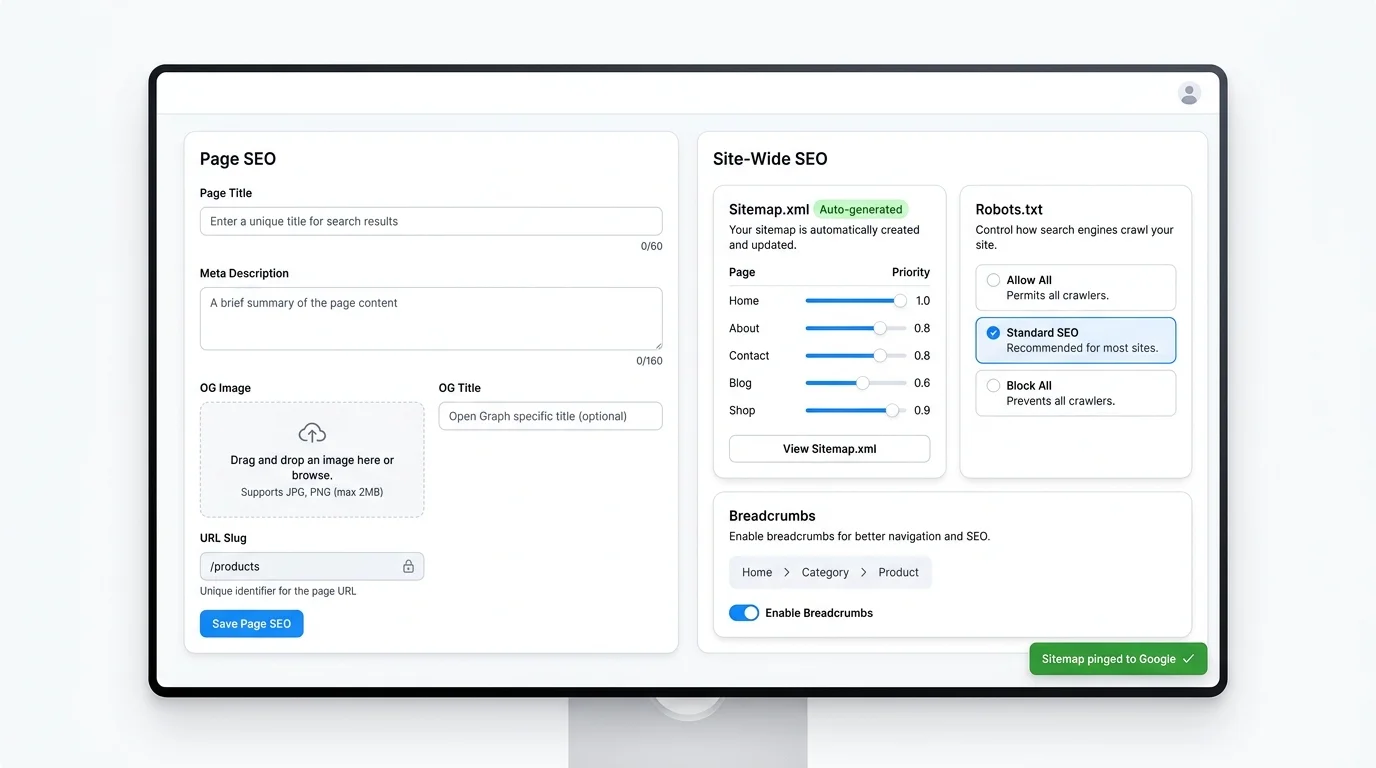
GTG CRM provides a complete SEO toolset, managed via Site-Wide Settings → SEO Config :
SEO per page (SEOConfig component)
Each page on GTG CRM has an SEOConfig component—a hidden component located at the top of the page, which includes:
| Attributes | Describe |
|---|---|
title | The <title> tag of the page |
description | The <meta name="description"> tag |
ogTitle , ogDescription | Open Graph metadata (displayed when sharing on social media) |
ogType | OG content type (website, article, product...) |
twitterCard | Twitter display style |
previewImage | OG's photo when shared |
icon | Page favicon |
Website-wide SEO
| Features | Detail |
|---|---|
| Sitemap.xml | Automatically generate from all pages, or import XML manually. Customize priority and change frequency for each page. Add custom URLs. Automatically ping Google when updated. |
| Robots.txt | Three ready-made templates: allow_all, block_all, standard_seo. Or edit manually with syntax checking. Automatically references sitemap URLs. |
| Breadcrumbs | The Breadcrumb component can be used on any page. |
| OG Metadata | Configure OG image, title, and description for each page. Supports dynamic OG images. |
| Custom URL | Each page has a custom page_path (e.g., /about-us , /products , /blog ). |
SEO-friendly URLs
| Type | Good example | Poor example |
|---|---|---|
| Product page | domain.com/products | domain.com/product?id=12345 |
| Introduction page | domain.com/about-us | domain.com/page.php?p=about |
| Article | domain.com/blog/tieu-de-bai-viet | domain.com/article?id=789 |
GTG CRM generates default SEO-friendly URLs — you just need to customize page_path for each page.
Shopping Cart & Checkout — complete on GTG CRM
A well-designed e-commerce website cannot be without a smooth purchasing process:
| Features | Detail |
|---|---|
| Shopping cart | Guest cart (localStorage) and shopping cart are synchronized upon login and automatically merged. |
| Cart Preview | Quickly view your shopping cart in drawer mode, without leaving the page. |
| Checkout | Delivery form → Product list → Order summary |
| Customer account | Register for OTP, log in to Google/Facebook/Apple |
| Track your order | Visual timeline, address management, purchase history. |
| Product review | Built-in review and favorite system |
| Transport | GHN, ViettelPost, VNPost, self-delivery — automatic fee calculation |
| Live Chat | Live chat integrated into the website allows agents to see order history. |
Multichannel selling
GTG CRM is more than just a website — it's a multi-channel sales platform:
| Channel | Ability |
|---|---|
| GTG CRM Website | A private website with a custom domain or subdomain *.gtgcrm.com |
| TikTok Shop | Automated synchronization of products, orders, and inventory. |
| London | Synchronize products, orders, brands, and categories. |
| Shopee | Synchronize products, orders, and logistics. |
| Handmade orders | Create orders directly from CRM. |
All orders from all channels are managed centrally in a single dashboard.
Common website structure errors
| Error | Consequence | How to fix this on GTG CRM |
|---|---|---|
| No clear category | Customers have difficulty finding products, and Google has trouble understanding the structure. | Create hierarchical categories in CRM → automatically display via CategoryCarousel |
| No blog | Lack of SEO traffic from long-tail keywords. | Use AI Article Writer to create a blog quickly and publish it through Content Hub. |
| Poor internal links | Google doesn't know which pages are important. | Use DynamicMenu + Breadcrumb + FeaturedProducts for automation. |
| Non-SEO-friendly URLs | Difficult to index, difficult to remember. | GTG CRM creates default canonical URLs, customizable via page_path. |
| Policy page missing | Reduced credibility, difficulty closing deals. | AI automatically generates Privacy and Terms pages for websites. |
| No SEO metadata configured. | Google doesn't understand the page content. | Use the SEOConfig component on each page. |
| There is no sitemap.xml | Google has difficulty detecting the new page. | GTG CRM automatically creates sitemaps and pings Google when updates are available. |
| The product page provides a general description. | Do not convert or duplicate content. | Use AI to create unique product descriptions, along with 3 AI-generated images. |
Checklist for a SEO-friendly e-commerce website structure.
| Part | GTG CRM support | Status |
|---|---|---|
| The homepage has a clear H1 tag and a Hero section. | There are (13 Hero variants) | ☐ |
| There are at least 3–5 main categories. | Yes (hierarchical categories) | ☐ |
| SEO-friendly URLs (short, with keywords) | Yes (custom page_path) | ☐ |
| Breadcrumbs are fully displayed. | Yes (Breadcrumb component) | ☐ |
| The product page includes a detailed description and photos. | Yes (ProductDetail + AI product creation) | ☐ |
| There is a blog and it is updated regularly. | Yes (Content Hub + AI Article Writer) | ☐ |
| There is a full policy page. | Yes (Privacy + Terms pages) | ☐ |
| There is an FAQ page. | There are (6 variations of the FAQ section) | ☐ |
| Proper internal linking | Yes (DynamicMenu + FeaturedProducts) | ☐ |
| Sitemap.xml has been configured. | Yes (automatically generated + ping Google) | ☐ |
| Robots.txt has been configured | There are (3 templates or custom) | ☐ |
| Open Graph full metadata | Yes (SEOConfig component) | ☐ |
| Shopping Cart + Checkout Complete | Yes (Cart + Checkout sections) | ☐ |
| Tracking & Analytics | Yes (Facebook Pixel, GA4, Google Ads, GTM) | ☐ |
| Multilingual | Yes (10 languages, AI translation) | ☐ |
Suggestions for continuous expansion and optimization.
1. Get started quickly with AI Website Generation
Instead of building each page manually, you can: - Describe your business (industry, target audience, style) - Choose your brand colors and tone - AI will automatically create a complete website with 14 page types: Homepage, Product Listing, Product Detail, About, Contact, FAQ, Privacy, Terms... - Then customize it using drag-and-drop to finalize it.
2. Use AI Content to Scale Your Blog
| AI tools | Application |
|---|---|
| AI Article Writer | Create automated blog posts |
| AI Image Studio | Create illustrations from text descriptions. |
| AI Video Studio | Create video marketing |
| AI Product Creation | Create a product listing with 3 AI images, specifications, and a product description. |
3. Optimize in stages, not all at once.
- Step 1: Create a website using AI → Complete the basic structure (homepage, categories, products)
- Step 2: Configure SEO (sitemap, robots.txt, SEOConfig for each page)
- Step 3: Build your blog using AI Article Writer to drive traffic.
- Step 4: Connect your sales channels (TikTok Shop, Lazada, Shopee)
- Step 5: Configure tracking (Facebook Pixel, GA4) to measure effectiveness.
4. Monitor effectiveness
- Google Search Console : Check indexing, monitor keyword ranking.
- GTG CRM Dashboard : Revenue, orders, best-selling products, conversion rate by channel
- GTG Attribution SDK : Track first-party visitors, accurately measure traffic sources.
Conclude
A website optimized for SEO should not only be visually appealing but also have a clear structure, be easy to navigate, and be optimized for both Google and users .
With GTG CRM , you have all the tools to build a SEO-friendly website from scratch: - AI-powered website creation from short descriptions - 100+ drag-and-drop components for all page types - Integrated SEO tools : automatic sitemap, robots.txt, OG metadata, breadcrumbs - Complete e-commerce : products, shopping cart, payment, shipping - Multi-channel sales : TikTok Shop, Lazada, Shopee - AI Content : blog writing, image creation, video creation, automatic product creation - Multilingual support : 10 languages with intelligent AI translation
Take immediate action: 1. Check your current website using the checklist above. 2. Register for GTG CRM and create a website using AI in minutes. 3. Configure SEO and connect sales channels. 4. Build a blog to increase organic traffic.
Contact us for detailed consultation and a demo of a standard website structure tailored to your industry!
Turn what you've just read into tangible results — apply it now with GTG CRM, free.
Apply now