Electronic invoices are not only legal sales documents but also reflect the professionalism of a business to its customers. An invoice with errors can lead to many undesirable consequences such as loss of reputation, subsequent invoice adjustments, and even disputes with tax authorities.
In reality, many retail shops and businesses often find themselves issuing invoices hastily, leading to confusion about customer information, incorrect amounts, or missing mandatory elements. These errors not only waste correction time but also affect the customer's shopping experience.
To help you avoid these risks, this article provides a detailed checklist of items to thoroughly check before sending an electronic invoice to customers. Each checking step is important and must be performed carefully to ensure the invoice is accurate, valid, and professional.
Why is it important to check invoices thoroughly before sending?
Checking invoices is not merely about avoiding administrative errors. It is a crucial factor that directly impacts your reputation and business operations. An accurate invoice helps customers feel reassured and confident in your working methods.
Legally, an electronic invoice with errors may require businesses to undertake complex adjustment or cancellation procedures according to tax authority regulations. In some serious cases, invalid invoices may result in administrative penalties or the inability to claim tax deductions.
From an operational perspective, having to correct invoices after they have been issued disrupts workflows, consuming valuable time and effort for both you and your customers. Furthermore, if customers have already used the invoice for tax declaration, adjustments become even more troublesome.
Detailed Checklist for Checking Electronic Invoices
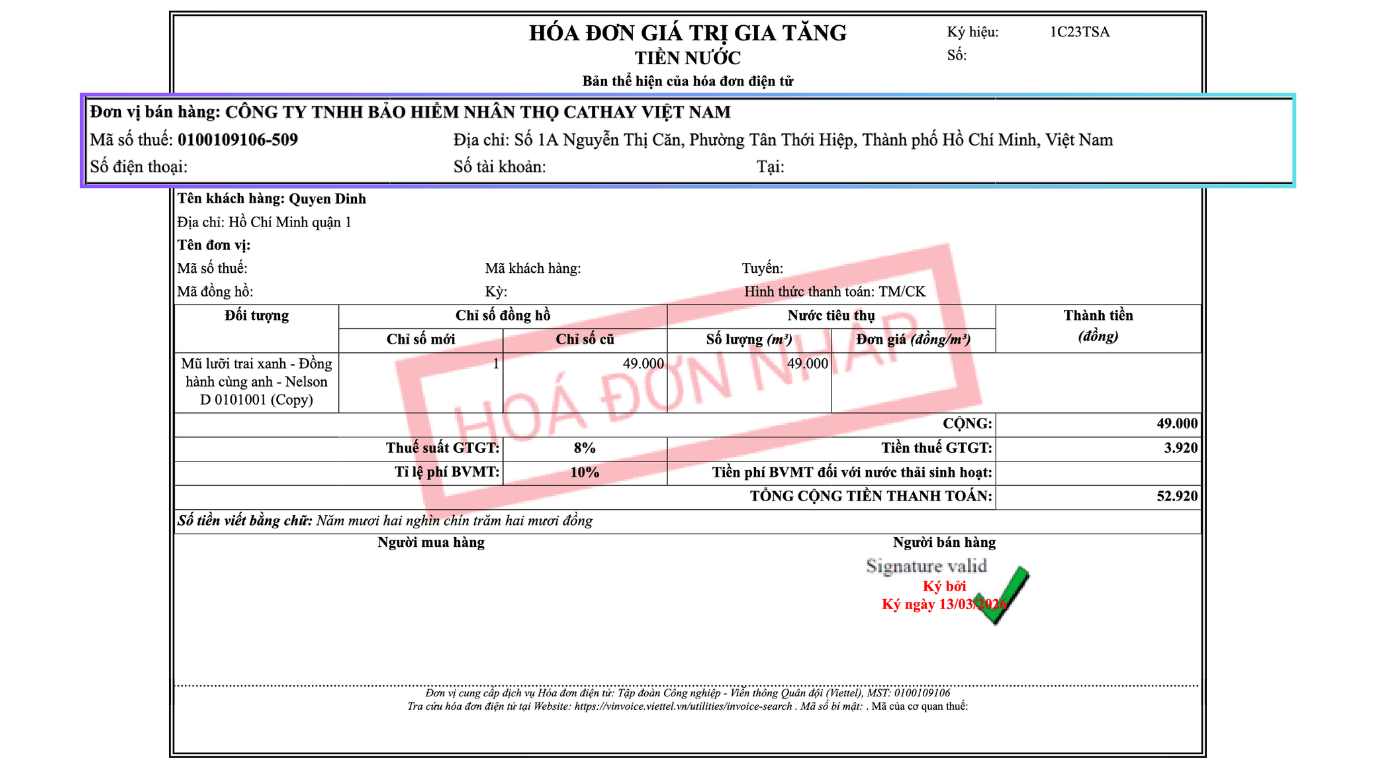
1. Check Seller Information
The first and most important step is to ensure that the seller's information appears completely and accurately on the invoice. This includes the business name or individual's name, which must precisely match the business registration and the electronic invoice issuance notification:
- Seller's Tax ID number must be printed clearly and accurately.
-
Business address needs to be complete, including house number, street name, ward, district, and city/province.
-
Contact phone number and email address should also be checked to ensure customers can reach you when needed.
-
Bank account information, if listed on the invoice, should be re-verified to avoid confusion during customer transfers.
2. Check Buyer Information
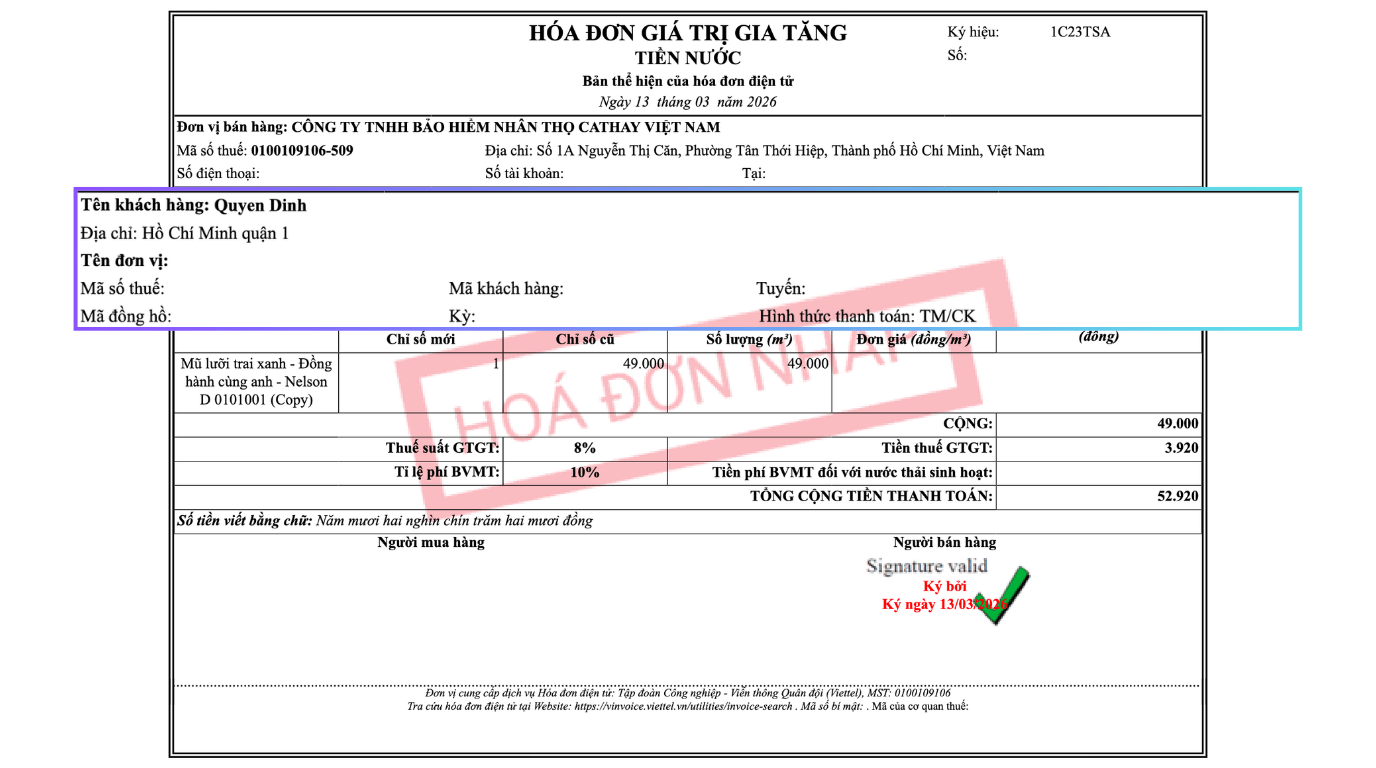
Buyer information is the most prone to errors as it is often entered manually from customer-provided data. - Buyer's name or company name must be recorded accurately according to legal documents, avoiding abbreviations or missing diacritics.
-
Buyer's Tax ID number must be accurate and cross-referenced with the General Department of Taxation's portal to ensure validity.
-
Buyer's address also needs to be recorded completely, which is especially important for business entities. In some cases, the address on the invoice differs from the actual delivery address and needs clarification to avoid future confusion.
-
Buyer's phone number and email address should be rechecked to ensure contact can be made when sending invoices or handling arising issues. If contact information is incorrect, the invoice may not reach the customer on time.
3. Check Goods and Services Content
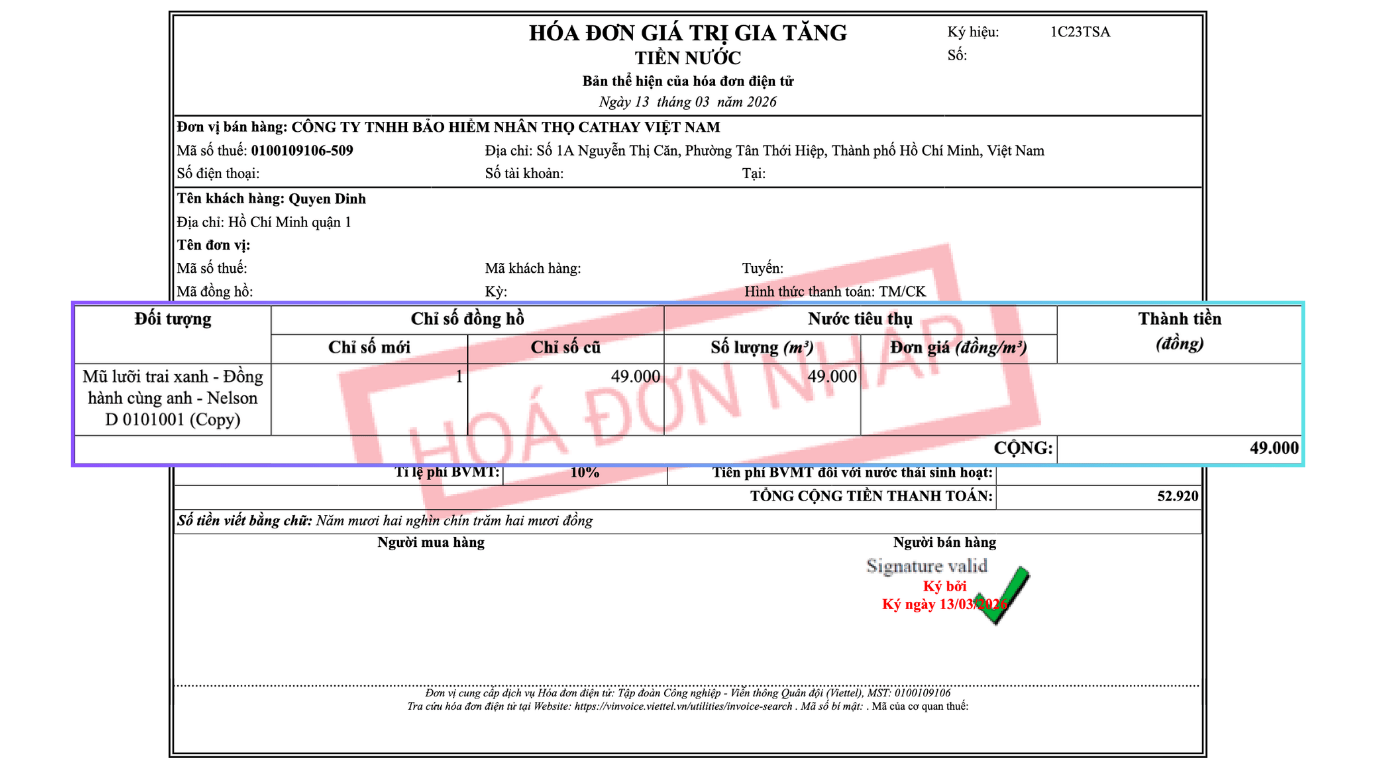
Information related to the content of goods and services you need to check includes: - Name of goods or services on the invoice must be described clearly, fully, and in accordance with the actual transaction. Avoid using generic terms like "goods" or "services" without specific details, as this can make it difficult to reconcile with contracts or other documents.
-
Unit of measure should be clearly stated such as piece, box, kg, liter, hour, month, depending on the type of goods or service. An incorrect unit of measure can lead to misunderstandings about the actual quantity or volume purchased.
-
Quantity of goods or services must precisely match the order and the warehouse dispatch note. This is a common error when the invoice preparer enters the wrong quantity or fails to update the quantity after customer changes.
-
Unit price and total amount must be checked carefully. The unit price must match the quotation or prior agreement with the customer. The total amount must be calculated accurately using the formula of quantity multiplied by unit price, and attention should also be paid to rounding if necessary.
 See more: Automatic Invoice Generation Solution with GTG CRM Template
4. Check Tax Rate and Tax Amount
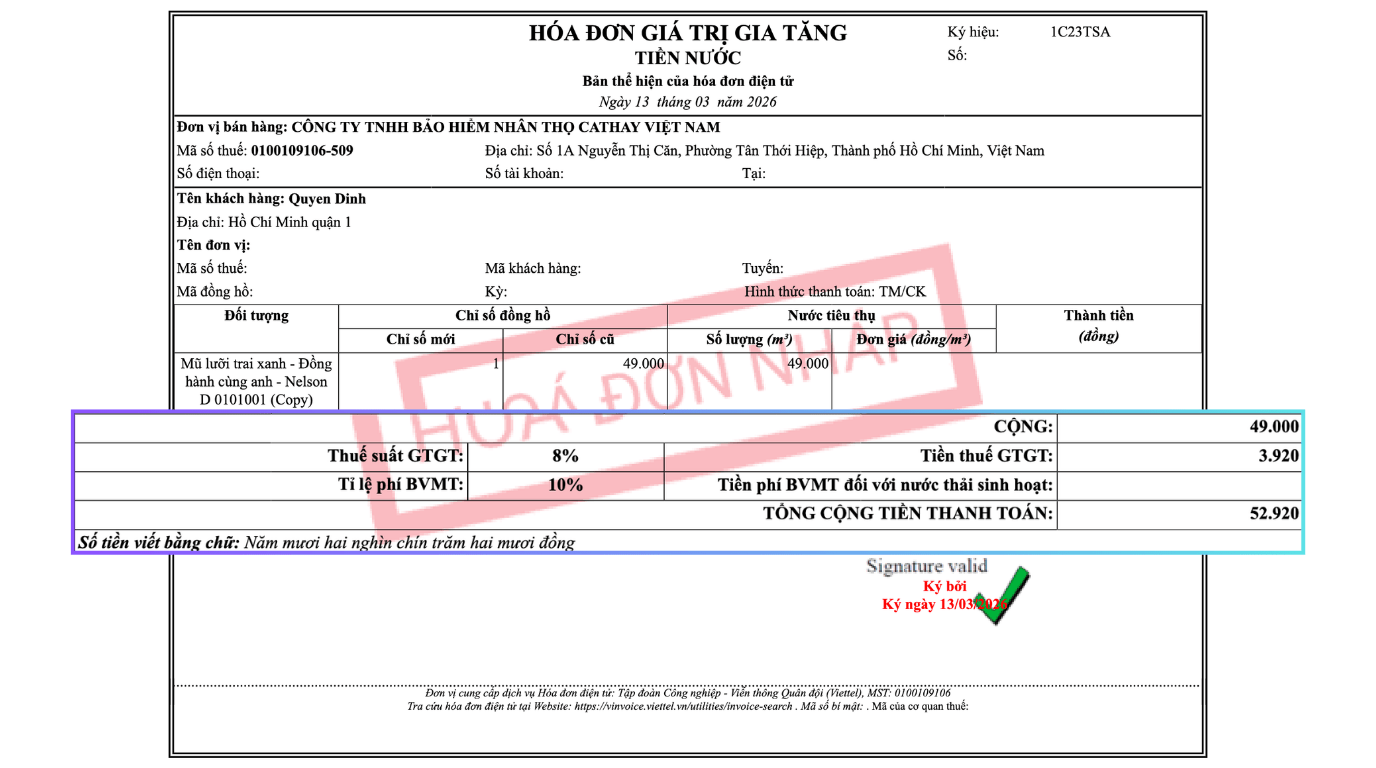
The applicable tax rate must comply with current legal regulations for each type of good or service. Currently, common tax rates are 0%, 5%, 8%, and 10% depending on the industry. Certain goods that are not subject to value-added tax or are exempt from tax also need to be correctly identified.
The value-added tax amount must be calculated accurately based on the tax base and tax rate. You need to recheck the calculation formula to ensure there are no errors, especially when the invoice has multiple lines of goods with different tax rates.
The final total payment amount must equal the total cost of goods plus the value-added tax. This is the most important figure that customers care about and is the basis for payment, so it needs to be checked especially thoroughly.
5. Check Invoice Symbol and Number
The invoice symbol must match the symbol accepted by the tax authority when the issuance was notified. Each type of invoice will have its own symbol, and you must ensure you are using the correct invoice type for the corresponding transaction.
The invoice number must be sequential and not duplicated. The electronic invoice software system usually auto-increments the number, but you should still check to ensure there are no technical issues causing duplicate numbers or unusual skips.
The invoice date must correspond to the time the tax liability arises, usually the date of goods transfer or service completion. Incorrectly recording the date can affect the tax declaration period for both the seller and the buyer.
6. Check Digital Signature and Verification Code
A valid electronic invoice must have the seller's digital signature. You need to ensure that the digital signature is still valid and has not expired. If the digital signature expires, the invoice will not be accepted by the tax authority.
The verification code from the tax authority or the electronic invoice service provider must appear on the invoice. This is the element that confirms the invoice has been submitted and accepted by the system, ensuring its legality and searchability.
The QR code or invoice lookup link must also be checked for functionality. Customers can scan the QR code or access the link to verify the authenticity of the invoice on the tax authority's portal.
7. Check Invoice Format and Appearance
The invoice template must be consistent with the issuance notification approved by the tax authority. Unauthorized changes to the invoice template may render the invoice invalid according to legal regulations.
Mandatory information must be displayed fully and clearly on the invoice. According to regulations, the invoice must include all elements such as invoice type, sample number symbol, invoice symbol, invoice number, seller information, buyer information, transaction content, digital signature, and verification code.
Font and font size should be checked to ensure readability. Some invoices printed or sent in PDF format with text that is too small or unclear can be difficult for customers to use.
8. Final Check Before Sending to Customer
After checking all the above elements, you should review the entire invoice again from the customer's perspective. Ask yourself, if you were receiving this invoice, is there any information that might raise questions or require clarification?
If the invoice will be sent via email, double-check the recipient's email address and ensure the attachment is in a standard format such as PDF or XML. The email subject line and body content should also be written professionally and clearly.
If the invoice is printed for delivery to the customer, check the print quality, ensuring all information is clear and not smudged or blurred. The invoice should be folded neatly or placed in a suitable envelope to demonstrate professionalism.
Conclusion
Thoroughly checking electronic invoices before sending them to customers not only helps you avoid unfortunate errors but also demonstrates professionalism and credibility in your business. Every minute you spend checking is an investment in building customer trust and preventing future legal troubles.
To simplify invoice management and issuance, GTG CRM offers an electronic invoice generation feature that is compliant and includes all mandatory fields, automatically populating customer information from the CRM. The system helps minimize invoice creation errors, save time, and ensure legal compliance.
With GTG CRM, you can be confident that every invoice sent is accurate, professional, and meets all tax authority requirements. Let technology assist you in invoice management so you can focus on business development.
Turn what you've just read into real results — apply now with GTG CRM, for free.
Apply Now