You have an old customer file in Excel, a few hundred or a few thousand rows, collected over years of sales. At the end of the year you want to send a promotion. Before you hit send, try answering one question: among these people, who agreed to receive promotions from you, where did they agree, when, and where is the proof now? The file only has names, phone numbers, and emails. The column that answers that question doesn't exist.
In Vietnam, the rules on advertising by email and SMS (Decree 91/2020/NĐ-CP) require advertisers to send only to recipients who gave prior consent, and to be able to prove it when asked. An email address sitting in a customer list is not consent. You may remember which customers signed up on your website and which left a business card at a trade fair, but when you have to point to the evidence, memory is not proof. (This is a general description, not legal advice.)
GTG CRM holds promotions back until someone records the consent
In Vietnam, your year-end promotion only reaches people whose consent has been recorded. When someone asks "When did this customer agree, where, and where's the proof?", you open the contact page and see the answer on one screen, instead of digging through the Excel file again.
If your business is based in a country that requires prior consent (in this article, Vietnam), GTG CRM will not send marketing email, SMS, or chat messages to a contact until someone in your business records that the contact has consented. You don't need to remember to turn anything on or time each send: the check runs before every marketing message, from email campaigns to the workflows in the Automation section.
You enter three details and tick one confirmation statement:
- Where did they agree to receive your promotions?: a website form, in person, a paper form, a reply email, at an event, a phone call, or another method.
- The evidence you keep and where you keep it, for example "Export of the sign-up list from my form, stored on Google Drive".
- On or before the date: the date they gave consent. It cannot be a future date.
The confirmation statement reads: My business keeps this consent on record and can produce it when requested.
GTG CRM stores this declaration under the name of the person who recorded it, along with the time it was recorded. GTG CRM does not store a copy of your evidence and does not verify it: the evidence stays wherever you saved it. So only tick the confirmation when you truly have the evidence.
Three ways to record consent, depending on how many customers you have
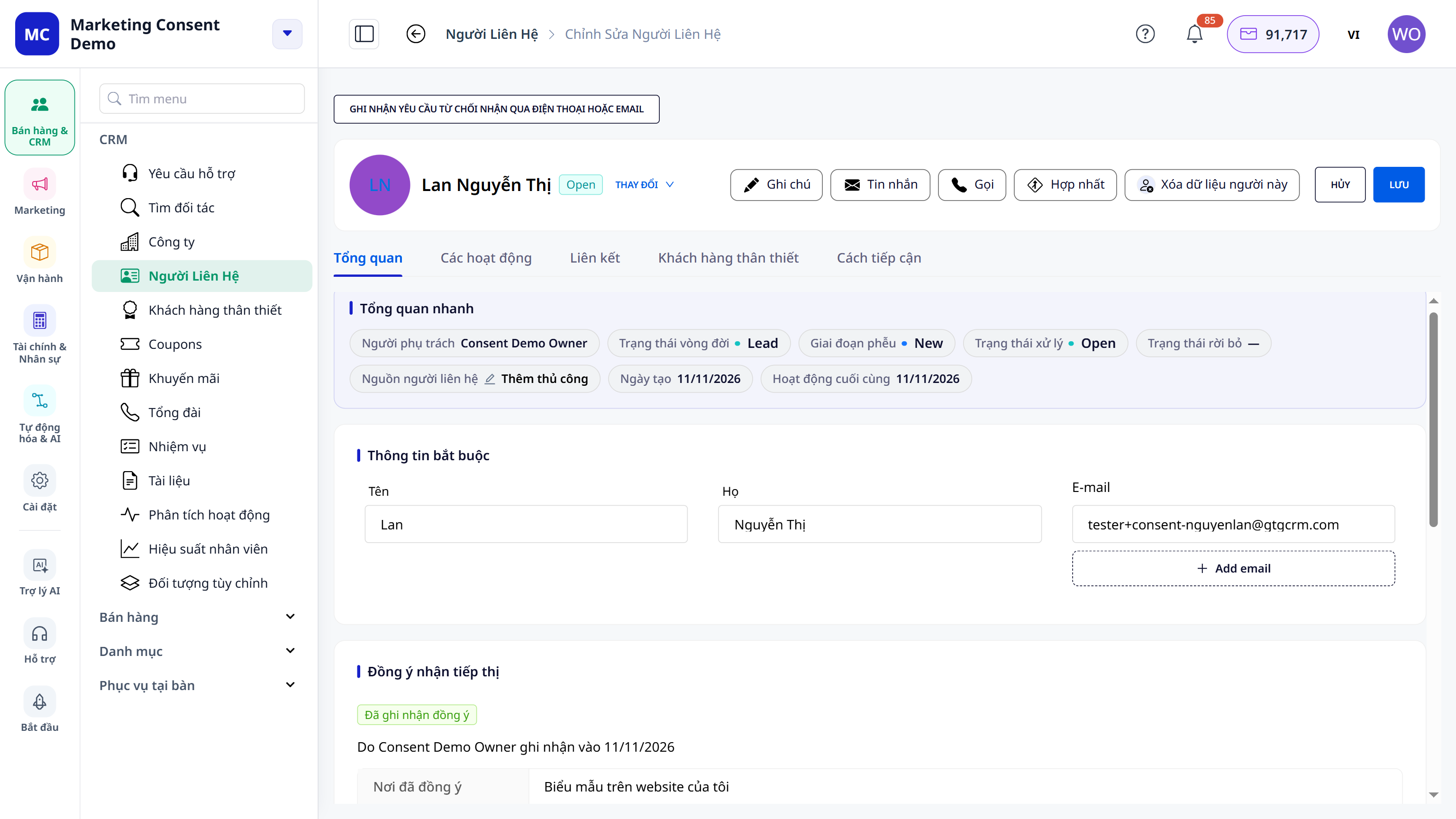
One customer: directly on the contact page
Go to Sales & CRM → Contacts, open a customer, and scroll to the bottom of the Overview tab, to the Marketing consent section. A customer with no record shows No consent recorded with a Record consent button. Fill in the three fields, tick the confirmation, and save. The section changes to Consent recorded, showing the name of the person who recorded it, the recording date, where consent was given, and the evidence. The customer's Activity tab also gets a new line logging this action.
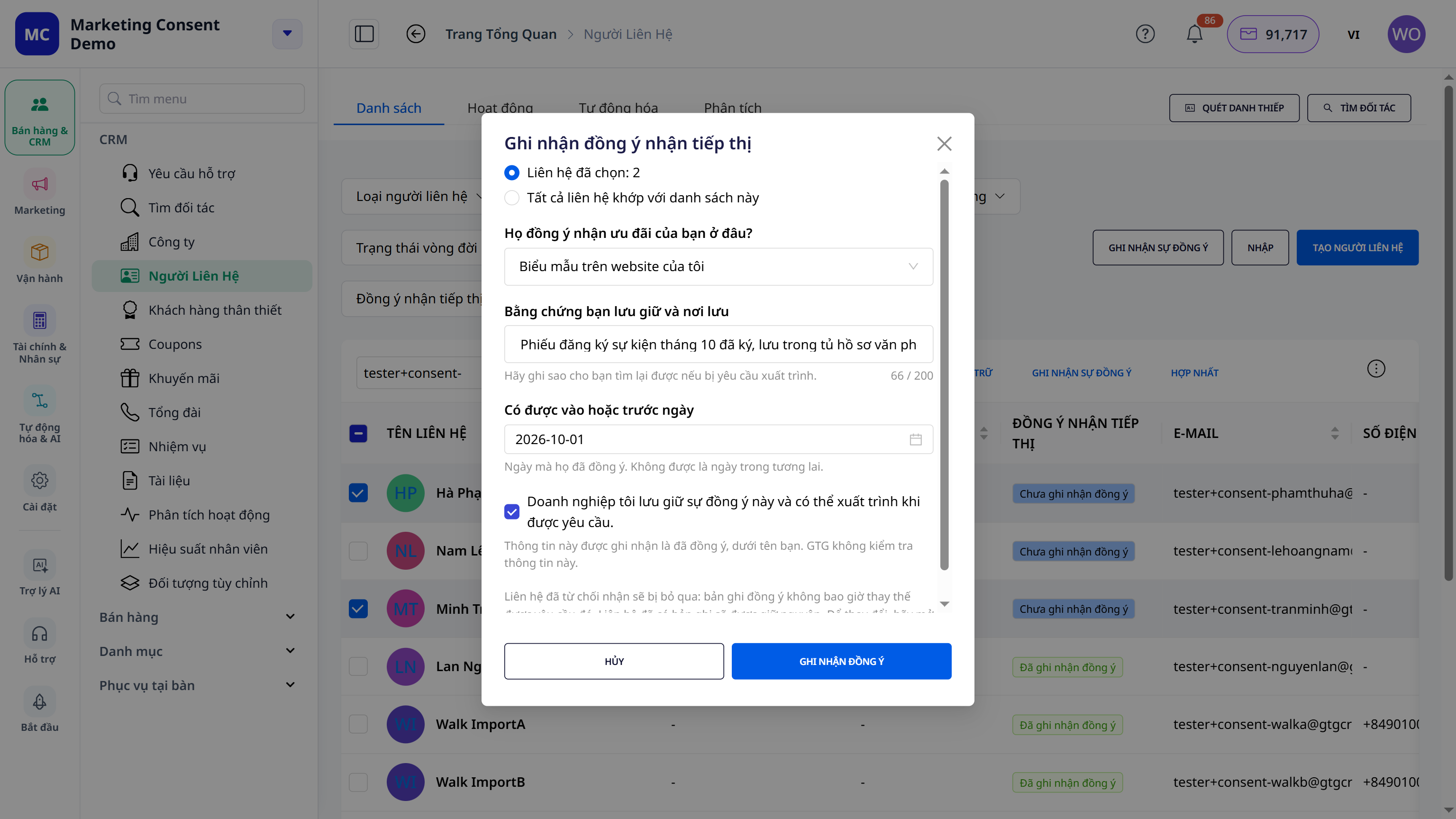
A whole list: select and record in one go
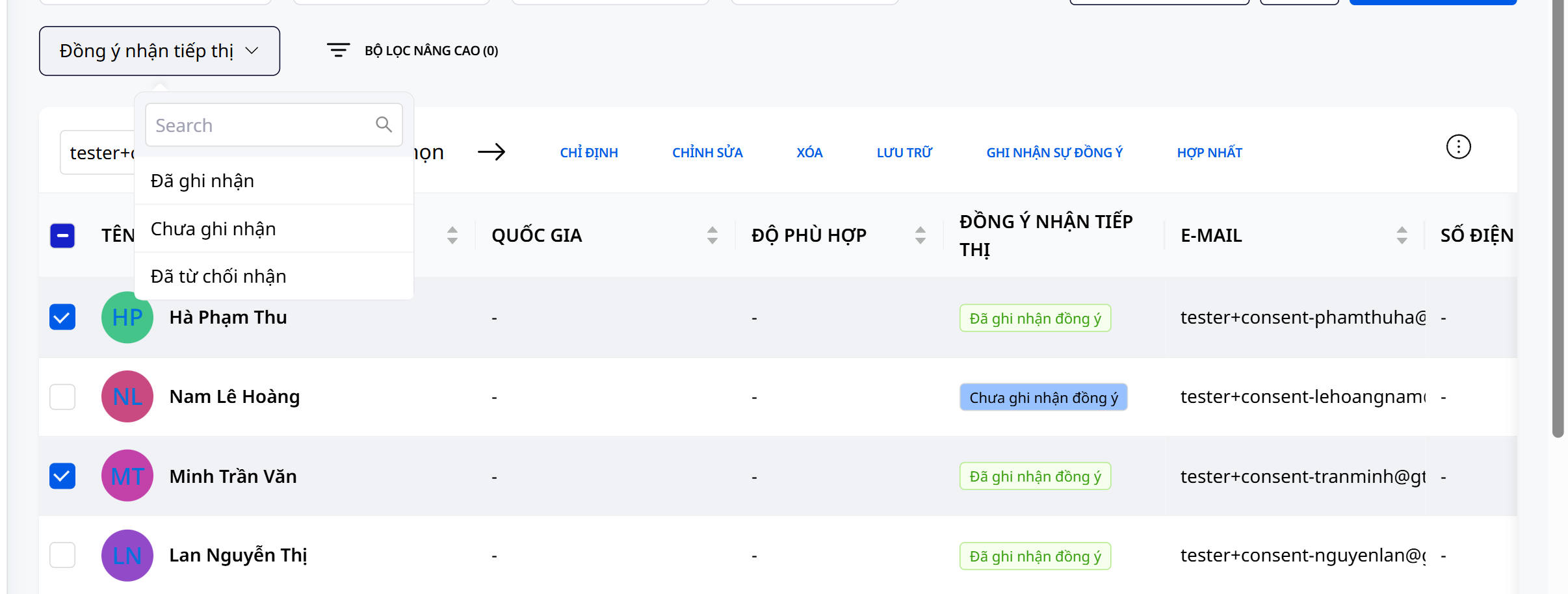
Ở danh sách liên hệ, mở bộ lọc Đồng ý nhận tiếp thị và chọn Chưa ghi nhận để thấy ai còn thiếu bản ghi. Cột Đồng ý nhận tiếp thị cũng cho bạn thấy trạng thái của từng người. Chọn những người bạn thật sự có sự đồng ý, bấm Ghi nhận sự đồng ý. Cửa sổ cho bạn thấy số liên hệ đã chọn trước khi lưu, rồi báo kết quả: bao nhiêu người đã có bản ghi, bao nhiêu người được giữ nguyên vì đã có bản ghi từ trước, bao nhiêu người bị bỏ qua vì đã từ chối nhận.
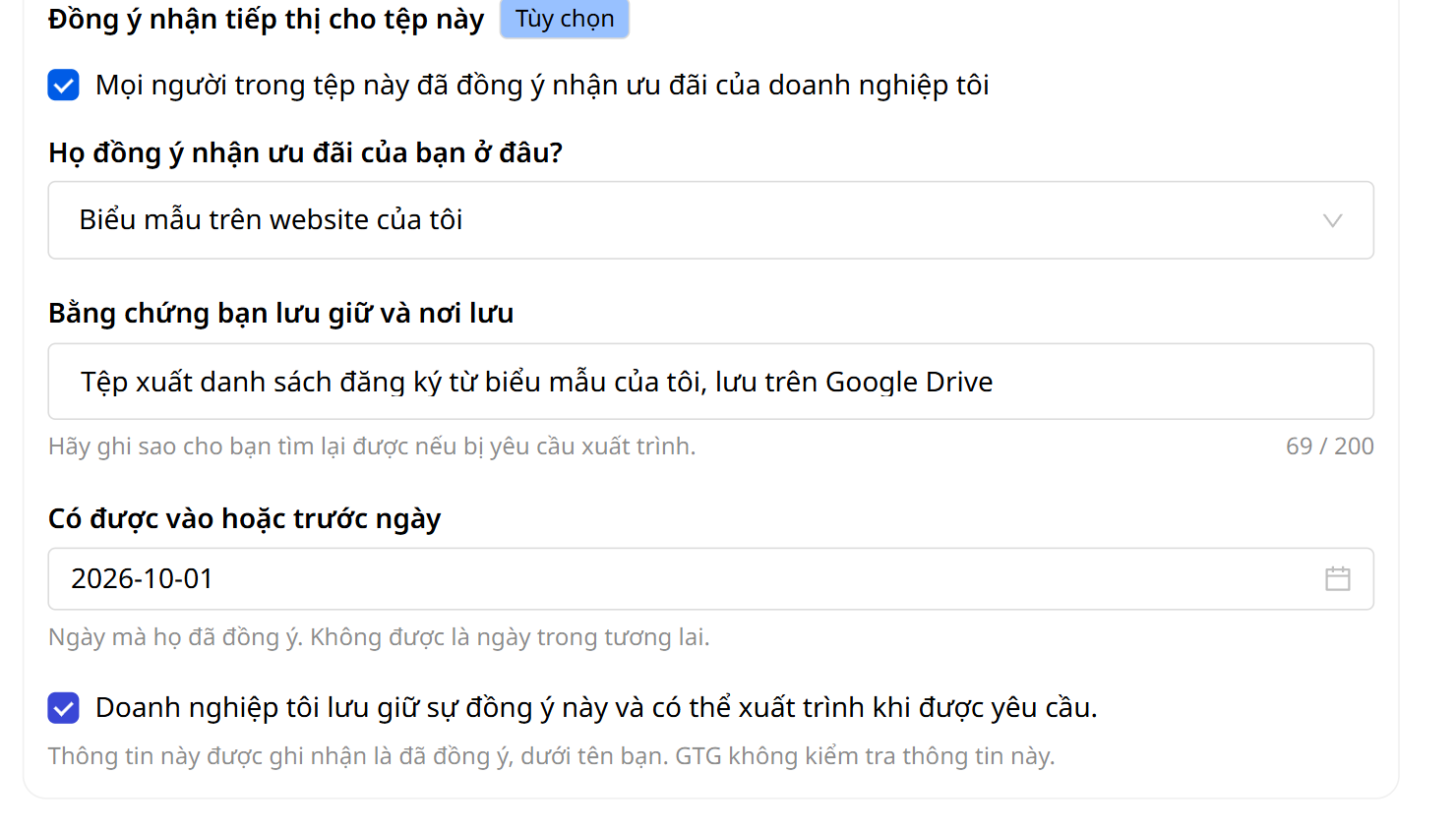
Khi nhập file: một ô tick
Ở bước Xem lại của màn hình Nhập dữ liệu có khung Đồng ý nhận tiếp thị cho tệp này (tùy chọn) với ô Mọi người trong tệp này đã đồng ý nhận ưu đãi của doanh nghiệp tôi. Tick ô này, điền ba thông tin như đã nêu ở trên, và mọi liên hệ được nhập sẽ có bản ghi đồng ý dưới tên bạn. Không tick thì danh sách vẫn được nhập, chỉ là các liên hệ ở trạng thái Chưa ghi nhận đồng ý.
Nếu bạn ghép một cột của file (ví dụ cột "Đồng ý") vào một trường đồng ý, GTG CRM vẫn không dùng cột đó để ghi nhận: cột bị bỏ qua và màn hình cuối nói rõ cột nào. Cột không được ghép thì không được nhập. Màn hình cuối cũng cho biết Đã ghi nhận đồng ý cho N trên M liên hệ, phần còn lại là những người đã từ chối nhận, đã có bản ghi hoặc không được nhập.
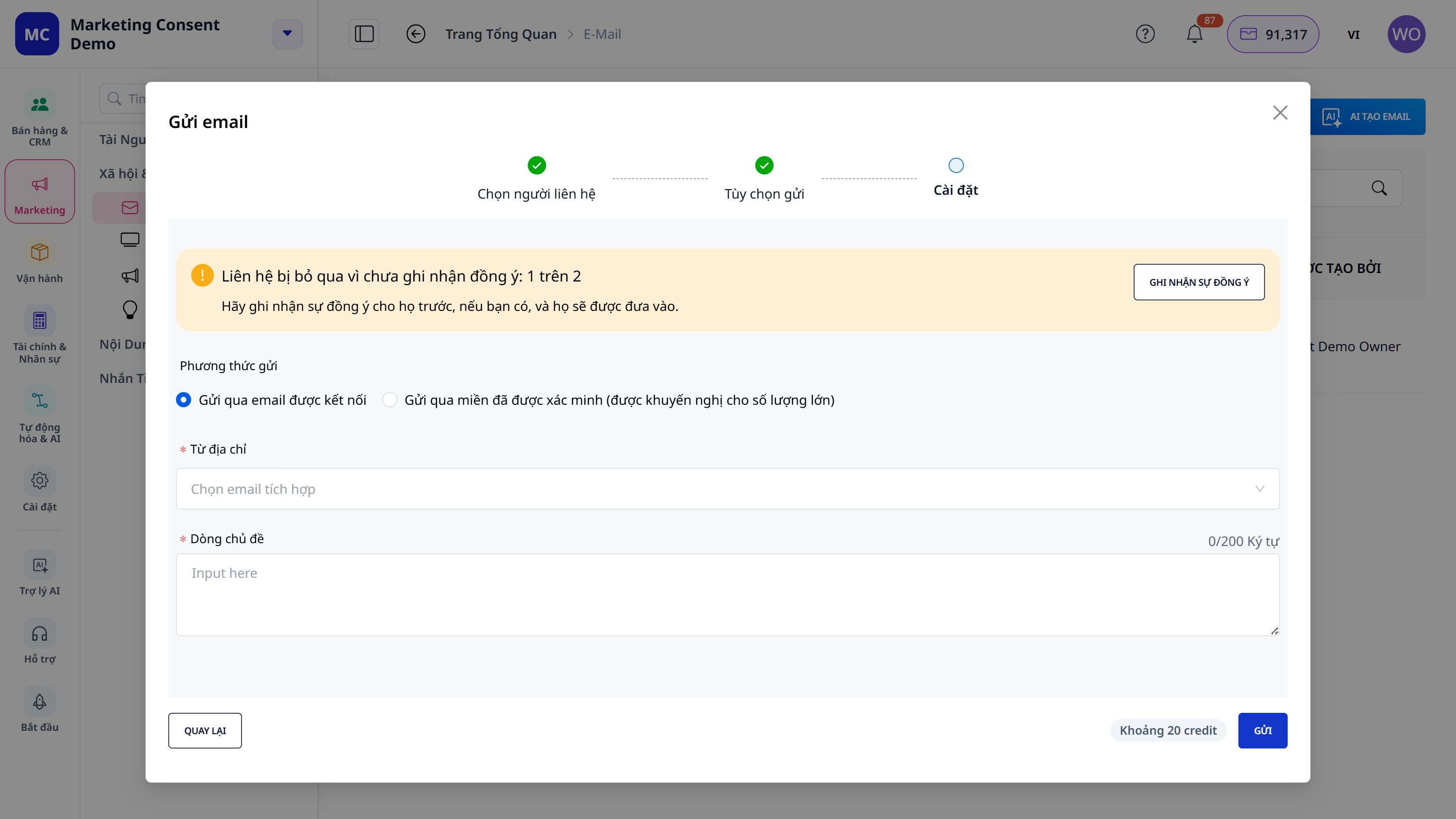
Trước khi gửi chiến dịch email, bạn biết ai đã có bản ghi đồng ý và ai chưa
Ở Việt Nam, mỗi đợt ưu đãi chỉ đến những người đã được ghi nhận đồng ý, và với chiến dịch email, bạn thấy số người bị giữ lại ngay trước khi bấm gửi, chứ không phải đến khi đã gửi xong mới biết.
Khi gửi một chiến dịch email, bước Cài đặt cho biết trước: Liên hệ bị bỏ qua vì chưa ghi nhận đồng ý: 1 trên 2, kèm câu "Hãy ghi nhận sự đồng ý cho họ trước, nếu bạn có, và họ sẽ được đưa vào" và liên kết Ghi nhận sự đồng ý, mở đúng cửa sổ ghi nhận cho những người bạn đã chọn. Nút Gửi không bị chặn: những người còn lại vẫn nhận email.
Mỗi liên hệ bị giữ có một dòng trong tab Hoạt động của họ. Chủ tài khoản nhận một thông báo mỗi ngày báo rằng có ưu đãi chưa được gửi, chỉ kèm ngày, không kèm tên ai. Với một quy trình trong mục Tự động hóa, bước gửi email được bỏ qua và lịch sử chạy của quy trình ghi lý do, quy trình không báo lỗi. Một ưu đãi đã bị giữ không được để dành rồi tự gửi sau: sau khi ghi nhận đồng ý, lần gửi kế tiếp sẽ đến liên hệ đó, còn ưu đãi đã lỡ thì bạn tự gửi lại.
Ai được ghi nhận, và những gì GTG CRM không làm
- Only a user with consent-recording permission can record consent. Sales staff without this permission can still see a contact's status, but the buttons are greyed out and the item shows "Ask an administrator to record consent." No automation can record consent: it is a human decision.
- Anyone who has opted out will never receive marketing email from you. No consent record can override that, and when you record consent in bulk, they are skipped.
- Mistakes can be corrected. You can Replace the record with more accurate evidence, or Delete the record. The earlier record remains in the history. Deleting a record does not turn the contact into an opt-out: it only means the offer for that contact is withheld again.
- GTG CRM is not legal advice. A record is a statement from your business. GTG CRM does not verify evidence, and recording consent does not by itself make a list compliant. If you need certainty that your list is eligible, ask someone who knows the law in your jurisdiction.
Start with the file you already have: import it into GTG CRM, filter by Not recorded to see right away how many contacts have no record, then record consent for the group you genuinely have consent for. The rest of the list stays put. They just won't receive the offer until you can say where and when they agreed.
Free trial — no credit card required.