

What is a Meta Description?
A meta description is a snippet of text (usually 120-160 characters) that search engines display below the title (title tag). It's not a direct ranking factor, but it significantly impacts click-through rate (CTR). When a description clearly outlines benefits and includes keywords relevant to the search query, users are more likely to click, and a better CTR can lead to your page being favored over time.

What is a meta description? Why is it important?
Three foundational principles before you write
Stick to the search intent, highlight clear benefits, and keep it concise. Users are looking for quick answers to their problems; you need to show them "Why should I click on this page right now?". An ideal length is around 140-155 characters to provide enough information without being cut off in search results. Avoid vague, general descriptions or keyword stuffing.
A 7-step process for optimizing meta descriptions
Step 1: Identify search intent and primary keywords
Choose one primary keyword that accurately reflects the user's search intent. For knowledge blogs, this is often keywords like "what is," "how to," or "guide." For sales pages/landing pages, prioritize transactional keywords ("price," "buy," "service"). If you don't have keyword research tools, you can type keywords into Google to see suggestions, "people also ask" sections, and the titles of top-ranking pages to infer the language real searchers use.
Step 2: Identify the reader and their one-sentence benefit
Write a sentence describing who will read and the specific benefit they will receive by clicking on the page. For example: "New shop owners doing SEO" + "get a 5-minute checklist to implement immediately." This benefit statement is the "soul" of your meta description, helping you avoid listing dry features.
Step 3: Choose a suitable writing "formula"
You can use the following sentence structures (fill in the blanks) and then refine the wording for flow:
- Problem → Solution → Result + CTA: "Struggling to increase CTR? Learn how to write SEO-friendly meta descriptions that match search intent to attract clicks. See detailed instructions now."
- Audience → Benefit → Differentiator: "For small businesses: Optimize meta descriptions step-by-step, with real-world examples and a quick fill-in template. Apply in 10 minutes."
- Feature → Benefit → CTA: "SEO-optimized meta descriptions: Standard length, natural keywords, compelling CTAs. Download the template and start optimizing today."
Step 4: Draft 140-155 characters, including the primary keyword early
Create 2-3 different versions, ensuring the primary keyword appears naturally in the first half of the sentence. Each version should highlight one main benefit; don't try to cram too many ideas in.
Example (for this article):
"What is a meta description? Step-by-step guide to writing SEO-friendly descriptions that match search intent and significantly boost your blog/landing page CTR. View now."
Step 5: Add a soft CTA to encourage clicks
End the description with an invitation that makes the reader feel "What will I get by clicking?": "See now," "Download template," "Apply in 5 minutes," "Learn step-by-step." CTAs should be concise, not overly salesy, and appropriate to the content's context.
Step 6: Add the description to the page and check its display
In HTML, insert:
<meta name="description" content="Meta description là gì? Hướng dẫn từng bước viết mô tả chuẩn SEO, đúng ý định tìm kiếm, giúp tăng CTR đáng kể. Xem ngay.">
If you're using a CMS (WordPress, Shopify, etc.), go to the SEO/Meta description section for each page.
Step 7: Monitor CTR and optimize periodically
After publishing, open Google Search Console → Performance → Pages, select the optimized page to view Impressions/CTR/Clicks. If CTR remains low compared to the query average after 2-4 weeks, go back to Step 4 to try a different description: Emphasize benefits more, shorten the wording, or adjust the CTA. Repeat the write-implement-measure cycle until CTR improves.
Quick practice: Writing meta descriptions for 4 types of pages
Knowledge blog page
Suggested formula: Clear topic + learnable benefit + CTA.
Example: "What is a meta description? A 7-step process for writing SEO-friendly descriptions, with a quick fill-in template and real examples. Apply now to increase CTR."
Product/service page
Suggested formula: Problem → Benefit → Trust signal + CTA.
Example: "All-inclusive SEO services to boost organic traffic, optimize technical aspects & content safely. Transparent pricing, clear contracts. Get a consultation."
Category page
Suggested formula: Product scope + selection benefit + assurance signal.
Example: "SEO-optimized landing page templates for SMEs, designed for conversions: clear layout, fast loading, easy editing. Explore the latest template collection."
GTG CRM Landing Page
Suggested formula: Key feature + quick action benefit + CTA.
Example: "Create landing pages and write SEO-friendly meta descriptions directly in GTG CRM. Preview snippets, publish quickly, and easily track performance."
60-second checklist before hitting "Publish"
- Length around 140-155 characters, flows smoothly when read
- Includes 1 primary keyword naturally, ideally appearing early
- Accurately states benefits, avoids vague slogans ("top quality," "great price")
- Includes a soft CTA (see now, download template, apply quickly...)
- Each page has a unique description, no repetition across pages
- Matches the actual content on the page
Common mistakes and quick fixes
Your ads might not be optimized if you make these mistakes:
1. Many descriptions are cut off because they're too long; shorten the last clause or remove verbose modifiers.
2. Some stuff keywords, making the sentence stiff and unconvincing; keep one primary keyword and turn the rest into specific benefits.
3. The most severe error is duplicate descriptions across multiple pages, making it hard for Google to differentiate; prioritize descriptions according to the specific intent of each URL.
4. Finally, don't promise what the page doesn't deliver – Google might generate its own description if it finds yours doesn't match the content.
GTG CRM - Helping you implement SEO-friendly ad content
If you need to write blog posts for advertising but don't have time for research or testing multiple versions, try GTG CRM – the platform that makes Google advertising easy with just a few steps.
Instead of struggling to figure out how to write SEO-friendly Titles and Meta Descriptions that are attractive enough, you can let GTG CRM's AI handle it. All you need to do is click, and the system will automatically suggest and complete the content optimization.
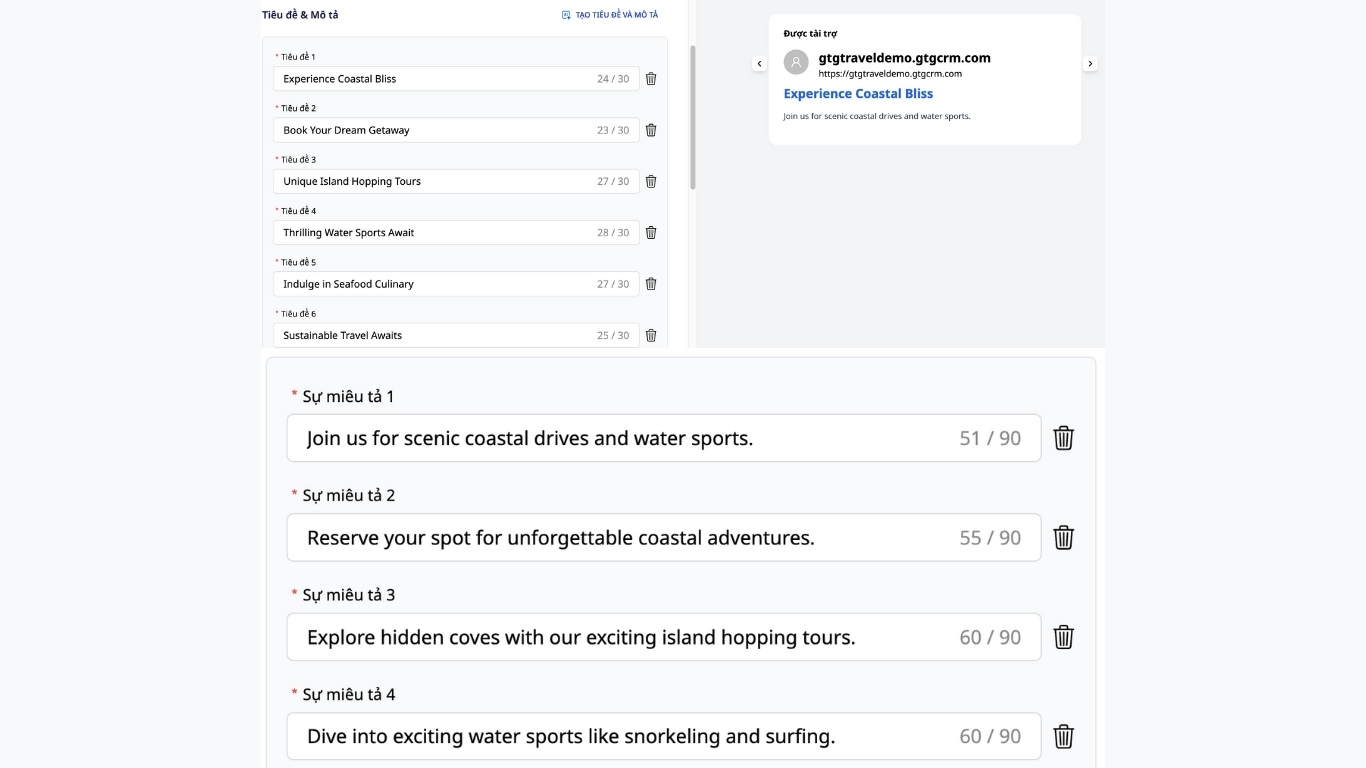
AI helps you create SEO-friendly titles and meta descriptions, optimizing your ad campaigns
Conclusion
Meta descriptions don't rank for you, but they bring users to your page. Stick to intent, state clear benefits, add a soft CTA, maintain an appropriate length, and most importantly, measure and rewrite for better results. GTG CRM is the tool that helps you prepare ready-to-use, SEO-friendly Meta descriptions.
Turn what you've just read into real results — apply it now with GTG CRM, for free.
Apply Now

