
Bạn đang gặp vấn đề này?
Anh Hùng có một xưởng bánh nhỏ ở Bình Dương, làm bánh giao cho các quán cà phê. Đơn về đều, doanh thu tháng nhìn thì đẹp, nhưng cuối năm tính lại anh không hiểu vì sao tiền không dư ra như kỳ vọng. Nguyên liệu anh mua ghi trong một cuốn sổ, công hai người thợ tính lương tháng, tiền điện lò nướng thì "gộp chung chi phí". Khi khách hỏi báo giá loại bánh mới, anh định giá theo cảm tính — cộng đại nguyên liệu rồi nhân đôi. Có loại lãi tốt, có loại làm càng nhiều càng lỗ, mà anh không biết loại nào là loại nào.
Đây là nỗi đau chung của mọi cơ sở tự sản xuất: không biết một sản phẩm thật sự tốn bao nhiêu để làm ra, nên mọi quyết định giá bán, khuyến mãi, nhận đơn sỉ đều là đánh cược. Và khi đơn dồn về, anh còn một nỗi lo thứ hai: không biết chắc kịp giao hay không, vì giữa ca chẳng ai nói được mẻ nào đang nướng, mẻ nào còn chờ.
Điều bạn thật sự muốn đạt được
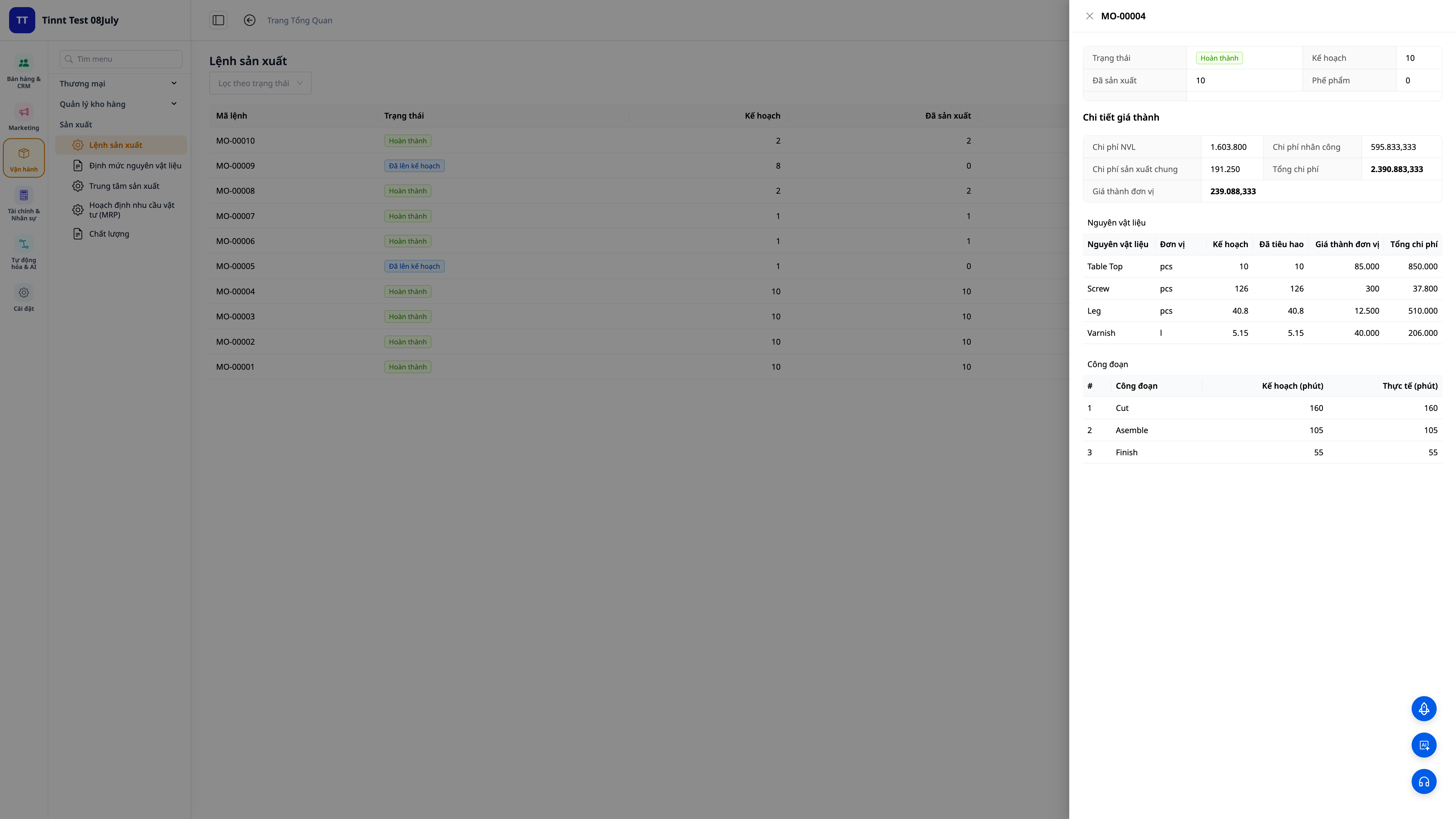
Anh Hùng không cần một "phần mềm sản xuất" phức tạp. Anh cần một câu trả lời rõ ràng cho từng sản phẩm: làm ra một cái tốn bao nhiêu tiền nguyên liệu, bao nhiêu tiền công, bao nhiêu tiền máy móc — và tổng lại là bao nhiêu. Từ đó anh định giá bán có lời chắc chắn, biết loại nào nên đẩy mạnh và loại nào nên bỏ. Anh cũng muốn nhìn một cái là biết hôm nay xưởng làm được tới đâu để hứa ngày giao cho khách mà không phải đoán. Và anh muốn tất cả con số này tự chảy vào báo cáo lãi lỗ, không phải ngồi cộng tay mỗi cuối tháng.
Cách GTG CRM giúp bạn làm điều đó
GTG CRM ghép các tính năng thành một quy trình sản xuất khép kín, ngay trên hệ thống bạn dùng để bán hàng, giữ kho và làm kế toán:
- Khai công thức một lần (BOM) — với mỗi loại bánh, khai định mức nguyên liệu (bột, đường, bơ… kèm % hao hụt) và các công đoạn (trộn, nướng, hoàn thiện ở tổ nào, mất bao lâu). Ai làm cũng ra đúng định mức, đúng chi phí.
- Đặt đơn giá nhân công và chi phí chung cho từng tổ — một lần khai, mọi lệnh sản xuất sau đó tự tính đúng phần công thợ và chi phí máy móc, không còn "ước chừng".
- Ra lệnh sản xuất, hệ thống tự tính giá vốn — chọn sản phẩm, công thức, số lượng; khi hoàn thành, hệ thống tính giá vốn đơn vị = (nguyên liệu + nhân công + chi phí chung) ÷ số lượng làm được. Anh Hùng nhìn thấy con số thật, cho từng loại bánh.
- Giá vốn tự vào sổ kế toán (COGM) — thành phẩm nhập kho đúng giá vốn đó và bút toán được ghi thẳng vào sổ cái, nên báo cáo lãi lỗ chính xác, không còn thành phẩm "0 đồng".
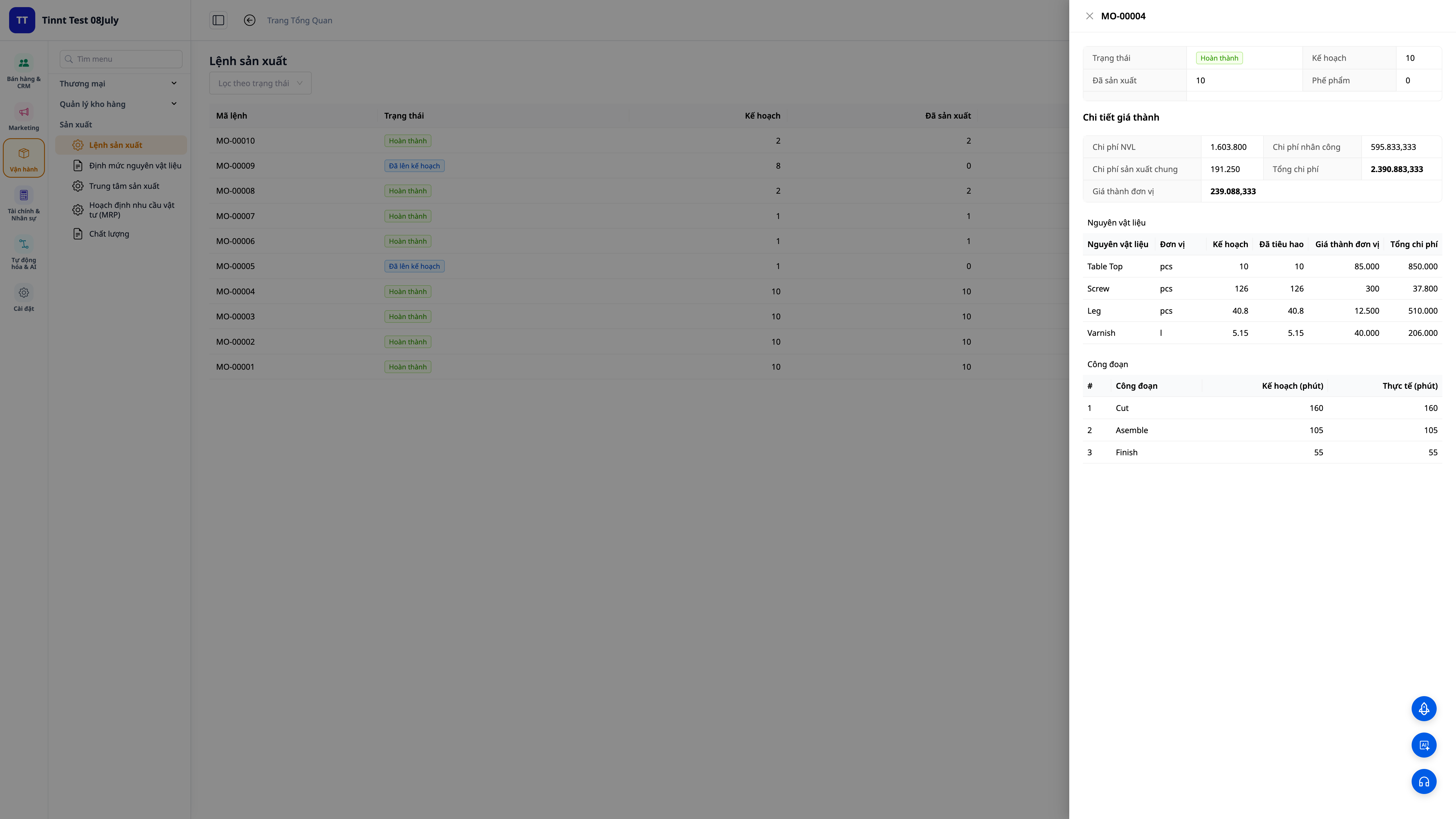
- Hoạch định mua và làm (MRP) — hệ thống so tồn kho với đơn khách đã đặt và định mức tồn, gợi ý cần mua thêm nguyên liệu gì và cần làm thêm bao nhiêu — để không đang làm thì hết bột, cũng không ôm tồn kho chết vốn.
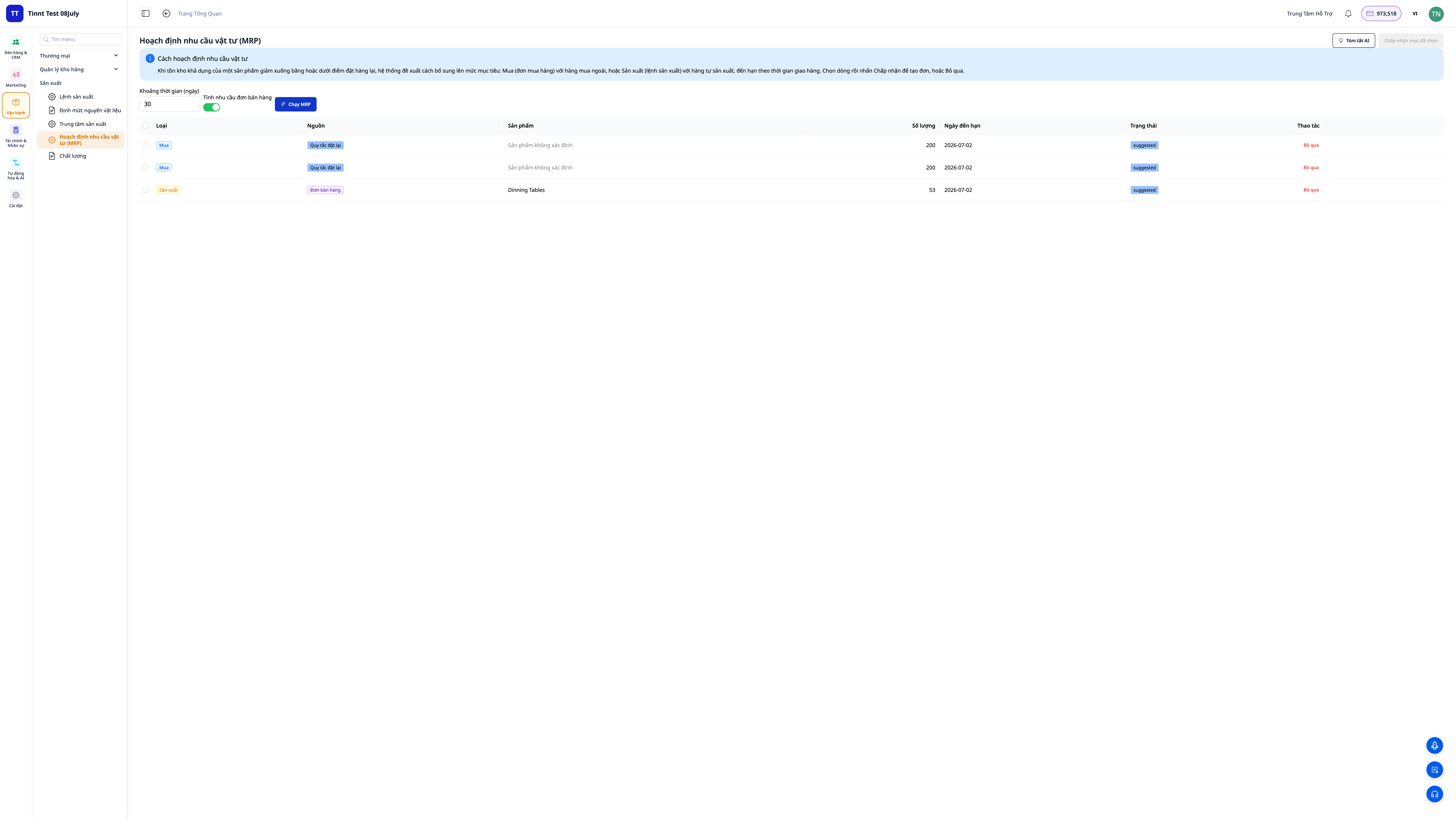
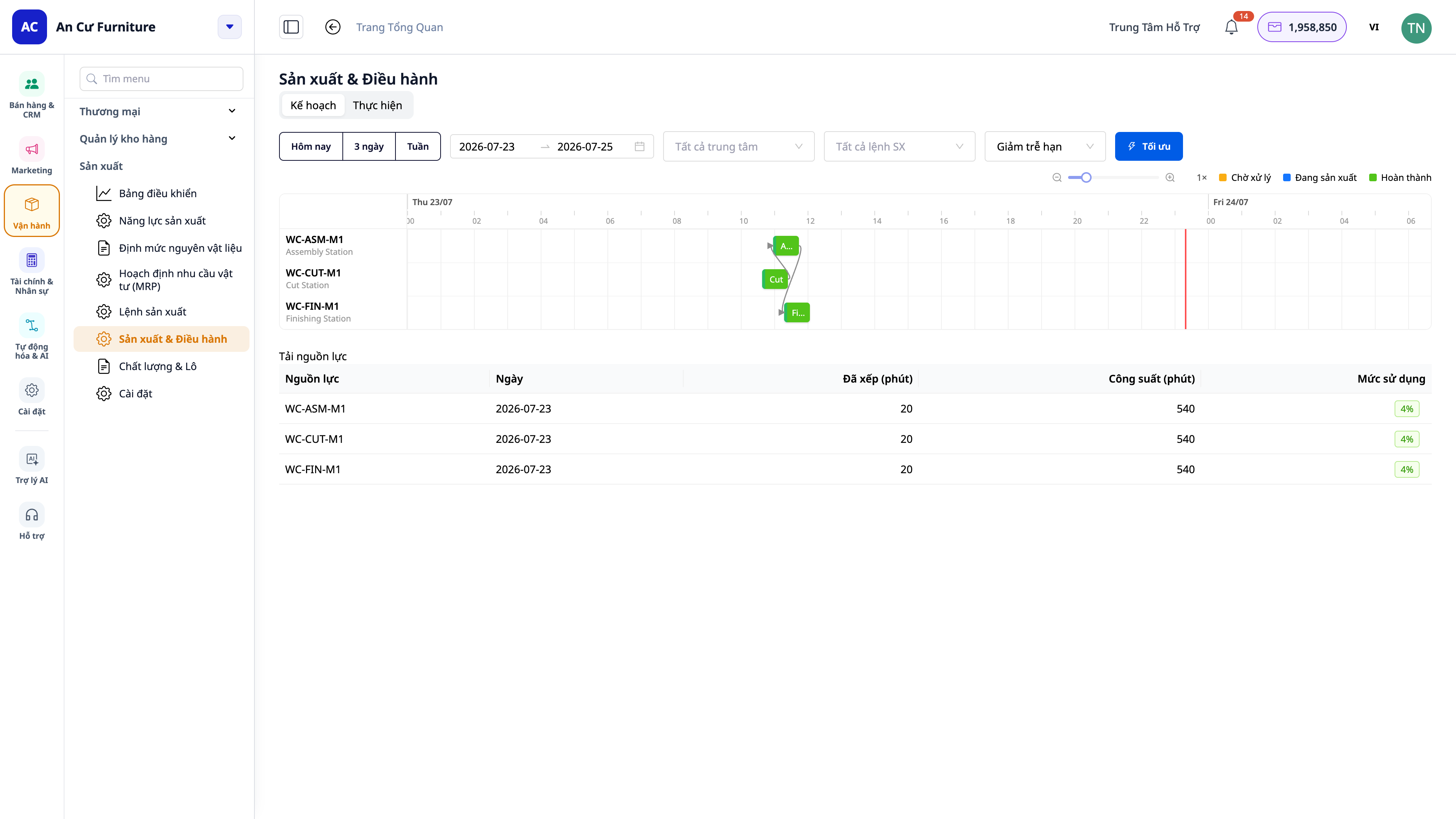
Khi đơn dồn về, anh Hùng còn muốn biết kịp giao hay không — và giờ anh có câu trả lời. Với biểu đồ lập lịch (Gantt), các mẻ được xếp theo công suất lò và số thợ, cả thời gian chuyển đổi giữa hai loại bánh cũng được tính vào, nên anh hứa ngày giao sát thực tế thay vì đoán. Bấm Hôm nay / 3 ngày / Tuần là thấy đúng giai đoạn muốn xem.
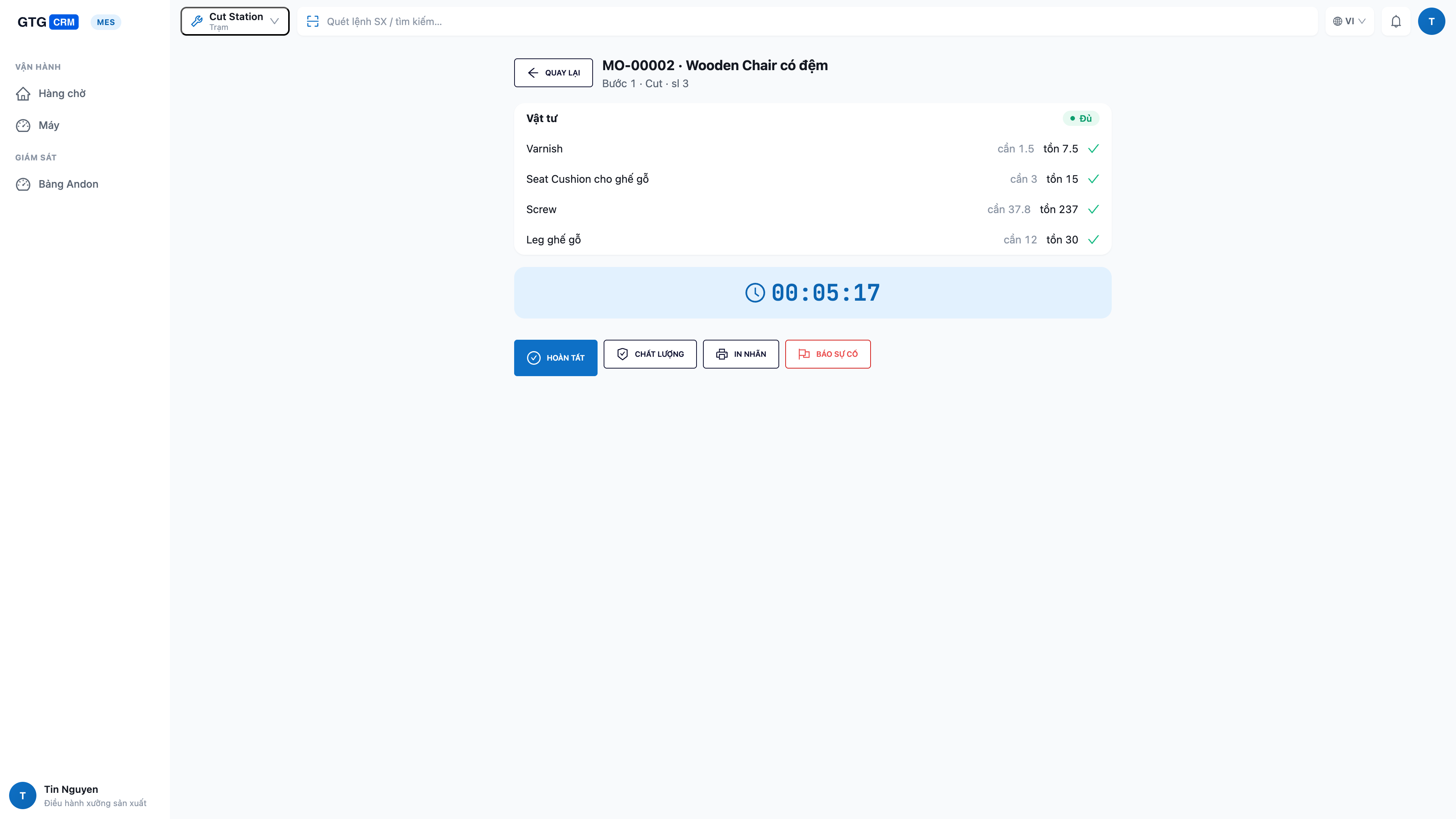
Và ngay giữa ca, anh không còn phải chạy xuống bếp hỏi tay. Trên một màn hình cảm ứng đặt tại mỗi tổ, thợ mở việc của tổ mình, bấm Bắt đầu, làm xong bấm Hoàn thành và nhập số làm được, số hỏng ngay tại chỗ — số liệu vào hệ thống tức thì và dồn thẳng vào giá vốn. Một màn hình lớn treo tường (bảng andon) cho anh thấy cả xưởng trong một cái liếc: tổ nào đang chạy, tổ nào rảnh, chỗ nào kẹt, và năng suất chung. Nếu hết bột hay lò trục trặc, thợ chạm một nút là báo động lên anh ngay.
Khi xưởng lớn dần, cùng bộ tính năng đó còn giúp anh truy được nguồn gốc: gán số lô cho từng mẻ để khi một khách phản hồi về chất lượng, anh truy ngược đúng lô nguyên liệu đã dùng (phả hệ) trong vài phút; và nhận cảnh báo hạn dùng để không để nguyên liệu/thành phẩm quá đát. Các cố vấn còn gợi ý mức tồn an toàn và lượng cần làm bằng ngôn ngữ dễ hiểu — biết giá vốn, kịp đơn, điều hành xưởng thời gian thực và truy được lô, tất cả một chỗ.
Xem đầy đủ tính năng ở bài Quản Lý Sản Xuất, hoặc làm theo hướng dẫn thiết lập sản xuất từng bước để dựng BOM, lập lịch và vận hành xưởng.
Kết quả bạn nhận được
- Định giá bán có cơ sở: biết chính xác giá vốn từng sản phẩm, định giá đảm bảo có lời thay vì nhân đôi theo cảm tính.
- Biết loại nào lời, loại nào lỗ: nhìn giá vốn thật, quyết định đẩy mạnh sản phẩm lời và cắt sản phẩm âm thầm gây lỗ.
- Báo cáo lãi lỗ chính xác: giá vốn chảy thẳng vào sổ kế toán, hết cảnh cộng tay và số liệu lệch nhau giữa các phần mềm.
- Không đứt nguyên liệu, không chết vốn tồn: hoạch định theo đơn khách và định mức tồn giúp mua đúng, làm đúng, đúng lúc.
- Kịp đơn và thấy xưởng thời gian thực: lập lịch Gantt theo công suất để hứa ngày giao đúng; màn hình xưởng và bảng andon cho biết ngay chuyền đang chạy tới đâu, trạm nào kẹt.
- Truy được nguồn gốc: truy vết lô + cảnh báo hạn dùng để xử lý sự cố chất lượng nhanh và không để hàng quá hạn.
- Một hệ thống duy nhất: bán hàng, kho, kế toán và sản xuất nói cùng một số liệu.
Câu hỏi thường gặp
Xưởng tôi nhỏ, chỉ vài sản phẩm, có cần phức tạp thế không? Chính vì nhỏ mới cần biết giá vốn thật — sai một chút trên mỗi sản phẩm, nhân với sản lượng, là lỗ lớn. Bạn chỉ cần khai công thức một lần cho mỗi sản phẩm, và có thể bật màn hình xưởng thời gian thực sau khi đã quen quy trình.
Tôi đang ghi công thức trong Excel, chuyển qua có cực không? Không. Kéo file Excel/CSV của bạn vào, AI tự khớp cột để bạn duyệt rồi nhập — chuyển được nhanh.
Giá vốn có tự vào báo cáo tài chính không? Có. Khi lệnh sản xuất hoàn thành, bút toán giá vốn thành phẩm được ghi vào sổ cái, nên báo cáo lãi lỗ phản ánh đúng — dồn đúng từ số thực làm ở từng công đoạn.
Thợ ở xưởng có phải dùng máy tính không? Không cần máy tính. Chỉ cần một máy tính bảng cảm ứng đặt tại tổ: thợ chạm để bắt đầu, hoàn thành và nhập số — đơn giản như dùng điện thoại.
Tôi vừa sản xuất theo kho vừa làm theo đơn khách đặt thì sao? Cả hai. Bạn làm sẵn để bán, hoặc tạo lệnh sản xuất nối thẳng từ một đơn bán cho phần còn thiếu.

